
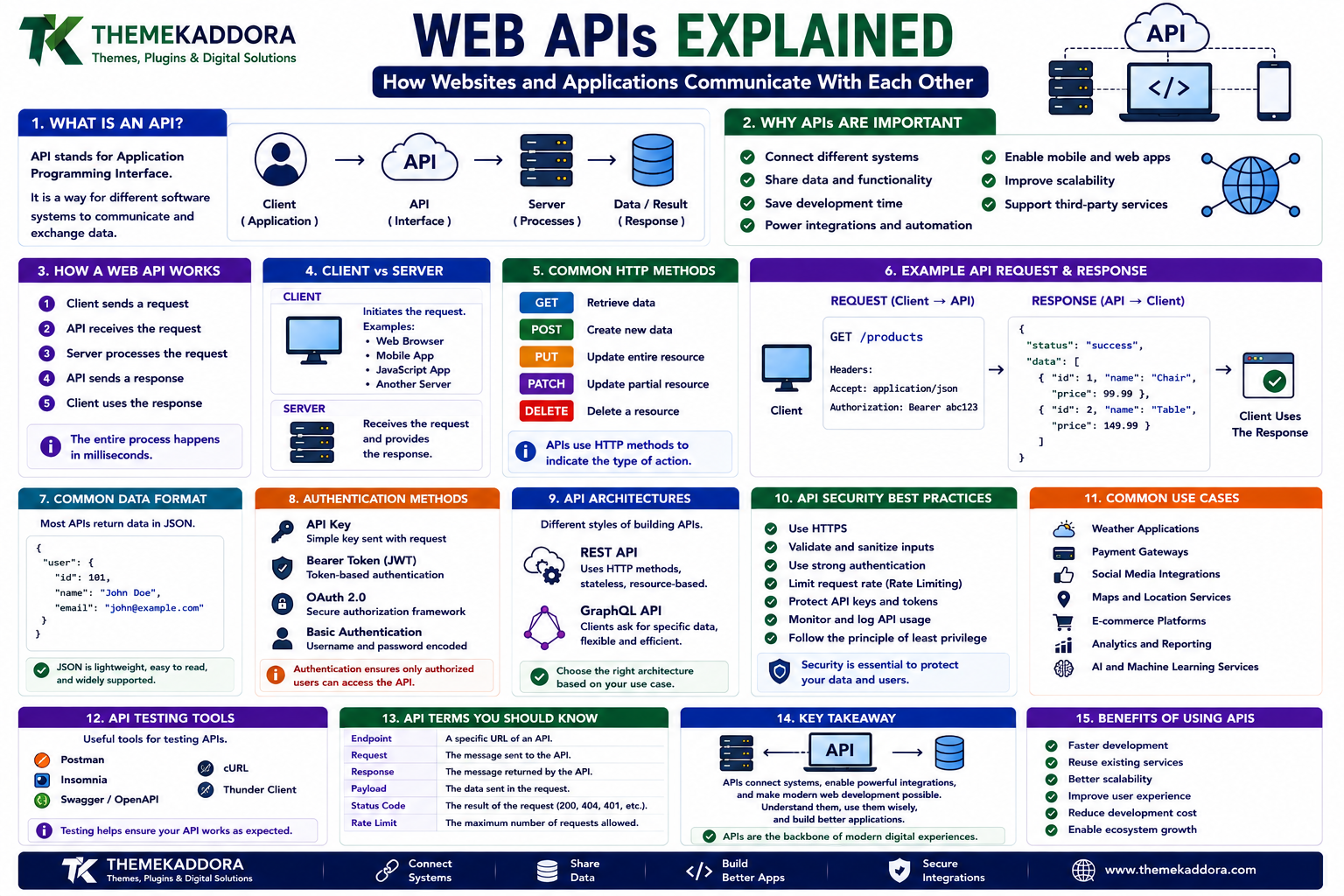
Web APIs Explained: How Websites and Applications Communicate With Each Other
Introduction
Modern websites rarely operate alone.
A weather application gets information from a weather service.
A shopping website communicates with payment systems.
A mobile application retrieves information from servers.
A WordPress website can connect with external services.
A map can be embedded into another application.
A login system can allow users to authenticate through another platform.
Behind many of these interactions are APIs.
An API, or Application Programming Interface, provides a structured way for different software systems to communicate.
Web APIs are particularly important because they allow browsers, servers, mobile applications, websites, databases, and external services to exchange information.
Understanding APIs is therefore one of the most useful foundations for modern web development.
What Is an API?
API stands for Application Programming Interface.
An API defines a way for one software system to request information or perform an action through another system.
Imagine a restaurant.
You do not normally walk into the kitchen and prepare your own meal.
You give your order to the waiter.
The waiter communicates with the kitchen.
The kitchen prepares the food.
The waiter brings the result back.
An API plays a similar role between software systems.
One application makes a request.
The API receives the request.
Another system processes it.
The API returns a response.
What Is a Web API?
A web API is an API that communicates over web technologies, commonly using HTTP or HTTPS.
A simplified interaction looks like:
Application
↓
HTTP Request
↓
Web API
↓
Server
↓
Data or Action
↓
HTTP Response
This allows applications to communicate without needing direct access to each other's internal code.
Why Are APIs Important?
APIs allow developers to build applications from multiple components.
Instead of creating everything from scratch, developers can connect existing services.
APIs can provide access to:
Maps
Payments
Weather data
Authentication
Search
Messaging
Analytics
Shipping information
Product catalogs
Databases
This makes modern software development more modular.
A Simple API Example
Imagine a website needs weather information.
Instead of storing weather data itself, it can request information from a weather API.
The application sends:
GET /weather
The API may return structured data such as:
Temperature
Location
Humidity
Forecast
Weather conditions
The website can then display that information to the user.
How a Web API Works
A typical API interaction includes:
1. Request
The client asks for information or an action.
2. Authentication
The API determines whether the client is authorized.
3. Processing
The server processes the request.
4. Response
The API returns information or an outcome.
5. Client Processing
The application uses the response.
This process can happen extremely quickly.
Client and Server
API communication usually involves a client and a server.
Client
The client initiates the request.
Examples include:
Web browser
Mobile application
Desktop application
JavaScript application
Another server
Server
The server receives the request and provides the response.
The API defines how the client and server communicate.
HTTP and APIs
Many web APIs use HTTP.
HTTP provides methods for interacting with resources.
Common HTTP methods include:
GET
POST
PUT
PATCH
DELETE
Each method generally communicates a different intention.
GET
GET is commonly used to retrieve information.
For example:
GET /products
might request a list of products.
The server can return data without modifying the underlying resource.
POST
POST is commonly used to submit or create information.
For example:
POST /users
could create a new user.
The request may contain data such as:
Name
Password
The server processes the submitted information according to its application rules.
PUT
PUT is generally used to replace or update a resource.
For example:
PUT /users/123
could update the resource associated with user 123.
The exact behavior depends on the API design.
PATCH
PATCH is generally used for partial updates.
For example:
PATCH /users/123
might change only the user's display name without replacing the entire user record.
DELETE
DELETE is used to request removal of a resource.
For example:
DELETE /comments/456
could request deletion of a particular comment.
APIs should implement appropriate authorization before allowing destructive operations.
What Is JSON?
JSON stands for JavaScript Object Notation.
It is one of the most common formats used by web APIs.
Example:
{ "name": "John", "role": "developer", "active": true }
JSON is popular because it is:
Human-readable
Lightweight
Widely supported
Easy for programming languages to process
API Request and Response
A request may contain:
URL
HTTP method
Headers
Parameters
Body
A response may contain:
Status code
Headers
Data
Error information
For example:
Request
GET /products/123
Response
{ "id": 123, "name": "Example Product", "price": 49 }
The client can then use this information.
What Are API Endpoints?
An endpoint is a specific location through which an API provides access to a resource or operation.
Examples might include:
/users
/products
/orders
/articles
Each endpoint represents a particular API capability.
A well-designed API uses predictable endpoint structures.
What Are API Parameters?
Parameters provide additional information to an API request.
For example:
/products?category=themes
The parameter:
category=themes
helps specify what information the client wants.
Parameters can also be used for:
Search
Filtering
Sorting
Pagination
Limits
What Is API Authentication?
Many APIs need to verify who is making a request.
Authentication mechanisms can include:
API keys
Tokens
OAuth
Session-based authentication
Signed requests
The appropriate method depends on the API and its security requirements.
API Keys
An API key is a credential used to identify or authorize API requests.
A request might include an API key through a header or another supported mechanism.
API keys should be protected.
Do not expose sensitive API credentials unnecessarily in public client-side code.
Token-Based Authentication
Tokens can be used to represent an authenticated session or authorization.
A client may receive a token after authentication and use it when making subsequent requests.
Tokens should be protected and managed according to the application's security requirements.
OAuth
OAuth allows applications to obtain delegated access to resources without requiring users to provide their primary credentials directly to the requesting application.
It is widely used for integrations involving user authorization.
OAuth implementations can be complex, so developers should follow the relevant provider's documentation carefully.
What Is REST?
REST stands for Representational State Transfer.
REST is an architectural style commonly used for designing web APIs.
RESTful APIs often:
Use HTTP methods
Represent resources through URLs
Return structured data
Remain stateless between requests
Use standard HTTP concepts
For example:
GET /articles
could retrieve articles.
GET /articles/10
could retrieve one article.
What Is a REST API?
A REST API exposes resources through HTTP endpoints.
For example:
GET /products
Retrieve products.
POST /products
Create a product.
GET /products/10
Retrieve product 10.
PATCH /products/10
Update product 10.
DELETE /products/10
Delete product 10.
This predictable structure makes APIs easier to understand.
What Is GraphQL?
GraphQL is a query language and API technology that allows clients to request specific data.
Instead of receiving a fixed response structure, clients can request the fields they need.
For example, an application might request:
Product name
Price
Image
without requesting additional information it does not need.
GraphQL can be particularly useful for complex applications with diverse data requirements.
REST vs GraphQL
Both technologies can be useful.
REST
Advantages:
Simple concepts
Familiar HTTP model
Easy caching in many situations
Widely supported
GraphQL
Advantages:
Flexible queries
Precise data requirements
Strong schema model
Useful for complex data relationships
The right choice depends on the application's requirements.
What Are Webhooks?
A webhook allows one system to notify another system when an event occurs.
For example:
Payment completed
↓
Payment service sends webhook
↓
Application receives notification
↓
Order status changes
Unlike repeatedly asking:
"Has anything happened?"
a webhook allows the system to receive an event notification when something happens.
APIs vs Webhooks
An API usually involves one system actively requesting information or an action.
A webhook usually involves one system sending a notification when an event occurs.
They can work together.
For example:
API
Application requests order information.
Webhook
Payment system informs application that payment has completed.
API Rate Limits
APIs may restrict how many requests a client can make within a specific period.
This is called rate limiting.
For example, an API may allow a certain number of requests per minute.
Rate limits can help:
Protect servers
Prevent abuse
Maintain performance
Ensure fair resource usage
Developers should design applications to handle rate limits gracefully.
API Errors
API requests do not always succeed.
Common HTTP status codes include:
200 OK
Request succeeded.
201 Created
A resource was created.
400 Bad Request
The request was invalid.
401 Unauthorized
Authentication is missing or invalid.
403 Forbidden
The client is authenticated but lacks permission.
404 Not Found
The requested resource could not be found.
429 Too Many Requests
The client has exceeded a rate limit.
500 Internal Server Error
The server encountered an unexpected problem.
Good APIs provide useful error information while avoiding unnecessary disclosure of sensitive internal details.
API Versioning
APIs evolve.
A new version may introduce:
New fields
Changed behavior
Removed features
Improved security
Different endpoints
Versioning can help developers manage these changes.
Examples include:
/api/v1/products
/api/v2/products
The exact strategy depends on the API architecture.
API Documentation
Good documentation is essential.
API documentation should explain:
Available endpoints
HTTP methods
Parameters
Authentication
Request examples
Response examples
Error codes
Rate limits
Version information
Poor documentation can make even a technically good API difficult to use.
API Security
APIs are important parts of modern applications and therefore require strong security.
Developers should consider:
Authentication
Authorization
Input validation
Rate limiting
Encryption
Secure credential storage
Logging
Monitoring
Error handling
Never assume an API is safe simply because it is not directly visible to users.
Authentication vs Authorization
These concepts are related but different.
Authentication
Answers:
Who are you?
Authorization
Answers:
What are you allowed to do?
A user may be authenticated but still not have permission to access a particular resource.
Both need to be implemented correctly.
Validate API Input
APIs should never blindly trust incoming data.
Validate:
Data types
Required fields
Allowed values
Length limits
Formats
Permissions
Input validation helps prevent unexpected behavior and security vulnerabilities.
Protect API Credentials
Credentials should not be placed carelessly in:
Public repositories
Client-side source code
Screenshots
Public documentation
Shared chat messages
Use secure configuration and secret-management practices where appropriate.
If a credential is accidentally exposed, it should be revoked or rotated promptly.
API Logging and Monitoring
Monitoring helps developers understand:
Request volume
Error rates
Response times
Failed authentication
Unusual traffic
System availability
Logs can help diagnose problems and investigate incidents.
Avoid logging sensitive information unnecessarily.
APIs and WordPress
WordPress includes a REST API that allows external applications to communicate with WordPress.
Developers can use it to interact with resources such as:
Posts
Pages
Users
Categories
Media
Custom content
This makes WordPress more than a traditional content management system.
It can also act as a content source for other applications.
WordPress as a Headless CMS
With a headless setup, WordPress can manage content while another application handles the frontend.
For example:
WordPress
↓
REST API
↓
JavaScript Application
↓
User Interface
This approach can allow developers to use WordPress's content management capabilities while building custom frontend experiences.
APIs and Mobile Applications
Mobile applications frequently communicate with backend services through APIs.
For example:
Mobile App
↓
API
↓
Database
The API acts as an intermediary between the application and backend systems.
This allows the same backend services to support multiple clients.
APIs and JavaScript
JavaScript applications can communicate with APIs using technologies such as:
Fetch API
XMLHttpRequest
Libraries
Framework-specific tools
A simplified example using the Fetch API might look like:
fetch('/api/products') .then(response => response.json()) .then(data => { console.log(data); });
The browser sends a request and processes the returned data.
APIs and Third-Party Services
Websites can use APIs to connect with external services.
Examples include:
Maps
Payment providers
Email services
Analytics
Search
Translation
Authentication
Shipping
Social platforms
This allows developers to extend functionality without building every service themselves.
API Performance
API performance can affect the entire application.
Factors include:
Server response time
Database queries
Network latency
Response size
Number of requests
Caching
Developers can improve performance by reducing unnecessary requests, optimizing backend operations, and returning only useful data.
API Caching
Caching can reduce repeated processing.
If the same information is requested frequently, a cache may allow the system to return previously generated data instead of repeating expensive operations.
Caching strategies depend on:
Data freshness
Request type
Application architecture
Security requirements
Not every API response should be cached.
API Pagination
APIs may contain thousands or millions of records.
Returning everything in one response can be inefficient.
Pagination divides results into smaller sets.
For example:
Page 1
Items 1–20
Page 2
Items 21–40
This reduces response sizes and improves application performance.
API Integration Testing
APIs should be tested before being used in production.
Testing can verify:
Successful requests
Invalid requests
Authentication
Authorization
Error handling
Rate limits
Response formats
Edge cases
Tools can help developers inspect and test API requests during development.
Common API Mistakes
Avoid:
Poor documentation
Weak authentication
Missing authorization checks
Exposing sensitive information
Ignoring rate limits
Returning unnecessarily large responses
Failing to validate input
Breaking existing clients without planning
Hardcoding credentials
Ignoring error handling
Good API design considers developers, applications, security, and long-term maintenance.
How to Learn APIs
A practical learning path is:
Step 1: Learn HTTP
Understand requests, responses, methods, headers, and status codes.
Step 2: Learn JSON
Understand how structured API data is represented.
Step 3: Use a Public API
Practice making GET requests.
Step 4: Learn Authentication
Understand API keys and token-based authentication.
Step 5: Build a Small API
Create simple endpoints for your own application.
Step 6: Learn REST Principles
Understand resources and HTTP-based API design.
Step 7: Explore Webhooks
Learn how event-driven communication works.
Step 8: Learn API Security
Study authentication, authorization, validation, and rate limiting.
Step 9: Learn Documentation
Practice documenting endpoints clearly.
Step 10: Build an Integration
Connect two applications and exchange real data.
Web API Checklist
Understand HTTP
Understand API endpoints
Understand GET, POST, PUT, PATCH, and DELETE
Understand JSON
Understand authentication
Understand authorization
Understand REST
Understand GraphQL basics
Understand webhooks
Understand API errors
Understand rate limiting
Understand API versioning
Protect API credentials
Validate input
Monitor API activity
Read API documentation
Why Choose Themekaddora?
Modern WordPress websites increasingly interact with external applications and services.
Themekaddora WordPress themes provide a flexible foundation for websites that may connect with APIs, plugins, ecommerce platforms, forms, analytics tools, and other web services.
Our themes provide:
Lightweight architecture
Responsive layouts
Fast loading performance
SEO-friendly code
WooCommerce compatibility
Flexible customization
Modern templates
Accessibility-conscious design
Clean HTML5 and CSS3 standards
Regular updates
Professional support
Because WordPress provides REST API capabilities, developers can also connect WordPress content with custom applications and modern frontend technologies.
The theme handles the presentation layer, while APIs can provide communication between WordPress and other digital systems.
Conclusion
APIs are one of the foundations of modern web development.
They allow applications to communicate without requiring every system to understand the internal implementation of another system.
From retrieving data and processing payments to connecting WordPress with external applications, APIs make software ecosystems more flexible and powerful.
Understanding APIs means understanding more than endpoints and HTTP methods.
Developers also need to consider:
Authentication
Authorization
Security
Performance
Documentation
Error handling
Versioning
Monitoring
A well-designed API should be predictable, secure, understandable, and reliable.
Whether you are building a WordPress website, mobile application, JavaScript application, or a larger web platform, learning how APIs work gives you the ability to connect different technologies and create richer digital experiences.
The modern web is not built from isolated applications.
It is built from systems that communicate with one another.
APIs are one of the technologies that make that communication possible.
Frequently Asked Questions (FAQs)
What is a web API?
A web API is an interface that allows software applications to communicate over web technologies such as HTTP and HTTPS.
What is REST API?
A REST API is an API designed around REST architectural principles, commonly using HTTP methods and resource-based URLs to exchange information.
What is JSON used for in APIs?
JSON is commonly used to represent structured data exchanged between applications because it is lightweight, readable, and widely supported.
Can WordPress use APIs?
Yes. WordPress provides REST API functionality that allows developers and external applications to access and interact with WordPress content and other supported resources.
What is API rate limiting?
API rate limiting restricts how many requests a client can make within a certain period to protect system resources and maintain service reliability.
Why are APIs important in web development?
APIs allow different applications, services, and systems to communicate, making it possible to build complex digital experiences from connected components.
Why choose Themekaddora?
Themekaddora provides lightweight, responsive, SEO-friendly WordPress themes with fast performance, WooCommerce compatibility, flexible customization, modern templates, accessibility-conscious design, regular updates, and professional support—providing a strong foundation for modern websites that connect with APIs and external services.
Comments (0)