
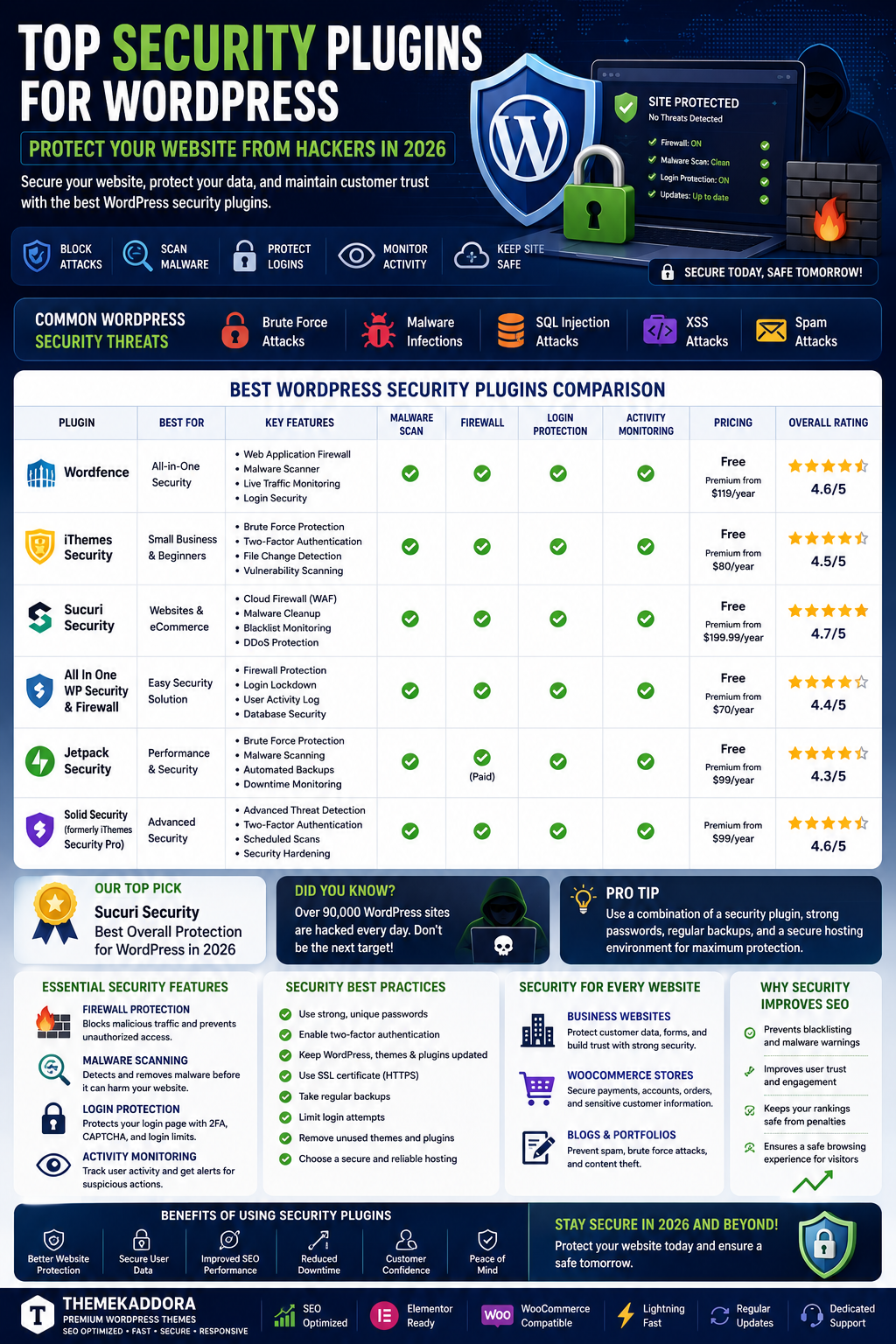
Top Security Plugins for WordPress: Protect Your Website from Hackers in 2026
Introduction
Cyber security has become one of the most important concerns for website owners. As WordPress continues to dominate the CMS market, it remains a frequent target for hackers, malware attacks, spam bots, and brute-force login attempts.
A single security breach can result in:
Lost customer trust
Data theft
SEO penalties
Revenue loss
Website downtime
Fortunately, WordPress security plugins provide powerful protection against modern cyber threats.
In this guide, we'll explore the best WordPress security plugins, why website security matters, and how to keep your website safe in 2026.
Why WordPress Security Matters
Many website owners assume hackers only target large corporations.
In reality, attackers often target:
Blogs
eCommerce stores
Agency websites
Startup websites
Hackers frequently use automated tools to scan thousands of websites looking for vulnerabilities.
Common WordPress Security Threats
Brute Force Attacks
Hackers attempt to guess login credentials repeatedly.
Risks include:
Unauthorized access
Data theft
Website takeover
Malware Infections
Malicious code can:
Damage websites
Redirect visitors
Steal customer information
SQL Injection Attacks
Attackers attempt to manipulate databases through vulnerable forms and URLs.
Cross-Site Scripting (XSS)
Malicious scripts are injected into website pages.
Spam Attacks
Spam bots can:
Flood comment sections
Submit fake forms
Consume server resources
What Security Plugins Do
Security plugins help:
Block attacks
Monitor activity
Scan for malware
Protect login pages
Strengthen website defenses
They provide an additional layer of protection beyond hosting security.
Essential Security Features
Firewall Protection
A firewall blocks suspicious traffic before it reaches your website.
Benefits include:
Reduced attack attempts
Improved performance
Better security
Malware Scanning
Regular scans help identify:
Infected files
Suspicious code
Security vulnerabilities
Login Protection
Features may include:
Two-factor authentication
Login limits
CAPTCHA verification
Activity Monitoring
Security plugins often track:
User logins
File changes
Administrative actions
Security for Business Websites
Business websites often store:
Customer inquiries
User accounts
Payment information
Strong security helps protect:
Business reputation
Customer trust
Revenue streams
Security for WooCommerce Stores
Online stores face additional threats.
Security plugins help secure:
Customer accounts
Payment processes
Product databases
Order information
Protecting eCommerce websites is critical for maintaining customer confidence.
Benefits of Security Plugins
Improved Website Protection
Prevent unauthorized access and malware infections.
Better SEO Performance
Google may penalize hacked websites.
Strong security helps maintain search rankings.
Reduced Downtime
Prevent attacks that could disrupt website operations.
Customer Confidence
Visitors trust secure websites more than vulnerable ones.
Common Security Mistakes
Weak Passwords
Always use strong, unique passwords.
Ignoring Updates
Outdated themes and plugins are common attack vectors.
No Backup Strategy
Security and backups should always work together.
Excessive Plugin Usage
Too many plugins can increase vulnerability risks.
Additional Security Best Practices
Enable SSL Certificates
HTTPS improves both security and SEO.
Use Secure Hosting
Choose reputable hosting providers with strong security measures.
Regular Backups
Maintain automated backup schedules.
Limit User Permissions
Only grant necessary access levels.
Security Trends in 2026
AI-Powered Threat Detection
Security tools increasingly use AI to identify suspicious behavior.
Advanced Bot Protection
Modern solutions block sophisticated automated attacks.
Real-Time Monitoring
Instant threat detection is becoming standard.
Cloud-Based Security
Cloud firewalls provide additional layers of protection.
Why Themekaddora Themes Support Better Security
Themekaddora themes are developed using modern coding standards and security best practices.
Benefits include:
Clean code structure
Regular updates
WooCommerce compatibility
Elementor integration
Performance optimization
A secure theme combined with reliable security plugins creates a stronger defense against attacks.
Security and SEO
Many website owners overlook the connection between security and SEO.
Secure websites benefit from:
Better user trust
Improved search visibility
Reduced risk of penalties
Higher conversion rates
Google prioritizes websites that provide safe browsing experiences.
Future of WordPress Security
As cyber threats evolve, website security will continue advancing through:
AI-based protection
Behavioral analysis
Automated incident response
Improved cloud security
Businesses that invest in security today will be better prepared for future challenges.
Conclusion
Website security is no longer optional.
Whether you operate a blog, business website, agency platform, SaaS application, or WooCommerce store, protecting your website should be a top priority.
The right WordPress security plugin can help prevent attacks, protect sensitive data, improve SEO, and maintain customer trust.
Combined with a secure, optimized theme from Themekaddora, strong security practices create a solid foundation for long-term online success.
Frequently Asked Questions
Why do I need a security plugin for WordPress?
Security plugins help protect websites from malware, hackers, spam, and unauthorized access.
Can WordPress websites be hacked?
Yes. WordPress websites can be targeted if they are not properly secured.
Do security plugins affect website speed?
Most modern security plugins are optimized to minimize performance impact.
Is SSL enough for website security?
No. SSL is important but should be combined with other security measures.
How often should I scan my website?
Daily monitoring and regular scans are recommended.
Are free security plugins effective?
Many free solutions provide basic protection, while premium options offer advanced features.
Do WooCommerce stores need extra security?
Yes. eCommerce websites handle customer and payment data, making security especially important.
Why use Themekaddora themes?
Themekaddora themes are built with security, performance, SEO, and compatibility in mind.
Comments (0)