
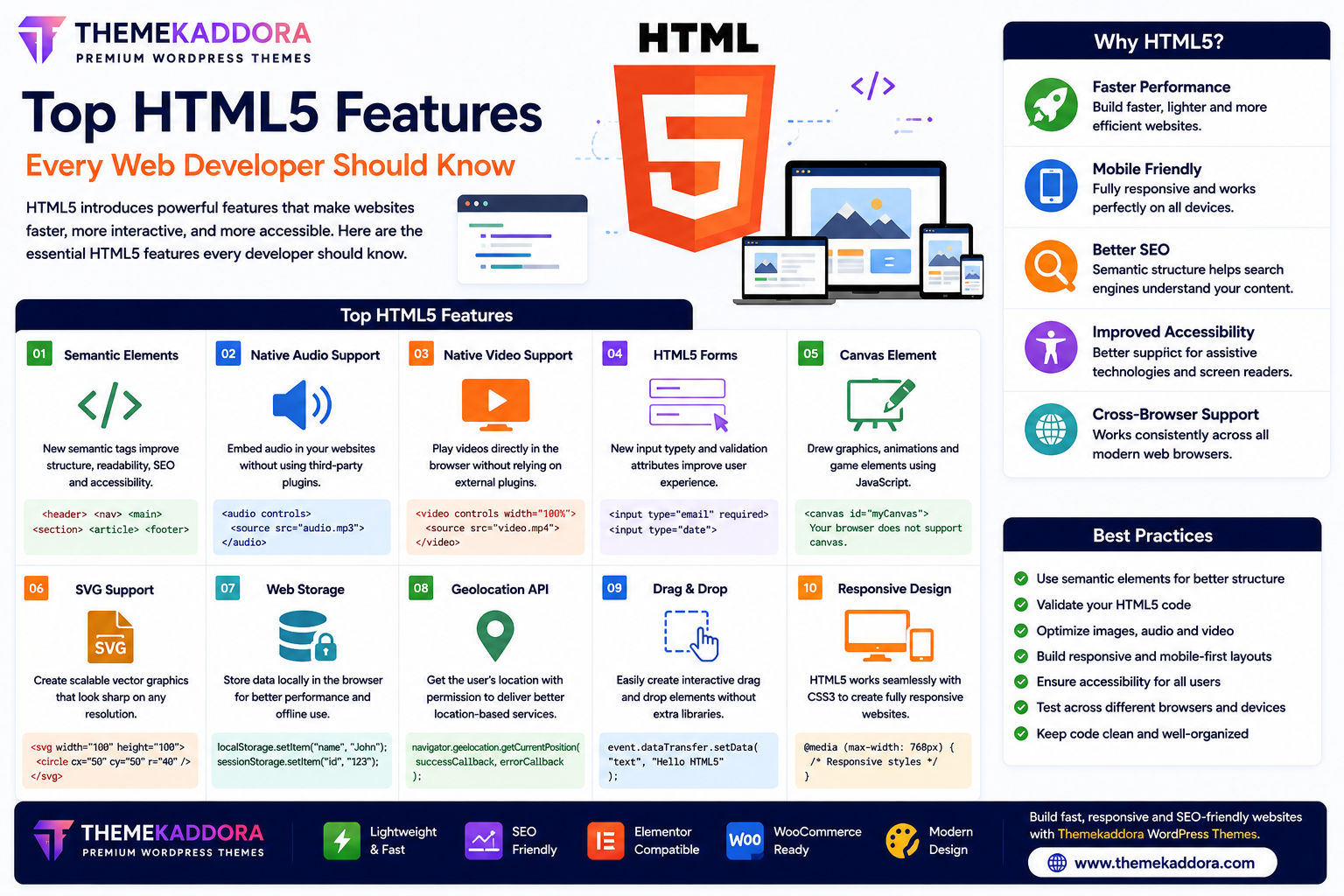
Top HTML5 Features Every Web Developer Should Know
Introduction
HTML5 transformed web development by introducing powerful features that make websites faster, more interactive, mobile-friendly, and easier to maintain. Compared to older versions of HTML, HTML5 provides built-in support for multimedia, better document structure, improved forms, and modern browser APIs.
Today, HTML5 serves as the foundation of nearly every modern website and web application. Whether you're building a personal portfolio, business website, blog, or eCommerce store, understanding HTML5 features will help you create better user experiences.
In this guide, we'll explore the most important HTML5 features every web developer should know.
Why HTML5 is Important
HTML5 offers several advantages over previous HTML versions:
Cleaner code structure
Better accessibility
Faster website performance
Mobile responsiveness
Native multimedia support
Improved SEO
Better browser compatibility
Rich web application capabilities
These improvements have made HTML5 the standard for modern web development.
1. Semantic HTML Elements
One of the biggest improvements in HTML5 is the introduction of semantic elements.
Instead of relying heavily on generic <div> tags, developers can use descriptive elements such as:
<header>
<nav>
<main>
<section>
<article>
<aside>
<footer>
Benefits
Better SEO
Improved accessibility
Easier code maintenance
Clearer document structure
2. Native Audio Support
HTML5 introduced the <audio> element, allowing developers to embed audio without third-party plugins.
Common uses include:
Podcasts
Music players
Voice recordings
Educational content
Benefits
Better browser support
Faster loading
No external plugins required
3. Native Video Support
The <video> element allows websites to display videos directly inside web pages.
Popular uses include:
Product demonstrations
Tutorials
Marketing videos
Online courses
Benefits
Plugin-free playback
Mobile compatibility
Improved user experience
4. HTML5 Forms
HTML5 significantly improved web forms with new input types.
Examples include:
URL
Number
Date
Time
Search
Range
Color
These input types help browsers validate user input automatically.
Benefits
Better user experience
Reduced validation errors
Cleaner forms
5. Canvas Element
The <canvas> element enables developers to create graphics dynamically using JavaScript.
Common applications include:
Games
Charts
Drawing applications
Interactive animations
6. SVG Support
HTML5 supports Scalable Vector Graphics (SVG).
SVG images:
Stay sharp on all screen sizes
Scale without quality loss
Load efficiently
Support animations
SVG is widely used for icons, logos, and illustrations.
7. Web Storage
HTML5 introduced client-side storage through:
Local Storage
Session Storage
Unlike cookies, web storage can hold more data and is easier to manage.
Common uses include:
User preferences
Shopping carts
Temporary website data
Offline information
8. Geolocation API
HTML5 enables websites to request a visitor's geographic location (with permission).
Common applications include:
Maps
Delivery services
Nearby business searches
Weather websites
User privacy and consent remain essential when using location data.
9. Drag-and-Drop Support
HTML5 includes built-in drag-and-drop functionality.
Examples include:
File uploads
Dashboard customization
Kanban boards
Interactive interfaces
This feature creates smoother user experiences.
10. Responsive Web Development
HTML5 works seamlessly with CSS media queries to create responsive websites.
Responsive design ensures websites adapt to:
Smartphones
Tablets
Laptops
Desktop computers
This is essential for modern web development.
HTML5 Features Used in Modern Websites
Most modern websites rely on HTML5 features for:
Navigation menus
Video players
Contact forms
Interactive dashboards
Online learning platforms
Business websites
eCommerce stores
Web applications
These features improve functionality and user engagement.
Best Practices for Using HTML5 Features
To get the most from HTML5:
Use semantic elements whenever possible.
Validate your HTML code.
Optimize multimedia files.
Build responsive layouts.
Write accessible markup.
Test across multiple browsers.
Minimize unnecessary code.
These practices improve performance and maintainability.
Common HTML5 Mistakes
Avoid:
Using excessive <div> elements instead of semantic tags.
Embedding large media files without optimization.
Ignoring accessibility attributes.
Creating non-responsive layouts.
Using outdated HTML elements.
Following HTML5 standards helps create modern, future-ready websites.
Why HTML5 Matters for WordPress Themes
Modern WordPress themes—including Themekaddora themes—are built using HTML5 standards.
Benefits include:
SEO-friendly structure
Faster page loading
Responsive layouts
Better accessibility
Cleaner code
Modern browser compatibility
Easier customization
HTML5 provides the strong technical foundation needed for professional WordPress websites.
Conclusion
HTML5 introduced features that completely changed how websites are built. From semantic elements and multimedia support to responsive design and browser APIs, HTML5 enables developers to create fast, accessible, and interactive websites.
Learning these features helps developers build websites that perform well across devices and meet modern web standards.
When combined with responsive WordPress themes from Themekaddora, HTML5 helps create professional websites that deliver excellent user experiences and long-term performance.
Frequently Asked Questions (FAQs)
What are the main features of HTML5?
HTML5 includes semantic elements, audio and video support, improved forms, canvas, SVG, web storage, geolocation, drag-and-drop functionality, and responsive web development support.
Why are semantic elements important?
Semantic elements improve website structure, accessibility, SEO, and code readability.
Does HTML5 support multimedia without plugins?
Yes. HTML5 provides native support for audio and video through the <audio> and <video> elements.
Is HTML5 suitable for responsive websites?
Absolutely. HTML5 works together with CSS to create websites that adapt to different screen sizes.
Why do Themekaddora WordPress themes use HTML5?
Themekaddora themes follow HTML5 standards to deliver responsive, SEO-friendly, accessible, and high-performance WordPress websites built for modern browsers.
Comments (0)