
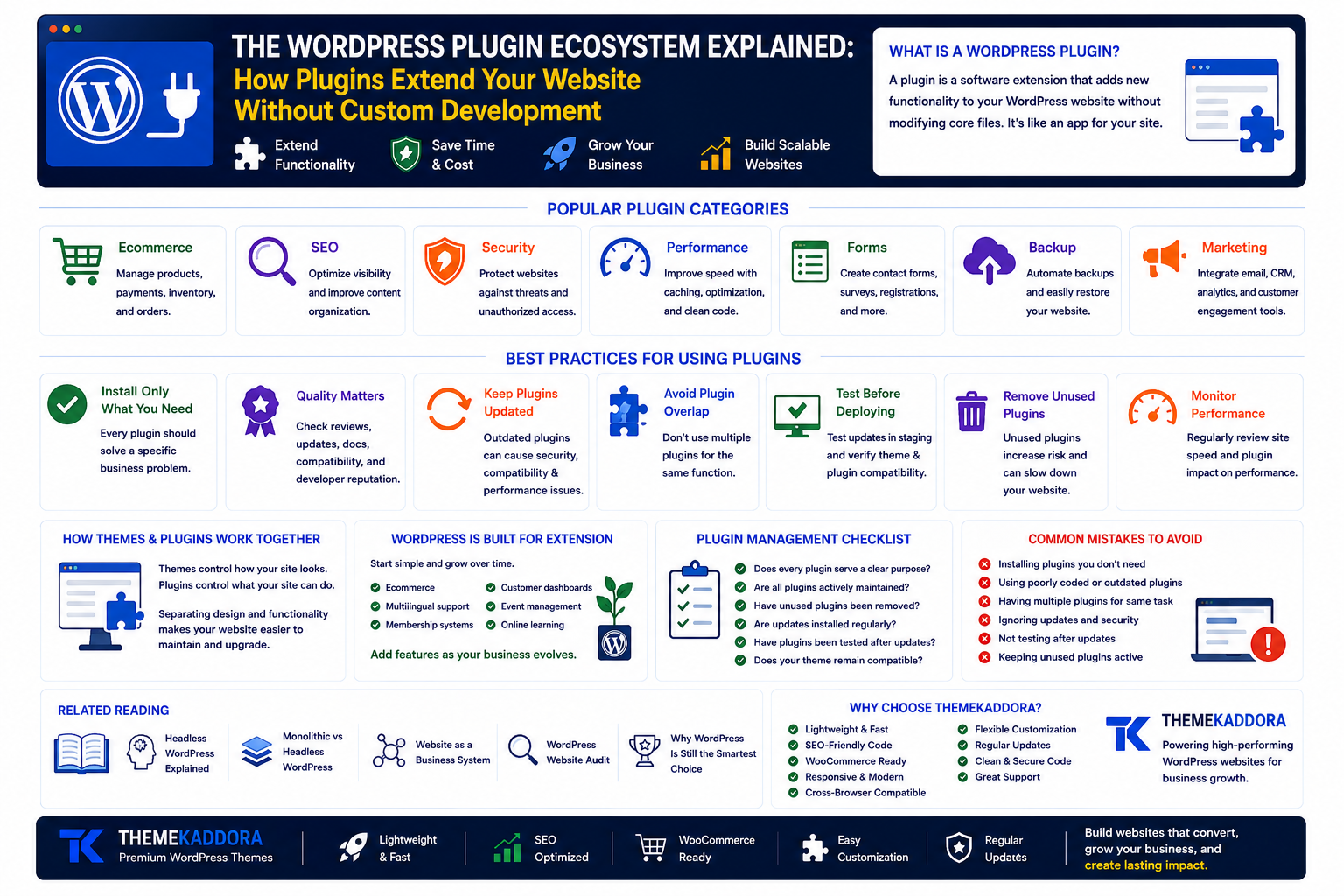
The WordPress Plugin Ecosystem Explained: How Plugins Extend Your Website Without Custom Development
Introduction
One of the biggest reasons WordPress powers millions of websites is its incredible flexibility.
Out of the box, WordPress provides everything needed to publish content and manage a website.
But every business has different needs.
Some require ecommerce.
Others need appointment booking, multilingual support, membership systems, learning platforms, customer portals, analytics, or advanced SEO tools.
Instead of forcing every feature into WordPress itself, the platform relies on an extensive plugin ecosystem.
Plugins allow website owners to add new capabilities without rebuilding their website from scratch.
Understanding how this ecosystem works helps businesses make smarter technology decisions while keeping websites secure, fast, and scalable.
What Is a WordPress Plugin?
A plugin is a software extension that adds new functionality to a WordPress website.
Think of WordPress as a smartphone.
The operating system provides the foundation, while apps add specialized features.
Plugins work in a similar way.
Instead of changing WordPress core files, they extend existing functionality.
Why Plugins Matter
Plugins transform WordPress from a blogging platform into a flexible business solution.
With plugins, businesses can build:
Online stores
Membership websites
Learning platforms
Booking systems
Contact forms
SEO tools
Analytics dashboards
Community forums
Customer portals
This flexibility reduces development time and cost.
The Strength of the Ecosystem
Thousands of developers contribute to the WordPress ecosystem.
This creates a wide range of solutions for common business challenges.
Instead of reinventing the wheel, businesses can often implement proven functionality through trusted plugins.
Popular Plugin Categories
Ecommerce
Manage products, payments, inventory, and orders.
Search Engine Optimization
Optimize website visibility and improve content organization.
Security
Protect websites against unauthorized access and malicious activity.
Performance
Improve loading speed, caching, and image optimization.
Forms
Create contact forms, surveys, registrations, and lead generation workflows.
Backup and Recovery
Protect website data through automated backup solutions.
Marketing
Integrate email marketing, analytics, CRM systems, and customer engagement tools.
Not Every Plugin Is Necessary
A common mistake is installing plugins simply because they seem useful.
Every plugin should solve a specific business problem.
Ask:
Does this feature support our goals?
Is there already another plugin performing the same task?
Will the plugin be maintained over time?
More plugins do not automatically create a better website.
Quality Matters More Than Quantity
Before installing any plugin, review:
Update frequency
Documentation quality
Compatibility
User reviews
Developer reputation
Support availability
Reliable plugins contribute to long-term website stability.
Keep Plugins Updated
Outdated plugins may create:
Security risks
Compatibility issues
Performance problems
Create a regular maintenance schedule to review updates and remove unused plugins.
Avoid Plugin Overlap
Sometimes multiple plugins perform similar functions.
For example:
Two SEO plugins
Multiple caching plugins
Duplicate security tools
Overlapping functionality increases complexity and may reduce performance.
Choose one well-supported solution for each major requirement.
Test Before Deploying
Whenever possible:
Test plugin updates in a staging environment.
Verify compatibility with your theme.
Review performance after installation.
A structured update process reduces unexpected issues.
How Themes and Plugins Work Together
Themes control how your website looks and presents content.
Plugins control what your website can do.
Keeping design and functionality separate makes your website easier to maintain and upgrade over time.
WordPress Is Built for Extension
One of WordPress's greatest strengths is its ability to grow with your business.
You can begin with a simple website and gradually add features as your needs evolve.
Examples include:
Ecommerce
Multilingual support
Membership systems
Customer dashboards
Event management
Online learning
This modular approach allows businesses to expand without rebuilding everything.
Why Choose Themekaddora?
A well-built theme provides the ideal foundation for plugin compatibility.
Themekaddora WordPress themes are designed with:
Lightweight architecture
Clean coding standards
SEO-friendly structure
WooCommerce compatibility
Responsive layouts
Fast loading performance
Flexible customization
Cross-browser compatibility
Regular updates
Professional support
Our themes work seamlessly with popular WordPress plugins, giving businesses the flexibility to expand functionality while maintaining excellent performance.
Plugin Management Checklist
Review your website regularly.
Ask yourself:
✅ Does every plugin serve a clear purpose?
✅ Are all plugins actively maintained?
✅ Have unused plugins been removed?
✅ Are updates installed regularly?
✅ Have plugins been tested after updates?
✅ Does your theme remain compatible?
Related Reading
Continue learning with:
Headless WordPress Explained
Monolithic vs Headless WordPress
Website as a Business System
WordPress Website Audit
Why WordPress Is Still the Smartest Choice for Modern Businesses
Together, these articles provide a deeper understanding of how the WordPress ecosystem supports modern businesses.
Conclusion
The WordPress plugin ecosystem is one of the platform's greatest competitive advantages.
It allows businesses to add powerful functionality without investing in expensive custom development for every new requirement.
The key is choosing plugins thoughtfully, maintaining them responsibly, and building on a strong technical foundation.
With lightweight, performance-focused WordPress themes from Themekaddora, you gain a reliable base that works smoothly with the broader WordPress ecosystem—helping your website evolve as your business grows.
Frequently Asked Questions (FAQs)
What is a WordPress plugin?
A WordPress plugin is an extension that adds new features or functionality to a WordPress website without modifying the core software.
Why are plugins important?
Plugins allow businesses to add ecommerce, SEO tools, security features, forms, backups, marketing integrations, and many other capabilities quickly and efficiently.
Can too many plugins slow down a WordPress website?
Yes. Installing unnecessary or poorly coded plugins can affect performance. Focus on quality, maintenance, and using only the plugins your website truly needs.
How often should WordPress plugins be updated?
Check for updates regularly and apply them after testing, especially for security and compatibility improvements.
Why choose Themekaddora WordPress themes?
Themekaddora themes are built with clean code, lightweight performance, WooCommerce compatibility, responsive layouts, and SEO-friendly architecture, ensuring excellent compatibility with the WordPress plugin ecosystem.
Comments (0)