
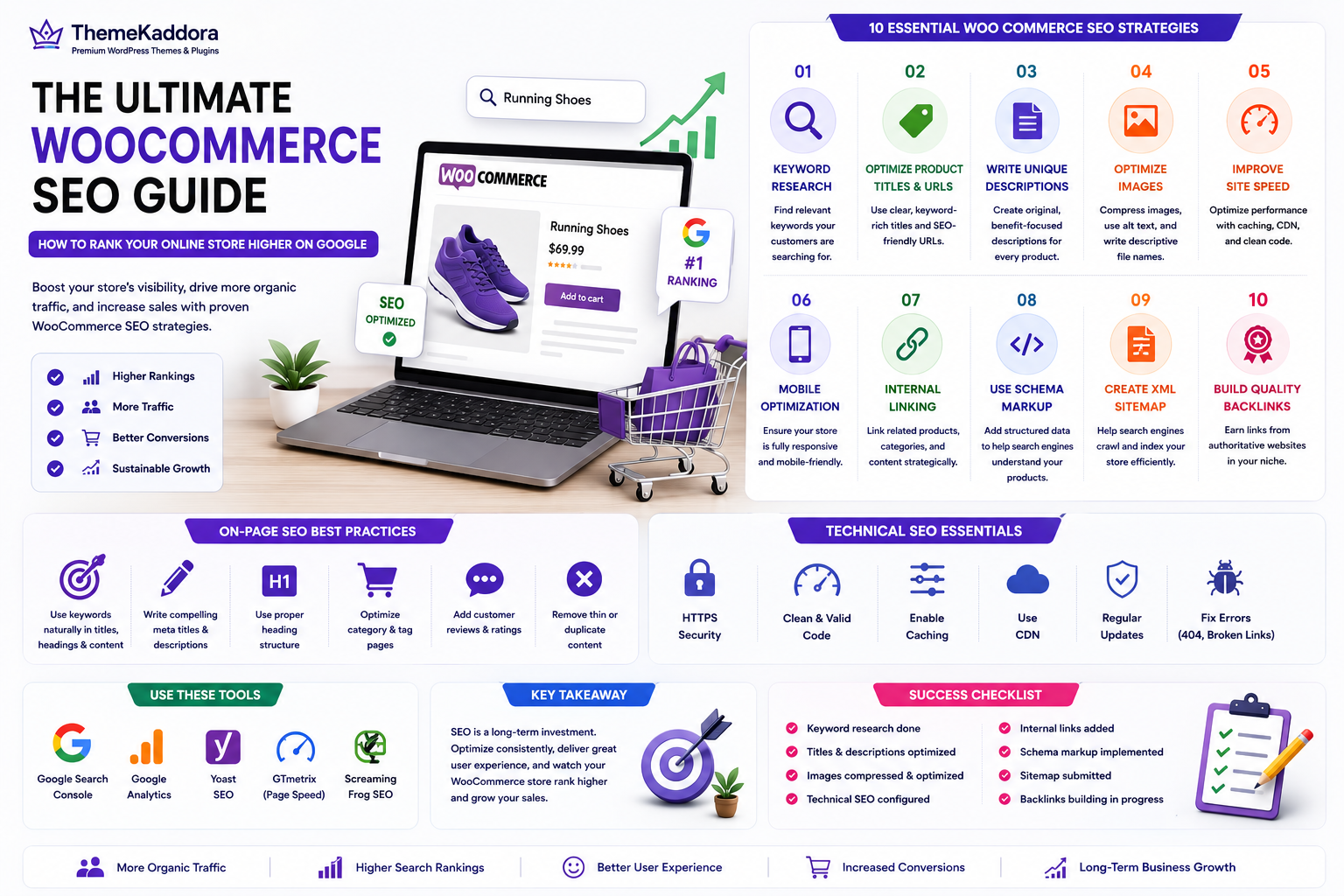
The Ultimate WooCommerce SEO Guide: How to Rank Your Online Store Higher on Google
Introduction
Launching a WooCommerce store is just the beginning of building a successful online business. No matter how attractive your website looks or how high-quality your products are, they won't generate consistent sales if potential customers can't find them. This is where WooCommerce Search Engine Optimization (SEO) becomes essential.
WooCommerce SEO is the process of optimizing your online store so that it ranks higher in search engine results. Higher rankings lead to increased visibility, more organic traffic, and ultimately more sales without relying entirely on paid advertising.
Unlike short-term marketing campaigns, SEO is a long-term investment. A well-optimized WooCommerce store can continue attracting qualified visitors for months or even years. By optimizing product pages, improving website performance, using the right keywords, and enhancing the overall shopping experience, you can build a strong online presence that drives sustainable business growth.
In this guide, you'll learn proven WooCommerce SEO strategies that help improve search rankings, increase organic traffic, and convert more visitors into loyal customers.
What Is WooCommerce SEO?
WooCommerce SEO is the process of improving your online store so search engines can understand, index, and rank your pages more effectively. It combines technical optimization, content improvements, keyword targeting, and user experience enhancements.
Effective WooCommerce SEO includes:
- Optimizing product pages
- Writing keyword-rich product descriptions
- Improving website speed
- Optimizing images
- Creating SEO-friendly URLs
- Building internal links
- Enhancing mobile usability
- Using structured data (Schema)
- Improving user experience
These optimizations help search engines understand your content while making it easier for customers to find the products they need.
Why WooCommerce SEO Matters
Many online stores depend heavily on paid advertising. While ads can generate immediate traffic, SEO provides long-term visibility and sustainable growth.
Benefits of WooCommerce SEO include:
- Increased organic traffic
- Better search rankings
- Higher conversion rates
- Improved user experience
- Reduced marketing costs
- Greater brand credibility
- Long-term business growth
A well-optimized store attracts visitors who are actively searching for the products you sell, making them more likely to convert into customers.
Choose an SEO-Friendly WooCommerce Theme
Your WordPress theme forms the foundation of your store's SEO performance. A lightweight, well-coded theme helps search engines crawl your website efficiently while providing visitors with a fast and responsive experience.
Look for a WooCommerce theme that offers:
- Clean, optimized code
- Fast loading times
- Mobile responsiveness
- SEO-friendly HTML structure
- Accessibility support
- WooCommerce compatibility
- Easy customization
- Regular updates
Avoid themes overloaded with unnecessary animations or features that negatively affect performance.
Optimize Product Titles and URLs
Your product title is one of the most important on-page SEO elements.
Write Descriptive Product Titles
Instead of using generic names like:
Running Shoes
Use descriptive titles such as:
Men's Lightweight Running Shoes for Daily Training
Clear titles improve both search visibility and click-through rates.
Use SEO-Friendly URLs
Keep URLs short, readable, and descriptive.
Good Example:
yourstore.com/mens-running-shoes
Avoid:
yourstore.com/product?id=9876
Simple URLs help both users and search engines understand your content.
Include Keywords Naturally
Use your primary keyword where it fits naturally in:
- Product titles
- URLs
- Meta titles
- Meta descriptions
- Headings
Avoid keyword stuffing, as it can negatively impact readability and search rankings.
Write High-Quality Product Descriptions
Many WooCommerce stores copy product descriptions directly from manufacturers. Duplicate content makes it difficult to rank well in search results.
Instead, create original descriptions that explain:
- Product features
- Customer benefits
- Technical specifications
- Usage recommendations
- Frequently asked questions
- Care instructions
High-quality content improves SEO while helping customers make informed purchasing decisions.
Focus on Benefits
Don't simply list product features.
Instead of:
- Waterproof material
Write:
- Stay comfortable during rainy weather thanks to the waterproof exterior that keeps your feet dry.
Benefit-focused descriptions are more persuasive and engaging.
Structure Content Clearly
Use:
- Headings
- Bullet points
- Short paragraphs
- Comparison tables where appropriate
Well-structured content is easier for visitors to read and for search engines to understand.
Optimize Product Images
Images are essential for online shopping, but poorly optimized images can slow your website and reduce search visibility.
Compress Images
Large image files increase loading times.
Compress images before uploading while maintaining good visual quality.
Use Descriptive File Names
Instead of:
IMG_2547.jpg
Use:
mens-lightweight-running-shoes.jpg
Descriptive filenames help improve image SEO.
Add Alternative Text (Alt Text)
Every image should include meaningful alt text.
Example:
Men's lightweight running shoes with breathable mesh upper
Alt text improves accessibility and helps search engines understand your images.
Use Modern Image Formats
Where supported, use formats such as WebP to reduce file size while maintaining image quality.
Improve Website Speed
Website speed is a confirmed ranking factor and has a direct impact on user experience.
Slow websites increase bounce rates and reduce conversions.
Improve performance by:
- Choosing quality hosting
- Enabling caching
- Using a Content Delivery Network (CDN)
- Compressing images
- Minimizing CSS and JavaScript
- Removing unnecessary plugins
- Optimizing your database
A faster WooCommerce store provides a better shopping experience and supports higher search rankings.
Optimize Category and Tag Pages
Many WooCommerce store owners spend most of their SEO efforts on product pages while overlooking category and tag pages. However, well-optimized category pages can rank for high-volume keywords and help customers discover multiple products at once.
Write Unique Category Descriptions
Instead of leaving category descriptions empty, create original content that explains:
- What products the category contains
- Who the products are for
- Key features and benefits
- Buying tips
- Related product categories
A well-written category description provides valuable context for both users and search engines.
Use SEO-Friendly Category URLs
Keep category URLs simple and descriptive.
Good Example:
yourstore.com/product-category/wireless-headphones
Avoid:
yourstore.com/product-category/cat-145
Readable URLs improve usability and SEO.
Organize Products Logically
Group related products into meaningful categories and avoid creating too many unnecessary tags. A clean site structure makes navigation easier and improves crawlability.
Build an Internal Linking Strategy
Internal links help visitors discover more content while allowing search engines to understand the relationship between your pages.
A strong internal linking strategy distributes authority across your website and keeps users engaged.
Link Related Products
Display related products that complement the item a customer is viewing.
Examples include:
- Matching accessories
- Similar products
- Best-selling alternatives
- Recently viewed items
This encourages customers to explore more of your catalog and increases average order value.
Connect Blog Posts to Products
Educational blog content can drive targeted traffic to your store.
For example, if you publish an article titled "How to Choose the Best Running Shoes", naturally link to your relevant product pages within the content.
This approach improves SEO while guiding readers toward purchasing decisions.
Use Descriptive Anchor Text
Avoid generic phrases such as:
- Click here
- Read more
- Learn more
Instead, use descriptive anchor text like:
- Explore our lightweight running shoes
- View our WooCommerce themes
- Learn how to improve WordPress SEO
Descriptive links improve both accessibility and SEO.
Add Product Schema Markup
Schema markup is structured data that helps search engines better understand your products and display enhanced search results.
Product schema can include information such as:
- Product name
- Price
- Availability
- Ratings
- Reviews
- Brand
- SKU
Rich snippets improve visibility in search results and often increase click-through rates.
Add Review Schema
If your products include customer reviews, review schema allows search engines to display star ratings directly in search results.
Visible ratings attract attention and build trust before customers even visit your website.
Optimize for Mobile Users
A significant percentage of WooCommerce purchases are completed on mobile devices. A poor mobile experience can reduce rankings and increase cart abandonment.
Use Responsive Design
Ensure your website adapts seamlessly to different screen sizes.
A responsive WooCommerce store should provide:
- Easy navigation
- Readable text
- Optimized images
- Touch-friendly buttons
- Fast loading pages
Simplify Mobile Checkout
Reduce friction by:
- Offering guest checkout
- Minimizing required fields
- Supporting autofill
- Displaying large tap targets
- Providing digital wallet payment options
A smooth mobile checkout process encourages higher conversion rates.
Build High-Quality Backlinks
Backlinks remain one of the strongest ranking signals for search engines.
Focus on earning links naturally through valuable content rather than attempting manipulative link-building tactics.
Effective strategies include:
- Publishing helpful buying guides
- Creating comparison articles
- Writing original research
- Producing infographics
- Guest posting on reputable websites
- Building relationships within your industry
Quality is far more important than quantity.
Monitor SEO Performance
SEO requires continuous improvement. Regularly monitor your WooCommerce store's performance to identify opportunities for optimization.
Track important metrics such as:
- Organic traffic
- Keyword rankings
- Conversion rate
- Bounce rate
- Click-through rate
- Indexed pages
- Page loading speed
Analyzing performance helps you make informed decisions and adapt your strategy over time.
Common WooCommerce SEO Mistakes
Avoiding common SEO mistakes can significantly improve your store's visibility and user experience.
Duplicate Product Descriptions
Copying manufacturer descriptions creates duplicate content that can limit your ability to rank well.
Always write unique, informative product descriptions.
Ignoring Image Optimization
Large image files and missing alt text slow down your website and reduce image search visibility.
Optimize every product image before publishing.
Poor Website Speed
Slow-loading websites increase bounce rates and reduce conversions.
Regularly optimize your hosting, database, images, and plugins.
Weak Internal Linking
Pages without meaningful internal links are harder for search engines to discover.
Create a logical linking structure across products, categories, and blog articles.
Neglecting Mobile Users
A poor mobile experience affects both search rankings and customer satisfaction.
Regularly test your website on multiple devices.
Keyword Stuffing
Using the same keyword excessively makes content difficult to read and may negatively affect rankings.
Use keywords naturally within valuable, informative content.
Why Choose ThemeKaddora?
At ThemeKaddora, we believe successful WooCommerce SEO begins with a strong technical foundation. Our WordPress themes and WooCommerce solutions are designed to help businesses build fast, secure, and search-engine-friendly online stores.
Our products include:
- Lightweight, optimized code
- Responsive, mobile-first designs
- WooCommerce compatibility
- SEO-friendly architecture
- Fast-loading performance
- Easy customization
- Clean development practices
- AI-powered plugins for automation and business growth
Whether you're launching a new store or improving an existing one, ThemeKaddora provides the tools needed to create a high-performing WooCommerce website that attracts traffic and converts visitors into customers.
Conclusion
WooCommerce SEO is one of the most effective long-term strategies for growing your online store. By optimizing product pages, improving website speed, enhancing mobile usability, creating high-quality content, implementing structured data, and building a strong internal linking strategy, you can increase your store's visibility and attract highly targeted organic traffic.
SEO is an ongoing process rather than a one-time task. Regularly reviewing your website, updating content, monitoring performance, and adapting to search engine best practices will help your store remain competitive.
With fast, SEO-friendly themes and AI-powered WordPress plugins from ThemeKaddora, you can build a WooCommerce store that not only ranks higher on Google but also delivers an exceptional shopping experience that drives long-term business growth.
Frequently Asked Questions
1. What is WooCommerce SEO?
WooCommerce SEO is the process of optimizing an online store to improve its visibility in search engine results and attract more organic traffic.
2. Why is WooCommerce SEO important?
SEO helps potential customers discover your products, increases organic traffic, reduces dependence on paid advertising, and supports long-term business growth.
3. How can I improve product page SEO?
Write unique product descriptions, optimize titles and URLs, compress images, use descriptive alt text, and implement structured data.
4. Does website speed affect WooCommerce SEO?
Yes. Faster websites provide a better user experience and are more likely to rank higher in search results.
5. What is product schema markup?
Product schema is structured data that helps search engines display rich information such as prices, availability, and ratings in search results.
6. Why are category pages important?
Well-optimized category pages target broader keywords, improve navigation, and help search engines understand your store's structure.
7. How do internal links help SEO?
Internal links improve crawlability, distribute page authority, and encourage visitors to explore more of your website.
8. How often should I review my WooCommerce SEO?
Review your SEO regularly, especially after adding new products, publishing content, updating plugins, or making major website changes.
9. Can blogging improve WooCommerce SEO?
Yes. Publishing valuable blog content attracts organic traffic, supports internal linking, and helps establish topical authority.
10. Why choose ThemeKaddora?
ThemeKaddora offers fast, SEO-friendly WordPress themes and AI-powered WooCommerce plugins built with clean code, responsive design, and performance optimization to help businesses grow online.
Comments (0)