
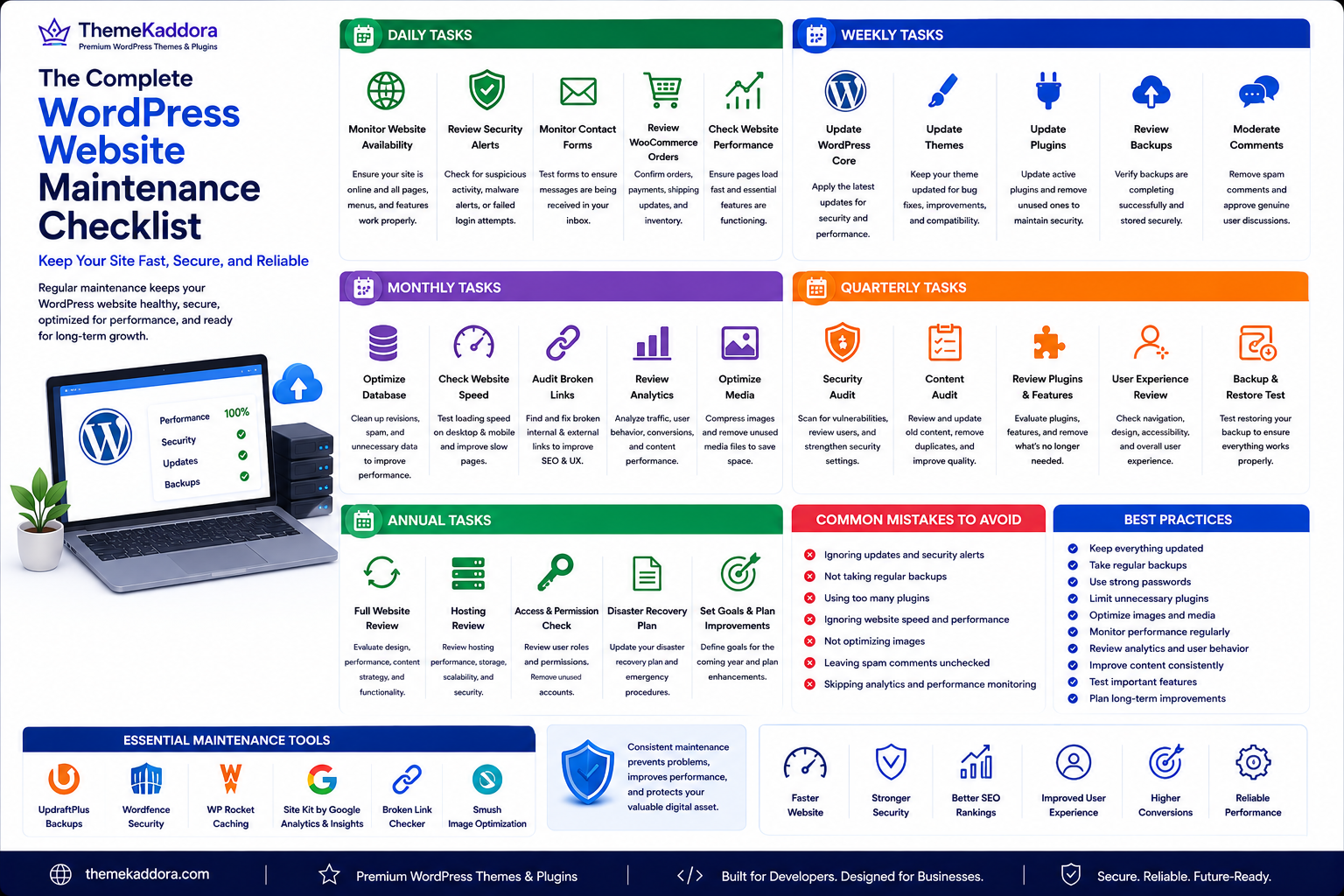
The Complete WordPress Website Maintenance Checklist: Keep Your Site Fast, Secure, and Reliable
Introduction
Building a WordPress website is only the beginning. To keep it performing at its best, regular maintenance is essential. Just like a car needs routine servicing to remain reliable, your website requires ongoing care to stay fast, secure, and functional.
Ignoring maintenance can lead to slow loading times, broken pages, outdated plugins, security vulnerabilities, poor search rankings, and even unexpected downtime. These issues affect both user experience and your business reputation.
A structured maintenance routine helps prevent problems before they occur. It keeps your website healthy, improves performance, protects valuable data, and ensures visitors always have a positive experience.
Whether you manage a personal blog, business website, portfolio, or WooCommerce store, following a maintenance checklist saves time and reduces the risk of costly issues.
In this guide, you'll learn the essential daily, weekly, monthly, and annual tasks that keep your WordPress website secure, optimized, and ready for long-term growth.
Why WordPress Maintenance Matters
A WordPress website is constantly evolving. Content is added, plugins are updated, themes receive improvements, and security threats continue to change. Without regular maintenance, these ongoing changes can gradually reduce performance and introduce vulnerabilities.
Consistent maintenance helps you:
- Improve website speed
- Protect against malware and hacking attempts
- Prevent plugin and theme conflicts
- Reduce unexpected downtime
- Improve SEO performance
- Enhance user experience
- Keep WooCommerce stores running smoothly
- Extend the lifespan of your website
Think of maintenance as preventive care—it is far easier to prevent issues than to recover from them after they occur.
Daily Maintenance Tasks
Some tasks take only a few minutes but make a significant difference over time.
Monitor Website Availability
Check that your website is online and functioning correctly. Even short periods of downtime can affect user trust and search engine rankings.
Look for:
- Homepage loading properly
- Navigation working
- Forms submitting correctly
- Product pages displaying
- Checkout process functioning
Review Security Alerts
If you use a security solution, review notifications for unusual login attempts, malware detections, or suspicious activity.
Address security warnings promptly to minimize risks.
Monitor Contact Forms
Test your contact forms periodically to ensure inquiries are reaching your inbox.
A broken contact form can result in missed business opportunities.
Review WooCommerce Orders
For online stores:
- Confirm orders are processing correctly.
- Verify payment confirmations.
- Check shipping updates.
- Monitor inventory changes.
Daily reviews help identify issues before they affect customers.
Weekly Maintenance Tasks
Weekly tasks focus on keeping your website clean, updated, and optimized.
Update WordPress Core
WordPress regularly releases updates that improve security, performance, and functionality.
Before updating:
- Create a fresh backup.
- Review compatibility with themes and plugins.
- Test the update on a staging site if possible.
Update Themes
Theme updates often include:
- Security patches
- Bug fixes
- Performance improvements
- Compatibility enhancements
Keeping themes updated reduces vulnerabilities and ensures smooth functionality.
Update Plugins
Outdated plugins are among the most common causes of security issues.
Regularly:
- Remove unused plugins.
- Update active plugins.
- Test important functionality after updates.
Only keep plugins that are actively maintained and necessary for your website.
Review Website Backups
A backup is only valuable if it can be restored successfully.
Each week:
- Verify backups are completing successfully.
- Ensure copies are stored securely.
- Keep multiple restore points.
Moderate Comments
Delete spam comments, approve legitimate discussions, and keep your comment section clean.
This improves user experience and helps maintain a professional appearance.
Monthly Maintenance Tasks
Monthly maintenance focuses on performance optimization and long-term website health.
Optimize the Database
Over time, your database accumulates unnecessary information such as post revisions, expired transients, spam comments, and unused metadata.
Regular optimization helps:
- Improve query speed
- Reduce storage usage
- Enhance overall website performance
Check Website Speed
Test your website's loading performance on desktop and mobile devices.
Pay attention to:
- Page load times
- Largest Contentful Paint (LCP)
- Cumulative Layout Shift (CLS)
- Interaction responsiveness
Identify slow pages and optimize them as needed.
Audit Broken Links
Broken links frustrate users and negatively affect SEO.
Review:
- Internal links
- External links
- Navigation menus
- Buttons
- Download links
Fix or remove broken links promptly.
Review Analytics
Analyze website performance by reviewing:
- Visitor trends
- Bounce rate
- Popular content
- Traffic sources
- Conversion rates
These insights help you identify opportunities for improvement.
Quarterly Maintenance Tasks
Quarterly maintenance helps keep your website healthy over the long term by addressing areas that don't require frequent attention but have a significant impact on performance, security, and user experience.
Perform a Complete Security Audit
Cyber threats evolve continuously, making regular security audits essential.
Review:
- Administrator accounts
- User roles and permissions
- Password policies
- Login activity
- Firewall settings
- Security plugins
- File integrity
Remove inactive user accounts and ensure only trusted individuals have administrator access.
Review Website Content
Outdated content can negatively impact user trust and search rankings.
Check for:
- Old blog posts
- Outdated pricing
- Expired promotions
- Broken images
- Incorrect contact information
- Obsolete product descriptions
Updating existing content often delivers better SEO results than constantly publishing new articles.
Test Website Functionality
Visit your website as if you were a customer.
Test:
- Navigation menus
- Search functionality
- Contact forms
- Login pages
- Newsletter signup forms
- WooCommerce checkout
- Payment gateways
- Mobile responsiveness
Identifying issues early helps maintain a smooth user experience.
Review SEO Performance
Quarterly SEO reviews help maintain visibility in search engines.
Analyze:
- Organic traffic
- Keyword rankings
- Indexed pages
- Meta titles
- Meta descriptions
- Internal links
- Structured data
Make improvements where necessary to maintain strong search performance.
Annual Maintenance Tasks
Annual maintenance focuses on reviewing your website's long-term strategy and ensuring it continues to support your business goals.
Evaluate Hosting Performance
As your website grows, your hosting requirements may change.
Consider:
- Server response time
- Storage capacity
- Traffic limits
- Security features
- Scalability
- Technical support
Upgrading your hosting plan may improve performance during periods of increased traffic.
Review Installed Plugins
Plugins that were useful a year ago may no longer be necessary.
Review each plugin and ask:
- Is it still actively maintained?
- Is it compatible with the latest WordPress version?
- Does it provide ongoing value?
- Can multiple plugins be replaced with one solution?
Removing unnecessary plugins reduces maintenance complexity and improves performance.
Update Your Design
Modern website design improves credibility and user engagement.
Review:
- Homepage layout
- Typography
- Color scheme
- Call-to-action buttons
- Images
- Mobile experience
Small design improvements can significantly increase conversions.
Refresh Your Content Strategy
Review your content performance and identify opportunities to create:
- New tutorials
- Updated guides
- Industry insights
- Product comparisons
- Case studies
A refreshed content strategy keeps your website relevant and supports long-term SEO growth.
Essential Maintenance Tools
The right tools simplify routine maintenance and reduce manual work.
Useful categories include:
- Backup solutions
- Security monitoring
- Performance optimization
- Caching
- Image optimization
- SEO analysis
- Broken link checking
- Database optimization
- Uptime monitoring
- Analytics
Choose trusted, well-maintained tools and avoid installing unnecessary plugins that could slow down your website.
Common Website Maintenance Mistakes
Many website owners unintentionally create problems by overlooking basic maintenance tasks.
Ignoring Backups
Never perform updates without creating a recent backup.
A reliable backup can save hours of recovery work if something goes wrong.
Delaying Updates
Outdated WordPress core files, themes, and plugins increase security risks and compatibility issues.
Apply updates regularly after verifying compatibility.
Installing Too Many Plugins
Every plugin adds additional code to your website.
Only install plugins that provide genuine value and are actively maintained.
Skipping Performance Tests
A website may appear to function normally while becoming slower over time.
Regular speed testing helps identify performance bottlenecks before they affect visitors.
Ignoring Mobile Users
A large percentage of visitors browse using smartphones.
Regularly test your website across different devices and screen sizes.
Never Reviewing Analytics
Without analytics, it's difficult to understand how visitors interact with your website.
Regular analysis helps identify opportunities to improve user experience and conversions.
Maintenance Best Practices
Follow these habits to keep your WordPress website running efficiently.
Create Regular Backups
Maintain automated backups and store copies in secure off-site locations.
Use Strong Security
Enable strong passwords, two-factor authentication where possible, and monitor login activity regularly.
Monitor Website Speed
Track loading performance and optimize slow pages before they affect user satisfaction.
Keep Software Updated
Regularly update WordPress core, themes, and plugins to benefit from the latest security patches and performance improvements.
Test After Every Major Change
Whenever you update plugins, change themes, or modify important settings, thoroughly test your website to ensure everything continues to function correctly.
Maintain Documentation
Keep records of major updates, plugin installations, configuration changes, and maintenance activities. Good documentation makes troubleshooting easier and helps maintain consistency over time.
Why Choose ThemeKaddora?
At ThemeKaddora, we understand that building a WordPress website is only the first step. Long-term success depends on maintaining a website that is fast, secure, reliable, and easy to manage.
Our WordPress themes and plugins are developed with clean code, performance optimization, and modern development standards to simplify website maintenance while delivering exceptional performance.
ThemeKaddora products provide:
- Lightweight and optimized coding
- SEO-friendly architecture
- Responsive, mobile-first design
- WooCommerce compatibility
- Easy customization
- Performance-focused development
- AI-powered business automation plugins
- Regular updates and ongoing improvements
Whether you're managing a blog, business website, or WooCommerce store, ThemeKaddora helps you create websites that remain reliable, scalable, and ready for future growth.
Conclusion
Regular WordPress maintenance is one of the most effective ways to protect your website and ensure long-term success. By following a structured schedule of daily, weekly, monthly, quarterly, and annual maintenance tasks, you can reduce downtime, improve security, enhance performance, and provide a better experience for your visitors.
Website maintenance is not a one-time task but an ongoing process. Consistently updating your website, monitoring performance, reviewing security, optimizing the database, and analyzing user behavior will help your site remain competitive and dependable.
A well-maintained website builds trust, supports better SEO rankings, and creates a solid foundation for business growth. Combined with high-quality themes and plugins from ThemeKaddora, regular maintenance ensures your WordPress website remains secure, fast, and prepared for future opportunities.
Frequently Asked Questions
1. What is WordPress website maintenance?
WordPress website maintenance involves regularly updating, securing, optimizing, and monitoring your website to ensure it performs efficiently and remains protected against issues.
2. How often should I maintain my WordPress website?
Some tasks, such as monitoring uptime and checking forms, should be performed daily. Updates and backups are typically weekly, while performance audits and strategic reviews can be completed monthly or quarterly.
3. Why is website maintenance important?
Regular maintenance improves website speed, strengthens security, prevents downtime, enhances SEO, and delivers a better user experience.
4. Should I back up my website before updates?
Yes. Always create a complete backup before updating WordPress core, themes, or plugins.
5. How can I improve website performance?
Optimize your database, compress images, enable caching, remove unnecessary plugins, and use reliable hosting.
6. What happens if I ignore maintenance?
Neglecting maintenance can lead to slower performance, security vulnerabilities, compatibility issues, broken functionality, and lower search rankings.
7. How do I know if my website needs maintenance?
Signs include slow loading times, outdated plugins, broken links, security warnings, or declining search performance.
8. Are plugin updates really necessary?
Yes. Updates often include security fixes, performance improvements, and compatibility enhancements that help keep your website stable and secure.
9. Can maintenance improve SEO?
Absolutely. Faster loading speeds, fewer errors, updated content, and better usability all contribute to improved search engine visibility.
10. Why choose ThemeKaddora?
ThemeKaddora provides performance-focused WordPress themes and AI-powered plugins built with clean code, SEO-friendly architecture, responsive design, and business-focused features to help you maintain secure, reliable, and high-performing websites.
Comments (0)