
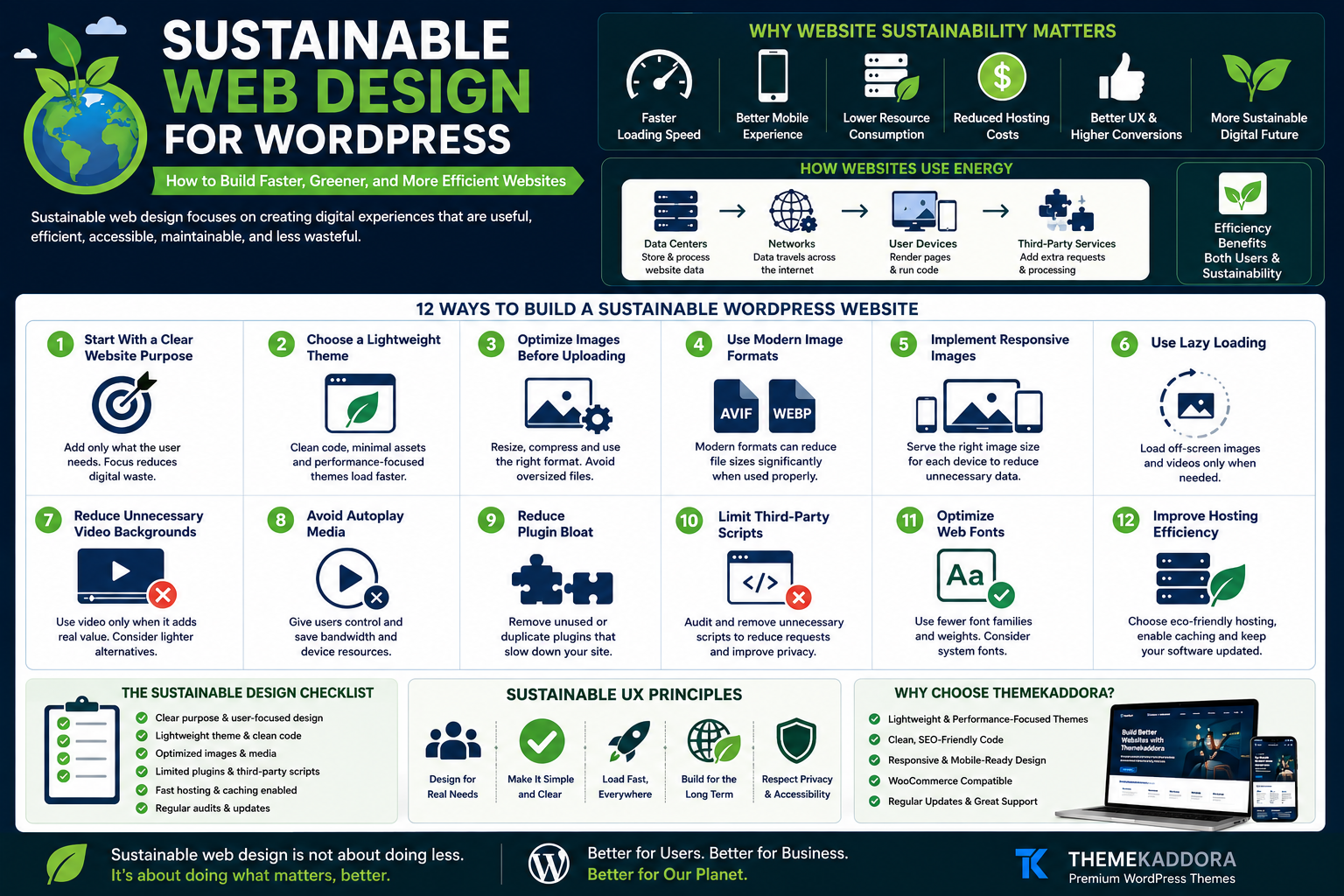
Sustainable Web Design for WordPress: How to Build Faster, Greener, and More Efficient Websites
Introduction
Every website uses resources.
When someone visits a webpage, data moves through networks, servers process requests, devices render content, images download, scripts execute, and infrastructure consumes electricity.
A single page view may appear insignificant.
But across thousands, millions, or billions of visits, digital activity becomes a meaningful operational consideration.
This is why sustainable web design is gaining attention.
Sustainable web design focuses on creating digital experiences that are useful, efficient, accessible, maintainable, and less wasteful.
For WordPress websites, sustainability often aligns with other important business goals.
A lighter website can be:
Faster
Easier to use
More mobile-friendly
Less expensive to operate
Simpler to maintain
Better suited to slower connections
The goal is not to make websites visually boring or remove every interactive feature.
The goal is to make deliberate choices.
In this guide, you'll learn what sustainable web design means, how WordPress websites consume resources, and how to build faster, lighter, and more efficient digital experiences.
What Is Sustainable Web Design?
Sustainable web design is an approach to designing, developing, hosting, and maintaining websites with efficiency and long-term impact in mind.
It may involve:
Reducing unnecessary data transfer
Improving page performance
Optimizing media
Simplifying user journeys
Reducing technical waste
Extending website lifespan
Choosing efficient infrastructure
Sustainability is not a single plugin or setting.
It is a design philosophy.
Why Website Sustainability Matters
Website sustainability can support several goals at once.
A more efficient website may help:
Improve loading speed
Reduce bandwidth use
Improve mobile usability
Support visitors on slower connections
Simplify maintenance
Reduce infrastructure demands
Improve user experience
Many sustainability improvements are also good performance practices.
How Websites Use Energy
A website visit may involve several systems.
Data Centers
Servers store and process website information.
Networks
Data travels between infrastructure and users.
User Devices
Phones, tablets, and computers render pages and execute scripts.
Third-Party Services
Analytics, advertising, chat tools, fonts, videos, and external widgets may add additional requests.
Every layer contributes to the overall digital experience.
The Connection Between Sustainability and Performance
Sustainable web design and performance optimization often overlap.
For example:
Smaller images transfer less data
Fewer scripts reduce processing
Efficient caching reduces repeated work
Simpler pages load faster
Lightweight themes reduce unnecessary assets
This creates a useful principle:
Efficiency can benefit both users and sustainability goals.
1. Start With a Clear Website Purpose
Unnecessary complexity often begins when websites lack focus.
Before adding a feature, ask:
Does the user need this?
Does it support a business goal?
Does it improve the experience?
Is there a simpler alternative?
A clear purpose reduces digital waste.
2. Choose a Lightweight WordPress Theme
Your theme forms the foundation of the website.
A heavy theme may load:
Large CSS files
Multiple JavaScript libraries
Unused components
Complex animations
Excessive assets
Look for themes that prioritize:
Clean code
Responsive design
Efficient assets
Flexible layouts
Performance
A lightweight foundation makes future optimization easier.
3. Optimize Images Before Uploading
Images are often among the largest assets on a webpage.
Before uploading:
Resize dimensions
Compress files
Choose appropriate formats
Remove unnecessary metadata where suitable
Avoid uploading a massive image only to display it as a small thumbnail.
4. Use Modern Image Formats Carefully
Modern formats can reduce file sizes in many situations.
However, test:
Browser compatibility
Image quality
Workflow requirements
Choose the format that provides an appropriate balance between quality and efficiency.
5. Implement Responsive Images
A smartphone should not always download the same oversized image intended for a large desktop display.
Responsive images help deliver more appropriate assets for different screen sizes.
This can reduce unnecessary data transfer.
6. Use Lazy Loading
Lazy loading delays certain off-screen resources until they are needed.
This can be useful for:
Images
Videos
Embedded content
However, avoid lazy-loading critical above-the-fold elements when it harms user experience.
7. Reduce Unnecessary Video Backgrounds
Large autoplaying background videos can add significant page weight.
Ask whether the video genuinely improves:
Understanding
Trust
Conversion
Storytelling
If not, consider:
Static image
Lightweight illustration
Optional video player
8. Avoid Autoplay Media
Autoplay can consume resources before users decide whether they want the content.
Give visitors control.
This supports:
Usability
Accessibility
Efficiency
9. Reduce Plugin Bloat
WordPress makes it easy to install plugins.
But over time, websites accumulate tools that:
Duplicate functionality
Load scripts globally
Add database overhead
Create maintenance complexity
Review plugins regularly.
Remove those that are genuinely unnecessary.
10. Limit Third-Party Scripts
Third-party scripts may include:
Analytics
Advertising
Chat widgets
Social embeds
Tracking tools
Marketing automation
Each script may add:
Requests
Processing
Dependencies
Privacy considerations
Audit third-party services regularly.
11. Optimize Web Fonts
Typography can add unnecessary weight.
Consider:
Fewer font families
Fewer font weights
Efficient file formats
System fonts where appropriate
A website rarely needs every available font variation.
12. Simplify Animation
Animations can improve understanding when used carefully.
But excessive motion may:
Increase processing
Distract visitors
Reduce accessibility
Slow low-powered devices
Use motion with purpose.
13. Improve Navigation
Sustainability is not only about file size.
If visitors need ten page loads to find information that could have been reached in three, the journey is inefficient.
Improve:
Menu labels
Search
Categories
Internal links
Information architecture
Help users reach their destination faster.
14. Improve Internal Search
For content-rich or eCommerce websites, effective search reduces unnecessary browsing.
Useful improvements include:
Relevant results
Helpful filters
Typo tolerance
Clear zero-result pages
Search suggestions
Better discovery creates more efficient journeys.
15. Remove Duplicate Content
Duplicate or nearly identical pages can create:
Maintenance burden
Search confusion
Content waste
Consolidate overlapping pages where appropriate.
16. Archive Outdated Content Strategically
Old content may become:
Incorrect
Irrelevant
Unsupported
Redundant
Review whether to:
Update
Merge
Redirect
Remove
A smaller, higher-quality content library can be easier to maintain.
17. Use Caching Effectively
Caching can reduce repeated processing and improve loading performance.
Depending on your setup, caching may involve:
Browser caching
Page caching
Object caching
CDN caching
Implementation depends on hosting and website architecture.
18. Optimize Your Database
Over time, a WordPress database may accumulate unnecessary data.
Potential areas to review include:
Old revisions
Expired transients
Unused plugin tables
Spam comments
Always create reliable backups before database maintenance.
19. Choose Hosting Thoughtfully
Hosting affects:
Performance
Reliability
Infrastructure efficiency
Scalability
Evaluate providers based on:
Performance
Transparency
Data center strategy
Operational practices
Support
Avoid relying only on marketing claims.
20. Use a CDN When It Makes Sense
A Content Delivery Network can serve assets from geographically distributed infrastructure.
Potential benefits include:
Reduced latency
Faster delivery
Improved resilience
Whether a CDN is useful depends on your audience and architecture.
21. Build Mobile-First Experiences
Many visitors browse on mobile devices.
Mobile-first design encourages:
Simpler layouts
Clear priorities
Smaller assets
Efficient interactions
A good mobile experience often benefits efficiency.
22. Improve Accessibility
Accessible design supports broader usability.
Focus on:
Keyboard navigation
Readable typography
Color contrast
Alternative text
Clear headings
Accessibility and sustainability often share a focus on inclusive, efficient experiences.
23. Reduce Unnecessary Popups
Excessive popups can:
Interrupt users
Load additional scripts
Create frustration
Increase interaction complexity
Use overlays carefully.
24. Create Evergreen Content
High-quality evergreen content can remain useful for longer periods.
This reduces the need to constantly replace low-value pages.
Examples include:
Comprehensive guides
Definitions
Tutorials
Frameworks
Update when necessary.
25. Design for Longevity
Trendy design can become outdated quickly.
A sustainable website should prioritize:
Clear layouts
Flexible components
Maintainable code
Strong typography
Consistent systems
Design longevity reduces unnecessary rebuilds.
26. Create Reusable Components
Reusable components can simplify development.
Examples:
Buttons
Cards
Forms
Pricing sections
Testimonials
CTA blocks
Consistency reduces duplication.
27. Measure Before Optimizing
Don't optimize blindly.
Track:
Page weight
Request count
Loading performance
Core Web Vitals
User journeys
Conversion paths
Measurement helps identify meaningful opportunities.
28. Set a Page Weight Budget
A performance budget defines limits for page resources.
You may track:
Total page size
Image weight
JavaScript size
Font size
Request count
Budgets create discipline.
29. Audit High-Traffic Pages First
Improving a page with substantial traffic can have greater cumulative impact than optimizing a rarely visited page.
Prioritize:
Homepage
Popular blog posts
Product pages
Landing pages
Checkout
Start where improvements matter most.
30. Make Sustainability Part of Governance
Sustainability should not depend on one person.
Create guidelines for:
Images
Videos
Plugins
Fonts
Third-party scripts
New features
This helps prevent performance regression.
Sustainable WordPress Website Checklist
Use this checklist:
✅ Lightweight theme
✅ Optimized images
✅ Responsive images
✅ Limited plugins
✅ Audited third-party scripts
✅ Efficient fonts
✅ Purposeful animations
✅ Clear navigation
✅ Effective caching
✅ Mobile optimization
✅ Accessible design
✅ Content maintenance
✅ Performance monitoring
Common Sustainable Web Design Mistakes
Avoid:
Treating sustainability as marketing only
Making unsupported environmental claims
Ignoring user experience
Removing useful features blindly
Optimizing without measurement
Forgetting accessibility
Installing unnecessary plugins
Ignoring mobile visitors
Using oversized media
Efficiency should support usefulness.
Sustainability and SEO
Many sustainable practices can complement SEO.
Examples include:
Faster pages
Better mobile usability
Clear architecture
Useful content
Efficient internal linking
However, sustainability should not be presented as an automatic ranking shortcut.
Focus on genuine improvements.
Sustainability and Conversion Optimization
A lighter website can support conversion experiences by:
Loading faster
Reducing friction
Improving mobile usability
Simplifying journeys
Visitors can reach important information more efficiently.
Why Your WordPress Theme Matters
A sustainable WordPress strategy begins with the foundation.
Your theme affects:
Asset size
Script loading
CSS complexity
Mobile performance
Layout efficiency
Long-term maintainability
A lightweight theme can reduce unnecessary overhead.
Why Choose Themekaddora for Efficient WordPress Websites?
Themekaddora WordPress themes are designed to provide a modern foundation for professional websites.
Key benefits include:
Lightweight architecture
Responsive layouts
SEO-friendly code
Fast loading performance
WooCommerce compatibility
Flexible customization
Clean HTML5 and CSS3 standards
Cross-browser compatibility
Regular updates
Professional support
These features help businesses create websites focused on performance, usability, and long-term flexibility.
A 30-Day Sustainable Website Improvement Plan
Week 1: Measure
Review:
Page weight
Images
Scripts
Plugins
High-traffic pages
Week 2: Reduce
Remove or replace:
Unused plugins
Oversized images
Unnecessary scripts
Duplicate content
Week 3: Optimize
Improve:
Caching
Fonts
Mobile layouts
Navigation
Accessibility
Week 4: Monitor
Track:
Performance
Page weight
User behavior
Conversion paths
Repeat the process regularly.
Conclusion
Sustainable web design is not about creating less valuable websites.
It is about reducing waste while preserving usefulness.
For WordPress websites, that means making thoughtful decisions about:
Themes
Images
Plugins
Scripts
Content
Hosting
Navigation
Maintenance
The benefits extend beyond sustainability.
A more efficient website can also become faster, easier to use, more maintainable, and more accessible.
Themekaddora WordPress themes provide lightweight architecture, responsive layouts, SEO-friendly code, WooCommerce compatibility, and flexible customization to help businesses create modern websites with efficiency in mind.
The future of the web should not only be more powerful.
It should also be more thoughtful.
Frequently Asked Questions (FAQs)
What is sustainable web design?
Sustainable web design is an approach focused on creating useful, efficient, maintainable digital experiences while reducing unnecessary resource consumption and technical waste.
Can WordPress websites be sustainable?
Yes. WordPress websites can improve efficiency through lightweight themes, optimized media, fewer unnecessary plugins, better caching, thoughtful hosting, and simpler user journeys.
Does a faster website use fewer resources?
Reducing page weight, unnecessary processing, and repeated data transfer can improve efficiency, although overall impact depends on many factors.
What is a website carbon footprint?
The term generally refers to greenhouse-gas emissions associated with the infrastructure, networks, devices, and energy involved in delivering and using digital services.
How can I reduce WordPress page weight?
Optimize images, reduce unnecessary scripts, audit plugins, simplify fonts, remove unused assets, and choose a lightweight theme.
Is sustainable web design good for SEO?
Many sustainable practices—such as faster performance, mobile usability, and clear architecture—also support strong technical and user-experience foundations, but sustainability itself should not be treated as a guaranteed ranking factor.
Why choose Themekaddora WordPress themes?
Themekaddora themes provide lightweight architecture, responsive layouts, SEO-friendly code, fast performance, WooCommerce compatibility, and flexible customization, helping businesses create efficient and professional WordPress websites.
Comments (0)