
Serverless Web Applications Explained: How Modern Websites Run Without Traditional Servers
Introduction
When people hear the word serverless, it is easy to assume that a server is no longer involved.
That is not actually what serverless means.
Servers still exist.
The difference is that developers do not need to manage traditional server infrastructure in the same way.
Instead of maintaining dedicated servers, operating systems, application processes, and scaling infrastructure manually, developers can use cloud platforms that manage much of the underlying infrastructure.
This approach is known as serverless computing.
Serverless architecture has become an important part of modern web development because it can simplify application deployment, automate scaling, and allow developers to focus more heavily on application code.
But serverless is not automatically better for every project.
It introduces its own advantages, limitations, costs, architectural decisions, and security considerations.
Understanding how it works helps developers decide when serverless architecture makes sense.
What Is Serverless Computing?
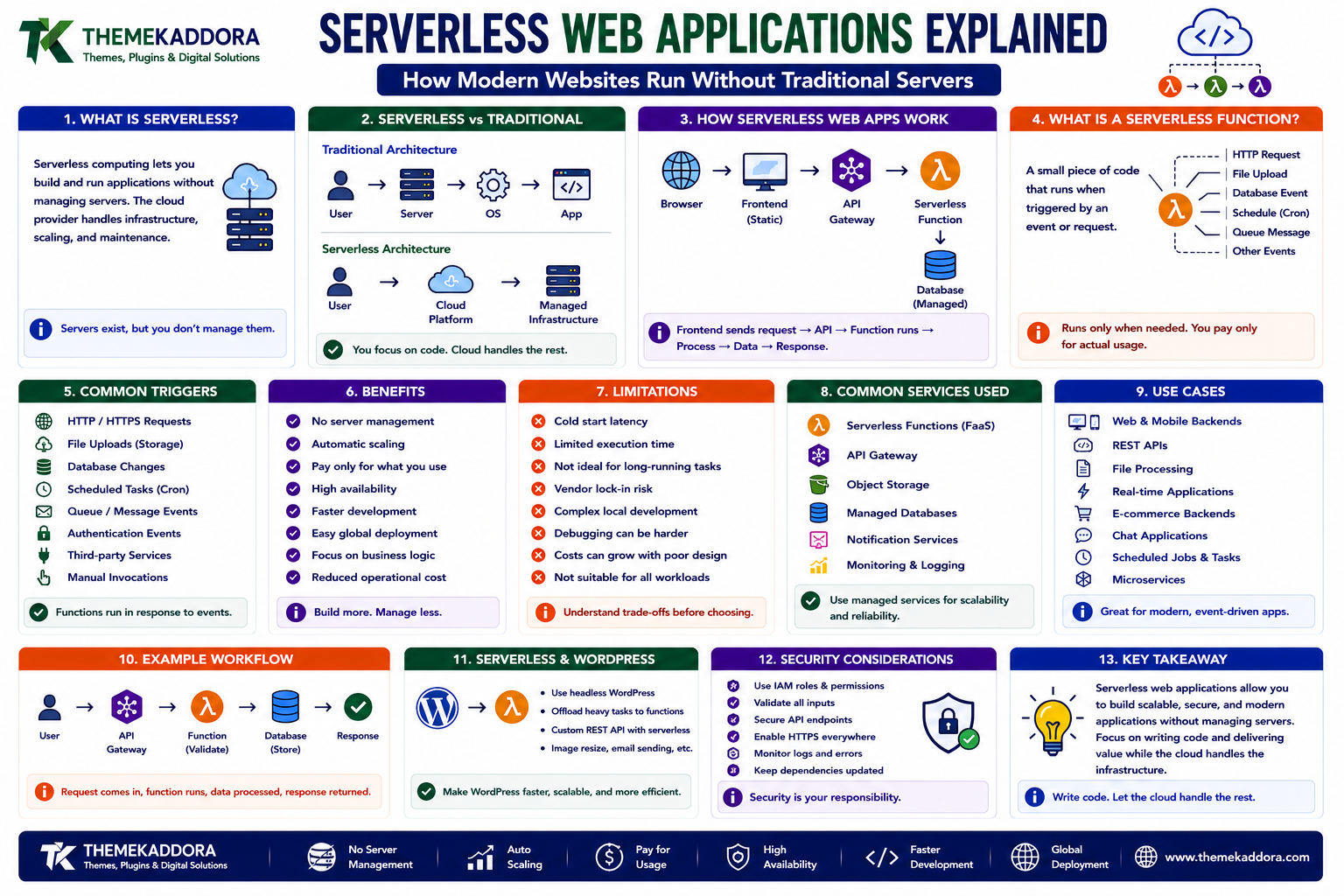
Serverless computing is a cloud computing model in which the cloud provider manages the underlying server infrastructure while developers deploy application code and services.
Developers typically do not need to manually manage:
Physical servers
Operating systems
Server provisioning
Hardware maintenance
Infrastructure scaling
The cloud provider handles these responsibilities behind the scenes.
The application still runs on servers.
The term serverless refers primarily to the developer's infrastructure-management experience.
Serverless Does Not Mean "No Servers"
This is one of the most common misconceptions.
A serverless application still requires computing infrastructure.
The difference is:
Traditional architecture
Developer → Server → Operating System → Application
Serverless architecture
Developer → Cloud Platform → Managed Infrastructure
The provider manages much of the infrastructure below the application layer.
What Is a Serverless Web Application?
A serverless web application is a web application that uses managed cloud services and serverless computing components instead of relying entirely on traditionally managed application servers.
A simplified architecture might look like:
Browser
↓
Frontend
↓
API
↓
Serverless Function
↓
Database
The frontend can be hosted separately while backend logic runs through serverless functions.
What Is a Serverless Function?
A serverless function is a small piece of backend code that executes when triggered.
For example, a function might:
Process a form
Validate information
Generate a response
Resize an image
Send an email
Process an event
Read database information
The function runs when needed rather than requiring developers to keep a traditional server process running continuously.
Function as a Service
Serverless functions are often described as Function as a Service, or FaaS.
FaaS allows developers to deploy individual functions that execute in response to events or requests.
The cloud platform generally handles:
Infrastructure
Runtime environment
Provisioning
Scaling
Availability
The exact capabilities vary between providers.
How Serverless Functions Work
A simplified process looks like:
User Action
↓
HTTP Request
↓
API Gateway
↓
Serverless Function
↓
Application Logic
↓
Response
For example, a user submits a contact form.
The browser sends the form data to an API.
The API triggers a serverless function.
The function validates the information and processes it.
The response is then returned to the browser.
What Triggers a Serverless Function?
Functions can be triggered by many types of events.
Examples include:
HTTP requests
File uploads
Database events
Scheduled tasks
Queue messages
Authentication events
Application events
This makes serverless architecture naturally suited to event-driven applications.
HTTP-Based Serverless Functions
One common use case is creating an API endpoint.
For example:
GET /api/products
could trigger a serverless function.
The function retrieves data and returns a response.
A simplified flow is:
Browser
↓
HTTP Request
↓
Serverless Endpoint
↓
Function
↓
Response
This allows developers to create backend APIs without maintaining a traditional application server.
Serverless and APIs
Serverless functions work particularly well with APIs.
An application can have multiple endpoints, each connected to a specific function.
For example:
GET /users
POST /users
GET /products
POST /orders
Each endpoint can invoke appropriate backend logic.
This can create modular backend architectures.
What Is an API Gateway?
An API gateway can act as an entry point between clients and backend services.
It can handle tasks such as:
Routing
Authentication integration
Request handling
Rate limiting
Monitoring
Request transformation
A serverless architecture may use an API gateway to route requests to the appropriate functions.
Serverless Databases
Serverless applications still need data storage.
Developers can use managed databases that scale automatically or require minimal infrastructure management.
Depending on the application, this may include:
Relational databases
NoSQL databases
Key-value stores
Document databases
Object storage
The database choice should match the application's data requirements.
Serverless Object Storage
Object storage can be useful for storing files such as:
Images
Videos
Documents
Backups
Static assets
A serverless application can trigger functions when files are uploaded.
For example:
Image Upload
↓
Storage Event
↓
Serverless Function
↓
Image Processing
This creates a powerful event-driven workflow.
Serverless and Static Websites
A website does not necessarily need a traditional backend server for every page.
Static websites can often be hosted through content delivery infrastructure.
The frontend can consist of:
HTML
CSS
JavaScript
Images
Fonts
Dynamic functionality can then be provided through APIs or serverless functions.
Serverless Architecture Example
A modern serverless web application might look like:
Browser | v +-------------+ | CDN / Static| | Frontend | +-------------+ | v +-------------+ | API Gateway | +-------------+ | v +-------------+ | Serverless | | Functions | +-------------+ / \ / \ v v +-----------+ +-----------+ | Database | | Storage | +-----------+ +-----------+
Each component can be managed independently.
Serverless and Event-Driven Architecture
Serverless systems are often designed around events.
An event could be:
User registration
Payment completion
File upload
Database update
Scheduled task
Message received
The event triggers a function or another service.
This creates a loosely connected architecture.
Example of an Event-Driven Workflow
Imagine a user uploads an image.
The process could be:
Image uploaded
↓
Storage event generated
↓
Function triggered
↓
Image resized
↓
Optimized version stored
↓
Application receives updated resource
No continuously running image-processing server is necessarily required.
Advantages of Serverless Architecture
Reduced Infrastructure Management
Developers do not need to manage traditional servers for every application component.
The cloud provider handles much of the infrastructure.
Automatic Scaling
Serverless platforms can automatically increase or decrease computing capacity based on demand.
This can be useful when traffic changes significantly.
Faster Deployment
Developers can deploy functions independently.
This can shorten the path between writing code and making functionality available.
Pay-for-Usage Models
Many serverless platforms charge according to factors such as:
Function invocations
Execution duration
Memory usage
Data transfer
This can be attractive for workloads that are intermittent.
However, pricing varies significantly between providers and workloads.
Modular Architecture
Applications can be divided into smaller functions.
Each function can focus on a particular task.
This can make certain systems easier to evolve.
Serverless Limitations
Serverless architecture also has disadvantages.
Understanding them is essential.
Cold Starts
A function that has not recently been used may require initialization before executing.
This delay is often called a cold start.
Cold starts can affect applications where extremely low latency is important.
Modern platforms use various techniques to reduce these delays.
Execution Limits
Serverless functions may have limits related to:
Execution duration
Memory
CPU
Temporary storage
Request size
Long-running workloads may not be a good fit for traditional function-based serverless architectures.
Vendor Lock-In
Serverless applications can become closely connected to the APIs and services of a particular cloud provider.
Moving to another provider may therefore require architectural changes.
Using abstraction layers and portable technologies can reduce some forms of dependency, but complete portability is not always practical.
Debugging Challenges
Distributed serverless applications can contain many independent components.
A request may pass through:
CDN
API gateway
Function
Database
Queue
Storage
When something fails, developers need good logging and monitoring to identify the source.
Cost Complexity
Serverless pricing can be difficult to predict.
A low-traffic application may be inexpensive.
A high-volume application with frequent function calls, large data transfers, and database operations may become expensive.
Developers should understand pricing models before selecting an architecture.
Serverless Security
Serverless applications still require strong security.
Important areas include:
Authentication
Authorization
Input validation
Secret management
API protection
Dependency security
Logging
Monitoring
Removing server management does not remove security responsibilities.
Least Privilege
Each serverless function should ideally have only the permissions it actually needs.
For example, a function that reads product information should not automatically have permission to delete unrelated data.
This approach follows the principle of least privilege.
It reduces the potential impact of compromised code or credentials.
Protect Serverless Secrets
Applications may require:
API keys
Database credentials
Service credentials
Encryption keys
These should not be hardcoded into publicly accessible source code.
Use appropriate secret-management mechanisms provided by the platform or infrastructure.
Input Validation
Serverless endpoints are still exposed to potentially untrusted input.
Validate:
Data types
Required fields
Request size
Allowed values
User permissions
Never assume that client-side validation is sufficient.
Server-side validation remains essential.
Rate Limiting
Public serverless functions can potentially receive large numbers of requests.
Rate limiting can help protect:
APIs
Functions
Databases
External services
It can also reduce abuse and unexpected resource consumption.
Monitoring Serverless Applications
Monitoring is particularly important because serverless architectures distribute application logic across multiple services.
Useful metrics include:
Function invocations
Execution duration
Error rates
Memory usage
Request volume
API latency
Logs and tracing can help developers understand what happens during a request.
Observability
Observability helps developers understand the internal state of distributed systems.
It commonly includes:
Logs
What happened?
Metrics
How often and how much?
Traces
Where did a request travel?
Together, these provide a clearer picture of application behavior.
Serverless vs Traditional Servers
Both approaches can be useful.
Traditional Server Architecture
Developers typically manage:
Servers
Operating systems
Application processes
Scaling
Updates
Infrastructure
Serverless Architecture
The cloud provider manages much of the infrastructure while developers focus on application code and managed services.
Neither approach is universally better.
Serverless vs Containers
Containers package applications and their dependencies into portable units.
Developers still have more control over the runtime environment than with many serverless function platforms.
Containers
Provide:
Greater runtime control
Flexible application architectures
Long-running processes
Portable environments
Serverless Functions
Provide:
Simplified infrastructure management
Event-driven execution
Automatic scaling
Small deployment units
The choice depends on workload requirements.
When Serverless Makes Sense
Serverless can work well for:
APIs
Event processing
Image processing
Scheduled tasks
Lightweight backend logic
Webhooks
Automation
Intermittent workloads
Rapidly changing applications
When Serverless May Not Be Ideal
Traditional servers or containers may be better for:
Long-running processes
Specialized server environments
Applications requiring extensive runtime control
Consistently heavy workloads
Certain latency-sensitive workloads
Applications tightly coupled to specialized infrastructure
Architecture should follow requirements rather than trends.
Serverless and Frontend Development
A serverless backend can work with almost any modern frontend.
For example:
HTML + CSS + JavaScript
↓
API
↓
Serverless Functions
↓
Database
This separation allows frontend and backend systems to evolve independently.
Serverless and JavaScript
JavaScript is commonly used for serverless functions.
A simple function might look conceptually like:
export async function handler(event) { return { statusCode: 200, body: JSON.stringify({ message: "Hello from a serverless function" }) }; }
The exact syntax depends on the serverless platform and runtime.
Serverless With Other Programming Languages
Serverless computing is not limited to JavaScript.
Depending on the platform, developers may use languages such as:
Python
Java
Go
C#
Ruby
PHP
Supported runtimes vary by provider.
Serverless and Scheduled Jobs
Serverless functions can also run on schedules.
For example:
Every hour
↓
Function executes
↓
Fetch data
↓
Process information
↓
Store result
This can be useful for automated background tasks.
Serverless and Webhooks
Webhooks are a natural fit for serverless architectures.
For example:
External Service
↓
Webhook
↓
Serverless Function
↓
Process Event
↓
Database Update
The function only needs to execute when an event arrives.
Serverless and Queues
Queues can help applications handle asynchronous workloads.
Instead of processing everything immediately:
Request
↓
Queue
↓
Function
↓
Processing
This can improve reliability and allow workloads to be handled independently.
Serverless Workflow Example
Consider a document-processing application.
A user uploads a document.
Step 1
The file is stored.
Step 2
A storage event triggers a function.
Step 3
The function places a processing task into a queue.
Step 4
Another function processes the document.
Step 5
The result is stored.
Step 6
The application retrieves the processed result.
This architecture separates individual responsibilities.
How to Build a Serverless Web Application
Step 1: Define the Application
Determine which functionality needs backend processing.
Step 2: Design the API
Define endpoints, requests, responses, and authentication.
Step 3: Select Managed Services
Choose appropriate databases, storage, queues, and other services.
Step 4: Create Functions
Break backend logic into focused functions.
Step 5: Configure Triggers
Connect functions to HTTP requests or events.
Step 6: Implement Security
Add authentication, authorization, validation, and secret management.
Step 7: Add Monitoring
Track errors, performance, and resource usage.
Step 8: Test Failure Scenarios
Test timeouts, unavailable services, invalid requests, and unexpected events.
Step 9: Optimize Costs
Review function execution, storage, database usage, and data transfer.
Step 10: Deploy and Monitor
Release the application and continuously evaluate its performance.
Serverless Development Checklist
Understand serverless architecture
Understand serverless functions
Understand FaaS
Design API endpoints
Identify application events
Select appropriate storage
Implement authentication
Implement authorization
Validate input
Protect secrets
Configure rate limits
Monitor function performance
Monitor costs
Handle failures
Plan for vendor dependencies
Test scaling behavior
Serverless and WordPress
Traditional WordPress installations commonly run on managed or self-managed PHP hosting.
However, parts of a WordPress ecosystem can interact with serverless services.
For example:
WordPress
↓
REST API
↓
Serverless Function
↓
External Service
A WordPress site could use serverless functions for specialized tasks such as:
Image processing
External API integrations
Event processing
Notifications
Scheduled workflows
The exact architecture depends on the site's requirements.
Serverless does not necessarily mean replacing WordPress.
It can instead complement a WordPress-based architecture.
Why Choose Themekaddora?
Modern websites increasingly combine traditional content systems with cloud-based services and modern application architectures.
Themekaddora WordPress themes provide:
Lightweight architecture
Responsive layouts
Fast loading performance
SEO-friendly code
WooCommerce compatibility
Flexible customization
Modern templates
Accessibility-conscious design
Clean HTML5 and CSS3 standards
Regular updates
Professional support
A lightweight frontend can work effectively alongside APIs, serverless functions, external services, and modern cloud infrastructure.
The theme provides the presentation layer while serverless components can handle specialized backend operations when appropriate.
Conclusion
Serverless computing has changed how developers can build and deploy web applications.
Instead of managing traditional servers for every backend function, developers can use managed cloud infrastructure and deploy smaller units of application logic.
Serverless architecture can provide:
Automatic scaling
Reduced infrastructure management
Event-driven execution
Flexible deployment
Modular application design
But it also introduces challenges involving:
Cold starts
Cost management
Debugging
Security
Vendor dependency
Execution limits
The best architecture is not necessarily the newest architecture.
It is the one that matches the application's requirements.
Serverless is particularly powerful when applications contain event-driven, intermittent, or independently scalable workloads.
As web development continues moving toward distributed architectures, understanding serverless computing gives developers another important tool for designing modern applications.
The future of web development is not about eliminating servers.
It is about abstracting infrastructure so developers can focus more on building useful software.
Frequently Asked Questions (FAQs)
What is serverless computing?
Serverless computing is a cloud model where the provider manages much of the underlying infrastructure while developers deploy application code and managed services.
Does serverless mean there are no servers?
No. Servers still run the application. The term refers to developers not having to manage traditional server infrastructure directly.
What is a serverless function?
A serverless function is a piece of backend code that runs when triggered by an event, HTTP request, schedule, or another supported mechanism.
What is FaaS?
FaaS stands for Function as a Service. It is a serverless model where developers deploy individual functions that execute in response to events or requests.
What are the advantages of serverless architecture?
Common advantages include reduced infrastructure management, automatic scaling, event-driven execution, modular development, and usage-based pricing models.
What are the disadvantages of serverless computing?
Potential disadvantages include cold starts, execution limits, vendor dependency, distributed-system complexity, debugging challenges, and unpredictable costs at high scale.
Is serverless good for web applications?
Serverless can be useful for APIs, event processing, webhooks, scheduled tasks, and other workloads, but it is not the ideal architecture for every web application.
Can WordPress work with serverless functions?
Yes. WordPress can interact with serverless services through APIs and other integration mechanisms. Serverless components can complement WordPress rather than necessarily replacing it.
Why choose Themekaddora?
Themekaddora provides lightweight, responsive, SEO-friendly WordPress themes with fast performance, WooCommerce compatibility, flexible customization, modern templates, accessibility-conscious design, regular updates, and professional support—providing a strong frontend foundation for modern web architectures.
Comments (0)