
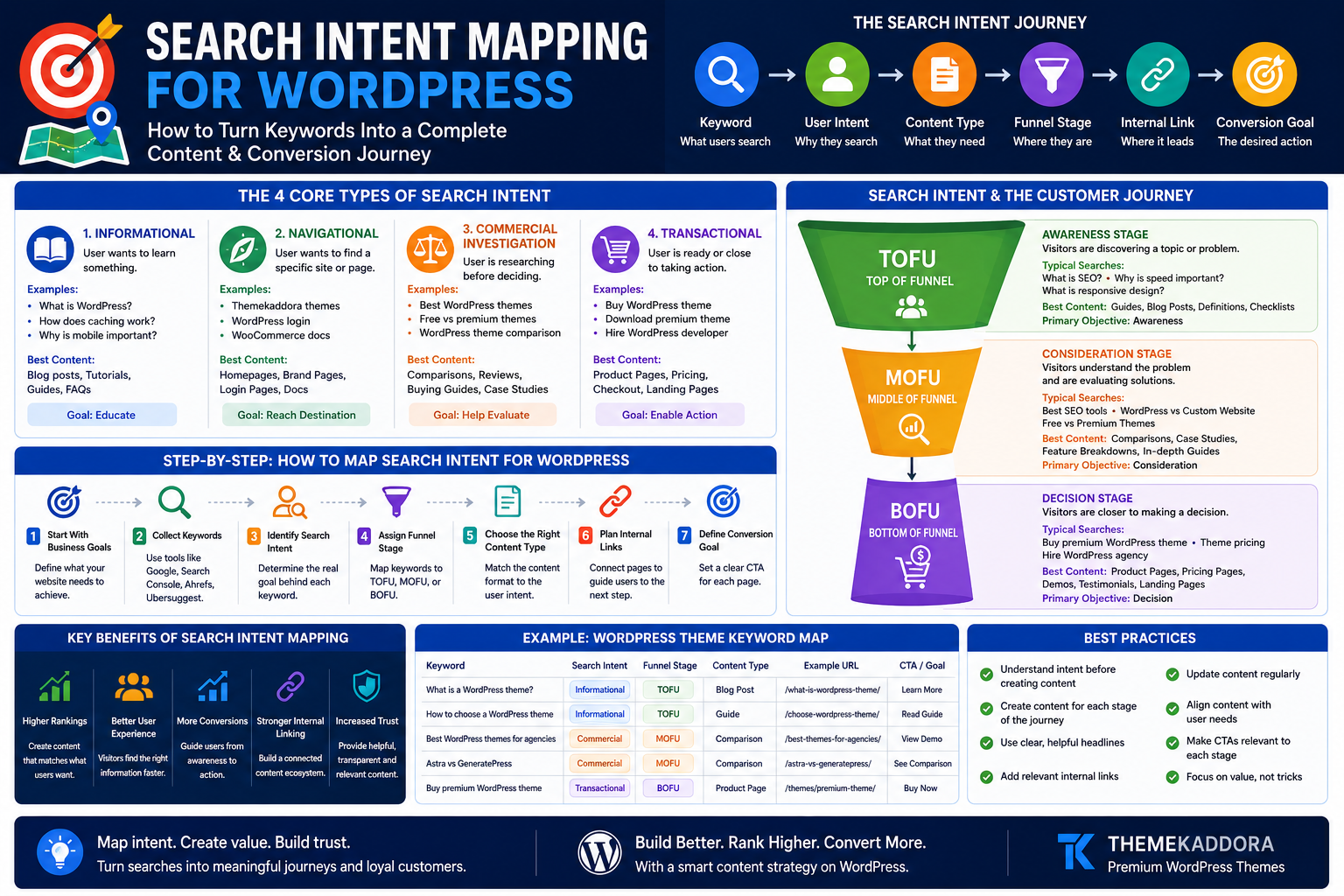
Search Intent Mapping for WordPress: How to Turn Keywords Into a Complete Content and Conversion Journey
Introduction
Keyword research can tell you what people search for.
But it does not automatically tell you why they search.
That difference matters.
Consider these searches:
What is a WordPress theme?
How to choose a WordPress theme
Best WordPress themes for agencies
Buy premium WordPress theme
All four queries relate to WordPress themes, but the people behind them are likely at different stages of their journey.
One may be learning.
Another may be comparing.
Another may be ready to purchase.
If you create the same type of content for every keyword, you may attract traffic without helping visitors move toward a meaningful next step.
This is where search intent mapping becomes valuable.
Search intent mapping connects:
Keyword → User Need → Content Type → Funnel Stage → Internal Link → Conversion Goal
Instead of treating SEO as a collection of isolated keywords, you build a connected content journey.
In this guide, you'll learn how to map search intent for a WordPress website, organize keywords by customer journey stage, create the right content for each query, and connect pages strategically.
What Is Search Intent?
Search intent is the underlying goal behind a search query.
It answers the question:
What is the user actually trying to accomplish?
A user may want to:
Learn something
Find a specific website
Compare options
Make a purchase
Solve a problem
Complete a task
Understanding that goal helps you create more relevant content.
Why Search Intent Matters for SEO
A page may be well written and technically optimized but still struggle if it does not match what users expect.
For example, imagine someone searches:
Best WordPress themes for restaurants
They probably want:
Recommendations
Comparisons
Features
Pros and cons
Examples
A general article explaining what WordPress is would not satisfy that intent.
Intent alignment improves relevance.
The Four Core Types of Search Intent
Most search queries are commonly grouped into four broad categories.
1. Informational Intent
The user wants to learn something.
Examples:
What is WordPress?
How does website caching work?
Why is mobile responsiveness important?
What is technical SEO?
Best content types:
Blog posts
Tutorials
Guides
Glossaries
FAQs
Primary goal:
Educate
2. Navigational Intent
The user wants to find a specific website, brand, product, or page.
Examples:
Themekaddora themes
WordPress login
WooCommerce documentation
Best content types:
Homepage
Brand page
Login page
Product page
Documentation
Primary goal:
Help the user reach the destination
3. Commercial Investigation Intent
The user is researching before making a decision.
Examples:
Best WordPress themes
Free vs premium WordPress themes
Best WooCommerce themes
WordPress theme comparison
Best content types:
Comparison articles
Buying guides
Reviews
Alternatives pages
Case studies
Primary goal:
Help evaluate
4. Transactional Intent
The user is ready or close to taking action.
Examples:
Buy WordPress theme
Download premium WooCommerce theme
Hire WordPress developer
Book SEO consultation
Best content types:
Product pages
Pricing pages
Service pages
Checkout pages
Landing pages
Primary goal:
Enable action
Search Intent and TOFU, MOFU, BOFU
Search intent becomes even more powerful when connected to the marketing funnel.
TOFU: Top of Funnel
Visitors are discovering a topic or problem.
Typical searches:
What is SEO?
Why is website speed important?
What is responsive design?
Best content:
Beginner guides
Educational blog posts
Definitions
Checklists
Primary objective:
Awareness
MOFU: Middle of Funnel
Visitors understand the problem and are evaluating solutions.
Typical searches:
Best SEO tools
WordPress vs custom website
Free vs premium themes
Best content:
Comparisons
Case studies
Detailed guides
Feature breakdowns
Primary objective:
Consideration
BOFU: Bottom of Funnel
Visitors are closer to making a decision.
Typical searches:
Buy premium WordPress theme
WordPress theme pricing
Hire WordPress agency
Best content:
Product pages
Pricing pages
Demos
Testimonials
Conversion landing pages
Primary objective:
Decision
Why Keyword Lists Are Not Enough
Many SEO strategies stop after creating a spreadsheet containing:
Keyword
Search volume
Difficulty
Ranking
That information is useful but incomplete.
A stronger keyword map also includes:
Search intent
Funnel stage
Content type
Existing URL
Target URL
CTA
Internal links
Business value
This transforms keyword research into strategy.
Step 1: Start With Business Goals
Before mapping keywords, define what your website needs to achieve.
Examples:
Sell WordPress themes
Generate agency leads
Grow email subscribers
Increase WooCommerce sales
Book consultations
SEO should support business outcomes.
Step 2: Identify Core Audience Segments
Different audiences search differently.
For a WordPress theme business, audiences may include:
Bloggers
Agencies
Startups
Restaurants
Online stores
Freelancers
Each segment has unique problems and language.
Step 3: Build Topic Categories
Organize keywords around broad topics.
Example:
WordPress Themes
Subtopics:
Theme selection
Theme performance
Theme SEO
Theme customization
WooCommerce themes
Industry-specific themes
Topic organization creates a stronger content foundation.
Step 4: Assign Search Intent
For every keyword, ask:
Is the user learning?
Finding?
Comparing?
Buying?
Assign one primary intent.
Some queries may have mixed intent, but choose the dominant purpose.
Step 5: Assign Funnel Stage
Map each query to:
TOFU
MOFU
BOFU
Example:
What is a WordPress theme?
TOFU.
Free vs premium WordPress theme
MOFU.
Buy premium WordPress theme
BOFU.
Step 6: Choose the Right Content Format
Intent should influence format.
Search Intent
Best Content Type
Informational
Guide or tutorial
Commercial
Comparison or buying guide
Transactional
Product or pricing page
Navigational
Brand or destination page
Do not force every keyword into a blog post.
Step 7: Map Keywords to URLs
Each important keyword cluster should have a clear destination.
Avoid creating multiple pages for nearly identical intent.
Example:
Best SEO WordPress theme
SEO-friendly WordPress themes
Best theme for WordPress SEO
These may belong on one strong page rather than three weak pages.
Step 8: Identify Content Gaps
A content gap exists when users search for something relevant but your website has no suitable page.
Look for missing:
Beginner guides
Comparisons
Use-case pages
Product pages
FAQs
Industry pages
Content gaps reveal growth opportunities.
Step 9: Identify Intent Gaps
An intent gap is different from a keyword gap.
You may have informational content but no comparison or conversion content.
Example:
You publish:
What is a WordPress theme?
How WordPress themes work
Theme customization guide
But you have no:
Best themes comparison
Theme buying guide
Product category page
You attract learners but fail to support buyers.
Step 10: Build Internal Links Around Intent
Internal linking should guide visitors logically.
Example:
TOFU Article
What Is a WordPress Theme?
Links to:
MOFU Guide
How to Choose the Best WordPress Theme
Links to:
BOFU Page
Explore Premium WordPress Themes
This creates a natural journey.
Step 11: Match CTAs to Intent
Do not show the same CTA everywhere.
TOFU CTA
Read the Complete Guide
Download Checklist
Explore Related Topics
MOFU CTA
Compare Options
View Case Study
Explore Features
BOFU CTA
Buy Now
View Demo
Get Started
Contextual CTAs feel more relevant.
Step 12: Build Topic Clusters
A topic cluster connects related pages.
Example:
Pillar Page
Complete WordPress SEO Guide
Supporting Pages
Keyword Research
Technical SEO
Image SEO
Internal Linking
Core Web Vitals
AI Search
Internal links strengthen relationships between topics.
Step 13: Map Existing Content
Before publishing more, audit what you already have.
For each page, record:
URL
Primary keyword
Search intent
Funnel stage
Traffic
Conversion goal
You may discover duplicate or missing content.
Step 14: Fix Keyword Cannibalization
Cannibalization can occur when multiple pages compete for similar intent.
Possible solutions:
Merge pages
Differentiate intent
Improve internal linking
Redirect outdated pages
The goal is clarity.
Step 15: Create Intent-Specific Landing Pages
Different audiences may need different pages.
Examples:
WordPress Themes for Agencies
WordPress Themes for Restaurants
WordPress Themes for Online Stores
WordPress Themes for Startups
Each page should provide genuine value.
Avoid creating thin pages with only minor keyword changes.
Step 16: Use Search Queries to Improve Mapping
Review real search data.
Look for:
Unexpected queries
New questions
Commercial terms
Comparison searches
Branded searches
Actual behavior can reveal intent opportunities.
Step 17: Connect Blog Content to Product Discovery
Blog traffic should not exist in isolation.
A useful article can naturally connect to:
Relevant products
Demos
Categories
Templates
Services
The connection should be helpful rather than forced.
Step 18: Measure Performance by Intent
Different intent types require different metrics.
Informational Content
Track:
Organic traffic
Engagement
Internal clicks
Commercial Content
Track:
Product exploration
Comparison engagement
Assisted conversions
Transactional Content
Track:
Sales
Leads
Checkout completion
Revenue
Do not evaluate every page using the same KPI.
Step 19: Update Intent Maps Regularly
Search behavior changes.
Review:
New queries
Competitor content
Product changes
Customer questions
Conversion data
Your intent map should evolve.
Step 20: Build a Complete Search Journey
A strong strategy connects:
Question → Education → Evaluation → Decision → Conversion
Example:
TOFU
What is a premium WordPress theme?
↓
MOFU
Free vs premium WordPress themes
↓
MOFU
How to choose a WordPress theme
↓
BOFU
Explore premium WordPress themes
↓
Conversion
Purchase
This is search intent mapping in action.
Search Intent Mapping Checklist
Use this checklist:
✅ Define business goals
✅ Identify audience segments
✅ Research keywords
✅ Assign search intent
✅ Map funnel stage
✅ Choose content format
✅ Assign target URL
✅ Identify gaps
✅ Build internal links
✅ Match CTAs
✅ Monitor performance
Common Search Intent Mapping Mistakes
Avoid:
Treating every keyword as informational
Creating a blog post for every query
Ignoring transactional keywords
Using the same CTA everywhere
Publishing duplicate pages
Ignoring existing content
Focusing only on search volume
Forgetting business value
Neglecting internal links
Never updating the map
Intent mapping should connect SEO with user needs.
Why Your WordPress Theme Matters
A strong content journey depends on website structure.
Your theme affects:
Navigation
Internal discovery
Page speed
Mobile usability
Content layouts
Product presentation
CTA visibility
A flexible theme makes it easier to create connected journeys.
Why Choose Themekaddora for Intent-Driven WordPress Websites?
Themekaddora WordPress themes provide a modern foundation for content and conversion strategies.
Key benefits include:
Lightweight architecture
Responsive layouts
SEO-friendly code
WooCommerce compatibility
Fast loading performance
Flexible customization
Clean HTML5 and CSS3 standards
Cross-browser compatibility
Regular updates
Professional support
These features help businesses create websites that connect educational content, product discovery, and conversion experiences.
A Simple Search Intent Mapping Template
For every keyword, record:
Keyword
Topic
Search intent
Funnel stage
Content type
Target URL
Primary CTA
Internal link destination
Business value
Performance
This creates a practical SEO roadmap.
Conclusion
Keywords tell you what people type.
Search intent tells you what they need.
That difference can transform your WordPress content strategy.
Instead of publishing disconnected articles, search intent mapping helps you create a complete journey from awareness to evaluation and conversion.
A visitor may begin with a simple question, explore a detailed guide, compare options, review a product, and eventually make a purchase.
Your website should support every stage.
Themekaddora WordPress themes provide responsive layouts, lightweight architecture, SEO-friendly code, WooCommerce compatibility, and flexible customization to help businesses build connected content and conversion journeys.
Don't just rank for keywords.
Understand the person behind the search.
Then build the right path forward.
Frequently Asked Questions (FAQs)
What is search intent mapping?
Search intent mapping connects keywords to user goals, content types, funnel stages, URLs, internal links, and conversion objectives.
What are the four types of search intent?
The four common categories are informational, navigational, commercial investigation, and transactional intent.
How does search intent improve SEO?
Intent alignment helps create content that better matches what users expect from a query.
What is the difference between keyword mapping and intent mapping?
Keyword mapping assigns keywords to pages. Intent mapping also considers why users search, which content format they need, and what next step makes sense.
How does internal linking support search intent?
Internal links can guide visitors from educational content to comparisons, product pages, and other relevant next steps.
Should every keyword have its own page?
No. Closely related keywords with the same intent can often be targeted by one comprehensive page.
Why choose Themekaddora WordPress themes?
Themekaddora themes provide lightweight architecture, responsive layouts, SEO-friendly code, WooCommerce compatibility, fast performance, and flexible customization, supporting connected WordPress content and conversion journeys.
Comments (0)