
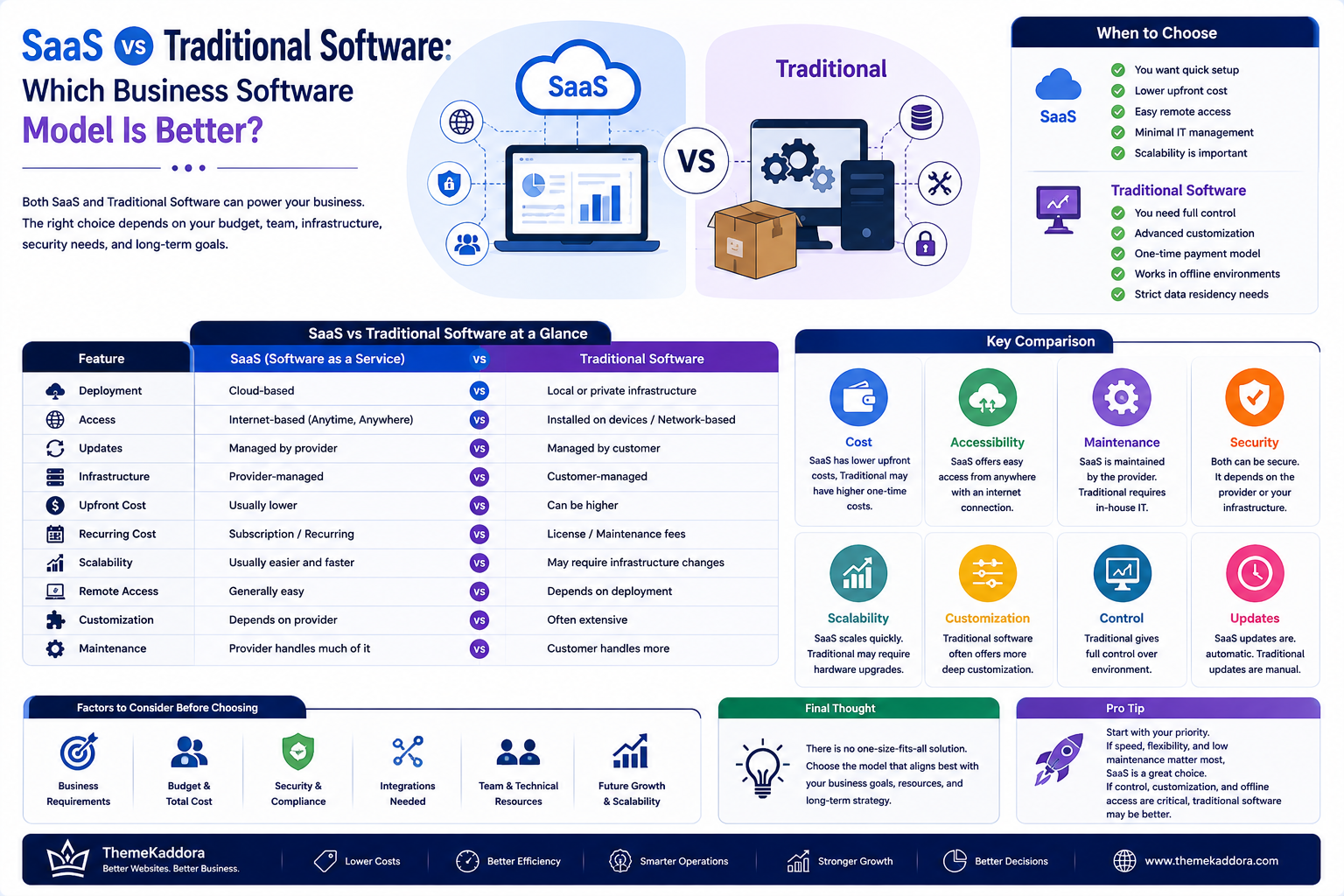
SaaS vs Traditional Software: Which Business Software Model Is Better?
Introduction
Software has become an essential part of modern business operations.
Companies use software to manage customers, employees, finances, projects, sales, inventory, communication, marketing, and countless other activities.
However, businesses can choose between different software delivery models.
Two common approaches are Software as a Service (SaaS) and traditional software.
Traditional software is typically installed and managed on a user's computer or business infrastructure. SaaS, on the other hand, is generally delivered through the internet and managed by a service provider.
Both approaches have advantages and limitations.
The right choice depends on factors such as:
Business size
Budget
Technical requirements
Security needs
Number of users
Remote access requirements
Customization
Scalability
Maintenance responsibilities
In this guide, we'll compare SaaS and traditional software to help businesses understand which model may be more suitable for their needs.
What Is SaaS?
SaaS stands for Software as a Service.
Instead of purchasing and installing software locally, users typically access the application through the internet.
Examples of SaaS categories include:
CRM
ERP
Accounting
Project management
HR management
Marketing automation
Customer support
Communication
Analytics
The provider generally manages the application infrastructure, updates, and service availability.
Users typically access the software through a web browser or application.
What Is Traditional Software?
Traditional software is commonly purchased or licensed and installed directly on a computer, server, or business infrastructure.
Depending on the product, the organization may be responsible for:
Installation
Updates
Backups
Infrastructure
Security
Maintenance
Technical support
Traditional software can provide significant control, particularly when organizations need specialized environments.
SaaS vs Traditional Software at a Glance
Feature
SaaS
Traditional Software
Deployment
Cloud-based
Local or private infrastructure
Access
Internet-based
Usually installed or network-based
Updates
Usually managed by provider
Often managed by customer
Infrastructure
Provider-managed
Customer-managed
Upfront Cost
Usually lower
Can be higher
Recurring Cost
Subscription
License/maintenance may vary
Scalability
Usually easier
May require infrastructure changes
Remote Access
Generally easy
Depends on deployment
Customization
Depends on provider
Often extensive
Maintenance
Provider handles much of it
Customer handles more
The actual features vary by product and provider.
1. Deployment
Deployment is one of the biggest differences.
SaaS
SaaS applications are generally hosted by the provider.
Businesses can often start using the software after:
Creating an account
Configuring settings
Adding users
Importing data
There is usually no need to install servers locally.
Traditional Software
Traditional software may require:
Installation
Server configuration
Database setup
Network configuration
Device installation
This can require additional technical resources.
2. Cost Structure
Cost should be evaluated over the entire lifecycle of the software.
SaaS Costs
SaaS commonly uses:
Monthly subscriptions
Annual subscriptions
Per-user pricing
Usage-based pricing
Feature-based plans
The initial cost may be lower, but recurring fees continue while the service is used.
Traditional Software Costs
Traditional software may involve:
License fees
Installation costs
Hardware
Maintenance
Support
Upgrade costs
The initial investment can be higher depending on the solution.
3. Maintenance
Maintenance requirements differ significantly.
With SaaS, the provider usually handles much of the:
Infrastructure maintenance
Software updates
Server management
Monitoring
Bug fixes
Traditional software may require the customer or an IT team to handle these activities.
For businesses with limited technical resources, SaaS can reduce operational complexity.
4. Software Updates
SaaS providers generally deliver updates centrally.
Users may receive:
New features
Bug fixes
Security updates
Performance improvements
Traditional software may require manual upgrades.
This gives businesses more control over update timing but can also increase maintenance work.
5. Accessibility
SaaS applications are generally designed for internet-based access.
This can make them useful for:
Remote teams
Multiple offices
Traveling employees
Distributed organizations
Traditional software can also support remote access, but additional infrastructure may be required depending on the deployment model.
6. Scalability
Businesses often grow over time.
A SaaS platform may allow businesses to scale by:
Adding users
Upgrading plans
Increasing usage limits
Activating additional modules
Traditional software may require:
Additional servers
Hardware upgrades
New licenses
Infrastructure expansion
However, highly customized traditional systems can also scale effectively when designed properly.
7. Customization
Customization is an important consideration.
Traditional software may offer extensive control because organizations can manage the environment directly.
SaaS customization depends on the provider.
Possible SaaS customization options include:
Settings
Integrations
APIs
Custom workflows
Themes
Extensions
Businesses requiring deep modifications should carefully evaluate the platform's flexibility before selecting it.
8. Security
Security responsibilities differ between the two models.
SaaS
The provider typically manages significant portions of:
Infrastructure security
Platform updates
Monitoring
Backups
Access controls
However, customers remain responsible for areas such as:
User access
Passwords
Permissions
Account security
Configuration
Traditional Software
The organization may be responsible for a larger portion of:
Server security
Software updates
Network security
Backups
Access controls
Infrastructure monitoring
Neither model is automatically secure.
Security depends on implementation, configuration, maintenance, and provider practices.
9. Data Ownership and Control
Businesses should understand where their data is stored and how it can be accessed.
Before choosing a SaaS platform, review:
Data storage location
Export capabilities
Backup policies
Retention policies
Account termination procedures
API access
Privacy terms
For traditional software, businesses may have greater direct control over infrastructure and storage.
10. Internet Dependency
SaaS applications generally depend on internet connectivity.
If connectivity is unavailable, access may be limited.
Traditional desktop applications may continue functioning without an internet connection depending on their architecture.
However, many traditional systems also depend on networks, servers, or online services.
11. Collaboration
SaaS platforms are often designed for multiple users working within the same environment.
Common collaboration features include:
Shared dashboards
User permissions
Comments
Notifications
Real-time updates
Activity history
This can be particularly useful for distributed teams.
12. Business Continuity
Software availability can directly affect business operations.
When evaluating SaaS, consider:
Service availability
Backup policies
Disaster recovery
Recovery objectives
Incident communication
Data export
For traditional systems, the organization may need to build and maintain its own continuity strategy.
13. Vendor Dependency
SaaS creates a relationship between the customer and software provider.
This can create vendor dependency.
Before choosing a provider, evaluate:
Pricing changes
Product roadmap
Support quality
Data portability
Contract terms
Integration options
A reliable provider can be valuable, but businesses should still plan for long-term flexibility.
14. Integration Capabilities
Modern businesses rarely use a single software application.
A CRM may need to connect with:
Email marketing
Accounting
ERP
Payment systems
Customer support
Analytics
eCommerce
SaaS platforms often provide APIs and integrations that allow different systems to communicate.
Always check whether required integrations are available before committing to a platform.
15. SaaS for Small Businesses
SaaS can be attractive to small businesses because it may reduce the need for dedicated infrastructure and technical staff.
Small businesses can use SaaS for:
CRM
Accounting
HR
Project management
Marketing
Customer support
The subscription model can also make budgeting more predictable.
However, businesses should calculate recurring costs as they add users and services.
16. SaaS for Growing Businesses
As a company grows, software requirements often become more complex.
A growing organization may need:
More users
Advanced permissions
Automation
Analytics
Integrations
Custom workflows
Multiple departments
Choose software that can support realistic future requirements rather than only today's needs.
17. When Traditional Software May Make Sense
Traditional software may be appropriate when an organization needs:
Extensive customization
Specialized infrastructure
Offline operation
Direct infrastructure control
Specific compliance requirements
Internal deployment
The decision should be based on actual business requirements rather than assumptions about which model is automatically better.
18. When SaaS May Make Sense
SaaS may be a good fit when a business wants:
Faster deployment
Lower initial infrastructure requirements
Remote access
Managed updates
Easy collaboration
Flexible scaling
Reduced IT maintenance
Again, the suitability depends on the specific application and business requirements.
19. Calculate Total Cost of Ownership
Don't compare software based only on its purchase price.
Calculate:
Total Cost of Ownership = Software + Infrastructure + Maintenance + Support + Upgrades + Training
For SaaS, include:
Subscription fees
Additional users
Premium features
Integrations
Usage charges
For traditional software, include:
Licenses
Hardware
IT staff
Maintenance
Upgrades
Security
Backup infrastructure
A lower initial price does not necessarily mean lower long-term cost.
20. Evaluate the Business Before Choosing
Ask these questions:
How many users will need access?
Do employees work remotely?
How much customization is required?
What data will the system store?
What integrations are needed?
How quickly must the system be deployed?
What is the expected budget?
How important is offline access?
Who will manage maintenance?
How easy would it be to migrate later?
The answers will help narrow the available options.
SaaS Selection Checklist
Before choosing a SaaS product, review:
Product
Required features
User limits
Integrations
Automation
Reporting
Security
Authentication
Permissions
Encryption
Backup policies
Incident response
Business
Pricing
Contract terms
Scalability
Vendor reputation
Support
Technical
APIs
Data export
Compatibility
Availability
Documentation
Common SaaS Mistakes
Choosing Only by Price
The cheapest plan may lack critical functionality.
Ignoring Data Portability
Always understand how data can be exported.
Adding Too Many SaaS Tools
Multiple subscriptions can create unnecessary complexity and cost.
Ignoring Integration Requirements
A cheap system that cannot integrate with existing tools may create additional work.
Not Reviewing User Permissions
Poor access management can create security problems.
Forgetting Long-Term Costs
Recurring subscription costs can become significant as usage grows.
SaaS and the Future of Business Software
SaaS continues to influence how businesses purchase and use technology.
Modern SaaS products increasingly combine:
Artificial intelligence
Automation
Analytics
Collaboration
APIs
Personalization
This allows businesses to build interconnected technology ecosystems rather than relying on isolated applications.
For companies evaluating digital products, understanding these capabilities is becoming increasingly important.
ThemeKaddora and the Digital Product Ecosystem
ThemeKaddora focuses on helping businesses, developers, freelancers, agencies, and entrepreneurs discover digital solutions for modern online projects.
The broader digital product ecosystem includes:
SaaS applications
WordPress themes
WordPress plugins
WooCommerce solutions
Website templates
Business tools
UI resources
Digital assets
Different businesses require different technologies.
The goal should not be to select technology simply because it is popular.
Instead, evaluate whether a product solves a real business problem, integrates with existing workflows, provides sufficient flexibility, and delivers long-term value.
Conclusion
SaaS and traditional software both have important roles in modern business technology.
SaaS can provide convenient deployment, remote accessibility, managed infrastructure, automatic updates, and flexible scaling.
Traditional software can provide greater control, customization, and infrastructure ownership in situations where those capabilities are important.
There is no universal winner.
The right solution depends on your:
Business requirements
Budget
Technical capabilities
Security needs
Scalability requirements
Integration needs
Long-term strategy
Before choosing a software model, calculate the total cost of ownership and evaluate how the technology fits into your broader business ecosystem.
The best software is not necessarily the newest or cheapest option.
It is the solution that solves the right problem, fits your workflow, and continues creating value as your business grows.
Frequently Asked Questions
1. What is SaaS?
SaaS, or Software as a Service, is a software delivery model where users generally access applications through the internet while the provider manages much of the underlying infrastructure.
2. What is traditional software?
Traditional software is commonly installed on local devices, private servers, or business infrastructure and may require the organization to manage more of the software environment.
3. Is SaaS cheaper than traditional software?
Not necessarily. SaaS may have lower initial costs, but recurring subscription fees can become significant over time.
4. Is SaaS more secure?
Neither model is automatically more secure. Security depends on implementation, configuration, maintenance, and the practices of the provider or organization.
5. Can SaaS be customized?
Many SaaS products provide settings, integrations, APIs, extensions, and workflow customization, but the level of customization varies.
6. Is SaaS suitable for small businesses?
Yes. SaaS can reduce infrastructure requirements and provide access to business software without requiring extensive internal IT resources.
7. What should I check before buying SaaS software?
Review features, pricing, security, integrations, scalability, support, data portability, user limits, and contract terms.
8. What is vendor lock-in?
Vendor lock-in occurs when moving from one software provider to another becomes difficult or expensive because of data, integrations, contracts, or technical dependencies.
9. What is total cost of ownership?
Total cost of ownership represents the overall cost of using software, including licenses or subscriptions, infrastructure, maintenance, support, upgrades, and related expenses.
10. How do I choose the right business software?
Start with your business requirements, then compare functionality, cost, security, integrations, scalability, usability, support, and long-term flexibility.
Comments (0)