
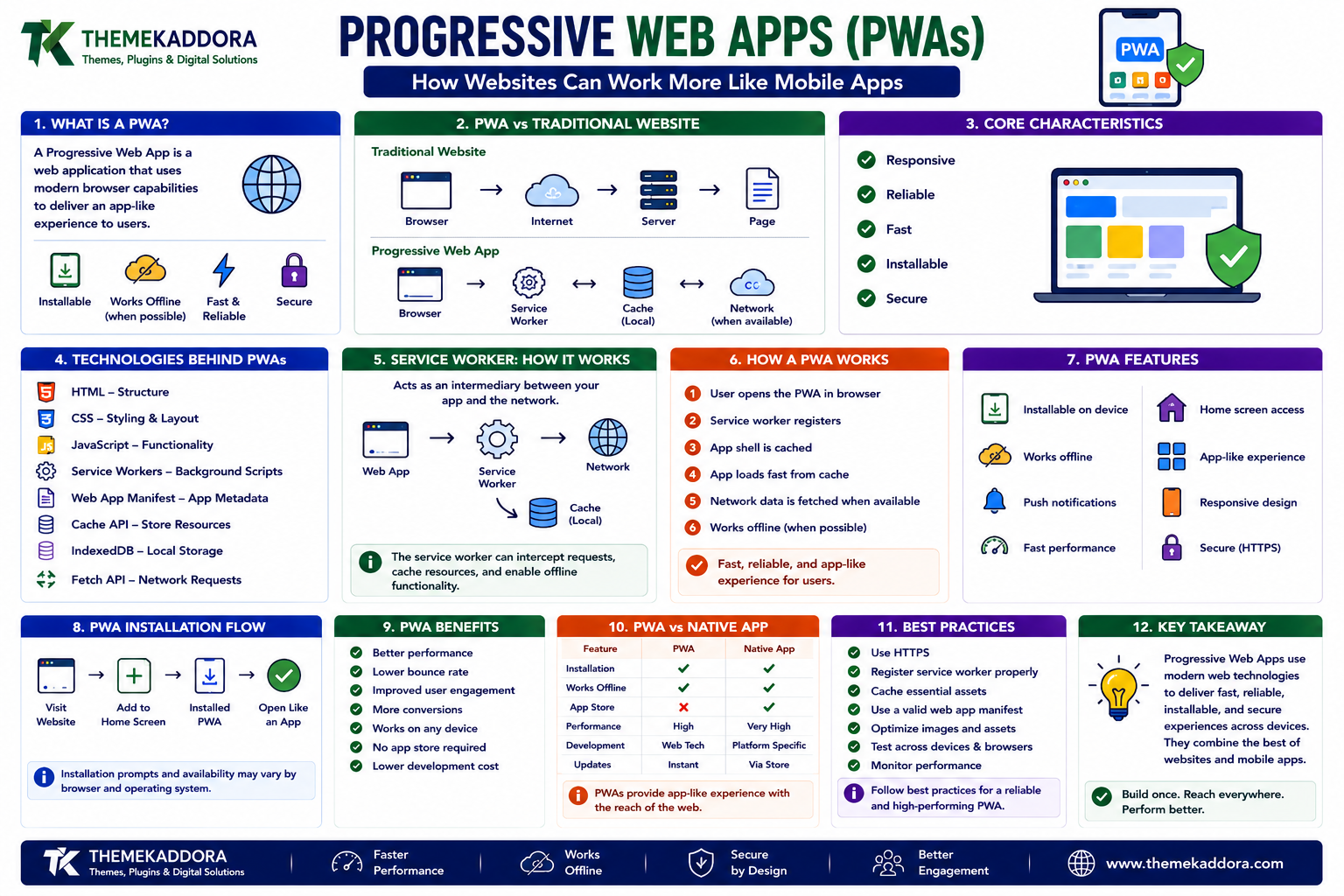
Progressive Web Apps (PWAs): How Websites Can Work More Like Mobile Apps
Introduction
Websites have changed dramatically over the years.
Early websites were mostly collections of static pages.
Modern web applications can provide experiences that feel surprisingly similar to native mobile applications.
They can:
Work across devices
Load quickly
Store information locally
Continue working during certain network interruptions
Support installation
Send notifications where supported
Respond to user interactions
Provide app-like interfaces
One technology that brings many of these capabilities together is the Progressive Web App, commonly called a PWA.
Progressive Web Apps combine standard web technologies with browser capabilities to create websites and applications that can provide a more app-like experience.
They do not require developers to abandon the web.
Instead, they build on technologies such as HTML, CSS, JavaScript, service workers, caching, HTTPS, and web app manifests.
What Is a Progressive Web App?
A Progressive Web App is a web application designed to provide enhanced capabilities and an app-like experience while remaining accessible through the web.
A PWA can be opened through a browser like a traditional website.
Depending on browser and platform support, it may also be installable and capable of providing features such as:
Offline or limited-connectivity experiences
Installation on a device
Background functionality
Push notifications
Local caching
Responsive interfaces
The exact capabilities available depend on the browser, operating system, device, and implementation.
Why Are PWAs Different From Traditional Websites?
A traditional website may primarily depend on a network connection for every page and resource.
A PWA can use browser technologies to store selected resources locally.
For example:
Traditional experience
Browser → Internet → Server → Page
A PWA may work more like:
Browser → Local resources
and communicate with the server when network access is available.
This can make the experience more resilient.
PWAs Are Still Web Applications
One of the most important things to understand is that PWAs are not a completely separate programming language.
Developers can build them using familiar web technologies.
Common technologies include:
HTML
CSS
JavaScript
Service workers
Web App Manifest
Fetch API
Cache API
IndexedDB
The browser provides the environment in which these technologies operate.
Core Characteristics of PWAs
PWAs are commonly associated with several characteristics.
They should be:
Responsive
The interface should adapt to different screen sizes.
Reliable
The application should provide a useful experience even when network conditions are imperfect.
Fast
Pages and interactions should respond efficiently.
Installable
Where supported, users can install the web application.
Secure
PWAs require HTTPS for important capabilities such as service workers.
These principles help create better web experiences.
Responsive Design
A PWA should work across different devices.
That can include:
Smartphones
Tablets
Laptops
Desktop computers
Responsive design allows layouts to adapt according to screen size and device characteristics.
CSS media queries, flexible layouts, responsive images, and modern layout systems such as Flexbox and Grid are commonly used.
What Is a Service Worker?
A service worker is a JavaScript file that runs separately from the webpage and can intercept certain network requests and support background capabilities.
It acts as an intermediary between the web application and network resources.
A simplified model is:
Web App
↓
Service Worker
↓
Network / Cache
The service worker can determine how certain requests should be handled.
Why Service Workers Matter
Service workers make several PWA capabilities possible.
They can help with:
Caching
Offline experiences
Network request handling
Background tasks
Push notifications
They are one of the most important technologies behind Progressive Web Apps.
How Service Worker Registration Works
A webpage can register a service worker using JavaScript.
A simplified example is:
if ('serviceWorker' in navigator) { navigator.serviceWorker.register('/service-worker.js'); }
The browser downloads and installs the service worker according to security and scope rules.
Once active, it can participate in supported network and background operations.
What Is the Cache API?
The Cache API allows web applications and service workers to store and retrieve certain network resources.
A service worker might cache:
HTML
CSS
JavaScript
Images
Fonts
Other application resources
This can allow previously cached resources to be reused.
Offline Functionality
One of the most recognizable PWA features is offline support.
Imagine a web application that has previously loaded important resources.
If the user loses connectivity, the application may still be able to display cached content.
However, offline support does not mean that every feature automatically works without the internet.
Developers must intentionally design offline behavior.
Different Offline Strategies
There are several ways developers can handle network requests.
Cache First
Try the cache first.
If the resource is unavailable, request it from the network.
Useful for relatively stable resources.
Network First
Try the network first.
If the network fails, use cached data.
Useful when fresh information is important.
Stale While Revalidate
Return cached content quickly while checking the network for an updated version.
Useful when speed and freshness both matter.
The correct strategy depends on the type of resource.
What Is a Web App Manifest?
A Web App Manifest is a JSON file that provides information about a web application.
It can describe:
Application name
Short name
Icons
Start URL
Display mode
Theme color
Background color
A simplified example might look like:
{ "name": "Example App", "short_name": "Example", "start_url": "/", "display": "standalone" }
Browser and platform support determines how these settings are used.
Installing a PWA
Depending on the platform and browser, users may be offered an option to install a PWA.
Installation can make a web application appear more like an application on the device.
For example, an installed PWA may have:
An application icon
A standalone window
A launch experience
Less visible browser interface
The exact installation experience varies by platform.
PWA Installation Does Not Mean a Traditional App Package
A PWA can be installed without necessarily being distributed like a traditional native application package.
This is one of the interesting aspects of web-based applications.
The application remains based on web technologies while gaining certain platform integration capabilities.
Push Notifications
Some PWAs can use web push technologies to deliver notifications.
For example, a user might receive:
New message notifications
Status updates
Reminders
Content alerts
Push notification support depends on the browser, operating system, permissions, and implementation.
Developers should use notifications carefully.
Too many notifications can quickly become frustrating.
Background Capabilities
Service workers can support certain background operations.
Depending on browser support and APIs available, applications can perform tasks outside the immediate webpage lifecycle.
However, background execution is controlled by the browser.
Developers should not assume that a service worker will run continuously like a traditional server process.
HTTPS Is Essential
Service workers generally require a secure context.
For production PWAs, this means using HTTPS.
HTTPS protects communication between the browser and server and is an important foundation for modern web applications.
Local development environments may provide special allowances for testing.
PWA Security
PWAs have many of the same security considerations as other web applications.
Developers should protect against:
Cross-site scripting
Cross-site request forgery
Injection attacks
Insecure data storage
Weak authentication
Exposed credentials
Service workers introduce additional considerations because they can control network requests within their scope.
A compromised service worker can have serious consequences.
Service Worker Scope
A service worker controls pages within its permitted scope.
For example, a service worker located appropriately within a website's structure may control requests under a particular path.
Understanding scope is important when designing a PWA.
Developers should avoid unintentionally controlling resources they did not intend to manage.
Updating a PWA
Updating a PWA can be more complex than updating a traditional webpage.
Service workers have lifecycle stages.
A new service worker may be:
Downloaded
Installed
Waiting
Activated
Used to control requests
Developers need to design update strategies carefully.
Poor caching or update logic can cause users to see outdated application resources.
The Service Worker Lifecycle
A simplified lifecycle looks like:
Register
↓
Download
↓
Install
↓
Wait
↓
Activate
↓
Control Pages
Understanding this lifecycle helps developers troubleshoot caching and update problems.
PWA Storage Options
Web applications can use several browser storage technologies.
Cache API
Useful for storing network resources.
IndexedDB
Useful for storing larger amounts of structured data.
localStorage
Useful for simple key-value storage.
sessionStorage
Useful for temporary session-related data.
Each technology has different capabilities and limitations.
Developers should choose storage based on the application's requirements.
IndexedDB and Offline Applications
IndexedDB provides a browser-based database mechanism.
It can store structured data locally.
This can be useful for applications that need to work with information while offline.
For example, an application might locally store:
Notes
Records
Drafts
Preferences
Cached application data
Applications must consider synchronization when the device reconnects to the network.
Data Synchronization
Offline functionality creates an important challenge:
What happens when local data and server data disagree?
Suppose a user edits information while offline.
Later, another device changes the same information.
When connectivity returns, the application needs a strategy for resolving the difference.
Possible approaches include:
Last-write-wins
Conflict detection
Manual resolution
Version tracking
Server-side reconciliation
The appropriate method depends on the application.
PWA Performance
Performance is an important part of the PWA experience.
Developers should optimize:
Images
JavaScript
CSS
Fonts
Network requests
Caching
Rendering
A PWA with excessive JavaScript and large resources can still be slow.
Being a PWA does not automatically make an application fast.
Lazy Loading
Lazy loading allows resources to be loaded when they are needed.
For example, images below the initial viewport may not need to load immediately.
This can reduce initial resource requirements.
However, critical content should not be delayed unnecessarily.
Code Splitting
Large JavaScript applications can divide code into smaller pieces.
Only the code needed for the current experience needs to be loaded initially.
Additional modules can be loaded when required.
This technique is commonly called code splitting.
Preloading Important Resources
Developers can sometimes tell the browser that particular resources are important.
Preloading can help prioritize resources such as:
Critical fonts
Important images
Essential scripts
However, excessive preloading can compete for bandwidth and reduce performance.
PWAs and Mobile Browsers
PWAs are particularly interesting on mobile devices.
Mobile users may experience:
Variable network quality
Limited bandwidth
Battery constraints
Different screen sizes
Storage limitations
A well-designed PWA can account for these conditions.
PWAs and Desktop Browsers
PWAs are not limited to smartphones.
Supported desktop environments can allow web applications to be installed and launched more like desktop applications.
This creates a flexible development model where one web application can serve multiple environments.
PWA vs Native App
PWAs and native applications have different strengths.
Progressive Web Apps
Advantages:
Web-based
Accessible through browsers
Cross-platform potential
Easy web distribution
Reusable web technologies
Limitations:
Browser-dependent capabilities
Platform-specific restrictions
Some native features may be unavailable or limited
Native Apps
Advantages:
Deep platform integration
Access to many device capabilities
Highly platform-specific experiences
Limitations:
Separate development requirements
Platform-specific distribution
Potentially more maintenance across platforms
The right approach depends on the application.
PWA vs Traditional Website
A traditional website can be primarily focused on information and navigation.
A PWA is generally designed around richer application behavior.
Traditional Website
Often emphasizes:
Content
Pages
Navigation
Search
PWA
Can emphasize:
App-like interaction
Offline capabilities
Installation
Local storage
Background functionality
The distinction is not always absolute.
Modern websites can use many advanced browser technologies without being full PWAs.
Do PWAs Work on Every Browser?
PWA capabilities depend on browser and operating system support.
Different platforms may support different features.
For this reason, developers should use progressive enhancement.
Build a useful web experience first.
Then provide enhanced capabilities where the browser supports them.
Progressive Enhancement
Progressive enhancement means starting with a functional baseline and adding advanced features when available.
For example:
Basic
Website works normally.
Enhanced
Service worker provides caching.
Further enhanced
Installation and additional capabilities are available.
This approach helps maintain compatibility.
Common PWA Mistakes
Avoid:
Assuming offline support happens automatically
Caching everything without a strategy
Serving outdated content
Ignoring service worker updates
Storing sensitive information carelessly
Requesting unnecessary notifications
Using excessive JavaScript
Ignoring accessibility
Forgetting mobile performance
Assuming all browsers support every feature
A PWA should improve the web experience rather than simply add technology for its own sake.
How to Build a Progressive Web App
Step 1: Build a Responsive Web Application
Start with a strong HTML, CSS, and JavaScript foundation.
Step 2: Enable HTTPS
Use a secure connection.
Step 3: Create a Web App Manifest
Define application metadata and installation-related information.
Step 4: Create a Service Worker
Register and configure a service worker.
Step 5: Define a Caching Strategy
Determine which resources should be cached and how they should be updated.
Step 6: Add Offline Support
Design meaningful behavior for limited or unavailable network conditions.
Step 7: Optimize Performance
Reduce unnecessary resources and improve loading behavior.
Step 8: Test Installation
Test supported browsers and devices.
Step 9: Test Updates
Verify that new versions replace old cached resources correctly.
Step 10: Monitor and Improve
Review performance, errors, compatibility, and user experience continuously.
PWA Development Checklist
Responsive design
HTTPS enabled
Web App Manifest created
Appropriate application icons
Service worker implemented
Caching strategy defined
Offline experience considered
Storage strategy defined
Update process tested
Mobile experience tested
Desktop experience tested
Accessibility reviewed
Performance optimized
Browser compatibility tested
Security reviewed
Tools for PWA Development
Developers can use modern browser tools to test PWAs.
Useful areas include:
Browser Developer Tools
Inspect:
Network requests
Storage
Service workers
Caches
Console errors
Lighthouse
Lighthouse can help evaluate aspects of web applications, including performance and certain PWA-related characteristics.
Application Panels
Browser developer tools can provide access to:
Service workers
Cache storage
IndexedDB
Local storage
Manifest information
These tools make debugging significantly easier.
PWAs and WordPress
WordPress websites can also use technologies associated with Progressive Web Apps.
A WordPress site can provide the underlying content while additional implementation adds capabilities such as:
Caching
Offline experiences
Installation
Web app manifests
Service workers
The exact implementation depends on the site's theme, plugins, hosting environment, and technical requirements.
Not every WordPress website needs to become a PWA.
The technology should be used when its capabilities provide genuine value.
Why Choose Themekaddora?
Modern WordPress themes need to work well across browsers, devices, and different types of web experiences.
Themekaddora WordPress themes provide:
Lightweight architecture
Responsive layouts
Fast loading performance
SEO-friendly code
WooCommerce compatibility
Flexible customization
Modern templates
Accessibility-conscious design
Clean HTML5 and CSS3 standards
Regular updates
Professional support
A well-structured theme provides a useful foundation for modern web technologies.
When additional PWA functionality is appropriate, developers can build on that foundation using service workers, manifests, caching strategies, and other browser capabilities.
Conclusion
Progressive Web Apps represent an important evolution of the web.
They combine the accessibility of websites with capabilities that can create more application-like experiences.
Through technologies such as:
Service workers
Web App Manifest
Cache API
IndexedDB
HTTPS
Responsive design
developers can create web applications that can be fast, installable, and more resilient to changing network conditions.
But PWAs are not about adding every available browser feature.
The strongest implementations begin with a solid web application and progressively enhance it where those capabilities genuinely improve the experience.
The web remains powerful because it is open, accessible, and built on widely supported standards.
PWAs extend that foundation by showing how far a modern website can go.
Frequently Asked Questions (FAQs)
What is a Progressive Web App?
A Progressive Web App is a web application that uses modern browser technologies to provide enhanced capabilities and an app-like experience while remaining accessible through the web.
What is a service worker?
A service worker is a background JavaScript component that can intercept supported network requests and enable capabilities such as caching, offline functionality, and certain background features.
Can a PWA work offline?
Yes, a PWA can provide offline or limited-connectivity functionality when developers intentionally cache appropriate resources and design the application for offline conditions.
Does a PWA need HTTPS?
Production PWAs generally require HTTPS because important capabilities such as service workers operate within secure contexts.
Can PWAs be installed?
On supported browsers and platforms, users may be able to install a PWA so it behaves more like an application on their device.
Are PWAs better than native apps?
Neither approach is universally better. PWAs provide strong web accessibility and cross-platform potential, while native applications can offer deeper platform-specific capabilities.
Can WordPress websites become PWAs?
Yes. WordPress can be combined with service workers, manifests, caching, and other technologies to provide PWA-style capabilities, depending on the website's requirements and implementation.
Why choose Themekaddora?
Themekaddora provides lightweight, responsive, SEO-friendly WordPress themes with fast performance, flexible customization, WooCommerce compatibility, accessibility-conscious design, modern templates, regular updates, and professional support—providing a strong foundation for modern web experiences.
Comments (0)