
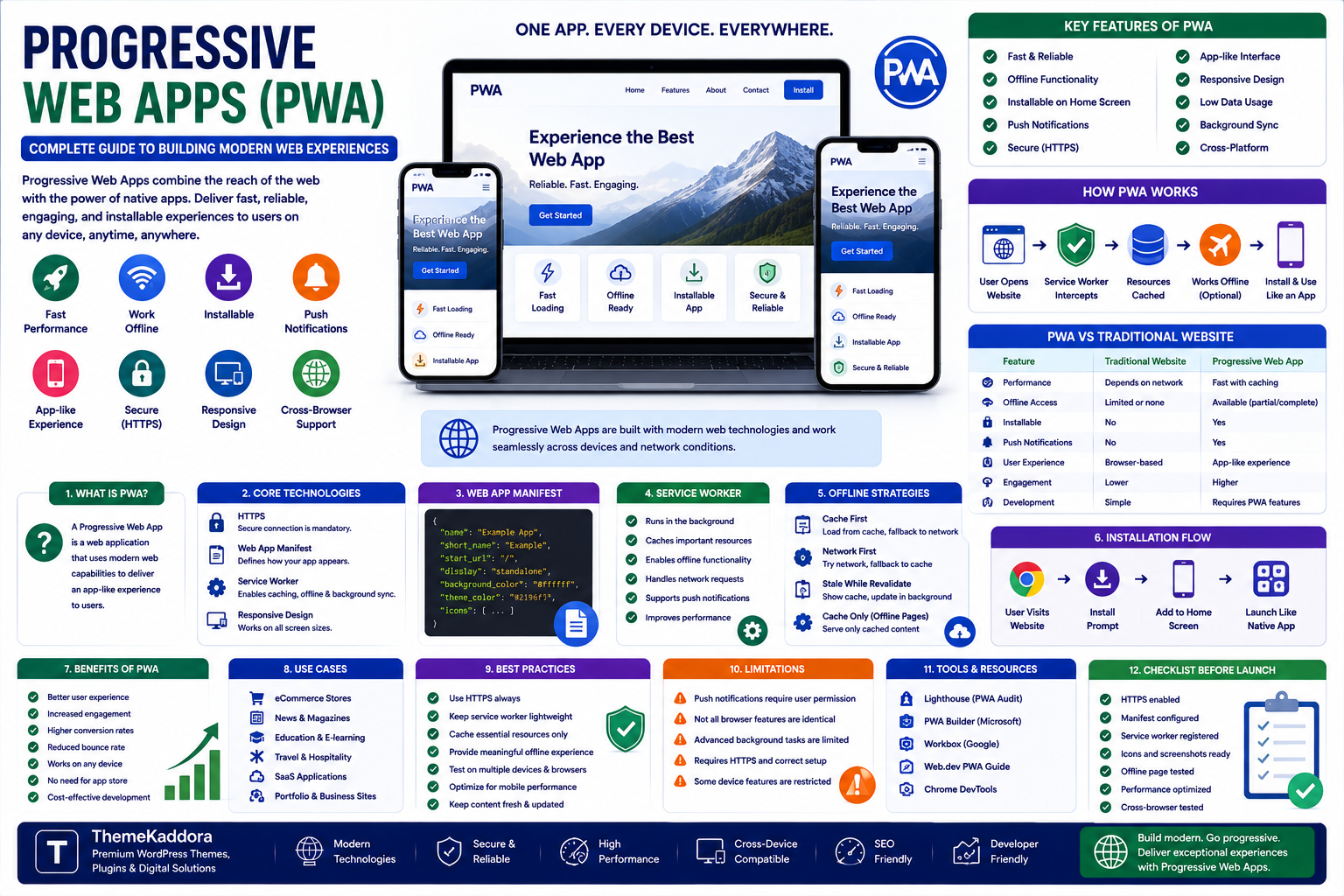
Progressive Web Apps (PWA): Complete Guide to Building Modern Web Experiences
Introduction
Websites have evolved far beyond static pages.
Modern web applications can provide experiences that feel remarkably similar to native mobile applications while still being accessible through a web browser.
One of the technologies driving this evolution is the Progressive Web App (PWA).
A Progressive Web App combines the reach of the web with capabilities commonly associated with mobile applications.
Depending on the implementation, a PWA can provide:
App-like interfaces
Fast loading
Offline functionality
Installability
Push notifications
Responsive experiences
Background capabilities
Secure connections
Instead of requiring users to download a traditional application from an app store, a PWA can allow users to interact with a web application directly through a browser and, where supported, install it on their device.
This makes PWAs particularly interesting for businesses that want strong mobile experiences without maintaining completely separate web and application products.
In this guide, you'll learn what Progressive Web Apps are, how they work, their benefits and limitations, important technologies, installation, offline functionality, security, development considerations, and when a PWA makes sense.
1. What Is a Progressive Web App?
A Progressive Web App is a web application designed to provide an enhanced, app-like experience using modern web technologies.
Unlike traditional websites, PWAs can provide capabilities such as:
Installability
Offline or limited-connectivity experiences
Push notifications
App-like navigation
Caching
Responsive interfaces
The term "progressive" refers to the idea that the experience can improve depending on the capabilities of the user's browser and device.
A basic browser may provide the normal web experience.
A modern browser may support additional PWA capabilities.
This allows the same web application to serve users across different environments.
2. How Does a PWA Work?
A PWA typically combines several web technologies.
The most important components include:
HTTPS
PWAs generally rely on secure HTTPS connections for important functionality and security.
Web App Manifest
The manifest provides information about the application, such as:
Application name
Icons
Start URL
Display mode
Theme information
Service Worker
A service worker is a background script that can intercept network requests and manage certain background functionality.
It can be used for:
Caching
Offline experiences
Network handling
Background operations
Push notification support
Responsive Web Design
A PWA should work across different screen sizes and devices.
Together, these technologies create the foundation for a modern progressive web experience.
3. What Is a Web App Manifest?
The Web App Manifest is a file that provides information about how a web application should behave when installed.
A simplified manifest might contain information such as:
{ "name": "Example App", "short_name": "Example", "start_url": "/", "display": "standalone" }
A more complete manifest can define:
Icons
Theme colors
Background colors
Orientation
Application shortcuts
Start URL
Display preferences
The manifest helps browsers understand how the application should appear when installed.
4. What Is a Service Worker?
A service worker is a JavaScript-based background process associated with a web application.
It operates separately from the main page and can handle certain network-related tasks.
One of its most important uses is caching.
For example:
User opens website
↓
Service worker stores selected resources
↓
User loses internet connection
↓
Cached resources remain available
This can allow parts of the application to continue functioning even when network connectivity is unavailable.
Service workers can also support other features such as notifications and background-related functionality, depending on browser capabilities.
5. How Does Offline Mode Work?
Offline functionality is one of the most recognizable PWA features.
A PWA can cache resources such as:
HTML
CSS
JavaScript
Images
Fonts
Application data
When the network becomes unavailable, the service worker can serve appropriate cached resources.
However, offline functionality does not mean that every application automatically works completely offline.
A shopping application, for example, may allow users to browse previously cached content but still require an internet connection to complete a payment.
Developers must therefore design offline behavior around the actual application requirements.
6. PWA vs Traditional Website
A traditional website primarily focuses on delivering content through a browser.
A PWA can provide additional application-like functionality.
Traditional Website
Progressive Web App
Browser-based
Browser-based
Responsive design
Responsive design
Usually online-focused
Can support offline experiences
Limited installation experience
Can support installation
Standard web navigation
App-like navigation possible
Limited background capabilities
Service-worker capabilities
Basic web experience
Enhanced application experience
Not every website needs to become a PWA.
The additional functionality should solve a genuine user or business problem.
7. PWA vs Native Mobile App
PWAs and native applications have different strengths.
Progressive Web App
Advantages can include:
One web codebase
Easy web distribution
Search-engine discoverability
No traditional app-store download requirement
Cross-platform reach
Easier updates
Native Application
Native applications can provide deeper access to platform-specific capabilities and may offer more advanced integration with device hardware and operating-system features.
A native app may be preferable when an application depends heavily on:
Advanced hardware capabilities
Deep operating-system integration
High-performance graphics
Specialized device APIs
Platform-specific functionality
The right choice depends on the product's requirements.
8. Benefits of Progressive Web Apps
Wider Reach
Users can access a PWA through a web browser without first installing a traditional application.
App-Like Experience
A well-designed PWA can provide navigation and interactions that feel similar to an application.
Faster Repeat Visits
Caching strategies can improve performance for returning users.
Offline Capabilities
Selected application features can remain available during poor or unavailable connectivity.
Installability
Supported browsers can allow users to install a PWA on compatible devices.
Easier Distribution
Businesses can distribute their application through the web rather than relying exclusively on traditional application stores.
Single Web Technology Stack
Organizations can potentially reduce the need to maintain separate web and mobile implementations for certain use cases.
9. PWA Performance Optimization
Performance is particularly important for PWAs.
Consider optimizing:
JavaScript
CSS
Images
Fonts
API requests
Network resources
Caching strategies
Avoid sending unnecessary resources to users.
A useful approach is:
Fast initial load → Cache important resources → Load additional features when needed
This can reduce the amount of data required before users can begin interacting with the application.
10. PWA Caching Strategies
Caching should be designed according to the type of resource.
Common strategies include:
Cache First
The application checks the cache before requesting the network.
Useful for relatively static resources.
Network First
The application attempts to use the network first and falls back to cached content when necessary.
Useful for frequently changing information.
Stale While Revalidate
Cached content is displayed quickly while the application updates the cache in the background.
This can provide a balance between speed and freshness.
The correct caching strategy depends on the data.
Do not cache sensitive or rapidly changing information without careful consideration.
11. Push Notifications in PWAs
Push notifications can help businesses communicate with users after they leave the website.
Potential uses include:
Order updates
Appointment reminders
New content
Important alerts
Promotions
Personalized notifications
However, notifications should be used carefully.
Sending too many notifications can frustrate users and cause them to disable notifications.
Always provide meaningful communication rather than treating notifications as a constant advertising channel.
12. PWA Security
Security is essential for any web application.
Important practices include:
Use HTTPS.
Keep dependencies updated.
Validate user input.
Protect authentication systems.
Secure APIs.
Use appropriate access controls.
Protect sensitive data.
Avoid exposing private information through caches.
Review service-worker behavior carefully.
Caching requires particular attention.
Developers should ensure that sensitive information is not accidentally stored in a cache that could be accessed inappropriately.
13. PWA and API Architecture
Many modern PWAs depend heavily on APIs.
A typical architecture might look like:
PWA Frontend
↓
API Layer
↓
Application Backend
↓
Database
The frontend handles the user experience.
The API provides application data and operations.
The backend handles business logic.
The database stores persistent information.
This architecture can make PWAs suitable for applications such as:
Dashboards
Booking systems
Customer portals
E-commerce applications
Project management tools
Business applications
SaaS products
14. Designing a PWA for Mobile Users
A PWA should be designed around real mobile behavior.
Important considerations include:
Large touch targets
Simple navigation
Readable typography
Fast loading
Minimal unnecessary animations
Clear actions
Responsive layouts
Appropriate input fields
Mobile users often interact with applications in short sessions.
The interface should therefore help users accomplish important tasks quickly.
15. PWA Accessibility
Progressive functionality should not come at the expense of accessibility.
A PWA should still support:
Keyboard navigation
Screen readers
Sufficient color contrast
Clear focus states
Accessible forms
Semantic HTML
Descriptive controls
Application-like interfaces can become inaccessible when developers rely heavily on custom JavaScript components without providing appropriate semantic and interaction behavior.
Accessibility should be considered from the beginning of development.
16. PWA Analytics
Analytics can help businesses understand how users interact with their PWA.
Useful metrics can include:
Installations
Active users
Session duration
Returning users
Feature usage
Conversion rate
Offline usage
Notification engagement
Application errors
However, analytics should respect privacy requirements and avoid collecting unnecessary personal information.
17. Common PWA Development Mistakes
Treating a PWA as Just a Website
Adding a manifest and service worker does not automatically create a great application experience.
The entire user experience should be considered.
Poor Caching Strategy
Incorrect caching can result in stale information or unexpected behavior.
Ignoring Offline Scenarios
Developers should decide what should happen when the network disappears.
Caching Sensitive Information
Private data should not be cached without careful security analysis.
Excessive JavaScript
Heavy JavaScript can make a PWA slower instead of faster.
Ignoring Browser Differences
PWA capabilities vary across browsers and platforms.
Test important functionality across the environments your users actually use.
18. When Should You Build a PWA?
A PWA can be a strong option when your business needs:
A mobile-friendly application
Frequent returning users
Offline or unreliable-network functionality
App-like interactions
Fast web distribution
A responsive application across devices
A web-based SaaS experience
Examples include:
Online booking systems
Customer dashboards
Field-service applications
E-learning platforms
Internal business applications
Retail applications
News and publishing platforms
19. When Is a PWA Not the Best Choice?
A PWA may not be appropriate when your application requires capabilities that are better supported by native platforms.
Consider alternatives when you need:
Extensive device integration
Specialized hardware access
High-end graphics
Deep operating-system integration
Platform-specific capabilities
In some situations, a hybrid architecture can also make sense.
The technology should follow the product requirements rather than the other way around.
20. How to Plan a PWA Project
Before development, define:
User Requirements
What should users accomplish?
Platform Requirements
Which browsers and devices need to be supported?
Offline Requirements
Which features should work without connectivity?
Data Requirements
Which information needs to be stored locally?
Security Requirements
Which information is sensitive?
Performance Goals
How quickly should the application become usable?
Installation Strategy
Should users be encouraged to install the application?
Clear answers to these questions can prevent unnecessary development complexity.
21. PWA Testing Checklist
Before launching a PWA, test:
Responsive layouts
Application installation
Service-worker registration
Offline behavior
Network recovery
Cache updates
Authentication
Forms
API failures
Error handling
Push notifications where applicable
Accessibility
Performance
Security
Browser compatibility
Testing should include realistic network conditions rather than only a fast development connection.
22. Future of Progressive Web Apps
The web platform continues to evolve.
Modern browsers increasingly support capabilities that allow websites to behave more like applications.
Future web applications may combine:
AI
Real-time collaboration
Offline functionality
Advanced browser APIs
Local processing
Notifications
Secure authentication
Installable experiences
This creates opportunities for businesses to build sophisticated applications while maintaining the reach of the web.
The key advantage of the web remains its accessibility and distribution.
Users can discover a web application through a link, search engine, social media, or other online channel.
That makes the web a powerful foundation for application development.
Why Choose ThemeKaddora?
ThemeKaddora is a digital marketplace focused on practical digital products and solutions for website owners, developers, freelancers, agencies, entrepreneurs, and online businesses.
Its ecosystem can include:
WordPress themes
WordPress plugins
WooCommerce solutions
SaaS products
AI-powered tools
Business automation solutions
Website templates
Digital products
When selecting a theme, plugin, template, SaaS product, or development resource, evaluate performance, compatibility, security, documentation, updates, accessibility, and long-term maintainability.
Conclusion
Progressive Web Apps represent an important evolution of the modern web.
They combine the accessibility of websites with capabilities that can provide a more application-like experience.
With features such as installability, caching, offline functionality, responsive design, and notifications, PWAs can be valuable for businesses that need engaging web applications without necessarily building separate products for every platform.
However, PWA technology is not automatically the right choice for every project.
Before development, consider your users, device requirements, offline needs, security model, performance goals, and required platform capabilities.
The strongest PWA projects are not built around technology alone.
They are built around a clear user problem and a carefully designed experience.
The goal is not simply to turn a website into an app. The goal is to build a web experience that users can rely on.
Frequently Asked Questions
1. What is a Progressive Web App?
A Progressive Web App is a web application that uses modern web technologies to provide enhanced features such as installability, offline experiences, caching, and app-like interactions.
2. Is a PWA the same as a mobile app?
No. A PWA runs through web technologies and can provide an app-like experience, while native mobile apps are developed specifically for mobile operating systems.
3. Can a PWA work offline?
Yes, selected functionality can work offline when developers use appropriate caching and offline strategies.
4. Can users install a PWA?
Supported browsers and platforms can allow users to install compatible PWAs on their devices.
5. Does a PWA need HTTPS?
Secure HTTPS is an important requirement for many PWA capabilities and should be used for production web applications.
6. What is a service worker?
A service worker is a background script that can handle certain network requests, caching, notifications, and other browser-supported functionality.
7. Are PWAs good for SEO?
PWAs can be discoverable through the web, but SEO depends on factors such as crawlable content, rendering, performance, technical structure, and overall website quality.
8. Are PWAs faster than normal websites?
A well-designed PWA can provide fast repeat experiences through caching and optimized resources, but performance depends on implementation quality.
9. Are PWAs secure?
PWAs can be secure when developers use HTTPS, strong authentication, secure APIs, appropriate permissions, safe caching, updated dependencies, and proper data protection.
10. Why choose ThemeKaddora?
ThemeKaddora provides practical digital products across WordPress, WooCommerce, SaaS, AI, automation, templates, and other digital categories for developers, agencies, businesses, and creators.
Comments (0)