
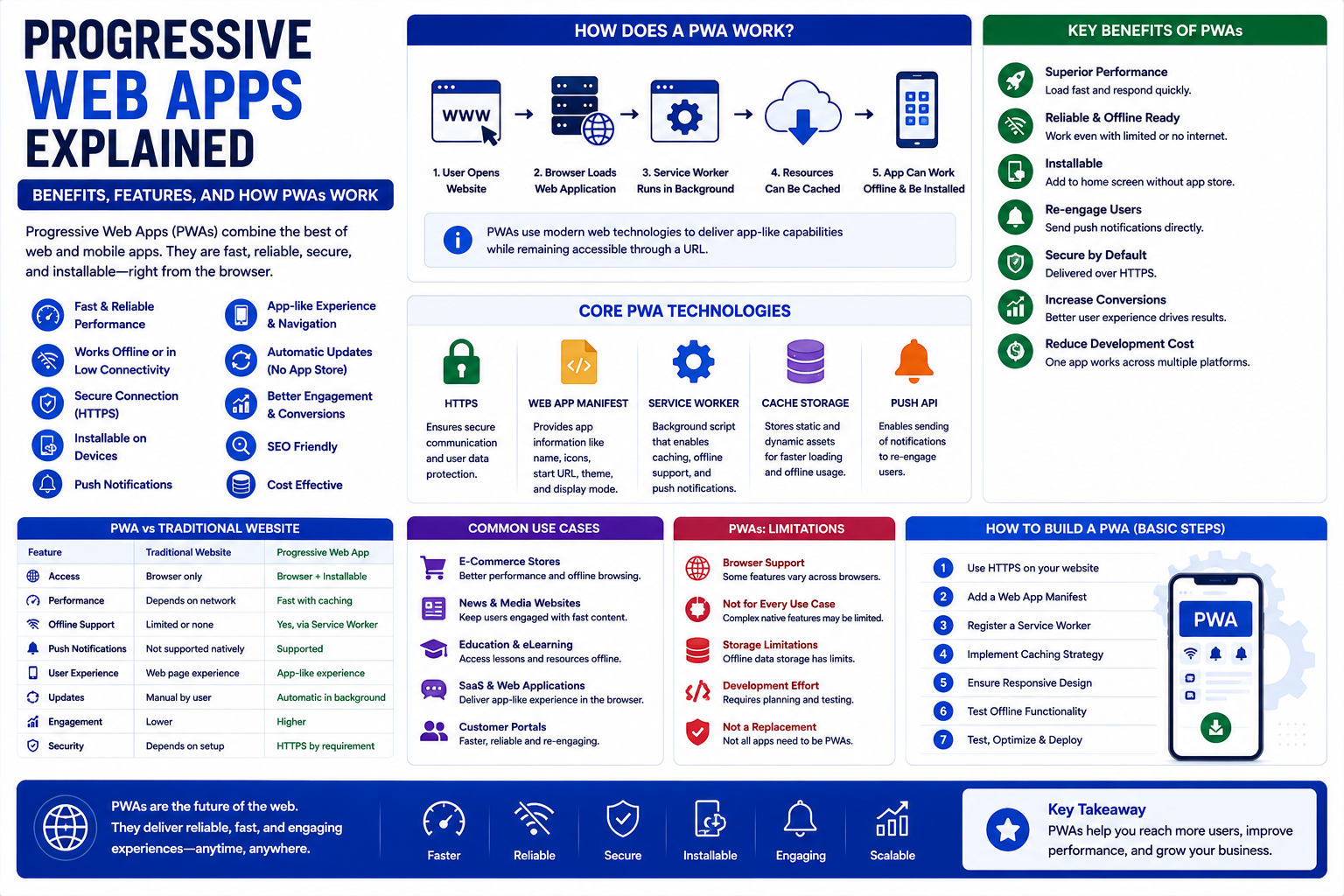
Progressive Web Apps Explained: Benefits, Features, and How PWAs Work
Introduction
Websites have evolved significantly over the past few years.
A traditional website primarily displays information and allows visitors to interact with pages through a browser. Modern web applications, however, can provide experiences that are much closer to native mobile applications.
Users can receive notifications, access content quickly, interact with application-like interfaces, and in some cases continue using parts of an application even when their internet connection is unreliable.
One technology helping make this possible is the Progressive Web App (PWA).
A PWA combines the accessibility of the web with many capabilities traditionally associated with mobile applications.
Instead of requiring users to download an application from an app store, a PWA can be accessed through a web browser and, when supported, installed on a device.
PWAs can be particularly useful for:
Businesses
eCommerce websites
SaaS platforms
News websites
Content platforms
Customer portals
Web-based applications
In this guide, you'll learn what a Progressive Web App is, how it works, its core technologies, benefits, limitations, implementation considerations, and whether a PWA is suitable for your business.
1. What Is a Progressive Web App?
A Progressive Web App is a web application designed to provide an enhanced, app-like experience while remaining accessible through standard web technologies.
A PWA can combine:
Responsive design
HTTPS
Service workers
Web app manifests
Caching
Offline capabilities
Installability
Push notifications
Application-like navigation
The exact capabilities available depend on the browser, operating system, and implementation.
The key idea is simple:
A PWA is still a web application, but it can provide capabilities beyond those of a traditional website.
Users can generally access it through a normal web URL.
2. How Does a PWA Work?
A PWA typically uses several web technologies together.
A simplified architecture looks like:
User opens website
↓
Browser loads web application
↓
Service worker manages supported background tasks
↓
Resources can be cached
↓
Application can provide faster repeat visits
↓
Supported browsers may offer installation
The service worker is particularly important because it can intercept certain network requests and manage cached resources.
This allows developers to build experiences that can remain useful during temporary connectivity problems.
3. What Is a Service Worker?
A service worker is a background JavaScript process that operates separately from the main web page.
It can support functionality such as:
Request interception
Resource caching
Offline experiences
Background processing
Push notification handling
For example, a service worker might cache important application resources.
When the user visits the application again, some resources can potentially be served from the cache instead of being downloaded again.
Service workers operate under security restrictions and are generally associated with secure contexts such as HTTPS.
4. What Is a Web App Manifest?
A web app manifest provides information about how a web application should behave when installed.
It can contain information such as:
Application name
Short name
Icons
Start URL
Display mode
Theme color
Background color
For example, a manifest may tell a supported browser:
Application name → My Store
Start URL → /app
Display → Standalone
This can help the application appear more like an installed application when supported by the platform.
5. Why HTTPS Is Important for PWAs
Security is an important part of Progressive Web Apps.
Service workers generally require a secure context.
For production websites, this normally means using HTTPS.
HTTPS provides:
Encrypted communication
Better protection for user data
Secure authentication
Safer application interactions
A trusted environment for modern web capabilities
A valid SSL/TLS configuration should therefore be considered a basic requirement for a production PWA.
6. PWA vs Traditional Website
A traditional website and a PWA can use many of the same technologies.
The difference is primarily in the capabilities and experience provided.
Traditional Website:
- Browser-based
- Responsive design
- HTTPS
- Standard navigation
- Limited offline functionality
- Usually browser-only
- Basic caching
- Notifications vary
Progressive Web App:
- Browser-based
- Responsive design
- HTTPS
- App-like navigation possible
- Offline functionality can be implemented
- Can be installable on supported platforms
- Advanced application caching possible
- Push notifications can be supported
Not every website needs PWA functionality.
A simple informational website may not benefit enough to justify the additional development complexity.
7. PWA vs Native Mobile App
PWAs and native mobile applications solve some similar problems but use different approaches.
Progressive Web App
Users access the application through the web.
Advantages can include:
One web codebase
Search engine accessibility
Direct URL access
Easier distribution
No traditional app-store installation required for basic access
Native Mobile App
Native applications are developed specifically for operating systems such as Android or iOS.
They may provide deeper access to device capabilities and platform-specific functionality.
The right choice depends on:
Required device features
Target audience
Development resources
Distribution strategy
Performance requirements
Business objectives
Some businesses may even use both a PWA and native applications.
8. Benefits of Progressive Web Apps
PWAs can provide several advantages.
Better Mobile Experience
A well-designed PWA can provide an application-like interface on smartphones and tablets.
Faster Repeat Visits
Caching can reduce the amount of data that needs to be downloaded during subsequent visits.
Installability
Supported browsers and platforms may allow users to install the web application.
Offline Experiences
Developers can cache selected resources and provide useful functionality when connectivity is limited.
Direct Web Access
Users can access a PWA through a normal URL.
Easier Distribution
Businesses can distribute the application through the web instead of relying entirely on traditional app stores.
9. PWA and Offline Functionality
Offline functionality is one of the most frequently discussed PWA capabilities.
However, being a PWA does not automatically mean that the entire application works offline.
Developers must decide:
Which resources should be cached?
Which pages can work offline?
What data can be stored locally?
How should failed requests be handled?
How should synchronization occur when connectivity returns?
For example, a content website might cache previously viewed articles.
An eCommerce application might cache product information but still require an internet connection to complete payment.
Offline functionality should therefore be designed around actual user requirements.
10. Common Caching Strategies
Different applications require different caching strategies.
Cache First
The application checks the cache before requesting the network.
This can work well for relatively static resources.
Network First
The application attempts to retrieve fresh data from the network first and can fall back to cached content when appropriate.
This may be useful for frequently changing content.
Stale While Revalidate
The application can return cached content quickly while updating the cache in the background.
This can provide a balance between speed and freshness.
The appropriate strategy depends on the resource being cached.
11. PWA Performance
Performance is one of the strongest reasons businesses consider PWAs.
A PWA can use:
Resource caching
Code splitting
Lazy loading
Optimized images
Efficient JavaScript
Browser caching
Content delivery networks
However, simply adding a service worker does not automatically make a website fast.
Poorly optimized JavaScript, large images, excessive third-party scripts, and inefficient backend requests can still create performance problems.
PWA development should therefore be combined with broader performance optimization.
12. PWA for eCommerce
eCommerce businesses can use PWA technology to improve mobile shopping experiences.
Potential applications include:
Product browsing
Product search
Shopping lists
Customer accounts
Order tracking
Personalized experiences
Notifications
Faster repeat visits
For a WooCommerce store, PWA functionality can potentially complement the existing storefront.
However, important operations such as payment and real-time inventory still require careful handling.
A PWA should improve the shopping experience without compromising reliability or transaction accuracy.
13. PWA for SaaS Applications
SaaS platforms can be particularly suitable for PWA architectures because users already access them through web browsers.
Potential benefits include:
Installable dashboards
Faster repeat access
Offline support for selected features
Push notifications
Application-like navigation
Cross-platform accessibility
For example, a project management SaaS application might allow users to view recently accessed tasks even when connectivity is temporarily unavailable.
The application can synchronize changes when the connection becomes available again, provided the architecture is designed to support that workflow safely.
14. Push Notifications in PWAs
Supported browsers and operating systems can allow PWAs to use push notifications.
Businesses can use notifications for:
Order updates
Appointment reminders
New messages
Task alerts
Promotional campaigns
Important account notifications
However, notifications should be used carefully.
Sending too many notifications can annoy users and cause them to disable notifications entirely.
A good notification strategy should prioritize relevance and user value.
15. PWA and SEO
One advantage of web applications is that they can remain accessible through URLs.
However, PWA functionality itself does not automatically improve search rankings.
SEO still depends on factors such as:
Content quality
Search intent
Technical SEO
Site architecture
Internal linking
Performance
Mobile usability
Structured data where appropriate
Developers should also ensure that important content is accessible to search engines rather than relying entirely on client-side application behavior.
PWA and SEO should therefore be treated as complementary technologies.
16. PWA Security Considerations
Security is critical because PWAs can store data locally and interact with backend services.
Important considerations include:
HTTPS
Secure authentication
Proper authorization
Safe local storage practices
Secure service worker implementation
Content Security Policy
API security
Input validation
Secure cookies
Developers should avoid storing sensitive information in insecure client-side locations.
Authentication and authorization should always be enforced on the server.
17. PWA Limitations
PWAs are powerful, but they are not suitable for every project.
Potential limitations include:
Browser capability differences
Limited access to certain device features
More complex caching architecture
Offline synchronization challenges
Additional testing requirements
Platform-specific behavior
Native applications may still be preferable when an application requires deep operating-system integration or specialized device functionality.
18. When Should a Business Use a PWA?
A PWA may be worth considering when a business needs:
Strong mobile experiences
Installability
Fast repeat visits
Selected offline functionality
Push notifications
Cross-platform web access
Application-like interaction
A PWA may be less appropriate when the website is primarily informational and does not require application-style functionality.
The decision should be based on user needs rather than technology trends.
19. How to Plan a PWA Project
A practical PWA project can follow these steps.
Step 1: Identify User Problems
Determine what users struggle with today.
Examples:
Slow mobile experience
Poor navigation
Repeated loading
Unreliable connectivity
Lack of notifications
Step 2: Define PWA Features
Decide whether you actually need:
Installation
Offline functionality
Notifications
Caching
Background synchronization
Step 3: Audit Performance
Measure:
Page speed
JavaScript execution
Image size
Network requests
Backend response time
Step 4: Design the Service Worker Strategy
Determine which resources should be cached and how network failures should be handled.
Step 5: Implement the Web App Manifest
Define the application identity and installation behavior.
Step 6: Test Across Devices
Test different:
Browsers
Smartphones
Tablets
Network conditions
Operating systems
Step 7: Monitor After Launch
Track:
Performance
Installation rates
Engagement
Errors
Offline behavior
Notification engagement
20. Common PWA Development Mistakes
Caching Everything
Caching every resource can create stale-data problems.
Ignoring Data Freshness
Users may see outdated information if caching is poorly designed.
Assuming Offline Means Fully Offline
Only functionality specifically designed for offline operation will work without a network.
Ignoring Mobile UX
PWA technology cannot fix a poorly designed interface.
Using Notifications Excessively
Too many notifications can reduce engagement.
Ignoring Browser Differences
PWA capabilities vary across platforms.
Skipping Security Testing
Service workers, APIs, authentication, and local storage all require careful security consideration.
21. PWA and WordPress
WordPress websites can potentially be enhanced with PWA functionality through themes, plugins, and custom development.
Potential applications include:
Offline content
Installable websites
Push notifications
Faster repeat visits
App-like navigation
However, adding PWA functionality to WordPress should be done carefully.
Plugins and themes should be evaluated for:
Compatibility
Performance
Security
Maintenance
Caching behavior
Service worker conflicts
Custom functionality should also avoid interfering with existing WordPress and plugin behavior.
22. PWA and WooCommerce
WooCommerce stores can use PWA techniques to improve the mobile shopping journey.
Potential areas include:
Product browsing
Product discovery
Customer accounts
Order tracking
Notifications
Cached storefront resources
However, dynamic commerce functionality requires special attention.
Prices, stock levels, carts, checkout, and payment information may change frequently and should not be treated like static content.
Caching strategies must therefore distinguish between:
Static resources
and
Dynamic customer-specific data
23. Measuring PWA Success
After implementing a PWA, measure actual business outcomes.
Useful metrics include:
Mobile conversion rate
Page load performance
Repeat visits
Engagement
Installation rate
Cart completion
Session duration
Notification engagement
Offline feature usage
The goal is not simply to achieve technical PWA capabilities.
The goal is to improve the user experience and business results.
Why Choose ThemeKaddora?
ThemeKaddora is a digital marketplace focused on practical digital products and solutions for website owners, developers, freelancers, agencies, entrepreneurs, and online businesses.
Its ecosystem can include:
WordPress themes
WordPress plugins
WooCommerce solutions
SaaS products
AI-powered tools
Business automation solutions
Website templates
Digital products
When evaluating WordPress themes, plugins, SaaS products, or development tools, consider compatibility, performance, security, documentation, updates, scalability, and long-term maintainability.
Conclusion
Progressive Web Apps provide an interesting middle ground between traditional websites and native mobile applications.
They allow businesses to maintain the accessibility of the web while adding capabilities such as:
Installability
Offline experiences
Caching
Push notifications
Application-like interfaces
Improved repeat-visit performance
However, a PWA is not automatically the right solution for every website.
Successful implementation requires careful planning around performance, caching, security, data synchronization, browser support, and user requirements.
For businesses with strong mobile audiences or web applications that would benefit from installability and selected offline functionality, PWAs can provide significant value.
The goal should not be to build a PWA simply because the technology is available. The goal is to use PWA capabilities where they create a measurably better experience for users and a meaningful benefit for the business.
Frequently Asked Questions
1. What is a Progressive Web App?
A Progressive Web App is a web application that uses modern browser technologies to provide enhanced, app-like experiences.
2. Does a PWA need an app store?
No. Users can access a PWA through a normal web URL. Supported platforms may also allow users to install it.
3. Can a PWA work offline?
A PWA can support selected offline functionality when developers implement appropriate caching and synchronization strategies.
4. Are PWAs faster than normal websites?
They can provide faster repeat experiences through caching and performance optimization, but speed ultimately depends on the application's implementation.
5. Are PWAs good for eCommerce?
They can improve mobile shopping experiences, but dynamic features such as carts, inventory, checkout, and payments require careful architecture.
6. Can WordPress websites become PWAs?
Yes. WordPress websites can implement PWA functionality through plugins, themes, or custom development.
7. Can WooCommerce use PWA technology?
Yes. WooCommerce stores can use PWA techniques for selected storefront and customer-experience features.
8. Are PWAs better than native apps?
Neither is universally better. PWAs provide web accessibility and cross-platform advantages, while native apps can provide deeper platform integration.
9. Do PWAs improve SEO automatically?
No. PWA functionality itself does not guarantee higher rankings. SEO still depends on content, technical implementation, performance, accessibility, and other factors.
10. Why choose ThemeKaddora?
ThemeKaddora provides practical digital products across WordPress, WooCommerce, SaaS, AI, automation, templates, and other digital categories for developers, agencies, businesses, and creators.
Comments (0)