
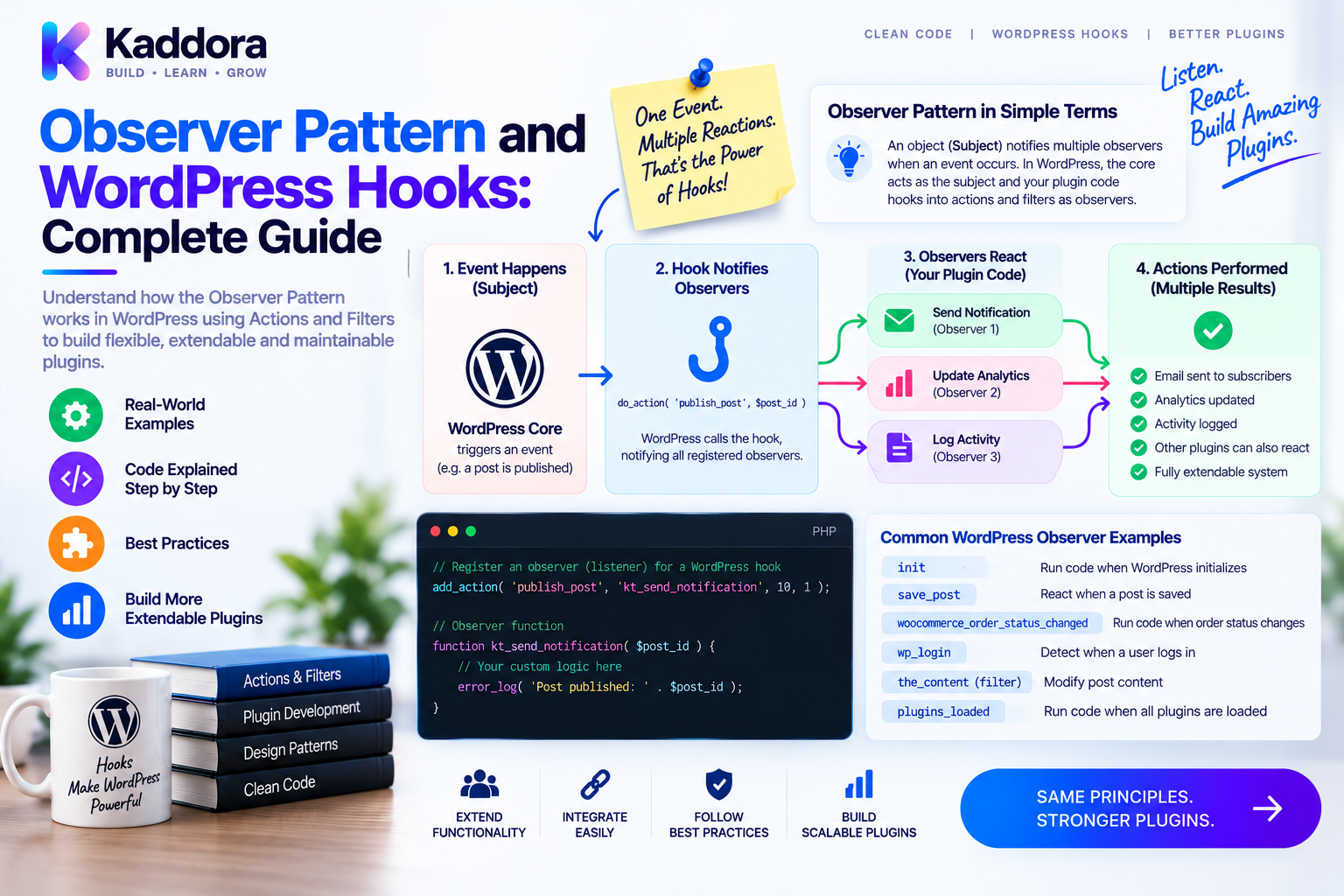
Observer Pattern and WordPress Hooks: Complete Guide
Introduction
Modern WordPress plugins rarely perform only one task.
A commerce plugin may need to handle orders, notifications, analytics, CRM synchronization, audit logs, cache invalidation, and reporting.
Putting all of these responsibilities into one class quickly creates tightly coupled code.
The Observer Pattern provides a cleaner architectural approach.
Instead of one component directly calling every dependent component, an event source notifies registered observers or listeners when something happens.
WordPress already provides a powerful mechanism that behaves similarly:
Actions and filters.
WordPress hooks allow one part of the application to expose an event or value while other components subscribe independently.
This makes hooks especially useful for building modular, extensible, event-driven plugins.
In this guide, you'll learn how the Observer Pattern works, how it relates to WordPress hooks, how to build object-oriented listeners, how to create custom events, and how to design maintainable plugin architectures.
What Is the Observer Pattern?
The Observer Pattern is a software design pattern in which one object or component, commonly called the subject, maintains a list of observers.
When an important event occurs, the subject notifies those observers.
Conceptually:
Subject | +----> Observer A +----> Observer B +----> Observer C
For example, imagine an order being completed.
Instead of the order service directly calling analytics, CRM, email, audit, and notification classes:
Order Service ├── Analytics ├── CRM ├── Notifications ├── Audit Logs └── Email
the service can publish an event:
Order Completed | +---- Analytics Listener +---- CRM Listener +---- Notification Listener +---- Audit Listener
Each observer can react independently.
How WordPress Hooks Resemble the Observer Pattern
WordPress hooks are not a textbook implementation of the Observer Pattern, but they provide a very similar extension model.
For actions:
do_action( 'kdr_order_completed', $order_id );
Listeners register with:
add_action( 'kdr_order_completed', $callback, 10, 1 );
Conceptually:
do_action() ↓ WordPress Hook System ↓ Registered Callbacks ├── Listener A ├── Listener B └── Listener C
This allows the original component to publish an event without knowing exactly which listeners will consume it.
That separation is one of the biggest architectural advantages of WordPress hooks.
Actions vs Filters
Understanding this distinction is essential.
Actions
Actions notify other code that something happened.
Use an action when you want to trigger side effects.
Example:
do_action( 'kdr_order_completed', $order_id );
Listeners subscribe with:
add_action( 'kdr_order_completed', [ $listener, 'handle' ], 10, 1 );
The listener does not return a value to the action system.
Filters
Filters pass a value through one or more callbacks.
Use a filter when you want other code to modify a value.
$value = apply_filters( 'kdr_discount_amount', $value, $context );
A filter callback must return the resulting value.
add_filter( 'kdr_discount_amount', function ( $value, $context ) { return $value * 0.9; }, 10, 2 );
A useful rule is:
Action = something happened.
Filter = something can be changed.
Hook Anatomy
A WordPress hook registration commonly contains four parts:
Hook Tag ↓ Callback ↓ Priority ↓ Accepted Arguments
Example:
add_action( 'kdr_order_completed', [ $listener, 'handle' ], 10, 1 );
Here:
kdr_order_completed is the hook name.
[ $listener, 'handle' ] is the callback.
10 is the priority.
1 tells WordPress to pass one argument.
Priority controls execution order. It does not indicate business importance.
The default priority is 10.
Avoid depending on extremely fine-grained priority relationships unless ordering is genuinely required.
Building an Object-Oriented WordPress Observer
For complex plugins, object-oriented listeners are usually easier to maintain than large anonymous callbacks.
Consider an order listener:
namespace Kaddora\MyPlugin\Listeners; use Kaddora\MyPlugin\Services\OrderService; final class OrderListener { public function __construct( private OrderService $service ) {} public function register(): void { \add_action( 'woocommerce_order_status_completed', [ $this, 'handle' ], 10, 1 ); } public function handle( $order_id ): void { $this->service->process( (int) $order_id ); } }
The listener has a very limited responsibility:
Receive a WordPress event and translate it into an application operation.
The business logic stays inside OrderService.
Why Thin Listeners Are Better
A common mistake is putting all business logic directly into a hook callback.
For example:
add_action( 'kdr_order_completed', function ( $order_id ) { // Validate order // Calculate revenue // Update analytics // Send email // Sync CRM // Write audit log // Clear cache } );
This works initially, but becomes difficult to test and maintain.
A better structure is:
WordPress Hook ↓ Listener ↓ Service ↓ Repository / Adapter
The listener should be an adapter between WordPress and the application layer.
Creating Custom WordPress Events
Custom hooks are extremely valuable for plugin extensibility.
For example:
do_action( 'kdr_order_completed', $order_id );
Another module can subscribe:
add_action( 'kdr_order_completed', [ $listener, 'handle' ], 10, 1 );
You can then have multiple independent listeners.
kdr_order_completed | +---- AnalyticsListener +---- NotificationListener +---- CrmSyncListener +---- AuditListener
This makes the core order workflow independent from optional integrations.
Naming Custom Hooks Correctly
Hook names exist in a global namespace by convention.
PHP namespaces do not automatically namespace your hook strings.
This is risky:
do_action( 'order_completed' );
Prefer a unique vendor or product prefix:
do_action( 'kdr_order_completed' );
Good hook names should be:
Unique
Descriptive
Lowercase
Stable
Based on domain events
Don't let arbitrary user input construct hook names.
Document Custom Hooks
A custom hook is an extension contract.
Document it clearly.
For actions:
/** * Fires when an order is synchronized. * * @param int $order_id Order ID. */ do_action( 'kdr_order_synced', $order_id );
For filters:
/** * Filters the generated score. * * @param float $score Generated score. * @param int $product_id Product ID. * @return float */ $score = apply_filters( 'kdr_product_score', $score, $product_id );
Documentation helps third-party developers understand exactly what they can safely consume.
Observer Pattern With Dependency Injection
Dependency injection makes listeners easier to test and compose.
For example:
final class Plugin { public function __construct( private OrderListener $orderListener ) {} public function register(): void { $this->orderListener->register(); } }
A service container can create:
Plugin Bootstrap ↓ Service Container ↓ OrderListener ↓ OrderService ↓ Repository
This becomes especially useful in larger WordPress plugins with multiple modules.
Recommended Event-Driven Architecture
A scalable plugin can use an architecture like:
Plugin Bootstrap ↓ Module Providers ↓ Listeners Register Hooks ↓ WordPress Events ↓ Application Services ↓ Repositories / Adapters ↓ Database / External APIs
This keeps WordPress-specific code concentrated at the integration boundary.
Your business logic becomes easier to reuse and test.
Observer Pattern for Multiple Integrations
Suppose a WooCommerce order is completed.
Instead of tightly coupling the order service to every integration:
Order Service ↓ CRM ↓ Analytics ↓ Email ↓ Notifications
publish one event:
Order Completed | ├── CRM Listener ├── Analytics Listener ├── Email Listener ├── Notification Listener └── Audit Listener
Adding a new integration then becomes much easier.
For example, adding a marketing platform may only require a new listener.
Hook Priority and Execution Order
Priority determines when callbacks execute.
For example:
add_action( 'kdr_order_completed', [ $first, 'handle' ], 10 ); add_action( 'kdr_order_completed', [ $second, 'handle' ], 20 );
The callback with priority 10 runs before the callback with priority 20.
Use priority only when an ordering dependency actually exists.
Do not assume a higher number means higher importance.
Also remember that registration order can matter when callbacks use the same priority, so avoid building fragile systems around undocumented assumptions.
accepted_args Must Match the Callback
Consider:
do_action( 'kdr_order_completed', $order_id, $customer_id );
If the callback needs both:
add_action( 'kdr_order_completed', [ $listener, 'handle' ], 10, 2 );
and:
public function handle( $order_id, $customer_id ): void { // ... }
The number of accepted arguments should match the callback's needs.
Incorrect argument configuration can produce warnings, missing values, or unexpected behavior.
Event Timing and State Consistency
One of the most important architectural decisions is when you fire the event.
Suppose an order completion event is triggered before the order state has actually been persisted.
A listener may immediately query the order and observe incomplete data.
A safer sequence is:
Update State ↓ Persist Successfully ↓ Trigger Domain Event ↓ Run Observers
Your event should represent a meaningful business state, not merely the beginning of an operation.
This becomes especially important for analytics, financial records, and external synchronization.
Security Considerations
WordPress hooks are not security boundaries.
Never assume callback arguments are safe simply because they came from an internal-looking event.
Apply security at the appropriate boundaries:
Authenticate requests
Verify capabilities
Validate input
Sanitize where appropriate
Use nonces for relevant requests
Protect REST and webhook endpoints
Avoid exposing secrets in hook arguments
Also avoid relying on hook priority to enforce security.
Security must be implemented explicitly.
Performance Considerations
Hooks themselves are generally lightweight, but the callbacks attached to them may not be.
This can become expensive:
init ├── Heavy API call ├── Complex database query ├── Large file operation └── Expensive report generation
High-frequency hooks should be used carefully.
Avoid running expensive work on every request unless required.
For slow external integrations, consider queues, scheduled processing, or background jobs where appropriate.
Dynamic Hooks
WordPress also supports dynamic hook names.
For example:
do_action( "kdr_product_{$product_id}_updated", $product_id );
Dynamic hooks can be useful, but the values used to build the hook name should be controlled.
Never let arbitrary user input determine hook names.
Dynamic hooks also require careful documentation because developers need to understand the naming convention.
Removing Observers
WordPress provides:
remove_action(); remove_filter();
These can be useful when customizing third-party behavior.
However, removing callbacks can be fragile because the exact callback, hook, and priority must match.
For example:
remove_action( 'kdr_order_completed', [ $listener, 'handle' ], 10 );
Plugin authors should avoid designing systems that depend on undocumented callback internals.
Testing Observer-Based Plugins
Observer-style architecture makes testing easier when responsibilities are separated.
Unit Tests
Test the listener method directly:
$listener->handle( 123 );
Then verify that the expected service was called.
Integration Tests
Test actual WordPress registration and hook execution.
Useful tools and APIs include:
has_action(); did_action(); current_filter();
For filters, verify that the resulting value is correct.
For actions, verify that the expected side effect occurred.
Also test priority interactions when execution order is part of the design.
Common Observer and Hook Mistakes
Avoid these common problems:
Business Logic Inside Callbacks
Keep callbacks thin.
Generic Hook Names
Use unique prefixes such as kdr_.
Forgetting Filter Returns
Filters must return the transformed value.
Incorrect accepted_args
Make callback parameters and accepted arguments consistent.
Overusing Priorities
Don't build fragile execution chains unnecessarily.
Giant Listener Classes
Avoid one class subscribing to dozens of unrelated events.
Expensive High-Frequency Hooks
Optimize or move heavy work into background processing.
Poor Event Timing
Fire events after the state represented by the event is actually valid.
Undocumented Custom Hooks
Hooks become difficult to consume without clear contracts.
Breaking Hook Contracts
Changing hook names or arguments can break extensions that depend on them.
Observer Pattern vs Other Design Patterns
These patterns are related but solve different problems.
Observer
Notifies multiple listeners when something happens.
Strategy
Selects an interchangeable algorithm.
Command
Encapsulates an operation as an object.
Adapter
Converts one interface into another.
Repository
Abstracts data access.
A mature WordPress plugin may use all of them together.
Observer Pattern and Plugin Decoupling
One of the biggest benefits of hooks is reduced coupling.
Without events:
Order Service ├── CRM ├── Analytics ├── Notifications └── Audit
With events:
Order Service ↓ kdr_order_completed ↓ Multiple Independent Listeners
This allows optional modules to be added or removed without rewriting the core service.
That is particularly useful for SaaS plugins, WooCommerce extensions, analytics modules, and third-party API integrations.
Observer Pattern and AI-Assisted Plugin Development
AI tools can be useful during architectural refactoring.
For example, AI can help identify:
Scattered side effects
Duplicate hook registrations
Overly large callbacks
High-frequency expensive hooks
Missing custom hook documentation
Candidates for service extraction
Missing tests
AI can also generate listener skeletons and basic test cases.
However, automatically restructuring hook-based code can be risky.
Changing hook order, execution timing, accepted arguments, or callback registration can introduce subtle regressions.
Use AI as an analysis and development assistant rather than blindly applying architectural changes.
Why Choose ThemeKaddora?
At ThemeKaddora, WordPress products can benefit from an event-driven architecture that keeps core functionality separate from optional integrations.
For example:
Core Product Event ↓ Analytics CRM Notifications Automation Audit External API
Product-prefixed hooks such as kdr_* help reduce collisions, while listeners, services, repositories, and adapters keep modules easier to maintain.
For larger WordPress products, dependency injection and service containers can further improve how event listeners are created and tested.
A modular hook architecture also makes it easier to extend ThemeKaddora products with future integrations without tightly coupling every feature to the core application.
Recommended Observer Architecture for WordPress Plugins
A practical project structure might look like:
src/ ├── Listeners/ │ ├── OrderListener.php │ ├── CustomerListener.php │ └── ProductListener.php ├── Services/ │ ├── OrderService.php │ └── CustomerService.php ├── Repositories/ │ └── OrderRepository.php ├── Adapters/ │ └── CrmAdapter.php └── Plugin.php
The flow becomes:
WordPress Hook ↓ Listener ↓ Service ↓ Repository / Adapter
This structure keeps the WordPress framework integration separate from business logic.
Observer Pattern Checklist
Before shipping a hook-driven plugin, verify:
Custom hooks use unique names
Actions and filters are used correctly
Filters return values
accepted_args matches the callback
Hook priorities are intentional
Listeners remain thin
Business logic lives in services
Custom hooks are documented
Security exists at request boundaries
Expensive callbacks are controlled
Event timing reflects valid application state
Hook contracts are treated as public APIs
Integration tests cover important events
Conclusion
The Observer Pattern provides a powerful way to decouple components and build systems that respond to events without tightly connecting every module.
WordPress hooks naturally support this style of architecture.
Actions allow components to announce that something happened, while filters allow other components to transform values.
For simple plugins, traditional callbacks may be enough.
For larger plugins, object-oriented listeners, dependency injection, services, repositories, and modular event architecture can significantly improve maintainability.
The most important principles are simple:
Keep listeners thin.
Use unique hook names.
Treat custom hooks as extension contracts.
Fire events only when application state is valid.
Keep business logic outside WordPress callbacks.
Test important hook behavior.
When used carefully, WordPress hooks become much more than simple callbacks—they become an architectural mechanism for building extensible, modular, and scalable plugins.
Frequently Asked Questions
What is the Observer Pattern in WordPress?
The Observer Pattern is a design approach where one component publishes an event and multiple listeners respond independently. WordPress actions and filters provide a similar event and extension mechanism.
Are WordPress hooks the Observer Pattern?
WordPress hooks are not a strict textbook implementation of the Observer Pattern, but their publish-and-subscribe behavior is conceptually very similar.
What is the difference between an action and a filter?
An action triggers side effects when an event occurs. A filter receives a value, allows callbacks to modify it, and requires the modified value to be returned.
What is a WordPress listener?
A listener is code registered to a WordPress hook that reacts when the hook executes. In object-oriented plugins, listeners are often dedicated classes.
What is accepted_args in WordPress hooks?
accepted_args tells WordPress how many arguments the callback should receive. It should match the callback's required parameters.
Does hook priority indicate importance?
No. Hook priority primarily determines execution order. A lower priority number runs earlier than a higher one.
Why should custom hooks have prefixes?
Hook names are globally shared by convention. A product or vendor prefix reduces the risk of collisions with WordPress core, themes, and other plugins.
Can WordPress hooks replace a service container?
No. Hooks and service containers solve different problems. Hooks provide event and extension mechanisms, while service containers manage object creation and dependencies.
Should business logic be placed inside hook callbacks?
For larger plugins, it is generally better to keep callbacks thin and move business logic into dedicated services.
Can I remove another plugin's action?
Yes, when you know the exact hook, callback, and priority. However, removing third-party callbacks can be fragile and should be done carefully.
How do I test WordPress hooks?
Use unit tests for listener behavior and integration tests for actual registration and execution. APIs such as has_action() and did_action() can help verify registration and execution.
Are WordPress hooks secure?
Hooks are not security boundaries. Authentication, authorization, input validation, nonces, and other security controls must be implemented where appropriate.
Can hooks cause performance problems?
The hook mechanism itself is usually lightweight, but expensive callbacks can create performance problems, especially on high-frequency hooks.
When should I create a custom WordPress hook?
Create custom hooks when other modules, add-ons, or third-party developers need a stable extension point around an important event or value.
Should custom hooks be documented?
Yes. Document their purpose, parameters, return behavior for filters, and expected timing so other developers can integrate safely.
Can AI help refactor WordPress hook architecture?
Yes. AI can identify duplicated callbacks, scattered side effects, missing documentation, and opportunities for service extraction, but hook timing and execution behavior should always be reviewed by a developer.
Why are WordPress hooks important for scalable plugins?
Hooks allow functionality to be extended without tightly coupling every feature to the core plugin, making modular development and third-party integrations easier.
Comments (0)