
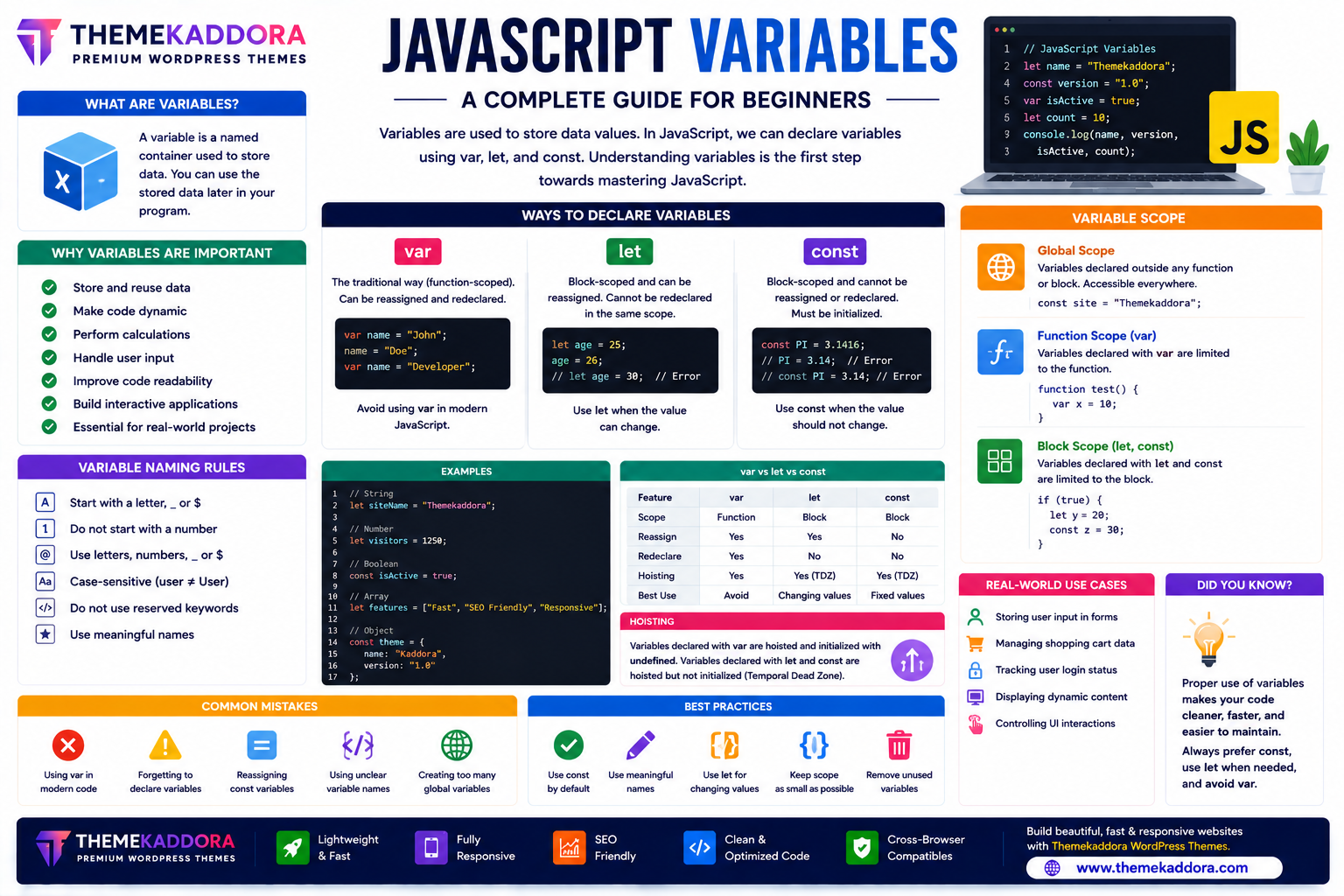
JavaScript Variables Explained: A Complete Guide for Beginners
Introduction
Every JavaScript program works with data. Whether you're storing a user's name, tracking a shopping cart, calculating prices, or updating a webpage dynamically, you need a way to store and manage information.
This is where JavaScript variables come in.
Variables act as containers that hold data so it can be used, updated, and manipulated throughout a program. Learning how variables work is one of the first and most important steps in becoming a JavaScript developer.
Modern JavaScript provides three ways to declare variables—var, let, and const. Understanding when to use each one helps you write cleaner, safer, and more maintainable code.
In this guide, you'll learn everything you need to know about JavaScript variables, including naming rules, scope, best practices, and common mistakes.
What Are JavaScript Variables?
A JavaScript variable is a named container used to store data.
Variables can hold many types of information, including:
Numbers
Text
Boolean values
Arrays
Objects
Functions
Dates
Once stored, the data can be accessed and used throughout your program.
Why Variables Are Important
Variables make JavaScript programs possible by allowing developers to:
Store user input
Perform calculations
Update webpage content
Track application state
Save configuration values
Reuse information
Build dynamic applications
Improve code readability
Without variables, JavaScript would not be able to process information efficiently.
Ways to Declare Variables
Modern JavaScript supports three keywords for declaring variables:
var
let
const
Each behaves differently and should be used appropriately.
The var Keyword
The var keyword was the original way to declare variables in JavaScript.
Characteristics:
Function-scoped
Can be reassigned
Can be redeclared within the same scope
While var is still supported, modern JavaScript generally favors let and const because they provide more predictable behavior.
The let Keyword
let is commonly used for variables whose values may change during program execution.
Benefits include:
Block scope
Can be reassigned
Cannot be redeclared in the same scope
Helps reduce accidental errors
let is a good choice for counters, loops, and values that need to be updated.
The const Keyword
const is used for variables that should not be reassigned after they are initialized.
Advantages:
Block scope
Must be initialized when declared
Cannot be reassigned
Improves code safety and readability
Use const whenever a value is intended to remain constant.
Variable Naming Rules
When creating variable names:
Start with a letter, underscore (_), or dollar sign ($).
Do not start with a number.
Use descriptive names.
Avoid JavaScript reserved keywords.
Remember that JavaScript is case-sensitive.
Meaningful names make code easier to understand and maintain.
Variable Scope
Scope determines where a variable can be accessed.
Global Scope
A globally scoped variable can be accessed from many parts of the program.
Use global variables sparingly to avoid unintended interactions.
Block Scope
Variables declared with let and const are limited to the block in which they are defined.
This helps prevent accidental access outside the intended area of the code.
Function Scope
Variables declared with var are scoped to the function in which they are declared.
Understanding scope is essential for avoiding bugs.
Variable Reassignment
Some variables are designed to change over time, while others should remain constant.
Choose:
let for changing values
const for values that should not be reassigned
Using the appropriate keyword improves code clarity.
Best Practices
Follow these recommendations when working with variables:
Prefer const by default.
Use let only when reassignment is necessary.
Avoid var in new projects.
Choose meaningful variable names.
Keep variable scope as small as possible.
Initialize variables appropriately.
Remove unused variables.
These habits improve code quality and maintainability.
Common Mistakes
Avoid:
Using vague variable names
Overusing global variables
Reassigning values unintentionally
Declaring variables without purpose
Using var unnecessarily in modern code
Ignoring variable scope
Good variable management reduces bugs and improves readability.
Variables in Real-World Applications
JavaScript variables are used in:
User authentication
Shopping carts
Form handling
Search functionality
Dashboards
Games
Chat applications
Data visualization
API responses
Web applications
Nearly every JavaScript program depends on variables.
JavaScript Variables in WordPress Themes
Modern WordPress themes—including Themekaddora themes—use JavaScript variables to power interactive features such as:
Mobile navigation
Theme customization
AJAX search
WooCommerce product filters
Sliders
Modal windows
Dynamic pricing
User interface updates
Well-managed variables contribute to responsive and interactive websites.
JavaScript Variables Checklist
Before writing JavaScript, remember to:
✅ Prefer const whenever possible
✅ Use let for changing values
✅ Avoid var in new code
✅ Choose descriptive names
✅ Keep scope limited
✅ Remove unused variables
✅ Maintain consistent naming conventions
✅ Write readable code
Conclusion
JavaScript variables are the foundation of every JavaScript program. They allow developers to store, update, and manage data efficiently, making dynamic web applications possible.
By understanding the differences between var, let, and const, following naming conventions, and using proper scope, you can write cleaner, safer, and more maintainable code.
When combined with modern HTML5, CSS, and responsive WordPress themes from Themekaddora, JavaScript variables help create fast, interactive, and user-friendly websites.
Frequently Asked Questions (FAQs)
What are JavaScript variables?
JavaScript variables are named containers used to store and manage data within a program.
What is the difference between let and const?
let allows reassignment, while const does not allow reassignment after initialization.
Should I still use var?
var is still supported, but modern JavaScript development generally prefers let and const because of their block scope and more predictable behavior.
Why is variable scope important?
Variable scope determines where a variable can be accessed, helping prevent conflicts and making code easier to maintain.
Why do Themekaddora WordPress themes use modern JavaScript practices?
Themekaddora themes follow modern JavaScript standards, using let and const where appropriate to create responsive, maintainable, high-performance WordPress websites with interactive user experiences.
Comments (0)