
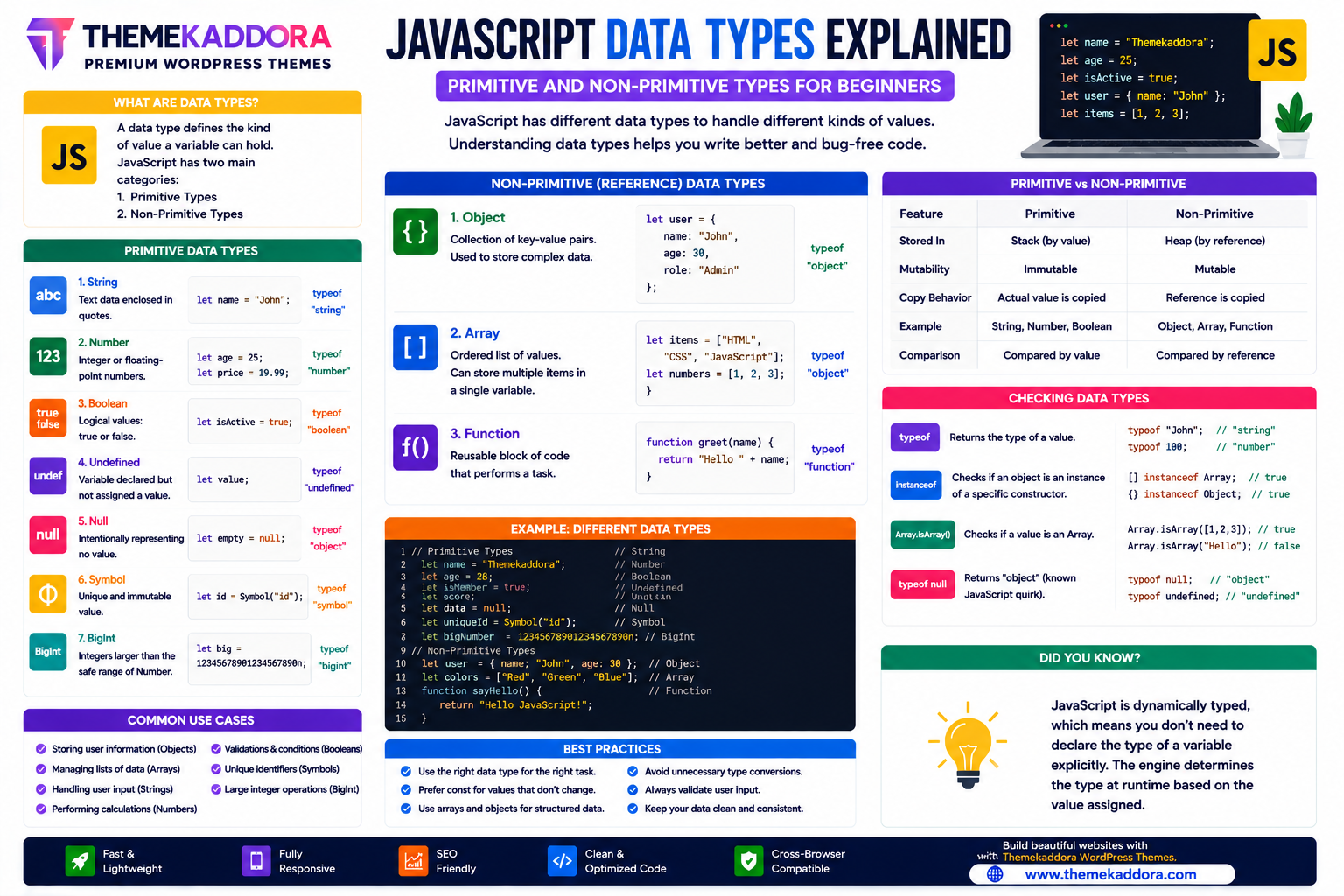
JavaScript Data Types Explained: Primitive and Non-Primitive Types for Beginners
Introduction
Every JavaScript application works with data. Whether you're storing a customer's name, calculating prices, validating a login form, or displaying products on an eCommerce website, JavaScript must understand the type of data it is processing.
JavaScript supports multiple data types, each designed to represent different kinds of information. Understanding these data types is essential because they determine how values are stored, compared, manipulated, and displayed.
Modern JavaScript divides data into two broad categories:
Primitive Data Types
Non-Primitive (Reference) Data Types
Learning these categories helps developers write cleaner, more efficient, and less error-prone code.
In this guide, you'll learn every JavaScript data type, its characteristics, practical use cases, and best practices.
What Are JavaScript Data Types?
A data type defines the kind of value stored inside a variable.
JavaScript uses data types to determine:
How values are stored
How memory is allocated
Which operations are allowed
How comparisons work
How values behave during execution
Choosing the correct data type improves both performance and code readability.
Why Data Types Matter
Understanding data types helps developers:
Prevent programming errors
Write cleaner code
Improve performance
Handle user input correctly
Build reliable applications
Debug problems more easily
Create scalable software
Improve maintainability
Data types form the foundation of JavaScript programming.
Primitive Data Types
Primitive values are immutable, meaning the value itself cannot be changed. When you appear to "modify" a primitive, JavaScript creates a new value instead.
JavaScript includes the following primitive data types.
String
A String represents textual data.
Common examples include:
Names
Addresses
Product titles
Email addresses
Messages
Strings are one of the most frequently used data types.
Number
The Number type represents both integers and floating-point values.
Examples include:
Prices
Ages
Scores
Quantities
Percentages
JavaScript uses the same Number type for whole numbers and decimals.
Boolean
A Boolean stores one of two values:
true
false
Booleans are commonly used in:
Login status
User permissions
Form validation
Conditional statements
Undefined
A variable has the value undefined when it has been declared but has not yet been assigned a value.
Understanding undefined helps developers identify missing or uninitialized data.
Null
The null value represents the intentional absence of a value.
It is often used to indicate that a variable currently has no meaningful object or data assigned.
Symbol
A Symbol is a unique and immutable primitive value.
Symbols are often used to create unique property keys and avoid naming collisions in objects.
BigInt
BigInt allows JavaScript to represent integers larger than the safe range supported by the Number type.
It is useful for:
Financial calculations involving extremely large integers
Scientific applications
Cryptography
Large identifiers
Non-Primitive Data Types
Non-primitive values are reference types.
Instead of storing the actual value directly, variables hold a reference to the underlying object in memory.
Object
Objects store related information using key-value pairs.
Examples include:
User profiles
Products
Orders
Settings
Configuration data
Objects are one of the most important data structures in JavaScript.
Array
Arrays store ordered collections of values.
Common applications include:
Product lists
Shopping carts
Image galleries
Search results
Student records
Arrays make it easy to manage groups of related data.
Function
Functions are reusable blocks of code that perform specific tasks.
They can also be assigned to variables, passed as arguments, and returned from other functions.
Functions are first-class objects in JavaScript.
Primitive vs Non-Primitive
Primitive
Non-Primitive
Stored by value
Stored by reference
Immutable values
Mutable objects
Fixed behavior
Flexible structures
Lightweight
More complex
Faster to copy
References are copied
Understanding the difference helps avoid unexpected behavior when assigning or comparing values.
Type Checking in JavaScript
Developers often need to determine the type of a value while debugging or writing application logic.
JavaScript provides built-in ways to inspect value types, which is especially useful when working with user input, API responses, or dynamic data.
Best Practices
When working with JavaScript data types:
Use the appropriate data type for the task.
Avoid unnecessary type conversions.
Validate user input before processing it.
Keep object structures organized.
Use arrays for ordered collections.
Choose descriptive variable names.
Handle null and undefined carefully.
These practices improve reliability and readability.
Common Mistakes
Avoid:
Confusing null with undefined
Using strings for numeric calculations
Ignoring data validation
Misunderstanding object references
Storing unrelated data together
Assuming all values behave the same way
A solid understanding of data types helps prevent subtle bugs.
JavaScript Data Types in Real-World Applications
Data types are used throughout modern applications, including:
eCommerce websites
Banking systems
CRM software
Dashboards
Social media platforms
Educational websites
Booking systems
Content management systems
Every JavaScript application relies on appropriate data structures.
JavaScript Data Types in WordPress Themes
Modern WordPress themes—including Themekaddora themes—use JavaScript data types to power interactive features such as:
AJAX product filtering
Theme customization
User preferences
Shopping cart functionality
Dynamic navigation
Search suggestions
Form validation
Dashboard widgets
Proper data handling improves performance and user experience.
JavaScript Data Types Checklist
Before writing your code, remember to:
✅ Choose the correct data type
✅ Validate user input
✅ Handle null and undefined
✅ Organize objects clearly
✅ Use arrays for collections
✅ Avoid unnecessary conversions
✅ Keep code readable
✅ Test application logic thoroughly
Conclusion
JavaScript data types are one of the building blocks of programming. By understanding the difference between primitive and non-primitive values, developers can write cleaner, safer, and more efficient applications.
Whether you're creating interactive websites, business applications, or WordPress themes, mastering JavaScript data types helps you manage information effectively and reduce programming errors.
Combined with HTML5, CSS, and responsive WordPress themes from Themekaddora, a strong understanding of JavaScript data types provides the foundation for building modern, high-performance web applications.
Frequently Asked Questions (FAQs)
What are JavaScript data types?
JavaScript data types define the kind of values that variables can store and determine how those values behave during program execution.
What are the primitive data types in JavaScript?
JavaScript has seven primitive data types: String, Number, Boolean, Undefined, Null, Symbol, and BigInt.
What are non-primitive data types?
Non-primitive data types are reference types, including Objects, Arrays, and Functions.
What is the difference between primitive and non-primitive values?
Primitive values are stored directly and are immutable, while non-primitive values are stored by reference and can contain multiple related properties or methods.
Why do Themekaddora WordPress themes use modern JavaScript practices?
Themekaddora themes follow modern JavaScript standards to efficiently manage data for dynamic features, responsive interfaces, AJAX functionality, WooCommerce integration, and interactive user experiences.
Comments (0)