
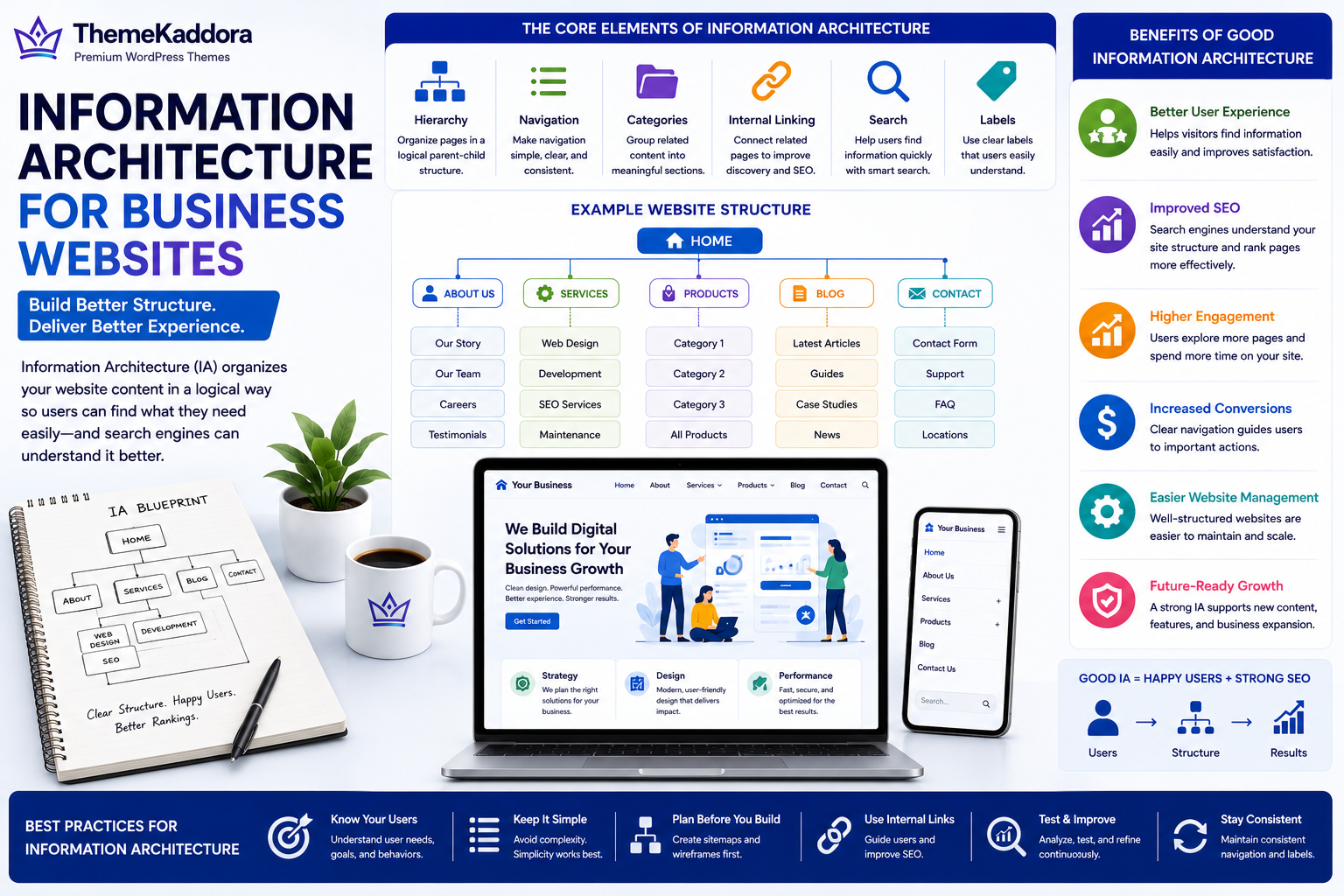
Information Architecture for Business Websites: A Complete Guide
Introduction
A business website may contain dozens—or even hundreds—of pages. As websites grow, visitors need a simple way to find products, services, blog articles, support resources, and contact information.
Without a clear structure, users become frustrated, search engines struggle to understand relationships between pages, and valuable content remains difficult to discover.
This is where Information Architecture (IA) becomes essential.
Information Architecture is the process of organizing website content into a logical structure that helps users find information quickly and helps search engines understand your website.
Whether you operate a company website, an ecommerce store, a knowledge base, or a WordPress-powered platform, strong Information Architecture improves usability, search visibility, and long-term website management.
What Is Information Architecture?
Information Architecture (IA) is the practice of organizing, labeling, and structuring digital content so users can easily find and understand information.
A well-designed IA includes:
Website hierarchy
Navigation menus
Categories
Page relationships
Internal linking
Search functionality
Content organization
The objective is to create intuitive user journeys while supporting business goals.
Why Information Architecture Matters
Businesses invest in Information Architecture to:
Improve user experience
Help visitors find information faster
Support SEO
Increase engagement
Improve conversions
Reduce user frustration
Simplify future website growth
Good IA benefits both users and website administrators.
Core Elements of Information Architecture
Website Hierarchy
Organize pages into logical parent and child relationships that reflect how users think about your business.
Navigation
Keep primary navigation simple, descriptive, and consistent throughout the website.
Categories and Taxonomy
Group related content into meaningful categories and subcategories to improve discoverability.
Internal Linking
Connect related pages using relevant internal links that help users continue exploring your website.
Search
Provide effective website search with relevant results, filters, and suggestions for content-rich websites.
Content Labels
Use clear page titles, menu labels, headings, and navigation terms that visitors immediately understand.
Benefits of Good Information Architecture
A strong IA helps businesses:
Improve website usability
Reduce bounce rates
Increase page views
Support SEO performance
Simplify content management
Improve accessibility
Create consistent customer journeys
Visitors reach their goals faster, which often leads to better business outcomes.
Common Information Architecture Mistakes
Avoid:
Overly complex navigation
Too many menu items
Duplicate categories
Inconsistent page naming
Orphan pages without internal links
Poor search functionality
Confusing content organization
A simple, logical structure usually performs better than a complicated one.
Best Practices
Plan your website before building it.
Organize content around user needs.
Keep navigation consistent.
Limit menu complexity.
Use descriptive page labels.
Strengthen internal linking.
Review your website structure regularly.
Information Architecture Across Different Businesses
Small Businesses
Create a straightforward structure with pages for services, about, pricing, testimonials, blog, FAQs, and contact information.
Ecommerce Businesses
Organize products into logical categories, subcategories, collections, and filters that make shopping easier.
Marketing Agencies
Structure case studies, services, industries, blog content, resources, and contact pages into a clear navigation system.
Enterprise Organizations
Manage multiple products, departments, documentation, support resources, careers, investor information, and regional websites through scalable content architecture.
WordPress Websites
WordPress businesses can use categories, tags, custom post types, menus, breadcrumbs, internal linking, and search optimization to create intuitive website structures that support SEO and improve user experience.
Information Architecture Checklist
Before launching or redesigning your website, make sure you:
✅ Create a logical website hierarchy
✅ Keep navigation simple
✅ Organize content into clear categories
✅ Improve internal linking
✅ Use descriptive labels
✅ Optimize website search
✅ Test user navigation
✅ Review page relationships
✅ Remove unnecessary complexity
✅ Continuously improve website structure
Why Choose Themekaddora?
Excellent Information Architecture begins with a flexible website foundation.
Themekaddora WordPress themes provide:
Lightweight architecture
Fast loading performance
SEO-friendly code
Responsive layouts
WooCommerce compatibility
Flexible customization
Accessibility-conscious design
Clean HTML5 and CSS3 standards
Cross-browser compatibility
Regular updates
Professional support
These features help businesses build well-structured WordPress websites with intuitive navigation, scalable content organization, and exceptional user experiences.
Conclusion
Information Architecture is one of the most important foundations of a successful business website. When content is organized logically, visitors find information more easily, search engines understand your website better, and future growth becomes much easier to manage.
Whether you're creating a new website or improving an existing one, investing in Information Architecture supports better usability, stronger SEO, improved conversions, and long-term digital success.
Frequently Asked Questions (FAQs)
What is Information Architecture?
Information Architecture (IA) is the process of organizing and structuring website content so users and search engines can easily find and understand information.
Why is Information Architecture important?
It improves navigation, user experience, SEO, accessibility, content management, and overall website effectiveness.
What are the main components of Information Architecture?
Key components include website hierarchy, navigation, categories, internal linking, search functionality, taxonomy, and content labeling.
How does Information Architecture improve SEO?
A clear website structure helps search engines understand relationships between pages, improves internal linking, and makes important content easier to discover and index.
Why choose Themekaddora?
Themekaddora provides lightweight, SEO-friendly WordPress themes with responsive layouts, WooCommerce compatibility, fast performance, accessibility-conscious design, regular updates, and professional support—helping businesses create well-organized websites that deliver excellent user experiences and sustainable digital growth.
Comments (0)