
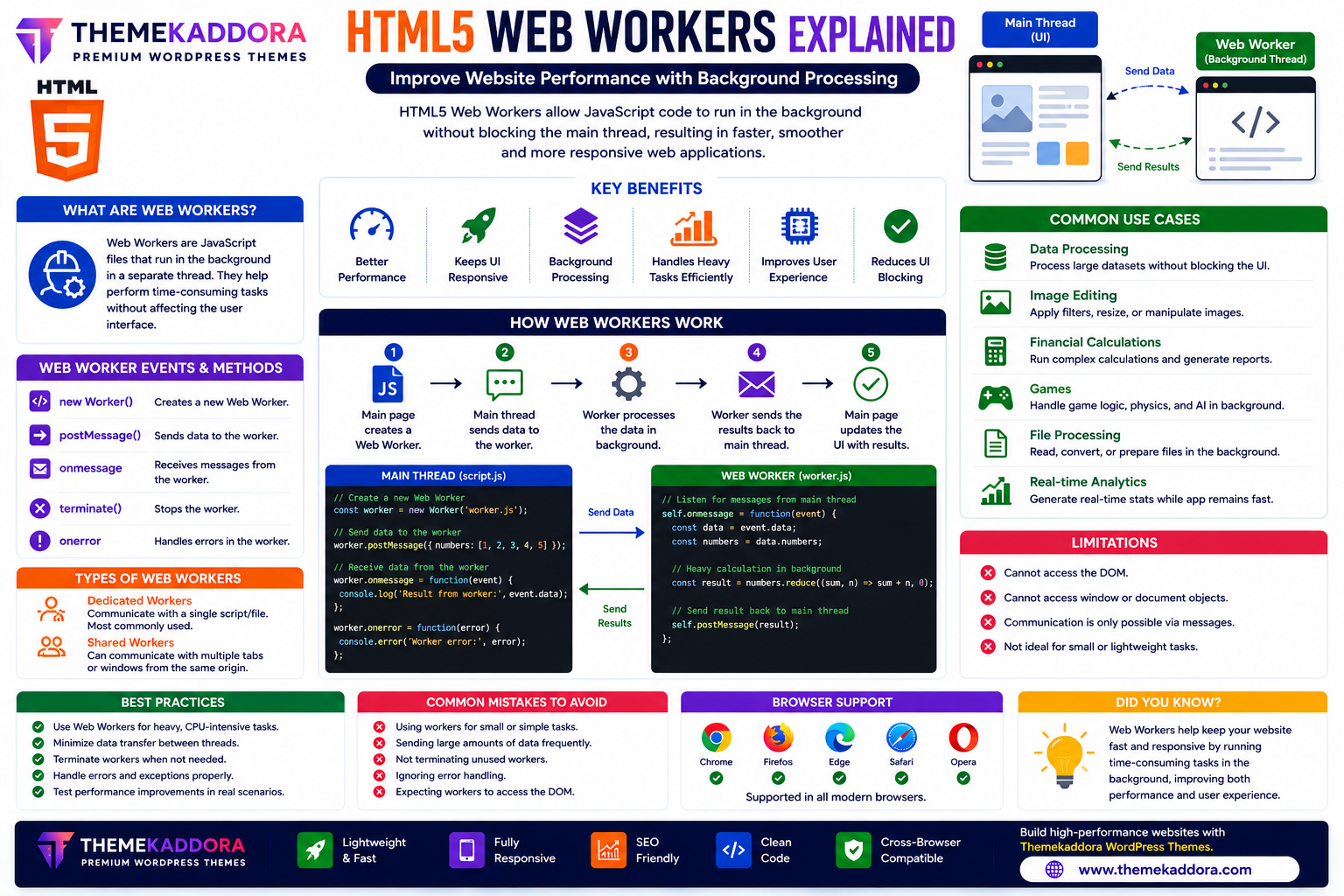
HTML5 Web Workers Explained: Improve Website Performance with Background Processing
Introduction
Modern websites and web applications perform increasingly complex tasks, from processing large datasets and editing images to running calculations and handling real-time updates. If all these operations run on the main browser thread, they can slow down the interface and make the website feel unresponsive.
HTML5 introduced Web Workers, allowing JavaScript code to run in the background without blocking the user interface. This makes websites smoother, faster, and more responsive, even when performing intensive tasks.
Whether you're developing dashboards, online editors, financial tools, games, or data-driven applications, Web Workers can significantly improve performance.
This guide explains how HTML5 Web Workers work, their advantages, common use cases, and best practices.
What Are HTML5 Web Workers?
HTML5 Web Workers are a browser feature that allows JavaScript to execute in a separate background thread.
Instead of running heavy tasks on the main thread—which is responsible for updating the page and responding to user interactions—Web Workers perform those tasks independently.
The main thread and the worker communicate by sending messages to each other.
Why Use Web Workers?
Web Workers help improve website performance by:
Preventing interface freezes
Keeping animations smooth
Improving responsiveness
Processing large datasets
Running background calculations
Enhancing user experience
Reducing delays during intensive operations
Supporting modern web applications
This separation keeps the interface responsive while background work continues.
How Web Workers Work
A typical workflow involves:
The main page creates a Web Worker.
The worker starts running JavaScript in the background.
The main thread sends data to the worker.
The worker processes the data.
The worker returns the results.
The main page updates the interface.
This message-based communication helps isolate long-running tasks.
Common Use Cases
Data Processing
Analyze large datasets without slowing down the user interface.
Image Editing
Apply filters, resize images, or perform image manipulation in the background.
Financial Calculations
Process complex calculations for dashboards, reports, or investment tools.
Games
Handle game logic, artificial intelligence, and physics calculations while maintaining smooth gameplay.
File Processing
Read, convert, or prepare files without interrupting user interactions.
Real-Time Analytics
Calculate statistics and generate reports while users continue using the application.
Benefits of Web Workers
Using Web Workers provides:
Better performance
Faster applications
Responsive interfaces
Improved user experience
Efficient background processing
Better scalability
Reduced UI blocking
Cleaner application architecture
These benefits become increasingly valuable as applications grow more complex.
Types of Web Workers
Dedicated Workers
Dedicated Workers communicate with a single webpage or script.
They are the most commonly used type.
Shared Workers
Shared Workers can communicate with multiple browser tabs or windows from the same origin.
They are useful when several pages need access to the same background process.
Limitations of Web Workers
Although powerful, Web Workers have some limitations.
They cannot directly access:
The DOM
Window object
Document object
Most UI elements
Instead, they communicate with the main thread using messages.
This design helps keep background processing isolated and safe.
Best Practices
Use Workers Only for Heavy Tasks
Simple operations should remain on the main thread.
Minimize Data Transfers
Sending large amounts of data between the main thread and workers can reduce performance gains.
Terminate Workers When Finished
Close workers that are no longer needed to free system resources.
Handle Errors Properly
Implement error handling to prevent background tasks from failing silently.
Test Performance
Measure the impact of Web Workers to ensure they improve performance for your specific application.
Common Mistakes to Avoid
Avoid:
Creating unnecessary workers
Running lightweight tasks in workers
Sending excessive data between threads
Forgetting to terminate workers
Assuming workers can manipulate the DOM directly
Ignoring browser compatibility testing
Using Web Workers strategically delivers the best results.
Web Workers in Modern Websites
HTML5 Web Workers are commonly used in:
Data dashboards
Online photo editors
Video editing tools
Browser games
Scientific applications
Financial platforms
AI-powered web applications
Large-scale business software
They enable complex functionality while maintaining a smooth user experience.
Why HTML5 Web Workers Matter for WordPress Themes
Modern WordPress themes—including Themekaddora themes—can benefit from efficient JavaScript and background processing techniques.
Examples include:
Interactive dashboards
Analytics widgets
Image optimization tools
Advanced page builders
Data visualization
Performance-focused interfaces
Combined with lightweight HTML5 architecture, these techniques help create faster and more responsive websites.
Conclusion
HTML5 Web Workers are an essential feature for building high-performance web applications. By moving resource-intensive tasks into background threads, developers can keep websites responsive while handling complex processing.
Whether you're building dashboards, image editors, financial tools, or modern web applications, Web Workers help improve speed, usability, and scalability.
When combined with responsive WordPress themes from Themekaddora, Web Workers contribute to delivering smooth, professional, and high-performance user experiences.
Frequently Asked Questions (FAQs)
What are HTML5 Web Workers?
HTML5 Web Workers allow JavaScript code to run in background threads without blocking the main browser interface.
Why should I use Web Workers?
They help improve performance by moving heavy processing away from the main thread, keeping websites responsive.
Can Web Workers access the DOM?
No. Web Workers cannot directly access the DOM. They communicate with the main thread using messages.
Are Web Workers useful for games and dashboards?
Yes. They are commonly used for games, analytics dashboards, image processing, financial calculations, and other performance-intensive applications.
Why do Themekaddora WordPress themes support modern HTML5 features?
Themekaddora themes are built with modern HTML5 standards, lightweight code, responsive layouts, SEO-friendly architecture, and performance-focused design, making them an excellent foundation for advanced web technologies like Web Workers.
Comments (0)