
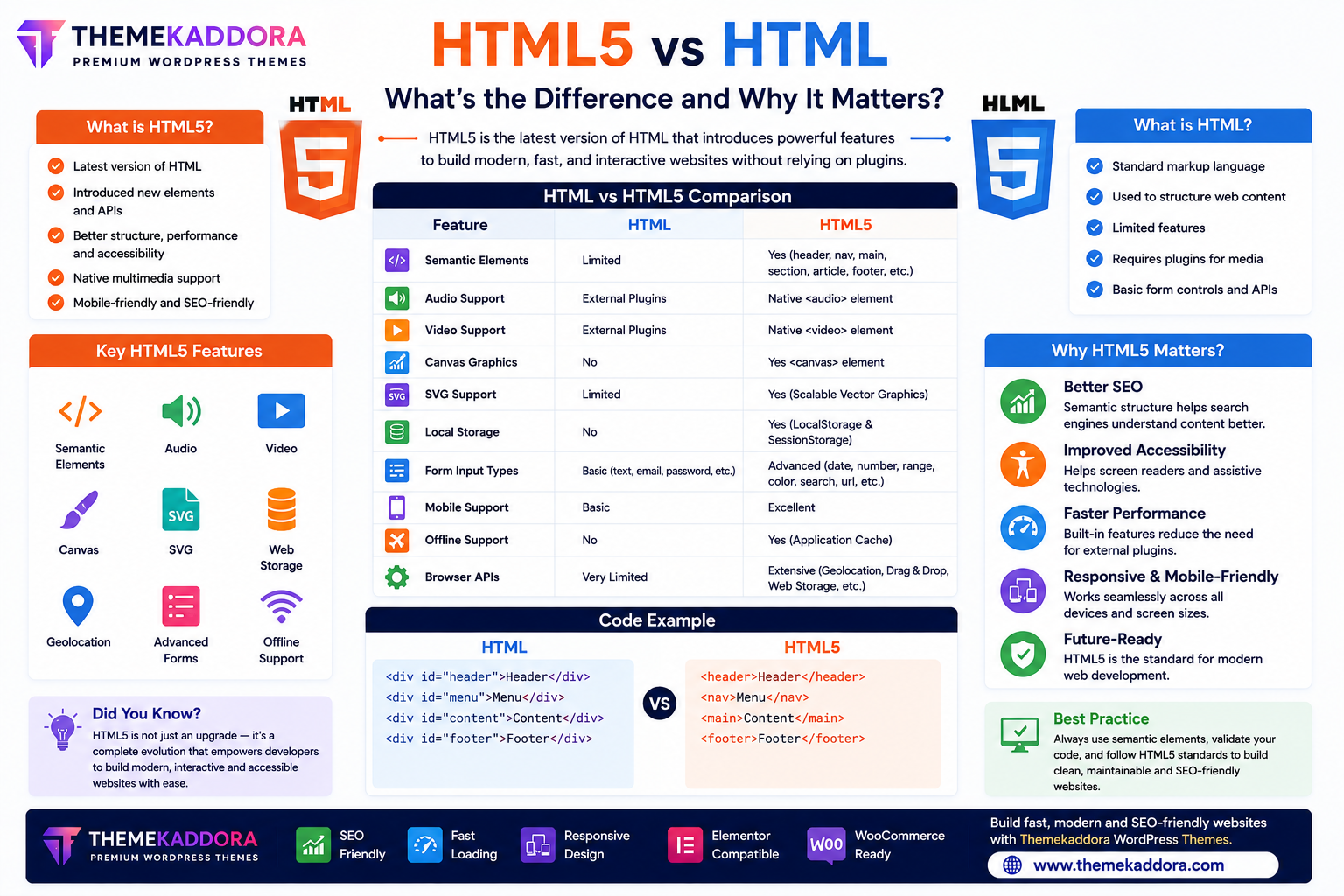
HTML5 vs HTML: What's the Difference and Why It Matters?
Introduction
If you're starting your journey into web development, you've probably come across the terms HTML and HTML5. While they sound similar, HTML5 introduced major improvements that changed the way modern websites are built.
Earlier versions of HTML focused mainly on structuring webpage content. HTML5 expanded those capabilities by introducing semantic elements, native multimedia support, modern APIs, improved forms, offline storage, and better mobile compatibility.
Today, HTML5 is the standard used by nearly all modern websites and web applications.
In this guide, we'll compare HTML and HTML5, explain their key differences, and show why HTML5 is the preferred choice for developers.
What is HTML?
HTML (HyperText Markup Language) is the standard markup language used to structure content on web pages.
HTML allows developers to create:
Headings
Paragraphs
Images
Links
Tables
Lists
Forms
It forms the foundation of every website.
What is HTML5?
HTML5 is the latest major version of HTML.
It expands traditional HTML by introducing:
Semantic elements
Native audio
Native video
Canvas graphics
SVG support
Local storage
Geolocation
Better forms
Improved accessibility
HTML5 provides everything needed for modern website development without relying heavily on external plugins.
HTML vs HTML5 Comparison
Feature
HTML
HTML5
Semantic Elements
Limited
Yes
Audio Support
External Plugins
Native
Video Support
External Plugins
Native
Canvas Graphics
No
Yes
SVG Support
Limited
Yes
Local Storage
No
Yes
Mobile Support
Basic
Excellent
Offline Support
No
Yes
Form Input Types
Basic
Advanced
Browser APIs
Very Limited
Extensive
Major Improvements in HTML5
1. Semantic Elements
HTML5 introduced meaningful tags such as:
<header>
<nav>
<main>
<section>
<article>
<aside>
<footer>
These improve website organization, SEO, and accessibility.
2. Multimedia Without Plugins
Before HTML5, developers often relied on third-party plugins to display audio and video.
HTML5 introduced:
<audio>
<video>
These elements simplify multimedia integration and improve compatibility.
3. Better Forms
HTML5 added new input types, including:
Number
Date
URL
Search
Color
Range
These improve user experience and browser-based validation.
4. Canvas Graphics
The <canvas> element enables developers to create graphics, charts, games, and animations directly in the browser using JavaScript.
5. Local Storage
HTML5 introduced browser storage options that allow websites to store user data locally for faster performance and improved functionality.
6. Improved Mobile Support
HTML5 was designed with responsive web development in mind.
Modern websites built with HTML5 work smoothly across:
Smartphones
Tablets
Laptops
Desktop computers
Why HTML5 is Better for SEO
HTML5 supports search engine optimization by providing:
Semantic structure
Clear content hierarchy
Better accessibility
Faster page loading
Cleaner code
These improvements help search engines understand webpage content more effectively.
Why HTML5 Improves Accessibility
Accessibility features include:
Semantic markup
Better document structure
Improved navigation
Support for assistive technologies
This helps create websites that are easier for everyone to use.
HTML5 in Modern Web Development
Today, HTML5 is used to build:
Business websites
Blogs
Online stores
Web applications
Educational platforms
Portfolio websites
News websites
SaaS platforms
It serves as the foundation for responsive, interactive, and high-performance websites.
Best Practices for HTML5 Development
To build better websites:
Use semantic HTML elements.
Validate your HTML regularly.
Optimize multimedia files.
Build responsive layouts.
Write accessible code.
Keep markup clean and organized.
Test across multiple browsers.
Following these practices helps improve performance and maintainability.
Common Mistakes to Avoid
Avoid:
Using outdated HTML elements.
Relying on plugins for basic multimedia.
Ignoring semantic markup.
Creating non-responsive layouts.
Writing invalid HTML.
Modern development should always follow HTML5 standards whenever possible.
Why HTML5 Matters for WordPress Themes
Professional WordPress themes—including those from Themekaddora—are built using HTML5 standards.
Benefits include:
Better SEO
Faster performance
Responsive layouts
Improved accessibility
Clean code
Modern browser compatibility
Easier customization
HTML5 provides a future-ready foundation for professional WordPress websites.
Conclusion
HTML5 is a significant evolution of HTML, introducing features that make websites faster, more accessible, more interactive, and easier to maintain.
From semantic elements and multimedia support to advanced forms and browser APIs, HTML5 has become the standard for modern web development.
Whether you're learning web development or building a WordPress website with Themekaddora themes, understanding the differences between HTML and HTML5 will help you create websites that meet today's web standards.
Frequently Asked Questions (FAQs)
Is HTML5 different from HTML?
Yes. HTML5 is the latest version of HTML and includes many new features such as semantic elements, multimedia support, advanced forms, local storage, and browser APIs.
Should beginners learn HTML or HTML5?
Beginners should learn modern HTML5 because it is the current web standard used for nearly all new websites.
Does HTML5 replace CSS and JavaScript?
No. HTML5 structures content, CSS styles the page, and JavaScript adds interactivity. All three technologies work together.
Is HTML5 good for SEO?
Yes. HTML5's semantic elements and clean document structure support better SEO and accessibility.
Why do Themekaddora WordPress themes use HTML5?
Themekaddora themes are built with HTML5 to deliver responsive layouts, SEO-friendly structure, clean code, modern browser compatibility, and excellent website performance.
Comments (0)