
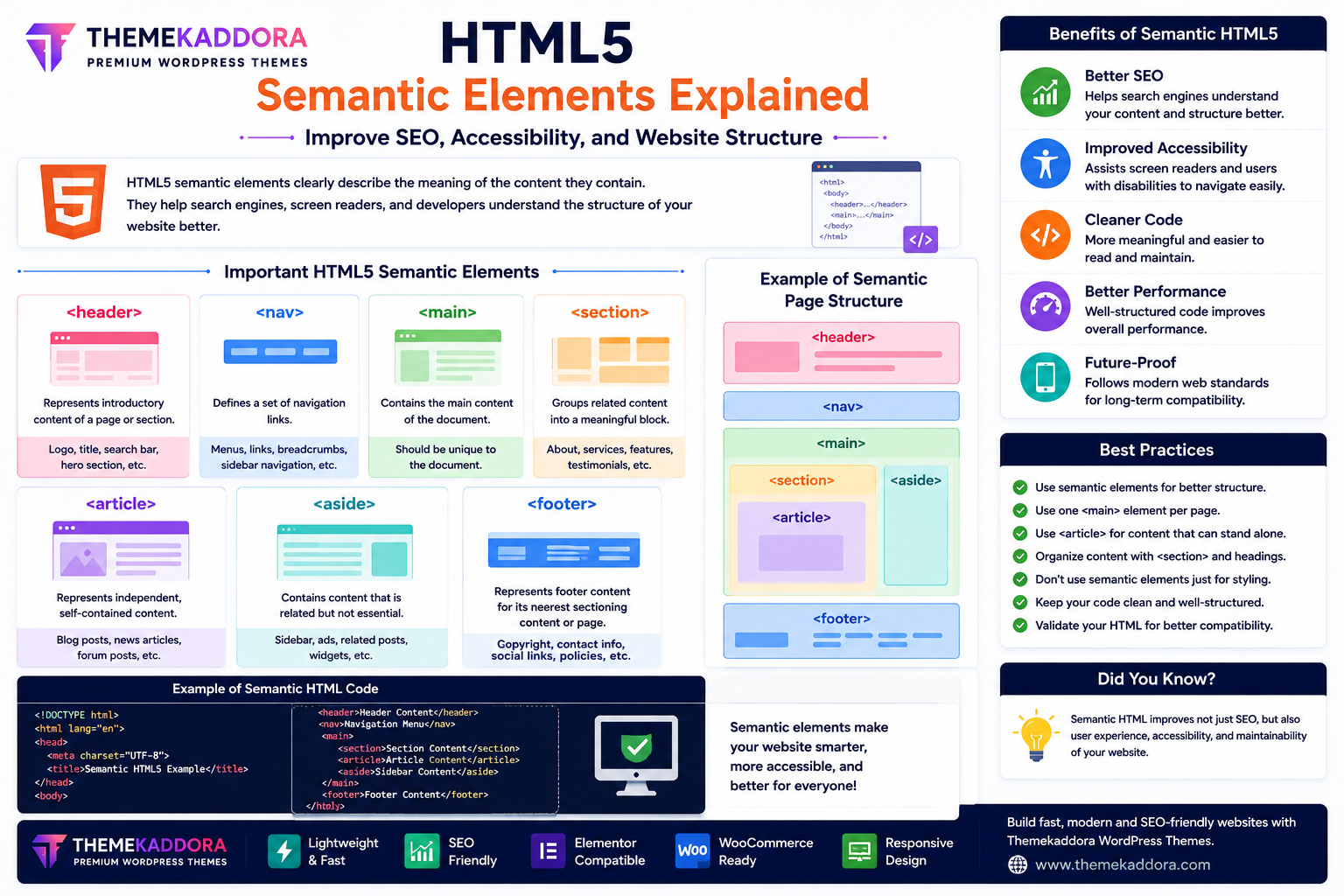
HTML5 Semantic Elements Explained: Improve SEO, Accessibility, and Website Structure
Introduction
Modern websites are expected to be fast, accessible, SEO-friendly, and easy to maintain. One of the biggest improvements introduced in HTML5 is the use of semantic elements, which provide meaningful structure to web pages.
Before HTML5, developers relied heavily on generic <div> elements to build layouts. While functional, these tags didn't describe the purpose of the content, making websites harder for search engines, screen readers, and developers to understand.
HTML5 semantic elements solve this problem by clearly defining different sections of a webpage.
In this guide, you'll learn what semantic elements are, why they matter, and how they help create better websites.
What Are HTML5 Semantic Elements?
Semantic elements are HTML tags that clearly describe the purpose of the content they contain.
Instead of using generic containers, semantic elements explain what each section of the webpage represents.
For example:
Website header
Navigation menu
Main content
Individual articles
Sidebar
Footer
This improves readability for both humans and machines.
Why Semantic HTML Matters
Using semantic elements provides many benefits:
Better SEO
Improved accessibility
Cleaner code
Easier maintenance
Better browser compatibility
Improved readability
Future-proof website structure
Semantic HTML is now considered a best practice for modern web development.
Important HTML5 Semantic Elements
<header>
The <header> element represents introductory content.
It commonly contains:
Website logo
Site title
Navigation
Search bar
Hero section
Every webpage typically begins with a header.
<nav>
The <nav> element contains navigation links.
Examples include:
Main menu
Sidebar navigation
Breadcrumbs
Footer navigation
Using <nav> helps search engines identify important website links.
<main>
The <main> element contains the primary content of a webpage.
It should include the unique content users came to read.
There should only be one <main> element per page.
<section>
A <section> groups related content into meaningful blocks.
Examples include:
About Us
Services
Features
Testimonials
Pricing
Contact Information
Sections help organize long webpages.
<article>
The <article> element represents independent content that can stand on its own.
Examples include:
Blog posts
News articles
Forum posts
Product reviews
Search engines often treat articles as standalone pieces of content.
<aside>
The <aside> element contains supporting information related to the main content.
Examples include:
Sidebar widgets
Advertisements
Related posts
Author information
It helps separate secondary content from primary content.
<footer>
The <footer> contains closing information such as:
Copyright notice
Contact details
Social media links
Privacy Policy
Terms & Conditions
Most websites include a footer at the bottom of every page.
Benefits for SEO
Semantic HTML helps search engines better understand webpage structure.
Benefits include:
Improved indexing
Better content hierarchy
Easier crawling
Clear page organization
Enhanced structured content
While semantic tags alone don't guarantee higher rankings, they support strong technical SEO.
Benefits for Accessibility
Screen readers and assistive technologies use semantic elements to help users navigate websites more efficiently.
Advantages include:
Easier navigation
Better content organization
Improved user experience
Faster access to important sections
Accessible websites serve a broader audience and often align with web accessibility standards.
Semantic HTML vs Generic <div> Elements
Generic <div>
Semantic HTML
No meaning
Clearly describes content
Harder to maintain
Easier to read
Less SEO-friendly
Better SEO structure
Less accessible
Improved accessibility
Generic layout
Well-organized content
Semantic elements make code more meaningful without changing the visual appearance of the page.
Best Practices for Using Semantic Elements
To build clean HTML5 websites:
Use one <main> element per page.
Place navigation links inside <nav>.
Use <article> for standalone content.
Organize content with <section>.
Include meaningful headings.
Avoid replacing every <div> unnecessarily—use semantic elements where they best describe the content.
A balanced approach creates clear and maintainable code.
Common Mistakes to Avoid
Avoid:
Using multiple <main> elements
Placing unrelated content inside <article>
Overusing <section> without headings
Ignoring accessibility considerations
Replacing every <div> with semantic tags regardless of context
Use semantic elements intentionally to reflect the actual structure of the page.
Why HTML5 Semantic Elements Matter for WordPress Themes
Modern WordPress themes—including Themekaddora themes—are built using semantic HTML5 markup.
Benefits include:
Better SEO structure
Improved accessibility
Responsive layouts
Cleaner code
Faster maintenance
Modern browser compatibility
Enhanced user experience
Semantic HTML helps create professional websites that are easier to maintain and optimize.
Conclusion
HTML5 semantic elements are an essential part of modern web development. They improve website structure, support accessibility, enhance SEO, and make code easier to understand and maintain.
Whether you're developing websites from scratch or customizing WordPress themes, learning semantic HTML will help you build cleaner, more professional websites.
Combined with Themekaddora's HTML5-based WordPress themes, semantic markup creates websites that are fast, accessible, and built for long-term success.
Frequently Asked Questions (FAQs)
What are HTML5 semantic elements?
Semantic elements are HTML tags that clearly describe the purpose of webpage content, such as <header>, <nav>, <main>, <section>, <article>, <aside>, and <footer>.
Do semantic elements improve SEO?
Semantic elements help search engines understand page structure more effectively, supporting better technical SEO and content organization.
Are semantic elements important for accessibility?
Yes. They improve navigation for screen readers and assistive technologies, making websites easier to use for people with disabilities.
Should I replace every <div> with semantic elements?
No. Use semantic elements only when they accurately describe the content. Generic <div> elements are still appropriate for layout or styling when no semantic element fits.
Why do Themekaddora WordPress themes use semantic HTML5?
Themekaddora themes use semantic HTML5 to provide cleaner code, improved SEO, better accessibility, responsive layouts, and modern web standards for professional WordPress websites.
Comments (0)