
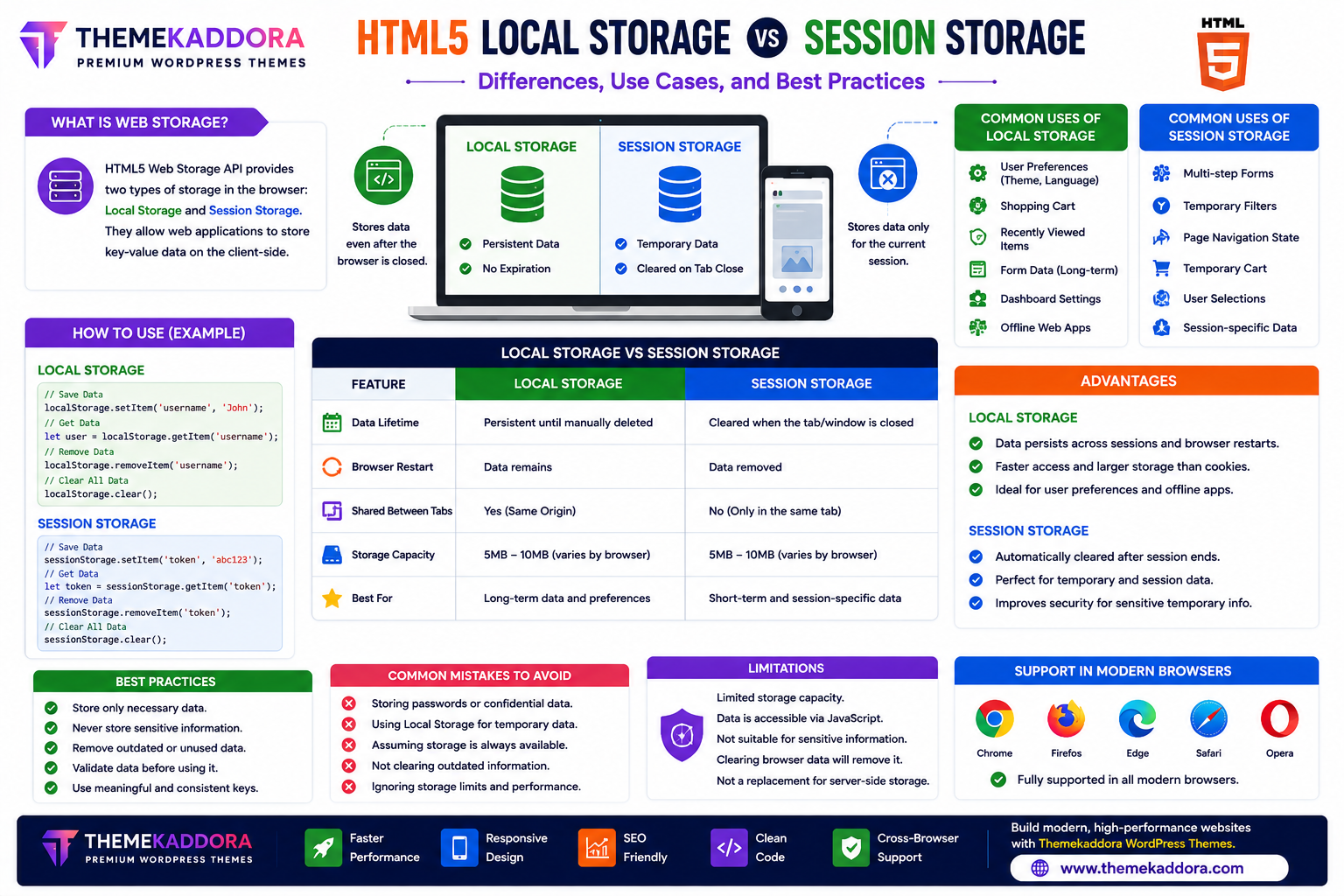
HTML5 Local Storage vs Session Storage: Differences, Use Cases, and Best Practices
Introduction
Modern websites and web applications often need to store small amounts of data directly in the user's browser. This allows websites to remember preferences, improve performance, personalize user experiences, and reduce unnecessary server requests.
Before HTML5, developers primarily relied on cookies for browser storage. While cookies are still useful in many situations, HTML5 introduced the Web Storage API, which includes Local Storage and Session Storage—two efficient ways to store data directly in the browser.
Although both technologies serve similar purposes, they behave differently and are designed for different use cases.
In this guide, you'll learn how Local Storage and Session Storage work, their differences, advantages, limitations, and best practices.
What is HTML5 Web Storage?
The HTML5 Web Storage API allows websites to store key-value data directly inside the user's browser.
It consists of two storage types:
Local Storage
Session Storage
Unlike cookies, Web Storage is designed for client-side data storage and does not automatically accompany every server request.
What is Local Storage?
Local Storage stores data that remains available even after the browser is closed.
The stored information stays on the user's device until:
The website removes it
The user clears browser data
This makes Local Storage useful for remembering long-term preferences.
Common Uses of Local Storage
Local Storage is commonly used for:
Dark mode preferences
Language selection
Shopping cart data
Recently viewed products
User settings
Dashboard preferences
Theme customization
Offline web applications
These settings remain available between browsing sessions.
What is Session Storage?
Session Storage stores data only while the current browser tab or window remains open.
Once the tab is closed, the stored data is automatically removed.
This makes Session Storage suitable for temporary information.
Common Uses of Session Storage
Session Storage is often used for:
Multi-step forms
Temporary shopping sessions
Search filters
Page navigation state
Temporary user selections
Session-specific application data
The data disappears when the browsing session ends.
Local Storage vs Session Storage
Feature
Local Storage
Session Storage
Data Lifetime
Persistent
Temporary
Browser Restart
Data Remains
Data Removed
Shared Between Tabs
Yes (same origin)
No
Storage Capacity
Larger than cookies
Larger than cookies
Best For
Long-term preferences
Temporary session data
Choosing the right storage depends on your application's needs.
Advantages of Local Storage
Local Storage provides:
Persistent browser storage
Fast access
Simple implementation
Better performance than cookies for many client-side tasks
Reduced server requests
It works well for saving user preferences across visits.
Advantages of Session Storage
Session Storage offers:
Automatic cleanup
Session-specific data
Improved temporary state management
Reduced risk of outdated session information
It is useful for workflows that should not persist after the user closes the tab.
Limitations of Web Storage
Developers should understand that Web Storage:
Is limited in storage capacity
Stores data only on the client device
Is accessible through JavaScript running on the same origin
Should not be used for sensitive information such as passwords or authentication tokens
Sensitive data should always be handled securely on the server or through appropriate secure mechanisms.
Best Practices
Store Only Necessary Data
Avoid storing unnecessary or large amounts of information.
Never Store Sensitive Information
Do not store:
Passwords
Credit card information
Personal identification data
Private authentication credentials
Use secure server-side solutions for sensitive data.
Remove Outdated Data
Delete information that is no longer needed to keep storage organized.
Validate Stored Data
Always check stored values before using them in your application.
Use Meaningful Keys
Choose descriptive names for stored items to improve code readability and maintenance.
Common Mistakes to Avoid
Avoid:
Storing confidential information
Filling browser storage with unnecessary data
Assuming storage is always available
Forgetting to remove outdated information
Using Local Storage for short-lived session data
Using Session Storage when long-term persistence is required
Selecting the appropriate storage type improves both security and usability.
Web Storage in Modern Websites
HTML5 Web Storage is widely used in:
eCommerce websites
Business dashboards
SaaS applications
Educational platforms
Blogs
Membership websites
Progressive Web Apps (PWAs)
Customer portals
It helps create faster, more personalized user experiences.
Why HTML5 Web Storage Matters for WordPress Themes
Modern WordPress themes—including Themekaddora themes—can benefit from HTML5 Web Storage for improving user experience.
Examples include:
Remembering theme preferences
Saving interface settings
Improving dashboard usability
Supporting responsive features
Enhancing personalization
When used thoughtfully, Web Storage contributes to smoother interactions without relying solely on server-side sessions.
Conclusion
HTML5 Local Storage and Session Storage provide simple, efficient ways to store browser data and enhance user experiences.
Local Storage is ideal for long-term preferences that should persist across browser sessions, while Session Storage is better suited for temporary information that only needs to exist during a single browsing session.
By understanding their strengths, limitations, and best practices, developers can build faster, more responsive, and user-friendly websites.
Combined with modern WordPress themes from Themekaddora, HTML5 Web Storage supports highly interactive websites that meet today's web development standards.
Frequently Asked Questions (FAQs)
What is the difference between Local Storage and Session Storage?
Local Storage keeps data until it is manually removed, while Session Storage automatically deletes data when the browser tab or window is closed.
Is Local Storage better than cookies?
Local Storage is useful for client-side preferences because it offers more storage space and does not automatically accompany every server request. Cookies remain important for scenarios that require communication with the server.
Can I store passwords in Local Storage?
No. Sensitive information such as passwords or authentication credentials should not be stored in Local Storage or Session Storage.
Is Session Storage shared across browser tabs?
No. Session Storage is unique to each browser tab or window.
Why do Themekaddora WordPress themes support modern HTML5 features?
Themekaddora themes follow modern HTML5 standards, helping developers build responsive, SEO-friendly, high-performance WordPress websites with excellent compatibility and user experience.
Comments (0)