
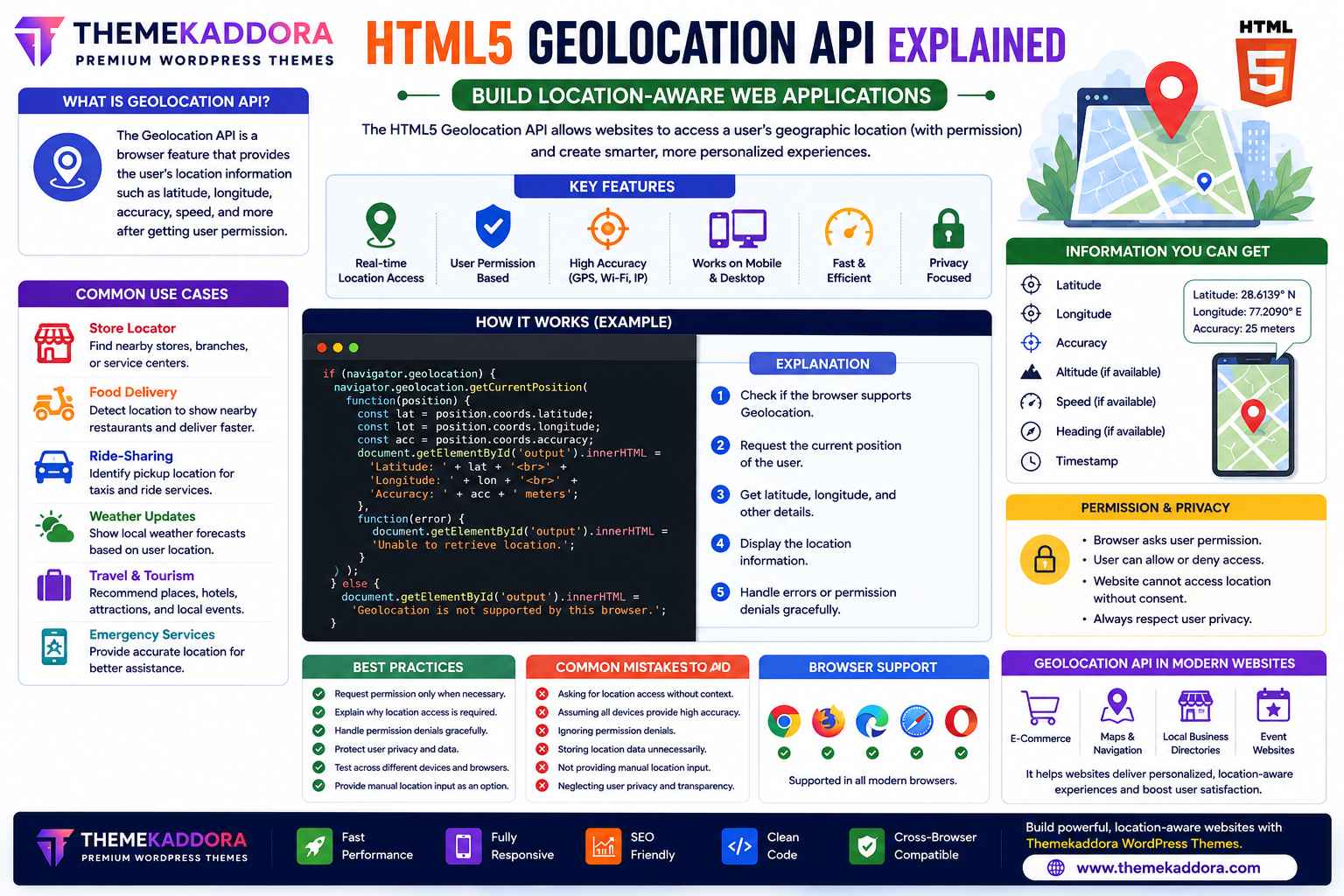
HTML5 Geolocation API Explained: Build Location-Aware Web Applications
Introduction
Location-based services have become a standard feature of modern websites and web applications. From food delivery and ride-sharing apps to weather forecasts and nearby store locators, users expect websites to provide personalized experiences based on their location.
The HTML5 Geolocation API enables websites to request a user's geographic location (with permission) directly through the browser. This makes it possible to create smarter, more interactive applications without requiring additional software.
Whether you're developing a business website, travel platform, delivery service, or mapping application, understanding the Geolocation API is an essential skill for modern web development.
This guide explains how the HTML5 Geolocation API works, its benefits, use cases, and best practices.
What is the HTML5 Geolocation API?
The HTML5 Geolocation API is a browser feature that allows websites to access a user's approximate geographic location after receiving their permission.
Depending on the device and available technologies, location information may be determined using:
GPS
Wi-Fi networks
Mobile networks
IP address
The browser chooses the most appropriate method based on the user's device.
Why Use the Geolocation API?
The Geolocation API helps websites provide:
Personalized experiences
Location-aware services
Faster user interactions
Improved navigation
Local business recommendations
Nearby search results
Better customer convenience
More relevant content
Location-based functionality enhances user engagement and usability.
Common Use Cases
Store Locator
Help visitors find:
Nearby stores
Branch offices
Service centers
Pickup locations
Food Delivery
Automatically identify the customer's location to display available restaurants and estimate delivery times.
Ride-Sharing Apps
Detect pickup locations for taxis, ride-sharing, and transportation services.
Weather Websites
Display local weather forecasts based on the user's location.
Travel Websites
Recommend:
Hotels
Attractions
Restaurants
Tourist destinations
based on the visitor's location.
Emergency Services
Provide accurate location information to improve emergency assistance and support.
Information the API Can Provide
With user permission, the Geolocation API can return:
Latitude
Longitude
Accuracy
Altitude (if available)
Heading (if available)
Speed (if available)
Timestamp
The exact information depends on the device and browser capabilities.
Permission and Privacy
Privacy is a core part of the Geolocation API.
Before accessing location data:
The browser requests user permission.
Users can allow or deny access.
Websites cannot retrieve location information without consent.
Always respect user choices and explain why location access is needed.
Benefits of HTML5 Geolocation
Using the Geolocation API provides:
Better personalization
Faster search results
Improved customer experience
Reduced manual input
Enhanced navigation
More relevant recommendations
Mobile-friendly functionality
Cross-platform support
These benefits improve overall website usability.
Best Practices
Request Permission Only When Needed
Avoid asking for location access immediately unless it is essential for the current task.
Explain Why Location Is Required
Clearly communicate how the location data will improve the user experience.
Handle Permission Denials Gracefully
Provide alternative options, such as allowing users to enter their location manually.
Protect User Privacy
Only collect and use location data for legitimate purposes, and avoid storing it longer than necessary.
Test Across Devices
Verify that your implementation works on:
Smartphones
Tablets
Desktop browsers
Location accuracy may vary depending on the device.
Common Mistakes to Avoid
Avoid:
Requesting location access without context
Assuming every device provides GPS-level accuracy
Ignoring permission denials
Storing location data unnecessarily
Failing to provide manual location input
Neglecting user privacy
A transparent and user-focused approach builds trust.
Geolocation API in Modern Websites
The HTML5 Geolocation API is widely used in:
eCommerce websites
Food delivery platforms
Taxi booking apps
Travel portals
Fitness applications
Navigation systems
Event websites
Local business directories
It helps websites deliver more personalized and location-aware experiences.
Why HTML5 Geolocation Matters for WordPress Themes
Modern WordPress themes—including Themekaddora themes—can integrate location-based features to enhance user engagement.
Examples include:
Store locators
Service area maps
Nearby business listings
Local event pages
Personalized content
Regional promotions
Combined with responsive design and clean HTML5 code, these features help create modern, user-friendly websites.
Conclusion
The HTML5 Geolocation API makes it possible to create personalized, location-aware web applications that improve convenience and user engagement.
From nearby store locators to delivery services and travel recommendations, the API enables developers to build smarter websites while respecting user privacy through explicit permission requests.
When paired with responsive WordPress themes from Themekaddora, location-based functionality can provide valuable experiences that keep users engaged and help businesses better serve their audiences.
Frequently Asked Questions (FAQs)
What is the HTML5 Geolocation API?
The HTML5 Geolocation API is a browser feature that allows websites to request a user's geographic location after obtaining their permission.
Does the Geolocation API require user permission?
Yes. Browsers always ask users for permission before sharing location information with a website.
Can the Geolocation API work on desktop computers?
Yes. Desktop browsers can use Wi-Fi networks, IP-based location, or other available methods, though accuracy may differ from GPS-enabled mobile devices.
Is location information always accurate?
No. Accuracy depends on the device, browser, available sensors, network conditions, and the location method being used.
Why do Themekaddora WordPress themes support HTML5 APIs?
Themekaddora themes are built using modern HTML5 standards, making it easy to integrate browser APIs such as Geolocation while maintaining responsive design, clean code, excellent performance, and SEO-friendly architecture.
Comments (0)