
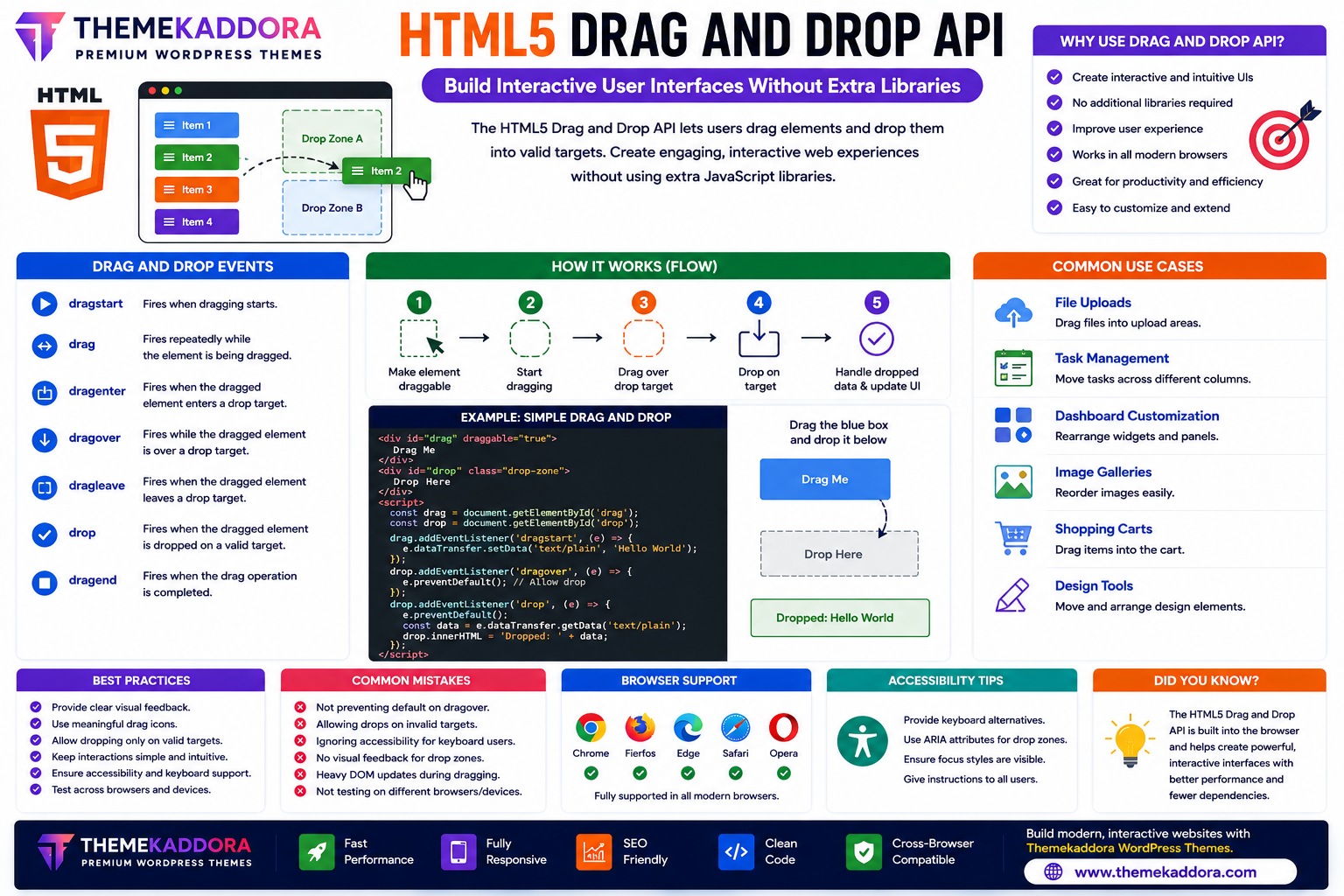
HTML5 Drag and Drop API: Build Interactive User Interfaces Without Extra Libraries
Introduction
Modern web applications are expected to provide smooth, interactive user experiences. From uploading files and organizing tasks to building dashboards and design tools, drag-and-drop interactions have become a standard feature of today's websites.
Before HTML5, developers often depended on third-party JavaScript libraries to implement drag-and-drop functionality. HTML5 introduced the Drag and Drop API, allowing developers to build interactive interfaces using native browser capabilities.
Whether you're creating project management tools, file upload systems, online editors, or customizable dashboards, the HTML5 Drag and Drop API offers a lightweight and efficient solution.
In this guide, you'll learn how the Drag and Drop API works, its features, common use cases, and best practices.
What is the HTML5 Drag and Drop API?
The HTML5 Drag and Drop API enables users to drag elements from one location and drop them into another within a web page.
It supports interactions between:
HTML elements
Lists
Cards
Images
Files
Custom interface components
The API works with JavaScript events to control the dragging process.
Why Use the Drag and Drop API?
The Drag and Drop API provides several benefits:
Interactive user interfaces
Better user experience
Faster workflows
Native browser support
No external libraries required
Mobile-friendly implementations (with additional touch handling where needed)
Flexible customization
Improved productivity
It allows users to interact with content more naturally.
Common Use Cases
File Upload Systems
Allow users to drag files directly into an upload area instead of selecting them manually.
Task Management Boards
Create project boards where users can move tasks between columns.
Examples include:
To Do
In Progress
Completed
Dashboard Customization
Enable users to rearrange widgets, reports, and dashboard panels.
Image Galleries
Allow visitors to reorder image collections using drag-and-drop interactions.
Shopping Carts
Support moving products into shopping carts through intuitive drag actions.
Online Design Tools
Graphic editors and layout builders frequently use drag-and-drop functionality for placing and organizing design elements.
HTML5 Drag Events
The Drag and Drop API includes several key events.
dragstart
Triggered when dragging begins.
drag
Occurs while an element is being dragged.
dragenter
Fires when the dragged item enters a valid drop target.
dragover
Occurs while the dragged element remains over the drop area.
This event typically needs to allow dropping.
dragleave
Triggered when the dragged item leaves a drop target.
drop
Occurs when the dragged item is released onto a valid target.
dragend
Fires after the dragging operation finishes.
How the Drag and Drop Process Works
A typical workflow includes:
Make an element draggable.
Detect when dragging starts.
Identify valid drop targets.
Allow dropping.
Handle the dropped data.
Update the interface.
This event-driven process enables highly interactive applications.
Advantages of Native Drag and Drop
Using the HTML5 Drag and Drop API provides:
Lightweight implementation
Browser support
Faster development
Reduced dependencies
Better maintainability
Flexible customization
It helps developers build rich interfaces without relying on external libraries for many common scenarios.
Best Practices
Provide Visual Feedback
Highlight valid drop areas so users understand where items can be placed.
Prevent Invalid Drops
Restrict dropping to appropriate target areas.
Keep Interactions Intuitive
Use familiar drag-and-drop behaviors that users can easily understand.
Optimize Performance
Avoid unnecessary DOM updates during dragging to maintain smooth interactions.
Test Across Devices
Verify functionality on:
Desktop browsers
Tablets
Mobile devices
Touch-based devices may require additional handling because browser support for native drag-and-drop interactions varies.
Accessibility Considerations
Not all users can perform drag-and-drop interactions.
Improve accessibility by providing:
Keyboard alternatives
Clear instructions
Visible focus indicators
Accessible controls for moving items
Offering multiple interaction methods makes your application more inclusive.
Common Mistakes to Avoid
Avoid:
Poor visual feedback
Unclear drop targets
Ignoring accessibility
Allowing invalid drops
Overcomplicated interactions
Assuming identical behavior across all browsers and devices
Careful testing improves reliability.
Drag and Drop in Modern Websites
The HTML5 Drag and Drop API is widely used in:
File managers
Kanban boards
Website builders
Online learning platforms
Inventory management systems
Design applications
CRM software
Project management tools
Interactive interfaces help improve productivity and engagement.
Why HTML5 Drag and Drop Matters for WordPress Themes
Modern WordPress themes—including Themekaddora themes—can support drag-and-drop interfaces for improved usability.
Examples include:
Custom page builders
Media management
Widget organization
Interactive dashboards
Product management
Content editors
Combined with responsive layouts and clean HTML5 code, these features create engaging user experiences.
Conclusion
The HTML5 Drag and Drop API simplifies the creation of interactive web applications by allowing users to move content naturally within a webpage.
From file uploads and project management boards to design tools and customizable dashboards, this API helps developers build intuitive interfaces while reducing dependence on external libraries.
When paired with responsive WordPress themes from Themekaddora, drag-and-drop functionality contributes to faster, more engaging, and user-friendly websites.
Frequently Asked Questions (FAQs)
What is the HTML5 Drag and Drop API?
The HTML5 Drag and Drop API allows users to drag elements and drop them into designated areas within a webpage using native browser functionality.
Do I need external libraries for drag and drop?
Not always. Many drag-and-drop interactions can be implemented using the native HTML5 API, though some advanced touch interactions may benefit from additional libraries or custom code.
Can the Drag and Drop API upload files?
Yes. It is commonly used to create drag-and-drop file upload interfaces.
Does drag and drop work on mobile devices?
Support varies across browsers and platforms. Many mobile experiences require additional touch event handling for the best results.
Why do Themekaddora WordPress themes use modern HTML5 features?
Themekaddora themes follow modern HTML5 standards to provide responsive layouts, clean code, SEO-friendly architecture, and compatibility with advanced browser features such as the Drag and Drop API.
Comments (0)