
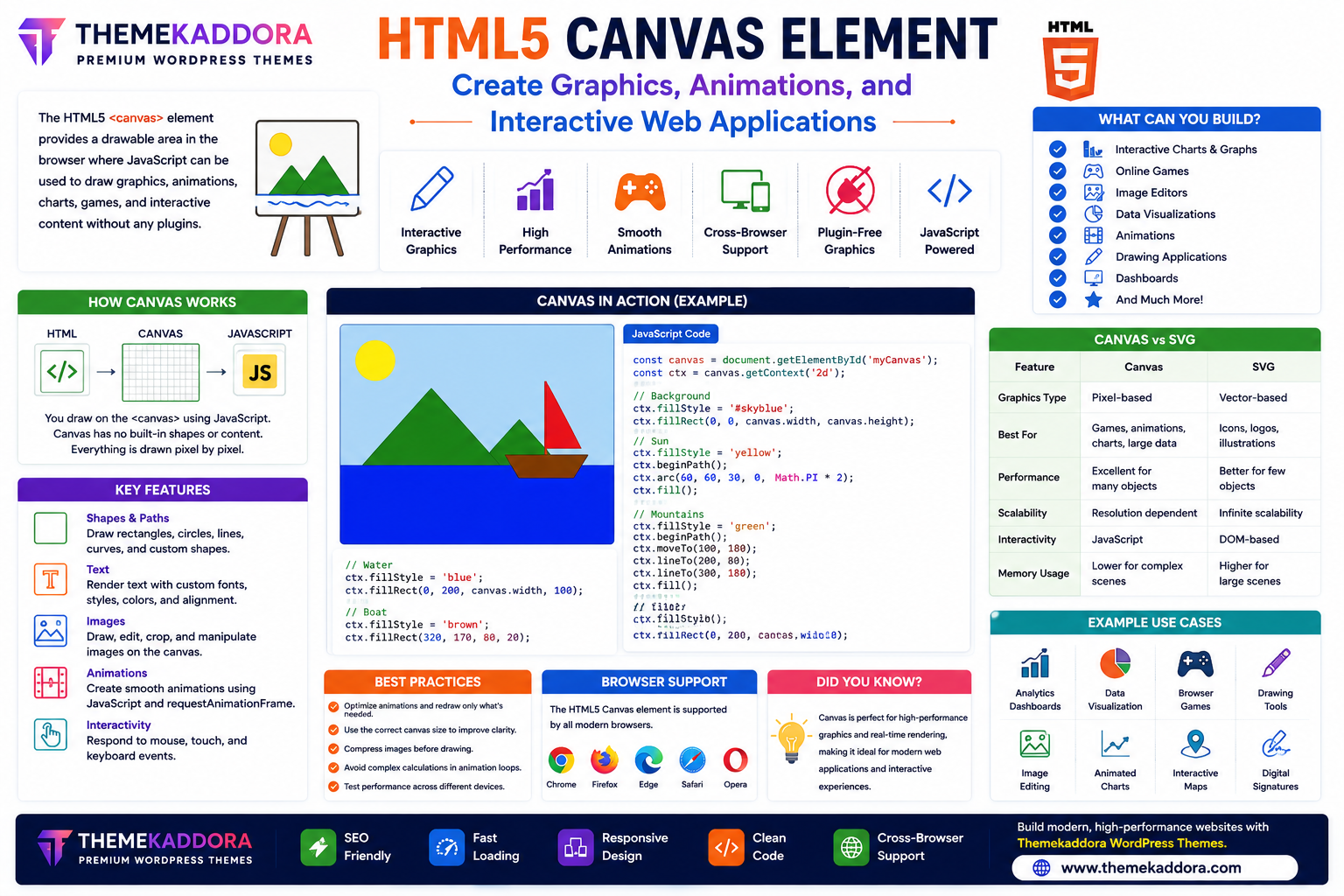
HTML5 Canvas Element Explained: Create Graphics, Animations, and Interactive Web Applications
Introduction
Modern websites are no longer limited to displaying static text and images. Today, users expect interactive dashboards, animated graphics, online games, visual data, drawing tools, and engaging user experiences.
The HTML5 Canvas element makes all of this possible. It provides developers with a flexible drawing surface that works directly inside the browser using JavaScript.
Whether you're creating charts, animations, games, design tools, or interactive applications, the Canvas element is one of the most powerful features introduced in HTML5.
In this guide, you'll learn how the HTML5 Canvas element works, its benefits, common use cases, and best practices for modern web development.
What is the HTML5 Canvas Element?
The <canvas> element is an HTML5 feature that provides a drawable area where developers can create graphics dynamically using JavaScript.
Unlike regular HTML elements, Canvas does not contain predefined visual content. Instead, JavaScript is used to draw and update graphics in real time.
This makes Canvas ideal for interactive and animated web applications.
Why Use HTML5 Canvas?
The Canvas element offers several advantages:
Interactive graphics
High-performance rendering
Smooth animations
Real-time updates
Plugin-free graphics
Cross-browser support
Mobile compatibility
Flexible drawing capabilities
These features make Canvas suitable for a wide range of web projects.
What Can You Build with Canvas?
The HTML5 Canvas element is commonly used for:
Interactive charts
Dashboards
Online games
Image editors
Whiteboards
Drawing applications
Infographics
Data visualizations
Digital signatures
Animated backgrounds
Its versatility makes it valuable for both simple and advanced projects.
Key Canvas Features
Drawing Shapes
Canvas can draw:
Rectangles
Circles
Lines
Polygons
Custom shapes
Developers have precise control over positioning and styling.
Text Rendering
Canvas supports displaying customized text using different:
Fonts
Sizes
Colors
Alignment
Effects
Useful for games, charts, and interactive graphics.
Images
Canvas can display and manipulate images by:
Cropping
Resizing
Rotating
Applying filters
Combining multiple images
Image editing tools often rely on Canvas.
Animations
By updating graphics continuously with JavaScript, developers can create:
Moving objects
Interactive effects
Loading animations
Particle systems
Game environments
Canvas enables smooth browser-based animations.
User Interaction
Canvas works with JavaScript events such as:
Mouse clicks
Touch gestures
Keyboard input
Pointer movement
This allows users to interact directly with graphics.
Canvas vs SVG
Both Canvas and SVG display graphics, but they serve different purposes.
Feature
Canvas
SVG
Graphics Type
Pixel-based
Vector-based
Best For
Games, animations, charts
Icons, logos, illustrations
Performance
Excellent for many objects
Better for simple scalable graphics
Scalability
Fixed resolution
Infinite scaling
Interactivity
JavaScript controlled
DOM-based elements
Choose the technology based on your project requirements.
Canvas in Modern Websites
Canvas is widely used in:
Business Dashboards
Display live charts and business metrics.
Educational Platforms
Create interactive learning activities and simulations.
Online Games
Canvas powers many browser-based games.
Data Visualization
Generate dynamic graphs and reports.
Design Applications
Support drawing tools and image editing features.
Interactive Landing Pages
Enhance user engagement with animated visual elements.
Performance Best Practices
To improve Canvas performance:
Optimize animation loops.
Redraw only the necessary areas.
Compress images before rendering.
Minimize expensive calculations.
Use efficient JavaScript code.
Test performance on mobile devices.
Efficient rendering creates smoother user experiences.
Accessibility Considerations
Because Canvas graphics are drawn visually, developers should also provide accessible alternatives where appropriate.
Examples include:
Descriptive text
Data tables for charts
Keyboard controls
ARIA attributes where applicable
This helps ensure content remains usable for a wider audience.
Common Canvas Mistakes
Avoid:
Creating oversized canvases
Rendering unnecessary objects
Ignoring mobile optimization
Failing to optimize animations
Not providing accessible alternatives
Mixing Canvas with excessive DOM updates
Good planning leads to better performance.
Why HTML5 Canvas Matters for WordPress Themes
Modern WordPress themes—including Themekaddora themes—can integrate Canvas-powered graphics for richer user experiences.
Benefits include:
Interactive dashboards
Animated hero sections
Visual statistics
Lightweight graphics
Faster page rendering
Responsive design compatibility
Modern website appearance
Canvas helps create engaging websites while maintaining HTML5 standards.
Conclusion
The HTML5 Canvas element has transformed web development by enabling developers to create graphics, animations, games, dashboards, and interactive applications directly in the browser.
Its flexibility, performance, and compatibility make it one of the most powerful features of HTML5.
When combined with responsive WordPress themes from Themekaddora, Canvas helps developers build visually impressive, high-performance websites that deliver exceptional user experiences.
Frequently Asked Questions (FAQs)
What is the HTML5 Canvas element?
The HTML5 <canvas> element provides a drawable area that allows developers to create graphics, animations, and interactive content using JavaScript.
Does Canvas require plugins?
No. Canvas is built into HTML5 and works in modern browsers without external plugins.
What is Canvas commonly used for?
Canvas is widely used for charts, games, animations, dashboards, drawing applications, image editing tools, and interactive graphics.
What's the difference between Canvas and SVG?
Canvas is pixel-based and well-suited for dynamic graphics and animations, while SVG is vector-based and ideal for scalable illustrations and icons.
Why do Themekaddora WordPress themes support HTML5 Canvas?
Themekaddora themes are built with modern HTML5 standards, allowing developers to integrate Canvas-powered graphics, animations, and interactive elements while maintaining responsive design, fast performance, and SEO-friendly code.
Comments (0)