
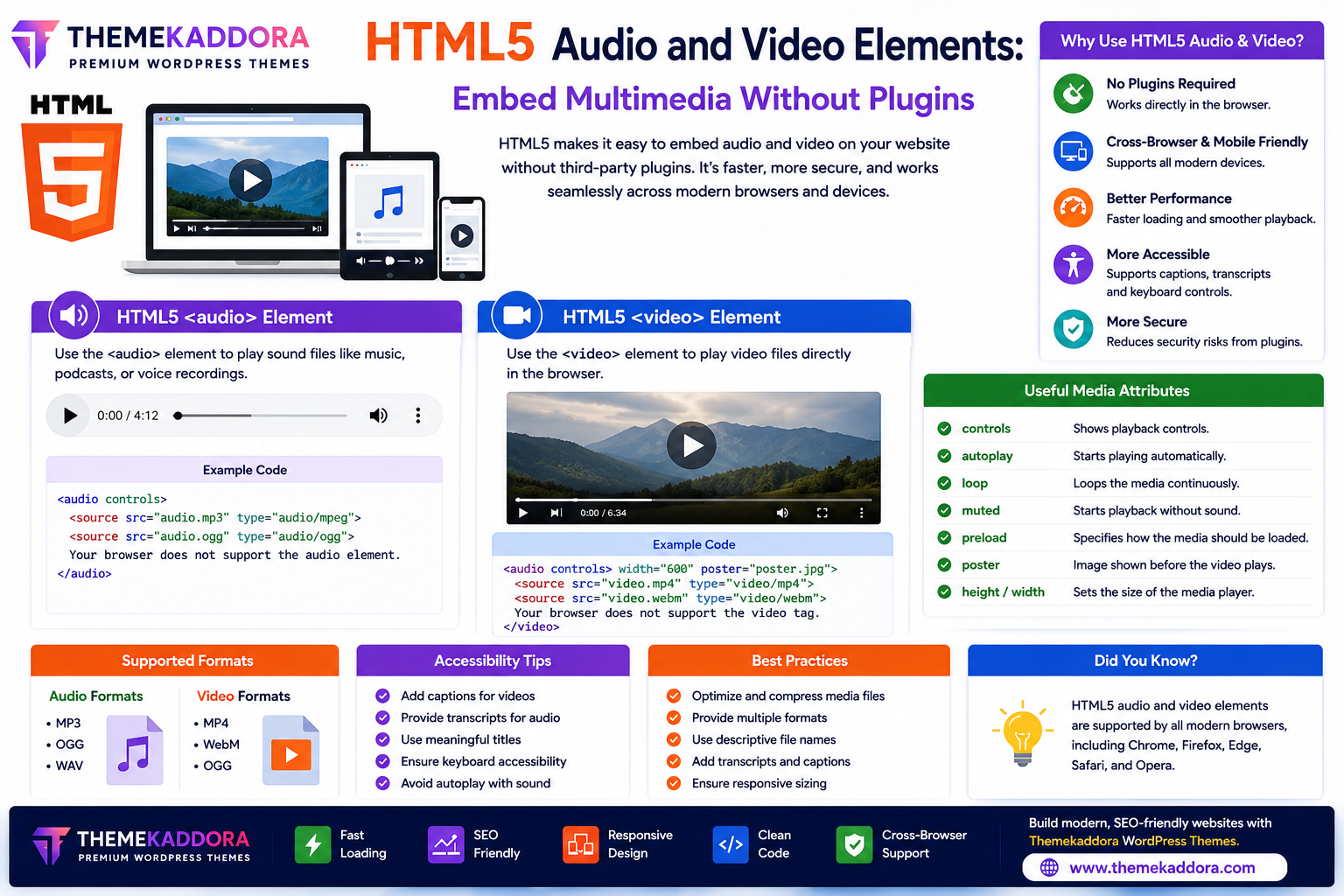
HTML5 Audio and Video Elements: Embed Multimedia Without Plugins
Introduction
Multimedia content has become an essential part of modern websites. Businesses use promotional videos, educators publish tutorials, musicians share audio tracks, and bloggers enrich articles with podcasts and interviews.
Before HTML5, developers often relied on third-party plugins to play audio and video content. This approach created compatibility issues, security concerns, and inconsistent user experiences across different devices.
HTML5 introduced built-in <audio> and <video> elements, allowing developers to embed multimedia directly into web pages without external plugins.
In this guide, you'll learn how HTML5 audio and video elements work, their features, benefits, and best practices for creating engaging multimedia experiences.
What Are HTML5 Multimedia Elements?
HTML5 provides native elements for displaying multimedia content directly in the browser.
The two primary multimedia elements are:
<audio>
<video>
These elements simplify media integration and improve compatibility across modern browsers and devices.
Why HTML5 Multimedia Matters
Using HTML5 multimedia elements offers several advantages:
No third-party plugins required
Better browser compatibility
Improved mobile support
Faster loading
Enhanced accessibility
Better user experience
Cleaner HTML code
Improved security
These benefits make HTML5 the preferred choice for embedding media.
The HTML5 Audio Element
The <audio> element is used to play sound files directly within a webpage.
Common uses include:
Podcasts
Music tracks
Interviews
Voice recordings
Sound effects
Language lessons
Visitors can listen without downloading additional software.
Audio Features
HTML5 audio supports:
Play
Pause
Volume control
Progress bar
Loop playback
Autoplay (use cautiously)
Mute option
Developers can customize audio controls using CSS and JavaScript.
The HTML5 Video Element
The <video> element allows websites to display video content directly inside web pages.
Popular uses include:
Product demonstrations
Online courses
Tutorials
Marketing videos
Customer testimonials
Event recordings
Videos play directly in supported browsers without external plugins.
Video Features
HTML5 video provides:
Play and pause controls
Full-screen mode
Volume adjustment
Playback progress
Subtitles and captions
Poster images
Responsive display
These features improve the viewing experience.
Supported Media Formats
Different browsers support different media formats.
Common audio formats include:
MP3
OGG
WAV
Common video formats include:
MP4
WebM
OGG
Providing multiple formats can improve compatibility across browsers.
Useful HTML5 Media Attributes
Common attributes include:
controls
Displays built-in playback controls.
autoplay
Automatically starts playback when the page loads.
Use this feature carefully, as unexpected autoplay can negatively affect user experience.
loop
Repeats the media continuously.
muted
Starts playback without sound.
Useful for background videos.
preload
Controls how much media the browser loads before playback begins.
poster
Displays an image before a video starts playing.
Helpful for improving visual appeal.
Accessibility Best Practices
Make multimedia accessible by:
Adding captions to videos
Providing transcripts for audio
Including descriptive titles
Offering keyboard-accessible controls
Avoiding autoplay with sound
These practices help create inclusive websites.
Multimedia SEO Tips
Optimize audio and video content by:
Using descriptive filenames
Adding structured headings around media
Including transcripts
Compressing media files
Writing descriptive page titles
Using relevant metadata
Well-optimized multimedia can improve user engagement and support SEO.
Performance Optimization
Large media files can slow down websites.
Improve performance by:
Compressing videos
Optimizing audio quality
Using responsive media
Hosting large files efficiently
Loading media only when needed
Performance optimization helps maintain fast page speeds.
Common Multimedia Mistakes
Avoid:
Uploading oversized videos
Using autoplay with sound
Missing captions
Ignoring mobile responsiveness
Embedding unsupported formats
Not compressing media
Optimized multimedia provides a better user experience.
HTML5 Multimedia in Modern Websites
HTML5 audio and video are commonly used in:
Business websites
Online courses
Podcasts
News websites
Product pages
Marketing campaigns
Entertainment platforms
Educational websites
Multimedia helps engage visitors and communicate information effectively.
Why HTML5 Multimedia Matters for WordPress Themes
Modern WordPress themes—including Themekaddora themes—are designed to support HTML5 multimedia.
Benefits include:
Responsive media layouts
Faster loading pages
SEO-friendly structure
Mobile compatibility
Clean HTML5 code
Better accessibility
Modern browser support
These features make it easier to deliver rich multimedia experiences.
Conclusion
HTML5 audio and video elements have transformed the way websites deliver multimedia content. By eliminating the need for third-party plugins, they provide faster, safer, and more consistent playback across devices.
Whether you're sharing tutorials, podcasts, product videos, or educational content, HTML5 multimedia helps create engaging websites that are accessible, responsive, and optimized for modern users.
When combined with HTML5-ready WordPress themes from Themekaddora, multimedia content becomes an even more powerful tool for improving user experience and website performance.
Frequently Asked Questions (FAQs)
What are HTML5 audio and video elements?
They are built-in HTML5 elements (<audio> and <video>) used to embed multimedia directly into web pages without external plugins.
Do HTML5 media elements work on mobile devices?
Yes. Modern smartphones and tablets support HTML5 audio and video playback in compatible browsers.
Which video formats are commonly supported?
Common formats include MP4, WebM, and OGG. Using multiple formats can improve browser compatibility.
Should I use autoplay for videos?
Autoplay should be used carefully. Unexpected playback, especially with sound, can create a poor user experience.
Why do Themekaddora WordPress themes support HTML5 multimedia?
Themekaddora themes are built with HTML5 standards, providing responsive media support, SEO-friendly structure, fast performance, and excellent compatibility across modern browsers and devices.
Comments (0)