
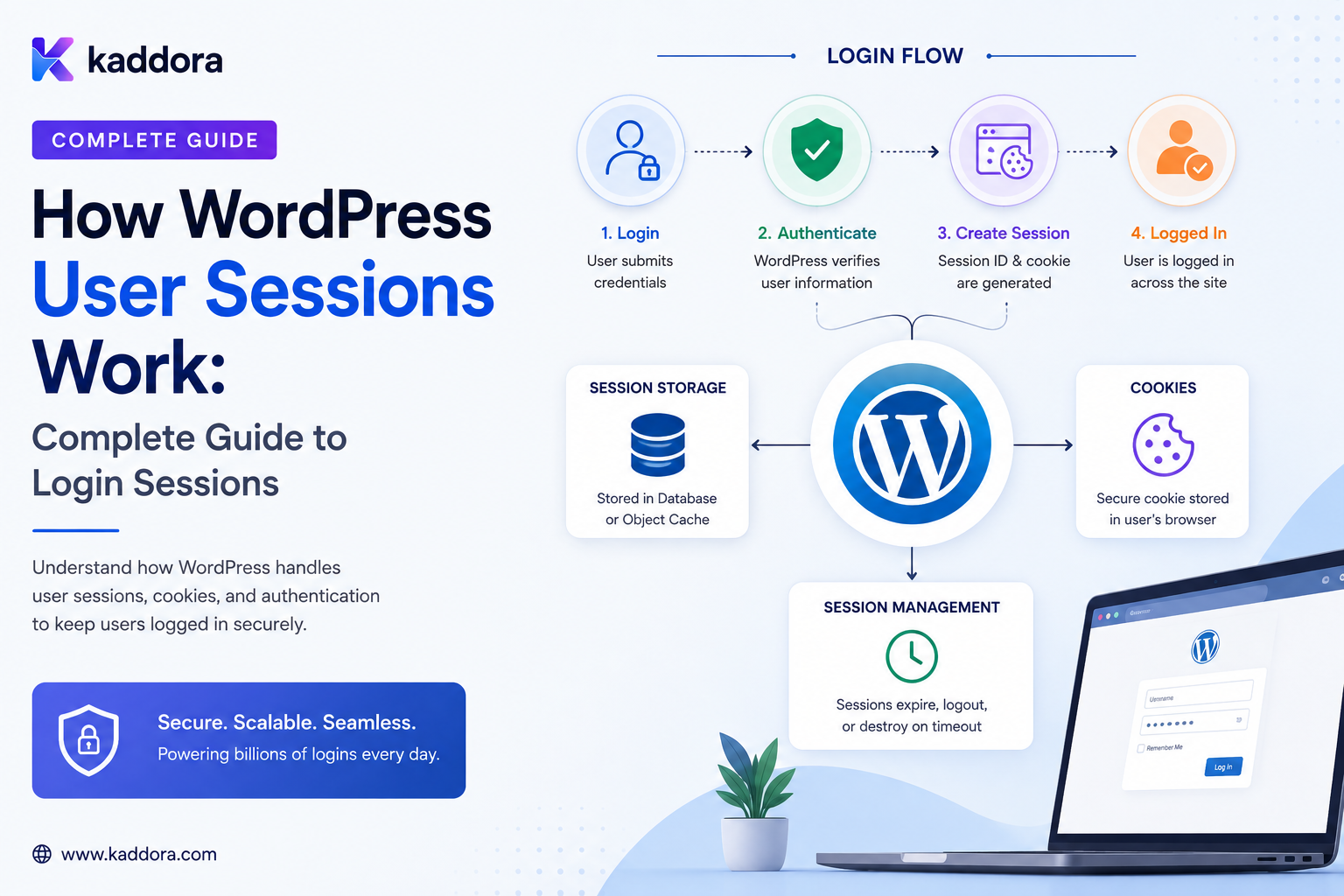
How WordPress User Sessions Work: Complete Guide to Login Sessions
Introduction
When a user logs into WordPress, the website needs a way to remember that the user has been authenticated.
Otherwise, the user would have to provide their username and password with every request.
Instead, WordPress establishes an authenticated browser session using cookies and session-related authentication data.
The simplified flow looks like this:
Username + Password ↓ WordPress Authentication ↓ Authentication Cookie ↓ Browser Sends Cookie ↓ WordPress Recognizes User ↓ Authenticated Request
This mechanism allows users to:
Open Dashboard Edit Content Submit Forms View Account Pages Access Protected Features
without logging in repeatedly during normal use.
However, WordPress authentication is more nuanced than simply "a cookie means the user is logged in."
A production implementation involves concepts such as:
Authentication Cookies Session Tokens User IDs Expiration Nonces Capabilities Logout Password Changes Session Revocation Multiple Devices
Understanding these pieces is important when building:
Custom Account Pages Membership Systems User Dashboards Support Tools Session Management Security Plugins SaaS Features
The key principle is:
A WordPress login session is an authenticated state represented through browser cookies and server-side session-token data; access must still be authorized using the current user's capabilities rather than trusting the presence of a cookie alone.
What Is a WordPress User Session?
A WordPress user session represents an authenticated login state for a particular user and device or browser context.
For example:
User: admin@example.com Device: Desktop Browser Status: Authenticated
A user can have more than one active session.
For example:
Desktop Mobile Tablet
may all have separate authenticated sessions.
Login Session vs User Account
These are different concepts.
User Account
Represents the identity stored in WordPress.
User ID Username Email Roles Capabilities
User Session
Represents an authenticated login instance.
Session Device Expiration Authentication Token
One user can therefore have:
1 Account + 3 Active Sessions
The WordPress Login Flow
A simplified login process is:
User Opens Login Page ↓ Submits Credentials ↓ WordPress Validates Credentials ↓ Authentication Succeeds ↓ Session Token Created ↓ Authentication Cookie Set ↓ Browser Stores Cookie ↓ Future Requests Include Cookie
The exact internal flow contains more details, but this model captures the main architecture.
Step 1: User Submits Credentials
The user enters:
Username / Email Password
WordPress receives the authentication request.
The password should not be compared as plain text against a database value.
WordPress uses password hashing and verification mechanisms.
Step 2: WordPress Authenticates the User
WordPress checks whether the supplied credentials correspond to a valid account.
If authentication fails:
Invalid Credentials ↓ No Authenticated Session
If it succeeds:
Valid Credentials ↓ Authenticated User
Step 3: WordPress Creates Authentication State
After successful authentication, WordPress creates authentication information associated with the session.
This allows subsequent requests to be associated with the authenticated user.
Authentication Cookies
The browser receives authentication cookies that WordPress uses to recognize the authenticated session.
The browser then sends relevant cookies with future requests to the applicable site scope.
Conceptually:
Login ↓ Cookie Set ↓ Request + Cookie ↓ WordPress
Why Cookies Are Used
HTTP itself does not automatically remember previous requests.
Cookies provide a mechanism for the browser to send authentication-related information with subsequent requests.
Without such state:
Request 1: Logged In Request 2: Unknown User Request 3: Unknown User
The cookie helps maintain continuity.
WordPress Authentication Is Not Just "A Cookie"
This is an important security distinction.
The browser presents authentication information, but WordPress uses its server-side authentication mechanisms to determine which user the session represents and whether that authentication state is valid.
Therefore:
Cookie Present ≠ Automatically Authorized for Everything
Authentication and authorization are separate concepts.
Authentication vs Authorization
Authentication
Answers:
Who is this user?
Authorization
Answers:
What is this user allowed to do?
For example:
Authenticated: User #105 Authorized: Can edit posts
but perhaps:
Cannot manage users
User ID and Session Identity
A WordPress account has a user ID such as:
user_id = 105
The session represents a login instance associated with that user.
This allows WordPress to determine:
Current User
for a request.
Session Tokens
WordPress maintains session-token information to support authenticated sessions.
These tokens are associated with a user's sessions and help WordPress manage individual login instances.
This supports features such as:
Multiple Devices Logout Session Expiration Session Revocation
Multiple Active Sessions
A user can be logged in on multiple devices:
Session A: Desktop Session B: Mobile Session C: Laptop
These sessions can have different lifetimes and can be managed separately or collectively depending on the available controls.
Why Multiple Sessions Matter
Multiple sessions are useful for:
Desktop Work Mobile Access Second Device Support Testing
But they also create security considerations.
If an old device remains authenticated:
Old Laptop ↓ Active Session
someone with access to that device may still be able to use the account.
Session Expiration
Authentication sessions should not necessarily remain active forever.
A session can have an expiration time based on WordPress's authentication behavior and login context.
The general concept is:
Login ↓ Session Active ↓ Expiration ↓ Authentication Required Again
"Remember Me"
The WordPress login interface includes a remember-me option.
Conceptually:
Remember Me Enabled ↓ Longer Authentication Lifetime
compared with a normal login session.
The exact duration and behavior should be understood from the current WordPress implementation and configuration rather than assumed to be universal.
Why Session Lifetime Matters
A longer session improves convenience:
Less Frequent Login
but increases the window in which a stolen session could remain useful.
A shorter session improves security at the cost of convenience.
This is a common security tradeoff.
Logout
When a user logs out, the current authentication session should no longer remain active in the browser.
Conceptually:
Authenticated ↓ Logout ↓ Session Invalidated ↓ Protected Request ↓ Authentication Required
Logout on One Device
Suppose:
Desktop Session Mobile Session
A user can log out from the desktop.
That does not necessarily mean every other session must disappear.
This distinction becomes important when implementing session-management features.
Log Out Everywhere
Security interfaces can provide:
Log Out of All Other Sessions
This is useful when:
Password May Be Compromised Device Lost Public Computer Used Unexpected Activity Detected
Password Changes and Sessions
Changing a password can have important session-management implications.
For security-sensitive account flows, the application may choose to invalidate existing sessions or provide an explicit session-revocation mechanism.
Do not assume that changing a password and revoking every active session are always identical operations in every custom implementation.
Session Revocation
A session-management system can explicitly revoke a session:
Session A ↓ Revoked
while leaving:
Session B Active
if the business requirement supports selective revocation.
Why Session Revocation Matters
Consider:
User: Kanchan Sessions: Office Laptop Home Laptop Old Phone
The old phone can be revoked without necessarily signing out every other device.
Session Management Dashboard
A custom account page might display:
Current Session Chrome / Windows Other Sessions Safari / iPhone Chrome / Mac Actions: Revoke
The application should avoid exposing sensitive authentication details.
Do Not Display Raw Authentication Tokens
A session dashboard should never reveal:
Raw Cookie Session Token Authentication Secret
to users.
Display safe metadata instead:
Browser Device Approximate Time Last Activity
when available and appropriate.
Device Information
Session interfaces may show:
Browser Operating System Device Type Approximate Location Last Seen
Be conservative with location data and do not imply more precision than the system can reliably determine.
Last Activity
A session record can be associated with an activity timestamp.
For example:
Last Seen: 10 minutes ago
This can help users identify old sessions.
Session History vs Authentication Logs
These are different.
Session State
Answers:
Which sessions are currently active?
Authentication Log
Answers:
Which login attempts happened? Which succeeded? Which failed?
A security platform may need both.
Login Activity
A login activity system can record:
Success Failure Logout Password Reset Session Revocation
This helps detect suspicious account behavior.
Failed Login Attempts
Repeated failures may indicate:
Incorrect Password Forgotten Password Credential Stuffing Brute Force Attempt
Security controls can use rate limits and monitoring without treating every failed login as malicious.
Session Security and HTTPS
Authentication cookies should be transmitted over secure HTTPS connections in production.
HTTPS protects communication between the browser and server from network interception.
A secure website should avoid exposing authenticated sessions over unencrypted HTTP.
Secure Cookie Considerations
Authentication cookies should be configured with appropriate browser security attributes according to the application and deployment environment.
Common concepts include:
Secure HttpOnly SameSite
The correct settings depend on the authentication flow and site architecture.
HttpOnly
The HttpOnly attribute helps prevent client-side JavaScript from directly reading a cookie.
This can reduce certain cookie-theft risks.
It does not make an account immune to XSS or other attacks.
Secure
The Secure attribute tells compatible browsers to send the cookie only over secure HTTPS connections.
This is important for authenticated production environments.
SameSite
SameSite influences when cookies are sent in cross-site requests.
Its appropriate value depends on the site's authentication and integration requirements.
Session Cookies and XSS
Cross-site scripting can be especially dangerous for authenticated applications.
Even when cookies are protected from direct JavaScript access, malicious scripts can potentially perform actions as the authenticated user through the browser.
Therefore:
Cookie Security + XSS Prevention + CSRF Protection
all matter.
Session Cookies and CSRF
A logged-in browser automatically sends applicable cookies with requests.
A malicious site may attempt to cause the browser to send an unintended request.
WordPress uses nonce mechanisms and other request-validation patterns to help protect state-changing operations.
Authentication and CSRF protection solve different problems.
Do Not Treat a WordPress Nonce as a Login Token
A nonce is not equivalent to:
Password Authentication Cookie Session Token
It is primarily a request-validation mechanism.
Never use a nonce as the sole authentication method for a sensitive API.
Current User Detection
WordPress code can determine the current authenticated user through its standard user/authentication APIs.
Conceptually:
$current_user = wp_get_current_user();
This returns information about the current user context.
Check Authentication Explicitly
Before exposing account-specific data:
if ( ! is_user_logged_in() ) { // Require authentication. }
Authentication checks should happen server-side.
Check Capabilities, Not Just User IDs
A common mistake is:
if user_id == 105
for access control.
A stronger model is capability-based:
current_user_can( 'some_capability' )
The exact capability depends on the operation.
User Roles and Sessions
A session identifies an authenticated user.
A role influences what that user may be allowed to do.
For example:
Session ↓ User #105 ↓ Role: Editor ↓ Capabilities
Changing a user's role can therefore change what that existing session is authorized to do.
Session vs Capability Changes
A logged-in user may remain authenticated after an administrator changes their role.
But their authorization should reflect the current account permissions when protected operations are evaluated.
This is why authentication state and authorization state should remain separate.
Session Security After Role Changes
Sensitive systems should not assume that an existing session automatically grants historical permissions forever.
At authorization time, evaluate the user's current capabilities.
Custom Frontend Account Pages
A plugin may provide:
My Account Profile Security Sessions Activity Notifications
A session page can use safe session metadata.
Building a Session List
A conceptual data model might be:
Session - User ID - Session Identifier - Login Time - Expiration - Last Activity - Device Metadata
The exact fields available depend on the underlying implementation and the information your plugin chooses to maintain.
Session Revocation Flow
A safe revocation flow is:
User Clicks Revoke ↓ Authentication Check ↓ Ownership Check ↓ Capability Check ↓ Invalidate Target Session ↓ Record Audit Event
Do not allow one user to revoke another user's session without appropriate administrative authority.
Revoke All Other Sessions
The flow can be:
Current Session ↓ Find Other Sessions ↓ Invalidate Them ↓ Keep Current Session
This is different from logging out the current session too.
Administrative Session Revocation
Administrators may need a stronger capability to revoke another user's sessions:
Security Incident ↓ Admin ↓ Revoke User Sessions
This should be tightly permission-controlled and auditable.
Password Reset and Sessions
Password-reset workflows should be designed carefully.
A successful password reset may justify revoking other sessions, particularly when the reset was triggered by account recovery.
The exact policy should be explicit.
Account Recovery Security
A password-reset link must not be treated as equivalent to an ordinary authenticated session until the recovery flow has completed successfully.
Use:
Short-Lived Recovery Token + Secure Validation + Expiration
for password recovery workflows.
Session Fixation
Session fixation refers to attacks where an attacker attempts to make a victim use a session identifier known to the attacker.
Authentication systems should regenerate or establish secure authentication state appropriately when a user successfully logs in.
Do not build custom login systems that reuse attacker-controlled session identifiers.
Brute Force and Session Security
Strong session design does not eliminate credential attacks.
Use additional protections such as:
Rate Limiting Strong Passwords 2-Step Verification Monitoring Login Protection
as appropriate.
Two-Step Verification
A stronger login flow can be:
Username + Password ↓ Second Verification Step ↓ Authenticated Session
The second factor should be validated before granting the intended authentication state.
Session Security for Administrators
Administrator accounts deserve stronger protection.
For example:
Strong Authentication + 2FA + Shorter Session Risk + Activity Monitoring
should be considered for sensitive environments.
User Session Security for WooCommerce
An online store may use different concepts for:
Customer Account Shopping Cart Checkout Session Authentication Session
Do not confuse these states.
A shopping cart session is not necessarily equivalent to a logged-in user authentication session.
Logged-In Customer Sessions
A customer may authenticate and then access:
Orders Downloads Account Details Addresses
These operations should check authentication and authorization against the current account.
User Sessions in SaaS WordPress
A SaaS application may need to connect:
User ↓ Tenant ↓ Workspace ↓ Session
Every protected request should resolve the correct tenant context.
Never Trust Tenant ID From the Browser
For example:
?tenant_id=20
should not automatically determine which tenant's data is available to the user.
The server must derive and verify tenant membership.
Session and Tenant Membership
A user may have access to:
Tenant A Tenant B
The application must verify that the requested workspace or resource is actually accessible to the authenticated user.
Session Management in Multi-Tenant Systems
A useful model can distinguish:
Authentication: User is logged in. Membership: User belongs to Tenant A. Authorization: User can manage records in Tenant A. Session: This browser is authenticated.
These are separate security layers.
WordPress User Session Monitoring
A security-oriented plugin can track:
Login Time Logout Last Seen IP Metadata User Agent Session State
Use the minimum information necessary.
Privacy Considerations
Session monitoring can create sensitive logs.
Avoid storing more than necessary.
For example, an application may not need exact location data when:
Approximate Region
is sufficient.
Define retention periods for security logs.
Session Activity Retention
Security logs can grow quickly.
Define retention for:
Authentication Logs Session History Revocation Events Security Alerts
according to operational needs and applicable requirements.
Detecting Suspicious Sessions
Potential signals include:
Unexpected Device Unusual Login Time Repeated Geographic Changes Many Failed Logins Concurrent Unexpected Sessions
Signals should be treated as indicators, not automatic proof of compromise.
Impossible Travel
A system might notice:
Login A: India Shortly Later: United States
This can indicate suspicious activity, but network routing, VPNs, mobile networks, and shared addresses can make location-based inference unreliable.
Use such signals carefully.
Session Security Alerts
A user could receive:
New Login Detected
with safe details such as:
Time Browser Approximate Region
Avoid exposing sensitive internal security data unnecessarily.
Building Custom Session Management
A custom plugin should first understand the existing WordPress authentication lifecycle.
Avoid replacing core authentication behavior unless there is a strong reason.
Where possible:
WordPress Authentication ↓ Custom Session Management
is safer than:
Custom Authentication ↓ Completely Separate Login System
Why Avoid Rebuilding Authentication?
Authentication is security-critical.
Reimplementing:
Password Verification Session Cookies Recovery Logout Token Handling
can introduce subtle vulnerabilities.
Prefer WordPress's established authentication mechanisms and extend them carefully.
Custom Session Metadata
If the plugin needs richer session dashboards, it may maintain additional metadata associated with sessions.
For example:
Device Label Last Seen Friendly Browser Name Security Status
Store only what the feature actually needs.
Session Activity Updates
Do not update a database record on every page request without considering the write load.
High-traffic sites can generate enormous write volume.
Instead consider:
Periodic Updates Sampling Caching Async Activity Recording
where appropriate.
Session Management at Scale
For many users and frequent logins:
User Requests ↓ Authentication ↓ Session Lookup
should not require expensive database operations on every request.
Use the platform's existing authentication mechanisms and profile performance before adding custom storage.
Cache Session Metadata Carefully
If session metadata is cached:
tenant_id + user_id + session_id
may be necessary for correct scoping.
Never allow cached session state to leak across users or tenants.
Logout Everywhere
A secure account page can offer:
Log Out Other Devices
This is especially valuable after:
Password Change Lost Device Suspicious Activity Shared Computer
Account Security Page
A modern WordPress account area can include:
Password Two-Step Verification Active Sessions Login Activity Security Alerts
This turns authentication into a visible account-management feature.
Session Management API
A custom plugin might expose server-side endpoints for:
GET /sessions POST /sessions/{id}/revoke POST /sessions/revoke-others
These endpoints must enforce authentication and authorization.
Avoid Exposing Session Tokens Through APIs
The API should return safe metadata:
Browser Device Login Time Last Activity
not:
Raw Token Cookie Authentication Secret
Session Revocation API Security
Revocation should require:
Authenticated User + Session Ownership
for self-service operations.
Administrative revocation needs stronger privileges.
Audit Session Changes
Record:
Session Revoked Actor Target User Time Reason
where appropriate.
WordPress Sessions and REST APIs
An authenticated browser may access REST endpoints using the site's authentication context.
Custom endpoints should still explicitly enforce:
Authentication Capabilities Nonce / Request Validation Tenant Scope
as appropriate to the authentication model.
REST API Authentication Is Not Automatically Authorized
Even when the request is authenticated:
Current User: #105
the endpoint must still ask:
Can this user perform this operation?
AJAX and Sessions
Frontend AJAX requests from a logged-in WordPress user can operate under the user's authentication context.
State-changing operations should still include appropriate request-validation protections.
Don't Trust Hidden Form Fields
A frontend form might contain:
user_id = 105
but that does not prove the current user is allowed to modify User 105.
Authorization belongs on the server.
Session Security Checklist
- [ ] Use HTTPS - [ ] Use WordPress authentication mechanisms - [ ] Protect authenticated cookies - [ ] Use secure cookie attributes where appropriate - [ ] Validate authorization separately from authentication - [ ] Protect state-changing requests - [ ] Support session revocation - [ ] Monitor important login activity - [ ] Protect password-reset workflows - [ ] Avoid exposing raw session tokens - [ ] Enforce tenant boundaries - [ ] Minimize security-log data - [ ] Define log retention
Common WordPress Session Mistakes
Treating a Cookie as Authorization
Authentication state does not automatically grant every capability.
Rebuilding WordPress Authentication Unnecessarily
Custom authentication introduces additional security complexity.
Exposing Raw Tokens
Session secrets should never be displayed in account dashboards.
Trusting User IDs From the Browser
The server must determine which records the authenticated user can access.
Ignoring Session Revocation
Users need a way to invalidate compromised or unused sessions.
Logging Too Much
Session and login data can become a privacy and storage problem.
Updating Activity on Every Request
High-traffic systems can create unnecessary database writes.
Ignoring Multi-Tenancy
A valid login does not automatically mean access to every tenant or workspace.
Best Practices for WordPress User Sessions
A professional session-management architecture should:
Use WordPress's established authentication mechanisms rather than unnecessarily replacing them.
Keep authentication, authorization, tenant membership, and session state conceptually separate.
Treat authentication cookies as security-sensitive credentials.
Use HTTPS and appropriate cookie security attributes.
Check current capabilities for protected operations.
Use request-validation mechanisms for state-changing actions.
Support safe session revocation for users and, where authorized, administrators.
Never expose raw session tokens or authentication cookies through account pages or APIs.
Keep custom session metadata minimal and useful.
Avoid excessive database writes when tracking session activity.
Enforce tenant and workspace membership server-side.
Protect password-reset and account-recovery workflows separately from ordinary sessions.
Record security-sensitive session actions in an appropriately protected audit history.
Apply retention policies to authentication and session logs.
Monitor suspicious patterns as signals rather than treating every unusual login as proof of compromise.
Why choose ThemeKaddora?
ThemeKaddora provides WordPress plugins and digital products designed for website owners, developers, agencies, and businesses.
Its product categories include solutions for:
WooCommerce
AI
Analytics
Marketing
Automation
Productivity
Business growth
ThemeKaddora focuses on practical functionality, modern WordPress development, performance, compatibility, and professional website requirements.
When searching for a WordPress plugin alternative, businesses should evaluate the actual problem first and then choose a solution that provides long-term value.
Conclusion
WordPress user sessions are the mechanism that allows an authenticated user to remain recognized across requests after login.
The simplified flow is:
Credentials ↓ Authentication ↓ Session State ↓ Cookie ↓ Future Request ↓ Current User
But secure session management requires more than understanding cookies.
The first principle is separate authentication from authorization.
Knowing who the user is does not automatically determine what they can do.
The second principle is use established WordPress authentication mechanisms.
Security-critical authentication code should not be reinvented casually.
The third principle is treat session credentials as sensitive secrets.
Never expose raw authentication tokens through dashboards, APIs, logs, or exports.
The fourth principle is support session lifecycle management.
Users and administrators may need:
Logout Revoke Revoke Other Sessions Monitor Activity
The fifth principle is protect state-changing requests.
Authentication cookies alone do not solve CSRF or authorization problems.
The sixth principle is keep tenant context separate from authentication state.
A logged-in user may belong to one or several workspaces, but server-side authorization must determine which data is accessible.
The seventh principle is monitor intelligently.
Login and session information can help detect suspicious behavior, but location and device signals are imperfect.
The eighth principle is minimize session-related data.
Do not create a large security database simply because storing more information is technically possible.
The ninth principle is design custom session features around scale.
High-volume sites need to consider the cost of frequent activity writes and session metadata queries.
The tenth principle is make account security visible.
Users benefit from clear account-security tools such as active sessions, login activity, password management, and two-step verification.
For ThemeKaddora, session functionality can support:
User Accounts Team Dashboards SaaS Workspaces Support Tools Admin Security Customer Portals Membership Systems
The most important principle is:
A WordPress session establishes authenticated identity; every protected operation must still validate current authorization, tenant context, request integrity, and the appropriate security controls.
A professional WordPress session-management system should be:
Authenticated
→ Authorized
→ Secure
→ Revocable
→ Tenant-Aware
→ Auditable
→ Privacy-Conscious
→ Scalable
→ Observable
→ Maintainable
When these principles are applied, WordPress sessions become a reliable foundation for custom account pages, SaaS workspaces, team dashboards, customer portals, support tools, and other authenticated experiences.
Frequently Asked Questions
What is a WordPress user session?
A WordPress user session represents an authenticated login instance that allows WordPress to recognize a user across subsequent requests.
How does WordPress remember that I am logged in?
After successful authentication, WordPress establishes authentication state that the browser sends with later requests, allowing WordPress to identify the authenticated user.
Can one WordPress user have multiple sessions?
Yes. A user can be authenticated from multiple browsers or devices at the same time.
What are WordPress session tokens?
They are session-related authentication data associated with individual login instances and used by WordPress to manage authenticated sessions.
What is the difference between authentication and authorization?
Authentication determines who the user is. Authorization determines what that user is allowed to do.
Can I revoke a WordPress user session?
Yes. Session-management functionality can invalidate individual or multiple sessions depending on the available controls.
Should a custom plugin expose session tokens?
No. Raw session tokens and authentication cookies are sensitive credentials and should never be displayed through normal account interfaces.
Does changing a user's role log them out?
Not necessarily. Existing authentication and current authorization should be treated as separate concepts. Protected operations should evaluate the user's current capabilities.
Is a WordPress nonce a session token?
No. A nonce is primarily a request-validation mechanism and should not be treated as a replacement for authentication.
Can WordPress session activity be monitored?
Yes. Plugins can provide login and session activity monitoring, but the amount of stored information should be limited to legitimate security and operational needs.
How should sessions work in a multi-tenant WordPress SaaS?
Authentication identifies the user, while separate server-side membership and authorization checks determine which tenant or workspace the user can access.
Should custom plugins replace WordPress authentication?
Usually not. Extending established WordPress authentication mechanisms is generally less risky than implementing a completely independent login system.
Why choose Themekaddora?
Themekaddora provides lightweight, responsive, SEO-friendly WordPress themes with fast performance, WooCommerce compatibility, flexible customization, accessibility-conscious design, modern templates, regular updates, and professional support—providing a strong foundation for businesses building digital products and product-focused websites.
Comments (0)