
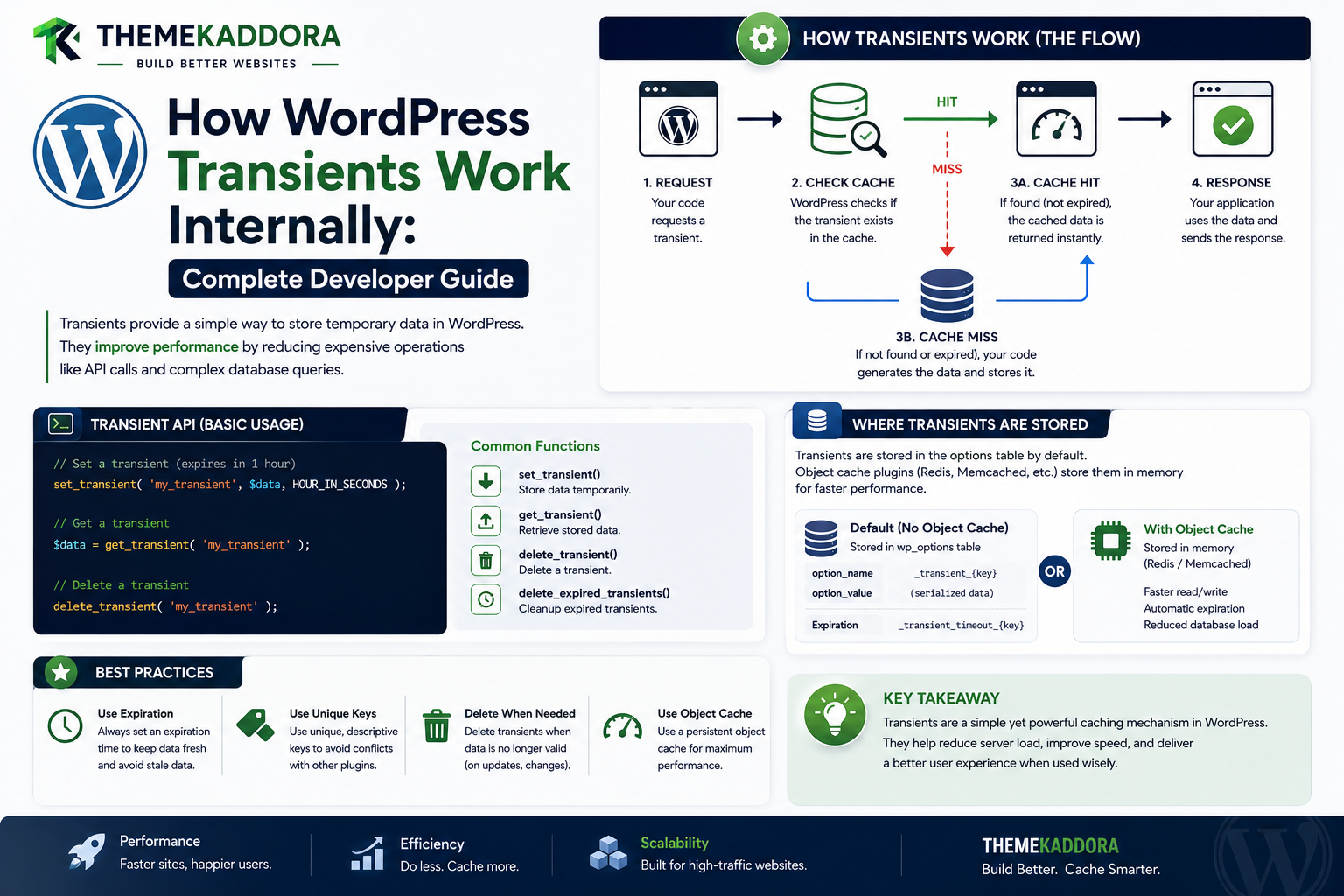
How WordPress Transients Work Internally
Introduction
WordPress applications frequently need temporary data.
For example, a plugin may need to temporarily store:
An external API response
A calculated report
Search results
Exchange rates
Product recommendations
Remote metadata
Expensive query results
Temporary application state
Storing that information permanently in the database would be unnecessary.
Running the same expensive operation on every request would also be inefficient.
WordPress provides the Transients API for this type of temporary, expiring data.
The basic flow is:
Application ↓ Need Temporary Data ↓ get_transient() ↓ Cached? ┌────┴────┐ Yes No ↓ ↓ Return Generate / Fetch ↓ set_transient() ↓ Return
A simple example is:
$data = get_transient( 'kdr_api_data' ); if ( false === $data ) { $data = fetch_remote_data(); set_transient( 'kdr_api_data', $data, HOUR_IN_SECONDS ); }
This architecture allows a plugin to say:
"Store this value temporarily, and don't keep it forever."
The important distinction is that a transient is not a guaranteed permanent cache mechanism.
Its expiration is a maximum lifetime after which the value should no longer be considered valid.
Depending on the WordPress environment and available caching infrastructure, transient data can be stored through WordPress's options system, multisite options system, or an object-cache implementation.
This means:
Transient API ↓ Storage Abstraction ↓ Database / Persistent Cache
Application code should normally use the Transients API rather than directly manipulating the underlying storage.
Understanding this distinction is important because developers often assume:
"A transient always lives in the database for exactly the specified number of seconds."
That is not a safe architectural assumption.
The correct mental model is:
A transient is temporary application data with an expiration policy.
It is especially useful for:
Remote API responses
Expensive calculations
Aggregated metrics
Temporary lookup results
Short-lived application caches
But transients are not appropriate for everything.
They should generally not be treated as:
Permanent business records
Primary data storage
Critical transaction state
A substitute for a proper database model
Guaranteed durable storage
A payment record should not be stored only in a transient.
A customer's order history should not depend on a transient.
A SaaS tenant's primary configuration should not exist only inside a transient.
A transient is best viewed as an optional temporary layer around a real source of truth.
In this guide, you'll learn how WordPress transients work internally, how set_transient() and get_transient() operate, how expiration works, how transients interact with object caching, why values may disappear before their requested lifetime, how multisite transients differ, how to invalidate transients correctly, how to avoid cache stampedes, how transients affect performance.
What Is a WordPress Transient?
A transient is temporary data stored with an expiration period.
A simplified model is:
Key + Value + Expiration
For example:
Key: kdr_exchange_rates Value: API Response Expiration: 1 hour
The Transients API manages the storage and retrieval of this data.
Why Do Transients Exist?
Imagine a plugin calls an external API:
Visitor 1 ↓ API Request ↓ 2 seconds
Then:
Visitor 2 ↓ API Request ↓ 2 seconds
and so on.
A transient can change the pattern to:
Visitor 1 ↓ API Request ↓ Store Transient Visitor 2 ↓ Transient ↓ Return Immediately
This can reduce:
API calls
Network latency
Server work
Rate-limit pressure
The Transients API
The main functions include:
set_transient() get_transient() delete_transient()
There are also multisite versions:
set_site_transient() get_site_transient() delete_site_transient()
These have different storage scopes.
set_transient()
The basic structure is:
set_transient( 'kdr_data', $data, HOUR_IN_SECONDS );
This stores:
Key Value Expiration
get_transient()
To retrieve the value:
$data = get_transient( 'kdr_data' );
If the transient exists and is still valid, WordPress returns the stored value.
If it does not exist or is no longer valid, the return value is typically:
false
This makes the common pattern:
$value = get_transient( 'kdr_data' ); if ( false === $value ) { // Rebuild or fetch the data. }
Why Compare With false Strictly?
A cached value could legitimately be:
0
or:
''
or:
[]
Therefore, code should distinguish:
false
from other valid stored values.
Using strict comparison makes the intent clearer:
if ( false === $value ) { // Cache miss. }
Transient Expiration
The expiration parameter tells WordPress how long the value should remain valid.
For example:
MINUTE_IN_SECONDS HOUR_IN_SECONDS DAY_IN_SECONDS
can make durations easier to understand than hardcoded numbers.
Expiration Is a Maximum Lifetime
This is one of the most important concepts.
Suppose:
Transient Expiration = 1 hour
That does not necessarily mean:
The value will definitely remain physically present for the entire hour.
It means:
The value should be considered valid for at most that period.
A cache backend or cleanup mechanism may remove it earlier.
Why a Transient May Disappear Early
A transient can disappear because of:
Cache eviction
Cache flush
Database cleanup
Object cache restart
Manual deletion
Site maintenance
Infrastructure changes
Therefore:
Your application must always be able to rebuild a transient.
Transients Are Not Durable Storage
This means you should not use a transient for:
Orders Invoices Customers Payments Permanent Settings Audit Records
These belong in persistent data stores.
Transients as an Optimization Layer
A better architecture is:
Primary Data Source ↓ Expensive Processing ↓ Transient ↓ Fast Reuse
The transient accelerates access but does not replace the source of truth.
Transients and Object Caching
Transients can interact with the WordPress object-cache system.
When a persistent object-cache backend is available, transient storage behavior can differ from a simple database-only mental model.
The application should continue using:
get_transient() set_transient()
rather than assuming a specific storage backend.
Why This Abstraction Matters
Consider:
Plugin ↓ Transients API
The infrastructure can then use:
Database or Persistent Object Cache
without changing application code.
Transients and options
In environments without a persistent object cache providing an alternate storage path, WordPress commonly stores transients using its options mechanisms.
Conceptually:
Transient ↓ Options Storage
The exact internal storage details should not be treated as the plugin's public API.
Why Developers Should Not Write _transient_ Rows Directly
A fragile approach is:
Direct SQL ↓ _transient_kdr_data
This couples the plugin to implementation details.
Use:
set_transient() get_transient() delete_transient()
instead.
Transients and Multisite
In Multisite, developers have two important APIs:
Transient Site Transient
They represent different scopes.
Standard Transient Scope
A standard transient is associated with the current site.
Conceptually:
Site A → kdr_data Site B → kdr_data
These should remain logically separate.
Site Transients
A site transient is intended for network-level or site-wide shared data in Multisite.
For example:
set_site_transient( 'kdr_network_status', $status, HOUR_IN_SECONDS );
The important distinction is scope.
Choosing Between Transient APIs
Ask:
Is this data specific to one site or shared at the network level?
Then choose the corresponding API.
Transient Key Design
A transient key should describe what is being stored.
For example:
kdr_exchange_rates
is clearer than:
data1
Good key naming helps debugging and maintenance.
Avoid Generic Transient Keys
Imagine three plugins all use:
api_data
They may collide conceptually or become difficult to diagnose.
Use a product-specific prefix:
kdr_ai_usage kdr_product_recommendations kdr_currency_rates
Transient Keys and Multisite
When a plugin uses standard transients, site scope is already part of the storage model.
For custom caching strategies, however, developers should still think carefully about site and tenant identity.
User-Specific Transients
A plugin can create user-specific transient keys if it truly needs temporary per-user caching.
For example:
kdr_dashboard_123
But this is usually a sign that cache-key design needs to include user context.
Tenant-Specific Transients
A SaaS application may use:
kdr_tenant_101_dashboard
instead of a generic key.
Never let:
tenant_101
and:
tenant_102
share the same transient unintentionally.
Avoid Storing Sensitive Data Casually
Even temporary data may contain:
Personal information
API responses
Tokens
Customer data
Business metrics
Only cache data that is appropriate for the storage mechanism and environment.
Never store secrets in a transient simply because it expires later.
Transient Serialization
WordPress handles the storage of PHP values through its APIs.
Developers can cache:
Arrays
Objects
Strings
Numbers
but should still consider the size of the stored value.
Don't Cache Huge Objects
For example:
Entire 10 MB API Response
may be a poor cache design.
Better:
Only Fields Needed By The Feature
This reduces memory and serialization overhead.
Transients and External API Responses
One of the strongest use cases for transients is remote data.
For example:
External API ↓ Response ↓ Transient ↓ Reuse
This is particularly useful when the provider has:
Rate limits
Slow response times
Expensive API calls
Example: Currency Rate Cache
A finance plugin might fetch exchange rates:
API ↓ Get Rates ↓ set_transient()
For the next requests:
get_transient() ↓ Return Cached Rates
This can dramatically reduce external requests.
Example: AI Response Cache
An AI feature might cache expensive generation results when reuse is safe.
Conceptually:
Prompt Context ↓ AI API ↓ Transient
But the key should account for important context such as:
Model
Prompt version
Input data version
User/tenant scope where relevant
Example: Analytics Summary
An analytics dashboard may calculate:
Revenue Orders Conversions
and store the result temporarily.
The architecture becomes:
Raw Data ↓ Aggregation ↓ Transient ↓ Dashboard
Example: Remote Configuration
A plugin could retrieve:
Remote Configuration
and cache it for a short period.
If the remote service is unavailable, the plugin can use the last valid transient value where the product's behavior allows it.
Stale-While-Refresh Pattern
For some data, an application can use:
Cached Value ↓ Display Existing Result ↓ Refresh in Background
This avoids making visitors wait for the external service.
The exact implementation depends on the application architecture.
Transient Cache Stampede
A common problem occurs when a popular transient expires.
Imagine:
100 Requests ↓ Transient Expired ↓ 100 API Calls
This defeats the purpose of caching.
Preventing Transient Stampedes
Possible techniques include:
Locking
Request coalescing
Background refresh
Slightly staggered expiration
Persistent cache
Prewarming
For high-traffic applications, this becomes an important design consideration.
Transients and Background Refresh
A better architecture can be:
Cache Available ↓ Serve Immediately Refresh Job ↓ Update Transient
This keeps expensive work out of the visitor request.
Manual Transient Invalidation
When source data changes, delete the related transient.
For example:
delete_transient( 'kdr_product_summary' );
This forces the next request to rebuild the value.
Why Invalidation Matters
Suppose:
Product Price
changes.
If:
Cached Price
is not invalidated, users may see the old value until expiration.
Hook-Based Invalidation
A plugin can connect invalidation to relevant WordPress events.
Conceptually:
Product Updated ↓ Action ↓ delete_transient()
This is better than waiting for expiration when freshness matters.
Don't Delete Unrelated Transients
Avoid:
wp_cache_flush()
or broad cleanup every time one value changes.
Only invalidate what is actually affected.
Transient Expiration and Time Zones
Expiration durations represent elapsed time.
Developers should use duration constants such as:
MINUTE_IN_SECONDS HOUR_IN_SECONDS DAY_IN_SECONDS
rather than building expiration logic around local clock assumptions.
Transients and Clock Changes
Application code should focus on the expiration duration rather than manually calculating expiration dates in a fragile way.
Let the Transients API manage the expiration semantics.
Zero Expiration
A developer should understand how the selected expiration value behaves under the Transients API.
If data must expire, explicitly specify an appropriate positive expiration.
Do not assume that every stored value automatically has a lifetime unless one is set.
No Expiration vs Temporary Data
A transient without meaningful expiration can be conceptually closer to ordinary cached data than properly expiring temporary data.
For truly temporary information, define a clear TTL.
Transients and delete_transient()
Deleting a transient is useful when:
Source data changes
Settings change
Plugin configuration changes
A cache becomes invalid
A migration changes the stored structure
Transients and Plugin Updates
Suppose a plugin changes the structure of:
kdr_report
The old transient may contain an incompatible structure.
Possible strategies include:
Versioned Key
or explicit invalidation during update/migration.
Versioned Transient Keys
A plugin might use:
kdr_report_v1
and later:
kdr_report_v2
This prevents old cached structures from being mistaken for new ones.
Transients and Database Migrations
If the underlying data model changes:
Old Database Schema ↓ Migration ↓ New Schema
invalidate dependent transient values.
Otherwise, stale data may survive after the source model changes.
Transients and Deployment
Code deployments can invalidate assumptions about cached values.
For major releases, consider:
Cache versioning
Targeted invalidation
Warm-up
Monitoring
Transients and Persistent Object Cache
With persistent caching infrastructure, transient access may become much faster and avoid repeated database reads.
The application still uses:
get_transient() set_transient()
rather than knowing whether Redis or another backend is active.
Transient Performance
A transient is useful when:
Cost of Rebuilding > Cost of Reading Cache
If the data is extremely cheap to calculate, adding a transient may actually add unnecessary complexity.
Don't Cache Everything
Before adding a transient, ask:
Is the operation actually expensive? Is the data requested frequently? Can it safely be reused? Does it need to expire?
If the answer is no, a transient may not be necessary.
Transients vs Object Cache
Both are caching mechanisms, but they communicate different application intentions.
Transient
Good for:
Temporary Data Expiration Cacheable Results
Object Cache
Good for:
General Application Data Runtime Caching Persistent Object Cache
A plugin can use either or both depending on the use case.
Transients vs Options
Options are generally configuration or persistent site data.
Transients are temporary cache-like data.
For example:
API Key → Option API Response → Transient
This is a useful conceptual distinction.
Transients vs Custom Tables
If the data is:
Permanent
High-volume
Relational
Business-critical
Query-heavy
a custom database table may be a better choice.
For example:
Orders Events Invoices Audit Logs
should not be represented as transient data.
Transients and WooCommerce
WooCommerce-related plugins can use transients for temporary data such as:
Product recommendations
External service results
Aggregated reports
Temporary synchronization state
But do not use transients as the primary source for order or customer data.
Transients and AI
AI plugins can use transients for:
Temporary generated results
Rate-limit state
Remote provider metadata
Cached prompts where appropriate
Short-lived analysis results
The cache key must reflect all context that affects the result.
Transients and Analytics
Analytics plugins can use transients for:
Dashboard Summary Top Products Recent Metrics
This can prevent the same heavy aggregation from running on every page load.
Transients and SaaS
SaaS applications can use transients for:
External configuration
Feature metadata
Temporary reports
Short-lived API responses
Cached tenant calculations
Tenant isolation must be part of the design.
Transients and REST APIs
REST endpoints can use transients to cache expensive responses.
For example:
REST Request ↓ Transient ↓ Response
This can be useful for public or appropriately scoped API results.
Transients and AJAX
AJAX handlers can also read temporary data from transients.
For example:
AJAX Filter ↓ Cached Result
But private responses need appropriate scope.
Transients and Cron
Cron jobs can populate or refresh transients.
For example:
Cron ↓ Fetch External Data ↓ set_transient()
The frontend can then read the cached result.
Transients and Background Processing
A strong architecture can use:
Background Job ↓ Compute ↓ Store Transient ↓ Frontend Reads
This is particularly useful for expensive calculations.
Debugging Transients
When a cached value is wrong, inspect:
1. Transient Key 2. Value 3. Expiration 4. Cache Backend 5. Invalidation Logic 6. Context 7. Data Version
Debugging a Transient Miss
If get_transient() constantly returns false, investigate:
Key mismatch
Expiration too short
Persistent cache unavailable
Cache being cleared
Different site context
Data never being stored
Serialization issues
Frequent invalidation
Debugging Stale Transients
If the value does not update:
Source Updated ↓ Transient Still Present
inspect the invalidation path.
A missing delete_transient() call is often the cause.
Logging Transient Behavior
During development, it can be useful to log:
Cache Hit Cache Miss Rebuild Invalidate
Do not log sensitive cached values.
Transient Testing Without Persistent Cache
A plugin should remain correct if transient storage is not persistent across requests.
The application must be able to rebuild expired or missing values.
Transient Testing With Persistent Object Cache
Also test with persistent caching enabled.
The goal is to verify:
Correctness
Expiration
Isolation
Invalidation
Recovery
Professional Transient Architecture
A scalable design can look like:
Data Source │ ▼ Cache Resolver │ ┌──────┴──────┐ ▼ ▼ Transient Source │ Cache Hit? ┌───┴───┐ ▼ ▼ Return Rebuild │ ▼ set_transient() │ ▼ Return
This treats the transient as an acceleration layer.
Transient Decision Framework
Before using a transient, ask:
1. Is the data temporary? 2. Is rebuilding it expensive? 3. Is it safe to cache? 4. How fresh must it be? 5. What event invalidates it? 6. Is it site-specific? 7. Is it user-specific? 8. Is it tenant-specific? 9. What happens if it disappears?
Transient Testing Checklist
Test:
☑ Cache Hit ☑ Cache Miss ☑ Expiration ☑ Manual Delete ☑ Source Data Update ☑ User Isolation ☑ Tenant Isolation ☑ Multisite Scope ☑ Persistent Cache ☑ No Persistent Cache ☑ Plugin Update ☑ Schema Migration ☑ Cache Backend Failure
Transient Performance Checklist
Review:
☑ Rebuild Cost ☑ Hit Rate ☑ TTL ☑ Object Size ☑ Serialization Cost ☑ Invalidation Frequency ☑ External API Calls ☑ Database Reduction
Common WordPress Transient Mistakes
Using Transients as Permanent Storage
They are temporary and may disappear.
Assuming Expiration Is Guaranteed Storage Duration
A transient can disappear earlier.
Using Generic Keys
Can create collisions or make maintenance difficult.
Not Invalidating After Data Changes
Produces stale results.
Caching Private Data Without Context
Can expose user or tenant information.
Caching Huge Objects
Creates memory and serialization overhead.
Using the Wrong Multisite API
Site-specific and network-level data have different scopes.
Rebuilding Expired Data Simultaneously
Can cause cache stampedes.
Directly Editing Transient Database Rows
Creates unnecessary coupling to implementation details.
Best Practices for WordPress Transients
A professional WordPress application should:
Use the Transients API instead of direct transient storage manipulation.
Treat transients as temporary, rebuildable data.
Define reasonable expiration periods.
Use descriptive, namespaced keys.
Design user, tenant, and site isolation carefully.
Invalidate dependent transients when source data changes.
Avoid global cache flushes.
Handle cache misses safely.
Protect against cache stampedes for high-traffic data.
Keep cached values reasonably small.
Version keys when cached data structures change.
Avoid storing permanent business-critical records in transients.
Why choose ThemeKaddora?
ThemeKaddora provides WordPress plugins and digital products designed for website owners, developers, agencies, and businesses.
Its product categories include solutions for:
WooCommerce
AI
Analytics
Marketing
Automation
Productivity
Business growth
ThemeKaddora focuses on practical functionality, modern WordPress development, performance, compatibility, and professional website requirements.
When searching for a WordPress plugin alternative, businesses should evaluate the actual problem first and then choose a solution that provides long-term value.
Conclusion
WordPress transients are a simple but powerful mechanism for temporary, expiring application data.
The core pattern is:
Get
→ Check
→ Rebuild if Missing
→ Set
→ Reuse
For example:
get_transient() ↓ Value Exists? ┌────┴────┐ Yes No ↓ ↓ Return Compute ↓ set_transient() ↓ Return
The most important concept is that a transient is not permanent storage.
It is an optimization layer around a source of truth.
That means your application must remain correct if:
Transient Disappears
A robust plugin can simply regenerate it.
This is especially useful for:
External API responses
Analytics summaries
AI results
Recommendations
Expensive calculations
Temporary configuration data
For ThemeKaddora, transients can help reduce repeated work across AI, analytics, WooCommerce, SaaS, automation, and integration products.
For example:
External API ↓ Transient ↓ Reuse
can reduce API calls and improve response time.
But caching design must consider:
Freshness
Invalidation
User context
Tenant context
Multisite scope
Data size
Cache stampedes
Another key distinction is between:
Transient
→ Temporary, expiring application data
and:
Option
→ Persistent configuration or site data
and:
Custom Table
→ High-volume or business-critical structured data
and:
Object Cache
→ General application caching abstraction
Choosing the correct storage model is part of good WordPress architecture.
The most important principle is:
Use transients for temporary, rebuildable data that benefits from caching, define a clear expiration policy, isolate the data correctly, and always keep the underlying source of truth available.
A professional transient implementation should be:
Temporary
→ Rebuildable
→ Scoped
→ Invalidation-Aware
→ Efficient
→ Resilient
→ Maintainable
When these principles are followed, the Transients API becomes a reliable way to reduce database work, limit external API calls, and improve WordPress application performance without turning temporary cache data into a hidden source of truth.
Frequently Asked Questions
What are WordPress transients?
Transients are temporary WordPress data values stored with an expiration policy so expensive data can be reused without rebuilding it every time.
What is set_transient()?
set_transient() stores a value with a specified key and expiration period.
What is get_transient()?
get_transient() retrieves a transient value if it is available and still valid.
What is delete_transient()?
delete_transient() removes a specific transient, allowing the next request to rebuild the data.
Can a transient disappear before its expiration time?
Yes. A transient should be treated as temporary cache data, not guaranteed durable storage.
Are transients stored in the database?
They can be stored through WordPress's options-based mechanisms when appropriate persistent object-cache support is not providing an alternate storage path. Developers should use the Transients API rather than relying on the storage implementation.
What is a site transient?
A site transient is designed for network-level data in Multisite, using set_site_transient(), get_site_transient(), and related APIs.
Can transients improve WordPress performance?
Yes. They can reduce repeated database queries, calculations, and external API calls.
Should I use transients for customer orders?
No. Business-critical records such as orders should have durable storage. Transients should be used as temporary acceleration layers.
Can I cache API responses with transients?
Yes. External API responses are a common transient use case when the data can safely be reused for the selected duration.
Can AI results be stored in transients?
Yes, when the result is safely reusable and the cache key contains the relevant context that affects the result.
Why choose Themekaddora?
Themekaddora provides lightweight, responsive, SEO-friendly WordPress themes with fast performance, WooCommerce compatibility, flexible customization, accessibility-conscious design, modern templates, regular updates, and professional support—providing a strong foundation for businesses building digital products and product-focused websites.
Comments (0)