
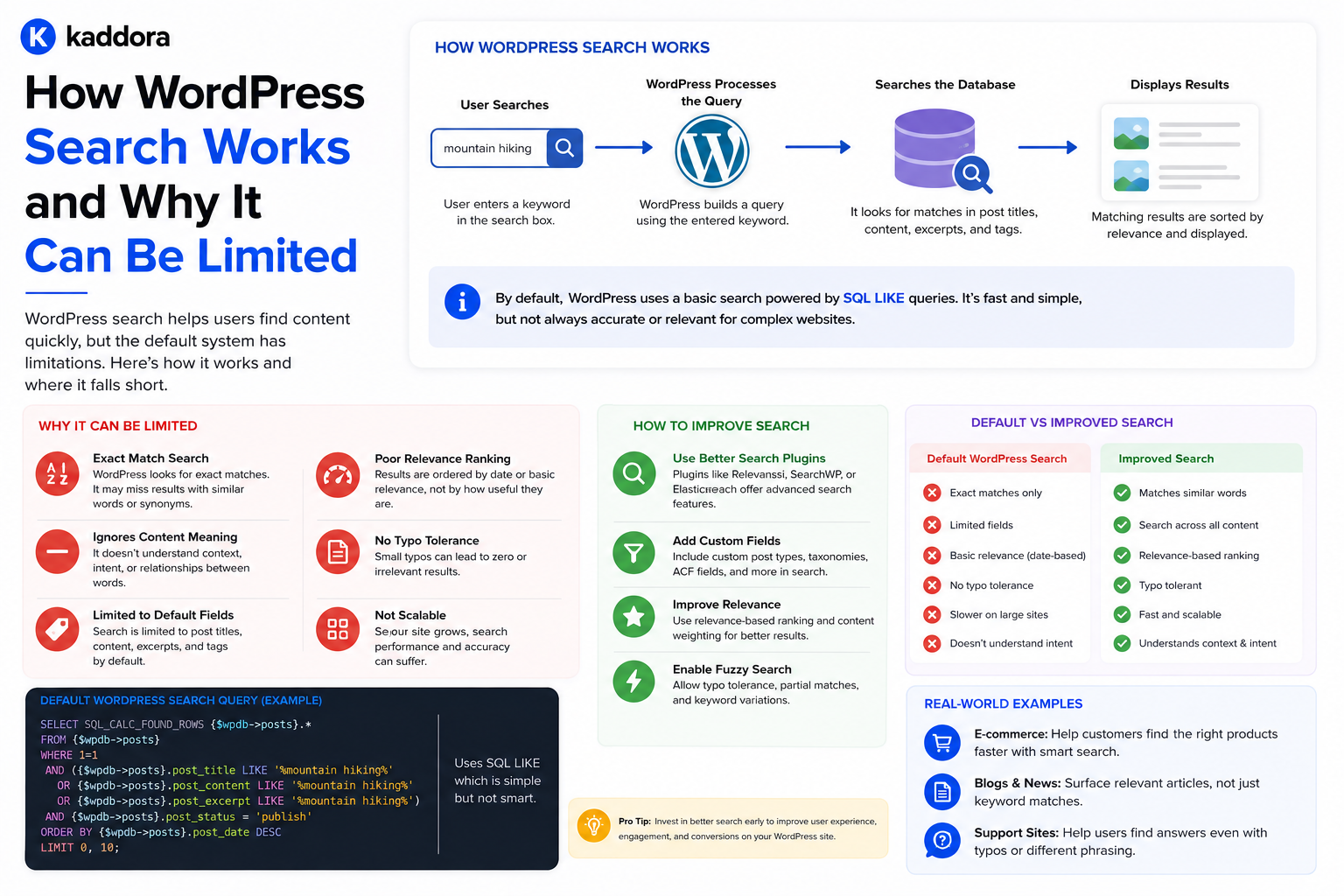
How WordPress Search Works and Why It Can Be Limited
Introduction
Search is one of the most important discovery features on a WordPress website.
A visitor may arrive on a site and immediately search for:
WordPress API, WooCommerce analytics, AI plugins, CRM integration
The website then needs to identify content that is relevant to that query.
At first, this sounds simple:
User Query ↓ WordPress Search ↓ Results
But search becomes considerably more complex as a website grows.
A modern WordPress website may contain:
Posts
Pages
Products
Documentation
FAQs
Custom Post Types
Taxonomies
Custom Fields
Reviews
Courses
Locations
The search system may need to find relevant results across all of them.
WordPress provides native search functionality, which is useful for many websites. However, the native system has a relatively simple search model and may not satisfy the needs of large or highly structured content libraries.
Common challenges include:
Limited relevance ranking
Searching across complex custom fields
Combining multiple content types
Advanced filtering
Faceted navigation
Typo tolerance
Autocomplete
Semantic search
Large-scale performance
Search analytics
Personalized results
This does not mean native WordPress search is bad.
It means:
The native search system is designed for general WordPress content discovery, while advanced search requirements often need additional indexing, ranking, filtering, or search infrastructure.
This guide explains how WordPress search works conceptually, where its limitations appear, how developers can improve it, and when a dedicated search engine becomes appropriate.
What Is WordPress Search?
WordPress search allows users to enter a query and retrieve matching content.
A basic flow is:
Search Form ↓ Search Request ↓ WordPress Query ↓ Matching Content ↓ Search Results Template
The search request generally uses WordPress's query system to identify relevant content.
The WordPress Search Query
When a visitor searches for something such as:
WordPress API
WordPress uses its query system to construct a database query.
Conceptually:
Search Term ↓ WP_Query ↓ Database ↓ Posts
The actual SQL and query behavior depend on the query arguments, WordPress version, database configuration, and customizations.
WP_Query and Search
WordPress uses WP_Query extensively for content retrieval.
A search request can be represented conceptually as:
$query = new WP_Query( array( 's' => 'WordPress API', ) );
The s argument represents the search query.
A real theme or plugin may use the main WordPress query instead of creating a separate query.
Search Results Template
Themes commonly use:
search.php
for search result presentation.
The template controls how the results appear.
It does not necessarily define how relevance is calculated.
This distinction is important.
Search Retrieval vs Search Presentation
There are two separate concerns:
Retrieval
Which records match the query?
Presentation
How should those records be displayed?
For example:
Database Query ↓ Matching Posts ↓ search.php ↓ HTML Results
Changing the template does not automatically improve retrieval relevance.
What Does Native WordPress Search Search?
Native search is primarily centered around standard WordPress content and the searchable text associated with it.
A typical website may search content such as:
Post titles
Post content
Excerpts
depending on the WordPress query and search behavior.
Developers can customize the search process to include additional data.
Why Search Can Become Limited
The basic challenge is that modern content is more structured than a simple text document.
Consider a product:
Product ├── Name ├── Description ├── Features ├── Compatibility ├── Technology ├── Industry ├── Documentation └── Reviews
A visitor may search for:
WooCommerce analytics
but the relevant information may live in a custom field or taxonomy rather than only in the main content body.
Search and Custom Post Types
Large websites often use custom post types:
Products Articles Documentation Courses Events Reviews
A search system may need to search all of them.
WordPress queries can be customized to search multiple post types.
For example:
$query = new WP_Query( array( 'post_type' => array( 'post', 'product', 'kdr_document', ), 's' => 'API', ) );
The exact post types depend on the website.
Cross-Content Search
A sophisticated website may want one search box to return:
Articles Products Documentation FAQs
with different result labels.
For example:
API Authentication Guide Article API Integration Toolkit Product Authentication Configuration Documentation
This is a cross-content search experience.
Why Cross-Content Search Is Harder
Different content types have different structures.
For example:
Article: Title Content Topic Product: Name Features Compatibility Documentation: Title Section Product
A good search system needs to normalize these differences.
Search and Taxonomies
Taxonomies are useful search signals.
For example:
Article Topic = APIs Technology = WordPress Audience = Developer
A visitor searching:
WordPress APIs
could receive results using both text and taxonomy relationships.
Native Search vs Taxonomy Filtering
A keyword search asks:
Which content contains terms related to this query?
A taxonomy filter asks:
Which content belongs to this classification?
They serve different purposes.
A modern search interface may combine both.
For example:
Query: API Filters: Content Type = Tutorial Technology = WordPress Difficulty = Advanced
Search and Custom Fields
Custom fields often contain important structured information.
For example:
Product: version = 3.2 compatibility = WooCommerce license = GPL
A user may search for:
WooCommerce GPL
but the relevant information may not be in the main post content.
Developers may need custom search logic to include such fields.
Why Searching Metadata Can Be Expensive
WordPress stores metadata separately from the main post record.
A simplified relationship looks like:
Post ↓ Post Metadata
Searching many metadata values can result in complex joins and filtering.
At small scale this may be acceptable.
At large scale, repeated metadata-heavy queries can become expensive.
Search Performance
Search performance depends on more than content volume.
Factors can include:
Number of content records
Number of searchable fields
Taxonomy complexity
Metadata usage
Database indexes
Query complexity
Hosting resources
Caching
Search frequency
A website with 100,000 records is not automatically slow.
The real question is:
How expensive is the search query being executed?
Why LIKE Queries Can Become Expensive
Traditional database search customizations may use string matching patterns such as:
LIKE '%wordpress%'
On large datasets, such searches may require scanning many rows.
This can become increasingly expensive as content volume grows.
Database Indexes and Search
Indexes can improve certain database lookups.
However, normal database indexes are not automatically a complete solution for arbitrary full-text search patterns.
Search architecture should be designed around actual query behavior.
Native Full-Text Search
Depending on the database and configuration, full-text indexing may support more efficient text retrieval than unrestricted substring matching.
But implementing advanced search using database-native features requires careful consideration of:
Supported fields
Query syntax
Ranking
Language
Indexing
Compatibility
Search Relevance
Finding matching content is not enough.
Suppose the user searches:
WordPress API
and WordPress finds 500 matching records.
Which should appear first?
A good search engine needs relevance ranking.
Why Relevance Can Be Limited
A basic search system may not understand that:
"WordPress API Authentication"
is more directly relevant than:
"Website Performance Guide"
just because both contain the word "WordPress."
A more advanced ranking model can consider:
Phrase matches
Field importance
Taxonomy matches
Freshness
Popularity
Relationships
Weighted Search
Different fields can have different importance.
For example:
Title Match = High Weight Keyword in Description = Medium Weight Keyword in Body = Lower Weight
Then:
Title: WordPress API Guide
can outrank:
Body: ...mentions WordPress API...
This can produce more useful results.
Search by Exact Phrase
Search systems often need to distinguish:
WordPress API
from:
WordPress plugin API development
Phrase-aware matching can improve relevance.
Partial Matching
Visitors may type:
wordpres ap
and still expect:
WordPress API
Native search does not automatically provide sophisticated typo tolerance or autocomplete behavior.
Advanced search systems can add these capabilities.
Search Autocomplete
Autocomplete can provide suggestions while users type:
word...
showing:
WordPress WordPress API WordPress themes WordPress plugins
Autocomplete is a separate discovery feature from final search ranking.
Search Suggestions
A website can suggest:
Popular searches
Recent searches
Matching titles
Categories
Products
Topics
The suggestion system should remain fast because it often runs while the user is typing.
AJAX Search
AJAX can allow search results to update without a full page reload.
Conceptually:
User Types ↓ AJAX Request ↓ Search Endpoint ↓ Results ↓ Update Interface
But AJAX itself does not make the underlying search faster.
A slow query is still slow when requested asynchronously.
Live Search
Live search displays results as the user types.
This can improve discovery but also increases request volume.
For example:
w wo wor word wordp
could generate many requests.
Use:
Debouncing
Minimum query length
Request cancellation
Caching
to reduce unnecessary load.
Search Debouncing
A debounce delay waits briefly after the user stops typing before sending the request.
Conceptually:
User Types ↓ Wait 200–400 ms ↓ Search
The exact delay should be tuned for the interface.
Search Pagination
Search results should normally be paginated.
For example:
Page 1 Page 2 Page 3
Do not retrieve thousands of records when the user only needs the first few results.
Search Result Counts
Displaying:
12,453 Results
can be expensive if an exact count requires heavy processing.
For large search systems, approximate or optimized counting may be preferable.
Search Filters
Users may want to narrow results:
Keyword: API Type: Documentation Topic: WordPress Difficulty: Advanced
This is the beginning of faceted search.
Search Facets
Facets are dynamic filters derived from the available results.
For example:
API Search Content Type: Tutorial (120) Documentation (70) Article (45) Technology: WordPress (150) PHP (90) REST (80)
Dedicated search engines are often better suited to large faceted datasets.
Native WordPress Search for Small Websites
Native search can be perfectly adequate for:
Small blogs
Small business sites
Simple content libraries
Low search traffic
Basic keyword queries
Do not introduce complex infrastructure without a real requirement.
When Native Search Starts Becoming Insufficient
Consider customization when users need:
Multiple content types
Custom field search
Weighted relevance
Advanced filters
Autocomplete
Typo tolerance
Faceted navigation
Search analytics
Semantic search
When to Consider a Dedicated Search Engine
A dedicated engine may become appropriate when:
Content volume is large
Search traffic is high
Query complexity is high
Filtering is extensive
Relevance ranking is advanced
Search must scale independently
Popular technologies include:
Elasticsearch
OpenSearch
Algolia
Other specialized search services
The correct choice depends on requirements and infrastructure.
WordPress as Source of Truth
Even when a dedicated search engine is used, WordPress can remain the canonical content source.
A common architecture is:
WordPress ↓ Indexer ↓ Search Engine ↓ Search Results
This separates content management from high-performance search.
Custom Search Index
An external or internal index can store normalized searchable information:
Document ID Title Excerpt Content Content Type Taxonomies Custom Fields Relationships URL Status
The index can then be optimized specifically for search.
Search Index Synchronization
When content changes:
WordPress Content Updated ↓ Index Update ↓ Search Engine
Use background processing for large or expensive indexing operations.
Incremental Indexing
Do not rebuild the entire search index every time one article changes.
Instead:
Article Updated ↓ Update Article Document
This is much more scalable.
Bulk Reindexing
When the search schema changes:
Search Schema Updated ↓ Queue Reindex ↓ Process Batches ↓ Monitor
Do not run a massive reindex inside a normal browser request.
Search Index Failures
If an index update fails:
WordPress ✓ Updated Search Index ✗ Failed
the source of truth remains correct, but search becomes stale.
Track indexing state explicitly.
Search Index Status
A useful status model:
Indexed Pending Failed Stale Reindexing
This makes search synchronization observable.
Search Index and Content Relationships
If your website has structured relationships, index them too.
For example:
Article → Product 501 → Topic 20
The search engine can then support queries such as:
Articles related to Product 501
without running complex WordPress database joins.
Search Ranking Signals
A mature search engine may rank results using:
Text Relevance + Title Weight + Taxonomy Match + Relationship Match + Freshness + Popularity + Business Rules
The exact model should reflect the site's goals.
Search Ranking Should Be Explainable
Developers should be able to determine why a result ranked highly.
For example:
Result: WordPress API Authentication Reasons: Title Match Topic Match Product Match High Content Quality
This makes ranking easier to improve.
Search Analytics
A search system should ideally measure:
Searches Clicks Zero Results Refinements Search-to-Conversion
This provides insight into what visitors are looking for.
Zero-Result Searches
A query such as:
advanced laravel webhook
returning no results can reveal:
Missing content
Missing synonyms
Poor indexing
Taxonomy gaps
Incorrect ranking
Failed searches are valuable product and content signals.
Search Analytics and Content Strategy
Search logs can reveal what visitors actually want.
For example:
Top Search: WooCommerce API Zero Result: WooCommerce webhook retry
The second query may represent a content opportunity.
Search and Synonyms
Users may use:
ecommerce e-commerce online store
to describe similar concepts.
A search system can map synonyms where appropriate.
Do not treat every similar word as identical without considering context.
Search and Stemming
Some search engines support linguistic processing so related word forms can match.
For example:
optimize optimization optimized
Support depends on the search technology and language.
Multilingual Search
A multilingual WordPress site has additional considerations:
Language-specific indexing
Stop words
Stemming
Synonyms
Transliteration
Language-aware ranking
Native search may need substantial customization for complex multilingual requirements.
Search Permissions
Search must respect content visibility.
For example:
Private Documentation
should not appear in public results.
This becomes more important for:
Membership sites
SaaS platforms
Private knowledge bases
Customer portals
Multi-Tenant Search
For SaaS:
Tenant A → Search Index A Tenant B → Search Index B
or one shared index with strict tenant filtering.
Every search request must carry appropriate tenant scope.
Search Security
Validate:
Query parameters
Filters
Page numbers
Content type values
Taxonomy values
Tenant IDs
Escape output correctly.
Do not expose internal IDs or private metadata unless required.
Search and Caching
Caching can help repeated searches, but search queries are highly variable.
A useful strategy may include:
Popular Queries + Autocomplete Cache + Static Facets
Avoid caching huge numbers of unique searches indefinitely.
Search Query Normalization
Normalize harmless variations:
" WordPress API "
and:
"wordpress api"
may map to the same normalized query.
Normalization can reduce duplicate cache entries and improve analytics.
Search Query Limits
Prevent abusive or accidentally expensive searches.
For example:
Maximum Query Length Maximum Filters Maximum Page Size
These limits should fit the application.
Search and Performance Monitoring
Track:
Search Latency P95 Search Latency Error Rate Zero Result Rate Index Lag
A search engine that returns excellent results but takes several seconds may still provide a poor experience.
Search Observability
A useful architecture tracks:
Query Duration Result Count Provider Index Version Cache Hit
Do not store sensitive query data unnecessarily.
Avoid Logging Sensitive Searches
Search queries can contain:
Customer names
Order numbers
Personal information
Internal terms
Apply appropriate privacy controls to search analytics.
Search Architecture Evolution
A WordPress site can evolve incrementally:
Stage 1: Native Search Stage 2: Custom Query + Filters Stage 3: Custom Search Index Stage 4: Dedicated Search Engine Stage 5: Hybrid Keyword + Semantic Search
Do not jump directly to Stage 5 unless the requirements justify it.
Common WordPress Search Mistakes
Assuming Native Search Is Always Enough
Simple search may struggle with complex content.
Searching Every Metadata Field
Can create expensive queries.
No Relevance Ranking
Results become difficult to use.
Loading Too Many Results
Creates unnecessary database work.
No Search Analytics
Misses valuable user intent data.
Ignoring Zero-Result Queries
Loses content opportunities.
No Index Synchronization
Search results become stale.
No Tenant Filtering
Can expose another customer's content.
Search Without Caching or Optimization
High traffic can create unnecessary load.
Best Practices for WordPress Search
A professional search architecture should:
Start with native WordPress search for simple requirements.
Identify actual relevance and filtering needs before replacing it.
Normalize searchable fields across content types.
Use structured taxonomy and relationship signals.
Support meaningful relevance weighting.
Paginate results.
Optimize expensive metadata searches.
Add autocomplete only when it provides real value.
Use debouncing for live search interfaces.
Track zero-result queries.
Track search latency and indexing lag.
Keep production and tenant data properly isolated.
Use a dedicated index when database search becomes a bottleneck.
Reindex incrementally rather than rebuilding unnecessarily.
Keep search logic separate from presentation.
Protect private content and sensitive query data.
Why choose ThemeKaddora?
ThemeKaddora provides WordPress plugins and digital products designed for website owners, developers, agencies, and businesses.
Its product categories include solutions for:
WooCommerce
AI
Analytics
Marketing
Automation
Productivity
Business growth
ThemeKaddora focuses on practical functionality, modern WordPress development, performance, compatibility, and professional website requirements.
When searching for a WordPress plugin alternative, businesses should evaluate the actual problem first and then choose a solution that provides long-term value.
Conclusion
WordPress search provides a useful foundation for content discovery, especially for smaller websites.
The basic architecture is:
Search Query ↓ WordPress Query ↓ Database ↓ Results
This is often enough for a simple blog.
But as a website becomes more complex, search requirements also become more sophisticated.
The first principle is understand the native system before replacing it.
Do not introduce Elasticsearch, OpenSearch, or another external system simply because the website has grown.
First identify the actual problem.
The second principle is separate retrieval from presentation.
A better search.php template does not automatically make the underlying search query more relevant.
The third principle is model search around your content architecture.
If your website contains:
Products Articles Documentation FAQs
search should understand those different content types.
The fourth principle is use structured signals.
Taxonomies, relationships, custom fields, and content types can all improve relevance and filtering.
The fifth principle is measure performance.
Track:
P50 P95 P99
and investigate slow queries rather than assuming every large dataset is inherently problematic.
The sixth principle is think about relevance.
A search result is useful only when it helps answer the user's actual need.
Field weighting, phrase matching, taxonomy relevance, relationships, and business rules can all contribute.
The seventh principle is track what users actually search for.
Search analytics can reveal:
Popular Queries Zero-Result Queries
which can guide product improvements and new content creation.
The eighth principle is use indexing when database search becomes the bottleneck.
A practical architecture is:
WordPress ↓ Indexer ↓ Search Engine ↓ Search API
WordPress can remain the source of truth.
The ninth principle is keep search secure.
Public search should not expose:
Private Content Internal Metadata Tenant Data Sensitive Search Information
The tenth principle is scale gradually.
A sensible evolution can be:
Native Search ↓ Custom Query ↓ Custom Index ↓ Dedicated Search Engine ↓ Hybrid Semantic Search
Only move to a more complex architecture when actual requirements justify it.
For ThemeKaddora, a mature search experience can bring together:
Products Articles Documentation FAQs Templates
through one search interface, with:
Keyword Matching + Taxonomies + Relationships + Relevance Ranking + Filters
This can transform search from a simple database query into a discovery system.
The most important principle is:
Improve WordPress search based on measurable user and performance requirements rather than assuming that more search infrastructure automatically produces better results.
A professional WordPress search architecture should be:
Relevant
→ Fast
→ Structured
→ Filterable
→ Observable
→ Secure
→ Scalable
→ Content-Aware
→ Analytics-Driven
→ Maintainable
When these principles are followed, WordPress can support everything from simple site search to sophisticated cross-content discovery while keeping the architecture proportional to the actual needs of the website.
Frequently Asked Questions
How does WordPress search work?
WordPress uses its query system to retrieve content matching a search term and then passes the results to the site's search presentation layer.
What does native WordPress search search?
Native search primarily works with standard searchable WordPress content. Developers can customize it to include additional content types, taxonomies, metadata, and other signals.
Why is WordPress search sometimes limited?
Native search can become insufficient when a website requires advanced relevance ranking, custom-field searching, complex filtering, typo tolerance, autocomplete, semantic search, or very large-scale performance.
Can I search custom post types?
Yes. Developers can configure WordPress queries to search multiple custom post types.
Can WordPress search custom fields?
Yes, but metadata-heavy queries can become expensive at scale and may require optimized query strategies or a dedicated search index.
Should every WordPress website use Elasticsearch or OpenSearch?
No. Native WordPress search is often sufficient for smaller or simpler websites. Dedicated search infrastructure should be introduced when actual search requirements justify it.
What is search relevance?
Search relevance determines how results are ranked so the most useful matches appear before weaker matches.
Can taxonomies improve WordPress search?
Yes. Taxonomies can provide structured classification signals that improve filtering and relevance.
What are zero-result searches?
They are user queries that return no useful results. Tracking them can reveal missing content, indexing problems, synonym gaps, and new content opportunities.
Does AJAX make WordPress search faster?
No. AJAX changes how results are delivered to the interface, but the underlying search query still needs to be efficient.
Why choose Themekaddora?
Themekaddora provides lightweight, responsive, SEO-friendly WordPress themes with fast performance, WooCommerce compatibility, flexible customization, accessibility-conscious design, modern templates, regular updates, and professional support—providing a strong foundation for businesses building digital products and product-focused websites.
Comments (0)