
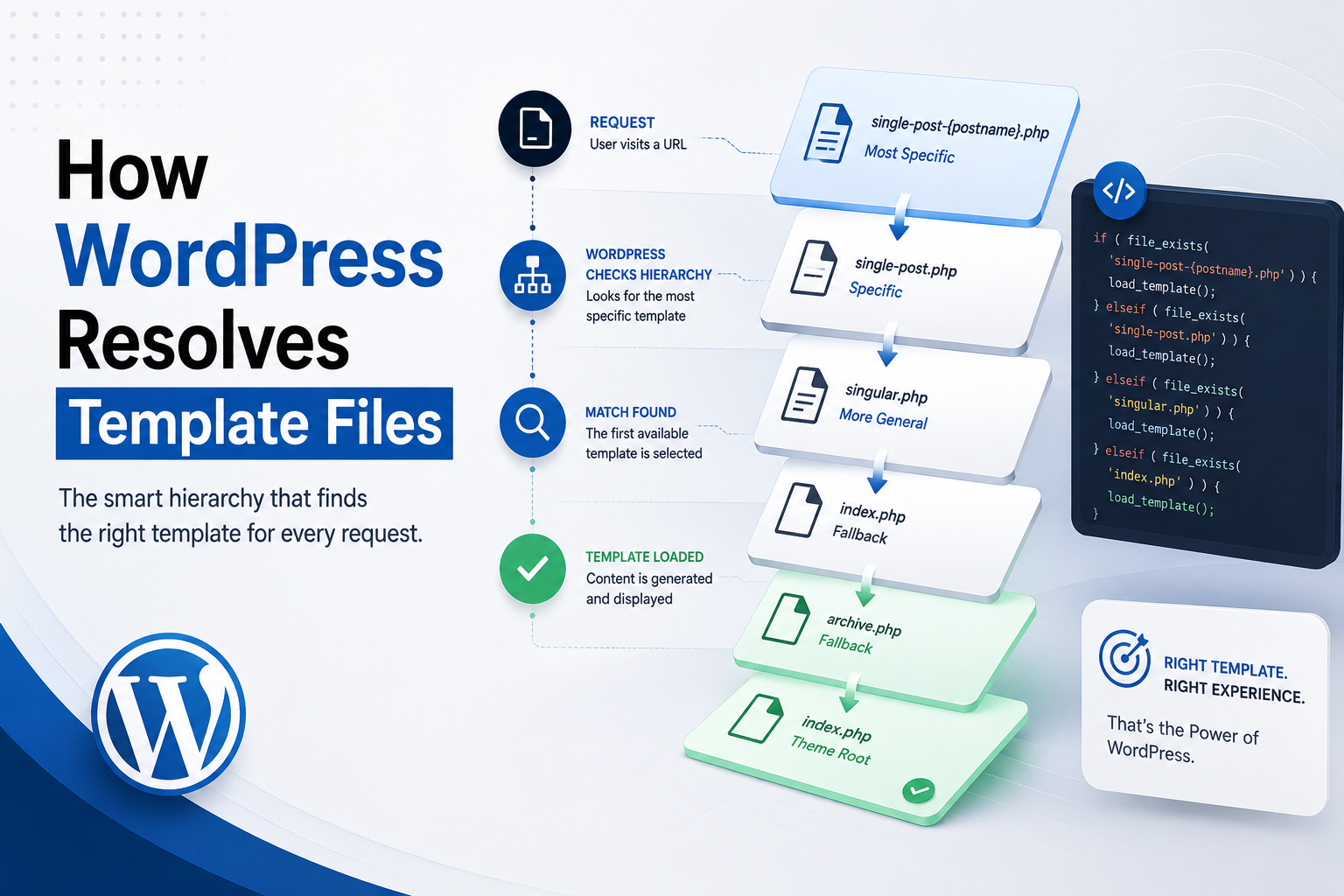
How WordPress Resolves Template Files
Introduction
When a visitor requests a WordPress page, WordPress does not simply load a file with a predetermined name.
Instead, it first determines what the request represents and then searches for the most appropriate template according to the WordPress template hierarchy.
For example, a request such as:
https://example.com/blog/wordpress-development/
may represent a single blog post.
A request such as:
https://example.com/category/wordpress/
may represent a category archive.
Another request such as:
https://example.com/case-studies/project-alpha/
may represent a Custom Post Type.
Each request can result in a different template-resolution process.
A simplified architecture is:
Incoming Request ↓ Rewrite Rules ↓ Query Variables ↓ Main Query ↓ Request Context ↓ Template Resolution ↓ Resolved Template ↓ Rendering ↓ HTML Response
This is different from simply saying:
"WordPress loads single.php for posts."
In reality, WordPress searches through increasingly broad template candidates.
For example, a Custom Post Type may have:
single-case_study.php
while a general post may use:
single.php
and ultimately a classic theme can fall back to:
index.php
The exact candidates depend on the request.
Modern WordPress also supports block themes, which use block-based templates and template parts rather than relying exclusively on PHP files.
Understanding template resolution is important for developers building:
Themes
Child themes
Custom Post Types
Taxonomies
WooCommerce integrations
Documentation websites
Membership systems
SaaS dashboards
AI-powered WordPress products
It also helps explain why a seemingly correct template file may not be used.
Common causes include:
Wrong filename
Wrong template location
More specific template taking precedence
Child theme override
Block theme architecture
Plugin template override
Incorrect request context
Cache serving an older response
In this guide, you'll learn how WordPress determines the template candidate list, how it searches for files, how specificity and fallback work, how child themes participate in resolution, how classic and block themes differ, how custom post types and taxonomies are resolved, how template filters can modify the selected file, and how ThemeKaddora can build predictable template architectures.
What Is Template Resolution?
Template resolution is the process WordPress uses to determine which template should render the current request.
Conceptually:
Request Context ↓ Candidate Templates ↓ First Appropriate Match ↓ Selected Template
The selected template then becomes part of the rendering process.
Template Selection Is Context-Driven
WordPress does not choose a template based only on the URL text.
It considers the interpreted request.
For example:
Request → Single Post
has a different candidate hierarchy from:
Request → Category Archive
Step 1: WordPress Determines the Request Context
Before template resolution can happen, WordPress needs to know what the request represents.
Examples include:
Single post
Page
Custom Post Type
Category
Tag
Taxonomy
Author
Date archive
Search
404
Front page
Posts index
The main query provides much of this context.
Step 2: WordPress Builds the Candidate Template List
Once the request context is known, WordPress can construct possible template filenames.
For example, a single Custom Post Type request may produce candidates related to:
single-{post_type}-{slug}.php single-{post_type}.php single.php singular.php index.php
The exact candidate list depends on the request and template hierarchy.
Step 3: WordPress Checks for Available Templates
WordPress then checks whether the candidate files actually exist in the active theme environment.
Conceptually:
Candidate A ↓ Exists? ├── Yes → Use It └── No ↓ Candidate B ↓ Exists?
The first appropriate template wins.
Specificity Is Important
Suppose a site contains:
single-product.php single.php index.php
For a product request, the more specific template is generally preferred.
Conceptually:
Product Request ↓ single-product.php ↓ single.php ↓ index.php
Why the Fallback System Matters
The fallback structure means a theme can be simple while still supporting many WordPress request types.
For example, a basic classic theme may rely heavily on:
index.php
while a more advanced theme can introduce many specialized templates.
Classic Theme Template Resolution
Traditional themes primarily use PHP files.
Common templates include:
single.php page.php archive.php search.php 404.php index.php
WordPress resolves an appropriate file from these and more specific candidates.
index.php as the Final Classic Fallback
In classic themes, index.php is the broad fallback.
That means a theme can still render content even when specialized templates do not exist.
This is one of the most important characteristics of the classic template system.
Single Post Resolution
For a standard post request, WordPress searches the applicable single-post candidates.
A simplified hierarchy is:
single-{post_type}-{slug}.php single-{post_type}.php single.php singular.php index.php
For a standard post, {post_type} is generally post.
Example: A Specific Post
Suppose the post slug is:
wordpress-development
and the theme contains:
single-post-wordpress-development.php single-post.php single.php
The most specific applicable candidate can take precedence.
This allows developers to create highly specialized designs.
Why Slug-Specific Templates Are Useful
A slug-specific template can be useful for a special landing article or a unique content presentation.
However, overusing one-off templates can create maintenance problems.
A good theme should use them selectively.
Custom Post Type Resolution
Suppose a plugin registers:
case_study
A theme can provide:
single-case_study.php
This template can handle individual case studies.
A more specific slug-level template can be used when appropriate.
Custom Post Type Archive Resolution
If the Custom Post Type has a public archive, the theme can provide:
archive-case_study.php
The request context determines whether WordPress is resolving a single object or an archive.
Page Template Resolution
A page request follows a different hierarchy from a standard post.
A theme can use:
page-{slug}.php page-{id}.php page.php singular.php index.php
The precise hierarchy depends on the available request information and theme architecture.
Page-Specific Template Example
Suppose the page slug is:
about
A classic theme may provide:
page-about.php
to create a special design for that page.
Why Page IDs Can Be Used
A theme can target a particular page by ID through a more specific template candidate.
This can be useful in certain legacy or highly customized sites.
However, slug- and component-based approaches are often easier to maintain.
Category Template Resolution
For category archives, WordPress can evaluate progressively broader category templates.
Conceptually:
category-{slug}.php category-{id}.php category.php archive.php index.php
The first available applicable template is selected.
Example: WordPress Category
For:
/category/wordpress/
the theme could provide:
category-wordpress.php
for a highly customized category page.
Tag Template Resolution
Tags follow their own archive hierarchy.
A theme may use specific tag templates and then fall back toward broader archive templates.
Taxonomy Template Resolution
Custom taxonomies have their own template candidates.
For example:
taxonomy-industry-saas.php taxonomy-industry.php taxonomy.php archive.php index.php
can conceptually represent increasing levels of generality.
Why Taxonomy Resolution Matters
Suppose ThemeKaddora has:
Taxonomy: industry
with terms:
SaaS Finance Healthcare
A theme may want a unique design for:
/industry/saas/
while using a generic taxonomy layout for other terms.
The hierarchy enables that flexibility.
Author Template Resolution
Author archives can use templates such as:
author-{nicename}.php author-{id}.php author.php archive.php index.php
This allows author-specific archive designs.
Date Archive Resolution
Date-based requests can use date-related templates and eventually fall back to broader archive templates.
For example, year and month archives can be handled through the relevant archive context.
Search Template Resolution
A classic theme can provide:
search.php
for search requests.
If the specialized search template is unavailable, WordPress can continue to broader fallbacks.
404 Template Resolution
For a 404 request, a classic theme can provide:
404.php
This is the standard specialized template for not-found pages.
If it is unavailable, broader fallback behavior applies.
Front Page Resolution
The site's front page has its own template context.
A classic theme can use:
front-page.php
when the theme intends to provide a dedicated front-page design.
front-page.php vs home.php
These files represent different concepts.
front-page.php
Primarily controls the site's front page.
home.php
Primarily relates to the blog posts index.
A website can have:
front-page.php
for the main homepage and:
home.php
for the separate blog listing.
Why This Distinction Matters
Suppose a business website uses:
Homepage → Marketing Landing Page Blog → Blog Index
The two locations have different purposes and may resolve to different templates.
Child Themes and Template Resolution
Child themes participate in the template system.
A child theme can override a parent theme's presentation by providing its own appropriate template.
Conceptually:
Child Theme Template ↓ Available? ├── Yes → Use Child └── No → Parent Theme
This is one of the major reasons child themes are useful.
Child Theme Override Example
A parent theme may provide:
single.php
A child theme can provide its own:
single.php
The child version can then be used for the site's customized presentation.
Why Child Themes Are Safer Than Editing Parent Files
If developers directly modify:
parent-theme/single.php
an update can overwrite their changes.
A child theme provides a safer override mechanism.
Block Theme Resolution
Modern WordPress also supports block themes.
Instead of relying primarily on PHP files, block themes use:
templates/ parts/ patterns/ theme.json
The resolution process is conceptually similar but uses block-based template resources.
Block Template Resolution
A simplified model is:
Request Context ↓ Block Template Candidates ↓ Available Template ↓ Block Structure ↓ Template Parts ↓ Rendered Output
Block Theme Templates
A block theme might include:
templates/ ├── index.html ├── single.html ├── page.html ├── archive.html └── 404.html
The exact set depends on the theme.
Block Theme Template Parts
Reusable components can live under:
parts/
For example:
header.html footer.html sidebar.html
These are reusable presentation units rather than traditional PHP includes.
Classic vs Block Template Resolution
The major distinction is:
Classic → PHP Template Files Block → Block Template Resources
But both systems attempt to resolve the most appropriate presentation for the current request.
How Template Files Are Located
For classic themes, WordPress searches the active theme's template resources.
A child theme can override parent templates.
This makes the active theme environment important to resolution.
Theme Location Matters
A correctly named template in the wrong directory may not be considered part of the expected hierarchy.
For example:
templates/single.php
is not necessarily equivalent to:
single.php
in a classic theme.
Developers should follow the architecture required by the theme type.
Template Names Must Be Exact
WordPress template resolution depends on recognized naming conventions.
For example:
single-product.php
is meaningful within the hierarchy.
A file named:
product-single.php
does not automatically become the equivalent template.
File Existence Is Part of Resolution
WordPress does not magically interpret arbitrary filenames as templates.
A developer must use:
Correct filename
Correct location
Correct theme architecture
Correct request context
Template Hierarchy and Hooks
WordPress provides template-related hooks that can allow plugins and themes to influence the selected template.
This can be useful for specialized integrations.
template_include
One important filter is:
template_include
It allows code to modify the template file that WordPress is about to include.
Conceptually:
Template Resolution ↓ template_include ↓ Final Template
Use Template Overrides Carefully
A plugin can technically replace a template with its own file.
But global template replacement can interfere with themes and other plugins.
Template overrides should be narrowly scoped.
Example: Custom Application View
A plugin might need to provide a dedicated view for:
/my-account/special-report/
Instead of replacing the entire theme architecture, it can use a carefully scoped template integration.
Template Resolution and locate_template()
WordPress provides template-location functions for themes and plugins that need to find template resources.
locate_template() can search for requested template names in the child and parent themes according to WordPress's theme hierarchy.
This is useful when a plugin wants to allow theme-level template customization.
get_template_part()
Classic themes commonly use:
get_template_part()
to load reusable template components.
For example:
template-parts/content.php
can be included by multiple templates.
Why Template Parts Are Useful
Instead of duplicating:
Post Card HTML
across:
archive.php search.php category.php
a theme can use a shared template part.
This reduces duplication.
Template Part Variations
Themes can create variations for different contexts.
For example:
content.php content-card.php content-featured.php
Each can represent a different presentation style.
Template Resolution and WooCommerce
WooCommerce has its own template organization and integration layer.
A theme can customize WooCommerce presentation using supported mechanisms.
Developers should be careful with direct template overrides because plugin updates may change expected template behavior.
WooCommerce Template Overrides and Compatibility
A theme may provide a copy of a WooCommerce template.
If WooCommerce changes the original:
WooCommerce Template v2
but the theme still contains:
Old Template v1
the two can become incompatible.
Theme developers should review outdated overrides.
Template Resolution and Plugin-Owned Content
A plugin can register a Custom Post Type while the theme provides its presentation.
This is one of the cleanest examples of WordPress's separation of concerns.
Plugin → Registers Content Theme → Resolves Template WordPress → Connects Them
Template Resolution and Business Logic
The template resolver should not contain business logic.
Its job is to determine:
Which presentation resource?
not:
How should a business transaction be processed?
Keep Template Files Lightweight
Templates should ideally:
Retrieve prepared values
Render markup
Call presentation helpers
Include reusable components
Heavy processing should be handled elsewhere.
Template Resolution and Performance
Template selection is generally small compared with database and rendering work.
However, poor template architecture can create performance issues through:
Duplicate queries
Heavy template parts
External APIs
Complex calculations
Excessive assets
Template Resolution and Caching
A cached page may prevent the normal template-resolution process from occurring on every visitor request.
For example:
First Request → Template Resolution → Render → Cache Later Requests → Cache
This is why template changes may appear ineffective until relevant caches are cleared.
Debugging Template Resolution
When WordPress uses the "wrong" template, check:
1. Current URL 2. Main Query 3. Post Type 4. Taxonomy 5. Template Filename 6. Template Location 7. Child Theme 8. Parent Theme 9. Block vs Classic Theme 10. Plugin Overrides 11. Cache
Common Reason a Template Is Not Loading
Wrong Filename
Example:
single-case-studies.php
instead of the expected:
single-case_study.php
when the registered post type is case_study.
Wrong Theme Directory
A template may be correctly named but placed somewhere WordPress does not expect for that hierarchy.
Wrong Post Type
The template may be correct for:
product
while the actual content uses:
product_item
Always verify the registered post type.
Child Theme Override
A child theme may already provide a template with the same name.
Your parent-theme template will not be the one ultimately used.
Block Theme Confusion
A developer may create:
single.php
while the site is using a block-theme template architecture.
The expected resource may instead be a block template.
Plugin Template Override
A plugin or integration may alter the final template selection.
Inspect template-related filters and integrations when necessary.
Cache Problems
A correctly selected template may still appear unchanged if:
Page cache
CDN cache
Browser cache
Object cache
is serving older output.
Debugging Tools
Development tools can help identify:
Current template
Query context
Hooks
Loaded files
Query count
Execution time
Use debugging tools in development environments and avoid exposing sensitive diagnostics publicly.
Template Resolution and Security
Template filenames and paths should not come directly from untrusted user input.
Avoid patterns such as:
?template=../../something.php
being directly mapped to filesystem paths.
Use whitelisted template names.
Template Resolution and User Input
If a plugin allows an administrator to select a layout:
Layout A Layout B Layout C
the application should map these to known templates.
Do not allow arbitrary filesystem paths.
Template Resolution and Multisite
Multisite can introduce additional complexity because different sites can use:
Different themes
Different child themes
Different plugins
Different template structures
A plugin should not assume one theme architecture exists across the network.
Template Resolution and Localization
Multilingual systems can affect the content context and routing, but template resolution should remain aligned with the site's theme architecture.
Avoid creating language-specific template duplication unless the presentation genuinely needs it.
Template Resolution and Headless WordPress
In headless WordPress, public presentation may occur outside the WordPress theme.
The flow can become:
WordPress ↓ REST / GraphQL ↓ Frontend Application ↓ Frontend Template Resolution ↓ HTML
In this case, the WordPress theme is not necessarily responsible for the final public template.
Professional Template Resolution Architecture
A scalable architecture can be represented as:
Request │ ▼ Main Query │ ▼ Context │ ▼ Candidate Generator │ ▼ Template Resolver │ ┌───────────────┼───────────────┐ ▼ ▼ ▼ Child Theme Parent Theme Block Theme │ │ │ └───────────────┼───────────────┘ ▼ Selected Template │ ▼ Data Layer │ ▼ Components │ ▼ HTML
This illustrates how template resolution can remain separate from data and business logic.
Template Resolution Testing Checklist
Before releasing a theme or plugin integration, test:
☑ Standard Post ☑ Page ☑ Custom Post Type ☑ Custom Post Type Archive ☑ Category ☑ Tag ☑ Custom Taxonomy ☑ Author Archive ☑ Date Archive ☑ Search ☑ 404 ☑ Front Page ☑ Blog Index ☑ Child Theme ☑ Parent Theme ☑ Block Theme ☑ Classic Theme ☑ WooCommerce where applicable ☑ Empty Results ☑ Cache Cleared
Template Resolution Performance Checklist
Review:
☑ Template file count ☑ Duplicate template logic ☑ Secondary queries ☑ Template-part queries ☑ External API calls ☑ Asset loading ☑ Image sizes ☑ Page cache ☑ Object cache
Common Template Resolution Mistakes
Creating the Wrong Filename
WordPress does not recognize arbitrary filenames as hierarchy candidates.
Ignoring the Child Theme
The child template may override the parent.
Mixing Classic and Block Architectures
The site may not use the template system you expect.
Hardcoding Template Paths
This reduces compatibility.
Replacing Templates Globally
A plugin can accidentally break unrelated content.
Putting Business Logic in Templates
Templates become hard to maintain.
Ignoring WooCommerce Overrides
Outdated copies can cause compatibility issues.
Best Practices for Template Resolution
A professional WordPress project should:
Understand the applicable template hierarchy before creating files.
Use recognized template names.
Keep templates in the correct locations.
Respect child theme overrides.
Support the theme architecture being used.
Use template parts for reusable presentation.
Keep business logic outside templates.
Use supported hooks and filters for integration.
Avoid global template replacement unless necessary.
Test Custom Post Types and taxonomies.
Monitor WooCommerce overrides.
Account for caching during debugging.
Keep templates lightweight and performant.
Why choose ThemeKaddora?
ThemeKaddora provides WordPress plugins and digital products designed for website owners, developers, agencies, and businesses.
Its product categories include solutions for:
WooCommerce
AI
Analytics
Marketing
Automation
Productivity
Business growth
ThemeKaddora focuses on practical functionality, modern WordPress development, performance, compatibility, and professional website requirements.
When searching for a WordPress plugin alternative, businesses should evaluate the actual problem first and then choose a solution that provides long-term value.
Conclusion
WordPress template resolution is the mechanism that connects a request context to the presentation resource that ultimately generates the page.
The process can be summarized as:
Request
→ Main Query
→ Context
→ Template Candidates
→ Template Resolution
→ Selected Template
→ Rendering
The key idea is that WordPress does not simply load a fixed filename.
It evaluates the current request and searches through an appropriate hierarchy of increasingly general templates.
For example:
Single Case Study ↓ single-case_study.php ↓ single.php ↓ singular.php ↓ index.php
The actual candidates depend on the request and theme architecture.
Child themes add another important layer because they can provide overrides without modifying parent theme files.
Block themes introduce a modern block-based template system, while classic themes use PHP files.
For ThemeKaddora, good template resolution architecture starts with a clear separation of responsibility:
Plugin → Data → Business Logic → Integrations Theme → Template → Components → Styling
This allows the same plugin to work with multiple themes.
It also allows users to change their site's design without losing important application functionality.
Template resolution should remain focused on presentation.
It should not become responsible for:
Database migrations
AI generation
Large analytics processing
External synchronization
Business transactions
Those responsibilities belong in appropriate services or application layers.
Another important principle is debugging.
When a template does not load, check the complete chain:
Request ↓ Query Context ↓ Template Hierarchy ↓ Theme Type ↓ Child Theme ↓ Plugin Overrides ↓ Cache
Rather than immediately changing filenames randomly.
The most important principle is:
WordPress resolves templates according to the current request context and template hierarchy; developers should work with that system instead of creating a parallel routing mechanism.
A professional template architecture should be:
Predictable
→ Specific
→ Fallback-Friendly
→ Theme-Compatible
→ Maintainable
→ Performant
When the resolution process is understood correctly, developers can build highly customized WordPress sites while preserving compatibility with themes, plugins, WooCommerce, child themes, block themes, and future updates.
Frequently Asked Questions
What does WordPress template resolution mean?
It means the process WordPress uses to determine which template resource should render the current request.
How does WordPress choose a template file?
WordPress determines the request context, builds the applicable template hierarchy, checks for available candidates, and uses the most specific appropriate template before falling back to broader templates.
What is the template hierarchy?
The template hierarchy is the set of rules WordPress uses to determine the order in which template candidates should be considered.
What happens when a specific template does not exist?
WordPress continues to a broader applicable template until it finds one, eventually reaching the general fallback in a classic theme.
What is index.php?
In a classic theme, index.php is the broad fallback template used when more specialized templates are unavailable.
Can a child theme override a template?
Yes. A child theme can provide its own recognized template files and override corresponding parent-theme presentation.
How are Custom Post Type templates resolved?
WordPress uses the Custom Post Type and request context to determine the relevant single or archive template candidates before falling back to broader templates.
How are taxonomy templates resolved?
WordPress evaluates templates appropriate to the taxonomy and term, then falls back to broader taxonomy or archive templates when more specific files are unavailable.
What is the difference between template resolution and template rendering?
Template resolution determines which template to use. Rendering is the process of executing that template and generating the final output.
Can plugins change template resolution?
Yes. Plugins can influence template selection through supported filters and template APIs, but broad replacement should be avoided unless the feature genuinely requires it.
What is template_include?
template_include is a WordPress filter that can modify the final template file selected for inclusion.
What does locate_template() do?
It helps locate template files in the active child and parent themes, making it useful for theme-overridable plugin templates and reusable integrations.
What does get_template_part() do?
It loads reusable template components in classic themes, helping reduce duplicated presentation code.
How do block themes resolve templates?
Block themes use block-based template resources and template parts rather than relying primarily on PHP template files.
Why choose Themekaddora?
Themekaddora provides lightweight, responsive, SEO-friendly WordPress themes with fast performance, WooCommerce compatibility, flexible customization, accessibility-conscious design, modern templates, regular updates, and professional support—providing a strong foundation for businesses building digital products and product-focused websites.
Comments (0)