
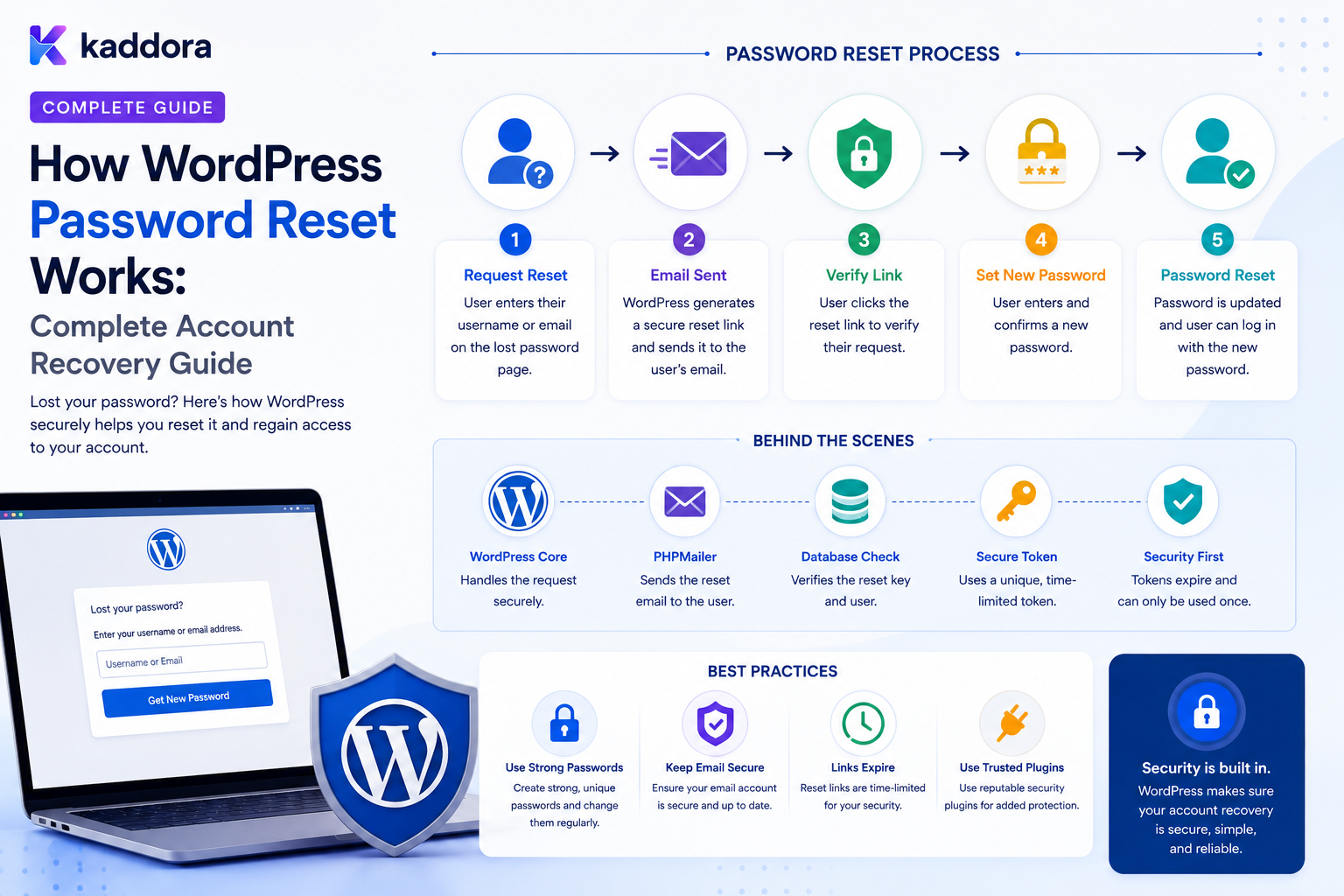
How WordPress Password Reset Works: Complete Account Recovery Guide
Introduction
Passwords are one of the most important credentials in a WordPress account.
But users forget them.
A secure WordPress website therefore needs an account-recovery process that allows an authorized user to establish a new password without knowing the old one.
The typical recovery flow looks like:
Forgot Password ↓ Enter Username / Email ↓ WordPress Creates Recovery Request ↓ Recovery Link Sent ↓ User Opens Link ↓ Token Validated ↓ New Password ↓ Account Recovery Complete
The process appears simple from the user's perspective.
Behind the scenes, however, password recovery involves:
Identity Lookup Recovery Tokens Expiration One-Time Use Secure Links Email Delivery Password Hashing Session Handling Rate Limiting Privacy Protection Audit Logging
A poorly designed reset system can create serious security problems.
Examples include:
Account Enumeration Weak Reset Tokens Reusable Reset Links Token Leakage Open Redirects Unlimited Requests Session Hijacking Password Disclosure
A custom WordPress plugin therefore should extend existing password-recovery mechanisms carefully rather than casually rebuilding authentication from scratch.
The key principle is:
A password-reset system should prove control of the recovery channel without revealing whether an account exists, should use short-lived and single-purpose recovery credentials, and should never expose the user's existing password.
What Is WordPress Password Reset?
WordPress password reset is the process used to help a user create a new account password after forgetting the current one.
It is different from a normal password change.
Password Change
The authenticated user changes their password while already signed in.
Logged In ↓ Current Password / Authorized Flow ↓ New Password
Password Reset
The user may not know the current password.
Not Authenticated ↓ Recovery Request ↓ Proof Through Recovery Channel ↓ New Password
Why Password Recovery Is Different From Login
A normal login asks:
Do these credentials authenticate this account?
A reset process asks:
Can this requester prove enough control of the recovery mechanism to establish a new credential?
This makes password recovery another security boundary.
The WordPress Password Reset Flow
A simplified WordPress recovery process is:
User Opens Password Recovery ↓ Submits Username / Email ↓ WordPress Locates Account ↓ Recovery Information Generated ↓ Reset Email Sent ↓ User Opens Link ↓ Recovery Credentials Validated ↓ New Password Chosen ↓ Password Stored Securely
The exact internal implementation can vary across WordPress versions and custom plugins, so custom integrations should use supported APIs and current platform behavior.
Step 1: User Requests a Reset
The standard workflow lets the user provide an account identifier such as:
Username or Email Address
The system then begins the recovery process.
Do Not Reveal Whether the Account Exists
A common security mistake is returning different messages:
Email exists: "Reset link sent." Unknown email: "No account exists."
This can allow attackers to discover registered accounts.
A safer public response is intentionally generic:
"If an account matches the information provided, recovery instructions will be sent."
The exact wording can vary.
The important security goal is consistent externally visible behavior.
Account Enumeration
Account enumeration occurs when an attacker can determine whether a particular username or email is registered.
For example:
alice@example.com → Account exists bob@example.com → Does not exist
Attackers can use this information for:
Credential Stuffing Phishing Target Selection Social Engineering
Password recovery should therefore be designed to minimize enumeration signals.
Step 2: Identify the Account
Internally, WordPress may locate the matching user record.
For example:
Username / Email ↓ User Record ↓ User ID
This does not mean that the public response should reveal the result.
Step 3: Create Recovery Credentials
A reset process needs temporary proof that the requester can access the recovery channel.
Conceptually:
User ↓ Temporary Recovery Credential ↓ Reset Link
The recovery credential should not be the existing password.
Password Reset Tokens
A password reset token is temporary authentication material associated with a recovery operation.
A secure token should be:
High Entropy Hard to Guess Short-Lived Single-Purpose
The exact storage and implementation should follow the current WordPress mechanism rather than introducing an incompatible parallel system.
Do Not Use Predictable Tokens
Avoid token designs based on:
User ID Timestamp Email Username Sequential Number
These values are predictable or discoverable.
A recovery token needs strong unpredictability.
Token Expiration
A recovery credential should not remain valid indefinitely.
Conceptually:
Reset Requested ↓ Token Valid ↓ Expiration ↓ Token Invalid
Short-lived recovery links reduce the damage caused by accidental exposure.
Single-Use Recovery
A good recovery process should prevent the same reset credential from being used repeatedly.
Conceptually:
Token ↓ Used Successfully ↓ Invalid
This limits replay.
Recovery Link
A reset email typically contains a link that points to the password-recovery process.
Conceptually:
https://example.com/... + Recovery Information
The exact link structure depends on WordPress and the implementation.
Never Put Sensitive Information in the URL Unnecessarily
URLs can appear in:
Browser History Analytics Proxy Logs Server Logs Referrer Data Screenshots
Therefore recovery URLs should contain only the minimum necessary temporary information.
Referrer Leakage Considerations
Once a user opens a reset page, embedded third-party resources can potentially create situations where sensitive URL information is exposed through referrer behavior.
A secure reset interface should minimize external resources and consider appropriate referrer policies.
HTTPS Is Essential
Password recovery should occur over HTTPS.
This protects:
Reset Request Recovery Link New Password
from network interception.
Email Delivery
The reset link is commonly delivered through email.
This means password recovery security depends partly on:
Email Account Security Mail Delivery Transport Template Security
The email itself should not contain the existing password.
Never Email the Existing Password
An insecure system might attempt:
"Your password is: mypassword123"
This is fundamentally wrong.
A secure recovery process creates a new credential rather than revealing the old one.
Password Hashing
WordPress stores passwords using password-hashing mechanisms rather than plain text storage.
Conceptually:
Plain Password ↓ Password Hashing ↓ Stored Password Representation
The original password should not be recoverable from the database under normal password-storage design.
Hashing vs Encryption
These concepts are different.
Hashing
Designed to be one-way for password verification.
Encryption
Designed to allow authorized recovery of the original data with a key.
Passwords generally should be handled using secure password hashing rather than reversible encryption.
Choosing a New Password
The reset form should accept a new password and apply the site's password policy.
Depending on the environment, the policy may include:
Minimum Length Password Strength Compromised-Password Checks
Do not rely only on visual password-strength indicators.
The server must enforce the actual policy.
Client-Side Validation Is Not Enough
A form may show:
Password Strength: Strong
but an attacker can bypass the interface and send a direct request.
Always validate the new password server-side.
Confirm Password
Some interfaces use:
New Password Confirm Password
This prevents accidental typing mistakes.
It is a usability feature, not the primary security mechanism.
Password Reset Completion
Once the new password is successfully established:
New Password ↓ Secure Hash ↓ User Record Updated
The recovery credential should no longer remain usable.
What About Existing Login Sessions?
Password-reset security should define what happens to existing sessions.
For security-sensitive applications, it may be appropriate to invalidate other sessions after a successful password recovery.
Do not assume that every custom implementation automatically provides the exact session-revocation behavior your security policy requires.
A clear policy should define:
Keep Current Session? Revoke Other Sessions? Revoke All Sessions?
Why Session Revocation Matters
Suppose an attacker already has:
Old Active Session
and the legitimate user performs:
Password Reset
If the old session remains valid, changing the password alone may not immediately remove that access.
Session revocation can reduce this risk.
Password Reset and Two-Step Verification
A stronger account-recovery design may require additional verification when risk is high.
For example:
Recovery Request ↓ Email Verification ↓ Risk Check ↓ Additional Verification ↓ New Password
The exact process depends on the site's security requirements.
Account Recovery vs Two-Step Login
These are separate security flows.
Login
Password + Second Factor
Recovery
Recovery Channel + Additional Verification
A recovery mechanism should not accidentally become an easy bypass around stronger login controls.
Don't Let Password Reset Bypass All Security Controls
For high-value accounts, consider risks such as:
Compromised Email Social Engineering Stolen Device Automated Abuse
Account recovery should be designed as carefully as login.
Rate Limiting Password Reset Requests
Attackers may repeatedly submit:
Forgot Password
to generate large volumes of emails.
This can cause:
Email Abuse Resource Consumption User Harassment Operational Costs
Rate limiting helps.
Rate Limits Can Use Multiple Signals
A system can consider:
Account IP Time Window Device Signals
The implementation should avoid making legitimate recovery impossible for users behind shared networks.
Email Flooding
An attacker may know someone's email address and repeatedly request reset messages.
Use:
Throttling Generic Responses Cooldowns Monitoring
to reduce abuse.
Password Reset Audit Events
Security-sensitive recovery actions can be logged:
Reset Requested Reset Link Sent Reset Completed Reset Failed Sessions Revoked
Logs should avoid storing the actual recovery token or password.
Never Log Password Reset Tokens
Do not write:
token=VERY_SECRET_VALUE
into ordinary application logs.
Logs frequently have broader access and longer retention than the recovery process itself.
Never Log New Passwords
This should be obvious, but it is important enough to state explicitly:
Password
must never appear in:
Application Logs Audit Logs Debug Output Analytics Emails Database Records
Password Reset Errors
Public-facing errors should reveal as little account information as practical.
Internally, detailed errors can help operators diagnose:
Mail Delivery Failure Configuration Problem Invalid Token Expired Token
But sensitive information should remain protected.
Invalid or Expired Reset Links
A reset link may be:
Expired Already Used Malformed Revoked Invalid
The user should receive a safe message and an option to begin recovery again.
Never Attempt to "Fix" Expired Tokens
Do not silently extend an expired recovery credential.
Instead:
Expired Token ↓ Start New Recovery
This keeps the lifecycle clear.
Recovery Token Reuse
A secure process should prevent:
Reset Token ↓ Password Changed ↓ Same Token Used Again
The token should no longer authorize another reset operation.
Custom WordPress Password Reset Forms
A plugin may create a custom frontend experience:
Forgot Password ↓ Email ↓ Recovery Message ↓ Reset Password
The UI can be customized without recreating the underlying password security model.
Use WordPress Password-Recovery APIs
Whenever possible, integrate with WordPress's established account-recovery mechanisms rather than creating a completely separate password store.
This reduces unnecessary security and maintenance complexity.
Custom Reset Page
A custom page may include:
Logo Instructions Email Field Reset Button Security Message
But the server-side recovery logic remains authoritative.
Avoid User Enumeration on Custom Forms
Do not show:
"That email exists."
or:
"That email is not registered."
The public response should be intentionally generic.
Custom Password Reset Endpoint
A plugin might expose a custom REST endpoint for a specialized frontend.
The endpoint should:
Validate Request ↓ Rate Limit ↓ Start Recovery
but must not expose whether an account exists.
Recovery Endpoint Security
A custom endpoint should be protected against:
Enumeration Abuse Injection Malformed Input Open Redirects Token Leakage
Password Reset Redirects
After resetting the password, the plugin may redirect the user to:
Login Account Dashboard
The destination should be validated.
Do not blindly redirect to a URL supplied by an untrusted request parameter.
Open Redirect Risks
An unsafe implementation may accept:
?redirect=https://malicious.example
and send the user there.
Use a safe redirect allowlist or URL validation approach appropriate to WordPress.
Password Reset and User Enumeration Through Timing
Even when response messages are identical, very different processing times can sometimes reveal whether an account exists.
Perfect timing indistinguishability may not always be practical, but implementations should avoid unnecessarily large observable differences.
Password Reset and Email Timing
Email delivery itself can introduce timing differences.
Avoid relying on email-send completion as a public indicator of account existence.
The public request should return an appropriate generic response while background mail delivery is handled reliably.
Queue Email Delivery
For busy sites:
Reset Request ↓ Validate ↓ Create Recovery Event ↓ Queue Email ↓ Return Response
can reduce request latency.
The exact architecture depends on WordPress hosting and mail infrastructure.
Mail Delivery Failures
If the recovery email cannot be delivered:
Mail Failure
the system should not expose the affected account existence through the public endpoint.
Operational monitoring can identify the mail-delivery issue internally.
Email Security
Reset emails should include:
Clear Purpose Safe Link Expiration Information Support Guidance
Avoid adding unnecessary personal or technical data.
Email Template Security
Do not include:
Password Session Token Internal Database ID Administrative Secrets
in the email.
Domain and Sender Security
Account-recovery email delivery also depends on proper email configuration.
For production systems, businesses should maintain appropriate sender authentication and mail-delivery controls.
Password Reset and User Status
A user account may have states such as:
Active Pending Blocked Deleted
The reset policy should explicitly define which states can initiate recovery.
Do not assume every stored user record should automatically receive a reset link.
Password Reset for Administrators
Administrator accounts are especially sensitive.
Consider stronger policies such as:
Additional Verification Security Alerts Session Revocation Shorter Recovery Windows
where appropriate.
Password Reset for Deleted or Disabled Users
If an account has been disabled, the recovery process should not accidentally reactivate it.
The recovery flow should respect current account state.
Password Reset and Account Verification
Some systems require email verification before full account use.
A recovery flow should define the relationship between:
Email Verified Password Reset Account Status
Do not automatically convert an unverified account into a fully trusted account without an explicit business rule.
Password Reset Security for SaaS
In a multi-tenant application:
User ↓ Tenant Membership ↓ Account Recovery
The user may belong to several tenants, so the recovery mechanism should focus on authenticating the user account rather than trusting a tenant identifier supplied in the URL.
Do Not Trust Tenant IDs During Recovery
Avoid:
?tenant_id=20
as proof that the user belongs to Tenant 20.
Tenant membership must be resolved from trusted account and membership records after identity is established.
Password Reset and User Import
Imported users may initially have:
No Local Password
A welcome or activation flow can allow the user to establish a password through a controlled invitation process.
Do not send temporary plain-text passwords through email.
Invitation vs Password Reset
These are conceptually different.
Invitation
Create or activate your new account.
Password Reset
Recover access to an existing account.
The tokens and lifecycle should not be confused.
One-Time Account Activation
An invitation can use:
Short-Lived Activation Credential
The user establishes a password after verifying the invitation.
This is different from recovering an existing password.
Password Reset for Custom User Types
A plugin may have:
Customer Vendor Member Employee Partner
All may ultimately use WordPress user accounts.
The recovery mechanism should remain tied to the underlying authenticated account rather than creating separate password stores for each custom user type.
Password Reset and User Metadata
Do not put recovery tokens into arbitrary user metadata unless the implementation has a strong reason and appropriate protection.
Prefer WordPress's supported recovery mechanisms.
Password Reset Security Testing
Test:
Valid Recovery Invalid Email Unknown Email Expired Token Used Token Malformed Token Repeated Requests Rate Limiting Password Policy Session Revocation Open Redirect Tenant Bypass
Enumeration Testing
Test whether an attacker can distinguish:
Existing Account
from:
Unknown Account
through:
Response Text Status Code Response Length Timing
where practical.
Token Testing
Verify that reset credentials:
Are Unpredictable Expire Cannot Be Reused Cannot Be Modified Cannot Be Used For Another Account
Session Testing
After a successful password recovery, verify the intended policy:
Current Session Other Sessions
and ensure session behavior matches the application's security requirements.
Authorization Testing
After a reset, verify that:
User ↓ Current Capabilities ↓ Protected Resources
remain correctly enforced.
Password recovery must not accidentally grant additional privileges.
Password Reset Monitoring
A security dashboard can track:
Reset Requests Successful Resets Expired Tokens Invalid Attempts Rate-Limited Requests Email Failures
Avoid exposing account-specific security data to unauthorized users.
Password Reset Metrics
Useful operational metrics include:
Recovery Request Rate Completion Rate Email Delivery Rate Invalid Token Rate Rate-Limit Events Average Completion Time
These can help detect system problems or abuse patterns.
Anomalous Recovery Activity
A sudden increase in:
Password Reset Requests
may indicate:
Attack Email Flooding User Confusion Broken Login System
Investigate patterns rather than treating volume alone as definitive proof of an attack.
Password Reset and Support Teams
Support staff may need to help users recover accounts.
Avoid giving support agents direct access to user passwords.
Instead provide safe operations such as:
Send Recovery Link Invalidate Sessions Verify Account State
according to the support role's permissions.
Never Let Support See Passwords
Even privileged support staff should not need access to:
User Password Password Hash Recovery Token Session Token
Support workflows should operate through controlled actions.
Safe Account Recovery for Support
A support workflow can be:
Support Request ↓ Verify User ↓ Trigger Recovery ↓ User Receives Secure Link ↓ User Sets Password
This preserves separation between support and credential handling.
WordPress Password Reset Architecture
A reusable system can use:
Recovery Request ↓ Rate Limit ↓ Account Lookup ↓ Generic Response ↓ Recovery Credential ↓ Secure Email ↓ Token Validation ↓ New Password ↓ Session Policy ↓ Audit Event
Common WordPress Password Reset Mistakes
Revealing Whether an Email Exists
Creates account-enumeration risk.
Emailing Existing Passwords
Passwords should never be recoverable from the system.
Weak Reset Tokens
Predictable values can be abused.
Tokens That Never Expire
Compromised recovery credentials remain useful too long.
Reusable Reset Links
A recovery credential should not remain valid indefinitely after use.
No Rate Limiting
Attackers can flood accounts with reset requests.
Logging Tokens
Recovery credentials become exposed through logs.
Unsafe Redirects
Attackers can abuse post-reset redirect parameters.
Bypassing Account State
Disabled accounts should not automatically become active through recovery.
Reset as Privilege Escalation
A password reset should not grant additional roles or capabilities.
WordPress Password Reset Checklist
- [ ] Use established WordPress recovery mechanisms - [ ] Use HTTPS - [ ] Return generic public responses - [ ] Prevent account enumeration - [ ] Generate strong temporary recovery credentials - [ ] Enforce expiration - [ ] Make recovery credentials single-use - [ ] Never email existing passwords - [ ] Validate new passwords server-side - [ ] Rate-limit recovery requests - [ ] Protect reset endpoints - [ ] Validate redirect destinations - [ ] Never log passwords - [ ] Never log raw recovery tokens - [ ] Define post-reset session behavior - [ ] Respect disabled / blocked account state - [ ] Enforce tenant membership separately - [ ] Record safe recovery audit events - [ ] Monitor recovery abuse - [ ] Test enumeration - [ ] Test expired and reused tokens - [ ] Test session revocation
Best Practices for WordPress Password Reset
A professional password-recovery system should:
Use WordPress's established password-reset mechanisms whenever possible.
Keep the recovery flow separate from normal authenticated password changes.
Return generic public responses that do not reveal account existence.
Use high-entropy, temporary, purpose-specific recovery credentials.
Expire recovery credentials and prevent their reuse after successful completion.
Keep password-reset links and recovery operations on HTTPS.
Avoid putting unnecessary sensitive information into reset URLs.
Never email or log the existing password.
Never expose password hashes or recovery tokens through support interfaces.
Validate new passwords on the server.
Rate-limit password-reset requests to reduce abuse and email flooding.
Validate redirect destinations after successful recovery.
Respect account state such as disabled or blocked users.
Define whether existing sessions are preserved or revoked after successful recovery.
Consider stronger verification for high-risk or privileged accounts.
Keep authentication, tenant membership, and authorization as separate security layers.
Record safe audit events without storing credentials or secrets.
Monitor abnormal recovery activity and investigate patterns.
Test enumeration resistance, token expiration, token replay, redirects, rate limits, and session behavior.
Why choose ThemeKaddora?
ThemeKaddora provides WordPress plugins and digital products designed for website owners, developers, agencies, and businesses.
Its product categories include solutions for:
WooCommerce
AI
Analytics
Marketing
Automation
Productivity
Business growth
ThemeKaddora focuses on practical functionality, modern WordPress development, performance, compatibility, and professional website requirements.
When searching for a WordPress plugin alternative, businesses should evaluate the actual problem first and then choose a solution that provides long-term value.
Conclusion
WordPress password reset is fundamentally an account-recovery process.
The simplified flow is:
Forgot Password ↓ Recovery Request ↓ Temporary Recovery Credential ↓ Secure Link ↓ Credential Validation ↓ New Password ↓ Account Access Restored
But a production system needs much more than a reset form.
The first principle is protect account privacy.
A public reset request should not reveal whether a particular email address belongs to a WordPress account.
The second principle is use strong temporary recovery credentials.
Recovery links need to be difficult to guess, short-lived, and limited in purpose.
The third principle is never recover or reveal the old password.
The goal is to establish a new password, not retrieve the previous one.
The fourth principle is rate-limit recovery requests.
Password reset endpoints can otherwise become a source of account abuse and email flooding.
The fifth principle is protect recovery links.
Use HTTPS, minimize URL-sensitive information, and consider leakage through browser history, logs, referrers, and screenshots.
The sixth principle is invalidate recovery credentials after use.
A successful password reset should not leave the same recovery authorization usable again.
The seventh principle is define post-reset session behavior.
For sensitive applications, existing sessions may need to be revoked according to the security policy.
The eighth principle is keep recovery separate from authorization.
A password reset should restore account access; it should not change roles, capabilities, or tenant permissions.
The ninth principle is monitor recovery behavior.
Track:
Requests Failures Completions Rate Limits Email Delivery
without exposing credentials.
The tenth principle is use established WordPress authentication infrastructure.
Custom password systems increase security complexity and maintenance cost.
For ThemeKaddora, secure recovery can support:
Customer Accounts Membership SaaS Workspaces Team Portals Support Tools Admin Security
The most important principle is:
A password reset should prove control of the recovery channel without revealing account existence or the old credential, then establish a new password through a short-lived, protected, single-use recovery process.
A professional WordPress password-reset system should be:
Private
→ Secure
→ Rate-Limited
→ Time-Bounded
→ Single-Use
→ Auditable
→ Session-Aware
→ Tenant-Aware
→ Abuse-Resistant
→ Maintainable
When these principles are applied, WordPress password recovery can provide a convenient user experience without turning the forgotten-password process into a security weakness.
Frequently Asked Questions
How does WordPress password reset work?
A user requests recovery, WordPress establishes temporary recovery credentials, sends a recovery link, validates the link, and allows the user to create a new password.
Does WordPress send the existing password by email?
No. A secure password system should never email or reveal the user's existing password.
Why shouldn't a password-reset form reveal whether an email exists?
It can allow attackers to enumerate registered accounts and use that information for phishing, credential attacks, or targeted abuse.
How long should a password-reset token remain valid?
There is no universal duration for every application. Recovery credentials should be short-lived enough to reduce exposure while still giving legitimate users a reasonable opportunity to complete recovery.
Should a reset token be reusable?
No. A successful recovery credential should not continue authorizing additional password resets.
Can password-reset requests be rate-limited?
Yes. Rate limiting helps reduce automated abuse, email flooding, and excessive resource consumption.
Should password reset revoke existing sessions?
The correct policy depends on the application's security requirements. Sensitive applications may choose to revoke other active sessions after successful recovery.
Can a disabled WordPress account reset its password?
The behavior should be explicitly defined by the application. Password recovery should not accidentally reactivate a blocked or disabled account.
Should support staff be able to see user passwords?
No. Support workflows should use controlled recovery operations rather than exposing passwords, password hashes, or recovery tokens.
Can WordPress password reset work in a multi-tenant SaaS?
Yes. Account recovery identifies the user account, while tenant membership and resource authorization remain separate server-side checks.
Can I build a custom password-reset page?
Yes. You can customize the interface while continuing to use WordPress's established authentication and recovery mechanisms.
Can AI be used in password recovery?
AI may assist with support workflows or risk analysis, but it should not replace deterministic authentication, token validation, authorization, or password security controls.
Why choose Themekaddora?
Themekaddora provides lightweight, responsive, SEO-friendly WordPress themes with fast performance, WooCommerce compatibility, flexible customization, accessibility-conscious design, modern templates, regular updates, and professional support—providing a strong foundation for businesses building digital products and product-focused websites.
Comments (0)