
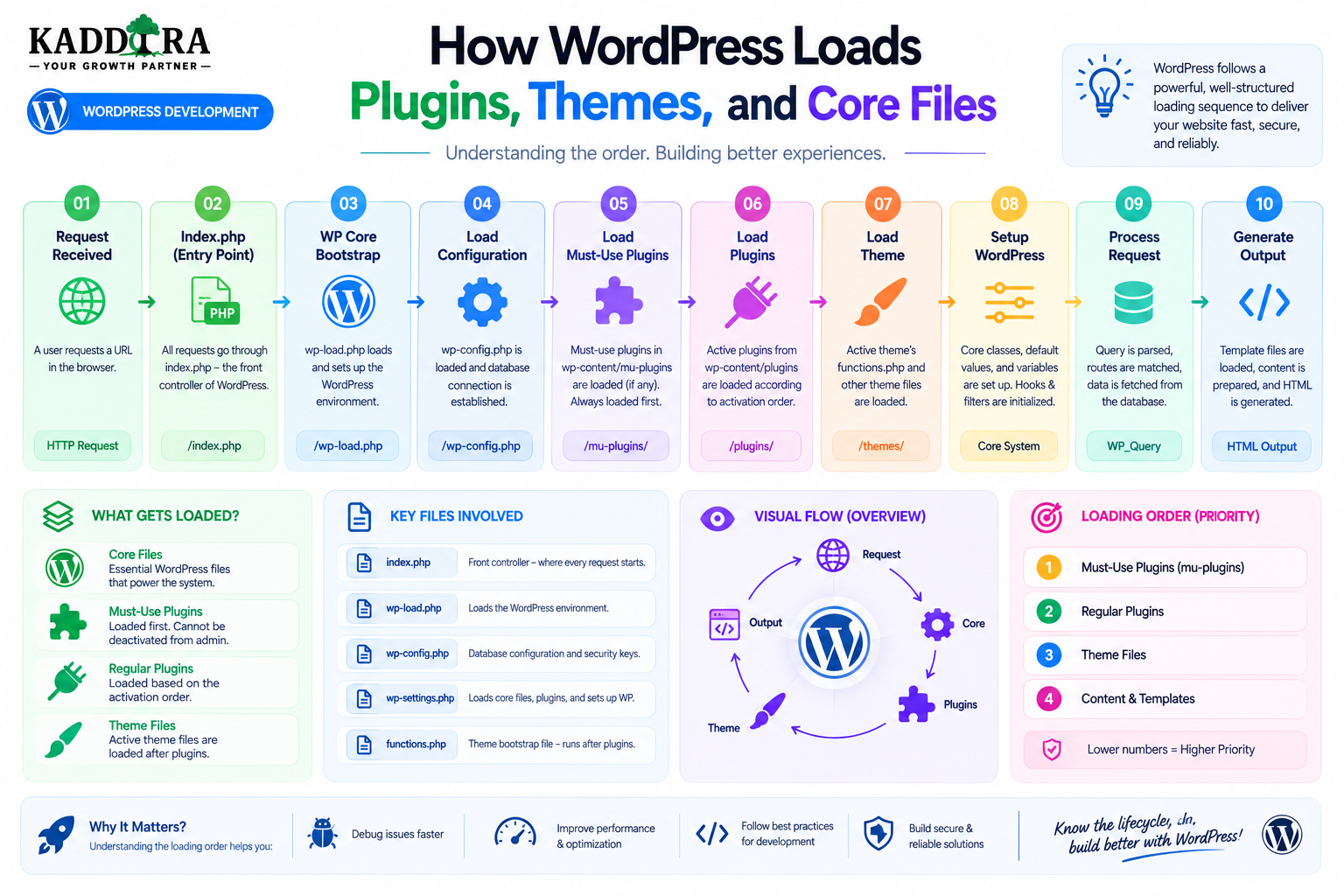
How WordPress Loads Plugins, Themes, and Core Files
Introduction
A WordPress website may contain dozens of files, plugins, themes, libraries, and configuration components.
Yet when a request arrives, WordPress must load them in a controlled sequence.
A simplified startup process looks like:
Request ↓ Configuration ↓ WordPress Core ↓ Must-Use Plugins ↓ Regular Plugins ↓ Theme ↓ Request Processing ↓ Response
Understanding this loading process is especially important for developers.
It helps explain:
Why one plugin can depend on another
Why some hooks are available only after certain stages
Why a plugin may load before the active theme
Why plugin conflicts happen
Why themes should not own important business logic
Why some code executes on every request
Why plugin load order affects performance
Why dependencies need to be declared and handled carefully
For example, imagine:
Plugin A → Depends on Plugin B
If Plugin A tries to use a class from Plugin B before that class is available, the result could be:
Fatal error
Missing function
Missing class
Broken initialization
Similarly, a theme may rely on a plugin-provided feature.
If the dependency is not available, the theme can fail or display incomplete functionality.
WordPress therefore has a startup architecture that determines when core, plugins, themes, and other components become available.
In this guide, you'll learn how WordPress loads its core environment, how configuration is initialized, how must-use plugins differ from normal plugins, how regular plugins are loaded, how plugin dependencies affect startup, how the active theme is initialized, how hooks control execution timing, how block and theme assets become available, how plugin conflicts arise, how loading affects performance and theme loading architecture.
What Does "Loading" Mean in WordPress?
When we say WordPress "loads" a component, we generally mean that its code becomes available and its initialization logic can participate in the current request.
For example:
Plugin File ↓ Included ↓ Classes / Functions Available ↓ Hooks Registered ↓ Plugin Becomes Part of Application
Loading does not necessarily mean that every feature of the plugin performs expensive work immediately.
A well-designed plugin should distinguish between:
Load Code
and:
Execute Expensive Operations
This distinction is critical for performance.
The High-Level WordPress Load Order
The exact internal lifecycle contains many details, but a useful high-level model is:
1. Configuration 2. Core Bootstrap 3. Must-Use Plugins 4. Network Plugins Where Applicable 5. Regular Plugins 6. WordPress Initialization 7. Query / Request Processing 8. Theme Initialization 9. Rendering / Response
The exact sequence varies by request context and WordPress configuration.
The important point is that plugins and themes do not all become active at the same moment.
Step 1: WordPress Reads Configuration
Before WordPress can initialize properly, it needs environment information.
This commonly comes from:
wp-config.php
and the surrounding server environment.
Configuration may contain:
Database credentials
Authentication keys
Debug settings
Table prefix
Custom constants
Environment-specific settings
Why Configuration Loads First
WordPress cannot initialize its database and application environment without knowing important configuration details.
Conceptually:
Configuration ↓ Database ↓ WordPress Environment
This is why configuration files are foundational rather than optional.
Step 2: WordPress Loads Core
WordPress then begins loading the application framework.
Core provides the infrastructure required by:
Plugins
Themes
Admin
REST API
Database operations
Queries
Authentication
Hooks
You can think of core as the platform on which everything else runs.
Core Is the Foundation
The relationship is roughly:
WordPress Core │ ├── Plugins ├── Theme ├── REST ├── Admin └── Database APIs
Plugins and themes rely on core APIs being available.
Does WordPress Load Every Core File at Once?
Not every file is necessarily executed in exactly the same way for every request.
WordPress uses its bootstrap and loading system to bring the required core functionality into the current execution environment.
The important idea for developers is:
Core establishes the environment before extensions can reliably use that environment.
Step 3: Must-Use Plugins
WordPress supports a special type of plugin called a must-use plugin, commonly stored in:
wp-content/mu-plugins/
These plugins are treated differently from regular plugins.
What Are Must-Use Plugins?
Must-use plugins can provide functionality that should always be loaded for the environment.
Examples include:
Hosting controls
Enterprise configuration
Environment settings
Security infrastructure
Platform-specific services
They are particularly useful when an organization needs functionality that should not depend on normal plugin activation.
Why Must-Use Plugins Are Different
Regular plugins can generally be:
Activated
Deactivated
Updated
Managed through WordPress admin
Must-use plugins follow a different model.
They are intended to be automatically loaded as part of the WordPress environment.
When Should You Use a Must-Use Plugin?
Good use cases include:
Hosting-Level Configuration Environment Management Enterprise Integrations Mandatory Security Controls Platform Services
They should not be used merely because a developer wants a plugin that users cannot easily deactivate.
Must-Use Plugins and Dependencies
If a regular plugin depends on a service provided by an MU plugin, the application architecture should clearly document that dependency.
For example:
MU Plugin → Provides Shared Service Regular Plugin → Uses Shared Service
This can be appropriate in controlled environments.
Step 4: Regular Plugins Are Loaded
WordPress then loads the plugins that are active for the current environment.
These plugins can register:
Hooks
Classes
Functions
Services
REST endpoints
Admin menus
Blocks
Shortcodes
Conceptually:
Active Plugins ├── Plugin A ├── Plugin B ├── Plugin C └── Plugin D
Plugin File Inclusion
The main plugin files are loaded into the WordPress runtime.
A plugin's main file may then register additional functionality.
For example:
Main Plugin File ↓ Autoloader ↓ Classes ↓ Services ↓ Hooks
Loading Code vs Running Features
A professional plugin might load classes and definitions first:
Class Definitions Functions Services
and only later execute specific operations:
Relevant Request ↓ Service Runs
This prevents unnecessary work.
Why WordPress Plugin Load Order Matters
Suppose:
Plugin A → Uses Plugin B
Plugin A needs Plugin B's code to be available before it attempts to use it.
If no dependency strategy exists, the result may be unreliable.
Plugin Dependencies
Modern WordPress supports plugin dependency declarations for supported plugin relationships.
This allows WordPress to better understand:
Plugin A Requires Plugin B
Developers should use supported dependency mechanisms when appropriate rather than assuming plugin activation order.
Why Dependencies Should Be Explicit
Without an explicit dependency:
Plugin A ↓ Assumes B Exists ↓ Plugin B Missing ↓ Failure
With a defined dependency:
Plugin A ↓ Requires B ↓ Dependency Checked
This makes plugin behavior more predictable.
Plugin Dependencies and Activation
A plugin that requires another plugin should handle the situation where the dependency is:
Not installed
Installed but inactive
Incompatible
Missing a required version
Don't allow the failure to become an unexplained fatal error.
Defensive Plugin Initialization
A robust plugin can check whether required functionality exists before using it.
Conceptually:
Dependency Available? ├── Yes → Initialize └── No → Show Useful Message
The exact implementation depends on the dependency model.
Plugin Load Order vs Hook Order
These concepts are related but different.
Plugin Loading
The plugin's code becomes available.
Hook Execution
Registered callbacks execute at a later lifecycle point.
For example:
Plugin Loaded ↓ Callback Registered ↓ Hook Fires Later ↓ Callback Executes
This distinction is extremely important.
Why Hooks Make WordPress Flexible
Plugins do not usually need to execute their complete functionality immediately.
Instead they can register callbacks:
Plugin ↓ add_action() ↓ Wait ↓ WordPress Event ↓ Callback
This makes plugin execution modular.
The plugins_loaded Stage
WordPress provides lifecycle hooks that allow developers to run initialization after plugins have been loaded.
This can be useful when one component needs to know that plugin loading has completed before continuing with its own initialization.
When Should You Use plugins_loaded?
It can be useful for plugin initialization that depends on other plugins being available.
However, developers should not automatically place everything on plugins_loaded.
The correct hook depends on the actual dependency and lifecycle requirement.
Don't Use plugins_loaded for Everything
This pattern:
Every Feature ↓ plugins_loaded
can make the lifecycle difficult to understand.
Use the narrowest appropriate lifecycle point.
Step 5: WordPress Initializes the Application
After the plugin environment has been established, WordPress continues initializing the application.
This stage prepares additional systems required for request processing.
At this point:
Core + Plugins
are becoming available to participate in later lifecycle events.
Step 6: WordPress Loads the Active Theme
The active theme becomes part of the frontend application.
The theme provides:
Templates
Styles
Components
Theme setup
Frontend presentation
Conceptually:
WordPress ↓ Active Theme ↓ Frontend Rendering
Theme Loading Is Not the Same as Plugin Loading
A theme and plugin have different roles.
Plugin → Functionality Theme → Presentation
This separation is important for maintainability.
functions.php
Classic themes commonly use:
functions.php
for theme-specific setup.
It can register:
Theme supports
Menus
Sidebars
Hooks
Assets
Theme-specific behavior
But important business functionality should generally not be placed only in the theme.
Block Themes
Modern block themes use a different architecture.
They can include:
theme.json templates/ parts/ patterns/
and participate in WordPress's block-based editing system.
The underlying principle remains the same:
The theme controls presentation and site design.
Theme Initialization
Themes can register their own hooks and services.
For example:
Theme ↓ Setup ↓ Menus ↓ Styles ↓ Templates
The actual details depend on whether the theme is classic or block-based.
Plugin Before Theme: Why It Matters
Plugins often provide functionality that the theme uses.
For example:
Plugin → Registers Product Data Theme → Displays Product Data
This separation is useful because the plugin owns the data while the theme controls how it looks.
What Happens If the Theme Depends on a Plugin?
The theme should detect whether the required functionality is available.
For example:
Commerce Plugin Active? ├── Yes → Show Commerce Layout └── No → Use Fallback
Avoid fatal assumptions.
Theme-Plugin Dependency Design
A theme might advertise compatibility with a plugin while remaining functional without it.
For example:
Theme + Optional Plugin
This is generally more resilient than making the entire theme unusable without one optional extension.
Step 7: WordPress Processes the Request
After the environment is initialized, WordPress can process the requested content.
For a frontend page:
URL ↓ Rewrite Rules ↓ Main Query ↓ Database
The active theme then renders the appropriate content.
Request-Specific Loading
Not every component needs to perform work on every request.
A well-designed plugin can distinguish:
Admin Request Frontend Request REST Request AJAX Request Cron Request
and execute only the relevant functionality.
Conditional Initialization
For example:
Frontend Feature? ├── Frontend → Load └── Admin → Skip
This can reduce overhead.
Asset Loading Happens Separately
Plugin and theme code may enqueue:
CSS
JavaScript
Images
Fonts
These resources are then included in the generated page where appropriate.
Why Conditional Asset Loading Matters
A plugin that loads:
100 KB JavaScript + 100 KB CSS
on every page can affect performance even if only one admin or frontend screen uses its functionality.
Prefer:
Relevant Screen ↓ Load Asset
WordPress Dependency Management for Scripts
When enqueuing JavaScript and CSS, WordPress allows developers to declare dependencies.
Conceptually:
Custom Script ↓ Requires ↓ WordPress Library
This helps ensure scripts load in a predictable order.
Plugin Dependencies Are Not the Same as Script Dependencies
These are separate levels:
Plugin Dependency → Plugin B Script Dependency → JavaScript Library
A professional plugin should manage both correctly.
Composer Dependencies
Plugins may also use Composer libraries.
For example:
Plugin ↓ Composer Autoloader ↓ External PHP Packages
These dependencies should be packaged and managed carefully.
Autoloading
Modern PHP plugins often use an autoloader rather than manually including every class file.
For example:
Service ↓ Class Reference ↓ Autoloader ↓ PHP Class Loaded
This keeps plugin architecture modular.
Why Autoloading Is Useful
Without autoloading, a large plugin may contain many manual includes:
require A require B require C require D
An autoloader can load classes when they are actually needed.
Don't Load Entire Applications Needlessly
Even with autoloading, plugins should avoid performing expensive initialization for features that aren't relevant to the request.
Good architecture separates:
Availability
from:
Execution
Plugin Loading and Memory
Every active plugin can add some amount of PHP memory usage.
A site with many plugins may therefore consume more memory before the page is fully generated.
This doesn't mean "more plugins always means slow."
The quality and behavior of those plugins matter.
Plugin Loading and Performance
Potential performance costs include:
Large libraries
Heavy initialization
Database queries
Remote APIs
Expensive object creation
Unnecessary hooks
A plugin can be well-organized and still be expensive if its workload is inappropriate.
Don't Run Database Queries During Plugin File Inclusion
A poor architecture might do:
Plugin File Loaded ↓ Database Query ↓ External API ↓ More Database Work
before WordPress has even reached the request-processing stage.
Plugin files should generally focus on registration and setup rather than immediately performing expensive operations.
Better Plugin Startup
A better pattern is:
Plugin File ↓ Register Services ↓ Register Hooks ↓ Wait for Relevant Event ↓ Execute Feature
This provides much better control.
Plugin Loading and Global State
WordPress uses global state extensively.
Plugins should avoid unnecessarily creating conflicting global variables.
Use:
Namespaces
Classes
Unique prefixes
Encapsulation
to reduce collisions.
Plugin Naming Conflicts
Two plugins might define:
function calculate_total()
This can cause fatal errors.
A unique namespace or prefix helps prevent collisions.
Class Naming Conflicts
Likewise, generic classes such as:
class Logger {}
can conflict with another extension.
Prefer namespaced classes.
Hook Registration During Loading
Plugins frequently register callbacks during startup.
For example:
Plugin Loads ↓ Registers Hook ↓ WordPress Continues ↓ Relevant Hook Fires ↓ Callback Runs
This is why registration and execution need to remain separate.
What Happens When a Plugin Is Disabled?
When a plugin is no longer active:
Plugin File ↓ No Longer Loaded ↓ Plugin Hooks Not Registered
The plugin may still have data in the database depending on its uninstall behavior.
Deactivation Does Not Automatically Mean Data Deletion
This distinction is important.
Deactivate → Stop Loading Plugin Uninstall → Potentially Remove Plugin Data
The exact behavior depends on the plugin.
Plugin Activation Is a Different Lifecycle Event
Activation can trigger setup operations such as:
Database tables
Default options
Rewrite configuration
Initial setup
These should be designed carefully.
Activation Should Not Perform Unbounded Work
A plugin activation process should avoid operations that may take too long for a normal browser request.
For large migrations or imports, initialize the system and perform heavy work separately.
Plugin Update Loading
When a plugin is updated:
Old Version ↓ New Files ↓ Plugin Loaded ↓ Migration / Compatibility Logic
A version migration system may be required.
Plugin Version Compatibility
A plugin may need to know:
Current Plugin Version Database Schema Version
These are not necessarily the same thing.
A plugin can have:
Code Version: 5.2.0 Database Schema: 3
Why Separate Code and Schema Versions?
Code may change without changing the database schema.
Conversely, a database migration may be required even when the visible feature changes are small.
Separating the concepts makes upgrades easier to manage.
Plugin Loading in Multisite
Multisite introduces additional scope.
A plugin can be:
Network Active
or active for selected sites depending on the network configuration.
The plugin should understand whether its settings and data are:
Network-wide
Site-specific
Theme Loading in Multisite
Each site can have its own active theme.
This means:
Network ├── Site A → Theme A ├── Site B → Theme B └── Site C → Theme A
A plugin should not assume one theme exists for the entire network.
Plugin Loading and WordPress Multisite
Network-wide functionality may load across multiple sites.
This makes performance and scope even more important.
Avoid unnecessary network-wide processing during every request.
What Happens When a Theme Changes?
The active theme changes the presentation layer.
The underlying plugin data remains available if the plugin continues to own that data.
For example:
Plugin → Products Theme A → Displays Products Theme B → Also Displays Products
This is one of the benefits of separating content from presentation.
What Happens When a Plugin Changes?
A plugin update may change:
Services
Hooks
Database schema
APIs
Admin pages
Frontend components
Therefore plugin updates should be tested carefully.
Plugin and Theme Compatibility
Some features require collaboration between plugin and theme.
For example:
Plugin → Registers Custom Content Theme → Provides Template
A stable integration contract should be defined.
Avoid Hidden Theme Dependencies
A plugin should not silently require one specific theme unless it is explicitly a theme-specific extension.
Likewise, a theme should not assume unrelated plugin internals.
Plugin Load Order and WooCommerce
A WooCommerce extension may depend on WooCommerce being available before certain features initialize.
A good architecture defines the dependency clearly rather than simply assuming the correct activation order.
Plugin Load Order and AI Providers
An AI plugin may depend on:
Provider SDK
or a separate service layer.
The plugin should validate that required libraries and configuration are available before executing requests.
Plugin Load Order and External APIs
An API integration can be structured as:
Plugin Loads ↓ API Service Registered ↓ Credentials Checked When Needed ↓ Request Triggered ↓ API Called
Avoid calling external services during every plugin initialization.
Plugin Load Order and Background Jobs
Queue and job systems should generally register workers or schedules during initialization and perform actual work only when the job executes.
This keeps normal requests lightweight.
How to Diagnose Plugin Load Problems
If a plugin appears not to load:
Check whether it is active.
Check PHP errors.
Check dependency requirements.
Check plugin file integrity.
Check initialization hooks.
Check fatal errors from another plugin.
Check whether the relevant request context is correct.
How to Diagnose Theme Load Problems
Check:
Active theme
Theme files
PHP errors
Required plugins
Template hierarchy
Theme initialization
Asset loading
Don't assume a white screen always means the theme itself is broken.
Loading and Fatal Errors
If a plugin contains:
Missing Class
or:
Missing Function
during initialization, WordPress may encounter a fatal PHP error.
Dependency management and defensive initialization can reduce these problems.
Loading and Recovery Mode
WordPress recovery mechanisms can help isolate certain fatal errors caused by themes or plugins.
This is especially useful when the affected component prevents the normal admin interface from loading.
Loading and Debug Logs
For development environments, logs can reveal:
Which file failed
Which class is missing
Which hook was executing
Which plugin initiated the error
Logs are generally more useful than displaying detailed errors directly to production visitors.
Loading and Security
Loading third-party code means trusting that code.
A WordPress website should therefore:
Keep extensions updated
Remove unused plugins
Review plugin sources
Monitor security
Limit administrative access
Every active plugin becomes part of the application's attack surface.
Loading and Unused Plugins
An inactive plugin generally does not participate in normal plugin execution, but keeping unnecessary software installed can still increase maintenance and security exposure.
Remove software that is genuinely no longer needed after checking dependencies.
Don't Optimize Plugin Count Blindly
The number of plugins is not a useful performance metric by itself.
For example:
20 Lightweight Plugins
may perform better than:
5 Extremely Heavy Plugins
Measure actual workload.
Plugin Load Monitoring
A professional development process can monitor:
PHP execution time
Memory usage
Query count
Slow queries
Remote requests
Asset size
The goal is to identify expensive behavior rather than simply count plugins.
Plugin Loading Best Practices
A professional plugin should:
Register functionality during initialization.
Use explicit dependencies.
Avoid expensive work during file inclusion.
Use autoloading appropriately.
Namespace code.
Avoid global collisions.
Execute features only when relevant.
Load assets conditionally.
Use background processing for long tasks.
Handle missing dependencies gracefully.
Separate code loading from business execution.
Theme Loading Best Practices
A professional theme should:
Keep presentation logic separate from business logic.
Register theme features appropriately.
Load assets efficiently.
Avoid unnecessary database work during initialization.
Use WordPress-supported APIs.
Handle optional plugins gracefully.
Maintain compatibility with its supported WordPress versions.
Professional WordPress Loading Architecture
A scalable structure can look like:
WordPress Core │ ┌───────────┴───────────┐ ▼ ▼ MU Plugins Regular Plugins │ ┌───────────┼───────────┐ ▼ ▼ ▼ Services APIs Features │ ▼ Request Context │ ▼ Theme │ ┌───────────┴───────────┐ ▼ ▼ Templates Assets │ ▼ Response
The important principle is that code should become available at startup while expensive work is deferred until necessary.
Why choose ThemeKaddora?
ThemeKaddora provides WordPress plugins and digital products designed for website owners, developers, agencies, and businesses.
Its product categories include solutions for:
WooCommerce
AI
Analytics
Marketing
Automation
Productivity
Business growth
ThemeKaddora focuses on practical functionality, modern WordPress development, performance, compatibility, and professional website requirements.
When searching for a WordPress plugin alternative, businesses should evaluate the actual problem first and then choose a solution that provides long-term value.
Conclusion
Understanding how WordPress loads plugins, themes, and core files is fundamental to building reliable WordPress applications.
The high-level model is:
Configuration
→ Core
→ Must-Use Plugins
→ Regular Plugins
→ Application Initialization
→ Request Processing
→ Theme
→ Rendering
But the most important distinction is between loading code and executing work.
A good plugin can load its classes and register its services without immediately:
Running expensive database queries
Calling external APIs
Processing thousands of records
Generating large reports
Performing unnecessary calculations
Instead:
Load
→ Register
→ Wait
→ Execute When Needed
This approach improves performance and makes the plugin easier to reason about.
Dependencies are equally important.
If Plugin A needs Plugin B, the relationship should be explicit.
If a theme depends on a plugin, the theme should handle the dependency safely.
If an AI feature requires an external provider, credentials and availability should be checked when the feature actually runs.
For ThemeKaddora, this architecture becomes especially important as plugins grow into larger products involving:
AI
WooCommerce
Analytics
SaaS
Automation
APIs
Background processing
The more complex the plugin ecosystem becomes, the more important predictable loading and initialization become.
The key rule is:
Load what you need, register what you can, and execute expensive work only when the current request actually requires it.
That principle produces WordPress products that are more:
Performant
→ Predictable
→ Compatible
→ Maintainable
→ Scalable
And it allows WordPress core, plugins, and themes to evolve independently without turning the entire website into one tightly coupled application.
Frequently Asked Questions
How does WordPress load plugins?
WordPress initializes its core environment and then loads active plugins, including applicable must-use and network-level plugins, before continuing through the request lifecycle.
What is a must-use plugin?
A must-use plugin is a special WordPress plugin that is automatically loaded from the mu-plugins directory rather than managed through the normal plugin activation workflow.
When are regular plugins loaded?
Active regular plugins are loaded during WordPress initialization so they can register their functionality and participate in later lifecycle hooks.
When does the theme load?
The active theme becomes part of the request's frontend presentation system after the WordPress environment and plugin ecosystem have been initialized.
Does WordPress load plugins before themes?
At a high level, plugins are initialized before the active theme's frontend presentation is processed. Exact execution details depend on the request context and specific lifecycle hooks.
What is plugin load order?
Plugin load order describes when plugin code becomes available and initializes relative to other plugins and WordPress components.
What is the difference between plugin loading and hook execution?
Loading makes a plugin's code and registration available. Hook execution happens later when WordPress reaches the relevant lifecycle point and invokes registered callbacks.
Why do plugin dependencies matter?
A plugin may require classes, functions, or services from another plugin. Without a correctly managed dependency, the plugin can fail during initialization or feature execution.
Should a plugin run database queries when it loads?
Generally, plugin startup should be lightweight. Expensive or unnecessary database work should be deferred until the relevant feature or lifecycle event needs it.
What happens when a plugin is deactivated?
Its normal runtime code is no longer loaded as an active plugin. Its stored data may remain until an explicit uninstall process removes it, depending on the plugin's design.
How do WordPress themes use plugins?
Themes can display data or features supplied by plugins, but they should handle optional dependencies safely and avoid assuming that unrelated plugins are always active.
Why choose Themekaddora?
Themekaddora provides lightweight, responsive, SEO-friendly WordPress themes with fast performance, WooCommerce compatibility, flexible customization, accessibility-conscious design, modern templates, regular updates, and professional support—providing a strong foundation for businesses building digital products and product-focused websites.
Comments (0)