
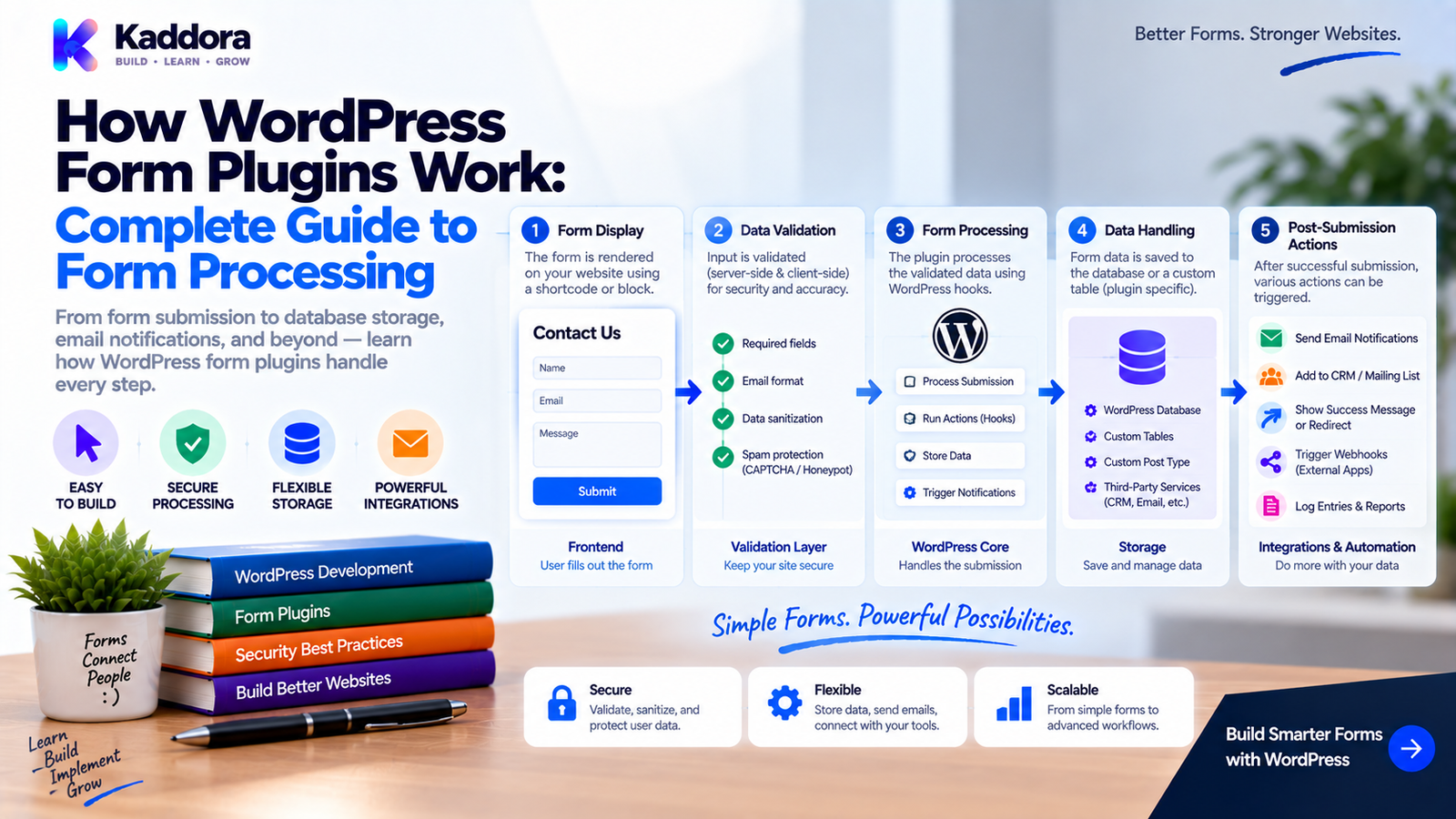
How WordPress Form Plugins Work: A Complete Guide to Form Processing
Introduction
Forms are one of the most common interactive features on WordPress websites.
A simple website may use a contact form.
A business website may need lead-generation forms.
An eCommerce store may use customer registration and checkout forms.
A membership website may require login, registration, and profile forms.
A booking platform may collect dates, services, staff selections, and customer information.
Behind every one of these interfaces is a processing system that receives the user's input, validates it, applies business rules, stores or forwards the information, and returns a result.
That is where a WordPress form plugin comes in.
A modern form plugin is much more than a collection of HTML fields.
It commonly contains several layers:
User ↓ Form Interface ↓ Browser Validation ↓ Request ↓ WordPress ↓ Security Checks ↓ Server Validation ↓ Business Logic ↓ Database / Email / API ↓ Response ↓ User
Understanding this architecture is useful for website owners, developers, agencies, and anyone building custom WordPress forms.
In this guide, you'll learn how WordPress form plugins work internally, how form submissions travel through the system, where data is stored, how plugins process requests, and what developers should consider when designing scalable form systems.
What Is a WordPress Form Plugin?
A WordPress form plugin is software that adds form-building and form-processing functionality to a WordPress website.
It may provide:
Form builders
Input fields
Submission processing
Data storage
Notifications
Confirmation messages
Spam controls
Integrations
Conditional behavior
Administrative entry management
A basic architecture looks like:
WordPress | +-- Form Plugin | +-- Form Builder +-- Renderer +-- Submission Handler +-- Validation +-- Storage +-- Notifications +-- Integrations
The exact implementation varies between plugins.
Why WordPress Form Plugins Are Useful
Without a form plugin, developers would have to build many components manually.
A complete custom form system may require:
HTML rendering
CSS
JavaScript
Request handling
Validation
Security
Database storage
Email delivery
Admin management
Error handling
A form plugin packages these capabilities into a reusable system.
For non-developers, this means forms can often be created through an administration interface rather than custom coding every field.
For developers, it provides a framework that can be extended through hooks, APIs, and custom integrations.
The Basic WordPress Form Lifecycle
A typical form follows this lifecycle:
1. Form Configuration ↓ 2. Form Rendering ↓ 3. User Enters Data ↓ 4. Browser Submits Request ↓ 5. WordPress Receives Request ↓ 6. Security Check ↓ 7. Input Processing ↓ 8. Validation ↓ 9. Business Logic ↓ 10. Data Storage ↓ 11. Notifications / Integrations ↓ 12. Response
Each stage has a different responsibility.
Separating these responsibilities helps prevent fragile form implementations.
1. Form Configuration
The process often begins inside the WordPress admin dashboard.
A form administrator may create:
Contact Form ------------------------- Name Email Phone Subject Message [Submit]
The plugin must store the form structure somewhere.
It may contain information such as:
Form ID Form Name Field IDs Field Types Labels Required Rules Default Values Validation Rules Display Settings Notification Settings
For example:
{ "name": "contact_form", "fields": [ { "name": "name", "type": "text", "required": true }, { "name": "email", "type": "email", "required": true } ] }
This configuration becomes the blueprint used when the form is displayed.
2. Form Rendering
Once a form is configured, the plugin must display it on the website.
This can happen through:
Shortcodes
Blocks
Widgets
Template functions
Page-builder integrations
Custom PHP APIs
For example:
Page ↓ Form Shortcode ↓ Form Renderer ↓ Field Definitions ↓ HTML Output
A shortcode could conceptually look like:
[kaddora_form id="25"]
The plugin reads the form configuration and generates the corresponding markup.
How a Form Becomes HTML
Suppose the configuration contains:
Field: email Type: email Required: yes
The renderer may generate:
<label for="customer-email"> Email Address </label> <input type="email" id="customer-email" name="customer_email" required >
The browser displays the form, but the browser is not the final security layer.
The server must still validate the submitted value.
3. The User Enters Data
The visitor interacts with the rendered form.
For example:
Name: John Doe Email: john@example.com Message: I would like more information.
The browser now has a set of field values.
These values are controlled by the client and therefore cannot automatically be trusted.
A malicious user can modify:
Field values
Hidden fields
IDs
URLs
Request parameters
JavaScript behavior
The server must treat submitted information as untrusted input.
4. Form Submission
A form can submit data using different transport mechanisms.
Traditional submission:
Browser ↓ HTTP POST ↓ WordPress
AJAX submission:
Browser ↓ JavaScript ↓ AJAX Request ↓ WordPress
REST-based submission:
Browser ↓ JavaScript ↓ REST Endpoint ↓ WordPress
The transport method changes the implementation details, but the core processing principles remain similar.
Traditional Form Submission
A traditional form might use:
<form method="post">
When the user submits the form:
Browser ↓ POST Request ↓ WordPress ↓ Plugin Handler
The browser may then receive a new page or redirect after processing.
This approach is simple and reliable for many forms.
AJAX Form Submission
AJAX can provide a smoother experience.
Instead of refreshing the page:
Submit ↓ AJAX ↓ Server ↓ JSON Response ↓ Update Interface
For example:
[ Submit ] ↓ Submitting... ↓ Thank you! Your message has been sent.
AJAX is particularly useful when a plugin wants to provide:
Inline validation
Dynamic calculations
Conditional forms
Multi-step interfaces
Immediate confirmation
REST-Based Form Processing
More advanced systems may use REST endpoints.
The architecture could be:
Frontend ↓ REST Request ↓ Authentication ↓ Validation ↓ Application Service ↓ Database ↓ JSON Response
This can be useful when forms are part of:
Headless WordPress
React interfaces
Mobile applications
SaaS integrations
Custom frontend applications
5. Security Checks
Before processing form data, the plugin should perform appropriate security checks.
Important considerations include:
Request authenticity
User permissions
Input validation
Authorization
Abuse controls
File restrictions where applicable
For administrator forms, a nonce may be used to verify the request context.
For sensitive actions, capability checks may also be required.
The key principle is:
Security ↓ Before ↓ Sensitive Processing
6. Input Extraction
After receiving the request, the plugin extracts expected fields.
For example:
$name = isset( $_POST['customer_name'] ) ? sanitize_text_field( wp_unslash( $_POST['customer_name'] ) ) : ''; $email = isset( $_POST['customer_email'] ) ? sanitize_email( wp_unslash( $_POST['customer_email'] ) ) : '';
The exact processing depends on the field type.
A plugin should not simply copy the entire request array into its database.
Instead, explicitly process expected fields.
7. Sanitization
Sanitization transforms input into an appropriate representation.
Examples include:
sanitize_text_field() sanitize_email() sanitize_key() sanitize_textarea_field() esc_url_raw()
The correct function depends on the data.
For example:
$title = sanitize_text_field( $title );
and:
$email = sanitize_email( $email );
are designed for different kinds of values.
Sanitization alone does not determine whether the value is valid.
8. Validation
Validation determines whether the input satisfies the form's requirements.
For example:
if ( ! is_email( $email ) ) { // Reject submission. }
A form may also require:
Name → required Email → valid Age → 18–100 Country → allowed list Message → minimum length
The form plugin can define these rules in its field configuration.
Validation Flow
A typical pipeline is:
Submitted Value ↓ Normalize ↓ Sanitize ↓ Validate ↓ Accept / Reject
For example:
Email: " JOHN@EXAMPLE.COM " ↓ Normalize ↓ "john@example.com" ↓ Validate ↓ Accepted
The exact normalization behavior depends on the application's requirements.
9. Business Rules
A technically valid value may still violate business rules.
For example:
Quantity: 5
The number is valid.
But what if only two units are available?
Then:
Quantity valid + Stock insufficient = Business rule failure
This is why form processing should go beyond simple field validation.
Business rules may include:
Availability
Ownership
Account status
Duplicate prevention
Pricing
Capacity
Scheduling
Eligibility
Form Submission Architecture
A larger form system can separate these responsibilities:
Request ↓ Form Controller ↓ Input Normalizer ↓ Validator ↓ Business Service ↓ Repository ↓ Notification Service ↓ Integration Service
This architecture makes the system easier to test and maintain.
10. Store Form Entries
Many form plugins allow administrators to store submissions.
For example:
Entry ------------------------- ID: 105 Form: Contact Form Name: John Doe Email: john@example.com Message: Hello Created: 2026-09-15
The plugin needs a storage strategy.
Depending on the system, data may be stored in:
WordPress posts
Post metadata
WordPress options
User metadata
Custom database tables
External services
The right choice depends on data volume and query requirements.
WordPress Options Are Not Always Suitable for Entries
The options system is useful for configuration.
It is generally not an ideal structure for thousands of independent form submissions.
For example:
Plugin Settings ↓ Options
is conceptually different from:
Customer Entries ↓ Structured Dataset
High-volume form entries may require a more suitable storage design.
Custom Database Tables for High-Volume Forms
A high-volume form system may use:
wp_kaddora_form_entries id form_id user_id status created_at
and related field data.
A dedicated table can make operations such as:
Search entries Filter by form Filter by date Sort by status Paginate results
more predictable.
But custom tables should be introduced only when justified by the architecture.
11. Send Notifications
After a successful submission, the form plugin may trigger notifications.
For example:
Form Submission ↓ Entry Saved ↓ Notification Service ↓ Email Administrator
A notification might contain:
New Contact Submission Name: John Doe Email: john@example.com Message: Hello
For business systems, notifications can also be sent to:
Sales teams
Support teams
Managers
Assigned staff
Email Should Not Be Treated as the Database
A common mistake is assuming the email notification is enough.
For example:
User submits form ↓ Send email ↓ Done
If the email fails, the submission may be lost.
A more reliable system is:
Submission ↓ Validate ↓ Store Entry ↓ Send Notification
The stored entry remains available even if email delivery encounters a problem.
12. Connect Forms to External Services
Form plugins frequently integrate with third-party systems.
Examples include:
CRM platforms
Email marketing tools
Payment gateways
Slack
Google services
Analytics
Webhooks
ERP systems
The workflow might become:
Form ↓ Validate ↓ Store ↓ CRM ↓ Email ↓ Analytics
Each integration should ideally be isolated from the core form-processing logic.
Form Integration Architecture
A scalable system may look like:
Form Submission | Validation | Business Logic | +--------------+--------------+ | | | Database Email CRM | Webhook
If the CRM is temporarily unavailable, the form database should not necessarily become unavailable as well.
13. Redirects and Confirmation Messages
After processing, the plugin needs to communicate the result to the user.
Possible responses include:
Success ↓ Thank You Message
or:
Success ↓ Redirect ↓ Thank You Page
For AJAX:
Success ↓ JSON Response ↓ Frontend Message
The response mechanism should match the form's transport architecture.
Handling Validation Errors
When validation fails, good form plugins should tell the user what needs correction.
For example:
Email [ invalid-email ] Please enter a valid email address.
The system should preserve valid fields where practical.
For a multi-field form:
Name ✓ Email ✕ Phone ✓ Message ✓
This creates a better user experience than clearing the entire form.
Form State
Complex forms may need to preserve state between steps.
For example:
Step 1 Customer Information ↓ Step 2 Service Selection ↓ Step 3 Payment ↓ Step 4 Confirmation
The system must know what the user has entered at each stage.
State can be managed through:
Browser state
Server sessions
Temporary records
Signed tokens
URL parameters
Application-specific storage
The appropriate approach depends on the form architecture.
How Conditional Fields Work
A form may display a field only when another field has a specific value.
Example:
Do you have a business? | Yes ↓ Business Name Business Website
The browser can show and hide fields with JavaScript.
But conditional rules should also be enforced server-side.
A hidden field can still be manually submitted.
Therefore:
Frontend Condition + Server Validation = Reliable Conditional Logic
Form File Uploads
Some forms allow users to upload:
Images
Documents
PDFs
Resumes
Attachments
The upload workflow should include:
Upload ↓ Permission Check ↓ File Validation ↓ Size Validation ↓ Type Validation ↓ Secure Storage
File uploads require more security attention than ordinary text fields.
Form Database Queries
Administrative form screens often need:
Pagination
Search
Filtering
Sorting
Date ranges
For example:
Entries ----------------------------------------- Search: john Status: New Form: Contact Date: This Month ----------------------------------------- 105 John Doe New 104 Jane Smith Contacted 103 John Patel New
Do not load every submission into memory when the dataset can become large.
Use appropriate database queries and pagination.
WordPress Form Hooks
A form plugin may expose hooks for developers.
For example:
do_action( 'kaddora_form_submission_created', $entry_id, $form_id );
Other code could react:
add_action( 'kaddora_form_submission_created', 'kaddora_sync_form_entry', 10, 2 );
Hooks allow extensions without modifying the core plugin.
This is an important part of WordPress plugin architecture.
Form Plugin Extensibility
A mature form plugin can provide extension points for:
Field Types Validation Submission Events Notifications Storage Integrations Rendering Admin Columns Exports
For developers, clear hooks reduce the need to edit plugin source files.
Form Processing and Asynchronous Integrations
Not every integration needs to complete during the original form request.
Imagine:
User ↓ Submit Form ↓ Save Entry ↓ Return Success
Then:
Background Process ↓ Send CRM Data ↓ Send Marketing Data ↓ Generate Follow-Up
This can make the frontend experience faster and reduce failures caused by slow external services.
Form Reliability
A reliable form system should consider what happens when:
Database works Email fails
or:
Database works CRM fails
or:
CRM works Email fails
Each dependency should have its own failure handling.
A submission should not necessarily disappear because one integration is temporarily unavailable.
Form Entries and Duplicate Submissions
Users can sometimes submit the same form multiple times.
Causes include:
Double-clicking
Slow connections
Browser retries
Refreshing after submission
Network instability
The plugin can reduce duplicates through:
Button State + Request IDs + Server Checks + Idempotency Rules
The correct mechanism depends on the form's purpose.
Form Performance
Form plugins can affect performance through:
JavaScript
CSS
Database queries
External API requests
Large entry tables
Complex conditional logic
Good plugins should avoid loading unnecessary assets across every page.
For example:
Homepage ↓ No form ↓ No form-specific JavaScript required
while:
Contact Page ↓ Form detected ↓ Load required form assets
Conditional asset loading helps reduce unnecessary frontend overhead.
Form Security
A form plugin should assume every submission is untrusted.
Security considerations include:
Request Protection ↓ Input Validation ↓ Authorization ↓ File Validation ↓ Safe Database Operations ↓ Output Escaping
Depending on the use case, additional controls may be needed.
Security should be built into the architecture rather than added at the end.
Admin Form Entry Security
Stored submissions can contain sensitive information.
Examples include:
Names
Email addresses
Phone numbers
Messages
Uploaded documents
Customer information
Administrators should only have access when their capabilities permit it.
A secure entry-management screen should protect:
View Edit Delete Export
independently where appropriate.
Data Retention
Form data doesn't necessarily need to remain forever.
A plugin may provide retention options such as:
Keep entries for: 30 days 90 days 1 year Forever
Retention policies should match:
Business requirements
Privacy requirements
Operational needs
Storage requirements
A plugin should make data retention behavior clear.
Form Export
Administrators may need to export entries.
Common formats include:
CSV
JSON
Spreadsheet-compatible formats
A secure export workflow is:
Export Request ↓ Capability Check ↓ Filter Validation ↓ Query Data ↓ Generate File ↓ Secure Download
Do not expose stored entries through an unprotected URL.
Form Plugins and WooCommerce
WooCommerce stores frequently use forms for:
Customer registration
Product inquiries
Custom checkout fields
Returns
Wholesale applications
Support requests
The form layer can connect with WooCommerce data:
Form ↓ Customer ↓ Order ↓ Product
This requires careful object validation.
A submitted order ID should never automatically grant access to another customer's order.
Form Plugins and Booking Systems
Booking systems use highly structured forms.
For example:
Service ↓ Date ↓ Time ↓ Staff ↓ Customer
The form itself only collects the requested information.
The booking engine must then determine:
Is the service available? Is the staff member available? Is the time available? Is the resource available?
This is business logic rather than ordinary field validation.
Form Plugins and Payment Systems
A payment form introduces another layer:
Form ↓ Order / Payment Intent ↓ Payment Gateway ↓ Payment Result ↓ Confirmation
Payment information must be handled carefully.
A form plugin should avoid storing sensitive payment credentials unnecessarily.
Payment providers typically handle the sensitive payment details according to their integration model.
Form Plugins and CRM Systems
A lead form may work like:
Visitor ↓ Contact Form ↓ Validation ↓ Database ↓ CRM ↓ Sales Team
The CRM integration may create:
Contact
Lead
Opportunity
Task
The form plugin should handle integration failures gracefully.
Form Plugins and Email Marketing
Marketing forms can trigger:
Form ↓ Consent ↓ Subscriber ↓ Email Platform
The system should clearly distinguish:
Form submission
from:
Marketing consent
A user submitting a contact form does not automatically imply consent for every type of marketing communication.
Form Plugins and AI
AI can be added to forms for use cases such as:
Lead classification
Message summarization
Automatic routing
Response suggestions
Spam detection
Data categorization
For example:
Form Submission ↓ Validate ↓ Store ↓ AI Analysis ↓ Category ↓ Assign Team
However, external AI requests should only transmit the data necessary for the intended feature.
Sensitive submissions require particular care.
Common WordPress Form Plugin Architecture
A mature plugin might use:
plugin/ | +-- src/ | | | +-- Forms/ | | +-- Form.php | | +-- Form_Manager.php | | +-- Form_Renderer.php | | | +-- Submission/ | | +-- Submission_Controller.php | | +-- Submission_Service.php | | | +-- Validation/ | +-- Storage/ | +-- Notifications/ | +-- Integrations/ | +-- Admin/ | +-- assets/ | +-- css/ | +-- js/ | +-- templates/ | +-- languages/
The exact organization depends on plugin size and complexity.
Example Form Processing Architecture
WordPress Form Plugin | +-----------+-----------+ | | Form Builder Frontend | | Form Config Renderer | | +-----------+-----------+ | Submission | Request Handler | +----------------+----------------+ | | | Security Validation Business Rules | | | +----------------+----------------+ | Application Service | +--------------+--------------+ | | | Database Email CRM | Admin UI
This separation makes it easier to extend the plugin without creating a monolithic submission handler.
Why Form Plugins Become Complex
A simple contact form may have:
5 fields 1 notification 1 database workflow
A business form system may have:
50 field types Conditional logic Multi-step forms File uploads Payments CRM integrations Email automation API integrations Entry management Permissions Exports Analytics
The number of interactions grows quickly.
That is why form architecture matters.
What Makes a Good WordPress Form Plugin?
A strong form plugin should ideally provide:
Simple form creation
Flexible field definitions
Reliable submission processing
Server-side validation
Strong security
Useful entry management
Clear notifications
Extensible integrations
Efficient database access
Responsive frontend behavior
Developer hooks
Good error handling
The most important feature isn't the number of fields.
It is the reliability of the complete submission workflow.
Common Form Plugin Mistakes
Trusting Browser Validation
Client-side validation can be bypassed.
Saving Raw Request Data
Only expected fields should be processed.
Sending Email Before Storage
A failed email can cause data loss.
Loading All Entries at Once
Large datasets require pagination.
Exposing Entry URLs
Stored form submissions need proper authorization.
Storing Sensitive Information Unnecessarily
Only retain data required for the workflow.
Performing Every Integration Synchronously
Slow external services can make form submissions unreliable.
Ignoring Duplicate Submissions
Repeated clicks can create duplicate entries.
Loading Assets Everywhere
Form JavaScript and CSS should be loaded only where appropriate.
Mixing Validation and Business Logic
This makes the plugin harder to test and maintain.
WordPress Form Plugin Performance Checklist
Frontend
Load form assets only where needed.
Minimize unnecessary JavaScript.
Avoid oversized form payloads.
Provide efficient multi-step interactions.
Server
Validate input early.
Avoid unnecessary queries.
Use pagination for entries.
Keep submission handlers focused.
Database
Use appropriate storage.
Index common queries where justified.
Avoid storing unnecessary duplicate data.
Plan for growth.
Integrations
Avoid unnecessary synchronous API calls.
Handle external failures.
Consider background processing for expensive tasks.
WordPress Form Plugin Security Checklist
Requests
Validate request authenticity where appropriate.
Validate every important input.
Never trust hidden fields.
Authorization
Protect administrative operations.
Protect entry viewing.
Protect deletion.
Protect exports.
Database
Use safe database operations.
Avoid unsafe dynamic SQL.
Restrict stored data.
Files
Validate uploads.
Limit file size.
Restrict file types.
Secure uploaded files.
Output
Escape displayed entry data.
Avoid exposing internal errors.
Protect sensitive information.
How Developers Can Extend Form Plugins
WordPress developers often need custom behavior.
A well-designed plugin can expose hooks such as:
apply_filters( 'kaddora_form_field_value', $value, $field, $form );
or:
do_action( 'kaddora_after_form_submission', $submission );
This allows custom extensions without editing the original plugin.
Possible extensions include:
CRM synchronization
Custom notifications
Data transformations
Custom field types
Analytics
Workflow automation
The Future of WordPress Form Plugins
Modern form plugins are increasingly moving toward intelligent workflows.
Possible developments include:
Form Builder ↓ Smart Validation ↓ Conditional Logic ↓ AI Classification ↓ Automation ↓ CRM ↓ Payment ↓ Analytics
Forms are increasingly becoming workflow entry points rather than simple contact pages.
This is especially relevant for:
Lead generation
eCommerce
Appointments
SaaS onboarding
Customer support
Business automation
Why Choose ThemeKaddora?
ThemeKaddora develops WordPress themes, plugins, HTML templates, UI kits, SaaS solutions, and business-focused digital products.
Forms are often the starting point of larger business workflows.
A form submission can lead to:
Lead ↓ CRM ↓ Sales ↓ Payment ↓ Order ↓ Notification ↓ Analytics
For this reason, ThemeKaddora's approach to WordPress products emphasizes clean architecture, secure input handling, responsive interfaces, maintainability, compatibility, and practical business workflows.
Whether you need a contact solution, WooCommerce workflow, booking interface, CRM form, AI-powered form, or custom business form system, a reliable architecture is essential for turning submitted data into useful business actions.
Final Thoughts
WordPress form plugins may look simple from the frontend.
Behind the scenes, they can contain an entire processing pipeline:
Form Configuration ↓ Rendering ↓ User Input ↓ Request ↓ Security ↓ Sanitization ↓ Validation ↓ Business Rules ↓ Storage ↓ Notifications ↓ Integrations ↓ Response
Understanding this process helps explain why form plugins can become complex systems.
The strongest implementations don't treat forms as isolated HTML elements.
They treat forms as structured data entry and workflow systems.
A professional form architecture should:
Process only expected input.
Validate data server-side.
Separate validation from business rules.
Store submissions reliably.
Handle notification failures gracefully.
Protect stored entries.
Keep external integrations isolated.
Support pagination and scalable storage.
Provide extension points for developers.
Protect sensitive information throughout the workflow.
The key principle is simple:
A form is not finished when the user clicks Submit. The real work begins when WordPress receives the request.
When that processing layer is designed carefully, WordPress forms can become reliable foundations for lead generation, customer management, eCommerce, bookings, payments, automation, and many other digital workflows.
Frequently Asked Questions
What is a WordPress form plugin?
A WordPress form plugin is software that allows websites to create, display, process, store, and manage forms and their submissions.
How do WordPress form plugins work?
They typically define a form configuration, render fields on the website, receive submitted data, validate and process the input, store entries, trigger notifications or integrations, and return a result to the user.
Where do WordPress form plugins store submissions?
Depending on the plugin, submissions may be stored using WordPress posts, metadata, options, custom database tables, or external services.
Are form submissions stored automatically?
Not necessarily. Some form systems primarily send notifications, while others provide persistent entry storage.
Is browser-side validation enough?
No. Browser-side validation improves usability but can be bypassed. Important validation must occur on the server.
What is the difference between sanitization and validation?
Sanitization transforms data into an appropriate representation, while validation determines whether the data satisfies the application's requirements.
Why should form submissions be validated server-side?
Because the browser is controlled by the user and submitted values can be modified before reaching WordPress.
Can WordPress forms use AJAX?
Yes. AJAX allows forms to submit data asynchronously and update the interface without requiring a complete page reload.
Can form plugins support WooCommerce?
Yes. Forms can be used for customer workflows, product inquiries, custom checkout interfaces, returns, wholesale applications, and other WooCommerce-related processes.
Can form plugins be used for bookings?
Yes. Forms can collect booking information, but availability, scheduling, resource allocation, and conflict rules must be handled by the booking system.
How should large form entry lists be displayed?
Use database-level filtering, sorting, and pagination instead of loading the entire dataset into memory.
Can form submissions be duplicated?
Yes. Double-clicks, retries, refreshes, or network issues can create duplicate requests. Important workflows may require duplicate-prevention or idempotency strategies.
How do conditional fields work?
JavaScript can show or hide fields based on user input, but the server should enforce the same business rules because hidden fields can still be submitted manually.
Can form plugins trigger automation?
Yes. A successful submission can trigger notifications, CRM synchronization, webhooks, data processing, workflow automation, or other business actions.
Should every integration run during the form submission request?
No. Expensive or unreliable operations may be better handled asynchronously or through background processing.
Can a form plugin use AI?
Yes. AI can be used for classification, categorization, summarization, routing, response assistance, and other workflows.
Should form submissions automatically be sent to an AI service?
Only when the feature requires it and the data-transfer behavior is appropriate. Sensitive information should not be transmitted unnecessarily.
Can developers extend form plugins?
Yes. Well-designed plugins can provide hooks, filters, APIs, custom field interfaces, and integration points for developers.
Why is form architecture important?
Forms often become entry points into larger workflows involving CRM systems, payments, bookings, eCommerce, marketing, and business automation. Good architecture keeps these workflows reliable and maintainable.
Why choose ThemeKaddora?
ThemeKaddora develops WordPress themes, plugins, HTML templates, UI kits, SaaS solutions, and digital products with a focus on clean architecture, secure development, responsive experiences, compatibility, performance, and practical business workflows.
Comments (0)