
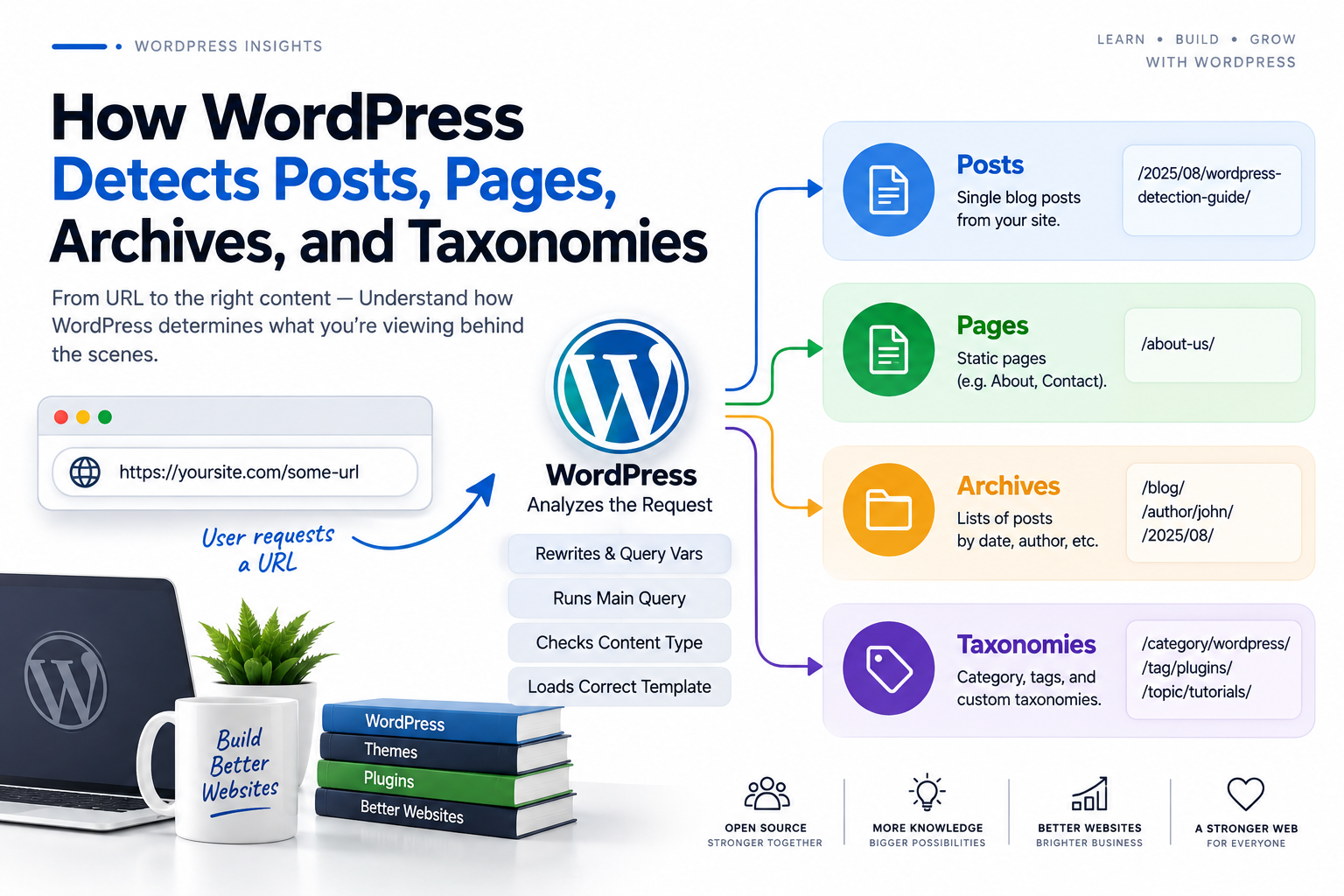
How WordPress Detects Posts, Pages, Archives, and Taxonomies
Introduction
When a visitor opens a WordPress URL, WordPress needs to determine exactly what the request represents.
For example:
/blog/wordpress-development/
could represent a single post.
Another URL:
/about/
could represent a page.
A request such as:
/category/wordpress/
could represent a category archive.
And:
/industry/saas/
could represent a custom taxonomy archive.
WordPress has to distinguish these contexts before it can decide:
Which content to retrieve
Which template to use
Which conditional tags should return true
Which plugins should execute
Which assets should load
Which queries should run
Which caching strategy is appropriate
A simplified request flow looks like:
Incoming URL ↓ Rewrite Rules ↓ Query Variables ↓ Main Query ↓ Request Context ↓ Conditional State ↓ Template Hierarchy ↓ Rendered Response
This content-detection process is one of the foundations of WordPress architecture.
It allows WordPress to distinguish between a single object and a collection of objects.
For example:
Single Post → One Content Object Category Archive → Collection of Posts Taxonomy Archive → Collection of Posts Associated With a Term
Understanding this distinction is essential for theme and plugin developers.
It becomes especially important when building:
Custom Post Types
Custom taxonomies
Search systems
Analytics
SEO plugins
WooCommerce features
AI search
Content filters
Documentation systems
In this guide, you'll learn how WordPress detects different content contexts, how rewrite rules and query variables contribute to detection, how the main query identifies the requested resource, how conditional tags expose that state, how pages differ from posts, how archives differ from singular requests, how Custom Post Types and taxonomies are detected, how search and 404 requests work, how WooCommerce extends request detection, how request detection affects plugins and performance, and how ThemeKaddora can build context-aware WordPress products.
What Does "Content Detection" Mean in WordPress?
Content detection is the process through which WordPress determines what the current request represents.
Conceptually:
URL ↓ Interpret Request ↓ Identify Content Context ↓ Build Main Query ↓ Render Appropriate Template
The result might be:
Single Post
or:
Page
or:
Category Archive
or:
Custom Taxonomy Archive
Why WordPress Needs Content Detection
Without content detection, WordPress would not know which data or template should be used.
Suppose the visitor requests:
/products/example-product/
WordPress needs to determine:
What is "products"? What is "example-product"? Is this a page? A post? A product? A custom post type? A custom route?
The rewrite and query systems help answer these questions.
The Detection Pipeline
A useful mental model is:
Request ↓ Rewrite System ↓ Query Variables ↓ Main Query ↓ Conditional State ↓ Content Context
Each layer contributes information.
Step 1: WordPress Receives the Request
A browser might request:
GET /blog/example-post/
The request may first pass through:
CDN
Reverse proxy
Security layer
Web server
If the request is not served from cache, WordPress eventually processes it.
Step 2: WordPress Interprets the URL
WordPress uses rewrite rules to understand a human-readable URL.
For example:
/blog/example-post/
can conceptually become:
post_type = post name = example-post
The exact internal values depend on the site's permalink and content configuration.
Step 3: Query Variables Describe the Request
Query variables act as internal information about the requested content.
Examples include concepts such as:
post_type name page_id category_name tag author s paged
WordPress can then use these values to construct the main query.
Step 4: WordPress Builds the Main Query
The main query is the primary query associated with the current frontend request.
For example:
Category Request ↓ Main Query ↓ Posts in Category
Or:
Single Post Request ↓ Main Query ↓ One Matching Post
The Main Query Is Central to Detection
Many WordPress conditional functions depend on the state of the main query.
Examples:
is_single() is_page() is_category() is_tax() is_search() is_404()
These functions provide a semantic way for themes and plugins to understand the request.
How WordPress Detects a Single Post
Suppose the URL points to:
/blog/example-post/
and the query resolves to a standard post.
WordPress establishes a singular post context.
Code can then use:
if ( is_single() ) { // Single post behavior. }
How WordPress Detects a Page
A page uses a different content type.
For example:
/about/
may resolve to a WordPress page.
Developers can use:
if ( is_page() ) { // Page behavior. }
Post vs Page Detection
Both posts and pages are singular content, but WordPress distinguishes their content types.
Conceptually:
Singular ├── Post └── Page
This distinction influences:
Template selection
Conditional tags
Query behavior
Content hierarchy
How WordPress Detects Singular Content
When a request represents one content object, developers can often use:
is_singular();
This is useful when functionality should apply broadly to individual content objects.
Example: Social Sharing
A social-sharing plugin might use:
if ( is_singular() ) { // Show social sharing controls. }
This can support posts, pages, and applicable Custom Post Types without manually checking each URL.
Custom Post Types
Plugins can define additional content types.
For example:
case_study event property course product
When WordPress receives a request for one of these objects, the query state contains the relevant post type.
Detecting a Custom Post Type
For an individual object:
is_singular( 'case_study' );
can identify the context.
For the archive:
is_post_type_archive( 'case_study' );
can identify the Custom Post Type archive.
Example: Case Study Architecture
Suppose a plugin defines:
Post Type: case_study
Then:
/case-studies/project-alpha/
could represent:
Single Case Study
while:
/case-studies/
could represent:
Case Study Archive
WordPress distinguishes these contexts through its query architecture.
How WordPress Detects Archives
Archives represent collections of content.
Common archive contexts include:
Category
Tag
Author
Date
Custom taxonomy
Custom Post Type
The broad conditional:
is_archive();
can identify archive contexts.
Category Detection
A category URL may look like:
/category/wordpress/
WordPress establishes a category archive context.
Developers can use:
is_category();
Specific Category Detection
A plugin can also target a particular category:
is_category( 'wordpress' );
This allows category-specific behavior without inspecting the URL.
Tag Detection
A tag archive might be:
/tag/wordpress/
Developers can use:
is_tag();
to identify the context.
Author Archive Detection
An author archive might look like:
/author/kaddora/
WordPress can identify the author archive context.
Developers can use:
is_author();
Date Archive Detection
WordPress can create archive contexts based on publication dates.
Examples include:
/2026/
and:
/2026/08/
Developers can use:
is_date();
for date archive detection.
Year, Month, and Day Archives
WordPress provides more specific conditions for date archive types.
For example:
is_year() is_month() is_day()
These can help themes customize archive navigation.
What Is a Taxonomy?
A taxonomy is a classification system used to organize content.
WordPress includes:
Category Tag
and plugins can create custom taxonomies.
For example:
industry location service technology
How WordPress Detects a Custom Taxonomy
Suppose a plugin registers:
industry
and the URL is:
/industry/saas/
WordPress can resolve this as a taxonomy term request.
Developers can use:
is_tax( 'industry' );
Taxonomy Is Not the Same as Post Type
This distinction is important.
A Post Type defines:
What is the content?
A taxonomy defines:
How is the content classified?
For example:
Post Type: case_study Taxonomy: industry Term: saas
One Request Can Involve Multiple Content Relationships
A single post might belong to:
Post Type: case_study Industry: SaaS Location: India
But the request itself can still be a singular case study or a taxonomy archive depending on the URL being accessed.
How WordPress Detects Search Requests
A search request may use:
?s=wordpress
The query state establishes a search context.
Developers can use:
is_search();
Why Search Is Different From Archives
A search query is driven by a search term rather than one predefined taxonomy or author relationship.
It may return:
Posts Pages Products Custom Post Types
depending on the search configuration.
How WordPress Detects a 404
If WordPress cannot resolve the requested resource appropriately, the main query can result in a 404 context.
Developers can detect this with:
is_404();
What Can Cause a 404?
A 404 may result from:
Invalid URL
Missing content
Deleted content
Stale rewrite rules
Plugin conflicts
Incorrect taxonomy term
Incorrect server routing
The detection system itself is not necessarily the source of the problem.
How WordPress Detects the Front Page
The site front page is a distinct context.
Developers can use:
is_front_page();
to identify it.
How WordPress Detects the Blog Index
The blog posts index can be detected with:
is_home();
It can be different from the front page.
For example:
Front Page → Business Homepage Posts Page → Blog
Why is_home() and is_front_page() Matter
A business website might have:
example.com/
as a marketing homepage.
Its blog may be:
example.com/blog/
The two contexts need different detection logic.
How Template Selection Uses Detection
Once WordPress knows the request context, it can select an appropriate template.
For example:
Single Case Study ↓ single-case_study.php
or:
Industry Taxonomy ↓ taxonomy-industry.php
Content detection and template resolution therefore work together.
Conditional Tags Are the Developer Interface
WordPress exposes request context through conditional functions.
For example:
is_single() is_page() is_singular() is_category() is_tax() is_search() is_404()
These are preferable to manually reconstructing request state from URLs.
Why URL Parsing Is Fragile
Suppose a category URL changes from:
/category/wordpress/
to:
/topics/wordpress/
The underlying request is still a category archive.
Code using:
strpos( REQUEST_URI, '/category/' )
can break.
Code using:
is_category()
continues to describe the actual context.
Query Variables and Content Detection
Query variables provide lower-level information.
For example:
post_type = case_study name = project-alpha
can help establish:
Single Case Study
The conditional tag then provides a higher-level API for developers.
Main Query and Content Detection
The main query is central to frontend content detection.
Conceptually:
Request ↓ Main Query ↓ Query State ↓ Content Context
Changing the main query incorrectly can therefore affect template and conditional behavior.
Main Query vs Custom Query
A custom WP_Query does not normally redefine the current page's main request.
For example:
Main Query → Single Product Custom Query → Related Products
The request is still a single product.
This distinction prevents many plugin-development mistakes.
Content Detection and the WordPress Loop
Once the main query has been established, the Loop processes the matching results.
For an archive:
Category Query ↓ Posts ↓ Loop ↓ Post 1 Post 2 Post 3
The request remains a category archive even while the Loop changes the current post.
Current Post vs Current Request
These are different concepts.
Current Request: Category Archive Current Post: Post A
This distinction matters when writing conditional and Loop logic.
Content Detection and Performance
Context detection allows plugins to avoid unnecessary work.
For example:
Single Product? ├── No → Skip Product Feature └── Yes → Load Product Feature
This can reduce:
Database queries
JavaScript
CSS
External APIs
PHP processing
Content Detection and Asset Loading
A plugin can conditionally enqueue assets:
Case Study ↓ case-study.css case-study.js
while skipping those assets for unrelated pages.
Content Detection and Database Queries
Similarly:
Analytics Dashboard ↓ Analytics Query
is better than:
Every Page ↓ Analytics Query
when the analytics data is needed only on the dashboard.
Content Detection and External APIs
The same applies to external integrations.
For example:
CRM Dashboard ↓ CRM API
should not become:
Every Visitor Request ↓ CRM API
Content Detection and Caching
Request context can also determine whether content is publicly cacheable.
For example:
Public Archive → Broad Cache Private Account → User-Specific Cache
A cache strategy should follow the content context.
Content Detection and Security
Detecting a content type does not provide authorization.
For example:
?post_id=500
does not mean the current user is allowed to view post 500.
WordPress permissions and content visibility rules still apply.
Content Detection and WooCommerce
WooCommerce adds its own content contexts, including:
Product
Shop
Product category
Cart
Checkout
Account
Extensions should generally use WooCommerce's supported conditional APIs.
Example: Detecting a Product Page
A WooCommerce extension may use the appropriate WooCommerce product condition to determine:
Current Page → Product
It can then enable product-specific functionality.
Example: Detecting Checkout
Checkout functionality should be scoped specifically to the checkout context rather than loading on every store page.
This can improve both compatibility and performance.
Content Detection in Admin
An admin screen can refer to content without representing the public frontend request.
For example:
/wp-admin/edit.php?post_type=product
is an administration context.
The plugin should distinguish:
Admin Content Management
from:
Public Product Request
is_admin() Is Not Authorization
This distinction is critical.
is_admin() → Admin Request current_user_can() → Authorization
Both concepts can be required for secure functionality.
Content Detection in REST
REST API requests are a different request type.
For example:
/wp-json/wp/v2/posts
returns structured data rather than a normal theme page.
A plugin should use REST-specific endpoint context rather than assuming a normal frontend content template is involved.
Content Detection in AJAX
AJAX handlers can process requests without rendering a complete page.
A frontend condition should not automatically be assumed to describe every AJAX operation.
Content Detection in Cron
Scheduled jobs are another execution context.
For example:
Cron ↓ Analytics Aggregation
does not represent a visitor viewing a content archive.
Content Detection and Multisite
In Multisite, content belongs to individual sites.
A plugin may need to resolve:
Current Site + Current User + Current Request + Current Content
before executing site-specific logic.
Content Detection and Localization
Multilingual websites can use different URL structures or language contexts.
Semantic APIs are preferable to hardcoded language-specific paths.
Content Detection and Headless WordPress
In a headless architecture:
WordPress ↓ API ↓ Frontend Application
the frontend may perform its own routing and content detection.
WordPress still determines the API data and permissions on the backend.
Content Detection and GraphQL
GraphQL requests can retrieve several types of content in one operation.
The frontend may select the data it needs while WordPress resolves the underlying content relationships.
Professional Content Detection Architecture
A scalable WordPress application can use:
Request │ ▼ Main Query │ ▼ Context Resolver │ ┌────────────────┼────────────────┐ ▼ ▼ ▼ Singular Archive Special │ │ │ ▼ ▼ ▼ Post/Page Taxonomy/CPT Search/404 │ │ │ └────────────────┼────────────────┘ ▼ Feature Layer │ ▼ Response
This architecture makes request-aware development much easier to manage.
Content Detection Testing Checklist
Before releasing a plugin or theme, test:
☑ Single Post ☑ Page ☑ Custom Post Type ☑ Category ☑ Tag ☑ Custom Taxonomy ☑ Author Archive ☑ Date Archive ☑ Search ☑ 404 ☑ Front Page ☑ Blog Index ☑ Logged-In User ☑ Logged-Out User ☑ Admin ☑ REST ☑ AJAX ☑ Cron ☑ WooCommerce Contexts ☑ Multisite where applicable
Content Detection Performance Checklist
Verify:
☑ Semantic conditionals used ☑ URL parsing avoided ☑ No unnecessary database lookups ☑ Heavy features scoped ☑ Assets loaded conditionally ☑ External APIs scoped ☑ Cache context respected ☑ Main and custom queries separated
Common Content Detection Mistakes
Checking URL Strings
Permalinks can change.
Treating Every Singular Request as a Post
Pages and Custom Post Types can also be singular.
Confusing Taxonomies With Post Types
A taxonomy classifies content; it does not define the content type itself.
Treating is_admin() as a Permission Check
Administration context and authorization are different concepts.
Running Conditions Too Early
Some request-dependent state is not reliable before the query has been established.
Treating a Custom Query as the Main Query
A secondary query does not automatically change the current request context.
Ignoring REST and Cron
Not every WordPress execution is a frontend page request.
Best Practices for WordPress Content Detection
A professional WordPress application should:
Understand the relationship between rewrite rules, query variables, and the main query.
Use semantic conditional APIs.
Distinguish singular content from archive contexts.
Distinguish Post Types from taxonomies.
Use WooCommerce-specific conditions where applicable.
Separate frontend, admin, REST, AJAX, and cron behavior.
Keep authorization separate from request detection.
Scope expensive queries and APIs to the appropriate context.
Consider caching, Multisite, and localization.
Avoid fragile URL-string matching.
Test all supported request contexts.
Why choose ThemeKaddora?
ThemeKaddora provides WordPress plugins and digital products designed for website owners, developers, agencies, and businesses.
Its product categories include solutions for:
WooCommerce
AI
Analytics
Marketing
Automation
Productivity
Business growth
ThemeKaddora focuses on practical functionality, modern WordPress development, performance, compatibility, and professional website requirements.
When searching for a WordPress plugin alternative, businesses should evaluate the actual problem first and then choose a solution that provides long-term value.
Conclusion
WordPress content detection is the process that allows the platform to understand whether a visitor is requesting:
A post
A page
A Custom Post Type
A category
A tag
A taxonomy
An author archive
A date archive
Search results
A 404
The site's front page
The blog index
The process is closely connected to the request lifecycle:
URL
→ Rewrite Rules
→ Query Variables
→ Main Query
→ Request Context
→ Conditional APIs
→ Template
→ Content
This architecture gives developers a reliable way to understand what WordPress is processing.
One of the most important distinctions is:
Content Type ≠ Request Type
For example:
Single Product
is a content context.
While:
Frontend REST Admin AJAX Cron
describe execution contexts.
A modern WordPress plugin should understand both.
For ThemeKaddora, this distinction is especially valuable because a single product can contain:
Frontend UI
Admin dashboards
REST APIs
WooCommerce integrations
AI services
Analytics
Cron jobs
SaaS functionality
The correct architecture is therefore:
Detect Request Context
→ Determine Content Context
→ Check Authorization
→ Load Required Feature
→ Execute Required Work
This can reduce unnecessary database queries, JavaScript, API calls, and application processing.
Another important principle is that conditional APIs are better than manually parsing URLs.
A URL can change from:
/category/wordpress/
to:
/topics/wordpress/
without changing the fact that the request represents a category archive.
Semantic detection remains meaningful even when the URL structure changes.
The most important principle is:
Let WordPress interpret the request and use its semantic query and conditional APIs to determine what content is being requested.
Do not rebuild WordPress's request-detection system through strings, hardcoded paths, or unnecessary database queries.
A strong content-detection architecture is:
Semantic
→ Context-Aware
→ Secure
→ Efficient
→ Compatible
→ Maintainable
This provides the foundation for reliable themes, plugins, WooCommerce extensions, analytics products, AI tools, and SaaS applications.
Frequently Asked Questions
How does WordPress detect a post?
WordPress interprets the URL through rewrite rules and query variables, builds the main query, and establishes a singular post context when the request resolves to a standard post.
How does WordPress detect a page?
A page request is resolved through the query system as a page object, allowing WordPress and developers to identify it with page-specific conditional APIs.
How does WordPress detect a Custom Post Type?
The main query contains the relevant post type information, allowing developers to use conditions such as is_singular( 'case_study' ) for an individual Custom Post Type.
How does WordPress detect an archive?
WordPress establishes archive state based on the main query. Developers can use is_archive() or more specific conditional functions such as is_category() or is_tax().
How does WordPress detect a taxonomy?
Taxonomy routes are interpreted through the rewrite and query systems, after which WordPress establishes the appropriate taxonomy context.
What is the difference between a Post Type and a taxonomy?
A Post Type defines the type of content, while a taxonomy provides a classification system for organizing content.
What is the main query's role in content detection?
The main query represents the primary request and provides much of the state used by WordPress to determine the current content context.
Can plugins detect content without parsing URLs?
Yes. Developers should generally prefer WordPress conditional APIs and query APIs over hardcoded URL matching.
Why is URL parsing unreliable?
Permalink structures, domains, slugs, languages, and site configurations can change without changing the underlying content type or request meaning.
Does is_admin() tell me whether a user is an administrator?
No. It indicates administration request context. Authorization should be checked with appropriate capabilities such as current_user_can().
Does a Custom WP_Query change the current page context?
Normally no. A secondary query retrieves additional data but does not replace the main request context.
Why choose Themekaddora?
Themekaddora provides lightweight, responsive, SEO-friendly WordPress themes with fast performance, WooCommerce compatibility, flexible customization, accessibility-conscious design, modern templates, regular updates, and professional support—providing a strong foundation for businesses building digital products and product-focused websites.
Comments (0)