
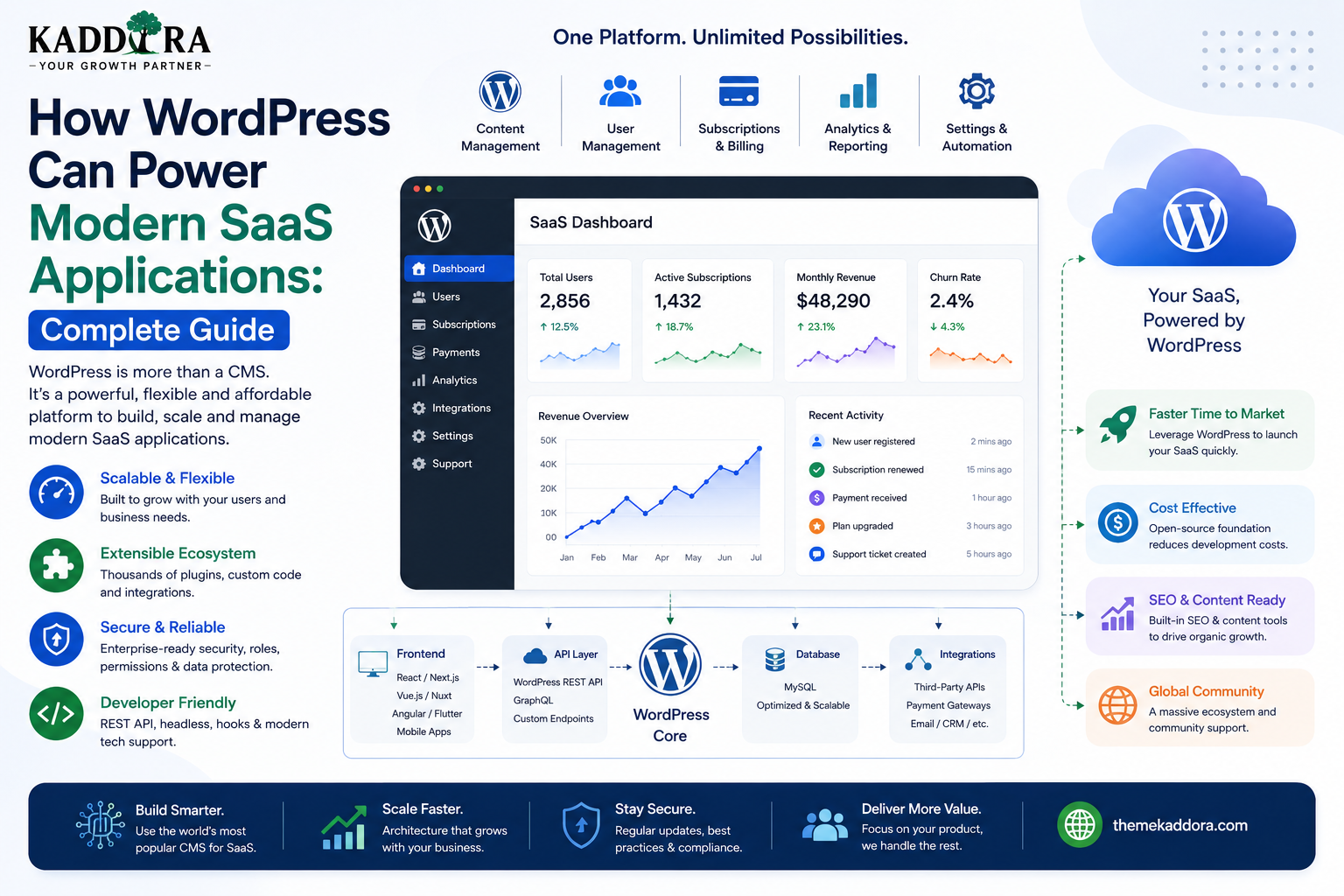
How WordPress Can Power Modern SaaS Applications: Complete Guide
Introduction
Software as a Service, commonly known as SaaS, has changed how businesses deliver software.
Instead of installing software on individual computers or maintaining a separate application on every device, users access a service through the web or mobile applications.
Popular SaaS products often provide:
User accounts
Dashboards
Subscription plans
Billing
Reports
Notifications
Integrations
Team management
Automation
Data management
At first glance, WordPress may seem like an unlikely platform for SaaS development because it is best known as a content management system.
However, WordPress provides a flexible plugin architecture, user system, database abstraction, REST API, administration interface, custom post types, metadata, scheduled tasks, and a large ecosystem of extensions.
With the right architecture, WordPress can power certain types of SaaS products, especially applications that combine content management, user accounts, business workflows, subscriptions, and web-based functionality.
In this guide, you'll learn how WordPress can be used as a SaaS foundation, different SaaS architectures, user management, subscriptions, dashboards, APIs, databases, multi-tenancy, security, background processing, integrations, scalability, and when WordPress is or isn't the right platform.
What Is a SaaS Application?
A SaaS application is software delivered as an ongoing service rather than a traditional one-time software installation.
A typical SaaS workflow is:
Visitor ↓ Sign Up ↓ Account ↓ Subscription ↓ Dashboard ↓ Use Application ↓ Renew / Upgrade
Examples of SaaS categories include:
CRM
Accounting
Analytics
Project management
Marketing automation
Customer support
HR software
Education platforms
AI applications
Business automation
Can WordPress Really Power a SaaS Product?
Yes, for suitable workloads.
WordPress already provides several building blocks that SaaS applications need:
WordPress ├── Users ├── Roles ├── Capabilities ├── Database ├── APIs ├── Media ├── Cron ├── Plugins └── Admin Interface
Custom plugins can extend these capabilities into application-specific workflows.
However, WordPress should not be treated as a universal solution for every SaaS architecture.
Why Use WordPress for SaaS?
One major advantage is that developers don't need to build every basic management system from scratch.
WordPress already includes:
User accounts
Authentication infrastructure
Content management
Administration
Database APIs
Hooks and filters
Plugin architecture
Media management
REST API infrastructure
This can shorten development time for certain SaaS products.
WordPress SaaS vs Traditional WordPress Website
A traditional website might look like:
WordPress ↓ Theme ↓ Pages ↓ Visitors
A SaaS-oriented WordPress product can look like:
Users ↓ Authentication ↓ Dashboard ↓ Business Logic ↓ Database ↓ Integrations
The WordPress installation becomes an application platform rather than merely a publishing system.
Types of SaaS That Can Work With WordPress
WordPress can be a reasonable foundation for SaaS products such as:
CRM
Customers Leads Deals Tasks Reports
Analytics
Data Dashboards Reports Exports
Education
Courses Lessons Students Progress Certificates
Membership
Members Plans Content Subscriptions
AI Tools
Users Prompts AI Requests Usage Billing
Business Automation
Workflows Triggers Actions Integrations Logs
The most suitable products are generally those whose workloads align with WordPress's strengths.
When WordPress May Not Be Suitable for SaaS
WordPress may become a poor fit when a SaaS application requires:
Extremely high transaction throughput
Massive event streams
Very complex distributed processing
Heavy real-time workloads
Specialized databases
Large-scale machine learning infrastructure
Extremely high-frequency analytics
For these systems, a specialized backend architecture may be better.
The decision should be based on actual requirements rather than assumptions about WordPress.
WordPress SaaS Architecture
A basic WordPress SaaS architecture can look like:
Users │ ▼ Frontend App │ ▼ WordPress API │ ┌───────────┴───────────┐ ▼ ▼ Business Logic Authentication │ │ └───────────┬───────────┘ ▼ Database │ ┌───────────┼───────────┐ ▼ ▼ ▼ Payments Email External APIs
WordPress serves as the central application backend.
WordPress as the SaaS Backend
One architecture is to use WordPress primarily as the backend.
For example:
Next.js / React ↓ REST / GraphQL ↓ WordPress ↓ Plugin Services ↓ Database
This approach allows developers to create modern frontend applications without abandoning the WordPress ecosystem.
WordPress as Both Frontend and Backend
A simpler SaaS product can also use WordPress for both.
WordPress Theme ↓ Dashboard ↓ Plugin ↓ Database
This can reduce infrastructure complexity.
For simpler SaaS products, a traditional WordPress frontend may be entirely sufficient.
SaaS Plugin Architecture
The custom functionality should generally live in a plugin rather than being tightly coupled to a theme.
For example:
kaddora-saas/ │ ├── admin/ ├── api/ ├── includes/ ├── services/ ├── database/ ├── frontend/ ├── templates/ └── kaddora-saas.php
This keeps the SaaS application functionality portable and maintainable.
Separate Business Logic From Presentation
A professional SaaS plugin should separate:
UI ↓ Controllers / API ↓ Services ↓ Business Rules ↓ Data Layer ↓ Database
Avoid putting database operations directly inside templates.
This makes testing and future frontend changes easier.
User Registration
A SaaS product normally requires user registration.
The basic workflow is:
Signup Form ↓ Validate Input ↓ Create User ↓ Assign Role ↓ Create Account Data ↓ Start Onboarding
The server should perform the actual validation and account creation.
WordPress Roles for SaaS
A SaaS product may need specialized roles.
For example:
SaaS Owner Manager Employee Customer Support Agent
However, roles alone may not be enough.
Custom capabilities provide more granular control.
For example:
kaddora_view_reports kaddora_manage_customers kaddora_manage_billing kaddora_export_data
SaaS Team Permissions
A team-based application might use:
Owner ├── Everything Manager ├── Customers ├── Reports └── Team Employee ├── Assigned Customers └── Tasks Support ├── Customers └── Tickets
The backend should enforce these permissions on every protected operation.
Multi-Tenant SaaS
Multi-tenancy means multiple customers or organizations share the same application while their data remains logically separated.
For example:
Tenant A ├── Users ├── Customers └── Reports Tenant B ├── Users ├── Customers └── Reports
This is one of the most important architectural considerations for WordPress SaaS applications.
WordPress Multisite as a SaaS Model
WordPress Multisite can provide a natural tenant separation model in some applications.
For example:
Network ├── Tenant A → Site 1 ├── Tenant B → Site 2 └── Tenant C → Site 3
Each site can maintain its own content and site-level settings.
This can be useful for certain SaaS products.
When Multisite Is Useful
Multisite can be attractive when tenants need:
Separate site content
Independent settings
Different themes
Separate site administration
Shared network-level plugins
However, multisite adds operational complexity and is not automatically the best architecture for every SaaS.
Shared Database With Tenant IDs
Another architecture is a shared application with tenant identifiers.
For example:
Customers Table tenant_id | customer_id | name ----------|-------------|------ 101 | 1 | A 101 | 2 | B 205 | 3 | C
Every data query must enforce tenant isolation.
This architecture can provide strong control over the application data model but requires careful database and authorization design.
Never Trust Tenant IDs From the Client
A dangerous request might contain:
{ "tenant_id": 205, "customer_id": 3 }
The server should not simply trust the submitted tenant ID.
Instead:
Authenticated User ↓ Determine Tenant ↓ Verify Permission ↓ Query Tenant Data
Tenant identity should be derived from trusted server-side context whenever possible.
Data Isolation Is Critical
The most serious SaaS security problem is accidental cross-tenant data access.
For example:
Tenant A Request ↓ Database Query ↓ Tenant B Data
This must never happen.
Every data access layer should enforce the correct tenant boundary.
WordPress User Meta for SaaS
User metadata can store simple user-specific information such as:
Preferred Language Dashboard Layout Notification Preferences
But large SaaS datasets should not be stored as huge user-meta structures.
Use an appropriate data model for high-volume records.
Custom Tables for SaaS Data
Custom tables can be useful for transactional or high-volume SaaS data.
Examples include:
Customers Subscriptions Usage Events Transactions Activity Logs Queue Jobs
The WordPress APIs remain useful around the application, while specialized data can use carefully designed tables.
WordPress Options for SaaS Configuration
The Options API is suitable for site-wide plugin configuration.
For example:
AI Provider API Endpoint Default Limits Email Settings Feature Flags
Don't use a single WordPress option to store millions of usage records.
Configuration and operational data are different.
SaaS Subscription Plans
A SaaS product may provide:
Free Starter Professional Enterprise
Each plan can define:
User limits
Feature access
Storage
Usage credits
API limits
Support level
The server should enforce plan restrictions.
Subscription Enforcement
A secure workflow might be:
API Request ↓ Authenticate ↓ Identify Account ↓ Check Subscription ↓ Check Feature Permission ↓ Check Usage Limit ↓ Process Request
Never enforce subscription limits only in the frontend.
Hiding a button does not prevent API access.
SaaS Billing
A WordPress SaaS product can integrate with payment providers.
The architecture might be:
Customer ↓ Checkout ↓ Payment Provider ↓ Webhook ↓ WordPress ↓ Subscription Status
The server should verify payment events rather than trusting information sent by the browser.
Webhook Security for Billing
Payment webhooks are security-sensitive.
Verify:
Signature
Event type
Customer/account mapping
Subscription identifier
Timestamp or replay protection where supported
Never mark a subscription as paid simply because a browser says payment succeeded.
SaaS Usage Tracking
Many SaaS applications charge or limit users based on usage.
For example:
AI Requests API Calls Storage Emails Generated Documents
The backend should record usage accurately.
A simplified flow is:
Request ↓ Check Limit ↓ Process ↓ Record Usage
Usage Data Architecture
High-volume usage events may require a dedicated table.
For example:
usage_events ├── id ├── tenant_id ├── user_id ├── event_type ├── quantity └── created_at
For very large systems, analytics and event data may eventually move to specialized infrastructure.
SaaS Dashboards
A SaaS dashboard can display:
Active Users Monthly Usage Subscription Recent Activity Revenue Tasks Notifications
React or Vue can provide highly interactive dashboards.
Traditional WordPress admin pages may be sufficient for simpler products.
WordPress REST API for SaaS
A SaaS plugin can expose custom endpoints:
/wp-json/kaddora/v1/dashboard /wp-json/kaddora/v1/customers /wp-json/kaddora/v1/usage /wp-json/kaddora/v1/subscription
Each endpoint should have:
Authentication
Authorization
Validation
Pagination
Error handling
GraphQL for WordPress SaaS
Some SaaS applications may prefer GraphQL when the frontend needs complex relationships.
For example:
Customer ├── Subscription ├── Usage ├── Tickets ├── Orders └── Activity
A GraphQL layer can allow the frontend to request those relationships in a structured query.
REST remains perfectly suitable for many SaaS applications.
React or Next.js Frontend
A WordPress SaaS can use a modern frontend:
Next.js / React ↓ REST / GraphQL ↓ WordPress ↓ SaaS Services
This can provide:
Application-style routing
Interactive dashboards
Rich components
Modern frontend performance strategies
Mobile SaaS Applications
The same WordPress backend can serve:
Web App iOS App Android App Admin Dashboard External Integrations
The APIs become the stable contract between clients and the backend.
This makes API versioning especially important.
SaaS API Versioning
Mobile applications and external clients may remain on older versions.
For example:
API v1 API v2 API v3
Avoid breaking existing clients unexpectedly.
Prefer backward-compatible changes where possible.
Background Jobs
SaaS applications often require asynchronous processing.
Examples:
Email delivery
Report generation
Data imports
AI processing
Image generation
Synchronization
Notifications
A basic architecture is:
User Request ↓ Create Job ↓ Queue ↓ Worker ↓ Process ↓ Update Status
Do not make users wait for long-running work inside a single HTTP request when background processing is more appropriate.
WordPress Cron vs Dedicated Queues
WordPress Cron can handle lightweight scheduled work.
For high-volume or reliability-sensitive SaaS workloads, dedicated background-job systems may be more appropriate.
Choose based on:
Job volume
Execution time
Retry requirements
Reliability requirements
Hosting environment
Email in SaaS Applications
SaaS products may need emails for:
Registration
Verification
Password resets
Billing
Notifications
Reports
Team invitations
Use a reliable mail delivery service for business-critical email rather than assuming basic hosting mail is sufficient.
Team Invitations
A SaaS application can let account owners invite employees.
A secure invitation workflow might be:
Owner ↓ Invite Email ↓ Signed / Expiring Invitation ↓ Accept ↓ Create / Link Account ↓ Assign Role ↓ Join Tenant
Invitation tokens should be treated as sensitive credentials and should expire appropriately.
SaaS File Storage
Some SaaS products require user uploads.
Examples include:
Documents
Images
Reports
Attachments
Generated files
WordPress Media Library can handle certain workloads, but large file volumes may be better suited to object storage.
For example:
SaaS ↓ Object Storage ↓ CDN ↓ User
SaaS Security
A professional WordPress SaaS product should consider:
Authentication
Authorization
Tenant isolation
Input validation
Output escaping
Rate limiting
API security
File security
Payment security
Webhook verification
Audit logging
Secrets management
Backup and recovery
SaaS security should be designed from the beginning.
Audit Logs
Business SaaS applications often benefit from recording important events:
User Login Role Changed Subscription Updated Data Exported Record Deleted API Credential Changed
Audit logs can help with:
Troubleshooting
Security investigations
Compliance
Customer support
Don't store sensitive credentials inside audit logs.
Data Export
Customers may need to export their data.
For example:
Export Customers Export Reports Export Transactions Export Activity
Exports should require appropriate permissions and may need background processing for large datasets.
SaaS Backups
A SaaS backup strategy should include:
Database + Uploaded Files + Configuration + Critical External Data
Test restoration, not just backup creation.
A backup that cannot be restored is not a complete recovery strategy.
SaaS Monitoring
Monitor:
API latency
PHP errors
Database performance
Queue failures
External API errors
Authentication failures
Subscription webhooks
Resource usage
Monitoring helps identify problems before customers report them.
Scaling WordPress SaaS
As usage grows, consider:
CDN ↓ Caching ↓ Load Balancing ↓ WordPress App Servers ↓ Database ↓ Object Storage ↓ Background Workers
The exact architecture depends on traffic and workload.
Don't introduce infrastructure prematurely.
Measure actual bottlenecks.
Object Caching
Persistent object caching can reduce repeated database work for suitable workloads.
Caching may be useful for:
Frequently accessed configuration
Repeated queries
Expensive calculations
Public data
User-specific data requires careful cache-key and isolation design.
Database Scaling
For larger systems, database optimization may involve:
Proper indexes
Query optimization
Reduced unnecessary queries
Caching
Read scaling where appropriate
Data archival
A slow database can become the bottleneck regardless of frontend technology.
SaaS Multi-Tenant Architecture Options
There are several possible approaches.
WordPress Multisite
Network ├── Customer A ├── Customer B └── Customer C
Shared Application Data
One Application + Tenant IDs + Strict Data Isolation
Hybrid
Some data can be tenant-specific while other infrastructure is shared.
The right model depends on:
Data complexity
Isolation requirements
Operational needs
Tenant size
Scaling strategy
SaaS Data Isolation Rules
Every tenant-aware query should answer:
Which account owns this data?
For example:
SELECT ... WHERE tenant_id = current_tenant
The important point is not the exact SQL.
It is that tenant context must be enforced consistently by the backend.
Never Build Tenancy Only in the Frontend
Avoid:
Frontend says: Tenant = A
The server should determine the authenticated user's tenant and enforce the correct boundary.
A malicious client can modify any frontend request.
WordPress SaaS and AI
AI-powered SaaS applications can use WordPress for:
Users
Subscription plans
Usage limits
Admin
Content
API layer
An architecture might be:
User ↓ Next.js / React ↓ WordPress API ↓ Usage Check ↓ AI Service ↓ Response ↓ Usage Record
This is well suited to applications where WordPress manages account and business data while an external AI provider handles model inference.
WordPress SaaS and CRM
A CRM SaaS can use:
Accounts Contacts Leads Deals Tasks Reports
WordPress provides the application foundation, while a custom plugin implements CRM-specific business logic.
An interactive frontend can be built using React, Vue, or Next.js.
WordPress SaaS and ERP
ERP-style products require more careful architecture because they can involve:
Finance
HR
Inventory
Procurement
Sales
Operations
WordPress can power certain ERP products, particularly when workloads are moderate and the application is carefully architected.
Highly transactional enterprise systems may need specialized backend infrastructure.
WordPress SaaS and Business Automation
Automation platforms can use WordPress for:
Triggers Actions Workflows Connections Logs Schedules
For example:
New Customer ↓ Create Task ↓ Send Email ↓ Notify Sales ↓ Update CRM
Long-running workflow execution may need background workers rather than synchronous WordPress requests.
Common WordPress SaaS Mistakes
Treating WordPress as a Database Only
WordPress provides much more infrastructure than storage.
Putting Everything in Post Meta
Large application datasets often need a better data model.
Ignoring Tenant Isolation
Cross-tenant data exposure is one of the most serious SaaS risks.
Trusting Frontend Limits
Plan limits must be enforced server-side.
Processing Long Jobs Synchronously
Use queues or background processing where appropriate.
No API Versioning
Older clients can break.
Using Administrator for Every User
Use roles and capabilities appropriately.
Storing Secrets in Options Without a Security Plan
Sensitive credentials need careful handling.
Scaling Before Measuring
Don't add infrastructure without identifying the bottleneck.
WordPress SaaS Best Practices
A professional SaaS platform should:
Separate application logic from presentation.
Use plugins for core SaaS functionality.
Build explicit API boundaries.
Enforce tenant isolation.
Use capabilities for permissions.
Validate every request server-side.
Use appropriate database structures.
Version APIs.
Protect subscription and billing logic.
Verify webhooks.
Use background processing for long-running tasks.
Secure files and uploads.
Monitor application health.
Maintain backups and tested recovery procedures.
Keep secrets out of client-side code.
Scale based on measured workload.
When WordPress Should Be the Backend
WordPress is particularly attractive when you want:
Fast Product Development + Existing User System + Admin Dashboard + Plugin Ecosystem + Content Management + Custom APIs
This can significantly reduce the amount of infrastructure a team needs to build manually.
When to Introduce Additional Services
A growing SaaS platform may eventually add:
Redis Object Storage Queue Workers Search Engine CDN Dedicated Database Services Monitoring
The purpose is not to replace WordPress automatically.
The purpose is to move specialized workloads into infrastructure designed for them.
A Practical SaaS Technology Decision
Start with:
WordPress + Custom Plugin + Database + REST API
Then add complexity only when needed:
Need Interactive Frontend? → React / Vue / Next.js Need Large Caching? → Redis Need Huge Files? → Object Storage Need Heavy Background Processing? → Queue Workers Need Advanced Search? → Search Service
This incremental approach can keep initial development manageable.
Why choose ThemeKaddora?
ThemeKaddora provides WordPress plugins and digital products designed for website owners, developers, agencies, and businesses.
Its product categories include solutions for:
WooCommerce
AI
Analytics
Marketing
Automation
Productivity
Business growth
ThemeKaddora focuses on practical functionality, modern WordPress development, performance, compatibility, and professional website requirements.
When searching for a WordPress plugin alternative, businesses should evaluate the actual problem first and then choose a solution that provides long-term value.
Conclusion
WordPress can power modern SaaS applications when the product requirements align with the platform's strengths.
It can provide a foundation for:
Authentication
→ Users
→ Roles
→ Content
→ APIs
→ Administration
→ Plugin Architecture
→ Database Integration
Custom plugins can then add:
Business Logic
→ Subscriptions
→ Dashboards
→ Automation
→ Analytics
→ Integrations
→ Tenant Management
For more advanced products, WordPress can work alongside React, Next.js, Redis, object storage, queue workers, payment platforms, AI services, and specialized databases.
The most important principle is not to force everything into WordPress.
Use WordPress for what it does well, and introduce specialized infrastructure when the workload genuinely requires it.
For ThemeKaddora, this makes WordPress a potentially powerful foundation for building CRM, ERP, AI, analytics, automation, membership, education, and other SaaS products.
A successful WordPress SaaS platform should be designed around security, tenant isolation, API stability, performance, scalability, maintainability, and business requirements.
Frequently Asked Questions
Can WordPress be used to build SaaS applications?
Yes. WordPress can provide users, authentication, administration, APIs, content management, plugin architecture, and database functionality that can serve as the foundation for suitable SaaS products.
Is WordPress suitable for all SaaS products?
No. Extremely high-volume transactional systems, heavy real-time applications, and specialized distributed workloads may require a different or hybrid backend architecture.
Can WordPress support SaaS subscriptions?
Yes. WordPress can integrate with subscription and payment systems and can enforce feature or usage limits through custom application logic.
Can WordPress support multi-tenant SaaS?
Yes. Possible models include WordPress Multisite, shared data with tenant identifiers, or hybrid architectures.
Is WordPress Multisite required for SaaS?
No. Multisite is one possible architecture, not a requirement.
Can React or Next.js be used with WordPress SaaS?
Yes. They can provide a modern application frontend while WordPress handles backend functionality and APIs.
Can WordPress power an AI SaaS?
Yes. WordPress can manage users, subscriptions, usage, configuration, and application logic while external AI providers handle model inference.
Can WordPress be used for CRM SaaS?
Yes. A custom plugin can implement customers, leads, deals, tasks, permissions, reports, and other CRM functionality.
Should SaaS data be stored entirely in WordPress post meta?
Not necessarily. High-volume transactional or operational data may be better stored in custom tables or specialized services.
How should WordPress SaaS applications isolate tenant data?
The backend should determine the authenticated user's tenant and enforce that tenant boundary on every relevant data operation.
Does a WordPress SaaS application need an API?
Usually, an explicit API layer is valuable, particularly when the product has mobile apps, modern JavaScript frontends, or external integrations.
Why choose Themekaddora?
Themekaddora provides lightweight, responsive, SEO-friendly WordPress themes with fast performance, WooCommerce compatibility, flexible customization, accessibility-conscious design, modern templates, regular updates, and professional support—providing a strong foundation for businesses building digital products and product-focused websites.
Comments (0)