
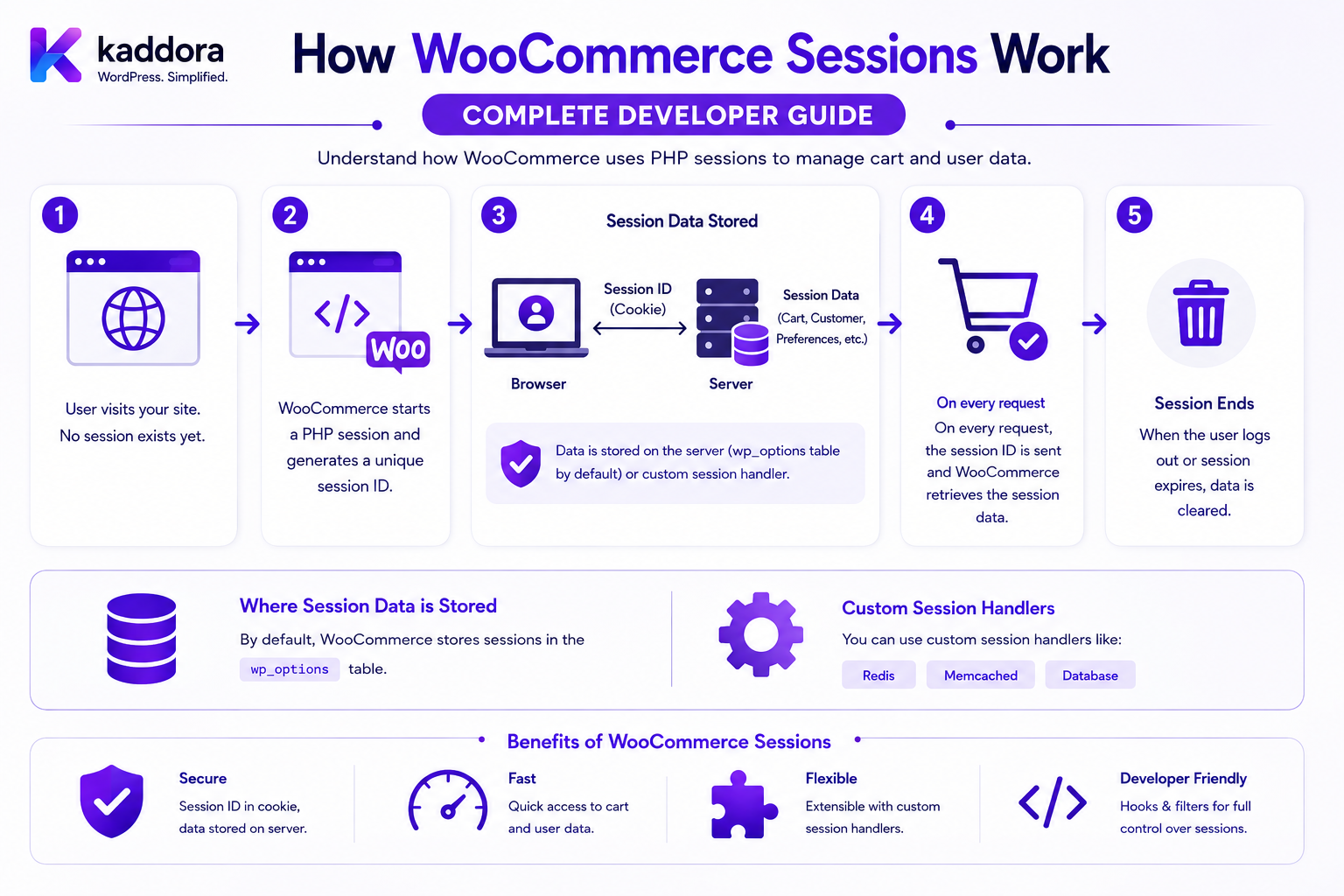
How WooCommerce Sessions Work: Complete Developer Guide
Introduction
A WooCommerce customer can add a product to a cart without logging in.
They can then:
Browse Products ↓ Add Items ↓ Change Quantity ↓ Update Address ↓ Select Shipping ↓ Continue Checkout
The store needs to remember that customer's temporary shopping state between requests.
This is where WooCommerce sessions become important.
A simplified flow looks like:
Browser ↓ Session Identifier ↓ WooCommerce Session ↓ Cart / Customer Context ↓ Checkout ↓ Order
WooCommerce's Store API documentation describes customer sessions as cookie-based by default and provides Cart Tokens as an alternative mechanism for headless cart interactions.
WooCommerce also has a dedicated WC_Session_Handler for current-customer session data, and the current code reference shows that WooCommerce session storage uses a custom table.
A separate WC_Customer_Data_Store_Session stores selected customer information in the session rather than treating that temporary context as the permanent customer record.
Understanding sessions is essential when building:
Cart Extensions Checkout Features Guest Shopping Dynamic Pricing Shipping Rules Customer Context Abandoned Cart Systems Headless Commerce Custom Store APIs WooCommerce Plugins
The key principle is:
A WooCommerce session represents temporary shopping context for the current customer or visitor; it is not a replacement for the persistent customer, product, or order data models.
What Is a WooCommerce Session?
A WooCommerce session is temporary server-side state associated with a shopper.
It allows WooCommerce to remember information between HTTP requests.
For example:
Request 1: Add Product A Request 2: View Cart Request 3: Change Quantity Request 4: Checkout
Without a session mechanism, WooCommerce would not reliably know that all four requests belong to the same shopping context.
Why WooCommerce Needs Sessions
HTTP requests are independent by default.
A browser might send:
GET /product/example
and later:
POST /cart/add
The server needs a way to associate these requests with the same shopper context.
The WooCommerce session provides that connection.
Session vs Customer Account
These are different concepts.
Customer Account
Persistent identity:
Name Email Account Orders
Session
Temporary shopping context:
Cart Shipping Context Temporary Customer Data
A guest can have a session without having a registered account.
Registered Customer Session
A logged-in customer can have:
WordPress Account ↓ WooCommerce Customer ↓ WooCommerce Session ↓ Cart
The account provides persistent identity.
The session provides temporary shopping state.
Guest Customer Session
A guest shopper can have:
Visitor ↓ WooCommerce Session ↓ Cart ↓ Checkout
There may be no permanent WordPress user account.
This is one of the most important reasons developers must not assume:
Cart = Logged-In Customer
Session vs Cart
The cart is business data representing current shopping intent.
The session is the mechanism that can hold temporary context used by the shopping process.
Conceptually:
Session ├── Customer Context ├── Cart Context └── Temporary Commerce Data
The exact internal representation should be treated as an implementation detail.
Session vs Order
A session is temporary.
An order is persistent.
For example:
Session ↓ Cart ↓ Checkout ↓ Order
If the shopper completes the purchase, the order becomes the persistent transaction record.
WooCommerce Session Handler
WooCommerce provides the WC_Session_Handler class for handling the current customer's session.
The current WooCommerce code reference states that the session handler manages current-customer session data and uses custom table-based session storage.
Conceptually:
Customer Request ↓ WC_Session_Handler ↓ Session Storage
WooCommerce Session Storage
The session handler uses a dedicated WooCommerce session storage table rather than requiring temporary session state to be stored entirely in the browser.
The source code documentation identifies a custom table-based storage model for WooCommerce sessions.
The exact database implementation should not normally be manipulated directly by extensions.
Why Session Data Is Server-Side
The browser can be modified.
A customer could attempt to change:
Cart Total Customer Role Shipping Cost Discount
If all of those values were trusted directly from browser storage, the commerce system would be insecure.
Server-side session data helps WooCommerce maintain authoritative state.
WooCommerce's Store API architecture explicitly treats the server as the source of truth for important customer and cart data.
Session Cookie
In the normal Store API architecture, WooCommerce customer sessions are cookie-based by default.
Conceptually:
Browser ↓ WooCommerce Session Cookie ↓ Server ↓ Session
The cookie helps the server identify the appropriate session.
Cookie Is Not the Whole Session
A useful distinction is:
Cookie = Session Identifier Server Session = Actual Temporary State
The browser does not need to contain the complete cart or customer session state.
Why This Matters
If the browser only provides an identifier:
Session Identity
WooCommerce can retrieve the associated server-side context.
This reduces reliance on client-controlled business values.
Cookie-Based Session Flow
A typical shopping flow may look like:
Visitor ↓ Request ↓ Session Cookie ↓ WooCommerce Session ↓ Cart ↓ Response
The next request can reuse the same session context.
Session Initialization
A session can be created or initialized when WooCommerce needs to maintain customer-specific state.
Not every public page necessarily requires the same amount of session activity.
Efficient session management avoids unnecessary storage and writes where possible.
Session Data
Session state can contain temporary customer-related information.
WooCommerce's customer session data store explicitly handles fields including:
Billing Information Shipping Information Customer ID Customer Dates VAT-Exempt State Calculated Shipping Metadata
as session-backed data for the customer context.
The exact session payload should be treated as an implementation detail.
Customer Session Data Store
WooCommerce has a dedicated:
WC_Customer_Data_Store_Session
The code reference describes it as the customer data store that stores customer data in session.
This makes an important distinction:
Persistent Customer Data
versus:
Temporary Session Customer Data
Why Customer Data Is Copied Into the Session
During shopping and checkout, WooCommerce may need customer information repeatedly:
Billing Address Shipping Address Phone Email Country State
Storing relevant values in session allows the current shopping context to be reused during the request flow.
Session Data Is Not the Permanent Customer Record
This distinction is critical.
If a customer changes:
Phone Number
the permanent customer profile and temporary session state have different lifecycle responsibilities.
WooCommerce's session data store includes logic to compare session identity and customer modification timestamps before using session-backed customer data.
Customer Login and Session Data
When a customer logs in, WooCommerce has to reconcile:
Existing Session + Persistent Customer
The current session customer store checks the stored customer ID and modification date when deciding whether session data can be reused.
This helps prevent stale session data from silently replacing updated customer data.
Customer Logout
When a customer logs out, the relationship between:
Account Session Cart
can change depending on store/session behavior.
Extensions should use WooCommerce's session and customer APIs rather than inventing their own logout semantics.
Cart and Session
The cart is strongly associated with the current WooCommerce session.
Conceptually:
Session A └── Cart A Session B └── Cart B
This prevents shoppers from sharing one cart accidentally.
Why Cart Ownership Matters
Consider:
Customer A ↓ Cart A Customer B ↓ Cart B
Customer B should not be able to obtain Customer A's cart merely by changing an ID in a URL.
The Store API is designed to expose current-session data rather than arbitrary customer carts.
Store API and Sessions
The WooCommerce Store API provides customer-facing cart and checkout endpoints.
WooCommerce documents these endpoints as reflecting the current user's/session's state.
For example:
GET /wp-json/wc/store/v1/cart
returns the current cart.
Cart API and Session
The Cart API documentation explicitly states that the cart endpoint returns the current cart for the current session or logged-in user.
This is a direct example of how sessions connect requests to cart state.
Cart Mutation
When a customer adds an item:
POST /cart/add-item
the request is associated with the current shopping session or valid cart token.
The server then:
Validate ↓ Update Cart ↓ Recalculate ↓ Return Cart
Cart Token
WooCommerce also supports Cart Tokens as an alternative to cookie-based sessions for headless interactions.
The official documentation states that a Cart Token can be returned by cart endpoints and then supplied as a request header to identify the associated cart.
Why Cart Tokens Exist
Headless frontends may not use WooCommerce's normal browser-cookie architecture in the same way.
For example:
Next.js ↓ Store API ↓ Cart Token ↓ WooCommerce
This allows the frontend to maintain a reference to the appropriate cart.
Obtaining a Cart Token
A client can request:
GET /wp-json/wc/store/v1/cart
and receive a Cart-Token response header when the token mechanism is used.
Using a Cart Token
The client can send:
Cart-Token: <token>
with later Cart and Checkout requests.
WooCommerce documents this as a way to identify the cart associated with the token.
Cart Token vs Cookie Session
These are alternative mechanisms for identifying cart context.
Cookie Session
Browser Cookie ↓ Session ↓ Cart
Cart Token
Frontend ↓ Cart Token ↓ Cart Context
Both ultimately connect the request to the appropriate shopping state.
Cart Token Security
A Cart Token should be treated as sensitive shopping-context information.
Avoid:
Logging Tokens Sending Tokens to Analytics Displaying Tokens Storing Tokens in Public Content
unless there is a legitimate reason.
Cart Token Is Not an Admin Credential
A cart token identifies a shopping cart context.
It should not be treated as:
Administrator Authentication
or:
WooCommerce REST API Credential
Those are separate concepts.
Session Expiration
Sessions should not remain active indefinitely.
WooCommerce's session system includes expiration and cleanup mechanisms.
The exact timing depends on WooCommerce's current configuration and implementation.
The important principle is:
Temporary Data ↓ Expiration ↓ Cleanup
Why Expiration Matters
Without expiration, a store could accumulate:
Old Guest Sessions Old Carts Old Temporary Customer Data
forever.
This would increase storage and maintenance overhead.
Session Cleanup
Session cleanup can remove old session records according to WooCommerce's expiration rules.
Developers should use WooCommerce's session APIs rather than manually deleting arbitrary rows from the session table.
Don't Manually Delete Session Rows
Avoid writing custom SQL such as:
DELETE FROM wp_woocommerce_sessions ...
because the actual table prefix and storage rules may differ, and WooCommerce manages session lifecycle itself.
Session Table Prefix
Never assume:
wp_woocommerce_sessions
is the actual table name.
WordPress sites can use custom database prefixes.
Extensions should use WooCommerce's APIs.
Session Lifetime and Business Requirements
A store might want a cart to remain available for a certain period.
But the session lifetime should not be confused with:
Order Retention Customer Account Retention Payment History
These are separate lifecycle policies.
Session Data and Abandoned Carts
An abandoned cart can be conceptually:
Session + Cart + No Order
A store may build recovery workflows around this.
But not every expired session should be treated as a recoverable marketing lead.
Abandoned Cart Automation
A possible workflow:
Cart Activity ↓ No Purchase ↓ Wait ↓ Eligibility Check ↓ Optional Reminder
Marketing permissions and privacy policies should be respected.
Session and Checkout
Checkout can use session context for:
Customer Shipping Billing Cart Chosen Shipping Temporary Checkout State
The final order should still be created from validated server-side checkout state.
Session Data During Checkout
A checkout request can depend on information stored in the current session.
For example:
Cart + Customer Address + Shipping Choice
The server uses this context to calculate final checkout state.
Never Trust Session Values Blindly
Session data is server-side, but extensions should still validate their own custom values.
For example:
Custom Cart Flag: eligible_for_discount = true
should not automatically guarantee a discount if the business rule is no longer satisfied.
Session and Dynamic Pricing
A pricing extension may store temporary context such as:
Customer Group Promotion Context Selected Offer
But the server should recalculate eligibility when important cart events occur.
Session and Shipping
Shipping selection can depend on:
Destination Cart Items Shipping Zone Selected Method
Changes to the session/customer context can therefore trigger shipping recalculation.
Session and Tax
Customer location stored in the shopping context can influence tax calculation.
For example:
Country State Postcode
should be validated before being used to determine final tax.
Session and Coupons
Coupon state may interact with the current cart and session.
However, coupon validity should always be recalculated against current:
Cart Customer Date Products Usage Rules
Session and Product Recommendations
Recommendations may use session activity such as:
Current Cart Recently Viewed Products Current Categories
Avoid collecting more behavioral data than the feature requires.
Session and Personalization
A store can use session context to personalize:
Currency Language Shipping Options Cart
But personalization should not override access-control rules.
Session and Customer Privacy
A session can reveal:
Products of Interest Address Shipping Selection Coupon Usage Shopping Intent
Protect session information from unnecessary exposure.
Session Data and Logs
Avoid logging complete session payloads in production.
A debug log containing:
Address Phone Email Cart Contents
can create a separate privacy problem.
Safe Session Logging
Where debugging is needed, log:
Request ID Operation Result Error Code
rather than complete customer/session data.
Session and Caching
Session-specific data should never enter a public shared cache unintentionally.
For example:
Customer A Cart ↓ Page Cache ↓ Customer B
must not happen.
Session-Aware Cache Design
For personalized data, consider:
Private Cache Session Scope User Scope
depending on the architecture.
Session and Page Caching
Public product pages can often be cached.
Personalized:
Cart Account Checkout Customer Data
requires much more careful handling.
Session and CDN Caching
Do not configure a CDN or reverse proxy to blindly cache personalized Store API responses.
Customer-specific endpoints require appropriate cache controls.
Session and REST APIs
Custom REST endpoints can accidentally bypass normal session assumptions.
A custom endpoint should clearly define:
Which Customer? Which Session? Which Cart? Which Authorization?
Store API vs Custom REST API
If the requirement is simply:
Modify Current Cart
use the Store API and WooCommerce cart mechanisms where appropriate.
Create a custom endpoint only when the feature genuinely requires one.
Session and AJAX
Legacy WooCommerce extensions may use AJAX requests.
The same principle applies:
Request ↓ Identify Session ↓ Validate Request ↓ Update Session ↓ Recalculate ↓ Return Result
Nonces and Session Requests
Browser-based state-changing requests should use the appropriate WooCommerce/WordPress request-protection mechanisms.
A nonce is not a substitute for determining which session or customer is authorized to perform the operation.
Session and Headless Commerce
Headless stores can use:
Cart Tokens Store API Customer Authentication
depending on the application.
WooCommerce officially documents Cart Tokens as a mechanism for headless cart interaction without relying exclusively on cookies.
Session Architecture for Mobile Apps
A mobile application may use server-facing commerce APIs instead of browser cookies.
The application should follow the API's supported session/token architecture rather than attempting to replicate WooCommerce's PHP session internals.
Session and Multiple Devices
A customer can use:
Desktop + Mobile
and may have different session contexts depending on the authentication and cart architecture.
Do not assume that every device automatically shares the same anonymous cart.
Logged-In Customer Across Devices
For persistent account features, the customer identity can be synchronized through authentication.
Cart behavior across devices should follow the store's supported cart/session architecture rather than relying on custom assumptions.
Session and Login
A customer moving from:
Guest
to:
Logged In
can require the system to reconcile temporary shopping context with the customer's account.
This should use WooCommerce's supported account/session behavior.
Session and Logout
When logout occurs, extensions should avoid making assumptions such as:
Logout = Delete Everything
because cart/session behavior may differ by storefront architecture.
Session and Order Creation
At checkout:
Session Cart ↓ Validate ↓ Checkout ↓ Order
The order becomes persistent independently of the temporary session.
Session After Order Creation
A successful purchase does not mean the customer's entire session should simply be destroyed immediately.
The session may still be needed for:
Post-Purchase Navigation New Cart Customer Context Storefront Behavior
The correct lifecycle is controlled by WooCommerce.
Session and Payment
Payment gateways may interact with checkout state.
However, sensitive payment credentials should never be stored in the WooCommerce session merely for convenience.
Use appropriate payment gateway/tokenization mechanisms.
Session and Payment Tokens
Payment tokens have their own WooCommerce data-store architecture and should not be confused with Cart Tokens or customer sessions.
The WooCommerce code reference lists a dedicated payment-token data store.
Cart Token vs Payment Token
These are completely different.
Cart Token
Identifies cart context for Store API interaction.
Payment Token
Represents a stored payment-method token managed by payment infrastructure.
Do not mix the two concepts.
Session and Security
A session system must protect against:
Session Fixation Session Hijacking Token Leakage Cross-Customer Access Cache Leakage Unauthorized Cart Access
Use WooCommerce and WordPress-supported security mechanisms.
Session Fixation
An attacker should not be able to force a victim to use a known session context and then gain access to the victim's resulting data.
Authentication and session-management architecture should be designed accordingly.
Session Hijacking
If an attacker obtains a valid session credential, they may be able to act within that session.
Therefore:
HTTPS Secure Cookie Handling Token Protection
are important security controls.
HTTPS
Customer session identifiers should be protected in transit.
A production WooCommerce store should use HTTPS for customer and checkout interactions.
Don't Put Session Tokens in URLs
Avoid:
/shop?session_token=...
because URLs may appear in:
Logs History Analytics Referrers Screenshots
Session and Third-Party Analytics
Be careful not to send:
Session ID Cart Token Customer Session Data
to unrelated analytics or advertising services.
Session and Webhooks
Webhooks are server-to-server events and generally should not need customer session credentials.
Do not expose browser session tokens to webhook consumers.
Session and Queues
Background workers normally operate using:
Business Event Resource ID
rather than relying on an interactive customer session remaining alive.
Don't Queue Raw Sessions
Avoid serializing entire session objects into background jobs.
Instead queue the minimum required context:
Order ID Customer ID Cart Event Resource ID
where appropriate.
Session and Background Jobs
Suppose:
Customer Adds Product
and a queue needs to process an analytics event.
Prefer:
Event: cart.item_added Cart Context ID Product ID
rather than storing the entire customer session in the queue.
Session Cleanup and Scale
Large stores can accumulate many session records.
WooCommerce's session handler manages session persistence and lifecycle.
Store owners should monitor database health rather than manually deleting session rows without understanding the WooCommerce lifecycle.
High-Traffic Stores
At scale, session workload can affect:
Database Checkout Cart Updates Customer Context
Monitor:
Session Reads Session Writes Database Queries Locking Checkout Latency
Avoid Excessive Session Writes
An extension should not write to the session on every page view unless needed.
For example, avoid repeatedly doing:
Session Set Session Save
for unchanged values.
Store Only Necessary Session Data
Good session data:
Temporary Offer Context Current Selection Temporary Cart Extension State
Avoid:
Huge API Response Large Product Catalog Full Customer History Large HTML Document
Session Data Size
Large session payloads increase:
Storage Serialization Read Cost Write Cost Network/DB Overhead
Keep session data small.
Session and Custom Cart Extensions
A cart plugin may need temporary state such as:
Gift Wrap Selected Installation Requested Special Delivery Preference
Store only the minimum necessary context.
Session and Custom Data Validation
Temporary session data should still be validated.
For example:
gift_wrap = true
does not automatically mean the customer is eligible for gift wrapping.
Eligibility should be recalculated when the cart is evaluated.
Session and Dynamic Pricing Context
A pricing plugin might store:
Customer Group Promotion ID
in session.
But it should verify current eligibility before applying a discount.
Session and Shipping Context
Shipping selections can change when:
Country State Postcode Cart Contents
change.
Session data should therefore be considered mutable context, not permanent truth.
Session and Tax Context
A tax-sensitive cart may require recalculation when address information changes.
Don't cache a tax result forever in session if the underlying conditions can change.
Session and Coupon Context
Applied coupon codes may be stored as cart/session state, but current coupon rules still determine whether the discount remains valid.
Session and Product Availability
A product can become unavailable after being added to a session cart.
At cart or checkout validation time:
Check Current Product Check Stock Check Pricing Check Rules
rather than trusting the old session state indefinitely.
Session and Stale Data
Session data can become stale.
The application should distinguish:
Stored Temporary State
from:
Current Authoritative Business Data
This is especially important for:
Price Stock Shipping Tax Customer Status
Session and Multi-Tenant Commerce
For a SaaS commerce platform:
Tenant A └── Session A Tenant B └── Session B
The session context must remain associated with the correct tenant/store.
Cross-Tenant Session Leakage
A token or cookie must never make:
Tenant A Session ↓ Tenant B
available.
Tenant scope must be enforced server-side.
Session Testing
Test:
Guest Cart Registered Cart Login Logout Cart Updates Coupon Shipping Tax Checkout Expiration Multi-Device Headless Cart Token
Session Security Testing
Test:
Session Hijacking Token Replay Cart IDOR Cross-User Access Cross-Tenant Access Cache Leakage
Session Concurrency
A customer can send multiple requests simultaneously:
Request A: Quantity +1 Request B: Coupon Apply
The session and cart architecture should handle concurrent updates safely enough for the business workflow.
Race Conditions
Poorly designed custom session updates can create:
Lost Cart Changes Incorrect Totals Duplicate Operations
Use WooCommerce's supported cart/session APIs and carefully test concurrent behavior.
Session and Performance Monitoring
Measure:
Session Read Time Session Write Time Cart Calculation Time Database Load API Latency Checkout Latency
Common WooCommerce Session Mistakes
Treating the Session as a Permanent Customer Record
Sessions expire and represent temporary state.
Trusting Session Values Forever
Price, stock, tax, and customer rules can change.
Storing Huge Objects in Session
This increases storage and processing overhead.
Writing Session Data on Every Request
Unnecessary writes can hurt performance.
Logging Complete Session Payloads
This can expose customer and shopping information.
Putting Session Tokens in URLs
Tokens can leak through logs and referrers.
Global Caching of Personalized Data
One shopper can receive another shopper's state.
Confusing Cart Token With Authentication
They represent different security concepts.
Treating Cart ID as a Public Resource
Cart access must remain tied to the appropriate current session or token.
Copying Entire Sessions Into Queues
Background work should use minimal context.
WooCommerce Session Checklist
- [ ] Understand WC_Session - [ ] Understand WC_Session_Handler - [ ] Understand session storage - [ ] Understand customer session data - [ ] Understand guest sessions - [ ] Understand registered customer sessions - [ ] Understand cookie-based sessions - [ ] Understand Cart Tokens - [ ] Understand Store API - [ ] Keep server as source of truth - [ ] Keep sessions small - [ ] Validate session-dependent business rules - [ ] Avoid excessive writes - [ ] Avoid raw session logging - [ ] Protect session identifiers - [ ] Protect cart access - [ ] Protect cache boundaries - [ ] Protect headless tokens - [ ] Separate session from order state - [ ] Separate session from persistent customer data - [ ] Test expiration - [ ] Test login/logout - [ ] Test guest carts - [ ] Test concurrent requests - [ ] Test cross-user access - [ ] Test cross-tenant access - [ ] Monitor session performance
Best Practices for WooCommerce Session Management
A professional WooCommerce extension should:
Treat sessions as temporary shopping context rather than permanent customer records.
Use WooCommerce's WC_Session and session-handler mechanisms instead of directly manipulating the session database.
Keep session data small and limited to information that genuinely belongs to temporary shopping state.
Avoid storing complete customer histories, large API responses, product catalogs, or other oversized payloads in sessions.
Treat the server-side session as authoritative for cart and temporary customer context while validating current product, stock, price, tax, shipping, and eligibility rules.
Use the WooCommerce Store API for supported customer-facing cart and checkout operations.
Use the Cart Token mechanism when appropriate for headless applications instead of inventing a separate cart-identification system.
Protect session identifiers, cookies, and cart tokens from unnecessary exposure through URLs, logs, analytics, or third-party systems.
Never expose one customer's session, cart, or customer context to another customer.
Keep personalized session responses out of global caches.
Avoid unnecessary session writes on every request because high write volume can increase database overhead.
Revalidate session-dependent business conditions when important cart or checkout events occur.
Separate session state from persistent customer data, order data, and payment-token data.
Use minimal identifiers and business context in background jobs instead of serializing complete sessions.
Design guest and registered-customer flows explicitly rather than assuming every session maps to a permanent user account.
Test expiration, login transitions, logout, cart updates, checkout, Cart Tokens, concurrent requests, and cross-user access.
Monitor session read/write performance on high-traffic stores.
Treat session storage as sensitive commerce data because it can reveal shopping intent, addresses, cart contents, discounts, and checkout context.
Keep AI, analytics, CRM, ERP, and other integrations downstream of the minimum session data they actually require.
Why choose ThemeKaddora?
ThemeKaddora provides WordPress plugins and digital products designed for website owners, developers, agencies, and businesses.
Its product categories include solutions for:
WooCommerce
AI
Analytics
Marketing
Automation
Productivity
Business growth
ThemeKaddora focuses on practical functionality, modern WordPress development, performance, compatibility, and professional website requirements.
When searching for a WordPress plugin alternative, businesses should evaluate the actual problem first and then choose a solution that provides long-term value.
Conclusion
WooCommerce sessions are the temporary state layer connecting individual HTTP requests to a shopper's current commerce experience.
A simplified architecture is:
Browser ↓ Session Identifier ↓ WooCommerce Session ↓ Cart / Customer Context ↓ Checkout ↓ Order
For normal storefronts:
Browser Cookie ↓ WooCommerce Session
For headless cart interactions:
Frontend ↓ Cart Token ↓ WooCommerce Cart Context
WooCommerce officially documents cookie-based customer sessions for the Store API and Cart Tokens as an alternative mechanism for headless interactions.
The first principle is separate temporary state from permanent business records.
A session is not an order, customer account, or product catalog.
The second principle is keep the server authoritative.
The client should request changes; WooCommerce should validate and calculate the resulting commerce state.
The third principle is understand guest and registered shoppers.
A session can exist without a permanent WordPress customer account.
The fourth principle is keep session data small.
Large session payloads increase storage, serialization, and database overhead.
The fifth principle is protect session identifiers.
Cookies and Cart Tokens can identify shopping context and should not be exposed unnecessarily.
The sixth principle is protect personalized caching.
Customer-specific cart and session responses should never enter shared caches incorrectly.
The seventh principle is validate stale session state.
Product price, stock, taxes, shipping, coupons, and customer eligibility can change after session data was created.
The eighth principle is use WooCommerce APIs rather than manipulating session tables.
The WC_Session_Handler exists specifically to manage session persistence and lifecycle.
The ninth principle is keep background jobs independent of live sessions.
Queue minimal business context rather than complete session objects.
The tenth principle is use documented Cart Tokens for headless commerce where appropriate.
WooCommerce provides this mechanism specifically to identify carts without relying exclusively on cookies.
For ThemeKaddora, WooCommerce session architecture can support:
Custom Cart Features Dynamic Pricing B2B Commerce Shipping Rules Abandoned Cart Workflows Headless Commerce Cart Add-Ons Product Recommendations Custom Checkout Commerce Automation
The most important principle is:
A WooCommerce session is temporary shopping context—not a permanent database of customer truth—and it should be handled through WooCommerce's supported session, cart, customer, and Store API architecture.
A professional WooCommerce session implementation should be:
Temporary
→ Server-Side
→ Session-Aware
→ Secure
→ Small
→ Validated
→ Cache-Safe
→ Headless-Friendly
→ Performance-Conscious
→ Maintainable
When these principles are followed, WooCommerce sessions can reliably support guest shopping, customer carts, checkout flows, dynamic pricing, shipping, headless commerce, and advanced extensions without turning temporary shopping state into a security or performance liability.
Frequently Asked Questions
What is a WooCommerce session?
A WooCommerce session is temporary server-side state associated with a shopper's current commerce interaction, helping WooCommerce maintain cart and customer context across requests.
Does a WooCommerce session require a logged-in customer?
No. Guest shoppers can have WooCommerce sessions without having permanent WordPress customer accounts.
How are WooCommerce sessions identified?
The Store API uses cookie-based customer sessions by default. WooCommerce also provides Cart Tokens as an alternative mechanism for cart identification, particularly in headless use cases.
Where are WooCommerce sessions stored?
WooCommerce's WC_Session_Handler manages session data using custom session storage rather than storing the complete session only in the browser.
What is WC_Customer_Data_Store_Session?
It is a WooCommerce customer data-store implementation that stores selected customer context in the current session.
Is session data the same as customer data?
No. Persistent customer data and temporary session-backed customer context have different lifecycles and purposes.
Is session data the same as order data?
No. Session data is temporary shopping context, while an order is the persistent record created through checkout.
What is a WooCommerce Cart Token?
A Cart Token identifies a cart context for Store API interactions and can be used instead of cookie-based session identification for headless cart and checkout requests.
Is a Cart Token the same as an authentication credential?
No. It identifies cart context and should not be treated as a general administrative or authenticated WooCommerce REST API credential.
Can I directly modify the WooCommerce session database?
You generally should not. Use WooCommerce's session and cart APIs so the platform controls session lifecycle and storage behavior.
Should I store large objects in WooCommerce sessions?
No. Keep sessions small and store only temporary data that is required for the current shopping workflow.
Can session data become stale?
Yes. Product prices, stock, tax rules, shipping options, coupons, and customer eligibility can change after session data is created. Important calculations should therefore be validated again.
Can WooCommerce sessions be used for abandoned-cart systems?
They can provide shopping context, but abandoned-cart workflows should have explicit eligibility, retention, privacy, and communication rules.
Can WooCommerce sessions be used with headless stores?
Yes. WooCommerce documents Cart Tokens as an alternative to cookie-based cart sessions for headless interactions.
Should WooCommerce session data be globally cached?
No. Personalized session and cart responses should use private or appropriately scoped caching.
Can AI access WooCommerce session data?
It can be used for permitted recommendation or support workflows, but only the minimum relevant data should be supplied, and customer privacy and authorization boundaries must be preserved.
Why choose Themekaddora?
Themekaddora provides lightweight, responsive, SEO-friendly WordPress themes with fast performance, WooCommerce compatibility, flexible customization, accessibility-conscious design, modern templates, regular updates, and professional support—providing a strong foundation for businesses building digital products and product-focused websites.
Comments (0)