
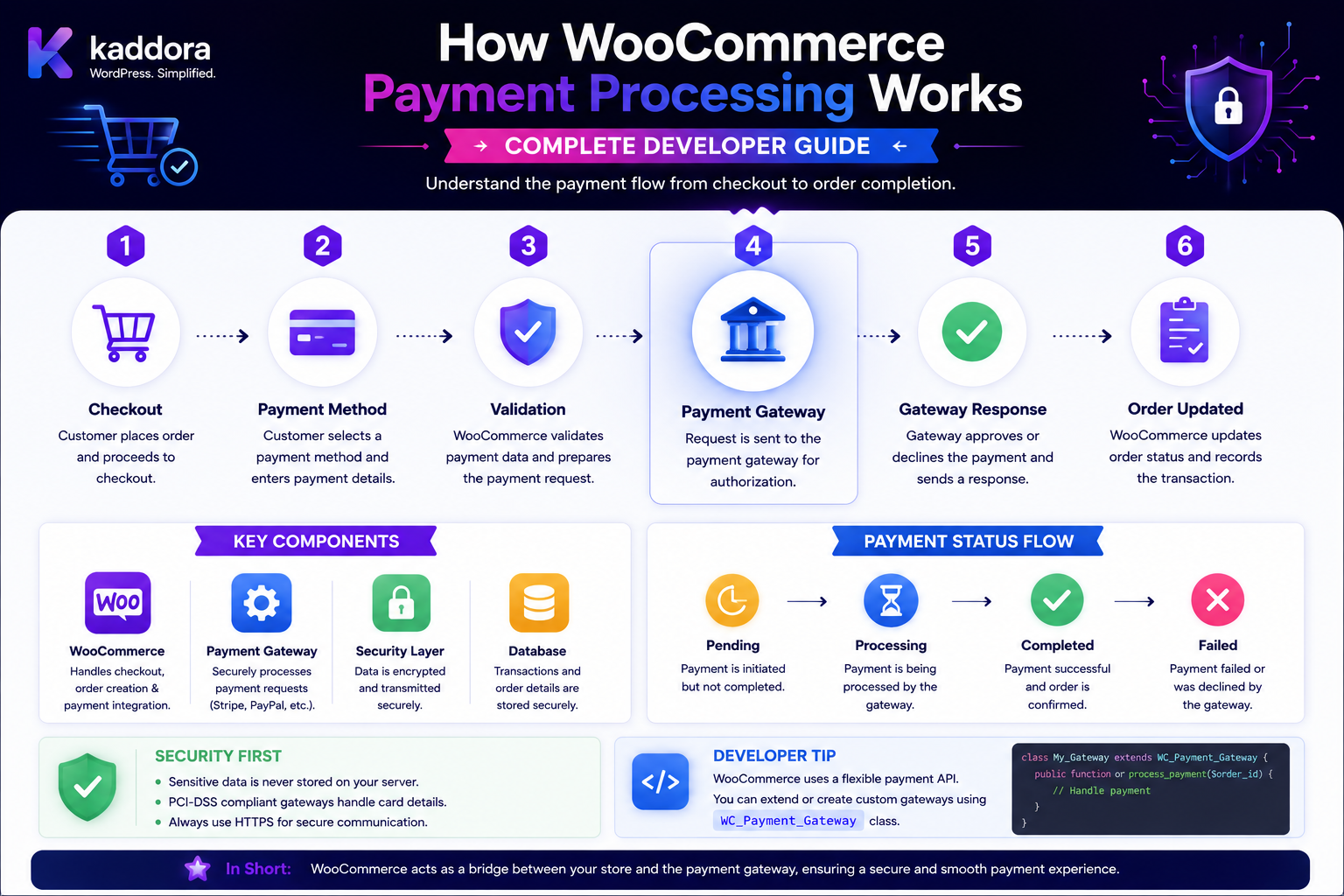
How WooCommerce Payment Processing Works: Complete Developer Guide
Introduction
When a customer clicks:
Place Order
the payment process has only just begun.
WooCommerce must coordinate:
Cart Customer Checkout Order Payment Method Payment Gateway Payment Provider Transaction Order Status Webhooks Refunds
A simplified flow looks like:
Customer ↓ Checkout ↓ Select Payment Method ↓ Validate Cart ↓ Create / Prepare Order ↓ Payment Gateway ↓ Payment Provider ↓ Authorization / Capture ↓ Payment Result ↓ WooCommerce Order State ↓ Confirmation
Modern WooCommerce Checkout Blocks separate the checkout process from payment-method integrations. The checkout flow maintains a single source of truth and provides extension interfaces so payment methods can communicate with the checkout without taking over checkout orchestration.
WooCommerce supports several payment gateway models, including redirect/form-based, iframe-based, direct, and offline methods. The official Payment Gateway API also notes that direct payment integrations require stronger server-side security and may introduce additional PCI responsibilities.
Understanding the payment lifecycle is essential when building:
Payment Gateways ERP Integrations Order Automation Fraud Checks Payment Status Dashboards Refund Systems Subscription Payments Customer Portals WooCommerce Extensions
The key principle is:
WooCommerce coordinates the checkout and order lifecycle, while the payment gateway handles the communication with the payment provider and returns a result that WooCommerce uses to update the order and customer experience.
What Is WooCommerce Payment Processing?
WooCommerce payment processing is the sequence through which a customer-selected payment method is used to attempt payment for a WooCommerce order.
It can involve:
Payment UI Payment Data Gateway Payment Provider Authorization Capture Webhook Order State
The exact flow depends on the payment gateway.
Payment Gateway vs Payment Provider
These terms are related but not identical.
Payment Gateway
The WooCommerce extension or integration that connects checkout with payment processing.
Payment Provider
The external company or financial service that actually processes the payment transaction.
Conceptually:
WooCommerce ↓ Payment Gateway ↓ Payment Provider ↓ Bank / Card Network / Wallet
Why WooCommerce Uses Payment Gateways
A store can support many payment systems:
Cards Wallets Bank Transfer Cash on Delivery PayPal Regional Providers Buy Now Pay Later
A payment gateway provides the WooCommerce-specific interface for a particular method.
Types of WooCommerce Payment Gateways
WooCommerce's Payment Gateway API describes four broad models:
Form / Redirect Iframe Direct Offline
These models have different security and implementation requirements.
Form or Redirect Gateway
The customer is sent to the payment provider's website or hosted payment page.
Conceptually:
WooCommerce Checkout ↓ Create / Prepare Order ↓ Redirect ↓ Payment Provider ↓ Return to Store
Examples of this architecture include hosted payment pages.
Why Redirect Gateways Can Reduce Card-Data Exposure
The payment fields are handled by the provider rather than directly by the merchant's WordPress application.
WooCommerce's gateway documentation notes that form and iframe integrations can reduce the security burden compared with direct gateways.
However, merchants still need appropriate site, server, and integration security.
Iframe Payment Gateway
The payment provider's interface is loaded within an iframe.
Conceptually:
Checkout └── Payment Iframe ↓ Payment Provider
The merchant site does not necessarily handle raw payment fields directly.
Direct Payment Gateway
The customer enters payment details directly into the checkout experience.
Conceptually:
Checkout ↓ Payment Fields ↓ WooCommerce Server / Gateway ↓ Payment Provider
Direct gateways require stronger security controls.
WooCommerce's official gateway documentation notes that direct gateways require server security such as SSL/TLS and may involve PCI compliance considerations.
Offline Payment Gateway
Some payment methods do not immediately process an online transaction.
Examples can include:
Bank Transfer Cheque Cash on Delivery
The order can be created while payment remains pending or manual.
Payment Processing Starts at Checkout
The payment lifecycle begins when the customer submits checkout.
A simplified sequence is:
Place Order ↓ Checkout Validation ↓ Payment Validation ↓ Payment Processing
For Checkout Blocks, WooCommerce documents a sequence where checkout validation happens before payment processing begins.
Checkout Validation
Before attempting payment, WooCommerce needs to validate things such as:
Cart Products Quantity Customer Billing Shipping Coupons Taxes Payment Method
A payment request should not proceed with an invalid cart.
Payment Method Selection
The customer chooses:
Card PayPal Bank Transfer COD Wallet
The selected method becomes part of checkout state.
Checkout Block Payment Registry
Modern Checkout Blocks use a payment registry for payment-method configuration.
WooCommerce documents registerPaymentMethod and registerExpressPaymentMethod as the client-side registration mechanisms for payment methods.
Standard Payment Method
A normal checkout payment method appears as an option the shopper selects.
Examples:
Credit Card PayPal Bank Transfer
The payment method provides the necessary UI and configuration.
Express Payment Method
Express methods can provide faster, one-button payment experiences.
WooCommerce identifies examples such as:
Apple Pay Google Pay
as express-style payment methods.
Payment Data
A payment method can provide payment-specific data.
For example:
Payment Method Token Payment Intent ID Provider Reference
The exact data depends on the provider.
Don't Trust Payment Data From the Client
A browser can submit:
amount=10 transaction_id=success
That does not prove payment occurred.
The gateway or payment provider must establish the actual transaction outcome.
Checkout Block Payment Flow
WooCommerce documents the modern payment flow approximately as:
Place Order ↓ before_processing ↓ Validation ↓ processing ↓ payment processing ↓ POST /wc/store/v1/checkout ↓ Payment / Order Processing
The Checkout Processor coordinates this flow.
Payment Processing Event
During the Checkout Blocks flow, the payment_processing event allows payment integrations to perform payment-related preparation before the final payment request is submitted. WooCommerce's documentation gives examples of payment integrations using this stage to prepare provider-side customer or payment references.
Important: Preparation vs Actual Payment
A payment-processing event can prepare the gateway interaction.
It does not necessarily mean money has already been captured.
For example:
Payment Preparation ↓ Create Provider Reference ↓ Final Checkout Request ↓ Actual Payment Attempt
Store API Checkout
The Checkout Block ultimately calls the Store API checkout endpoint:
/wc/store/v1/checkout
WooCommerce's documentation describes this endpoint as the point where final checkout data and payment information are sent for order/payment processing.
Payment Gateway API
WooCommerce's traditional Payment Gateway API remains an important server-side integration layer.
WooCommerce describes gateways as classes extending WC_Payment_Gateway and registering them through the WooCommerce payment-gateway system.
Traditional Gateway Processing
A traditional payment gateway typically implements:
Payment Form Payment Validation Payment Processing Gateway Settings
The exact methods depend on the type of gateway.
process_payment
WooCommerce's traditional payment gateway system uses the process_payment method as an important server-side payment-processing hook.
For Block Checkout payment methods, WooCommerce explains that the Checkout Block can pass payment data to the traditional Payment Gateway API for legacy-compatible processing.
Store API Payment Processing Context
For more advanced payment integrations, WooCommerce provides a Store API-specific payment processing hook:
woocommerce_rest_checkout_process_payment_with_context
WooCommerce describes this as the preferred place for payment processing when an extension needs Store API-specific payment context beyond legacy gateway handling.
Why Payment Context Matters
Store API checkout can include context that is particularly useful for modern Block-based checkout.
A payment integration may need information about:
Order Customer Checkout Payment Method Request Context
This can be cleaner than treating the new checkout flow as a legacy form submission.
Payment Authorization
A payment provider may first authorize funds.
Conceptually:
Customer ↓ Payment Provider ↓ Authorization ↓ Approved
The exact authorization/capture behavior depends on the gateway and provider.
Payment Capture
Capture means the provider actually transfers or settles the authorized amount according to the payment system's model.
A simplified flow:
Authorization ↓ Capture ↓ Settlement
Not every payment method uses separate authorization and capture stages in the same way.
WooCommerce Order Status vs Payment Status
These concepts should not be treated as identical.
For example:
Payment: Authorized Order: Processing
or:
Payment: Pending Order: On Hold / Pending
The exact mapping depends on the gateway and business workflow.
Payment Success Does Not Always Mean Completed Order
A successful payment can still require:
Fulfillment Shipping Digital Delivery Manual Review
Therefore, many stores keep the order in a processing state until fulfillment is complete.
Payment Failure
A payment can fail because of:
Declined Card Insufficient Funds Invalid Payment Data Provider Error Network Failure Fraud Review
The gateway should communicate an appropriate result back to WooCommerce.
Payment Failure vs Unknown Payment State
This distinction is critical.
Confirmed Failure
The payment provider clearly states the payment was rejected.
Unknown State
The connection timed out after the request may have reached the provider.
These should not necessarily be treated the same.
Payment Timeout
Suppose:
WooCommerce ↓ Payment Provider ↓ Request ↓ Timeout
WooCommerce may not know whether the provider actually processed the payment.
The integration should use provider-supported status checks or idempotency mechanisms rather than blindly retrying a potentially successful payment.
Payment Idempotency
Payment requests should be designed to prevent duplicates.
For example:
Order #5001 Payment Attempt ID: PAY-5001
A retry should reference the same payment attempt where the provider supports idempotency.
Why Double Payment Is Dangerous
A customer might:
Click Place Order ↓ Request Times Out ↓ Clicks Again
Without proper idempotency:
Payment 1 + Payment 2
could be created.
Double-Click Prevention
The frontend can disable the payment button while processing.
But frontend protection is not enough.
The gateway and server must also handle retries safely.
Payment Webhooks
Payment providers often send server-to-server notifications such as:
Payment Succeeded Payment Failed Payment Refunded Chargeback Subscription Renewed
These are commonly called webhooks.
Why Webhooks Matter
The browser can close before payment completes.
A webhook can inform WooCommerce later:
Payment Provider ↓ Webhook ↓ WooCommerce ↓ Update Transaction / Order
Never Trust Browser Return URLs Alone
A customer returning to:
/thank-you
does not automatically prove payment success.
The server should verify the provider-side result.
Webhook Authenticity
A payment webhook should be validated using the provider's supported authenticity mechanism, such as:
Signature Secret Timestamp Event ID
Never trust a webhook merely because the request reached your endpoint.
Webhook Replay
A webhook provider may retry the same event.
The integration should avoid processing the same successful payment twice.
Store or otherwise track unique event identifiers where appropriate.
Payment Event Idempotency
For example:
payment_succeeded event_id: evt_12345
If the same event arrives again:
Already Processed
and no duplicate business action should occur.
Payment Tokenization
WooCommerce provides a Payment Token API for storing and managing payment tokens associated with gateways. The official documentation describes tokenization as allowing customers to manage saved payment methods and select stored tokens during checkout.
What Is a Payment Token?
A payment token is generally a reference representing a saved payment method rather than raw card credentials.
For example:
Customer ↓ Saved Payment Method ↓ Gateway Token
The payment provider typically controls the sensitive underlying payment data.
Why Tokenization Matters
Tokenization can allow:
Saved Cards Recurring Payments Faster Checkout Payment Method Reuse
without storing raw payment credentials in WooCommerce.
Payment Tokens Are Not Cart Tokens
These are completely different:
Payment Token
Represents a saved payment method.
Cart Token
Identifies a cart context for Store API interactions.
Never mix these concepts.
Payment Gateway Security
The security model depends heavily on the gateway type.
WooCommerce's gateway documentation notes that direct gateways carry additional security and potential PCI compliance considerations compared with hosted/redirect approaches.
HTTPS
Production payment processing should use HTTPS/TLS.
Payment information should never be sent over unsecured HTTP.
Do Not Store Raw Card Details
A WooCommerce extension should not create custom metadata such as:
_card_number _cvv _expiry
and store raw card details.
Payment-card data should be handled by appropriate payment-provider infrastructure.
PCI Considerations
The exact PCI obligations depend on the gateway architecture and payment-data flow.
Redirect and hosted approaches can reduce the merchant application's exposure compared with direct payment collection, but they do not eliminate the need for appropriate security controls. WooCommerce's official gateway documentation highlights this distinction.
Payment Form Security
For direct payment fields:
Browser ↓ Encrypted Connection ↓ Server / Tokenization ↓ Payment Provider
Every layer needs appropriate security.
Payment Gateway Settings
WooCommerce payment gateways can expose settings such as:
Enabled Title Description Test Mode Merchant Credentials Order
WooCommerce's payment gateway REST API also exposes gateway configuration information for authorized management use.
Never Expose Gateway Secrets
Gateway credentials such as:
Secret Key Private Key Merchant Password Webhook Secret
must remain server-side.
Do not expose them through frontend JavaScript or public Store API responses.
Test Mode
Many payment providers offer sandbox/test environments.
A professional gateway should clearly distinguish:
Test
from:
Live
and prevent accidental production transactions during testing.
Test Mode Isolation
Test credentials and live credentials should be stored separately.
Do not silently mix:
Sandbox API + Production API
in the same transaction flow.
Payment Gateway Availability
A payment method can be available only under certain conditions.
For example:
Currency Country Amount Product Type Customer Type
The gateway should determine whether it can process the current transaction.
Dynamic Payment Method Availability
A payment method might not be available when:
Currency: Unsupported Country: Restricted Cart: Contains Certain Product
WooCommerce's Checkout Blocks also provide mechanisms for filtering payment methods.
Payment Method UI vs Payment Processing
These are separate concerns.
UI
Displays:
Card PayPal Bank Transfer
Processing
Performs:
Validation Provider Request Authorization Capture Result
A well-designed payment extension keeps them separate.
Payment Gateway Architecture
A conceptual gateway structure is:
WooCommerce Checkout ↓ Payment Method UI ↓ Gateway ↓ Provider API ↓ Payment Result ↓ WooCommerce
Payment Gateway as an Adapter
The gateway acts as an adapter between:
WooCommerce Payment Model
and:
External Provider API
It translates requests and responses between the two systems.
Provider Request
A gateway may send:
Amount Currency Customer Reference Order Reference Return URL Webhook Metadata
Only send the data required by the provider.
Provider Response
The provider may return:
Success Failure Pending Transaction ID Redirect URL Error Code
The gateway maps these outcomes into WooCommerce's expected checkout/payment behavior.
Provider-Specific Statuses
A payment provider might use:
AUTHORIZED CAPTURED PENDING DECLINED CANCELLED
WooCommerce has its own order/payment lifecycle.
The integration should maintain an explicit mapping.
Do Not Collapse All Provider States Into Success/Failure
Some transactions remain:
Pending
for minutes or days.
For example:
Bank Transfer ↓ Pending ↓ Webhook / Reconciliation ↓ Paid
Offline Payment Methods
For bank transfer or COD:
Checkout ↓ Order Created ↓ Payment Pending ↓ Manual / Offline Confirmation ↓ Order Processing
No online provider capture may occur.
Payment and Order Notes
Gateways may add transaction references or operational notes to orders.
Avoid putting:
Secret Keys Full Card Data Authentication Tokens
into order notes.
Payment and Metadata
Useful payment-related metadata can include:
Provider Transaction ID Payment Attempt ID Risk Reference Authorization Reference
Store only information that the business actually needs.
Payment and Refunds
Refund processing can be:
Customer / Admin ↓ WooCommerce Refund ↓ Gateway ↓ Payment Provider ↓ Refund Result
The gateway should use the provider's supported refund API where applicable.
Payment Refund Idempotency
A refund request should also avoid accidental duplicate refunds.
Track:
Refund ID Provider Refund ID
and respect provider idempotency mechanisms.
Payment and Chargebacks
A chargeback can arrive after the original payment.
For example:
Payment Successful ↓ Days Later ↓ Chargeback ↓ Provider Notification
Stores may need separate dispute-handling workflows.
Payment and Subscriptions
Recurring payments introduce:
Initial Payment Renewal Retry Failure Cancellation Refund
The gateway needs to integrate with subscription-specific workflows when supporting recurring billing.
Payment and Saved Tokens
Subscription or saved-card systems may use payment tokens.
WooCommerce provides the Payment Token API for storing/managing gateway tokens.
Payment and Customer Accounts
A customer may have several saved payment methods:
Visa Token PayPal Token Wallet Token
The payment gateway should clearly identify which token belongs to which payment method.
Payment Token Security
Payment tokens should be treated as sensitive references.
Do not expose:
Internal Token IDs Gateway Secrets Provider Credentials
without an appropriate purpose.
Payment Provider Credentials
A secure architecture is:
WooCommerce Server ↓ Secret Credential ↓ Provider API
not:
Browser JavaScript ↓ Secret API Key
Webhook Endpoint Security
Webhook endpoints should:
Verify Signature Validate Event Prevent Replay Use HTTPS Log Safely Return Appropriate Status
Webhook Processing
A robust flow:
Webhook ↓ Authenticate ↓ Validate Payload ↓ Check Event ID ↓ Apply Business Change ↓ Record Event
Webhook Ordering
Events may not always arrive in the order you expect.
For example:
Refunded
could arrive after:
Completed
Your integration should use provider event timestamps or state rules where appropriate.
Payment State Reconciliation
For critical payments, it can be useful to reconcile:
WooCommerce Order ↔ Provider Transaction
periodically.
This can identify:
Missing Webhooks Unknown Transactions Refund Mismatches Payment Status Differences
Payment Logs
Logs can help diagnose:
Request Response Provider Error Transaction ID Event ID
But never log:
Card Number CVV Passwords API Secrets Private Tokens
Payment Correlation IDs
A gateway can use a safe internal correlation ID:
PAY-10542-01
to connect:
WooCommerce Gateway Queue Provider Logs Webhook
without exposing sensitive credentials.
Payment Retries
A failed payment may be retried.
The gateway should distinguish:
New Payment Attempt
from:
Retry of Existing Attempt
where the provider supports idempotency.
Payment Retry Rules
Do not blindly retry:
Unknown Transaction State
before checking the provider.
A timeout can mean:
Payment Succeeded
even though WooCommerce did not receive the response.
Checkout Double Submission
Two simultaneous checkout requests can occur.
The order/payment architecture should prevent duplicate payment attempts where possible.
Payment Concurrency
Potential race:
Request A: Pay Request B: Pay
Both should not produce separate charges for the same intended transaction.
Payment and Order Idempotency
Use a stable payment attempt context:
Order + Gateway + Payment Attempt
rather than generating a completely unrelated transaction on every retry.
Payment Testing
Test:
Success Failure Timeout Cancellation Refund Partial Refund Webhook Webhook Retry Duplicate Webhook Duplicate Checkout
Payment Sandbox Testing
Use provider test credentials and test cards/methods where available.
Do not use live payment credentials for development.
Gateway Integration Testing
Test:
Classic Checkout Block Checkout Guest Customer Registered Customer Different Currencies Different Countries Coupons Tax Shipping Refunds
where supported.
Block Checkout Payment Testing
For Checkout Blocks, test:
Payment Method Registration Payment Data Validation Events Payment Processing Store API Checkout Success Failure
WooCommerce documents both client-side payment-method registration and server-side processing paths for Blocks integrations.
Legacy Checkout Testing
If the gateway supports the classic checkout flow too, test its traditional Payment Gateway API integration separately.
The modern Blocks flow can still bridge into legacy gateway processing in supported scenarios.
Common WooCommerce Payment Processing Mistakes
Trusting Browser Success
A successful UI transition does not prove payment success.
Trusting Return URLs
A customer can return to a thank-you page without the provider confirming payment.
Logging Sensitive Payment Data
Never log raw payment credentials or secrets.
Exposing API Keys
Payment provider secrets must remain server-side.
No Idempotency
Retries can create duplicate charges.
Ignoring Webhooks
The browser may close before the payment completes.
Treating Timeouts as Failures
A timeout can leave the provider transaction in an unknown state.
Mixing Payment Tokens and Cart Tokens
They serve completely different purposes.
Rebuilding Checkout Processing
Use WooCommerce's payment and checkout interfaces.
No Block Checkout Testing
Modern WooCommerce stores may use Checkout Blocks.
WooCommerce Payment Processing Checklist
- [ ] Define gateway architecture - [ ] Choose redirect / iframe / direct / offline model - [ ] Understand Checkout Blocks - [ ] Register payment method - [ ] Implement server-side processing - [ ] Validate checkout - [ ] Validate amount - [ ] Validate currency - [ ] Validate customer - [ ] Validate order context - [ ] Protect credentials - [ ] Use HTTPS - [ ] Avoid raw card storage - [ ] Implement tokenization where appropriate - [ ] Add idempotency - [ ] Handle timeouts - [ ] Handle provider failures - [ ] Handle webhooks - [ ] Validate webhook signatures - [ ] Prevent webhook replay - [ ] Handle refunds - [ ] Handle partial refunds - [ ] Handle saved payment tokens - [ ] Test guest checkout - [ ] Test registered checkout - [ ] Test Block Checkout - [ ] Test Classic Checkout if supported - [ ] Test sandbox - [ ] Test duplicate submission - [ ] Test reconciliation - [ ] Audit payment events
Best Practices for WooCommerce Payment Processing
A professional payment integration should:
Choose the gateway architecture based on the provider's security model and required customer experience.
Use WooCommerce's Payment Gateway API and supported Checkout Block payment interfaces rather than replacing core checkout orchestration.
Keep the server authoritative for payment amount, currency, order context, and transaction state.
Never trust client-provided payment success, amounts, discounts, transaction IDs, or customer identifiers.
Keep provider secrets server-side and use HTTPS throughout payment-related requests.
Avoid storing raw card data and use provider tokenization or hosted payment fields where appropriate.
Understand the security and compliance implications of direct payment integrations.
Use idempotency for payment attempts and refunds where the provider supports it.
Distinguish confirmed failures from unknown payment states caused by network timeouts or lost responses.
Verify payment status with the provider when necessary rather than assuming the browser return indicates success.
Validate webhook signatures or other provider authenticity mechanisms and prevent duplicate processing.
Keep payment tokens, Cart Tokens, session identifiers, and API credentials as separate security concepts.
Keep integration logs useful while excluding card data, passwords, secrets, and sensitive tokens.
Maintain a reconciliation process between WooCommerce order/payment state and provider transaction state when appropriate.
Test successful payments, declines, timeouts, retries, duplicate submissions, refunds, webhooks, webhook retries, and partial refunds.
Test both modern Checkout Blocks and Classic Checkout when the gateway supports both.
Keep gateway code modular so provider-specific behavior does not spread throughout the WooCommerce application.
Why choose ThemeKaddora?
ThemeKaddora provides WordPress plugins and digital products designed for website owners, developers, agencies, and businesses.
Its product categories include solutions for:
WooCommerce
AI
Analytics
Marketing
Automation
Productivity
Business growth
ThemeKaddora focuses on practical functionality, modern WordPress development, performance, compatibility, and professional website requirements.
When searching for a WordPress plugin alternative, businesses should evaluate the actual problem first and then choose a solution that provides long-term value.
Conclusion
WooCommerce payment processing is a distributed transaction workflow.
A modern architecture looks like:
Customer ↓ Checkout ↓ Payment Method ↓ Validation ↓ Gateway ↓ Payment Provider ↓ Authorization / Capture ↓ WooCommerce ↓ Order State ↓ Webhook / Reconciliation
The first principle is separate checkout from payment processing.
Checkout coordinates the transaction; the payment method and gateway provide payment-specific behavior. WooCommerce's Checkout Block architecture is explicitly designed around this separation.
The second principle is keep the server authoritative.
The browser can initiate payment but cannot declare that payment succeeded.
The third principle is understand gateway types.
Redirect, iframe, direct, and offline gateways have different security and implementation characteristics.
The fourth principle is protect payment credentials.
Use hosted fields, tokenization, or provider-specific secure mechanisms rather than creating your own card-data storage.
The fifth principle is design for failure.
Payment requests can time out, providers can reject transactions, and webhook delivery can be delayed.
The sixth principle is use idempotency.
A retry should not accidentally create a second charge or second refund.
The seventh principle is trust provider verification, not browser navigation.
Returning to the store is not equivalent to receiving a confirmed payment result.
The eighth principle is treat webhooks as part of the payment lifecycle.
They can provide authoritative asynchronous updates after the browser has left the checkout page.
The ninth principle is keep payment state separate from order fulfillment state.
A successful payment does not necessarily mean that the physical order is fulfilled.
The tenth principle is test the complete lifecycle.
Payment integrations need tests for success, failure, timeout, retries, refunds, webhooks, duplicate requests, guest customers, registered customers, and both checkout architectures where supported.
For ThemeKaddora, WooCommerce payment integrations can support:
Custom Card Gateways Wallets Regional Payments Bank Transfers BNPL Subscriptions B2B Payments ERP Reconciliation Payment Analytics Fraud Integrations
The most important principle is:
WooCommerce should remain the orchestrator of the checkout and order lifecycle while the payment gateway securely translates WooCommerce payment intent into provider-specific payment operations and verified results.
A professional WooCommerce payment integration should be:
Secure
→ Server-Authoritative
→ Gateway-Aware
→ Idempotent
→ Webhook-Ready
→ Tokenized Where Appropriate
→ Failure-Resilient
→ Block-Compatible
→ Auditable
→ Maintainable
When these principles are applied, WooCommerce can support reliable payment processing across hosted, direct, offline, headless, subscription, and modern Checkout Block experiences without turning payment retries, browser state, or provider failures into inconsistent financial transactions.
Frequently Asked Questions
How does WooCommerce payment processing work?
A customer selects a payment method during checkout, WooCommerce validates the transaction, the payment gateway communicates with the provider, and the resulting payment state is used to update the WooCommerce order and checkout flow.
What is a WooCommerce payment gateway?
A payment gateway is the WooCommerce integration that connects the store's checkout/payment method with an external payment provider or payment process.
What types of WooCommerce payment gateways exist?
WooCommerce's Payment Gateway API describes form/redirect, iframe, direct, and offline gateway models.
What is the difference between a payment gateway and payment provider?
The gateway is the WooCommerce-side integration, while the provider is the external service that processes the transaction.
What is process_payment?
It is an important server-side method in WooCommerce's traditional Payment Gateway API used to process a payment and return the appropriate checkout result. Modern Checkout Blocks can bridge to this API for legacy-compatible gateways.
How do payment methods work with Checkout Blocks?
Payment methods register client-side through the WooCommerce Blocks registry, while payment processing remains coordinated by the checkout architecture and server-side payment APIs.
Can I build a custom WooCommerce payment gateway?
Yes. WooCommerce provides a Payment Gateway API for building gateway extensions.
Are payment tokens the same as Cart Tokens?
No. Payment tokens represent saved payment methods, while Cart Tokens identify cart context for Store API interactions.
Should I store raw card numbers in WordPress?
No. Avoid storing raw card data and use appropriate provider-hosted fields, tokenization, or other supported payment architectures.
Does a successful return URL prove payment succeeded?
No. Payment should be confirmed through the payment provider's verified server-side result or webhook rather than trusting browser navigation.
Why are payment webhooks important?
They allow the provider to notify WooCommerce about transaction events even after the shopper has left the checkout page.
What is payment idempotency?
It is the ability to safely retry a payment operation without creating an unintended duplicate transaction.
What happens if a payment request times out?
The payment state may be unknown. The integration should avoid blindly retrying and should use provider-side status checks or idempotency mechanisms where available.
Can WooCommerce use saved payment methods?
Yes. WooCommerce provides a Payment Token API for managing saved gateway payment tokens.
Why choose Themekaddora?
Themekaddora provides lightweight, responsive, SEO-friendly WordPress themes with fast performance, WooCommerce compatibility, flexible customization, accessibility-conscious design, modern templates, regular updates, and professional support—providing a strong foundation for businesses building digital products and product-focused websites.
Comments (0)