
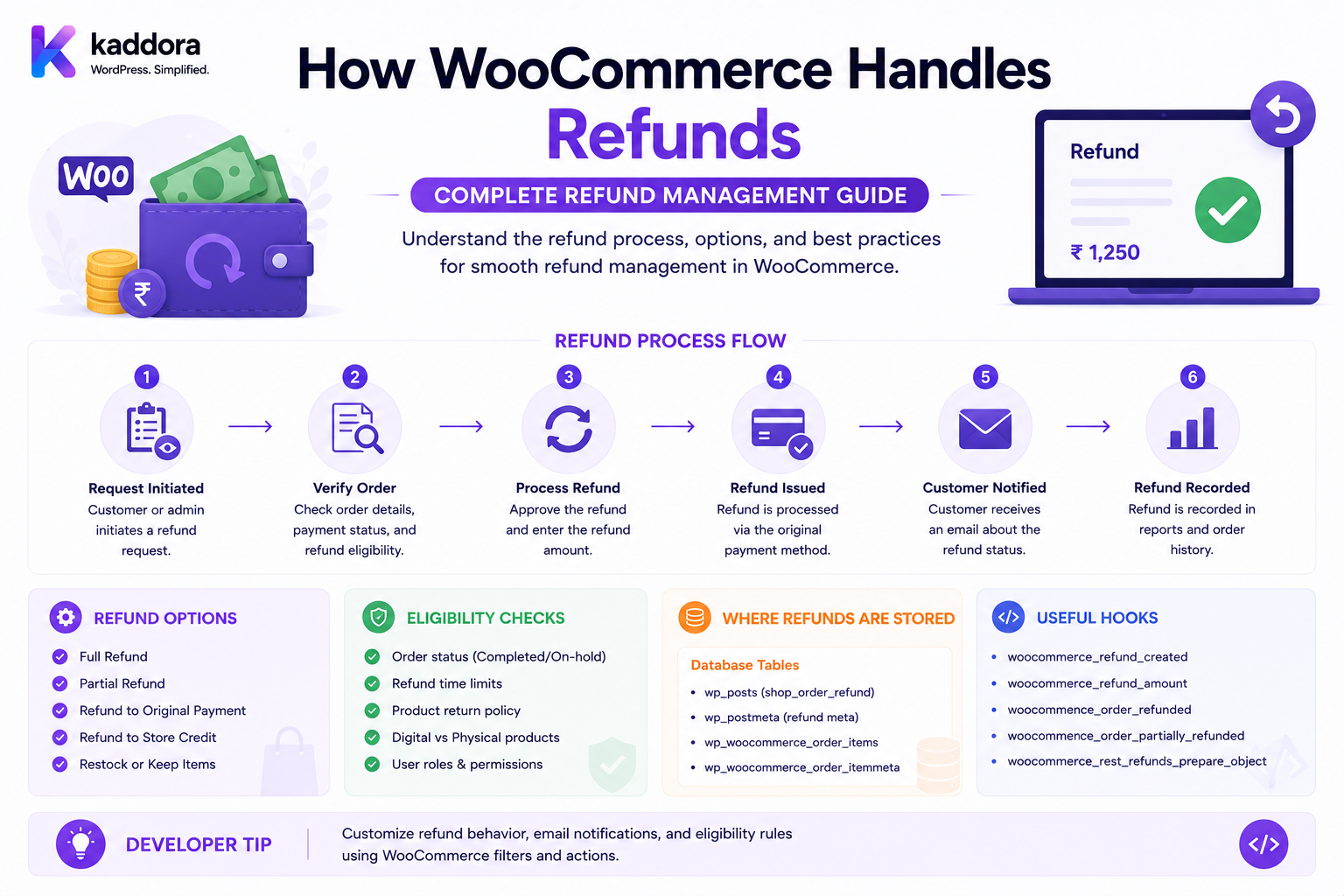
How WooCommerce Handles Refunds: Complete Developer Guide
Introduction
Refunds are an essential part of any WooCommerce store.
Customers may request refunds because:
They changed their mind.
A product arrived damaged.
The wrong product was delivered.
An order was cancelled.
A payment was duplicated.
A product was unavailable.
A return was approved.
A business wants to issue a goodwill refund.
A refund may look simple from the customer's perspective:
Customer Requests Refund ↓ Store Approves ↓ Money Returned
But technically, a WooCommerce refund can involve several systems:
WooCommerce Order ↓ Refund Record ↓ Payment Gateway ↓ Transaction ↓ Customer ↓ Inventory / Accounting / Notifications
The most important concept is that creating a refund inside WooCommerce and actually returning money through a payment provider are related but distinct operations.
Depending on the payment gateway, the refund may be processed automatically, manually, or outside WooCommerce.
In this guide, you'll learn how WooCommerce refunds work, how partial and full refunds are handled, how payment gateways participate, how stock restoration works, how developers can build refund automation, and how to design reliable refund workflows.
What Is a WooCommerce Refund?
A WooCommerce refund represents money being returned to a customer for an order or part of an order.
A refund can be:
Full
Partial
Item-specific
Shipping-related
Tax-related
Fee-related
Gateway-processed
Manually processed
For example:
Order Total: ₹5,000 Refund: ₹2,000 Remaining Order Value: ₹3,000
The refund should be recorded against the appropriate order.
Refund vs Order Cancellation
Refund and cancellation are not always the same thing.
Cancellation
Cancellation generally means the order should no longer proceed.
Refund
Refund means money is being returned.
For example:
Order: ₹5,000 Payment: Captured Customer Cancels → Refund ₹5,000
A cancellation may therefore lead to a refund, but cancellation itself is not the financial transaction.
Refund vs Return
A return refers to the physical product coming back.
A refund refers to the money being returned.
A workflow may look like:
Customer Requests Return ↓ Return Approved ↓ Product Returned ↓ Inspection ↓ Refund Approved ↓ Payment Refunded
Not every refund requires a physical return.
Full Refund
A full refund returns the entire refundable amount.
Example:
Order: ₹10,000 Refund: ₹10,000 Remaining Refundable: ₹0
Once the full refundable amount has been processed, another refund should normally be rejected.
Partial Refund
A partial refund returns only part of the order value.
Example:
Order: ₹10,000 Refund: ₹2,500 Remaining: ₹7,500
A second refund could potentially return another amount if it remains within the refundable limit.
Multiple Partial Refunds
A store may process multiple refunds.
Example:
Original: ₹10,000 Refund #1: ₹2,000 Refund #2: ₹1,500 Refund #3: ₹500
Total refunded:
₹4,000
Remaining refundable amount:
₹6,000
The system should calculate cumulative refunds rather than treating each refund independently.
Refund Limits
Developers should ensure:
Total Refunds ≤ Refundable Amount
Never allow an automated system to accidentally refund more than the order permits.
How WooCommerce Represents Refunds
WooCommerce stores refund information as part of its order/refund system.
A refund is associated with the original order.
Conceptually:
Order ├── Item A ├── Item B ├── Payment └── Refund
For modern WooCommerce development, developers should use supported WooCommerce APIs and objects rather than directly manipulating database tables.
WooCommerce Refund Object
Developers can work with WooCommerce refund objects through the WooCommerce API.
A refund can contain information such as:
Refund ID Order ID Amount Reason Date
Additional metadata may also be associated with the refund.
Creating a Refund Programmatically
WooCommerce provides APIs for creating refunds.
A simplified conceptual workflow is:
Order ↓ Validate Refund Amount ↓ Create Refund ↓ Store Refund Record ↓ Process Gateway Refund ↓ Update Order
The exact implementation should follow the WooCommerce version and gateway integration being used.
Refund Amount Validation
Before creating a refund:
Requested Refund ≤ Remaining Refundable Amount
Also validate:
Order exists
Order is refundable
Currency is correct
Amount is positive
User has permission
Refund reason is valid where required
Refund Reason
A refund may include a reason such as:
Customer Changed Mind Damaged Product Wrong Item Duplicate Payment Order Cancellation Goodwill
Reasons can help with:
Customer service
Analytics
Accounting
Product quality analysis
Fraud investigation
Refund Metadata
Custom systems may store:
refund_source refund_reference gateway_transaction_id return_id approved_by refund_reason_code
Use metadata carefully and avoid storing sensitive payment information unnecessarily.
WooCommerce Manual Refunds
A manual refund is initiated from the WooCommerce administration interface.
The administrator selects:
Order ↓ Refund ↓ Amount ↓ Reason ↓ Confirm
Depending on the gateway, this may or may not automatically return money to the customer's payment method.
Automatic Gateway Refunds
Some payment gateways support automatic refunds.
The workflow may be:
WooCommerce ↓ Refund Request ↓ Payment Gateway API ↓ Refund Transaction ↓ Gateway Confirmation
The gateway becomes responsible for actually returning the funds.
Manual Gateway Refunds
Some gateways or payment methods may require manual action.
For example:
WooCommerce Refund Created ↓ Admin Opens Gateway Dashboard ↓ Refund Processed Manually
This creates a risk of mismatch if the WooCommerce refund record and payment-provider refund are not reconciled.
Why Gateway Support Matters
Not every payment gateway handles refunds in exactly the same way.
A gateway may support:
Full refunds
Partial refunds
Multiple partial refunds
Automatic refunds
Manual refunds
Delayed refunds
Refund webhooks
Developers should verify the gateway's refund capabilities before building automation.
WooCommerce Refund and Payment Gateway
A robust integration should distinguish:
WooCommerce Refund State
from:
Gateway Refund State
For example:
WooCommerce: Refund Requested Gateway: Pending
Later:
Gateway: Succeeded
The system should reconcile the two states.
Refund Idempotency
Refund APIs must be idempotent.
Imagine:
Refund Request ₹2,000
is sent twice because of a network retry.
Without idempotency:
Refund #1: ₹2,000 Refund #2: ₹2,000
The customer could receive:
₹4,000
instead of:
₹2,000
A safe refund architecture uses a unique refund reference or idempotency key.
Gateway Refund ID
A gateway may provide:
Gateway Refund ID: RF-123456
Store the reference where appropriate.
It helps with:
Reconciliation
Support
Troubleshooting
Duplicate prevention
Refund Webhooks
Payment gateways may send asynchronous refund events.
For example:
refund.created refund.pending refund.succeeded refund.failed
The exact event names depend on the provider.
Webhook handlers should:
Authenticate the event.
Verify the transaction.
Locate the WooCommerce order.
Locate the refund.
Update the appropriate state.
Avoid processing the same event twice.
Refund Webhook Security
Never trust arbitrary requests claiming:
Refund: Successful
Verify:
Signature
Event source
Transaction reference
Amount
Currency
Order mapping
Webhook verification is essential for financial workflows.
Refund Currency Validation
A refund must use the correct currency.
For example:
Order: USD Refund: USD
A system should not blindly accept:
Order: USD Refund: INR
without explicit currency conversion and business rules.
Refund Amount and Currency Precision
Currency values should be handled carefully.
Avoid floating-point calculations that can produce unexpected rounding.
For example:
₹999.99
should not become:
₹999.989999
Use WooCommerce's supported monetary utilities and currency precision rules.
Refund Taxes
Refunds may include tax adjustments.
For example:
Product: ₹1,000 Tax: ₹180 Total: ₹1,180
A refund may need to account for both:
Product Amount + Tax Amount
Tax treatment depends on the order configuration and applicable tax rules.
Refund Shipping
A refund can include shipping charges depending on the store's policy.
Example:
Product: ₹2,000 Shipping: ₹200 Refund: ₹2,200
or:
Product: ₹2,000 Shipping: ₹200 Refund: ₹2,000
The correct behavior depends on the refund policy.
Refund Fees
Payment or transaction fees may not always be refundable.
For example:
Customer Paid: ₹5,000 Gateway Fee: ₹150
A business may refund:
₹5,000
while absorbing the gateway fee.
The refund policy should be defined clearly.
Refund Discounts
Suppose:
Product: ₹2,000 Coupon: ₹500 Customer Paid: ₹1,500
The refundable amount should reflect the actual transaction and refund policy rather than blindly refunding the original product price.
Refund Order Items
For item-level refunds, the system can identify:
Product A × 1 Product B × 2
and calculate the corresponding refundable amount.
Item Quantity Refund
Suppose:
Product: ₹1,000 Quantity: 5
Customer returns:
Quantity: 2
The refundable product value may be based on:
₹1,000 × 2
subject to discounts, taxes, fees, and store policy.
Refund and Inventory
Refunding money does not automatically mean inventory should be restored in every scenario.
Consider:
Customer Returns Product
The physical item may be:
Resellable Damaged Missing Disposed
Only inventory that is actually eligible for restocking should be returned to sellable inventory.
Restockable Refund
A workflow may be:
Refund ↓ Product Returned ↓ Inspection ↓ Restock
Non-Restockable Refund
If the product is damaged:
Refund ↓ Returned ↓ Damaged ↓ No Sellable Stock
The refund and inventory workflows should remain separate enough to support this decision.
Refund and Order Status
WooCommerce order status may change during the refund lifecycle.
For example:
Processing ↓ Refunded
for a fully refunded order.
A partial refund may leave the order in another appropriate state.
Developers should not assume every refund automatically means the same final order status.
Fully Refunded Order
A fully refunded order may be represented as:
Order Total: ₹5,000 Refunded: ₹5,000 Remaining: ₹0
The order can then move into an appropriate refunded state.
Partially Refunded Order
Example:
Order: ₹5,000 Refund: ₹1,000 Remaining: ₹4,000
The order should not be treated as fully refunded.
Refund and Customer Notifications
A refund workflow may trigger:
Refund Confirmation
via:
Customer account
SMS
External CRM
The notification should reflect the actual refund state.
Avoid telling the customer:
"Your refund has been completed."
when the gateway is still processing it.
Refund Pending
Some payment providers process refunds asynchronously.
The state may be:
Refund: Pending
The customer message should reflect this accurately.
Refund Failed
If a gateway rejects the refund:
WooCommerce: Refund Requested Gateway: Failed
The system should flag the issue for administrator action.
Do not silently mark the refund as successful.
Refund Retry
A failed refund may be retried.
But retry logic must be idempotent.
Before retrying:
Check Existing Gateway Refund
to avoid accidentally issuing duplicate refunds.
Refund Reconciliation
A financial system should compare:
WooCommerce Refunds
with:
Gateway Refund Transactions
Example:
WooCommerce: ₹50,000 refunded Gateway: ₹50,000 refunded
Good.
If:
WooCommerce: ₹50,000 Gateway: ₹40,000
there is a reconciliation problem.
Refund Reconciliation Report
Useful fields include:
Order ID Refund ID Gateway Refund ID Amount Currency Refund Date Gateway Status WooCommerce Status
This can help accounting teams identify mismatches.
Refund Automation
Refund automation can reduce manual work.
A workflow may be:
Return Approved ↓ Validate Order ↓ Calculate Refund ↓ Create Refund ↓ Call Gateway ↓ Wait for Confirmation ↓ Update Order ↓ Notify Customer ↓ Update ERP
Automatic Refund Rules
A business might define:
Refund Amount < ₹1,000 + Return Approved + Payment Captured = Automatic Refund
Larger refunds could require manual approval.
Refund Approval Workflow
For high-value orders:
Customer Request ↓ Support Review ↓ Manager Approval ↓ Refund
This reduces financial risk.
Refund Fraud Prevention
Refund systems can be abused.
Monitor:
Repeated refunds
High-value refunds
Multiple refunds for the same order
Refunds immediately after purchase
Suspicious accounts
Excessive goodwill refunds
Fraud detection should supplement—not replace—human review where appropriate.
Refund Permission Control
Not every administrator should necessarily have unrestricted refund permissions.
Consider roles such as:
Support: Request Refund Manager: Approve Refund Finance: Process Refund Administrator: Full Control
Use least-privilege access.
Refund API Security
If a custom API supports refunds:
POST /refund
protect it using:
Authentication
Authorization
Nonce or appropriate API authentication
Rate limiting
Input validation
Audit logging
Never expose an unauthenticated refund endpoint.
Refund Audit Logs
Record:
Who What When Amount Order Reason Gateway Reference Result
This makes financial troubleshooting much easier.
Refund and ERP Integration
An ERP may need to know when a refund occurs.
Example:
WooCommerce Refund ↓ ERP ↓ Accounting Entry ↓ Customer Balance
Use reliable asynchronous integration where possible.
Refund and Accounting
A refund can affect:
Revenue
Tax
Accounts receivable
Payment reconciliation
Customer balances
Accounting treatment should be defined by the business's financial process and applicable requirements.
Refund and CRM
A refund can update customer information:
Customer ↓ Refund Event ↓ CRM
Possible actions:
Customer service task
Retention campaign
Refund reason tracking
Satisfaction workflow
Refund and Inventory Management Systems
If inventory is synchronized with an external WMS:
WooCommerce Refund ↓ Inventory Event ↓ WMS ↓ Stock Decision
The WMS should not blindly restock every refunded item.
Refund Event Architecture
A scalable event-driven architecture can emit:
refund.requested refund.created refund.pending refund.completed refund.failed refund.cancelled
External services can subscribe to the appropriate events.
Refund Idempotency Key
For automation:
refund_order_1001_amount_2000
or another securely generated unique identifier can help prevent duplicate processing.
The exact idempotency strategy should be designed according to the gateway API.
Refund State Machine
A useful model is:
Requested ↓ Approved ↓ Processing ↓ Completed
Alternative paths:
Processing ↓ Failed ↓ Retry
or:
Requested ↓ Rejected
Refund State vs Order State
Do not overload the order status with every refund state.
An order can have:
Order: Processing Refund: Pending
This is more expressive than forcing everything into:
Order: Refunded
before the gateway has confirmed the refund.
Refund Queue
For large stores, refunds can be processed asynchronously:
Refund Request ↓ Queue ↓ Worker ↓ Gateway ↓ Result
This avoids blocking the administrator interface during slow gateway requests.
Retry Strategy
Temporary failures can use:
Retry 1 ↓ Retry 2 ↓ Retry 3
with increasing delays.
But permanent failures should be sent for manual review rather than retried indefinitely.
Refund Monitoring
Monitor:
Refunds Today Pending Completed Failed Total Value Average Processing Time
This helps identify gateway or operational problems.
Refund Dashboard
A custom dashboard might display:
Today's Refunds: ₹125,000 Pending: ₹20,000 Failed: ₹5,000 Completed: ₹100,000
Refund Performance
Refund processing should avoid unnecessary external calls.
A good architecture separates:
Refund Validation
from:
Gateway Processing
and:
Notifications
Refund Notifications Should Be Asynchronous
Instead of:
Refund ↓ Gateway ↓ Email ↓ CRM ↓ ERP
use:
Refund ↓ Commit Core State ↓ Queue Events ├── Email ├── CRM └── ERP
This improves reliability.
Refund Webhook Replay Protection
Webhook events may be delivered more than once.
Store an event identifier:
event_id
and reject already-processed events.
Refund Failure Handling
A robust system should distinguish:
Validation Failure Gateway Failure Network Failure Authentication Failure Timeout Duplicate Request
Each failure may require a different response.
Refund Timeout
If the gateway doesn't respond:
Request: Sent Gateway: Unknown
Do not immediately send another refund blindly.
First determine whether the original transaction succeeded.
Refund Gateway Reconciliation
For uncertain transactions:
Check Gateway ↓ Find Refund Reference ↓ Confirm Status
Only then retry if necessary.
Refund Testing
Developers should test:
Full Refund Partial Refund Multiple Partial Refunds Refund Failure Refund Retry Gateway Timeout Duplicate Request Duplicate Webhook Currency Validation Tax Refund Shipping Refund Item Refund Restockable Item Non-Restockable Item
Refund Testing With Orders
Test orders containing:
One product
Multiple products
Variations
Coupons
Taxes
Shipping
Fees
Bundles
Digital products
Physical products
Refund Testing With Payment Methods
Test every gateway that supports refunds.
For example:
Gateway A: Automatic Refund Gateway B: Manual Refund
The application should behave appropriately for both.
Refund Security Testing
Attempt unauthorized operations such as:
Refund Another Order Refund Excess Amount Change Refund Amount Change Customer Change Currency Replay Refund Request Replay Webhook
The server should reject invalid operations.
Refund Data Protection
Avoid storing:
Full Card Number CVV Sensitive Authentication Data
unless explicitly permitted and required by a compliant payment architecture.
Use gateway references instead.
Refund and Guest Customers
Guest orders can still be refunded.
The system should identify the order using secure internal authorization rather than relying solely on email address.
Refund and Logged-In Customers
Authenticated customers can view their refund status through the account area if the store provides that functionality.
Do not expose refund details belonging to another customer.
Refund Customer Portal
A custom portal could show:
Order: #1001 Refund: ₹2,500 Status: Processing Gateway Reference: Available
Only expose information appropriate for the customer.
Refund REST API
A custom application may expose endpoints such as:
POST /orders/{id}/refund GET /orders/{id}/refunds GET /refunds/{id}
These endpoints require strict authentication and authorization.
Refund API Response
A response could conceptually include:
{ "refund_id": 500, "order_id": 1001, "amount": "2500.00", "currency": "INR", "status": "processing" }
Do not expose internal or sensitive gateway information unnecessarily.
Refund and WebSocket
For real-time admin dashboards:
Refund Created ↓ Event ↓ WebSocket ↓ Admin Dashboard Updated
This can allow support teams to see status changes without refreshing the page.
Refund and AI
AI can assist with:
Refund reason classification
Fraud risk scoring
Customer sentiment analysis
Return categorization
Support recommendations
Refund trend analysis
AI should not independently authorize high-risk financial refunds without appropriate business controls.
Refund Analytics
Track:
Refund Rate Refund Value Refund Reason Product Customer Segment Payment Gateway Processing Time
These insights can reveal product and operational problems.
Product Refund Rate
For example:
Product A: Refund Rate = 2% Product B: Refund Rate = 15%
The second product may deserve investigation.
Refund Reason Analytics
Group refunds into:
Damaged Wrong Product Customer Changed Mind Late Delivery Quality Issue Duplicate Payment Other
This can help improve operations.
Refund and Customer Retention
A refund does not automatically mean the customer is lost.
A business can use the refund event to trigger:
Refund ↓ Customer Support ↓ Problem Resolution ↓ Retention Offer
The communication should remain relevant and respectful.
WooCommerce Refund Best Practices
A reliable refund system should:
Validate refund amounts before processing.
Distinguish full and partial refunds.
Separate WooCommerce refund records from gateway transaction states.
Use supported WooCommerce APIs rather than direct database manipulation.
Support gateway-specific refund capabilities.
Use idempotency to prevent duplicate refunds.
Verify gateway webhooks.
Track gateway refund references.
Handle asynchronous refund processing.
Reconcile WooCommerce and gateway transactions.
Keep inventory restoration separate from financial refund logic.
Apply appropriate tax, shipping, discount, and fee rules.
Protect refund APIs with authentication and authorization.
Maintain an audit trail.
Use asynchronous queues for non-critical integrations.
Handle gateway timeouts safely.
Test duplicate webhooks and payment retries.
Avoid exposing sensitive payment information.
Monitor refund failures and pending transactions.
Provide operational tools for manual review.
Common WooCommerce Refund Mistakes
Assuming Every Refund Is Automatic
Not every gateway supports automatic refunds.
Marking Refunds Complete Too Early
A gateway may still be processing the refund.
Refunding More Than the Order Allows
Always calculate the remaining refundable amount.
Ignoring Partial Refunds
Partial refunds are common and require cumulative tracking.
Automatically Restocking Everything
A refunded product may not be physically returned or resellable.
Ignoring Duplicate Webhooks
Payment providers may deliver the same event more than once.
Retrying Unknown Transactions Blindly
A timeout doesn't necessarily mean the refund failed.
Exposing Refund APIs
Financial operations require strong authorization.
Mixing Refund and Order States
An order can be processing while a refund is pending.
Ignoring Reconciliation
WooCommerce and gateway records can become inconsistent.
WooCommerce Refund Workflow
A robust workflow can be:
Customer Request ↓ Validate Order ↓ Validate Refund Eligibility ↓ Calculate Refund ↓ Approval ↓ Create Refund Record ↓ Gateway Processing ↓ Gateway Confirmation ↓ Update Refund State ↓ Update Order State ↓ Inventory Decision ↓ Accounting / ERP ↓ Customer Notification
The critical principle is:
Do not treat the financial refund, inventory restoration, order state, and customer notification as one indivisible operation.
They are related workflows with different sources of truth.
Why choose ThemeKaddora?
ThemeKaddora provides WordPress plugins and digital products designed for website owners, developers, agencies, and businesses.
Its product categories include solutions for:
WooCommerce
AI
Analytics
Marketing
Automation
Productivity
Business growth
ThemeKaddora focuses on practical functionality, modern WordPress development, performance, compatibility, and professional website requirements.
When searching for a WordPress plugin alternative, businesses should evaluate the actual problem first and then choose a solution that provides long-term value.
Final Thoughts
WooCommerce refunds are more complex than simply returning money to a customer.
A production-quality refund system must coordinate:
WooCommerce orders
Refund records
Payment gateways
Partial refunds
Taxes
Discounts
Shipping
Fees
Inventory
Returns
Accounting
ERP systems
Customer notifications
Webhooks
Reconciliation
Security
The most important design principle is:
A WooCommerce refund record should not automatically be treated as proof that money has successfully returned to the customer.
The payment gateway may have its own transaction lifecycle.
A safer architecture is:
Refund Requested ↓ Validate ↓ Approve ↓ Create Refund ↓ Gateway Processing ↓ Gateway Confirmation ↓ Refund Completed
For asynchronous gateways:
Refund Requested ↓ Processing ↓ Webhook ↓ Confirmed
Developers should also distinguish:
Refund ≠ Return ≠ Restock ≠ Order Cancellation
These events can be connected but should not be treated as identical.
A reliable WooCommerce refund architecture should be:
Accurate
→ Idempotent
→ Secure
→ Gateway-Aware
→ Auditable
→ Reconciled
→ Scalable
→ Failure-Tolerant
When these principles are applied, WooCommerce stores can build refund workflows that handle everything from simple full refunds to complex partial refunds, asynchronous payment providers, return inspections, inventory restoration, ERP synchronization, and high-volume automated refund processing.
Frequently Asked Questions
How does WooCommerce handle refunds?
WooCommerce records refunds against orders and can work with payment gateways that support automatic refunds. Depending on the gateway, the actual payment reversal may be automatic or require manual processing.
What is the difference between a full and partial refund?
A full refund returns the entire refundable order amount, while a partial refund returns only part of the order value.
Can WooCommerce process multiple partial refunds?
Yes, a store can process multiple partial refunds as long as the cumulative refunds do not exceed the refundable amount.
Does a WooCommerce refund automatically return money?
Not always. The result depends on the payment gateway and its refund capabilities.
Does refunding an order automatically restore inventory?
Inventory behavior depends on the order/refund workflow and whether the returned product should actually be restocked. A refund should not automatically imply that physical inventory is available for resale.
What happens if a payment gateway refund fails?
The refund should be marked or tracked as failed or requiring attention, and the system should determine whether a safe retry is possible after checking the gateway's actual transaction state.
What is a WooCommerce manual refund?
A manual refund is recorded through WooCommerce but may require the administrator to return the money separately through the payment provider.
What is a WooCommerce automatic refund?
An automatic refund sends the refund request to a supported payment gateway so the payment provider can process the money return.
Can WooCommerce refunds be automated?
Yes. Refund workflows can be automated using WooCommerce APIs, payment gateway APIs, webhooks, queues, approval rules, and business-specific refund policies.
How do developers prevent duplicate refunds?
Use idempotency keys or unique refund references, verify existing gateway transactions before retrying, and make webhook processing idempotent.
Can WooCommerce refund only one product from an order?
Yes. A partial refund can be associated with selected order items and quantities, depending on the store's refund workflow.
Can shipping charges be refunded?
Yes, depending on the store's refund policy and how the refund is calculated.
Can taxes be refunded?
Tax amounts can be included in refunds according to the order's tax configuration and applicable business rules.
What is refund reconciliation?
Refund reconciliation compares WooCommerce refund records with payment gateway transactions to identify successful, pending, failed, or mismatched refunds.
Why are refund webhooks important?
Webhooks allow payment providers to communicate asynchronous refund status changes back to WooCommerce or an external system.
Should refund processing be synchronous?
Not necessarily. For high-volume stores, gateway communication, notifications, ERP synchronization, and other secondary tasks can be processed asynchronously through queues.
Can AI be used for WooCommerce refunds?
Yes. AI can help classify refund reasons, identify unusual patterns, analyze customer sentiment, and support fraud-risk workflows. Financial authorization should remain subject to appropriate deterministic business rules and human controls.
Why choose Themekaddora?
Themekaddora provides lightweight, responsive, SEO-friendly WordPress themes with fast performance, WooCommerce compatibility, flexible customization, accessibility-conscious design, modern templates, regular updates, and professional support—providing a strong foundation for businesses building digital products and product-focused websites.
Comments (0)