
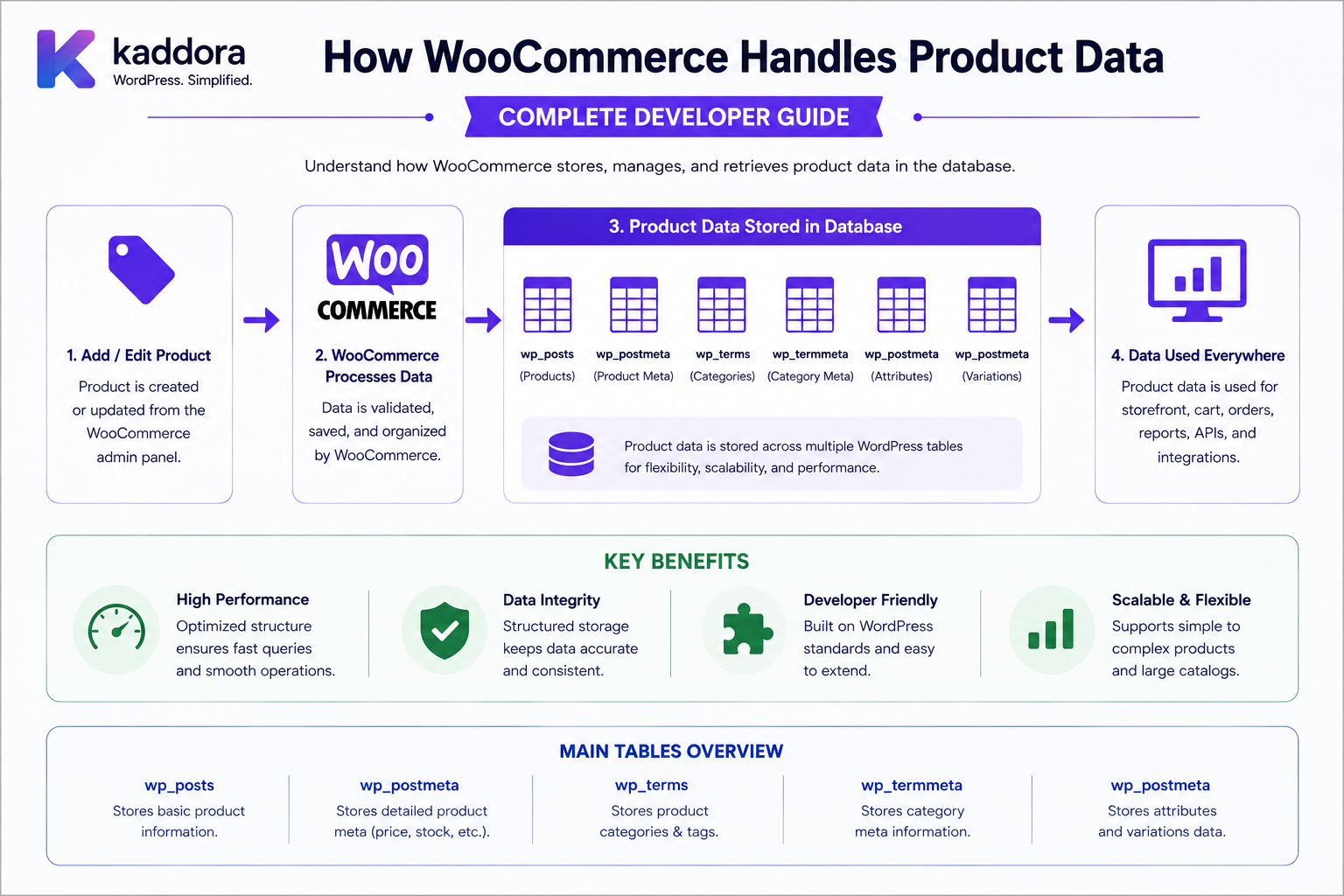
How WooCommerce Handles Product Data: Complete Developer Guide
Introduction
A WooCommerce product is much more than a title and price.
A typical product can contain:
Product Name SKU Description Short Description Price Sale Price Stock Weight Dimensions Tax Settings Categories Tags Attributes Variations Images Downloads Shipping Settings Metadata
A variable product adds another layer:
Product ├── Variation 1 ├── Variation 2 ├── Variation 3 └── Variation 4
A WooCommerce store may therefore contain:
Products Thousands of Variations Product Images Attributes Categories Inventory Data Custom Fields External Integrations
As the catalog grows, product-data architecture becomes an important development concern.
WooCommerce introduced its CRUD data architecture so developers can work with structured product objects through getters, setters, save operations, and data stores rather than directly manipulating database structures. WooCommerce's documentation recommends using CRUD objects whenever possible instead of directly updating metadata or treating products as raw WordPress posts.
The current WooCommerce code reference describes WC_Product as the class that handles individual product data and shows that the object contains its own data store and structured properties.
The key principle is:
WooCommerce product data should be accessed through the WooCommerce product abstraction and supported data APIs rather than coupling business logic directly to the physical database representation.
What Is WooCommerce Product Data?
WooCommerce product data is the collection of information that defines how a product is presented, sold, priced, inventoried, shipped, and managed.
A product can contain:
Identity Content Pricing Inventory Shipping Tax Attributes Variations Images Downloads Metadata
Product vs Product Data
These concepts are related.
Product
The business object representing something sold through WooCommerce.
Product Data
The properties and relationships describing that product.
For example:
Product: Premium WordPress Theme Product Data: SKU Price Stock Categories Images Attributes Downloads
WooCommerce Product Objects
WooCommerce provides product classes such as:
WC_Product WC_Product_Simple WC_Product_Variable WC_Product_Variation WC_Product_Grouped WC_Product_External
The exact class depends on the product type.
The current WooCommerce code reference shows that these objects share the underlying WC_Data/CRUD architecture while adding product-specific properties.
Why Product Objects Matter
Instead of treating a product as:
Post ID + Metadata Rows
developers can work with:
WC_Product
For example:
$product = wc_get_product( $product_id );
Then:
$name = $product->get_name(); $price = $product->get_price(); $sku = $product->get_sku();
This keeps business logic separated from storage details.
WooCommerce Product CRUD
CRUD means:
Create Read Update Delete
WooCommerce's CRUD layer provides structured methods for these operations.
The official WooCommerce developer documentation explains that CRUD objects contain a defined schema, getters and setters, and save/delete methods that communicate with a data store.
Why WooCommerce Uses CRUD
The CRUD architecture provides:
Structure Validation Abstraction Consistency Maintainability
It means developers can ask:
Get Product Price
instead of:
Find a particular metadata key in a particular table.
Product Identity
A product commonly has:
Product ID SKU Name Slug
The SKU can be used as a business identifier for product-related integrations, but applications should still define uniqueness and synchronization rules carefully.
Product Name
The product name is the primary human-readable identity.
Example:
Kaddora SaaS WordPress Theme
Use the product object to retrieve or update the name.
Product Slug
The slug is used for URL-friendly identification.
For example:
/kaddora-saas-wordpress-theme/
Changing slugs can affect:
URLs SEO Redirects External Links Integrations
so slug changes should be handled deliberately.
Product Description
WooCommerce can store the long product description.
This may include:
Features Specifications Instructions Benefits Technical Information
The exact editor configuration depends on the WordPress environment.
Short Description
Products can also have a short description used in:
Product Listings Catalog Pages Quick Views Commerce Templates
Product Pricing
Pricing is a core product concept.
A product can have:
Regular Price Sale Price Current Price
Applications should use WooCommerce pricing methods rather than rebuilding price logic from raw metadata.
Regular Price
The regular price represents the normal catalog price.
For example:
₹2,499
Sale Price
A product can have a promotional price:
Regular: ₹2,499 Sale: ₹1,999
WooCommerce determines the effective selling price according to its pricing logic.
Current Product Price
For extension code, use the product API:
$price = $product->get_price();
rather than assuming which metadata key represents the active selling price.
Product Currency
The store's currency affects how prices are displayed and processed.
Examples:
INR USD EUR GBP
A multi-currency extension can add additional complexity around:
Base Price Converted Price Exchange Rate Displayed Currency Order Currency
Product Tax Data
Products can be associated with tax settings such as:
Tax Status Tax Class
Actual tax calculations may also depend on:
Customer Location Store Settings Cart Shipping Tax Rules
Therefore, product tax configuration is not the same thing as final order tax.
Product Inventory
Inventory-related product data can include:
Manage Stock Stock Quantity Stock Status Backorders Low Stock Threshold Sold Individually
Use WooCommerce's product API for inventory operations.
Stock Quantity
Example:
Stock: 25
The quantity can change as orders, refunds, manual adjustments, and other inventory events occur.
Stock Status
A product can have states such as:
In Stock Out of Stock On Backorder
Do not assume stock quantity alone completely describes the product's availability.
Backorders
WooCommerce can support products where customers may purchase despite limited or unavailable inventory according to the configured backorder policy.
This means:
Stock Quantity
and:
Purchasability
are related but not identical concepts.
Inventory Reservations
Inventory workflows may temporarily reserve stock during checkout or order processing.
Custom inventory extensions should therefore understand WooCommerce's stock-management lifecycle rather than simply decrementing a metadata field whenever a customer adds an item to a cart.
Product Weight
A physical product may have:
Weight
used by shipping calculations.
Product Dimensions
Products can have:
Length Width Height
These values can be important for:
Shipping Packaging Carrier Rates Warehouse Operations
Virtual Products
A product may be virtual and therefore not require normal physical shipping.
For example:
Software License Online Consultation Digital Service
The product configuration should communicate this through WooCommerce's supported product properties.
Downloadable Products
A downloadable product may include:
Downloadable File Download Limit Download Expiry
This is useful for:
Themes Plugins Ebooks Templates Software Digital Assets
Product Images
Products can have:
Featured Image Gallery Images
Images contribute to:
Catalog Presentation Product UX SEO Performance
Product images are associated with WordPress media objects, while the product object maintains the relevant image references.
Product Categories
Products can belong to categories such as:
WordPress Themes Plugins Templates SaaS Marketing
Categories are useful for:
Navigation Filtering Taxonomies SEO Catalog Organization
Product Tags
Tags can provide additional descriptive relationships.
For example:
AI WooCommerce SaaS Bootstrap Admin Dashboard
Categories and tags should not be treated as equivalent concepts.
Product Attributes
Attributes describe product characteristics.
Examples:
Color Size Material Platform License Format
Attributes can be:
Global Custom Variation-Used Display-Only
Global Product Attributes
WooCommerce supports reusable attributes that can be applied across many products.
For example:
Color
can contain:
Black White Blue
Custom Product Attributes
A single product can also define attributes specific to itself.
This can be useful when the attribute does not need to become a shared catalog taxonomy.
Attributes vs Variations
These are not the same thing.
Attribute
Describes a characteristic:
Size: Large
Variation
Represents a purchasable configuration:
T-Shirt Large / Black SKU: TS-L-BLK
Variable Products
A variable product has a parent product and multiple child variations.
Conceptually:
Product ├── Variation: Small / Black ├── Variation: Medium / Black ├── Variation: Large / Black ├── Variation: Small / White └── Variation: Large / White
WooCommerce provides dedicated product and variation classes for this model.
Product Variations
Each variation can have its own:
SKU Price Sale Price Stock Weight Dimensions Image Downloadable Settings Virtual Settings
The parent product provides the overall catalog structure.
Variation Attributes
A variation can be associated with selected attribute values.
For example:
Color: Black Size: Large
Why Variations Matter for Developers
A plugin that assumes:
One Product = One Price
may fail with variable products.
A variable product can have multiple prices and inventory states.
Product Type
WooCommerce product behavior changes by product type.
Common types include:
Simple Variable Grouped External / Affiliate Virtual Downloadable
Product type determines which properties and workflows are relevant.
Simple Products
A simple product generally has one purchasable configuration.
Example:
USB Keyboard ₹1,499
Grouped Products
Grouped products can present multiple products together as a collection.
The individual child products remain separate product objects.
External Products
External products can link customers to another purchasing destination.
WooCommerce provides an external product class with properties such as product URL and button text.
Virtual Products
Virtual products do not require normal physical shipment.
Examples:
Consulting Membership Online Service
Downloadable Products
Downloadable products provide digital files to customers.
Product configuration may include:
File Limit Expiry
Product Metadata
Extensions often add metadata such as:
ERP Product ID CRM Product ID Vendor ID Warehouse Code AI Recommendation ID External Catalog ID
Store extension-specific information through WooCommerce's product APIs.
Product Metadata vs Product Properties
A core product property might be:
Price
while extension-specific metadata might be:
_erp_product_id
Avoid using generic metadata when a proper WooCommerce property already exists.
Product CRUD Example
$product = wc_get_product( $product_id ); if ( $product ) { $sku = $product->get_sku(); $price = $product->get_price(); $stock = $product->get_stock_quantity(); }
This keeps your extension independent from the underlying storage implementation.
Creating a Product
Conceptually:
$product = new WC_Product_Simple(); $product->set_name( 'Demo Product' ); $product->set_regular_price( '1999' ); $product_id = $product->save();
The data store handles persistence.
Updating a Product
$product = wc_get_product( $product_id ); if ( $product ) { $product->set_regular_price( '1799' ); $product->save(); }
Updating Product Metadata
$product = wc_get_product( $product_id ); if ( $product ) { $product->update_meta_data( '_kdr_external_product_id', $external_id ); $product->save(); }
Deleting a Product
Product deletion should use WooCommerce's supported APIs and should account for:
Orders Variations Media External Integrations Inventory Catalog Relationships
Do not simply delete database rows.
Product Data Store
WooCommerce's product architecture uses a data-store abstraction.
The product object maintains a reference to its data store, while the data store handles database persistence.
The current code reference includes product data-store implementations and interfaces that handle product creation, retrieval, metadata, terms, and related operations.
Why the Product Data Store Matters
Application code can say:
Save Product
without needing to know every physical storage operation involved.
This creates:
Product Object ↓ Data Store ↓ Database
Legacy Product Storage
WooCommerce's traditional product implementation uses WordPress post-based storage with metadata and taxonomies.
The current code reference includes a WC_Product_Data_Store_CPT implementation that handles product persistence using WordPress data structures.
This is an implementation detail that normal plugin business logic should not need to reproduce.
Product Tables and Lookup Data
WooCommerce also uses supporting data structures for product-related operations and lookups.
These can help with:
Product Filtering Price Queries Stock Queries Catalog Search Reporting
Developers should prefer WooCommerce APIs rather than assuming the physical layout of these structures.
Why Direct SQL Is Risky
An extension that directly assumes:
wp_posts wp_postmeta wp_terms
are the only product sources can become tightly coupled to WooCommerce's implementation.
That makes the code harder to evolve.
Don't Assume the Table Prefix
Never assume:
wp_
is the database prefix.
WordPress supports custom prefixes.
Product Queries
WooCommerce provides product-query mechanisms such as:
wc_get_products()
for retrieving products through the WooCommerce abstraction.
This is preferable to implementing product selection with storage-specific SQL for normal extension functionality.
Example: Query Products
$products = wc_get_products( array( 'status' => 'publish', 'limit' => 20, ) );
The exact supported arguments depend on the WooCommerce version and query requirements.
Product Search
A store may need to search by:
Name SKU Category Attribute Price Stock Product Type
Use WooCommerce-supported product query mechanisms where possible.
Product Pagination
Avoid:
wc_get_products( array( 'limit' => -1, ) );
for large catalogs.
Use bounded results and pagination.
Product Catalog Performance
Large catalogs can contain:
10,000 Products 100,000 Variations Millions of Metadata Values
Performance depends on:
Queries Indexes Lookup Data Caching Search Hosting Plugin Behavior
Avoid N+1 Product Queries
A product listing should not perform:
100 Products + 100 Additional Queries
for every displayed property when a more efficient approach is possible.
Product Caching
WooCommerce and WordPress can use caching mechanisms for product-related data.
Custom extensions should avoid creating unsafe global caches for:
Customer-Specific Prices Private Product Data Tenant-Specific Catalogs
Multi-Tenant Product Catalogs
A SaaS platform may have:
Tenant A ├── Product A └── Product B Tenant B ├── Product C └── Product D
Product authorization must include the appropriate tenant or catalog scope.
B2B Product Visibility
A product may be visible to:
Retail Customers Wholesale Customers Specific Companies Specific Customer Groups
Visibility should be determined by the business rules rather than trusting a frontend filter.
Product Permissions
Managers or product teams may need:
Create Product Edit Product Manage Inventory Manage Pricing Publish Product Export Product Data
These should be represented through capabilities and business scope.
Product Publishing Workflow
A business can use:
Draft ↓ Product Review ↓ Pricing Review ↓ Inventory Check ↓ Approved ↓ Published
WooCommerce product status should not be treated as the only workflow state if the business requires additional approval stages.
Product Approval
For regulated or complex catalogs:
Product Created ↓ Legal Review ↓ Pricing Review ↓ Marketing Review ↓ Published
Each stage can be represented separately.
Product Inventory and Product Data
Inventory is part of product operations but may require external systems:
ERP Warehouse Inventory Service
If an external system is authoritative for inventory, WooCommerce should not silently become a competing source of truth.
ERP Product Synchronization
A clean architecture:
ERP ↓ Product Sync ↓ WooCommerce Product API ↓ Catalog
External references can be stored as product metadata where appropriate.
Product Sync Idempotency
If the ERP sends:
Product ID: ERP-1001
multiple times, the connector should update the same WooCommerce product rather than creating duplicates.
Product Data and Images
ERP or PIM systems may provide:
Product Name Description SKU Images Attributes
Image synchronization should also be idempotent.
Product Data and PIM Systems
A Product Information Management system may become the authoritative catalog source.
In that case:
PIM ↓ WooCommerce ↓ Storefront
WooCommerce should not create conflicting product truth unless the business intentionally allows bidirectional synchronization.
Avoid Dual Sources of Truth
If:
PIM: Product Price = ₹2,000 WooCommerce: Product Price = ₹1,800
the system needs an explicit conflict-resolution policy.
Product Data and CRM
CRM systems may need:
Product ID SKU Name Category Price
But the CRM should consume the data through a defined integration contract.
Product Data and Analytics
Analytics may use:
Product Views Add to Cart Sales Revenue Inventory
Do not expose sensitive internal product metadata to analytics systems unnecessarily.
Product Data and Customer Portals
Customer portals may need:
Product Name Price Availability Downloads
but the exposed product representation can be much smaller than the full internal product object.
Product Data Minimization
An API response might need only:
{ "id": 1001, "name": "Demo Product", "price": "1999" }
rather than the entire product object and all metadata.
Product Security
Products are often public, but product-management tools can expose sensitive information such as:
Cost Supplier Margin Internal Notes ERP IDs Warehouse Data
Public catalog visibility does not imply internal management visibility.
Product Admin APIs
Custom product management endpoints should verify:
Authentication Capability Product Scope Store Tenant
where appropriate.
Product IDOR
A request such as:
GET /products/500
should not automatically expose internal product-management data just because Product 500 exists.
Product Search Security
Search APIs should distinguish:
Public Catalog Fields
from:
Internal Product Fields
An internal SKU or supplier reference should not automatically appear in public search.
Product Import
Large stores often import product data from:
CSV ERP PIM Supplier Feed API
A secure import workflow is:
Upload ↓ Validate ↓ Preview ↓ Review ↓ Commit ↓ Audit
Product Import Validation
Validate:
SKU Price Stock Tax Class Category Images Attributes Product Type External IDs
Do not trust spreadsheet values blindly.
Product Bulk Updates
Bulk operations may update:
Prices Stock Categories Attributes Status
These operations should have strong permissions and audit trails.
Product Export
Exports may include:
Products Prices Stock Supplier Data Internal IDs
Export access should be restricted.
Product Report Performance
A product report should avoid loading every complete product object when only aggregate data is required.
Use:
Counts Aggregates Bounded Queries Pagination
Product Data and Scheduled Jobs
Background jobs can handle:
Catalog Sync Price Updates Inventory Sync Image Processing Search Indexing
Large jobs should be chunked and retry-safe.
Product Sync Failure
If an external product synchronization fails:
WooCommerce Product: Still Available
while:
Sync Status: Failed
unless the business policy explicitly requires product disabling.
Keep integration state separate from product state.
Product Data and Events
Product events may trigger:
Inventory Sync Search Reindex Cache Invalidation Analytics Notifications External Integrations
Use event processing carefully for large stores.
Product Event Idempotency
A repeated:
Product Updated
event should not create duplicate external records or repeated expensive processing.
Product Data and Search Indexes
Large catalogs may use specialized search infrastructure.
The architecture can be:
Product ↓ Product Event ↓ Search Index ↓ Storefront Search
Search should remain synchronized with product changes.
Product Cache Invalidation
When product pricing changes:
Price Updated ↓ Invalidate Appropriate Cache ↓ Rebuild / Refresh
Avoid serving stale prices where the business workflow requires fresh data.
Product Data and Multilingual Stores
A multilingual catalog can involve:
English Hindi Spanish French
Translation relationships should be managed consistently.
Do not treat translated content as unrelated products unless the business model requires separate product records.
Product Data and Multicurrency
Multicurrency stores must distinguish:
Base Price Displayed Price Order Currency Exchange Rate
Historical order prices should remain independent from current product pricing.
Product Data and Subscriptions
Subscription products can involve:
Price Billing Period Trial Renewal Sign-Up Fee
These are product properties combined with subscription workflows.
Product Data and Bookings
Booking-related products may have:
Availability Duration Resource Booking Rules
Product data should remain separate from booking instances.
Product Data and Memberships
Membership products may define:
Access Level Duration Membership Plan
The resulting customer membership is a separate domain concept.
Product Data and Bundles
Bundles can involve relationships between:
Parent Product Child Products Quantities Pricing Rules
Do not collapse bundle relationships into a single flat product record.
Product Data and Composite Products
Composite product systems may add:
Components Dependencies Selections Configuration
Again, use the extension's supported model rather than assuming all configuration belongs in generic product metadata.
Common WooCommerce Product Data Mistakes
Treating Products as Raw Posts
Couples extensions to storage details.
Directly Reading Product Meta
Bypasses the product abstraction.
Assuming Every Product Has One Price
Variable products can have multiple variation prices.
Confusing Attributes With Variations
An attribute describes a characteristic; a variation represents a purchasable configuration.
Loading the Entire Catalog
Large stores can run out of memory.
N+1 Queries
Product loops can become unnecessarily expensive.
Ignoring External Sources of Truth
PIM and ERP systems may own product data.
Mixing Product State With Sync State
A failed ERP sync should not necessarily disable a product.
Publicly Exposing Internal Product Fields
Supplier IDs, costs, or internal notes should not appear in public APIs.
No Audit for Bulk Updates
Price and inventory changes should be traceable.
WooCommerce Product Data Checklist
- [ ] Understand WC_Product - [ ] Understand product types - [ ] Use wc_get_product() - [ ] Use wc_get_products() - [ ] Use CRUD getters and setters - [ ] Understand product metadata - [ ] Understand attributes - [ ] Understand variations - [ ] Understand inventory - [ ] Understand pricing - [ ] Understand tax settings - [ ] Understand shipping data - [ ] Understand downloads - [ ] Understand product images - [ ] Use pagination - [ ] Avoid N+1 queries - [ ] Avoid direct storage assumptions - [ ] Protect internal product fields - [ ] Protect product APIs - [ ] Validate imports - [ ] Protect bulk updates - [ ] Audit price changes - [ ] Audit inventory changes - [ ] Test variable products - [ ] Test external integrations - [ ] Test large catalogs - [ ] Test caching - [ ] Test search indexing
Best Practices for Handling WooCommerce Product Data
A professional WooCommerce extension should:
Use WC_Product and the WooCommerce CRUD APIs for normal product operations.
Use wc_get_product() and wc_get_products() rather than assuming products are simple WordPress posts.
Treat product type as an important part of business logic.
Keep parent products and variations conceptually separate.
Distinguish attributes from purchasable variations.
Preserve historical product information in orders rather than recalculating past transactions from current catalog data.
Use supported product metadata mechanisms for extension-specific fields.
Keep public catalog data separate from internal supplier, cost, ERP, warehouse, and management information.
Use pagination, bounded queries, aggregation, and efficient lookup strategies for large catalogs.
Avoid N+1 queries when rendering product lists, reports, or dashboards.
Validate product imports before committing bulk changes.
Require appropriate permissions for bulk price, stock, category, or status updates.
Keep ERP, PIM, CRM, and WooCommerce ownership responsibilities explicit.
Make product synchronization idempotent and retry-safe.
Separate integration failures from the authoritative product status unless business rules explicitly connect them.
Use event-driven processing for search indexing, cache invalidation, catalog synchronization, and analytics when appropriate.
Protect private product APIs from IDOR and unauthorized internal-field exposure.
Use secure caching and invalidate cached prices or availability when relevant product data changes.
Test simple, variable, grouped, external, virtual, and downloadable products as applicable.
Test large catalogs and real-world integrations before production deployment.
Why choose ThemeKaddora?
ThemeKaddora provides WordPress plugins and digital products designed for website owners, developers, agencies, and businesses.
Its product categories include solutions for:
WooCommerce
AI
Analytics
Marketing
Automation
Productivity
Business growth
ThemeKaddora focuses on practical functionality, modern WordPress development, performance, compatibility, and professional website requirements.
When searching for a WordPress plugin alternative, businesses should evaluate the actual problem first and then choose a solution that provides long-term value.
Conclusion
WooCommerce product data is a structured business model rather than a collection of random WordPress fields.
A useful conceptual model is:
Product ├── Identity ├── Content ├── Pricing ├── Inventory ├── Tax ├── Shipping ├── Attributes ├── Variations ├── Images ├── Downloads └── Metadata
A variable product adds:
Parent Product ↓ Variations ↓ Variation-Specific Data
The first principle is use WooCommerce's product abstraction.
WC_Product gives extensions a structured interface to product data while the data store handles persistence.
The second principle is do not assume the storage implementation.
WooCommerce's CRUD architecture exists specifically to separate product business logic from the underlying data store.
The third principle is understand product types.
Simple, variable, grouped, external, virtual, and downloadable products can behave differently.
The fourth principle is understand the difference between attributes and variations.
An attribute describes a characteristic, while a variation can represent a distinct purchasable configuration.
The fifth principle is design for catalog scale.
Thousands of products and large variation sets require efficient queries, pagination, caching, and search strategies.
The sixth principle is keep product synchronization architecture explicit.
PIM, ERP, CRM, and WooCommerce may each own different parts of the product lifecycle.
The seventh principle is protect internal catalog information.
A public product page should not automatically expose supplier IDs, internal costs, warehouse information, or management notes.
The eighth principle is make bulk operations safe.
Price and inventory changes can affect thousands of products and should be validated, auditable, and recoverable.
The ninth principle is separate product state from integration state.
A synchronization failure should not automatically make a product unavailable unless the business workflow explicitly requires that behavior.
The tenth principle is keep product logic independent from database details.
That makes extensions easier to maintain as WooCommerce's data architecture evolves.
For ThemeKaddora, WooCommerce product-data architecture can support:
Product Catalogs ERP / PIM Integrations Inventory Management B2B Pricing Product Analytics AI Recommendations Catalog Automation Customer Portals Product Comparison Wishlist Systems
The most important principle is:
Treat WooCommerce products as structured domain objects accessed through supported product APIs, not as raw database records that an extension is free to manipulate directly.
A professional WooCommerce product-data architecture should be:
Structured
→ CRUD-Based
→ Type-Aware
→ Variation-Aware
→ Performance-Conscious
→ Integration-Friendly
→ Secure
→ Scalable
→ Storage-Independent
→ Maintainable
When these principles are followed, WooCommerce extensions can handle complex product catalogs, variations, inventory, pricing, attributes, external synchronization, analytics, and customer-facing features without becoming tightly coupled to the underlying WordPress database implementation.
Frequently Asked Questions
What is WooCommerce product data?
WooCommerce product data includes the information that defines a product's identity, content, price, inventory, shipping, tax configuration, attributes, variations, images, downloads, and extension metadata.
How should developers retrieve a WooCommerce product?
A common approach is:
$product = wc_get_product( $product_id );
Then use the appropriate product getters and setters.
What is WooCommerce CRUD?
CRUD is WooCommerce's structured approach to creating, reading, updating, and deleting its business objects. It provides getters, setters, validation, and data-store abstraction.
What is the WC_Product class?
WC_Product is the main WooCommerce product object and provides access to structured product data through the CRUD architecture. The current WooCommerce code reference shows that the object maintains product data and a data-store reference.
What is a variable product?
A variable product is a parent product with multiple purchasable variations, where each variation can have its own price, stock, SKU, image, and other properties.
What is the difference between product attributes and variations?
Attributes describe characteristics such as size or color. Variations represent specific purchasable combinations of those attributes.
Can WooCommerce products have custom metadata?
Yes. Extensions can attach custom metadata to products through WooCommerce's product APIs.
Should I use get_post_meta() for WooCommerce product data?
For modern extension development, WooCommerce's product CRUD APIs are generally preferable because they reduce coupling to storage implementation.
Can product data come from an ERP or PIM?
Yes. Many businesses use an ERP or PIM as the authoritative source for some product information and synchronize selected fields into WooCommerce.
How do I prevent ERP and WooCommerce product data from conflicting?
Define one source of truth for each important field or domain and establish explicit synchronization and conflict-resolution rules.
Can WooCommerce product data be used for B2B pricing?
Yes. B2B extensions can layer customer-group, company, catalog, or role-specific pricing over the underlying product data.
How should large catalogs be optimized?
Use bounded queries, pagination, caching, efficient lookups, search indexes where appropriate, and avoid loading the entire catalog into memory.
Should internal product information be public?
No. Internal fields such as supplier references, cost, warehouse information, or management notes should be exposed only to authorized users.
Can AI work with WooCommerce product data?
Yes. AI can support product recommendations, catalog enrichment, search, descriptions, categorization, and analytics, but it should only receive data appropriate to the requesting workflow and user permissions.
Why choose Themekaddora?
Themekaddora provides lightweight, responsive, SEO-friendly WordPress themes with fast performance, WooCommerce compatibility, flexible customization, accessibility-conscious design, modern templates, regular updates, and professional support—providing a strong foundation for businesses building digital products and product-focused websites.
Comments (0)