
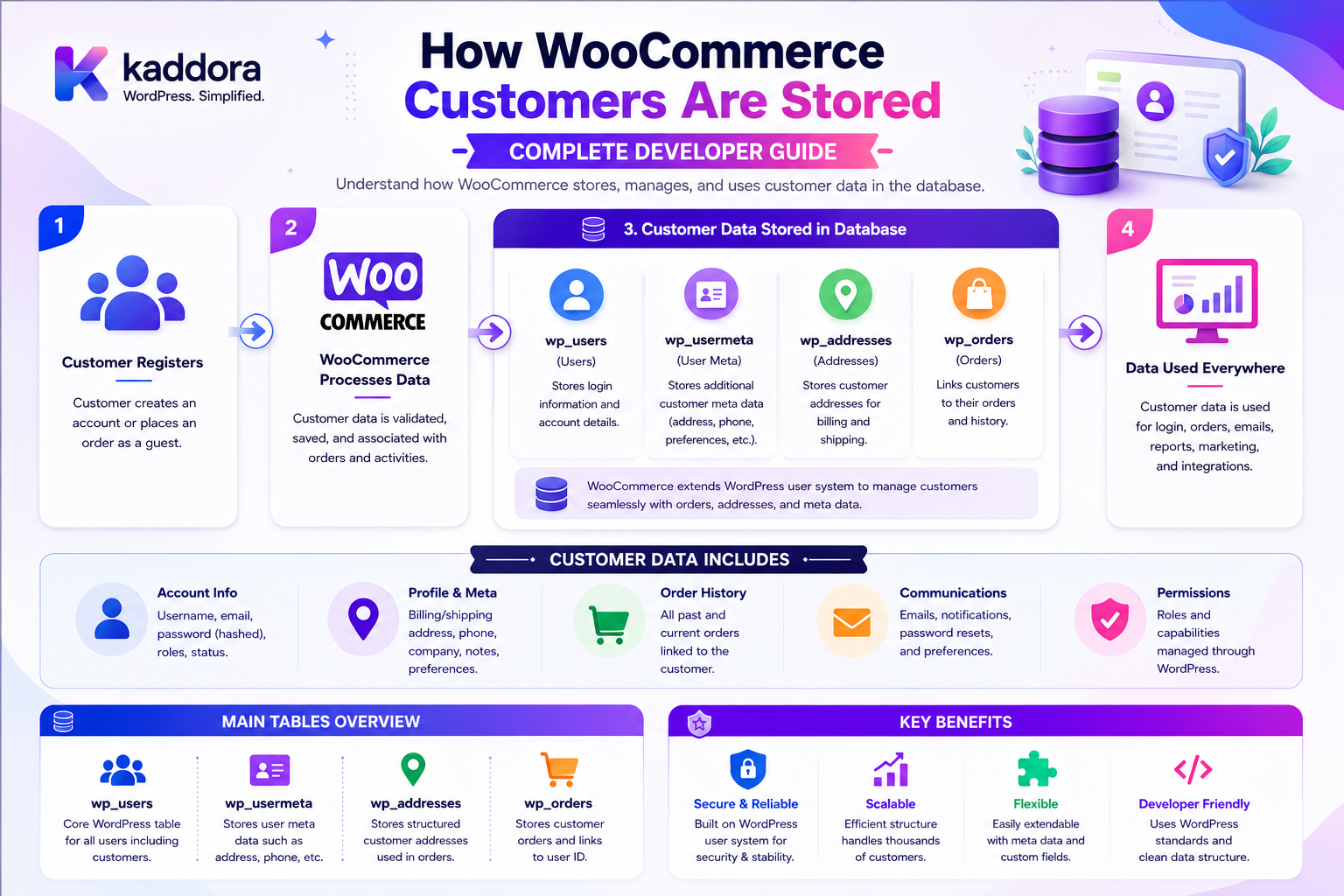
How WooCommerce Customers Are Stored: Complete Developer Guide
Introduction
A WooCommerce customer is much more than an email address.
A registered customer can have:
User Account Name Email Username Billing Address Shipping Address Phone Customer Metadata Order History Payment Tokens Downloads Session Data
For example:
Customer ↓ WordPress User ↓ WooCommerce Customer Object ├── Billing Information ├── Shipping Information ├── Customer Metadata ├── Order Relationships └── Commerce Statistics
A guest shopper is different:
Guest Shopper ↓ Checkout ↓ Order
There may be no permanent WordPress customer account.
This distinction becomes important when developing:
CRM Integrations ERP Integrations Customer Portals Loyalty Systems Marketing Automation B2B Commerce Analytics Support Tools WooCommerce Extensions
WooCommerce provides a WC_Customer object and a customer data store to abstract customer data from the storage layer. The current WooCommerce code reference identifies WC_Customer as the customer object and WC_Customer_Data_Store as its standard data store.
WooCommerce's CRUD architecture recommends using these objects instead of directly manipulating raw WordPress data structures whenever possible.
The key principle is:
Treat a WooCommerce customer as a WooCommerce domain object backed by the appropriate WordPress user/customer storage and access it through WooCommerce APIs rather than scattering direct database assumptions throughout extension code.
What Is a WooCommerce Customer?
A WooCommerce customer represents a person or account associated with shopping activity in a WooCommerce store.
A customer may have:
Identity Contact Information Billing Details Shipping Details Orders Downloads Payment Methods Metadata Commerce Statistics
The customer object provides a structured interface for working with this information.
Registered Customer vs Guest Customer
One of the most important concepts is the difference between:
Registered Customer
and:
Guest Customer
Registered Customer
A shopper has an account associated with a WordPress user.
Guest Customer
A shopper completes a purchase without creating or using a permanent customer account.
Conceptually:
Registered Shopper ↓ Account ↓ WC_Customer ↓ Orders
versus:
Guest Shopper ↓ Checkout ↓ Order
Do not assume every order belongs to a registered WordPress user.
WordPress User and WooCommerce Customer
For registered customers, WooCommerce builds its customer abstraction around WordPress user/account data.
Conceptually:
WordPress User ↓ WC_Customer ↓ WooCommerce Commerce Data
This means customer identity and WooCommerce commerce information are related but should still be treated as separate application concepts.
Customer ID
A registered customer has a customer/user identifier.
For example:
Customer ID: 250
The ID can be used to associate:
Orders Downloads Customer Metadata Other Commerce Records
But an ID is never proof that the current user is authorized to access that customer's information.
Loading a WooCommerce Customer
A common developer pattern is:
$customer = new WC_Customer( $customer_id );
or, depending on the workflow:
$customer = WC()->customer;
when working with the current WooCommerce customer/session context.
The appropriate approach depends on whether the application needs:
Persistent Customer Account
or:
Current Shopper / Session
Customer CRUD Architecture
WooCommerce's CRUD architecture provides:
Create Read Update Delete
through structured objects.
The official WooCommerce CRUD documentation explains that these objects expose properties through getters and setters and communicate with a data store for persistence.
Conceptually:
Extension ↓ WC_Customer ↓ Customer Data Store ↓ Persistence
Why the Customer Data Store Matters
The current WooCommerce customer data store implements the standard data-store interface and contains WooCommerce-specific customer operations such as order count and total spent.
This keeps customer business logic separate from low-level storage details.
Customer Identity Data
A registered customer can have identity-related fields such as:
First Name Last Name Username Email Display Name
The current WooCommerce customer API exposes properties such as customer ID, dates, email, names, username, and related customer fields.
Customer Email
Email is one of the most important customer properties.
It can be used for:
Account Communication Order Notifications Customer Support Marketing Password Recovery External Integrations
Do not assume that email alone is a reliable authorization identity.
Customer Username
Registered WooCommerce customers can have a WordPress username.
Depending on store configuration, WooCommerce can generate a username automatically from the customer's email.
An extension should use the supported customer/user APIs rather than generating its own username logic unnecessarily.
Customer Password
Customer passwords are authentication credentials.
They should never be treated as ordinary customer data.
When interacting with WooCommerce REST APIs, the password property is write-only rather than readable through the customer resource.
Never store or log customer passwords in custom metadata.
Customer Billing Information
A customer's billing information can include:
First Name Last Name Company Address City State Postcode Country Email Phone
The WooCommerce customer API exposes structured billing properties.
Customer Shipping Information
Shipping information can include:
First Name Last Name Company Address City State Postcode Country Phone
The exact available fields depend on the WooCommerce version and configuration.
Billing vs Shipping
These should not be assumed to be identical.
For example:
Billing: Mumbai Shipping: Pune
A customer can maintain different addresses for commerce purposes.
Customer Data and Order Data
Customer information and order information are related but different.
A customer may have:
Customer Profile + Orders
For example:
Customer #250 ├── Order #1001 ├── Order #1022 └── Order #1089
The customer object should not be treated as a replacement for the order model.
Customer Order Count
WooCommerce's customer data-store interface provides a method for retrieving the number of orders associated with a customer.
This can support:
Customer Dashboard CRM Analytics Segmentation
Customer Total Spent
The customer data-store interface also exposes a method for retrieving total customer spend.
This can be useful for:
Customer Segmentation Loyalty Reporting CRM
but should not be interpreted as an independently authoritative financial ledger.
Last Order
WooCommerce's customer data-store interface includes support for retrieving a customer's last order.
This can be useful for:
Customer Support CRM Retention Personalized Experiences
Customer Metadata
Extensions frequently need custom customer information.
Examples include:
CRM Contact ID ERP Customer ID Company ID Loyalty ID External Account ID Customer Segment
WooCommerce supports customer metadata through its CRUD architecture.
Reading Customer Metadata
A plugin can use the customer object:
$customer = new WC_Customer( $customer_id ); $crm_id = $customer->get_meta( '_kdr_crm_customer_id', true );
This keeps custom data attached to the customer abstraction.
Updating Customer Metadata
For example:
$customer->update_meta_data( '_kdr_crm_customer_id', $crm_customer_id ); $customer->save();
Avoid directly updating arbitrary rows in user metadata when a WooCommerce customer API is appropriate.
Customer Metadata vs Core Properties
Use core customer properties for core concepts.
For example:
Email First Name Last Name
should use the WooCommerce customer object.
Custom metadata is more appropriate for extension-specific information such as:
CRM ID ERP ID External Segment Loyalty Identifier
Where Customer Data Is Stored
WooCommerce's current customer data store extends the WordPress data-store implementation and maintains many customer properties through WordPress user/meta infrastructure. The current code reference lists internal customer-related fields such as names, billing/shipping information, paying-customer status, and other user properties.
A simplified conceptual model is:
wp_users ↓ Identity / Account + wp_usermeta ↓ Customer-Related Properties
This is an implementation detail that extensions should access through WooCommerce's customer APIs rather than assuming a particular storage layout.
Why Customer Storage Is Different From HPOS
WooCommerce's HPOS architecture is specifically focused on order storage.
HPOS provides dedicated order tables for order-related information.
Customer account data remains a separate domain.
Therefore:
Customer Storage ≠ Order Storage
Even though the two are closely related.
Customer vs Order Architecture
A useful conceptual model is:
Customer ↓ Orders ↓ Order Items ↓ Products
The customer is not physically stored as part of every order in the same way.
Orders can retain billing/shipping snapshots while customer identity remains separately managed.
Why Orders Keep Customer Information
Historical orders need their own transaction-time customer/address information.
For example:
Customer Current Address: Pune Historical Order: Mumbai
The order must preserve the information relevant to that transaction.
Therefore:
Current Customer Profile ≠ Historical Order Address
This is an important ecommerce data-model distinction.
Customer Address Changes
Suppose a customer changes their address:
Before: Mumbai After: Delhi
Future orders may use Delhi.
Historical orders should not automatically be rewritten to make their shipping history look like Delhi.
Customer Sessions
WooCommerce also has a customer data store specifically for session-based customer data. The current code reference identifies WC_Customer_Data_Store_Session as a customer data store that stores customer data in the session.
This means:
Persistent Customer
and:
Current Customer Session
are different concepts.
Customer Session vs Account
A shopper can have session state without being a permanently registered customer.
For example:
Guest Shopper ↓ WooCommerce Session ↓ Cart ↓ Checkout
This is different from:
Registered Account ↓ WC_Customer
Why Session Storage Matters
Customer session state can include information relevant to the current shopping experience.
For example:
Cart Shipping Selection Checkout Context Temporary Customer Data
WooCommerce's Cart and Checkout documentation states that critical transactional and persistent data is maintained server-side, either in the database or the customer's session.
Don't Store Persistent Customer Data Only in Session
Session data is temporary.
Do not use it as the primary source of truth for permanent customer records such as:
Account Identity CRM ID Long-Term Preferences Customer History
Use the appropriate persistent storage layer.
Guest Customer Architecture
A guest checkout can look like:
Visitor ↓ Session ↓ Checkout ↓ Order
There may be no:
WordPress User
associated with that shopper.
This is why order and customer integrations must handle both registered and guest purchases.
Registered Customer Architecture
A registered purchase can look like:
WordPress User ↓ WC_Customer ↓ Session ↓ Cart ↓ Checkout ↓ Order
The same person can therefore participate in multiple layers of the commerce architecture.
Customer Data and Checkout
WooCommerce's Checkout Blocks architecture treats the server as the source of truth for persistent customer data such as billing and shipping addresses.
This is important because checkout data should not remain permanently authoritative only in browser state.
Customer Data Flow
A simplified flow:
Browser ↓ Checkout UI ↓ Server ↓ Customer / Session ↓ Order
Persistent customer changes should be processed server-side.
Don't Trust Browser Customer Data
A browser can submit:
customer_id=500
but that does not prove the shopper is Customer 500.
Authorization must come from authenticated server-side identity and ownership rules.
Customer API Security
Custom endpoints should validate:
Authentication Customer Ownership Capability Store Scope Tenant Scope
where required.
Customer IDOR
An insecure endpoint might expose:
GET /customer/500
to every logged-in customer.
An attacker could then try:
GET /customer/501
This is an IDOR vulnerability.
The server must verify access to Customer 501 before returning data.
Customer Data Minimization
A customer dashboard may only need:
Name Email Orders Addresses
An internal CRM screen may need:
Customer ID Order Count Total Spent CRM ID Segment
Return only the fields necessary for the current role.
Public vs Internal Customer Data
Public storefront data might include:
Display Name Reviews
while internal systems may contain:
Billing Details CRM IDs Customer Segments Order Metrics Support Notes
These should not share the same visibility policy.
Customer Data and Privacy
Customer information may contain personal data such as:
Name Email Phone Address Order History
Treat it as sensitive business information.
Avoid exposing customer information through:
Public REST Endpoints Search Logs Exports Analytics URLs
without a defined purpose and appropriate access.
Customer Data Exports
A CRM or WooCommerce administrator may need to export customer information.
Exports should use:
Authorization Scoped Queries Protected Storage Short-Lived Links Audit
where appropriate.
Customer REST API
WooCommerce provides customer REST API resources for creating, viewing, updating, deleting, and batch-processing customers. The current API documentation exposes fields such as identity, addresses, customer status, avatar URL, and metadata.
This is useful for:
ERP CRM Mobile Applications Customer Portals Automation
Customer API Authentication
External applications should use appropriate WooCommerce API authentication and permissions.
Do not expose customer resources through unrestricted custom endpoints.
Customer API Data Minimization
A custom integration should request only necessary fields.
For example:
{ "id": 250, "email": "customer@example.com", "first_name": "John", "last_name": "Smith" }
rather than transmitting every available customer property when the workflow does not require it.
Customer Search
A business system may search customers by:
Email Name Username Customer ID External ID
Search itself must remain permission-aware.
Customer Search Leakage
Do not allow an anonymous or low-privilege user to discover:
Customer Names Email Addresses Phone Numbers
merely by entering partial search text.
Customer Autocomplete Security
An internal endpoint such as:
/customers/search?q=john
can expose customer information.
Limit:
Who Can Search Which Customers Which Fields How Many Results
Customer Data and CRM
A CRM integration may map:
WooCommerce Customer ID ↔ CRM Contact ID
The WooCommerce customer can store the external reference through metadata.
Customer Sync Architecture
A clean integration can use:
WooCommerce Customer ↓ Customer API / Event ↓ Integration Service ↓ CRM
Customer Sync Idempotency
Repeated customer synchronization should update the same CRM record rather than creating duplicates.
Use a stable external identifier.
Customer Data and ERP
ERP integrations may use:
Customer ID Name Billing Address Shipping Address Tax Information Order Relationships
The ERP may become authoritative for some business fields.
Define the Source of Truth
For example:
WooCommerce: Store Account ERP: Business Customer ID CRM: Sales Segment
The exact mapping should be documented.
Don't Create Conflicting Customer Records
A poorly designed integration can create:
WooCommerce Customer + ERP Customer + CRM Customer
without stable mapping.
Use external IDs and clear synchronization rules.
Customer Data and B2B
B2B WooCommerce stores may introduce:
Company Department Buyer Approver Credit Terms Customer Group
A customer account can therefore become part of a larger company/customer hierarchy.
Don't Treat Every B2B Relationship as User Metadata
Complex B2B structures often deserve explicit business entities such as:
Company Customer Account Buyer Role Approval Group
instead of storing everything as arbitrary user meta.
Customer Groups
Stores may segment customers into:
Retail Wholesale VIP B2B Partners Members
These groups can drive:
Pricing Catalog Visibility Promotions Shipping Credit Policies
Customer Data vs Customer Segmentation
Customer data describes the person/account.
Segmentation describes business classification.
For example:
Customer: John Smith Segment: VIP Wholesale
Keep these concepts separate.
Customer Analytics
Useful customer metrics include:
Order Count Total Spent Average Order Value Last Order Date
But analytics calculations should use appropriate order data and business definitions rather than blindly trusting a cached metric.
Customer Metrics and Historical Accuracy
A customer's current total spend can change over time through:
Refunds Order Changes Deleted Orders Business Corrections
Reports should define whether they are:
Live Historical Snapshot Period-Based
Customer Data and Refunds
Refunds can affect customer-level metrics.
For example:
Gross Purchases: ₹100,000 Refunds: ₹20,000 Net: ₹80,000
The business definition of "total spent" should be understood before using it for analytics or loyalty decisions.
Customer Data and Payment Tokens
Payment tokens may be stored separately from normal customer profile information.
WooCommerce's current data-store registry includes a dedicated payment-token data store.
Do not treat payment tokens as ordinary customer metadata.
Customer Downloads
Digital stores may associate downloadable access with customers and orders.
WooCommerce includes dedicated customer-download data-store classes.
Download permissions should be checked before serving files.
Customer Data and Digital Products
A customer may have:
Account ↓ Order ↓ Download Permissions
The download system should not simply trust the customer ID supplied by the browser.
Customer Data and Memberships
A WooCommerce customer may also participate in:
Membership Subscription Loyalty B2B Company
These are separate domains.
Do not overload the customer object with every business concept.
Customer Data and Subscriptions
Subscription data may involve:
Customer Subscription Recurring Order Payment Method Renewal
The customer is the relationship anchor, not the entire subscription record.
Customer Data and Cart
The customer's persistent profile should remain separate from:
Current Cart
which may be session-based.
WooCommerce's Blocks documentation notes that cart and customer data involved in transactions remain server-side, including session-backed data where appropriate.
Customer Sessions
A current customer/session store can maintain temporary shopping state.
The WooCommerce code reference explicitly includes a customer session data store.
This separation supports:
Guest Shopping Registered Shopping Multi-Step Checkout
without converting every temporary state value into permanent customer profile data.
Customer Data and Caching
Do not globally cache personalized information such as:
My Addresses My Orders My Account Data
because another customer could receive the cached response.
Scope-Aware Customer Caching
Private customer data should use appropriate user/session scope.
For example:
User + Store + Context
may form part of the cache boundary.
Customer Data and Multi-Tenant Commerce
A SaaS commerce platform may have:
Tenant A └── Customers Tenant B └── Customers
Every customer query must preserve tenant isolation.
Cross-Tenant Customer IDOR
A request such as:
customer_id=900
must not reveal another tenant's customer.
Tenant membership must be determined by the server.
Customer Data and Internal Teams
Different employees may require different customer access:
Support: Basic Contact + Orders Sales: Customer Profile + CRM Data Finance: Billing + Financial Information Warehouse: Shipping Data
Least privilege should determine what each team receives.
Customer Data and Customer Support
Support agents may need:
Order Status Customer Name Email Shipping Details Support History
They may not need:
Internal Financial Notes Payment Secrets Administrative Credentials
Customer Data and AI
AI can help support teams:
Summarize Customer History Explain Recent Orders Suggest Support Responses
but it should receive only customer data the current employee is authorized to access.
AI Customer Data Security
A secure flow is:
Support Agent ↓ Authorization ↓ Authorized Customer Data ↓ AI ↓ Summary
not:
Support Agent ↓ AI ↓ Entire Customer Database
Customer Data and Search
Internal customer search should be restricted.
A support dashboard may search customers.
A normal website visitor should not be able to search the entire customer database.
Customer Data and Imports
Bulk customer imports can come from:
ERP CRM CSV Marketplace Legacy Store
Use:
Upload ↓ Validate ↓ Preview ↓ Approve ↓ Import ↓ Audit
Customer Import Validation
Validate:
Email Customer Identity External ID Addresses Role Company Tenant
Do not overwrite customers blindly based only on email addresses.
Customer Deduplication
A common problem is:
John Smith john@example.com John Smith john@example.com
The system needs an explicit deduplication strategy.
Possible matching signals:
External ID Email Account ID Business Identifier
Email alone may not be sufficient for every organization.
Customer Merge
If two customer records are merged, consider:
Orders Downloads Addresses Metadata External IDs Subscriptions Loyalty
before changing account identity.
Customer merges can have significant downstream effects.
Customer Deletion
Deleting a customer can be complicated because the account may be connected to:
Orders Downloads Subscriptions Payment Tokens CRM ERP Support History
Follow the organization's retention and privacy policies.
Do not casually delete customer-related data from the database.
Anonymization vs Deletion
Depending on the business requirement, an organization may need:
Delete Account
or:
Retain Transaction + Remove / Anonymize Personal Information
The correct approach depends on applicable obligations and the store's data-retention requirements.
Customer Data and Backups
Backups contain customer information.
Protect them using:
Access Control Encryption Where Appropriate Secure Storage Retention Policies Restore Testing
A customer-data deletion process should also consider how backup retention is handled.
Common WooCommerce Customer Storage Mistakes
Treating Every Shopper as a WordPress User
Guest customers can exist without registered accounts.
Assuming Customer Data Equals Order Data
Orders retain transaction-related information independently of the customer's current profile.
Directly Updating User Meta Everywhere
Use the WooCommerce customer abstraction for WooCommerce customer properties.
Trusting Customer IDs From the Browser
Identifiers are not authorization.
Exposing Customer Search Publicly
Customer search can leak names, emails, and other personal data.
Caching Customer Data Globally
Personalized responses can leak between accounts.
Storing Passwords in Custom Metadata
Passwords are authentication credentials, not customer business data.
Treating Payment Tokens as Normal Profile Data
Payment credentials require specialized handling.
Ignoring Guest Customers
Guest checkout is an important WooCommerce workflow.
Deleting Customers Without Reviewing Connected Data
Orders, subscriptions, downloads, CRM records, and retention policies can complicate deletion.
WooCommerce Customer Storage Checklist
- [ ] Understand WC_Customer - [ ] Understand customer data store - [ ] Understand WordPress user relationship - [ ] Understand user metadata - [ ] Understand billing data - [ ] Understand shipping data - [ ] Understand guest customers - [ ] Understand sessions - [ ] Understand orders - [ ] Understand customer metadata - [ ] Understand payment tokens - [ ] Understand downloads - [ ] Use WC_Customer APIs - [ ] Avoid direct storage assumptions - [ ] Protect customer APIs - [ ] Protect search - [ ] Protect exports - [ ] Protect caching - [ ] Protect AI access - [ ] Validate imports - [ ] Plan deduplication - [ ] Plan merging - [ ] Plan deletion/anonymization - [ ] Protect backups - [ ] Test multi-tenant isolation - [ ] Test customer IDOR
Best Practices for WooCommerce Customer Storage
A professional WooCommerce extension should:
Treat WC_Customer as the application-level customer abstraction.
Use WooCommerce CRUD APIs rather than scattering direct database or user-meta manipulation throughout the codebase.
Distinguish registered customers from guest shoppers.
Separate persistent customer profiles from session-based shopping state.
Keep current customer profile information separate from historical order snapshots.
Use supported customer metadata APIs for extension-specific identifiers and classifications.
Protect customer APIs through authentication, capability checks, ownership checks, and store or tenant scope where appropriate.
Minimize customer data returned to dashboards, APIs, exports, support systems, and AI workflows.
Keep passwords and authentication credentials outside ordinary customer business data.
Treat payment tokens as a specialized security-sensitive domain.
Protect customer search and autocomplete from unauthorized discovery.
Avoid globally caching personalized account, order, address, or customer-profile data.
Define clear source-of-truth relationships when integrating with CRM, ERP, loyalty, PIM, or other systems.
Make customer synchronization idempotent and use stable external identifiers.
Validate customer imports before creating or modifying accounts.
Define explicit rules for duplicate detection and customer merging.
Consider orders, subscriptions, downloads, payment tokens, and external records before deleting or anonymizing a customer.
Protect backups and account exports because they contain customer information.
Enforce tenant isolation for SaaS or multi-company stores.
Keep AI downstream of authorization and provide it only with customer data the requesting employee or customer is allowed to access.
Test registered customers, guests, account changes, imports, deletion workflows, IDOR, search leakage, cache leakage, and external integrations.
Why choose ThemeKaddora?
ThemeKaddora provides WordPress plugins and digital products designed for website owners, developers, agencies, and businesses.
Its product categories include solutions for:
WooCommerce
AI
Analytics
Marketing
Automation
Productivity
Business growth
ThemeKaddora focuses on practical functionality, modern WordPress development, performance, compatibility, and professional website requirements.
When searching for a WordPress plugin alternative, businesses should evaluate the actual problem first and then choose a solution that provides long-term value.
Conclusion
WooCommerce customer storage is a layered architecture.
A useful conceptual model is:
Customer ↓ WordPress Account ↓ WC_Customer ├── Identity ├── Billing ├── Shipping ├── Metadata └── Commerce Metrics
Alongside it are:
Session ↓ Cart ↓ Checkout ↓ Order
and:
Customer ↓ Orders ↓ Downloads ↓ Subscriptions / Other Commerce Systems
The first principle is separate customer identity from customer commerce activity.
A registered account is not the same thing as an order, subscription, payment token, or current shopping session.
The second principle is remember guest customers.
A shopper can purchase without becoming a permanent WordPress user.
The third principle is use the WooCommerce customer abstraction.
The customer data store exists to separate WooCommerce customer behavior from lower-level persistence.
The fourth principle is separate current customer data from historical order data.
Changing a customer's address should not rewrite the historical shipping address recorded on an old transaction.
The fifth principle is protect customer identity.
Names, emails, addresses, phone numbers, and order relationships can all represent sensitive customer information.
The sixth principle is never trust customer IDs from the browser.
Customer ownership must be determined from authenticated context and server-side authorization.
The seventh principle is separate session data from persistent account data.
WooCommerce has a dedicated customer session data store for temporary session-backed information.
The eighth principle is define integration ownership.
CRM, ERP, loyalty, and other systems may own different parts of the customer lifecycle.
The ninth principle is plan deletion carefully.
Customers can be connected to orders, subscriptions, downloads, payment tokens, and external records.
The tenth principle is protect customer data throughout the stack.
Search, APIs, exports, caches, backups, integrations, and AI systems can all become customer-data leakage paths if they are not properly scoped.
For ThemeKaddora, WooCommerce customer architecture can support:
CRM Integrations ERP Customer Portals Loyalty B2B Commerce Customer Segmentation AI Support Marketing Automation Analytics Customer Management
The most important principle is:
Treat the WooCommerce customer as a structured domain object with explicit identity, commerce, session, and integration boundaries rather than as a collection of user-meta values.
A professional WooCommerce customer architecture should be:
Structured
→ CRUD-Based
→ Privacy-Aware
→ Guest-Compatible
→ Session-Aware
→ Integration-Friendly
→ Secure
→ Tenant-Safe
→ Scalable
→ Maintainable
When these principles are followed, WooCommerce extensions can manage customer accounts, guest purchases, CRM synchronization, B2B relationships, customer portals, loyalty programs, analytics, and AI-assisted support without turning customer data into an uncontrolled collection of database fields and integrations.
Frequently Asked Questions
How does WooCommerce store customers?
Registered WooCommerce customers are represented through the WC_Customer abstraction and its customer data store, which currently builds on WordPress user/data-store infrastructure and customer-related metadata.
Is every WooCommerce customer a WordPress user?
No. Guest shoppers can place orders without having a permanent registered customer account.
What is WC_Customer?
WC_Customer is WooCommerce's structured customer object used to work with customer data through the WooCommerce CRUD architecture.
What information can a WooCommerce customer contain?
Customer identity, billing and shipping information, metadata, account information, and commerce-related metrics such as order count and total spent can be associated with the customer object and data store.
Where is customer information stored?
The current WooCommerce customer data store uses WordPress user and metadata infrastructure for many customer properties, while WooCommerce provides the customer abstraction above that storage.
Is customer storage the same as HPOS?
No. HPOS is primarily an order-storage architecture. Customer account data remains a separate domain.
How should developers access WooCommerce customer data?
Use the WooCommerce customer object and CRUD methods rather than scattering direct database operations throughout an extension.
Can customers exist without registered accounts?
Yes. Guest checkout allows shoppers to purchase without necessarily having a permanent customer account.
What is the difference between customer data and order data?
Customer data represents the current account/profile, while orders contain historical transaction information such as billing and shipping details associated with that particular purchase.
Can a customer change their address without changing old orders?
Yes. Historical orders should preserve their transaction-specific address information rather than automatically inheriting a customer's current address.
Does WooCommerce store customer sessions?
Yes. WooCommerce includes a dedicated customer session data store for session-based customer information.
Can customer data be accessed through the REST API?
Yes. WooCommerce provides customer REST API resources for creating, reading, updating, deleting, and batch-processing customers.
Should customer passwords be stored in custom metadata?
No. Passwords are authentication credentials and should never be treated as ordinary customer metadata. WooCommerce's REST customer API exposes password information as write-only.
Can WooCommerce customers have custom metadata?
Yes. Extensions can attach customer-specific metadata through the WooCommerce customer abstraction.
How should customer APIs be secured?
Use authentication, customer ownership checks, appropriate capabilities, and organization or tenant scope where needed. Never assume a customer ID submitted by the browser proves ownership.
Can WooCommerce customers be synchronized with a CRM?
Yes. Use stable external IDs and an idempotent synchronization process to connect WooCommerce customers with CRM contacts.
Can customers belong to B2B companies?
Yes. B2B extensions can build explicit company, account, buyer, and role relationships around the WooCommerce customer model.
Can AI access WooCommerce customer data?
Yes, but only after authorization determines which customer records the requesting user is allowed to access. AI should never become a shortcut around customer-data permissions.
Why choose Themekaddora?
Themekaddora provides lightweight, responsive, SEO-friendly WordPress themes with fast performance, WooCommerce compatibility, flexible customization, accessibility-conscious design, modern templates, regular updates, and professional support—providing a strong foundation for businesses building digital products and product-focused websites.
Comments (0)