
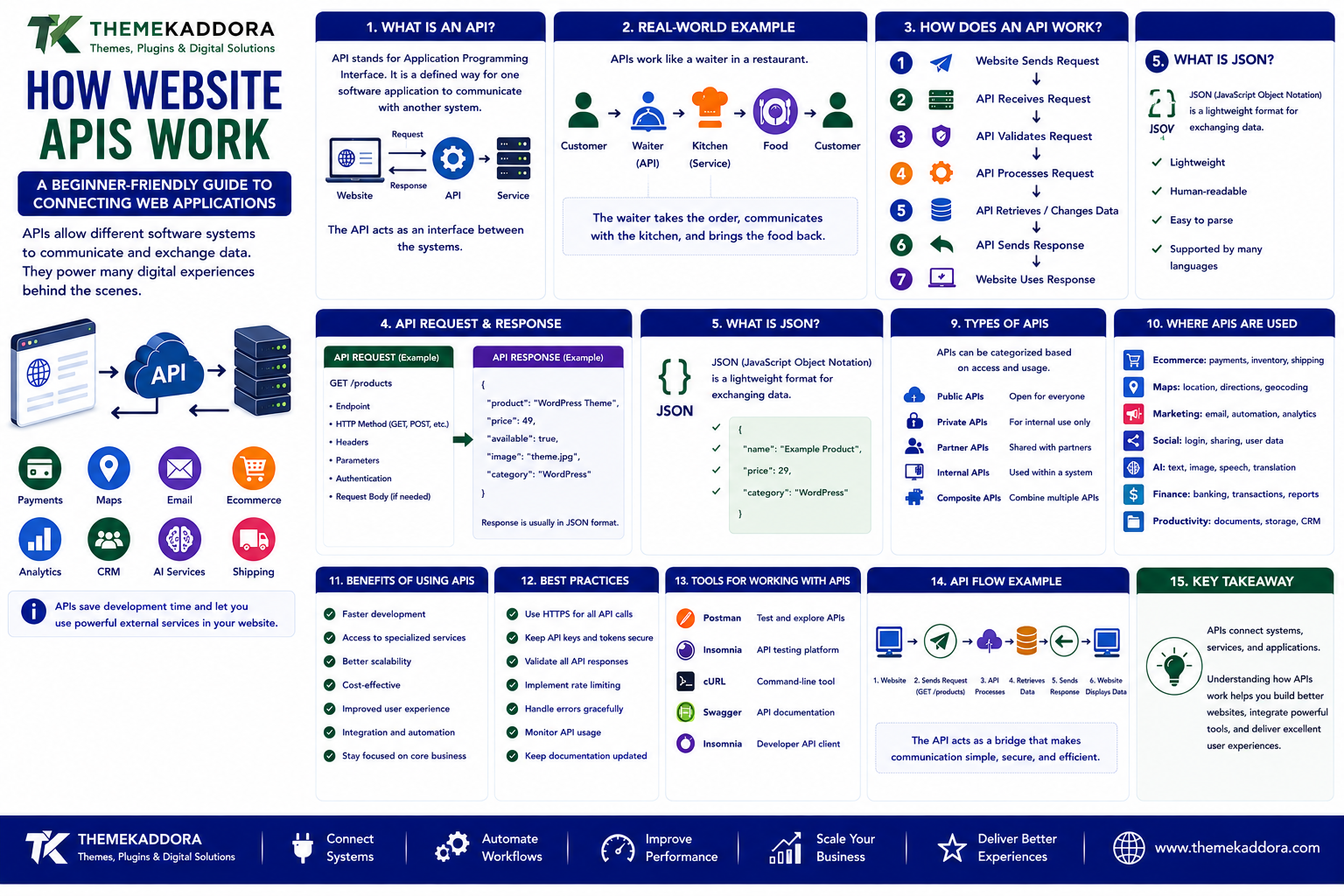
How Website APIs Work: A Beginner-Friendly Guide to Connecting Web Applications
Modern websites rarely work completely on their own.
A website may connect with payment systems, maps, email platforms, analytics tools, customer databases, social networks, AI services, booking systems, shipping providers, and many other applications.
But how do all these systems communicate with each other?
One of the most important technologies making this possible is an API.
APIs allow different software systems to exchange information and perform actions without requiring developers to build every function from scratch.
For example:
Website
↓
API Request
↓
External Service
↓
API Response
↓
Website
This simple concept powers many of the digital experiences people use every day.
From checking a weather forecast to processing an online payment, APIs help applications communicate behind the scenes.
This guide explains website APIs in simple terms and shows how they work, why they matter, and how businesses and developers can use them.
What Is an API?
API stands for Application Programming Interface.
An API is a defined way for one software application to communicate with another system.
Instead of directly accessing another application's internal code or database, a program can use the API to request specific information or perform supported actions.
A simple example is:
Website
→ "Give me the latest products"
↓
API
→ Processes the request
↓
Product System
→ Returns product information
↓
API
→ Sends response
↓
Website
The API acts as an interface between the systems.
A Simple Real-World Example of an API
Imagine ordering food at a restaurant.
You do not normally walk into the kitchen and prepare the food yourself.
Instead:
Customer
↓
Order
↓
Waiter
↓
Kitchen
↓
Food
↓
Waiter
↓
Customer
The waiter acts as an interface between the customer and kitchen.
An API works in a similar conceptual way.
Application
↓
API Request
↓
API
↓
Service
↓
API Response
↓
Application
The API provides a structured way to communicate with another system.
Why Do Websites Need APIs?
Modern websites often depend on external services.
For example, a website might need to:
Process payments
Display maps
Send emails
Show product information
Verify addresses
Translate content
Connect with a CRM
Generate reports
Access AI services
Retrieve shipping information
Instead of building every system internally, developers can integrate existing services through APIs.
This saves development time and allows websites to use specialized technologies.
How Does an API Work?
A basic API interaction involves a request and a response.
The process can look like:
1. Website Sends Request
↓
2. API Receives Request
↓
3. API Validates Request
↓
4. API Processes Request
↓
5. API Retrieves or Changes Data
↓
6. API Sends Response
↓
7. Website Uses Response
For example:
Website
→ Request product information
↓
Product API
→ Finds product
↓
API Response
→ Product name, price, image, availability
↓
Website
→ Displays product
What Is an API Request?
An API request is a message sent from one application to another through an API.
The request can contain information such as:
Endpoint
HTTP method
Parameters
Headers
Authentication information
Request body
A simplified request might look conceptually like:
GET /products
This tells the API that the application wants to retrieve product information.
What Is an API Response?
An API response is the information returned by the API after processing a request.
For example, a response might contain:
Product name
Product ID
Price
Availability
Image URL
Modern APIs commonly return structured formats such as JSON.
A simplified response might look like:
{ "product": "WordPress Theme", "price": 49, "available": true }
The application can then use this information.
What Is JSON?
JSON stands for JavaScript Object Notation.
It is a commonly used format for exchanging structured data between applications.
JSON is popular because it is:
Lightweight
Human-readable
Easy for applications to process
Supported by many programming languages
For example:
{ "name": "Example Product", "price": 29, "category": "WordPress" }
An application can read these values and display them on a website.
What Is an API Endpoint?
An endpoint is a specific URL or route through which an API provides access to a particular resource or function.
For example:
/products
could provide product information.
Another endpoint could be:
/customers
for customer-related information.
And:
/orders
for order information.
A larger API might therefore have multiple endpoints.
API
├── /products
├── /customers
├── /orders
└── /payments
Each endpoint can perform a different function.
What Are HTTP Methods?
Web APIs commonly use HTTP methods to describe what an application wants to do.
The most common methods are:
GET
Used to retrieve information.
GET /products
→ Get products
POST
Used to create or submit information.
POST /orders
→ Create an order
PUT
Often used to update an existing resource.
PUT /customers/123
→ Update customer information
PATCH
Used to partially update a resource.
PATCH /customers/123
→ Update selected customer information
DELETE
Used to remove a resource.
DELETE /customers/123
→ Delete customer information
The exact behavior depends on the API design.
What Is a REST API?
REST stands for Representational State Transfer.
REST is an architectural approach commonly used for designing web APIs.
A REST-style API generally uses standard HTTP methods and resources.
For example:
GET /products
→ Retrieve products
GET /products/25
→ Retrieve product 25
POST /products
→ Create product
PATCH /products/25
→ Update product 25
DELETE /products/25
→ Delete product 25
REST APIs are widely used because they work naturally with web technologies.
What Is an API Authentication?
APIs often need to verify who is making a request.
This process is called authentication.
Without authentication, sensitive APIs could potentially be accessed by unauthorized applications.
Common authentication approaches include:
API keys
Access tokens
OAuth
JSON Web Tokens
Signed requests
The appropriate method depends on the API and its security requirements.
What Is an API Key?
An API key is a credential used by some APIs to identify and authorize applications.
For example:
Website
↓
API Key
↓
API
↓
Request Processed
API keys should be handled carefully.
They should not be exposed unnecessarily in public source code when the API requires them to remain secret.
What Is OAuth?
OAuth is a framework that allows applications to obtain delegated access to resources without requiring users to share their primary credentials with the application.
A common example is allowing one application to connect with another service while giving the user control over what access is granted.
OAuth is widely used for integrations involving user accounts and third-party services.
What Are API Headers?
Headers provide additional information about an API request or response.
They can contain information related to:
Authentication
Content type
Caching
Client information
Request preferences
For example, an API request might specify that the application expects JSON data.
Headers operate behind the scenes but are an important part of API communication.
What Are API Parameters?
Parameters allow an application to provide additional information to an API.
For example:
/products?category=wordpress
The parameter:
category=wordpress
tells the API which type of products the application is interested in.
Other parameters might include:
Search terms
Page numbers
Sorting
Filtering
Date ranges
User IDs
Parameters make APIs more flexible.
API Request and Response Example
Imagine an online store wants to display product information from another system.
The workflow could be:
Website
↓
GET /products/100
↓
Product API
↓
Find Product 100
↓
Return JSON
↓
Website
↓
Display Product
The website does not necessarily need direct access to the product database.
It communicates through the API.
What Are API Status Codes?
APIs use HTTP status codes to communicate the result of requests.
Common examples include:
200
Request successful.
201
Resource successfully created.
400
Bad request.
401
Authentication required or invalid.
403
Request is not permitted.
404
Requested resource was not found.
429
Too many requests.
500
Server-side error.
These codes help developers understand what happened during an API request.
What Is API Rate Limiting?
APIs often limit how many requests an application can make within a certain period.
For example:
100 Requests / Minute
If an application exceeds the limit, the API may temporarily reject additional requests.
Rate limiting can help:
Protect infrastructure
Prevent abuse
Control resource usage
Maintain service reliability
Developers should design applications to handle rate limits gracefully.
What Is API Integration?
API integration is the process of connecting one software system with another through an API.
For example:
WordPress
↓
CRM API
↓
Customer Record
A website could automatically send a new lead to a CRM.
Another example:
WooCommerce
↓
Payment API
↓
Payment Provider
↓
Payment Confirmation
API integrations allow systems to work together.
Common API Integrations for Websites
Websites can connect with many external services.
Common examples include:
Payment gateways
CRM platforms
Email services
Maps
Analytics
Shipping systems
Social media
AI platforms
Search services
Booking systems
Accounting software
Marketing platforms
The exact integration depends on the website's requirements.
APIs and Payment Systems
Online stores commonly use APIs to communicate with payment providers.
A simplified process looks like:
Customer
↓
Checkout
↓
Website
↓
Payment API
↓
Payment Provider
↓
Payment Result
↓
Website
↓
Order Confirmation
The payment provider handles sensitive payment processing according to its architecture and security requirements.
The website receives the appropriate result through the integration.
APIs and Maps
Many websites need location functionality.
For example:
Store locations
Delivery areas
Directions
Address searches
Location-based services
A website can integrate a mapping service through its API.
The process could be:
Website
↓
Location Request
↓
Maps API
↓
Location Data
↓
Website
This allows developers to add mapping functionality without building an entire mapping system themselves.
APIs and Email Services
Websites often need to send emails automatically.
For example:
Customer Submits Form
↓
Website
↓
Email API
↓
Email Service
↓
Customer Receives Email
APIs can therefore support:
Transactional emails
Notifications
Password resets
Marketing workflows
Contact form messages
APIs and AI Services
AI services can also be integrated through APIs.
A website might send information to an AI service and receive a generated result.
For example:
User Question
↓
Website
↓
AI API
↓
AI Processing
↓
Response
↓
Website
AI APIs can support applications such as:
Chat assistants
Content tools
Search
Summarization
Translation
Classification
Recommendations
The implementation should consider privacy, security, cost, accuracy, and response time.
APIs and WordPress
WordPress includes APIs that allow developers to interact with website content and functionality.
The WordPress REST API can allow applications to retrieve or modify supported WordPress data programmatically.
For example:
External Application
↓
WordPress REST API
↓
WordPress Content
This can support integrations between WordPress and other applications.
WordPress REST API Use Cases
The WordPress REST API can be used for:
Mobile applications
Custom dashboards
Headless websites
External applications
Content management integrations
Custom frontend experiences
For example:
WordPress
→ Manages content
↓
REST API
↓
Custom Frontend
→ Displays content
This separates content management from the frontend experience.
What Is a Headless Website?
A headless website separates the content management system from the frontend presentation layer.
A simplified architecture is:
WordPress
↓
API
↓
Frontend Application
↓
Visitor
Instead of WordPress directly generating every page, another application can consume content through the API.
This approach can provide flexibility but also introduces additional technical complexity.
API Security
APIs should be designed with security in mind.
Important considerations include:
Authentication
Authorization
HTTPS
Input validation
Rate limiting
Access controls
Secure credentials
Logging
Monitoring
Error handling
Sensitive information should not be exposed unnecessarily through API responses.
Never Expose Secret API Credentials
API credentials should be treated like passwords.
Avoid placing sensitive keys directly into publicly accessible frontend code when they are intended to remain secret.
A safer architecture may be:
Frontend
↓
Your Backend
↓
Secret API Credential
↓
External API
This keeps sensitive credentials on the server side where appropriate.
API Error Handling
APIs can fail.
Possible causes include:
Network problems
Invalid credentials
Service outages
Rate limits
Invalid requests
Server errors
Applications should handle these situations gracefully.
For example:
API Request
↓
Failure
↓
Application Detects Error
↓
Retry or Alternative Action
↓
User Receives Clear Message
A good integration should not simply stop working when an external service temporarily fails.
API Documentation
Good API documentation explains how developers can use an API.
Documentation commonly includes:
Authentication
Endpoints
Parameters
Request examples
Response examples
Error codes
Rate limits
Usage rules
Clear documentation can significantly reduce integration time.
API Testing
Before launching an API integration, developers should test different scenarios.
For example:
Successful Request
Does the API return the expected information?
Invalid Request
Does the application handle errors correctly?
Expired Credentials
Does authentication fail safely?
Rate Limit
Does the application handle excessive requests?
Service Failure
Does the website continue functioning appropriately?
Testing helps identify problems before users encounter them.
API Monitoring
Once an API integration is live, monitoring becomes important.
Useful metrics can include:
Request volume
Response time
Error rate
Failed requests
Rate-limit events
Availability
API costs
Monitoring can help developers identify problems before they become major service issues.
APIs and Website Performance
APIs can add functionality, but external requests can also affect performance.
For example:
Website
↓
API Request
↓
Wait for External Service
↓
Response
↓
Page Continues
If the external API is slow, the user experience can also be affected.
Developers can use strategies such as:
Caching
Asynchronous requests
Background processing
Request optimization
Fallback systems
to reduce unnecessary delays.
APIs and Data Synchronization
APIs can help keep information synchronized between systems.
For example:
Online Store
↓
API
↓
Inventory System
If a product is purchased, the inventory system can receive updated information.
Another example:
Website Form
↓
API
↓
CRM
↓
Sales Team
This reduces the need for employees to manually transfer information between systems.
API Webhooks
Webhooks provide another way for systems to communicate.
Instead of repeatedly asking:
"Has something changed?"
a system can notify another application when an event occurs.
For example:
Payment Completed
↓
Webhook
↓
Website
↓
Order Updated
This can create faster event-driven integrations.
API Polling vs Webhooks
Polling
An application repeatedly asks whether something has changed.
Application
↓
"Any update?"
↓
"Any update?"
↓
"Any update?"
Webhook
The external system sends a notification when something happens.
Event
↓
Webhook
↓
Application
Webhooks can reduce unnecessary repeated requests when the service supports them.
API Versioning
APIs can change over time.
A service may introduce:
New fields
Changed endpoints
Updated authentication
Removed functionality
API versioning helps applications continue working with a defined version of the API.
For example:
/api/v1/products
and:
/api/v2/products
Developers should monitor API changes and update integrations when necessary.
Common API Mistakes
1. Exposing Secret Credentials
Sensitive API keys should not be publicly exposed.
2. Ignoring Error Handling
External services can fail.
3. Making Too Many Requests
Excessive requests can trigger rate limits and increase costs.
4. Ignoring API Documentation
Incorrect assumptions can create integration problems.
5. Not Monitoring Integrations
A working integration can still fail later if an external service changes.
6. Depending on One External Service Without a Plan
Critical systems should consider failure scenarios.
7. Sending Unnecessary Data
Only send the information required for the API operation.
8. Ignoring Privacy
Data shared with third-party APIs should be handled responsibly.
How to Build an API Integration Step by Step
Step 1: Define the Requirement
Identify exactly what the integration needs to accomplish.
Step 2: Choose the API
Evaluate the available service and its documentation.
Step 3: Review Authentication
Understand how credentials and access are managed.
Step 4: Test the API
Use a testing environment or suitable API testing tool.
Step 5: Build the Integration
Create the necessary requests and response handling.
Step 6: Add Error Handling
Prepare for failed requests, timeouts, and service errors.
Step 7: Secure Credentials
Store sensitive information appropriately.
Step 8: Add Monitoring
Track errors, performance, usage, and availability.
Step 9: Test Real Workflows
Verify that the complete website process works correctly.
Step 10: Maintain the Integration
Monitor documentation and API version changes over time.
Website API Checklist
Planning
Define the integration objective
Identify required data
Choose an appropriate API
Review API documentation
Security
Use HTTPS
Protect API credentials
Implement authentication
Apply authorization
Validate input
Limit access
Development
Handle API errors
Respect rate limits
Validate responses
Use appropriate caching
Test different scenarios
Monitoring
Track requests
Monitor response times
Monitor errors
Track usage
Review API changes
Maintenance
Monitor API versions
Update integrations
Review credentials
Test critical workflows regularly
How Themekaddora Fits Into the API Ecosystem
Themekaddora focuses on WordPress, web technology, themes, plugins, AI, SEO, performance, and digital development.
APIs connect many of these technologies.
For example:
WordPress
Plugins
REST APIs
AI Services
Payment APIs
Analytics
can create a connected digital platform.
Understanding APIs helps WordPress users understand how modern websites communicate with external systems.
It also provides a foundation for exploring more advanced topics such as:
Headless WordPress
API-first development
Webhooks
Microservices
Event-driven architecture
AI integrations
SaaS integrations
Why Choose Themekaddora?
WordPress-Focused Knowledge
Themekaddora explores WordPress, plugins, themes, development, APIs, and modern website technologies.
Beginner-Friendly Technology Guides
Complex concepts such as APIs and web architecture are explained in practical language.
Modern Web Development Topics
Explore technologies that connect websites with external applications and digital services.
AI and Emerging Technology
Learn how APIs connect websites with AI, automation, and other modern technologies.
Practical Integration Knowledge
The content focuses on how technologies work together rather than explaining individual tools in isolation.
Growing Digital Knowledge Hub
Themekaddora brings WordPress, technology, AI, SEO, web development, and digital business topics together in one resource.
Conclusion
APIs are one of the fundamental technologies behind modern websites and applications.
They allow different software systems to communicate without requiring every application to build every capability internally.
A website can use APIs to connect with:
Payment systems
Maps
Email services
CRMs
AI platforms
Analytics
Inventory systems
Shipping services
Booking platforms
Other applications
Understanding the basic API workflow is relatively simple:
Application
↓
API Request
↓
API
↓
Service
↓
API Response
↓
Application
From REST APIs and JSON to authentication, webhooks, API security, and WordPress integrations, these technologies provide the foundation for connected digital experiences.
As websites become more intelligent and interconnected, API knowledge will become increasingly valuable for developers, website owners, and digital businesses.
The future of the web is not just about individual websites.
It is about systems communicating with systems.
APIs are one of the technologies making that connected web possible.
Frequently Asked Questions
1. What is an API?
An API, or Application Programming Interface, is a defined way for software applications to communicate and exchange information.
2. How does an API work?
An application sends a request to an API, the API processes the request, and the API returns a response that the application can use.
3. What is a REST API?
A REST API is an API designed around REST architectural principles and commonly uses HTTP methods such as GET, POST, PUT, PATCH, and DELETE.
4. What is JSON used for in APIs?
JSON is commonly used to represent and exchange structured data between applications.
5. What is an API endpoint?
An endpoint is a specific URL or route through which an API provides access to a resource or operation.
6. What is API authentication?
API authentication verifies the identity or credentials of an application or user requesting access to an API.
7. Can WordPress use APIs?
Yes. WordPress can communicate with external services and applications through APIs, and WordPress also provides its own REST API for supported content and functionality.
8. What can APIs be used for?
APIs can connect websites with payment systems, CRMs, AI services, email platforms, maps, analytics, inventory systems, booking platforms, shipping services, and many other applications.
9. What is a webhook?
A webhook is a mechanism that allows one system to send an automated notification to another system when a specific event occurs.
10. Are APIs secure?
APIs can be designed securely using authentication, authorization, HTTPS, input validation, rate limiting, secure credentials, monitoring, and appropriate access controls.
11. Can APIs slow down a website?
They can if a website depends on slow external requests during page loading. Caching, asynchronous processing, and efficient API architecture can help reduce performance problems.
12. Why Choose Themekaddora?
Themekaddora provides practical knowledge about WordPress, APIs, web development, AI, plugins, SEO, and modern digital technology, helping readers understand how different technologies work together.
Comments (0)