
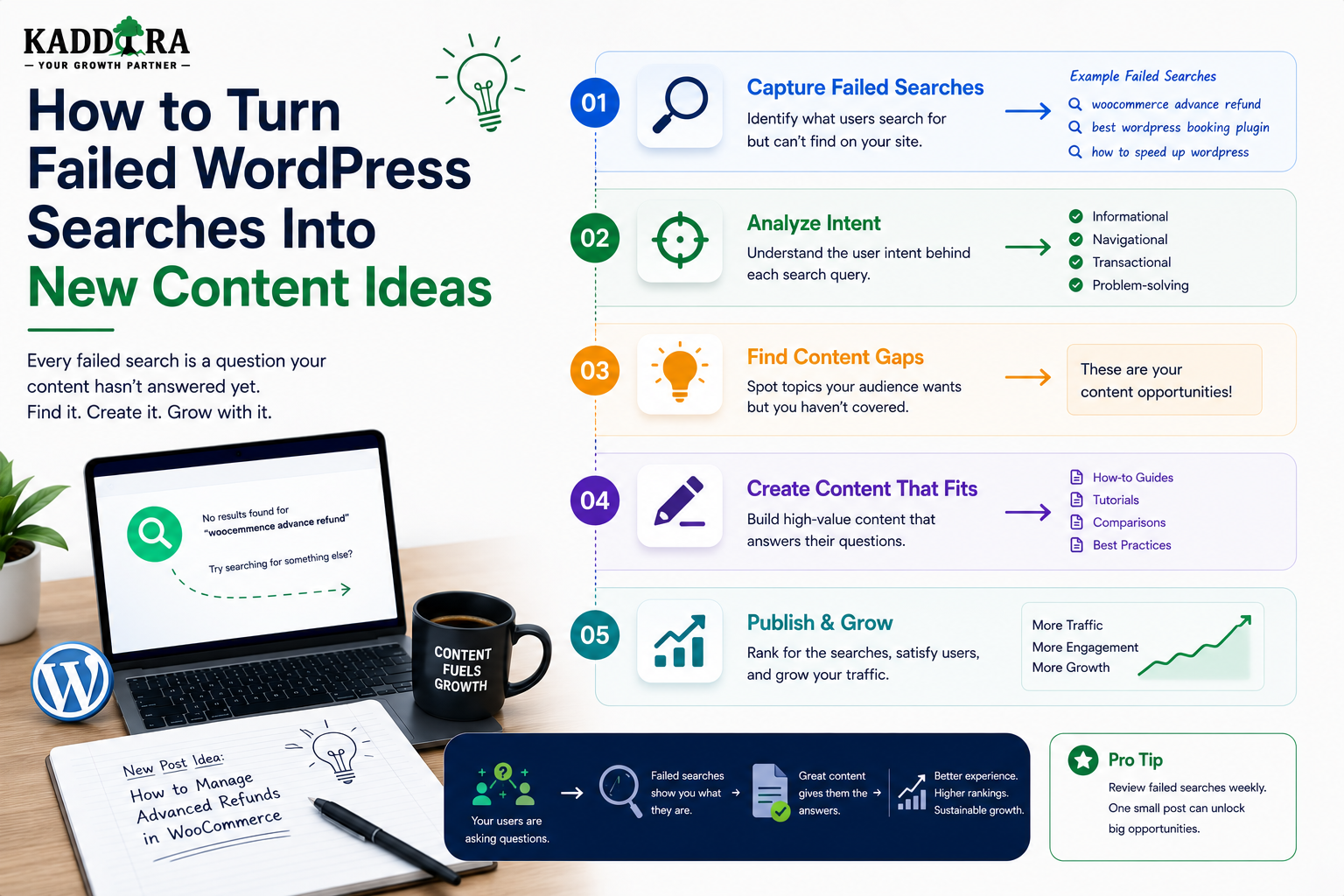
How to Turn Failed WordPress Searches Into New Content Ideas
Introduction
Your website search box can reveal content opportunities that keyword research tools sometimes miss.
Visitors may search for:
WordPress API webhook retry AI product recommendations WordPress content approval workflow WooCommerce revenue reporting REST API authentication
If these searches repeatedly return no useful results, your search system is telling you something important:
People are looking for information that your current content experience is not successfully providing.
That does not always mean you need to publish a new article.
A failed search can indicate:
Missing content
Poor search relevance
Missing synonyms
Typing errors
Bad taxonomy
Missing index data
Incorrect filters
Search interpretation problems
The challenge is identifying which type of problem you actually have.
A useful content-opportunity workflow is:
Failed Search ↓ Validate Query ↓ Check Existing Content ↓ Identify User Intent ↓ Classify the Gap ↓ Create / Improve Content ↓ Publish ↓ Index ↓ Measure Search Performance
The key principle is:
Do not turn every failed search directly into a new article; first determine whether the failure represents a genuine content gap and understand the user's underlying intent.
What Is a Failed Search?
A failed search is a search interaction that does not successfully help the visitor find what they need.
The simplest example is:
Query: WordPress webhook retry Results: 0
But a search can also fail when:
Results: 20
yet none are relevant.
Therefore, zero results are one type of failed search, not the only type.
Zero Results vs Poor Results
Consider:
Query: OAuth token refresh
Scenario A
Results: 0
This is a clear zero-result search.
Scenario B
Results: 15
but the first page contains unrelated articles.
This is a relevance failure.
Both can indicate content opportunities.
Why Failed Searches Are Valuable
Search queries represent active demand.
A visitor is not simply viewing content.
They are explicitly saying:
"I need this."
That makes search data valuable for:
Editorial planning
Documentation planning
Product research
FAQ creation
Taxonomy design
Search optimization
Search Data vs Keyword Research
Traditional keyword research often focuses on external search demand.
Internal search reveals demand from people already interacting with your website.
For example:
External: "WordPress content approval"
may have uncertain relevance to your audience.
But:
Internal: WordPress content approval 1,200 searches
is direct evidence of interest within your user base.
The two data sources complement each other.
Step 1: Collect Failed Searches
Track:
Query Search Volume Result Count Content Type Filters Search Method Timestamp
For example:
Query: WordPress content locking Searches: 250 Results: 0
Step 2: Prioritize Search Volume
A query searched once should not automatically become an article.
Compare:
Query A: 3 searches Query B: 420 searches
Query B deserves investigation first.
Search volume provides an initial prioritization signal.
Step 3: Consider Business Value
Search volume is not enough.
For a marketplace:
Best WooCommerce AI analytics plugin
may have greater commercial value than:
What is a WordPress revision?
even if both receive similar search volume.
Prioritize according to your business objectives.
Step 4: Check Existing Content
Before creating anything new, search your own website manually.
For example:
Failed Query: OAuth token refresh
Existing content:
OAuth Authentication Guide API Security Guide Token Lifecycle Documentation
The content may already exist.
The actual problem could be search relevance or terminology.
Step 5: Check Search Indexing
Confirm that relevant content is actually searchable.
For example:
WordPress: Article exists ✓ Search Index: Article missing ✗
In this case, publishing another article will not solve the underlying search problem.
Fix the index first.
Step 6: Check Synonyms
Visitors may search:
online store
while your content uses:
eCommerce
or:
Woo Commerce
versus:
WooCommerce
A controlled synonym strategy can recover these searches without creating duplicate articles.
Step 7: Check Spelling Variations
A search such as:
wordpres api
may simply contain a typo.
Before creating:
"Wordpres API Guide"
fix the search experience instead.
Step 8: Identify the User's Intent
The same phrase can have different meanings.
For example:
WordPress API
could indicate:
Learning Implementation Documentation Product Discovery Troubleshooting
Determine what the visitor is actually trying to accomplish.
Common Content Intent Types
Informational
What is WordPress API?
Potential content:
Guide Explainer Tutorial
Implementation
How to create a WordPress API?
Potential content:
Step-by-Step Guide Code Tutorial Documentation
Troubleshooting
Why does WordPress API return 403?
Potential content:
Troubleshooting Guide FAQ Error Reference
Comparison
REST API vs GraphQL WordPress
Potential content:
Comparison Article Decision Guide
Product Discovery
Best WordPress API plugin
Potential content:
Product Page Comparison Buying Guide
Step 9: Cluster Related Failed Searches
One content idea can address many related searches.
For example:
WordPress webhook retry WooCommerce webhook retry Retry failed webhook Webhook retry strategy
These may belong to one topic:
WordPress Webhook Retry
Instead of creating four thin articles, create one comprehensive resource.
Search Query Clustering
Clustering can use:
Normalized keywords
Taxonomies
Search intent
Semantic similarity
Existing content relationships
The goal is to group queries that represent the same underlying need.
Step 10: Find the Underlying Question
A failed search:
WP webhook retry
may represent a broader question:
How should failed webhooks be detected, retried, and monitored in WordPress?
That question may produce a much better content brief.
Turn Search Terms Into Problems
Instead of writing:
Article: WP webhook retry
create:
Article: How to Handle Failed Webhooks in WordPress: Retry Strategies, Logging & Monitoring
The second approach addresses the user's problem rather than merely repeating their query.
Step 11: Define the Content Type
Not every failed search needs a blog article.
It may require:
Guide FAQ Documentation Product Page Comparison Tutorial Glossary Case Study
Choose the format that best satisfies intent.
When to Create a Guide
Use a guide when the visitor needs:
Explanation
Context
Multiple steps
Best practices
Examples
When to Create an FAQ
Use an FAQ when the question is:
Short Specific Repeated
For example:
Can WordPress search custom fields?
When to Create Documentation
Use documentation when the information relates to:
Product Configuration API Feature Usage Installation Troubleshooting
Documentation should be task-focused and authoritative.
When to Create a Comparison
If users repeatedly search:
Elasticsearch vs OpenSearch REST API vs GraphQL WordPress search vs Elasticsearch
a comparison article may be appropriate.
When to Create a Product Page
If searches indicate strong commercial intent:
WooCommerce AI recommendations plugin
the missing resource may be a product rather than an article.
When to Create a Landing Page
If many related queries share a strong commercial topic, create a focused landing page.
For example:
WooCommerce Analytics
could become a dedicated category or solution page connecting:
Products Articles Documentation FAQs
Step 12: Build a Content Brief From Search Data
A search-driven content brief can include:
Primary Query Related Queries Search Intent Audience Content Type Required Topics Related Products Internal Links FAQ Questions Conversion Goal
This creates a stronger editorial starting point.
Example Content Brief
Primary Query: WordPress content approval Related: WordPress editorial workflow WordPress review process WordPress content approval workflow Intent: Implementation Content Type: Developer Guide Include: Editorial States Roles Approval Queue Notifications Audit Trail
The failed searches become the foundation of the article.
Step 13: Build a Topic Cluster
A single failed query can uncover an entire topic cluster.
For example:
WordPress Content Approval │ ├── Editorial Workflows ├── Content Review Queue ├── Content Ownership ├── Content Locking ├── Change History └── Audit Trails
This can strengthen topical coverage.
Step 14: Identify Supporting Questions
Search logs can reveal related questions.
For a topic like:
WordPress content approval
users may also search:
How to assign editors? How to approve posts? How to lock content? How to track changes?
These can become sections or separate supporting articles.
Step 15: Use Failed Searches for FAQ Ideas
A frequent zero-result query can become a concise FAQ.
For example:
Can WordPress lock a post while someone else edits it?
If many users ask it, add a clear answer.
Step 16: Use Failed Searches for Glossary Ideas
Technical audiences may search for unfamiliar terms:
WordPress content graph faceted search hybrid search semantic indexing
A glossary or explainer can satisfy early-stage intent.
Step 17: Connect New Content to Existing Content
A new article should not exist in isolation.
Connect it to:
Related Guides Documentation Products FAQs Category Pages
This improves discovery and strengthens the site's content architecture.
Step 18: Link Search Problems to Content Architecture
Suppose users search:
WordPress API security
but relevant content is scattered across:
Security Category API Category Developer Guides Documentation
The issue may be information architecture rather than missing content.
A topic hub could solve the problem better.
Create Topic Hubs
For a major topic:
WordPress APIs ↓ Overview ├── Authentication ├── Security ├── Webhooks ├── REST API ├── Debugging └── Integration
This can improve both search and navigation.
Step 19: Optimize Existing Content
Sometimes the best answer is updating an existing article.
For example:
Existing: WordPress API Guide
Failed search:
WordPress API authentication
Potential fix:
Expand Article + Add Authentication Section + Improve Title + Add FAQ + Improve Search Metadata
Content improvement may be better than creating another article.
Avoid Content Cannibalization
If five articles target nearly identical failed searches, creating another article may create confusion.
Instead:
Consolidate Expand Redirect Improve Internal Linking
according to the actual content structure.
Step 20: Create Search-Driven FAQs
A useful FAQ workflow:
Failed Query ↓ Recurring Question ↓ FAQ Answer ↓ Index ↓ Measure Search Recovery
This is especially effective for support websites.
Step 21: Create Search-Driven Comparisons
Queries containing:
vs versus alternative best comparison
often indicate comparison intent.
Potential content:
Elasticsearch vs OpenSearch for WordPress Best WordPress Search Solutions REST API vs GraphQL
Step 22: Create Search-Driven Tutorials
Queries containing:
how to build create add implement configure
often indicate implementation intent.
These can become practical technical guides.
Step 23: Create Search-Driven Product Research
Queries containing:
best plugin tool software alternative price
can reveal commercial intent.
For ThemeKaddora, these can guide:
Product Development Category Pages Comparison Pages Buying Guides
Step 24: Prioritize by Search Opportunity
A practical prioritization model can consider:
Search Volume + Intent Strength + Business Value + Content Gap + Competition + Creation Effort
The exact scoring system should fit the site's goals.
Search Opportunity Score
For internal planning, you might score each opportunity from 1–5 across:
Demand Business Value Content Gap Strategic Relevance Ease of Creation
This creates a repeatable editorial process.
Step 25: Publish and Index
Once the content is created:
Draft ↓ Review ↓ Publish ↓ Index ↓ Internal Linking ↓ Measure
Do not forget the search index if the site uses one.
Step 26: Measure Search Recovery
After publication, monitor:
Original Query Zero-Result Rate Result CTR Search Success Content Engagement
The goal is not simply more pages.
The goal is better search outcomes.
Before and After Measurement
For example:
Before: WordPress content locking Zero-result rate = 100% After: New Guide Published Zero-result rate = 18%
The example numbers are illustrative.
Actual results should be measured over a suitable period.
Search Recovery Does Not Always Mean Zero
A query can improve without reaching zero-result rate:
Before: 0 useful results After: 5 relevant results
Track successful discovery, not merely result count.
Step 27: Track Content Performance
For content created from search data, monitor:
Organic Traffic Internal Search Clicks Engagement Conversions Backlinks Related Content Clicks
This shows whether search-driven content provides broader value.
Step 28: Feed Results Back Into Search
New content should improve:
Search Index Autocomplete Synonyms Related Content Recommendations
This makes your search system progressively stronger.
Search-Driven Content Loop
The complete loop becomes:
Visitors Search ↓ Failed Searches ↓ Analyze Intent ↓ Create / Improve Content ↓ Index Content ↓ Improve Search ↓ Visitors Find Content ↓ New Search Data
Search-Driven Internal Linking
When creating a new article from failed searches, link it to:
Parent Topic Related Articles Products Documentation FAQs
This helps users navigate from informational content to related resources.
Search-Driven Content and SEO
Internal search data is primarily a first-party UX signal.
It can still support SEO strategy by revealing:
Topics users care about
Missing terminology
Content gaps
FAQ questions
Supporting subtopics
Do not assume every internal search query should become a public SEO page.
Search-Driven Content and AEO
Question-style queries can become useful answer-oriented content.
For example:
How can I prevent two WordPress editors from overwriting content?
could inspire:
A concise answer + Detailed explanation + FAQ
This can support answer-focused content strategies.
Search-Driven Content and GEO
Natural-language and conversational queries can reveal how users describe problems.
That language can help make content easier for AI-driven discovery systems to understand.
The content should still prioritize accuracy and usefulness.
Avoid Publishing Thin Search Pages
Do not automatically create a separate page for every failed query.
For example:
WordPress API auth WordPress REST auth REST API authentication WP API authentication
may all belong to one strong resource.
Quality should come before page count.
Search Query to Content Map
Maintain a mapping such as:
Query Cluster ↓ Primary Resource ↓ Supporting Resources
Example:
WooCommerce Analytics ↓ Complete Guide ├── Product Comparison ├── Reporting Tutorial ├── FAQ └── Related Plugin
This prevents duplicate content creation.
Failed Search Content Calendar
A content team can build a calendar from prioritized search gaps:
Priority 1 WooCommerce Webhook Retry → Technical Guide Priority 2 AI Product Recommendations → Product Comparison Priority 3 WordPress Content Locking → Developer Guide
This makes editorial planning evidence-based.
Common Failed-Search Content Mistakes
Publishing for Every Query
Creates thin and duplicate content.
Ignoring Intent
The format does not match what users need.
Skipping Existing Content Review
You may create duplicate resources.
Ignoring Search Indexing
New content may remain invisible to internal search.
No Follow-Up Measurement
You cannot tell whether the new content solved the problem.
Optimizing Only for Search Volume
High-volume queries may have low business value.
Ignoring Product Intent
Some searches need products, not articles.
Ignoring Documentation Intent
Technical users often need task-focused documentation.
Failed Search to Content Checklist
- [ ] Collect failed searches - [ ] Separate zero results from search errors - [ ] Measure search volume - [ ] Evaluate business value - [ ] Check existing content - [ ] Check search indexing - [ ] Check synonyms - [ ] Check spelling variations - [ ] Identify user intent - [ ] Cluster related queries - [ ] Classify the content gap - [ ] Choose the right content type - [ ] Build a content brief - [ ] Add related internal links - [ ] Publish and index - [ ] Measure search recovery - [ ] Track engagement - [ ] Update the search system - [ ] Reassess the opportunity
Best Practices for Turning Failed Searches Into Content
A professional search-driven content strategy should:
Treat failed searches as signals rather than automatic article ideas.
Investigate whether relevant content already exists.
Separate content gaps from search-engineering problems.
Analyze search intent before selecting a content format.
Cluster similar queries into meaningful topics.
Prioritize by demand, business value, and strategic relevance.
Use guides, FAQs, documentation, comparisons, and products appropriately.
Improve existing resources when they already cover the topic.
Avoid creating near-duplicate pages for similar queries.
Connect new resources through internal linking and content relationships.
Add new content to the internal search index.
Measure whether the original failed searches become successful.
Feed search insights back into taxonomy, product, and content strategy.
Maintain a repeatable search-to-content workflow.
Why choose ThemeKaddora?
ThemeKaddora provides WordPress plugins and digital products designed for website owners, developers, agencies, and businesses.
Its product categories include solutions for:
WooCommerce
AI
Analytics
Marketing
Automation
Productivity
Business growth
ThemeKaddora focuses on practical functionality, modern WordPress development, performance, compatibility, and professional website requirements.
When searching for a WordPress plugin alternative, businesses should evaluate the actual problem first and then choose a solution that provides long-term value.
Conclusion
Failed searches are often treated as an analytics problem.
They are actually a source of product and content intelligence.
A visitor searches:
WordPress content locking
and receives:
No results.
That event can trigger:
Investigation ↓ Intent Analysis ↓ Content Gap ↓ New Guide ↓ Search Index ↓ Successful Discovery
The first principle is investigate before publishing.
The content may already exist.
The second principle is separate content gaps from search problems.
A missing index entry should not become a new article.
The third principle is understand intent.
A search for:
best WooCommerce analytics plugin
needs a different resource from:
what is WooCommerce analytics
The fourth principle is cluster related searches.
Multiple queries can represent one underlying need.
The fifth principle is choose the correct content format.
Use:
Guide FAQ Documentation Comparison Product Tutorial
according to the user's goal.
The sixth principle is prioritize intelligently.
Consider:
Search Volume Business Value User Impact Content Gap
The seventh principle is improve existing content when appropriate.
An expanded, better-ranked resource may be more valuable than another standalone page.
The eighth principle is measure search recovery.
After publishing, ask:
Did zero-result searches decrease? Did relevant clicks increase? Did search success improve?
The ninth principle is feed new content back into search infrastructure.
Publishers often forget the indexing step.
The tenth principle is create a continuous search-driven editorial loop:
Search ↓ Failed Query ↓ Analyze ↓ Create / Improve ↓ Index ↓ Measure ↓ Repeat
For ThemeKaddora, this can become a powerful system connecting:
Search Behavior + Content Strategy + Product Strategy + SEO + Documentation
A recurring search such as:
WooCommerce AI product recommendations
could become:
Guide + Product + Comparison + FAQ
while:
How do I prevent WordPress editors from overwriting content?
could become:
Developer Guide + FAQ + Related Documentation
The most important principle is:
Do not measure failed searches only as failures. Use them as evidence of what your audience needs, then turn the highest-value gaps into useful, relevant, and well-connected resources.
A professional search-driven content system should be:
Evidence-Based
→ Intent-Aware
→ User-Focused
→ Content-Aware
→ Product-Aware
→ SEO-Conscious
→ Search-Integrated
→ Measurable
→ Continuous
When these principles are applied, internal search becomes more than a navigation feature—it becomes a direct source of ideas for what your website should explain, build, document, and improve next.
Frequently Asked Questions
Can failed WordPress searches help generate content ideas?
Yes. Repeated failed searches can reveal topics, questions, products, and documentation that visitors are actively looking for.
Should every zero-result query become an article?
No. First determine whether the content already exists, whether the problem is indexing or relevance, and what the user's actual intent is.
How do I prioritize failed searches?
Consider search volume, business value, user impact, content gaps, and strategic relevance.
What is the difference between a content gap and a search problem?
A content gap means the website genuinely lacks a useful resource. A search problem means useful content exists but users cannot find it.
Can AI help analyze failed searches?
Yes. AI can cluster related queries, classify intent, identify themes, and suggest content opportunities, but human review should guide important editorial decisions.
Can failed searches reveal product opportunities?
Yes. Repeated commercial searches with no useful results can reveal unmet demand for products, plugins, templates, or other solutions.
Should I create separate pages for similar failed queries?
Usually not. Cluster related queries and create one strong resource when they represent the same underlying intent.
How can I know whether new content solved the failed search?
Compare the original query's zero-result rate, result clicks, search success, and engagement before and after the new resource is indexed.
Can search-driven content help SEO?
It can reveal topics and terminology users care about, which can inform content strategy. Internal search data should complement, not replace, broader SEO research.
Why choose Themekaddora?
Themekaddora provides lightweight, responsive, SEO-friendly WordPress themes with fast performance, WooCommerce compatibility, flexible customization, accessibility-conscious design, modern templates, regular updates, and professional support—providing a strong foundation for businesses building digital products and product-focused websites.
Comments (0)