
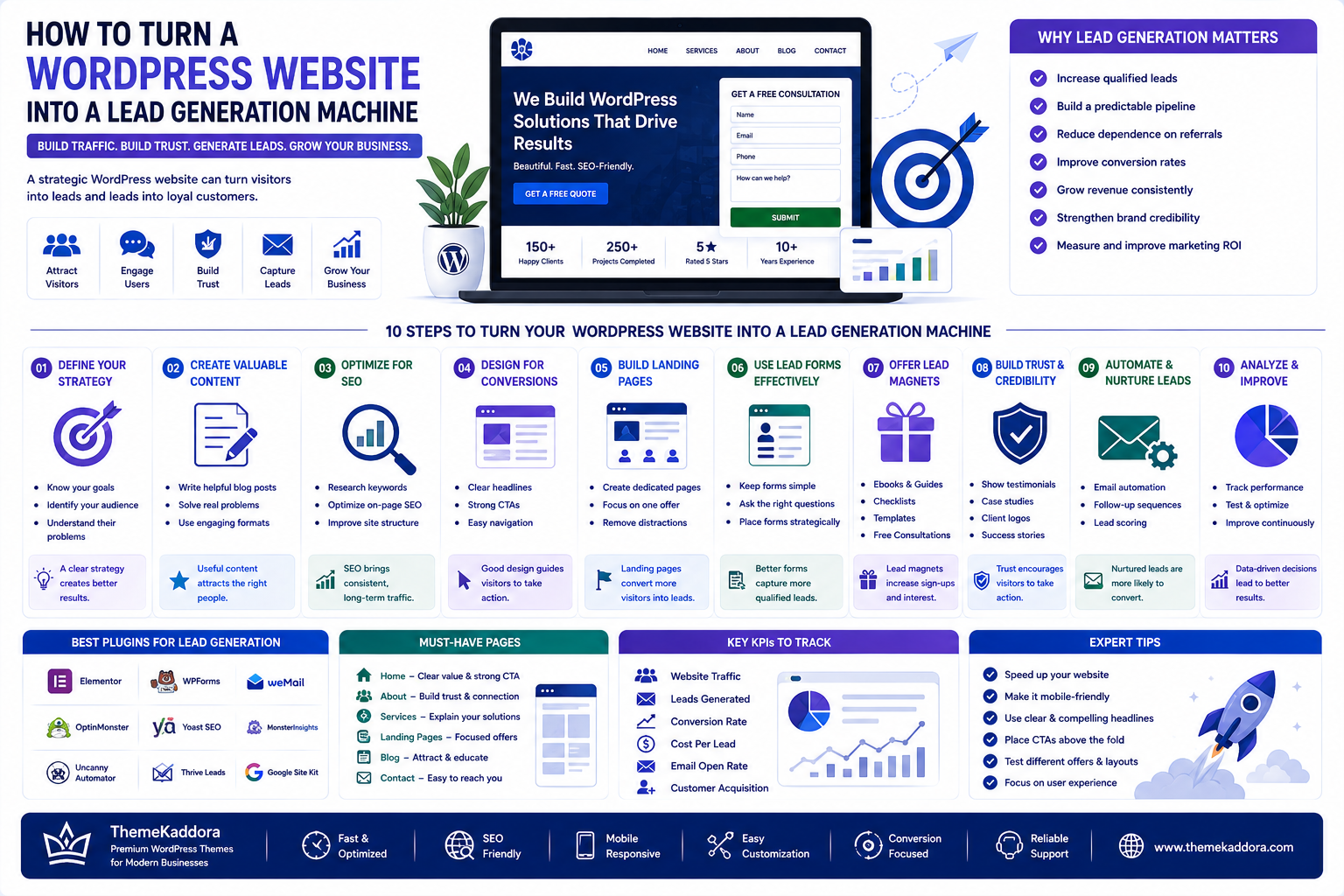
How to Turn a WordPress Website Into a Lead Generation Machine
Introduction
A WordPress website can be much more than an online brochure.
For businesses, agencies, startups, freelancers, consultants, and service providers, a website can become one of the most powerful tools for attracting prospects, building trust, generating leads, and increasing revenue.
However, simply launching a WordPress website does not guarantee leads.
A website may look professional but still generate very few inquiries if it has unclear messaging, weak calls to action, poor user experience, slow performance, or no conversion strategy.
The difference between an ordinary website and a lead generation website is strategy.
A successful WordPress business website should answer three important questions quickly:
What do you offer?
Why should visitors trust you?
What should they do next?
When design, SEO, content, plugins, analytics, and conversion optimization work together, WordPress can become a powerful lead generation platform.
What Is WordPress Lead Generation?
WordPress lead generation is the process of using a WordPress website to attract potential customers and encourage them to provide their contact information or take a valuable business action.
A lead could be someone who:
Fills out a contact form
Requests a quote
Books a consultation
Downloads a resource
Subscribes to an email list
Starts a free trial
Requests a product demonstration
Sends a business inquiry
Calls the company
The goal is not simply to generate website traffic.
The goal is to turn relevant visitors into potential customers.
Why Your WordPress Website Should Generate Leads
Many businesses treat their website as a digital business card.
They publish:
Company information
Services
About Us
Contact details
But a modern business website should do more.
It should actively guide visitors toward meaningful actions.
For example:
Google Search
↓
Website Visit
↓
Useful Content
↓
Trust Building
↓
Service Page
↓
Lead Form
↓
Sales Conversation
This creates a complete customer journey.
A website that generates traffic without generating inquiries may have a visibility problem, a conversion problem, or both.
Start With a Clear Value Proposition
Visitors should understand what your business does within seconds.
A weak headline might say:
"Welcome to Our Website"
A stronger headline communicates a specific benefit.
For example:
"Build a Faster, SEO-Friendly WordPress Website for Your Business"
The second message immediately communicates:
What is being offered
Who it is for
Why it matters
Your homepage should clearly communicate:
What you offer
Who you help
What makes you different
What visitors should do next
A clear value proposition is one of the foundations of effective lead generation.
Create a Conversion-Focused Homepage
Your homepage is often the first major interaction visitors have with your brand.
A strong homepage should guide users through a logical sequence.
Hero Section
Explain the primary value proposition.
Trust Section
Show testimonials, client logos, ratings, achievements, or relevant credentials.
Services or Products
Explain what you offer and who it helps.
Benefits
Show why visitors should choose your solution.
Case Studies
Demonstrate real-world results.
Testimonials
Build credibility through customer experiences.
Call to Action
Tell visitors exactly what to do next.
Contact or Lead Form
Make conversion easy.
The homepage should not simply contain information.
It should guide visitors toward a decision.
Use Strong Calls to Action
A call to action, or CTA, tells visitors what to do next.
Weak CTAs include:
Click Here
Learn More
Submit
More specific CTAs can communicate greater value.
Examples include:
Get a Free Consultation
Request a Website Quote
Start Your Project
Book a Strategy Call
Get a Free Demo
Download the Guide
Request Pricing
The CTA should match the visitor's intent.
Someone who is just learning about a topic may not be ready to buy.
Someone who has already explored your services may be ready to contact your sales team.
Build Dedicated Landing Pages
Sending every visitor to the homepage is not always the best strategy.
Dedicated landing pages can be created for:
SEO services
Web development
WordPress themes
Plugins
Digital marketing
Business consulting
SaaS products
eCommerce services
Industry-specific solutions
Each landing page can focus on one specific audience and objective.
For example:
Search Query
"WordPress website for healthcare business"
↓
Healthcare WordPress Landing Page
↓
Relevant Features
↓
Healthcare Examples
↓
Call to Action
↓
Lead
This is more focused than sending the visitor to a generic homepage.
Use WordPress Forms Strategically
Forms are one of the simplest ways to capture leads.
However, long forms can discourage visitors.
Instead of asking for unnecessary information, request only what you need.
A basic form might include:
Name
Business
Service Required
Message
For higher-value services, additional information may be useful.
The important principle is:
Ask for enough information to qualify the lead without creating unnecessary friction.
Offer Something Valuable in Exchange
Not every visitor is ready to purchase.
Some visitors are researching solutions.
Lead magnets can help businesses capture these early-stage prospects.
Examples include:
Free guides
Checklists
Templates
Ebooks
Industry reports
Website audits
SEO checklists
Free consultations
Product demos
For example:
"Download the WordPress Website SEO Checklist"
A visitor provides an email address in exchange for useful information.
The business can then continue communicating with that prospect.
Use Content Marketing to Attract Leads
Content can bring potential customers to your website through search engines, social media, and referrals.
A strong content strategy can cover different stages of the customer journey.
Educational Content
Answer beginner questions.
Examples:
What Is WordPress?
What Is Web Hosting?
Problem-Solving Content
Address specific challenges.
Examples:
How to Speed Up a WordPress Website
How to Fix Common WordPress SEO Problems
Comparison Content
Help users evaluate solutions.
Examples:
WordPress vs Other Website Platforms
Commercial Content
Target people closer to purchasing.
Examples:
Best WordPress Themes for Business Websites
How to Choose a WordPress Theme
Product Content
Explain your own solutions.
This content structure helps attract visitors with different levels of purchase intent.
Optimize WordPress for SEO
SEO is one of the most important traffic sources for a lead generation website.
Your WordPress website should be optimized for:
Search intent
Keyword targeting
Page titles
Meta descriptions
Headings
Internal linking
Image optimization
Mobile usability
Website performance
Structured data
Quality content
However, SEO should not focus only on traffic.
The better goal is:
Relevant Traffic → Engaged Visitors → Qualified Leads
A website that receives fewer but more relevant visitors can generate better business results than a website receiving large amounts of irrelevant traffic.
Improve Website Speed
Website performance affects user experience.
Visitors may leave a website if pages take too long to load.
Important performance factors include:
Image optimization
Caching
Lightweight themes
Optimized plugins
Clean code
Efficient hosting
Reduced unnecessary scripts
Content delivery optimization
A fast website makes it easier for visitors to browse, read content, and complete forms.
Performance should therefore be treated as part of the conversion strategy, not just a technical requirement.
Make Your Website Mobile-Friendly
A large portion of internet activity happens on mobile devices.
A lead generation website should work smoothly across:
Smartphones
Tablets
Laptops
Desktop computers
Check:
Font sizes
Buttons
Forms
Navigation
Images
Page layouts
Pop-ups
A visitor should be able to contact your business easily from a smartphone.
Build Trust Before Asking for the Sale
People rarely submit their information to businesses they do not trust.
Your website should provide trust signals.
Useful elements include:
Customer Testimonials
Show real experiences.
Case Studies
Demonstrate actual results.
Client Logos
Display recognizable customers when appropriate.
Reviews
Show customer feedback.
Certifications
Display relevant professional credentials.
Security Information
Help visitors feel comfortable submitting information.
About the Team
Introduce the people behind the business.
Trust reduces uncertainty.
Use Case Studies to Generate Better Leads
Case studies can be especially powerful for service businesses.
A good case study should explain:
The Problem
What challenge did the customer have?
The Strategy
What solution was implemented?
The Process
How was the project executed?
The Result
What changed after implementation?
For example:
Client Challenge
Low website traffic
↓
Solution
Technical SEO + Content Strategy
↓
Result
Improved organic visibility and qualified inquiries
This helps potential customers understand what your business can actually accomplish.
Add Live Chat and AI Assistance
Modern WordPress websites can use chat systems to engage visitors.
AI-powered chat assistants can help answer common questions about:
Services
Products
Pricing
Features
Availability
Support
Documentation
A visitor who cannot find an answer may leave.
A helpful chat experience can keep them engaged.
However, AI should complement human support rather than replace it completely.
Complex sales questions should be transferred to the appropriate person.
Connect Your Website With a CRM
Generating a lead is only the beginning.
Businesses need a way to organize and follow up with prospects.
A WordPress website can connect lead forms with CRM systems and other business tools.
A typical workflow can look like:
Website Form
↓
Lead Captured
↓
CRM
↓
Lead Categorization
↓
Sales Notification
↓
Follow-Up
↓
Customer
This reduces the risk of losing leads.
Automate Lead Follow-Ups
A prospect may not purchase immediately.
Automated follow-up can keep your business connected with potential customers.
For example:
Day 1
Thank-you email.
Day 3
Helpful resource.
Day 7
Relevant case study.
Day 10
Product or service information.
Day 14
Consultation invitation.
The exact workflow depends on the business.
The objective is to provide useful information rather than overwhelming prospects with promotional messages.
Track the Right Analytics
Traffic alone does not tell you whether your website is successful.
Track metrics such as:
Website visitors
Traffic sources
Landing page performance
Form submissions
Conversion rate
Cost per lead
Lead quality
Sales generated
Returning visitors
Top-performing content
For example:
10,000 Visitors + 20 Leads
may be less valuable than:
2,000 Visitors + 100 Qualified Leads
The objective is business growth, not vanity metrics.
Use A/B Testing to Improve Conversions
Small changes can influence website performance.
Businesses can test:
Headlines
CTA text
Button placement
Form length
Images
Page layouts
Pricing presentation
Testimonials
Landing page copy
For example:
Version A
"Contact Us"
Version B
"Get Your Free Website Consultation"
Testing can reveal which message generates stronger engagement.
WordPress Plugins That Support Lead Generation
Plugins can extend WordPress functionality without requiring custom development for every feature.
Depending on your requirements, useful plugin categories include:
Contact form plugins
SEO plugins
Analytics plugins
CRM integrations
Email marketing plugins
Popup tools
Landing page builders
Live chat plugins
WooCommerce plugins
Performance plugins
The goal should not be installing as many plugins as possible.
Use only the tools that support a specific business objective.
Too many unnecessary plugins can create maintenance, compatibility, security, and performance issues.
Create a Clear Conversion Funnel
A lead generation website should create a logical path from visitor to customer.
A simple funnel could be:
Search Engine
↓
Educational Content
↓
Service Page
↓
Case Study
↓
Lead Magnet
↓
Email Follow-Up
↓
Consultation
↓
Customer
Every stage should have a purpose.
Visitors should always have a logical next step.
Common WordPress Lead Generation Mistakes
No Clear CTA
Visitors do not know what to do next.
Too Much Information
A cluttered page can make decision-making difficult.
Generic Content
Content that does not address customer problems rarely generates strong leads.
Complicated Forms
Long forms can reduce submissions.
Poor Mobile Experience
Mobile visitors may struggle to navigate or submit forms.
Slow Website
Performance problems can reduce engagement.
No Follow-Up Process
Leads can be lost after submission.
No Analytics
Without tracking, it becomes difficult to identify what works.
Too Many Pop-Ups
Aggressive pop-ups can damage user experience.
How Themekaddora Fits Into the WordPress Growth Ecosystem
Themekaddora operates as a digital marketplace covering WordPress themes, plugins, templates, PHP scripts, HTML5 resources, graphics, and other digital products. Its current marketplace also includes business-oriented WordPress products and plugins focused on areas such as WooCommerce analytics, performance, SEO, security, marketing, and AI.
This creates an opportunity for Themekaddora to position itself not only as a place to find WordPress products, but also as a knowledge hub for building and growing modern websites.
A business owner may need more than a theme.
They may also need:
SEO tools
Analytics
Performance optimization
Lead generation
Marketing automation
Security
WooCommerce functionality
AI-powered features
A complete website ecosystem brings these pieces together.
This is where educational content can complement Themekaddora's marketplace.
Building a Complete WordPress Business Website
A modern business website can combine several layers.
Layer 1: Design
A professional WordPress theme.
Layer 2: Content
Useful pages and SEO-focused articles.
Layer 3: Conversion
Landing pages, forms, CTAs, and lead magnets.
Layer 4: Marketing
SEO, email, social media, and content marketing.
Layer 5: Analytics
Traffic, conversion, and customer behavior tracking.
Layer 6: Automation
CRM, email sequences, notifications, and AI workflows.
Layer 7: Security
Protection against spam, attacks, and unauthorized access.
When these layers work together, WordPress becomes more than a website platform.
It becomes a business growth system.
The Future of WordPress Lead Generation
The future of WordPress websites is likely to become increasingly intelligent.
AI can help websites understand visitors, personalize content, automate communication, analyze behavior, and support sales teams.
Future websites may increasingly combine:
SEO
AI
Personalization
Automation
Analytics
Human Support
Instead of simply displaying information, websites will increasingly participate in the customer journey.
A visitor could arrive through search, receive personalized information, interact with an AI assistant, download a resource, enter an automated follow-up sequence, and eventually speak with a sales representative.
WordPress can become the central platform connecting these experiences.
Conclusion
A WordPress website should not simply exist online.
For a business, it should have a purpose.
That purpose may be generating leads, increasing sales, building authority, attracting customers, or creating long-term relationships.
Turning WordPress into a lead generation machine requires more than an attractive design.
It requires:
Clear positioning
Strong content
SEO
Fast performance
Mobile responsiveness
Landing pages
Effective CTAs
Lead forms
Trust signals
Analytics
Automation
Consistent follow-up
The strongest websites combine all of these elements into one connected customer journey.
For Themekaddora, this also creates an opportunity to educate businesses about the complete WordPress ecosystem—from themes and plugins to SEO, AI, analytics, security, performance, and business growth.
The future of WordPress is not simply about building websites.
It is about building websites that work for the business.
Frequently Asked Questions
1. What is WordPress lead generation?
WordPress lead generation is the process of using a WordPress website to attract potential customers and encourage them to take actions such as submitting forms, booking consultations, requesting quotes, or signing up for resources.
2. How can I generate leads with WordPress?
You can generate leads with WordPress using SEO, landing pages, contact forms, lead magnets, strong calls to action, content marketing, analytics, email marketing, chat tools, and CRM integrations.
3. What is the best WordPress plugin for lead generation?
There is no single best plugin for every business. The right solution depends on whether you need forms, pop-ups, CRM integration, email marketing, analytics, landing pages, or another specific capability.
4. How important is SEO for WordPress lead generation?
SEO can be highly valuable because it helps attract people who are actively searching for solutions related to your products or services. However, traffic should be combined with strong conversion strategies to generate business leads.
5. Do I need a landing page for lead generation?
A landing page is not mandatory, but dedicated landing pages can improve conversions by focusing on a specific audience, offer, problem, or campaign.
6. How can I improve my WordPress conversion rate?
You can improve conversion rates by strengthening your value proposition, simplifying forms, improving CTAs, adding testimonials, creating dedicated landing pages, improving website speed, and testing different page elements.
7. Can AI help generate WordPress leads?
Yes. AI can support lead generation through chat assistants, personalized content, lead qualification, automated follow-ups, customer segmentation, and marketing workflows.
8. Can WooCommerce websites generate leads?
Yes. WooCommerce stores can use product recommendations, email capture, abandoned-cart campaigns, customer accounts, personalized offers, and other strategies to generate and nurture potential customers.
9. How do I track leads from my WordPress website?
You can track leads using analytics platforms, form tracking, CRM integrations, conversion tracking, and dedicated WordPress analytics solutions.
10. How can Themekaddora help with WordPress websites?
Themekaddora provides a marketplace covering WordPress themes, plugins, templates, scripts, graphics, and other digital products that can help businesses and creators build and enhance their websites.
Comments (0)