
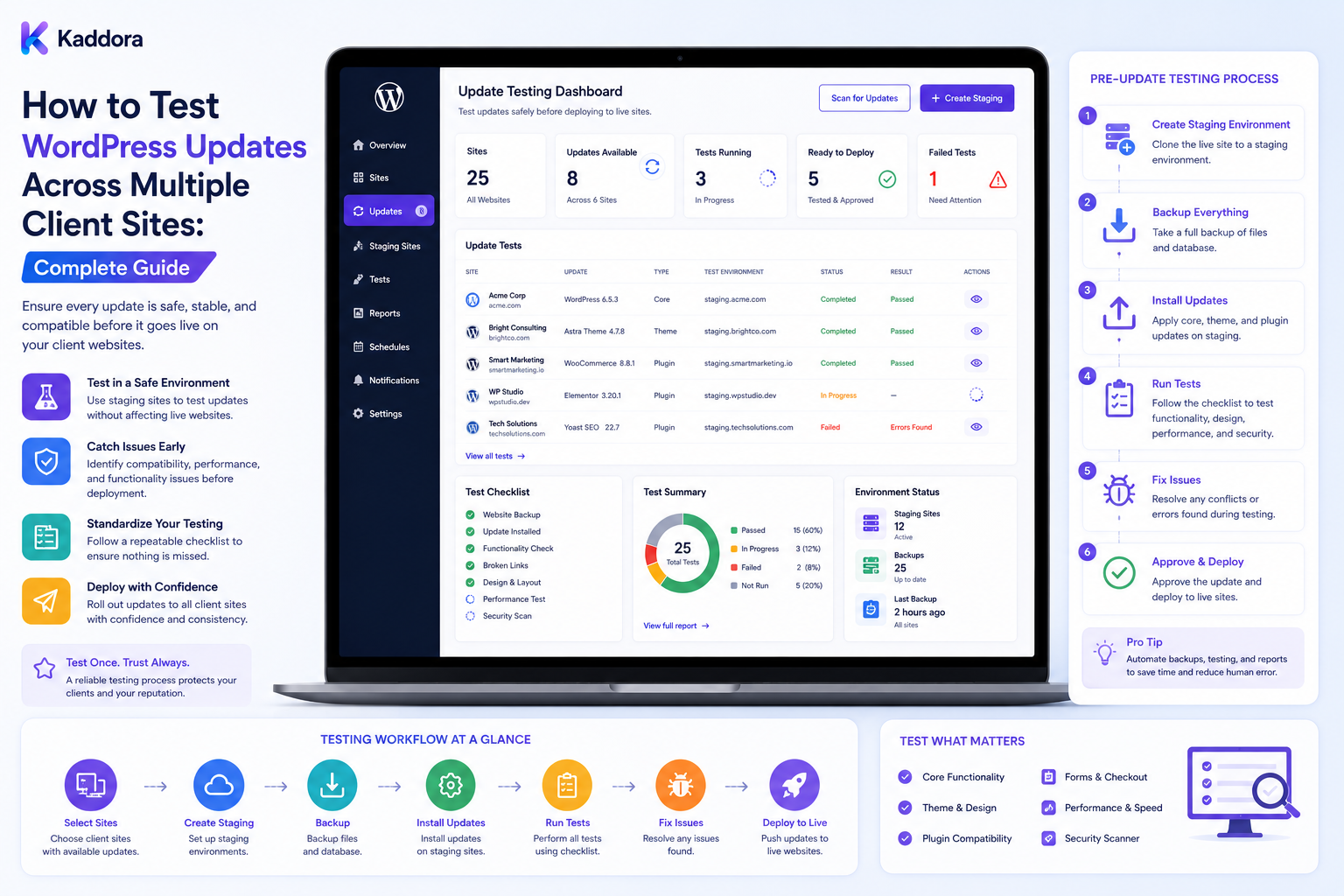
How to Test WordPress Updates Across Multiple Client Sites: Complete Guide
Introduction
Testing a WordPress update on one website is manageable.
Testing updates across dozens or hundreds of client websites requires a different strategy.
Client websites rarely have identical environments.
They may use different:
WordPress versions
Themes
Plugins
WooCommerce extensions
Hosting platforms
Custom code
APIs
Databases
Caching systems
Because of these differences, an update that succeeds on one website can fail on another.
For agencies, the challenge is therefore not simply:
Does the update install?
The better question is:
Does the update work safely in the environments where it will actually be deployed?
A scalable testing workflow can look like:
Update Available ↓ Inventory Review ↓ Compatibility Analysis ↓ Representative Test Group ↓ Staging ↓ Automated Tests ↓ Manual QA ↓ Approval ↓ Production Deployment ↓ Post-Update Verification
The objective is to reduce update risk without making every deployment unnecessarily slow.
A strong WordPress agency testing strategy combines representative environments, automated checks, business-critical workflow testing, controlled approvals, and post-update monitoring.
Why Multi-Client Update Testing Is Difficult
A single plugin may run across:
Client A → Simple Business Site Client B → WooCommerce Store Client C → Custom Theme Client D → Membership Website Client E → SaaS Integration
The same update may interact differently with each environment.
This is why agencies should avoid testing only one "standard" website and assuming the results apply everywhere.
Build a Client Compatibility Inventory
Start by recording:
Client Site Environment WordPress PHP Theme Plugins WooCommerce Custom Code Hosting Risk Level
This becomes the foundation of update testing.
Create a Compatibility Matrix
A matrix can show which combinations require testing.
Component
WordPress
PHP
WooCommerce
Theme
Risk
Plugin A
Current
Supported
N/A
Custom
Medium
Plugin B
Current
Supported
Current
Store Theme
High
Theme C
Current
Current
Current
Child Theme
High
The matrix should be based on actual supported environments.
Group Similar Client Sites
Instead of testing every site individually from the beginning, group sites by meaningful characteristics.
For example:
Group A Simple Marketing Sites Group B WooCommerce Group C Custom Themes Group D High-Traffic Sites
Testing becomes more efficient when groups represent real compatibility differences.
Choose Representative Test Sites
A representative site should reflect important characteristics of the wider group.
For example, a WooCommerce pilot group might include:
Different PHP Version Different Theme Large Product Catalog Custom Checkout Third-Party Payment
One simple website is not enough to represent all of them.
Use Staging Environments
For important updates:
Production ↓ Staging Copy ↓ Apply Update ↓ Test ↓ Approve ↓ Production
Staging provides a safer environment for compatibility testing.
Keep Staging Close to Production
Important characteristics should match where practical:
PHP WordPress Theme Plugins Database Structure Caching External Integrations
Significant differences can make staging results misleading.
Protect Staging Data
If production data is copied into staging, consider:
Customer Information Orders User Data API Credentials Emails Payments
Sensitive information should be minimized, anonymized, or otherwise handled appropriately.
Disable Production Integrations
Staging should not accidentally:
Send customer emails
Process live payments
Trigger production webhooks
Modify production CRM data
Process production queues
Use sandbox services or isolated integrations whenever available.
Capture a Baseline Before Updating
Before applying an update, record important baseline information:
Homepage Login Forms Search Checkout APIs Email Performance
This makes comparison easier after the update.
Test the Update Installation
First verify:
Package Downloads Installation Activation Database Migration Dependencies
An update that installs successfully can still break functionality.
Test Frontend Workflows
Check important user-facing pages:
Homepage Landing Pages Posts Products Search Forms
Look for:
Layout Errors JavaScript Failures Missing Content Broken Links
Test Authentication
For relevant websites, test:
Login Logout Password Reset Registration Account Pages Role Permissions
An update can affect authentication or custom user workflows.
Test Forms
Forms often represent important business functions.
Verify:
Submission Validation Email CRM Spam Protection Success Response
A form can appear visually correct while its backend workflow fails.
Test WooCommerce
For ecommerce websites, test:
Product Cart Checkout Payment Shipping Tax Coupon Order Email
The exact test should reflect the store's architecture.
Test APIs
Check important integrations:
CRM Payment Email Analytics AI Search Automation
Verify authentication, response handling, and error behavior.
Test Background Jobs
Some updates affect:
Cron Queues Imports Exports Synchronization Reports
Check that important background jobs still execute correctly.
Database Testing
If an update changes the database, verify:
Migration Tables Data Integrity Queries Reports
Do not assume a successful migration means the application is fully compatible.
Performance Testing
Compare important metrics before and after the update:
Response Time Page Performance Database Query Time Error Rate
A small performance change may be acceptable, while a major regression may require investigation.
Visual Regression Testing
Theme and frontend plugin updates can produce visual changes.
Automated screenshot comparisons can detect:
Layout Shifts Missing Elements Typography Changes Broken Components
This is especially useful for agencies managing recurring website updates.
Browser Testing
Test supported browsers for workflows where compatibility matters.
Focus on actual client requirements rather than attempting to support every browser.
Mobile Testing
Check important pages on supported mobile screen sizes.
Pay particular attention to:
Navigation Forms Checkout Tables Buttons Menus
Accessibility Testing
Review critical interface changes for:
Keyboard Navigation Focus Labels Headings Contrast Interactive Controls
Do not claim formal accessibility compliance unless the relevant requirements were actually evaluated.
Regression Testing
Regression tests answer:
Did an existing feature stop working after the update?
Create reusable tests for common agency workflows:
Login Forms Search Checkout Reports API
Automated Testing
Automation can verify:
Plugin Active WordPress Loads Homepage Works REST API Responds Critical URLs Return Expected Results
Automate predictable checks.
Keep human review for areas requiring judgment.
Test Data
Use controlled data sets for staging tests.
Examples:
Test Users Test Products Test Orders Sample Forms Sample Content
Avoid using unnecessary real customer information.
Test Edge Cases
Don't test only the happy path.
Check:
Empty Results Invalid Input Large Content Missing Data Permission Restrictions Failed API
Test Dependencies
An update can fail because of another dependency.
Check:
Plugin A + Plugin B + Theme + WooCommerce
rather than evaluating the updated plugin in complete isolation.
Test Custom Code
Custom functionality may depend on:
Hooks Filters Templates Overrides Database Queries REST Endpoints
Review these after significant component updates.
Don't Modify Third-Party Core Files
If previous projects modified plugin or theme files directly, updates may overwrite those changes.
Prefer supported:
Hooks Filters APIs Child Themes Extensions
Create Update Gates
Before production deployment, require conditions such as:
Backup: Ready Staging: Passed Critical Tests: Passed Open Critical Issues: 0
Only then should the deployment move forward.
Risk-Based Test Depth
Low Risk
Basic smoke tests may be sufficient.
Medium Risk
Use staging plus broader regression tests.
High Risk
Use staging, representative testing, detailed regression coverage, approval, and post-deployment monitoring.
Pilot Testing
Use a small pilot group before larger rollout:
Update ↓ Pilot ↓ Observe ↓ Approve ↓ Wave 2
This reduces blast radius.
Pilot Success Criteria
Define measurable conditions:
Installation Success Critical Workflow Success No Critical Errors Acceptable Performance
Move to the next wave only when the criteria are satisfied.
Test Result Storage
Record:
Site Component Old Version Target Version Test Date Tester Result Notes
This creates institutional knowledge.
Update Evidence
Approval should ideally include evidence:
Staging Passed Backup Current Regression Passed No Critical Errors
This is stronger than approving an update based solely on version availability.
Failed Test Workflow
When testing fails:
Failure ↓ Collect Logs ↓ Identify Scope ↓ Classify Severity ↓ Investigate ↓ Fix / Block ↓ Retest
Do not continue rollout simply because the update is considered important.
Known Conflict Database
Record repeated issues:
Plugin Theme WordPress PHP Conflict Workaround
This can prevent the same problem from being rediscovered.
Automated Update Blocking
An agency can block updates when:
Known Conflict Unsupported PHP Backup Missing Staging Failed Critical Incident Unresolved Dependency
where the policy requires it.
Production Verification
After deployment:
Update ↓ Health Check ↓ Smoke Test ↓ Monitor
The work is not complete immediately after installation.
Post-Update Monitoring
Watch for:
Errors Uptime Performance Forms Checkout API Failures
The observation period should depend on update risk.
Deployment Correlation
Record:
Deployment: 14:00 Errors: 14:05
This provides useful investigation context.
It does not prove that the update caused the errors.
Stop Conditions
A rollout should pause when:
Site Down Critical Error Spike Checkout Failure Security Issue Backup Problem
exceeds defined thresholds.
Update Waves
A mature agency can use:
Wave 1: Pilot Wave 2: Low Risk Wave 3: Medium Risk Wave 4: High Risk
Each wave should have a defined success gate.
Testing at Agency Scale
At larger scale, automation can collect:
Health Versions Test Results Screenshots Logs Performance
and centralize the results.
Central Testing Dashboard
An agency dashboard might show:
Sites Tested Passed Failed Blocked Pending
and allow filtering by:
Client Risk Technology Update Environment
Test Result States
Use:
Not Tested Testing Passed Failed Blocked Skipped Unknown
Unknown is useful when the system cannot determine the result reliably.
Don't Treat Missing Results as Passed
A test that did not run is not a successful test.
Testing Parallelism
Large portfolios can run tests concurrently, but use reasonable limits to avoid overwhelming:
Hosting Databases Monitoring Systems External APIs
Queue-Based Testing
A scalable architecture can use:
Update Request ↓ Test Queue ↓ Workers ↓ Results ↓ Dashboard
Retry Handling
Transient failures can be retried.
Use:
Bounded Attempts Backoff Deduplication
Avoid endlessly rerunning failed tests.
Test Idempotency
A repeated test should not create harmful side effects.
This is especially important for:
Forms Webhooks Orders External API Calls
Use safe test mechanisms.
Synthetic Monitoring
A synthetic test can perform controlled actions such as:
Open Page Submit Test Form Check Response
Use safe test data and destinations.
Avoid Real Transactions
Do not create unnecessary live payments, customer records, or production orders merely to test updates.
Use supported testing mechanisms.
Update Testing and Backups
Before production deployment:
Backup ↓ Verify
should be part of the update gate for important sites.
Recovery Testing
For high-value websites, periodically test restoration separately from normal update testing.
Client Approval
Depending on the maintenance agreement, updates may require:
Agency Approval Client Approval Automatic Pre-Approval
Do not assume one process fits every client.
Documentation
Maintain:
Compatibility Matrix Test Cases Known Conflicts Update Policies Runbooks
This helps new team members follow the same process.
Update Testing Knowledge Base
After every significant failure, record:
What Failed? Why? Which Environment? What Test Detected It? What Rule Should Change?
Use incidents to improve future coverage.
Common WordPress Update Testing Mistakes
Avoid:
Testing only one client site.
Testing only installation and activation.
Ignoring different PHP versions.
Ignoring custom themes and plugins.
Skipping WooCommerce workflows.
Testing without a staging environment for high-risk sites.
Using production data carelessly in staging.
Allowing staging to send real emails or payments.
Ignoring APIs and webhooks.
Ignoring cron and queues.
Failing to record a pre-update baseline.
Treating missing test results as passed.
Running unlimited test retries.
Allowing duplicate test jobs.
Continuing an update wave after critical failures.
Assuming rollback is always possible.
Failing to maintain known-conflict records.
Approving updates without evidence.
Giving AI unrestricted production access.
Best Practices for Testing WordPress Updates Across Multiple Client Sites
A professional agency should:
Maintain a centralized compatibility inventory covering WordPress, PHP, themes, plugins, WooCommerce, hosting, custom code, and important integrations.
Group websites according to meaningful technical and business characteristics rather than assuming all clients are equivalent.
Select representative pilot sites that cover the major variations in the portfolio.
Use staging for complex, high-risk, transactional, or heavily customized websites.
Keep staging sufficiently close to production for meaningful results.
Protect or sanitize copied production data and prevent staging from sending real emails, payments, webhooks, CRM changes, or production jobs.
Capture a pre-update baseline for critical workflows and performance.
Test installation, activation, dependencies, database migrations, and actual application behavior.
Test real client workflows such as login, forms, search, checkout, APIs, reports, cron, queues, and external integrations.
Use automated smoke and regression tests for repeatable checks.
Use visual regression testing when frontend or theme changes are important.
Test supported browser and mobile experiences according to actual client requirements.
Review relevant accessibility behavior after significant interface changes.
Test custom hooks, filters, overrides, child themes, templates, and bespoke integrations.
Prefer supported extension mechanisms over direct modification of third-party plugin or theme files.
Test dependency combinations rather than evaluating updated components in isolation.
Use risk-based test depth so simple websites do not receive unnecessary complexity while critical sites receive sufficient coverage.
Use pilot groups and phased update waves to reduce blast radius.
Define objective success gates before moving from one update wave to the next.
Require a current verified backup or recovery point before important production deployment.
Distinguish available updates, tested updates, approved updates, deployed updates, and verified updates.
Store detailed test results including site, component, versions, environment, date, tester, status, and notes.
Use explicit states such as not tested, testing, passed, failed, blocked, skipped, and unknown.
Never interpret missing test execution as a passed result.
Maintain a known-conflict database containing components, environments, failures, workarounds, and testing requirements.
Automatically block updates when documented policy conditions such as failed staging tests, known conflicts, missing backups, unsupported environments, or critical incidents require it.
Use queues and controlled concurrency for testing large client portfolios.
Apply bounded retries, backoff, deduplication, and idempotency to testing jobs.
Prevent synthetic tests from creating unnecessary real transactions, customer records, payments, or production side effects.
Use safe synthetic monitoring for forms and workflows where appropriate.
Record deployment timing and correlate later incidents with recent changes for investigation without assuming correlation proves causation.
Define stop conditions that pause further rollout when critical errors, checkout failures, site outages, security issues, or recovery problems exceed acceptable thresholds.
Perform post-update smoke testing and production monitoring after deployment.
Periodically test restore procedures for critical client websites separately from ordinary update testing.
Align client approval requirements with maintenance agreements and site risk.
Keep test cases, compatibility matrices, update policies, known conflicts, and runbooks documented and versioned.
Convert significant failures into new regression tests or blocking rules.
Track testing quality through update success, test failure, verification failure, rollback or recovery frequency, and time to approve safe releases.
Include ThemeKaddora themes and plugins in the same compatibility, staging, regression, approval, and verification process as other third-party products.
Track ThemeKaddora product version, license, dependencies, customization, compatibility, and test results where applicable.
Never allow AI to bypass testing or directly control unrestricted production update execution.
Use AI to summarize test results, identify recurring failure patterns, draft compatibility notes, and organize knowledge-base entries from verified data.
Treat AI-generated risk assessments as recommendations that require validation against actual test results and environment information.
Keep authoritative environment data, test results, deployment history, backup state, and monitoring records as the source of truth.
Regularly review whether the testing matrix still reflects the agency's current client portfolio.
Why choose ThemeKaddora?
ThemeKaddora provides WordPress plugins and digital products designed for website owners, developers, agencies, and businesses.
Its product categories include solutions for:
WooCommerce
AI
Analytics
Marketing
Automation
Productivity
Business growth
ThemeKaddora focuses on practical functionality, modern WordPress development, performance, compatibility, and professional website requirements.
When searching for a WordPress plugin alternative, businesses should evaluate the actual problem first and then choose a solution that provides long-term value.
Conclusion
Testing WordPress updates across multiple client sites is not about running the same test repeatedly.
It is about identifying the environments that matter and creating enough coverage to understand how an update behaves across them.
The wrong approach is:
Update Available ↓ Test One Site ↓ Update Everyone
The better approach is:
Inventory ↓ Group ↓ Select Representative Sites ↓ Stage ↓ Baseline ↓ Test ↓ Pilot ↓ Approve ↓ Deploy in Waves ↓ Verify ↓ Monitor
The first principle is test representative environments.
A single simple site cannot represent a portfolio containing WooCommerce, custom themes, different PHP versions, and specialized integrations.
The second principle is test functionality, not just installation.
A plugin can install correctly while breaking forms, checkout, APIs, layouts, or background jobs.
The third principle is use staging where risk justifies it.
Staging provides an important safety layer for complex and business-critical websites.
The fourth principle is protect staging.
Copied production data must be handled carefully, and staging must not accidentally trigger production emails, payments, webhooks, or other external actions.
The fifth principle is use objective gates.
Testing should produce clear evidence that an update passed or failed before it reaches the next deployment wave.
The sixth principle is design for failure.
Tests can fail because of environment differences, dependencies, network problems, or incorrect assumptions.
Queues, retries, deduplication, known-conflict rules, and stop conditions make large-scale testing manageable.
The seventh principle is record the evidence.
Test history becomes increasingly valuable when the same plugin is updated across many clients over time.
The eighth principle is learn from failures.
A recurring compatibility problem should become a regression test, knowledge-base entry, or automatic update block.
The ninth principle is verify production after deployment.
Passing staging tests does not guarantee production success.
The tenth principle is use AI as a testing assistant, not as unrestricted authority.
AI can organize verified results and highlight patterns, but actual compatibility should be established through real environments, tests, and controlled deployment processes.
For ThemeKaddora-based projects, agencies should include:
Product Version Compatibility Dependencies Customization Test Result
in the update-testing record.
A mature multi-client WordPress testing architecture can look like:
Central Inventory ↓ Compatibility Matrix ↓ Site Grouping ↓ Representative Test Sites ↓ Staging ↓ Baseline ↓ Automated + Manual QA ↓ Pilot ↓ Approval ↓ Update Waves ↓ Post-Update Smoke Tests ↓ Production Monitoring ↓ Knowledge Base
A professional agency testing system should be:
Representative
→ Risk-Based
→ Repeatable
→ Automated
→ Evidence-Based
→ Secure
→ Phased
→ Auditable
→ Recoverable
→ Scalable
The most important principle is:
Test updates against representative client environments and real business workflows, then use staged pilots, objective gates, controlled rollout, and post-deployment verification to reduce the risk of applying one change across many different WordPress websites.
When agencies build this process, they can update more client websites with greater confidence, identify compatibility problems earlier, reduce production failures, create reusable testing knowledge, and scale WordPress maintenance without treating every client environment as identical.
Frequently Asked Questions
Why is WordPress update testing difficult across multiple clients?
Client websites have different WordPress, PHP, theme, plugin, WooCommerce, hosting, custom-code, and integration configurations.
Should an agency test every site individually before every update?
Not necessarily. Representative testing, risk classification, pilot groups, and automated checks can provide efficient coverage.
What is a representative test site?
A site selected because its technology, configuration, and business workflows represent an important group of client environments.
Why use a compatibility matrix?
It helps identify meaningful differences between client environments and determine where additional testing is necessary.
What should the compatibility matrix include?
WordPress, PHP, themes, plugins, WooCommerce, custom code, hosting, and other relevant dependencies.
Should every client site have a staging environment?
Not necessarily. High-risk and complex sites benefit more strongly from staging, while simpler sites may use lighter testing procedures.
What should staging resemble?
Important production characteristics such as WordPress, PHP, plugins, themes, database structure, caching, and integrations should match where practical.
Can staging use production data?
It can sometimes be useful, but sensitive customer information should be minimized, sanitized, anonymized, or otherwise handled appropriately.
Should staging send real customer emails?
Normally no. Use test or isolated email systems.
Should staging process real payments?
No for normal testing. Use appropriate sandbox or controlled mechanisms.
Why choose Themekaddora?
Themekaddora provides lightweight, responsive, SEO-friendly WordPress themes with fast performance, WooCommerce compatibility, flexible customization, accessibility-conscious design, modern templates, regular updates, and professional support—providing a strong foundation for businesses building digital products and product-focused websites.
Comments (0)