
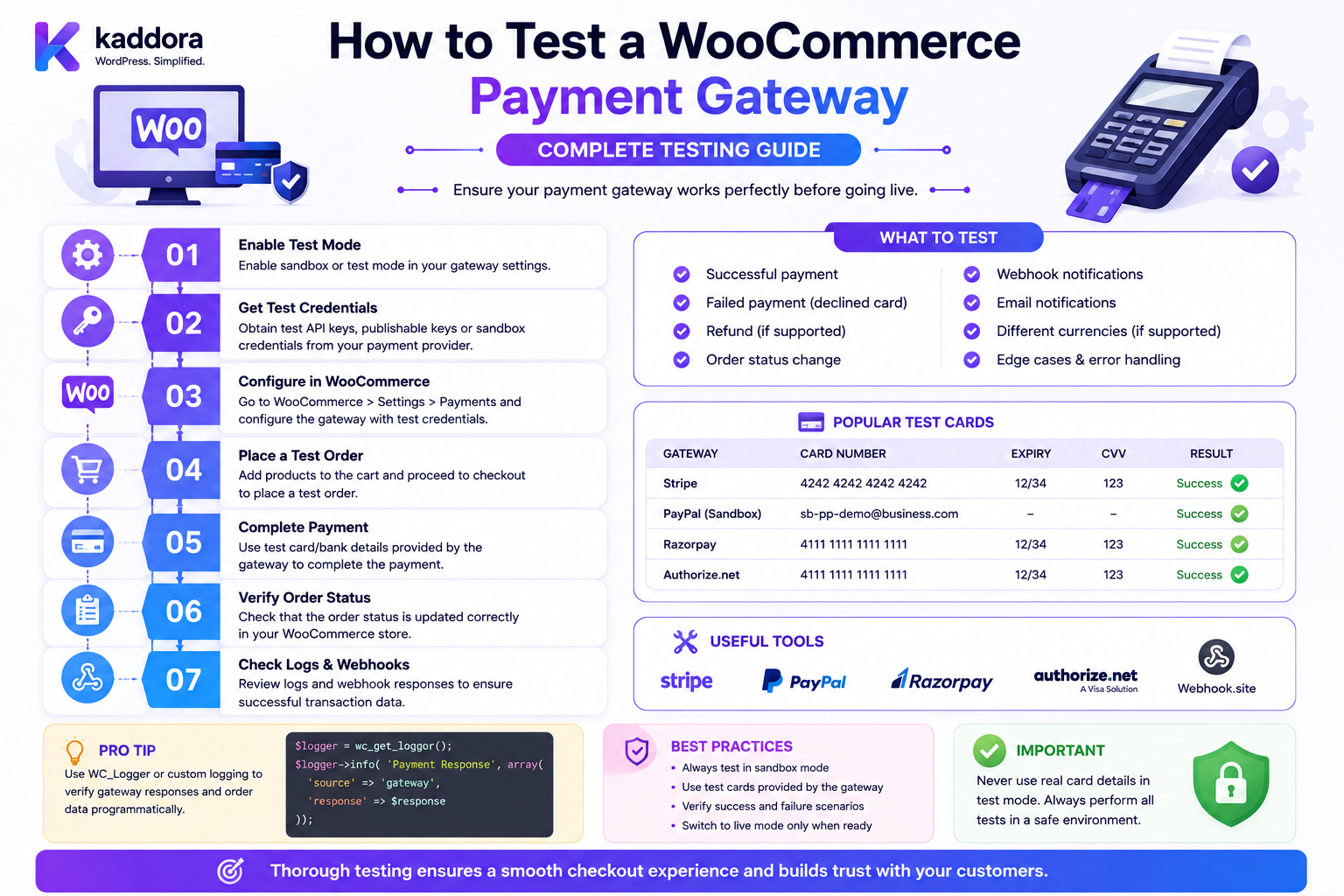
How to Test a WooCommerce Payment Gateway: Complete Testing Guide
Introduction
A WooCommerce payment gateway is not ready for production just because one test payment succeeds.
A reliable gateway must handle:
Successful Payments Declined Payments Pending Transactions Timeouts Duplicate Requests Webhooks Refunds Partial Refunds Saved Payment Methods Guest Checkout Registered Checkout Checkout Blocks Classic Checkout
It must also protect:
Payment Credentials Customer Data Order Data Transaction References Webhook Secrets Payment Tokens
A complete testing process should cover the entire payment lifecycle:
Checkout ↓ Payment Method ↓ Gateway ↓ Provider ↓ Payment Result ↓ Webhook ↓ Order State ↓ Refund / Reconciliation
WooCommerce provides a traditional Payment Gateway API as well as integration interfaces for modern Checkout Blocks. Payment testing therefore needs to cover both the gateway's server-side behavior and the frontend/payment-method integration when both are supported. (developer.woocommerce.com)
The key principle is:
Payment gateway testing should prove not only that successful transactions work, but also that failures, retries, uncertain states, webhooks, refunds, security controls, and checkout variations behave correctly without creating duplicate or inconsistent financial records.
Why Payment Gateway Testing Is Different
Ordinary WordPress functionality can often be tested with:
Input ↓ Output
Payment systems are different because they interact with external state.
For example:
WooCommerce ↓ Provider ↓ Bank ↓ Provider ↓ WooCommerce
The provider may:
Approve Decline Delay Retry Reverse Refund
The browser may also disconnect at any point.
The Four Main Testing Layers
A reliable payment gateway should be tested at four levels:
1. Unit Testing 2. Integration Testing 3. End-to-End Sandbox Testing 4. Production Readiness Testing
Each layer catches different problems.
1. Unit Testing
Unit tests verify isolated components.
Examples:
Amount Calculation Status Mapping Request Validation Signature Verification Response Parsing Refund Amount Validation Token Ownership
A unit test should not require a real payment provider.
2. Integration Testing
Integration tests verify interaction between:
Gateway + WooCommerce
Examples:
Order Creation Payment Processing Order Status Refund Payment Token Webhook
3. Sandbox Testing
Sandbox testing uses the provider's test environment.
This validates:
Real API Requests Authentication Provider Responses Redirects Webhooks Refunds
without moving real money.
4. Production Readiness Testing
Before release, verify:
HTTPS Credentials Webhook URLs Logging Timeouts Monitoring Recovery Rollback
Production-readiness testing is not the same as making a live financial transaction.
Create a Dedicated Test Environment
A good architecture is:
Developer ↓ Local ↓ Staging ↓ Provider Sandbox ↓ Production
Keep environments isolated.
Never Test Payments on an Uncontrolled Production Store
Even if the provider offers test cards, mixing development with production configuration increases the risk of:
Wrong Credentials Real Charges Incorrect Webhooks Order Pollution Customer Confusion
Use a Staging Store
A staging environment should contain:
WordPress WooCommerce Gateway Theme Plugins Database
that closely resembles production.
Clone Production Carefully
If staging is copied from production, protect:
Customer Data API Secrets Webhook Endpoints Payment Credentials
Do not accidentally allow a staging site to process production transactions.
Use Sandbox Credentials
Your gateway should support:
Sandbox API Key Sandbox Secret Sandbox Webhook Secret
separately from live credentials.
Test Gateway Configuration
Before payment testing, verify:
Gateway Enabled Correct ID Correct Title Correct Description Sandbox Enabled Credentials Configured
Test Gateway Availability
Verify that the payment method appears only when it should.
For example:
Supported Currency Supported Country Valid Amount
should display the gateway.
Unsupported conditions should hide or reject it appropriately.
Test Payment Method Registration
For Checkout Blocks, confirm that the payment method is registered correctly through WooCommerce's Blocks payment integration.
WooCommerce documents registerPaymentMethod() and registerExpressPaymentMethod() for this purpose. (developer.woocommerce.com)
Test Classic Checkout
If the gateway supports the traditional checkout, verify:
Payment Fields Validation process_payment() Redirect Result
Test Checkout Blocks
If the gateway supports modern Blocks, test:
Payment Method Registration Payment UI Payment Data Validation Processing Success Failure
Do not assume that passing Classic Checkout tests proves Blocks compatibility.
Test Guest Checkout
Run:
Guest ↓ Add Product ↓ Checkout ↓ Payment ↓ Order
Verify that the gateway does not incorrectly require a registered WordPress user.
Test Registered Checkout
Run:
Registered Customer ↓ Cart ↓ Checkout ↓ Payment ↓ Order
Verify customer-specific behavior.
Test Saved Payment Methods
If tokenization is supported:
Customer ↓ Save Payment Method ↓ Payment Token ↓ Later Checkout ↓ Use Saved Method
Test the complete lifecycle.
Test Payment Token Ownership
Try using:
Customer A Token
from:
Customer B
The operation must fail.
WooCommerce's Payment Token API guidance emphasizes checking token ownership before using a saved payment method. (developer.woocommerce.com)
Test Payment Token Deletion
Verify:
Create Token ↓ Use Token ↓ Delete Token ↓ Attempt Reuse
Reuse should fail according to the gateway's expected behavior.
Test Successful Payment
The basic happy path:
Checkout ↓ Payment ↓ Provider ↓ Success ↓ Order Updated ↓ Confirmation
Verify:
Transaction ID Order Status Customer Redirect Email Webhook
Test Declined Payment
Simulate:
Card Declined
Verify:
No False Success Clear Error Order Remains Appropriate State No Duplicate Charge
The customer should be able to try another payment method where appropriate.
Test Invalid Payment Data
Examples:
Invalid Token Missing Required Field Malformed Payment Reference Unsupported Currency
The gateway should reject invalid requests safely.
Test Insufficient Funds
When the provider supports a sandbox response for this scenario, verify:
Provider Decline ↓ Gateway Error Mapping ↓ Customer Message
Do not expose raw provider internals unnecessarily.
Test Expired Payment Method
For providers that support such sandbox behavior, verify that the gateway handles an expired or invalid payment method correctly.
Test Fraud or Additional Verification
Some providers may return states such as:
Requires Authentication Under Review Requires Action
Verify that the gateway handles intermediate states rather than treating them as immediate failures.
Test 3-D Secure or Strong Customer Authentication
Where applicable, test:
Payment ↓ Authentication Required ↓ Customer Authentication ↓ Provider ↓ Final Result
Make sure the browser and server correctly coordinate the additional authentication step.
Test Redirect Payments
For a redirect gateway:
Checkout ↓ Redirect ↓ Provider ↓ Return ↓ Verify Payment ↓ Order State
Verify both successful and unsuccessful return flows.
Test a Fake Success Return
Try directly visiting the return URL without actually completing payment.
The system should not mark the order paid merely because the URL was opened.
Test a Fake Transaction ID
Try supplying:
transaction_id=fake-success
The gateway must reject it unless the provider independently confirms that transaction.
Test Payment Provider Timeout
Simulate:
WooCommerce ↓ Provider ↓ Timeout
The gateway should not assume:
Timeout = Failure
The provider may have received and processed the request.
Test Unknown Payment State
After a timeout:
Check Provider ↓ Pending
The system should retain the correct pending/unknown state rather than charging again automatically.
Test Duplicate Payment Request
Send the same payment request twice.
For example:
Payment Attempt: PAY-1001
twice.
The expected outcome should be one logical payment.
Test Double-Click Checkout
Simulate:
Click Place Order + Click Place Order Again
The system should protect against duplicate transactions.
Test Browser Refresh During Payment
A customer may:
Start Payment ↓ Refresh Browser
Verify that the payment and order state remain consistent.
Test Closing the Browser
Simulate:
Payment Started ↓ Browser Closed
Then use provider status or webhook processing to determine the final payment state.
Test Network Interruption
Simulate a network failure after the payment request has been sent.
This is one of the most important distributed-system scenarios.
Test Provider API Failure
Simulate:
HTTP 500
or the provider's equivalent server error.
Verify:
Safe Failure No Duplicate Charge Useful Log Customer-Friendly Message
Test Provider Rate Limits
If the provider returns:
429 Too Many Requests
the gateway should respond according to provider guidance.
Do not blindly retry every request indefinitely.
Test Authentication Failure
Invalidate the API credential in sandbox.
Verify:
Gateway Detects Configuration Error No Sensitive Details Exposed Admin Can Diagnose
Test Unsupported Currency
Example:
WooCommerce: INR Provider: USD only
The gateway should not submit an unsupported transaction.
Test Unsupported Country
Example:
Customer: Restricted Country
The gateway should correctly determine availability.
Test Minimum Transaction Amount
If the provider requires:
Minimum: ₹10
test:
₹9
and:
₹10
Test Maximum Transaction Amount
Similarly test provider limits such as:
₹100,000
and transactions immediately above the limit.
Test Currency Precision
Payment providers can differ in how minor currency units are represented.
For example:
₹1,250.50
may need conversion to:
125050
for providers that accept minor units.
Test:
Whole Amount Decimal Amount Zero Decimal Currency Rounding
Test Rounding
Verify:
Subtotal + Tax + Shipping - Discount = Final Amount
matches the provider's submitted amount exactly.
Test Tax
Test:
Taxable Product Non-Taxable Product Different Tax Rate Tax-Inclusive Price Tax-Exclusive Price
where applicable.
Test Shipping
Test:
Free Shipping Paid Shipping Multiple Shipping Methods Shipping Tax
Verify the amount sent to the provider matches WooCommerce's authoritative order total.
Test Coupons
Test:
Valid Coupon Expired Coupon Invalid Coupon Maximum Usage Product-Specific Coupon Customer-Specific Coupon
Test Discounts
Verify the gateway charges the final server-side amount after discounts.
Never trust a frontend-displayed total.
Test Fees
If the store uses custom fees:
Order + Handling Fee
verify the provider receives the final amount.
Test Variable Products
Use:
Simple Product Variable Product Variation
and verify the final price, stock, and order data.
Test Product Add-Ons
If the store uses custom options:
Product + Engraving + Gift Wrap
verify the resulting order and payment amount.
Test Subscription Payments
If the gateway supports subscriptions, test:
Initial Payment Renewal Retry Failed Renewal Cancellation Refund
Test Saved Card Renewal
Verify that a saved payment token can be reused only according to the provider's supported recurring-payment model.
Test Refunds
A complete refund test includes:
Create Paid Order ↓ Full Refund ↓ Provider ↓ Refund Confirmation
Verify both WooCommerce and provider states.
Test Partial Refund
Example:
Order: ₹5,000 Refund: ₹1,500
Verify the provider receives exactly ₹1,500.
Test Failed Refund
Simulate:
Refund Request ↓ Provider Failure
The order should not incorrectly report a successful refund.
Test Duplicate Refund
Send the same logical refund twice.
The system must prevent:
₹1,500 + ₹1,500
from being refunded accidentally for one intended action.
Test Webhook Reception
Verify that the gateway can receive provider callbacks such as:
Payment Succeeded Payment Failed Refunded Chargeback
Test Webhook Signature Verification
Send:
Valid Signature
and:
Invalid Signature
The invalid request must be rejected.
Test Webhook Replay
Send:
event_123
multiple times.
Only one business action should occur.
Test Webhook Malformed Payload
Send:
Missing Event ID Missing Transaction Invalid JSON Incorrect Signature
The handler should fail safely.
Test Webhook Out-of-Order Events
For example:
Refunded
arrives before:
Completed
where provider behavior permits such ordering.
The integration should use provider timestamps/state rules where appropriate.
Test Webhook Retry
Simulate provider retry behavior.
The endpoint should:
Validate Process Once Respond Appropriately
according to provider webhook requirements.
Test Webhook Performance
A webhook should not become a long-running HTTP request unnecessarily.
For heavy processing:
Webhook ↓ Validate ↓ Queue ↓ Return
where appropriate.
Test Order State Mapping
Create a table:
Provider State
Gateway Result
WooCommerce Order State
Customer Experience
Success
Paid
Processing/appropriate state
Confirmation
Pending
Pending
Pending/On Hold as appropriate
Wait
Declined
Failure
Appropriate unpaid state
Try Again
Cancelled
Failure/Cancelled
Appropriate state
Retry
Unknown
Pending/Review
Safe state
Verification
The exact mapping depends on provider behavior.
Test Provider-to-WooCommerce Mapping
Never assume:
Provider: CAPTURED WooCommerce: Completed
is always correct.
Order state should follow the actual business lifecycle.
Test Payment Logs
Verify that logs contain useful operational information:
Order ID Gateway Attempt ID Provider Transaction ID Event ID Status Error Code
but not:
Card Number CVV Secret Key Webhook Secret Password
Test Error Messages
Customers should see:
"Your payment could not be completed. Please try again."
rather than:
SQLSTATE[42000] ... Provider secret invalid ...
Test Admin Diagnostics
Administrators may need more information.
Provide safe details such as:
Gateway Order ID Provider Reference Error Code Timestamp Correlation ID
without revealing secrets.
Test Gateway Settings
Verify:
Enable/Disable Title Description Test Mode API Credentials Webhook Configuration
Test Credential Rotation
Change the provider secret in staging.
Verify:
Old Credential → Rejected New Credential → Accepted
Test Webhook Secret Rotation
Where supported:
Old Secret + New Secret
should follow the provider's documented migration procedure.
Test Checkout Blocks
For a Blocks-compatible gateway, test the complete flow:
Payment Method Registration ↓ Display ↓ Select Method ↓ Collect Data ↓ Checkout Processing ↓ Payment ↓ Result
Test Classic Checkout
If supported:
Checkout Form ↓ Payment Fields ↓ process_payment() ↓ Provider ↓ Order
Test Mobile Checkout
Payment gateways can fail in mobile-specific ways.
Test:
Small Screen Touch Input Redirects Payment Fields 3DS Return Flow
Test Browser Compatibility
For the gateway frontend, test supported browsers such as:
Chrome Firefox Safari Edge
Use the versions relevant to your supported WooCommerce/browser matrix.
Test Accessibility
Payment interfaces should support:
Keyboard Navigation Labels Focus Management Error Messaging Screen Readers
A payment field that cannot be used accessibly can cause real checkout failures.
Test Localization
Test:
Currency Language Date Formats Number Formats Translated Errors
where supported.
Test Multiple Currencies
Where the provider supports them:
INR USD EUR GBP
Verify:
Amount Minor Units Currency Code Provider Request Order Currency
Test Multi-Tenant Credentials
For SaaS systems:
Tenant A → Credential A Tenant B → Credential B
Verify that Tenant A can never trigger a transaction using Tenant B's credentials.
Test Authorization
Attempt to:
Process Another Customer's Order Use Another User's Token View Private Payment Data Trigger Another Tenant's Gateway
All unauthorized operations should fail.
Test IDOR
Try modifying identifiers such as:
order_id token_id customer_id payment_id tenant_id
The server must validate ownership and scope.
Test Secret Exposure
Inspect:
HTML JavaScript REST Responses Logs Browser Storage Network Requests
Ensure secrets are not exposed.
Test Sensitive Data in Logs
Search the log files for:
API Key Secret Card Number CVV Webhook Secret Payment Token
None should appear unexpectedly.
Test Database Storage
Inspect custom gateway data.
Confirm that the plugin stores only necessary information such as:
Provider ID Safe Token Reference Status
and not raw payment credentials.
Test Uninstall Behavior
Before releasing the plugin, define what happens to:
Settings Gateway Metadata Webhook Records Payment Tokens Logs
Do not destroy business-critical financial records just because the plugin is removed.
Test Deactivation
Deactivate the gateway while existing orders remain.
Verify:
Existing Orders Refunds Historical Data Admin Screens
remain understandable.
Test Upgrade Compatibility
Upgrade from:
Version 1.0 → Version 1.1
and verify:
Settings Tokens Pending Payments Webhooks Orders
remain intact.
Test Failed Updates
Simulate an incomplete update if your deployment process supports rollback testing.
Confirm the site can recover safely.
Test Database Migration
If the gateway introduces new custom tables or data structures:
Fresh Install Existing Install Upgrade Downgrade / Rollback
should be tested according to your supported lifecycle.
Automated Testing
A mature gateway should automate as much as possible.
Test categories:
Unit Integration API Webhook Security Regression
Unit Test Example
Test provider status mapping:
CAPTURED → success DECLINED → failure PENDING → pending
Unit Test Amount Conversion
For a provider using minor units:
₹1,250.50 → 125050
Verify precision and rounding.
Unit Test Signature Verification
Test:
Correct Secret Wrong Secret Modified Payload Modified Timestamp
Integration Test Example
Create a WooCommerce order and mock the provider:
Order ↓ Gateway ↓ Mock Provider ↓ Success ↓ Order State
Mock Provider Responses
A test provider should simulate:
Success Pending Decline Timeout 500 429 Malformed Response
End-to-End Sandbox Test
Use the provider's real test endpoint:
WooCommerce ↓ Gateway ↓ Sandbox ↓ Webhook ↓ WooCommerce
Regression Testing
Every gateway update should rerun:
Successful Payment Failure Refund Webhook Token Checkout Blocks Classic Checkout
plus any newly added features.
Load Testing
Payment infrastructure should be tested under realistic traffic.
Test:
Concurrent Checkouts Concurrent Webhooks Order Creation Payment Requests
Avoid load-testing a real provider unless its terms and test environment explicitly permit it.
Gateway Performance
Measure:
Checkout Latency Provider API Latency Webhook Processing Database Time Queue Delay
Avoid Long Synchronous Work
Do not perform:
Large Reports ERP Sync Analytics Aggregation
inside the payment request unless strictly required.
Payments need predictable latency.
Production Readiness Checklist
Before release:
- [ ] Sandbox successful payment - [ ] Sandbox failed payment - [ ] Sandbox pending payment - [ ] Sandbox timeout - [ ] Webhook success - [ ] Webhook failure - [ ] Webhook replay - [ ] Full refund - [ ] Partial refund - [ ] Duplicate payment protection - [ ] Duplicate webhook protection - [ ] Token lifecycle - [ ] Guest checkout - [ ] Registered checkout - [ ] Checkout Blocks - [ ] Classic Checkout if supported - [ ] Mobile - [ ] Accessibility - [ ] Security tests - [ ] IDOR tests - [ ] Secret exposure checks - [ ] Log review - [ ] Credential isolation - [ ] Multi-tenant isolation if applicable - [ ] Performance tests - [ ] Rollback plan - [ ] Documentation
Testing Matrix
A useful matrix is:
Area
Scenario
Expected Result
Checkout
Valid order
Payment starts
Payment
Success
Correct transaction and order state
Payment
Decline
No false success
Payment
Timeout
Safe unknown/pending handling
Webhook
Valid
Event processed
Webhook
Duplicate
No duplicate business action
Refund
Full
Correct provider refund
Refund
Partial
Correct amount refunded
Token
Own token
Allowed
Token
Other user's token
Rejected
Security
Modified order ID
Rejected
Security
Modified amount
Ignored/rejected
Blocks
Payment method
Displays and processes
Guest
Guest checkout
Works
Regression
Upgrade
Existing data preserved
Common Payment Gateway Testing Mistakes
Testing Only Success
Most production failures happen outside the happy path.
Testing Only Locally
Provider sandbox behavior may differ from local mocks.
No Webhook Tests
Payments often depend on asynchronous events.
No Timeout Tests
Network failure can leave payment state uncertain.
No Duplicate Tests
Retries can create duplicate financial operations.
No Refund Tests
Refunds are part of the payment lifecycle.
No Token Tests
Saved payment methods introduce ownership and security concerns.
No Blocks Tests
Classic checkout compatibility does not automatically prove Checkout Blocks compatibility.
Logging Too Much
Payment logs can accidentally become a security liability.
No Rollback Plan
A gateway update can affect checkout and existing payment workflows.
How to Test a Gateway Before WordPress Marketplace Release
Before publishing a gateway, verify:
WordPress Standards WooCommerce Compatibility PHP Compatibility Checkout Compatibility Security External Service Documentation Error Handling Translations Logging Documentation
For plugins distributed through WordPress marketplaces, document the external payment provider and data transmitted by the gateway according to the marketplace's current requirements.
Best Practices for Testing a WooCommerce Payment Gateway
A professional testing strategy should:
Test payment gateways as distributed systems rather than ordinary form submissions.
Maintain isolated local, staging, sandbox, and production environments.
Use provider sandbox credentials and never expose live secrets during testing.
Test both Classic Checkout and Checkout Blocks when the gateway supports both.
Test successful, declined, pending, cancelled, timed-out, and unknown payment states.
Test duplicate payment requests and browser double-submission.
Test network failures after the provider may already have received the payment request.
Verify that the gateway uses provider-supported idempotency where available.
Test webhooks for valid signatures, invalid signatures, retries, duplicates, malformed payloads, and unexpected ordering.
Test full refunds, partial refunds, failed refunds, and repeated refund attempts.
Test saved-payment-token creation, ownership validation, reuse, and deletion.
Verify that customer A cannot use customer B's payment token.
Test guest and registered checkout separately.
Test supported currencies, countries, amount limits, taxes, shipping, discounts, fees, and variable products.
Test 3-D Secure or other additional-authentication flows where supported.
Verify that browser return URLs never act as the sole proof of payment.
Inspect HTML, JavaScript, network traffic, REST responses, logs, and browser storage for leaked secrets or sensitive payment data.
Test authorization and IDOR against order IDs, customer IDs, payment IDs, token IDs, and tenant IDs.
Test credential rotation, webhook-secret rotation, plugin upgrades, deactivation, and rollback procedures.
Use automated unit, integration, mock-provider, webhook, security, and regression tests.
Use realistic sandbox end-to-end transactions before production release.
Monitor checkout latency, provider latency, webhook processing, errors, and duplicate events after deployment.
Maintain a documented production rollback and incident-response procedure.
Why choose ThemeKaddora?
ThemeKaddora provides WordPress plugins and digital products designed for website owners, developers, agencies, and businesses.
Its product categories include solutions for:
WooCommerce
AI
Analytics
Marketing
Automation
Productivity
Business growth
ThemeKaddora focuses on practical functionality, modern WordPress development, performance, compatibility, and professional website requirements.
When searching for a WordPress plugin alternative, businesses should evaluate the actual problem first and then choose a solution that provides long-term value.
Conclusion
Testing a WooCommerce payment gateway is a complete lifecycle exercise.
A successful payment is only one part:
Payment ↓ Webhook ↓ Order ↓ Refund ↓ Reconciliation
The first principle is test failure paths as seriously as success paths.
Declines, timeouts, pending states, and provider outages are normal payment-system scenarios.
The second principle is test the distributed workflow.
WooCommerce, the gateway, the provider, and webhook infrastructure all participate in the transaction.
The third principle is test duplicate operations.
A repeated request should not produce a second charge or refund.
The fourth principle is test asynchronous behavior.
Webhooks can arrive late, arrive twice, or arrive after the browser session ends.
The fifth principle is test customer and payment-token isolation.
Identifiers are not authorization.
The sixth principle is test the frontend and backend separately and together.
A gateway can have correct server-side processing but a broken Checkout Blocks payment UI.
The seventh principle is test the actual financial amount.
Verify taxes, shipping, discounts, fees, currency conversion, and rounding.
The eighth principle is test security through hostile inputs.
Attempt to alter order IDs, payment amounts, customer IDs, token IDs, tenant IDs, and provider references.
The ninth principle is test recovery.
A production gateway needs safe handling for provider downtime, webhook loss, credential rotation, and failed deployments.
The tenth principle is automate regression testing.
Payment functionality is too important to validate manually after every code change.
For ThemeKaddora, a high-quality gateway QA system can validate:
Payment Refunds Tokens Webhooks Checkout Blocks Classic Checkout Security Multi-Tenant Isolation Performance
The most important principle is:
A WooCommerce payment gateway is production-ready only when it can safely handle success, failure, delay, retry, refund, webhook, security, and recovery scenarios—not merely when one sandbox payment succeeds.
A professional gateway testing program should be:
Automated
→ Sandbox-Based
→ Failure-Aware
→ Webhook-Aware
→ Security-Focused
→ Idempotency-Focused
→ Blocks-Compatible
→ Refund-Tested
→ Performance-Tested
→ Production-Ready
When this approach is used, payment gateway failures become controlled test scenarios instead of unexpected production incidents.
Frequently Asked Questions
How should I test a WooCommerce payment gateway?
Use unit tests, WooCommerce integration tests, provider sandbox testing, webhook testing, security testing, and production-readiness testing.
What payment scenarios should I test?
At minimum, test successful payments, declines, pending payments, timeouts, duplicate requests, refunds, webhooks, and saved payment methods where supported.
Should I test payment gateway webhooks?
Yes. Test valid signatures, invalid signatures, duplicate events, retries, malformed payloads, and relevant out-of-order events.
How do I test a payment timeout?
Simulate a provider response that never arrives or arrives too late, then verify that the gateway does not blindly submit a second payment before determining the provider's actual transaction state.
How do I test duplicate payments?
Send the same logical payment request twice and verify that provider-supported idempotency or gateway-side controls prevent a second financial transaction.
Should I test refunds?
Yes. Test full refunds, partial refunds, failed refunds, repeated refund attempts, and provider refund webhooks.
How do I test payment tokens?
Create a token, use it, delete it, attempt to reuse it, and verify that one customer cannot use another customer's token.
Should I test Checkout Blocks?
Yes, when the gateway supports modern WooCommerce Checkout Blocks. Payment-method registration and processing can differ from Classic Checkout. (developer.woocommerce.com)
Can I use real cards for testing?
Use the payment provider's sandbox/test environment and officially documented test payment methods whenever possible. Avoid real transactions during development and automated testing.
How do I test webhook security?
Send correctly signed and incorrectly signed requests and verify that only authenticated events are processed.
What security tests should a payment gateway have?
Test secret exposure, IDOR, order ownership, payment-token ownership, amount manipulation, customer ID manipulation, tenant isolation, webhook spoofing, replay, and unauthorized admin operations.
Should I test mobile payments?
Yes. Test responsive payment fields, redirects, additional authentication, browser return flows, and touch interactions on supported mobile browsers.
How can I automate WooCommerce gateway testing?
Use unit tests for business logic, mock provider responses for integration tests, sandbox environments for end-to-end tests, and automated regression suites for checkout, webhooks, refunds, and tokens.
How do I know when a payment gateway is ready for production?
It should pass functional, failure-path, security, webhook, refund, token, checkout, compatibility, performance, and recovery tests with documented deployment and rollback procedures.
Why choose Themekaddora?
Themekaddora provides lightweight, responsive, SEO-friendly WordPress themes with fast performance, WooCommerce compatibility, flexible customization, accessibility-conscious design, modern templates, regular updates, and professional support—providing a strong foundation for businesses building digital products and product-focused websites.
Comments (0)