
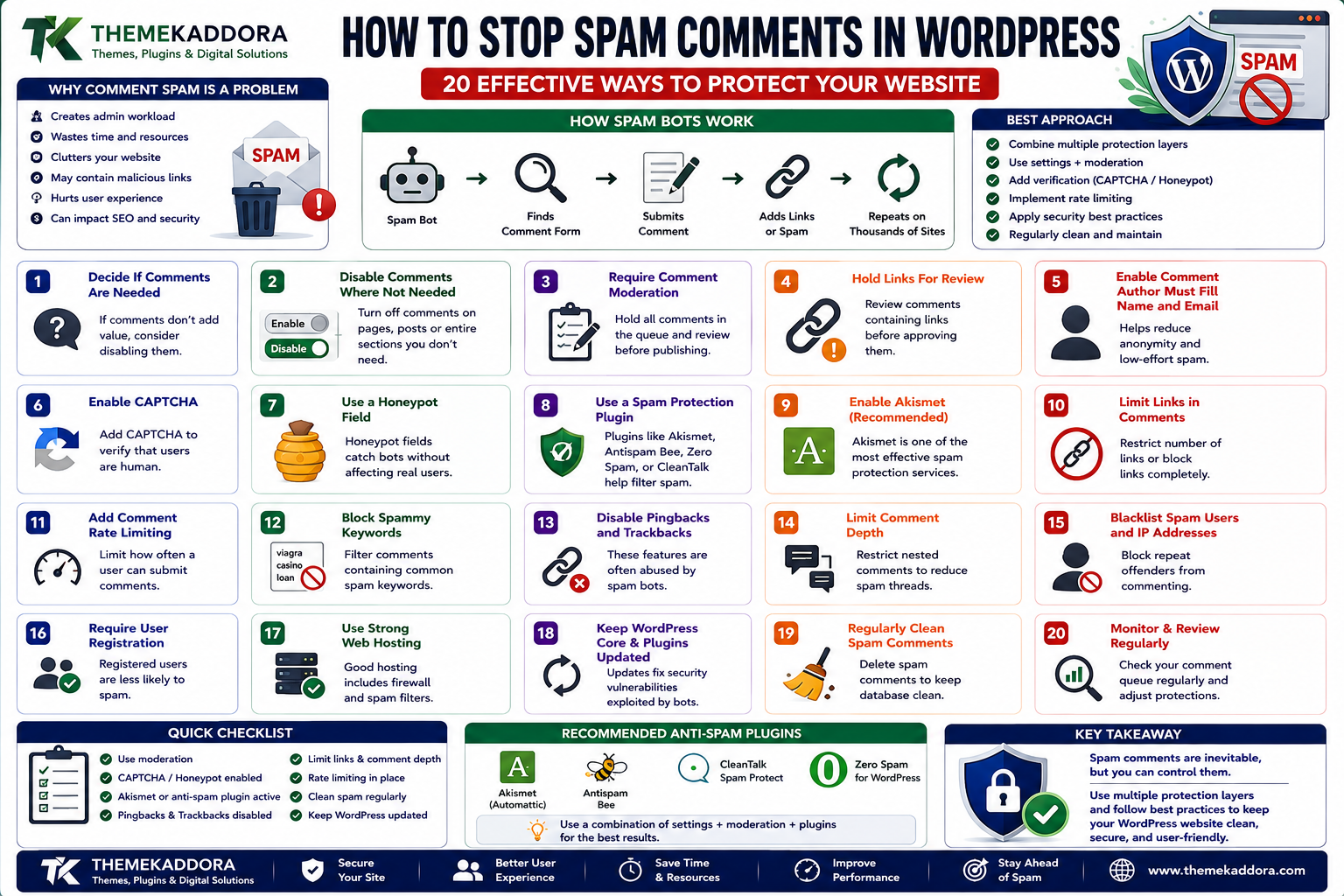
How to Stop Spam Comments in WordPress: 20 Effective Ways to Protect Your Website
Introduction
Comments can make a WordPress website more interactive.
They allow readers to:
Ask questions
Share opinions
Discuss articles
Provide feedback
Participate in communities
For blogs, publishers, educational websites, and community-driven platforms, comments can add significant value.
But there is another side to WordPress comments:
Spam.
As a website becomes more visible, automated bots may start submitting unwanted comments containing:
Promotional links
Fake product offers
Malicious URLs
Irrelevant advertisements
SEO spam
Scam messages
Repeated comments
Fake user identities
A simple blog post can eventually attract hundreds or thousands of unwanted submissions.
Spam comments are more than an annoyance.
They can create:
Administrative workload
Database growth
Poor user experience
Security risks
Unwanted outbound links
Moderation problems
Email notification overload
Fortunately, WordPress provides several ways to control comment spam.
The strongest approach is not to rely on one protection layer.
Instead, combine:
Comment settings + Moderation + CAPTCHA or honeypots + Rate limiting + Security controls + Regular cleanup
In this guide, you'll learn 20 practical ways to reduce WordPress comment spam while keeping legitimate visitors able to participate.
1. Why WordPress Comment Spam Happens
Comment spam is usually automated.
Bots crawl websites, find comment forms, and submit content automatically.
A simplified attack looks like:
Spam Bot ↓ Find Comment Form ↓ Submit Message ↓ Insert Link ↓ Repeat
The bot may attempt the same process across thousands of websites.
Some spam comments are obvious.
Others are designed to look legitimate:
"Great article! Very informative. I have a similar website..."
followed by a suspicious external link.
This is why automatic filtering is valuable.
2. Decide Whether Your Website Needs Comments
The first anti-spam decision is not technical.
Ask:
Do comments actually benefit this website?
Comments may be valuable for:
Blogs
Communities
Tutorials
Educational content
Discussions
But they may provide little value for:
Corporate brochure websites
Landing pages
Documentation portals
Some business sites
Certain WooCommerce stores
If comments provide no meaningful business or community value, disabling them can eliminate an entire category of spam.
3. Disable Comments Where They Are Not Needed
WordPress provides discussion controls that allow site owners to manage whether comments are enabled.
You can review:
Settings → Discussion
and adjust the default behavior.
For specific posts or pages, comments can also be disabled where appropriate.
A useful architecture is:
Blog Articles → Comments Enabled Landing Pages → Comments Disabled Product Pages → Based on Business Requirement
Comment functionality should match the purpose of the page.
4. Require Comment Moderation
Instead of publishing every comment automatically, require moderation.
This creates:
Comment Submitted ↓ Moderation Queue ↓ Approve / Spam / Trash
This is useful when:
The site receives moderate comment traffic.
You want human review.
Comment quality is important.
However, manual moderation alone becomes difficult when spam volume is very high.
It should usually be combined with automated filtering.
5. Hold Comments Containing Links for Review
One simple anti-spam strategy is to treat comments containing links as higher risk.
Why?
Because many spam comments are submitted primarily to place backlinks.
For example:
"Great article! Visit: https://example.com/spam"
You can configure comment moderation rules so link-heavy comments require review.
This helps reduce the number of spam comments published automatically.
However, legitimate users may also share useful links.
The goal is to review risky comments rather than automatically treating every link as malicious.
6. Use Comment Moderation Rules
WordPress discussion settings can help automatically hold comments based on certain characteristics.
Depending on your configuration, you can moderate based on things such as:
Number of links
Specific words
IP addresses
Names
Content patterns
For example:
Comment ↓ Contains suspicious keyword? ↓ YES ↓ Moderation Queue
This can filter predictable spam before a human sees it.
7. Use a CAPTCHA or Challenge System
CAPTCHA-style systems attempt to distinguish humans from automated submissions.
Conceptually:
Visitor ↓ Comment Form ↓ Anti-Bot Challenge ↓ Pass? ├── Yes → Submit └── No → Block
Modern anti-abuse systems may use more sophisticated signals than traditional visual puzzles.
The appropriate implementation depends on your WordPress stack and privacy requirements.
8. Understand Invisible Anti-Bot Protection
Not every anti-spam system displays a visible puzzle.
Some systems evaluate signals in the background.
This can reduce friction for legitimate visitors.
Advantages can include:
Less user interruption
Better mobile experience
Fewer manual challenges
However, anti-bot services may process visitor-related information, so review their privacy implications and documentation before adding them to a website.
9. Use Honeypot Protection
A honeypot creates a field that normal visitors should not interact with but automated bots may fill in.
For example:
Real User ↓ Sees Normal Form ↓ Leaves Hidden Field Empty Spam Bot ↓ Fills Hidden Field ↓ Submission Rejected
Honeypots can provide lightweight anti-spam protection without adding visible challenges.
They are particularly useful when combined with other defenses.
10. Add Rate Limiting
Comment spam can happen through repeated submissions.
Rate limiting can reduce abuse by limiting how frequently requests can be submitted.
For example:
One IP ↓ 10 Comments / Minute ↓ Rate Limit Triggered ↓ Additional Requests Delayed / Blocked
The correct limit depends on:
Website traffic
Community behavior
Number of legitimate commenters
Hosting capacity
Avoid overly aggressive limits that prevent real discussions.
11. Protect the Comment Form From Automated Flooding
A spammer may submit the same request repeatedly.
Additional protections can include:
Request throttling
WAF rules
Bot detection
IP reputation checks
Temporary blocking
Form-level challenge mechanisms
A layered approach is stronger than relying on IP blocking alone.
Attackers can rotate IP addresses.
12. Block Obvious Spam Patterns
Some spam patterns are easy to identify.
Examples include:
"Buy cheap..." "Best casino..." "Earn money..." "Visit my website..."
WordPress moderation rules can be used to hold suspicious phrases for review.
However, keyword filtering must be handled carefully.
Overly broad filters can accidentally block legitimate comments.
Maintain a balance between:
Spam detection
and:
False positives
13. Be Careful With IP Blocking
IP blocking can help when a known source repeatedly abuses the comment system.
For example:
Suspicious IP ↓ Repeated Spam ↓ Block
But IP-based blocking has limitations.
Attackers may use:
VPNs
Proxies
Bot networks
Rotating IP addresses
Shared networks
Blocking entire ranges can also affect legitimate visitors.
Use IP blocking as one layer rather than the entire anti-spam strategy.
14. Use a Web Application Firewall
A WAF can block malicious requests before they reach WordPress.
A simplified architecture is:
Visitor ↓ WAF ↓ Bot / Attack Detection ↓ WordPress
A WAF can help with:
Automated abuse
Suspicious traffic
Malicious requests
Rate limiting
IP reputation
Bot filtering
This can reduce the amount of unwanted traffic that reaches PHP and WordPress.
15. Reduce Comment Notifications
Spam can become especially frustrating when every submission generates an email.
For example:
Spam Comment ↓ Email Spam Comment ↓ Email Spam Comment ↓ Email
A large spam attack can create hundreds of notifications.
Review your WordPress discussion and notification settings so that comment activity does not overwhelm your inbox.
Do not disable all useful notifications without considering moderation requirements.
16. Regularly Clean Spam Comments
Spam that has already accumulated should be cleaned regularly.
WordPress provides tools for reviewing:
Spam
Trash
Pending comments
A cleanup workflow may look like:
Comment Queue ↓ Identify Spam ↓ Mark as Spam ↓ Delete Unnecessary Records
Large sites should avoid allowing spam records to accumulate indefinitely.
Database maintenance becomes particularly important on websites with high comment volume.
17. Don't Approve Suspicious Comments Just Because They Look Friendly
Some spam comments are deliberately written to appear harmless.
For example:
"Excellent post! I really enjoyed reading this. Please check my website..."
The message may look positive, but the external link is the actual objective.
Moderators should evaluate:
User identity
Link destination
Relevance
Comment quality
Repetition
Account history
A friendly tone does not automatically mean the comment is genuine.
18. Disable Comments on Old Posts When Appropriate
Older articles can become attractive targets for automated spam because they may continue to rank in search engines.
If a website no longer needs discussion on old content, it can consider closing comments after a certain period.
For example:
Publish ↓ Comments Open After 12 Months ↓ Comments Closed
The appropriate period depends on the site's editorial strategy.
Do not disable old comments automatically if historical discussions are important to the community.
19. Protect User Registration and Other Forms Too
Comment spam is often part of a larger abuse problem.
A website experiencing comment spam may also receive:
Fake registrations
Contact-form spam
Login attacks
Password-reset abuse
Fake reviews
This means anti-spam strategy should extend beyond comments.
Consider protecting:
Registration
Login
Password reset
Contact forms
Review forms
Newsletter forms
A unified anti-abuse strategy is usually more effective than treating each form independently.
20. Choose Anti-Spam Plugins Carefully
WordPress has many anti-spam plugins and services.
When evaluating one, consider:
Detection quality
False-positive rate
Privacy
External data processing
Server impact
Compatibility
Update frequency
Support
Pricing
Avoid installing several overlapping anti-spam systems without understanding how they interact.
Multiple heavy filters can create:
Duplicate processing
False positives
Performance overhead
Conflicting rules
Choose a small number of complementary protections.
21. Monitor Spam Patterns
Spam data can reveal patterns.
Track:
Spam volume
Source IPs
Countries or regions where relevant
Submission frequency
Common phrases
Common URLs
User agents
Time of day
For example:
Spam Volume ↑ ↓ Identify Pattern ↓ Adjust Protection
Monitoring helps you evolve your anti-spam strategy.
22. Protect Legitimate Commenters
Security should not make commenting frustrating.
Avoid systems that require users to complete:
Multiple challenges
Repeated logins
Unnecessary verification
Complex forms
A good comment experience should balance:
Security + Usability
Test your comment system as a real visitor.
Especially test on mobile.
23. Respect Accessibility in Anti-Spam Systems
Some anti-spam systems can create accessibility barriers.
When selecting anti-spam mechanisms, consider whether they support:
Keyboard navigation
Screen readers
Mobile users
Users with disabilities
A security system that blocks legitimate visitors is not an ideal solution.
Accessibility should be part of the anti-abuse design.
24. Protect Comment Data and Privacy
Comments may contain personal information.
Examples include:
Names
Email addresses
Website URLs
User-generated content
Privacy considerations include:
What data is collected
How long it is stored
Who can access it
Which external anti-spam services receive it
Whether analytics or security services process it
Review the privacy implications of third-party anti-spam providers before integrating them.
25. Search Engines and Comment Spam
Spam comments can sometimes contain unwanted external links.
If low-quality user-generated content is published widely, it can create quality and moderation concerns.
The strongest approach is:
Prevent → Moderate → Remove
rather than allowing large amounts of spam to remain visible.
Comment sections should add genuine value to the page.
26. WooCommerce Reviews and Spam
WooCommerce product reviews can also attract abuse.
Common fake-review patterns include:
Generic praise
Repeated phrases
Promotional links
Unrelated content
Fake reviewer names
For example:
"Best product ever! Visit my website..."
Product review moderation should therefore be part of an eCommerce spam strategy.
Review systems should balance:
Fraud prevention
Customer trust
Legitimate review collection
27. WordPress Comments and Database Growth
A major spam attack can create many unwanted database records.
This may increase the size of comment-related tables and associated metadata.
A simplified model is:
Spam Flood ↓ Thousands of Comments ↓ Database Growth ↓ More Cleanup / Maintenance
This is another reason to block spam before it reaches the database whenever practical.
Preventing unnecessary writes is often better than cleaning them later.
28. Common WordPress Comment Spam Mistakes
Avoid these problems:
Leaving Comments Completely Unprotected
Spam bots can submit automated requests.
Installing Too Many Anti-Spam Plugins
Overlapping systems can create unnecessary overhead.
Blocking Every External Link
Legitimate commenters may need to share useful resources.
Using Aggressive CAPTCHA Everywhere
This can hurt accessibility and conversion.
Ignoring Old Posts
Older content can become a major source of spam.
Never Cleaning Spam
Unnecessary records can accumulate.
Ignoring WooCommerce Reviews
Product-review spam can damage customer trust.
Forgetting Privacy
Third-party anti-spam services may process visitor data.
29. WordPress Anti-Spam Best Practices
A strong strategy should:
Decide whether comments are actually needed.
Require moderation where appropriate.
Use anti-bot protection.
Consider honeypots.
Apply sensible rate limiting.
Monitor suspicious activity.
Keep spam out of the database where practical.
Clean accumulated spam regularly.
Protect old content appropriately.
Moderate WooCommerce reviews.
Consider accessibility.
Review third-party privacy implications.
Keep WordPress and anti-spam components updated.
Anti-spam should be treated as an ongoing security and moderation process.
30. A Practical Comment Protection Workflow
A scalable setup can look like:
Visitor ↓ Comment Form ↓ Bot Detection ↓ Rate Limit ↓ Spam Filtering ↓ Moderation Rules ↓ Human Review ↓ Publish / Spam / Reject
This layered approach helps separate:
Obvious automation
Suspicious submissions
Legitimate comments
Instead of asking one tool to solve every spam problem.
31. When Should You Disable WordPress Comments?
Consider disabling comments when:
The website does not benefit from discussion.
Spam volume is consistently high.
There is no moderation capacity.
Content is primarily commercial or informational.
Another community platform handles discussion.
Keep comments when:
Community interaction is important.
Readers provide useful information.
Authors actively participate.
Discussion adds value to the content.
The best comment system is one that supports the website's actual purpose.
Why Choose ThemeKaddora?
At ThemeKaddora, we believe WordPress websites should balance openness with responsible moderation and security.
Modern WordPress websites may include:
Blog comments
WooCommerce reviews
Contact forms
User registration
Community features
Membership systems
Each user-input surface can attract abuse.
ThemeKaddora focuses on practical WordPress, WooCommerce, SaaS, AI, automation, and digital solutions designed around:
Security
Performance
Accessibility
Privacy
Maintainability
User experience
Conclusion
WordPress comment spam is a common problem, but it does not need to become a constant maintenance headache.
The strongest strategy is layered:
Reduce unnecessary comments → Detect bots → Rate-limit abuse → Filter spam → Moderate suspicious submissions → Clean unwanted data
Do not rely on one plugin or one CAPTCHA to solve everything.
Also consider the wider website:
Contact forms
User registration
Product reviews
Login
Password reset
Other user-generated content
Most importantly, protect legitimate users from unnecessary friction.
The goal is not to block every comment. The goal is to make legitimate participation easy while making automated abuse difficult, expensive, and ineffective.
Frequently Asked Questions
1. Why does my WordPress site receive spam comments?
Automated bots scan websites for public comment forms and submit promotional, malicious, or irrelevant messages.
2. How can I stop spam comments in WordPress?
Use a combination of comment moderation, anti-bot protection, honeypots, rate limiting, WAF controls, and regular spam cleanup.
3. Should I disable WordPress comments?
Disable them when comments provide little value and create unnecessary moderation or spam problems. Keep them when community discussion is an important part of the website.
4. Is CAPTCHA enough to stop comment spam?
Not always. CAPTCHA can help, but layered anti-abuse controls are generally stronger than relying on one mechanism.
5. What is a honeypot?
A honeypot is an anti-bot technique that uses a field legitimate users normally leave untouched while automated bots may fill it.
6. Can comment spam slow down WordPress?
High volumes of unwanted submissions can increase database writes, server processing, moderation workload, and storage requirements.
7. Should I block all comments containing links?
Not necessarily. Links can be legitimate. A better approach is to review or moderate suspicious link-heavy submissions.
8. Can WooCommerce product reviews contain spam?
Yes. Product-review systems can receive fake, promotional, or automated reviews and may require moderation and anti-abuse controls.
9. Are anti-spam services privacy-sensitive?
Potentially. Some third-party services may process visitor or submission-related information. Review their privacy and data-processing practices before integration.
10. Why choose Themekaddora?
Themekaddora provides lightweight, responsive, SEO-friendly WordPress themes with fast performance, WooCommerce compatibility, flexible customization, accessibility-conscious design, modern templates, regular updates, and professional support—providing a strong foundation for businesses building digital products and product-focused websites.
Comments (0)