
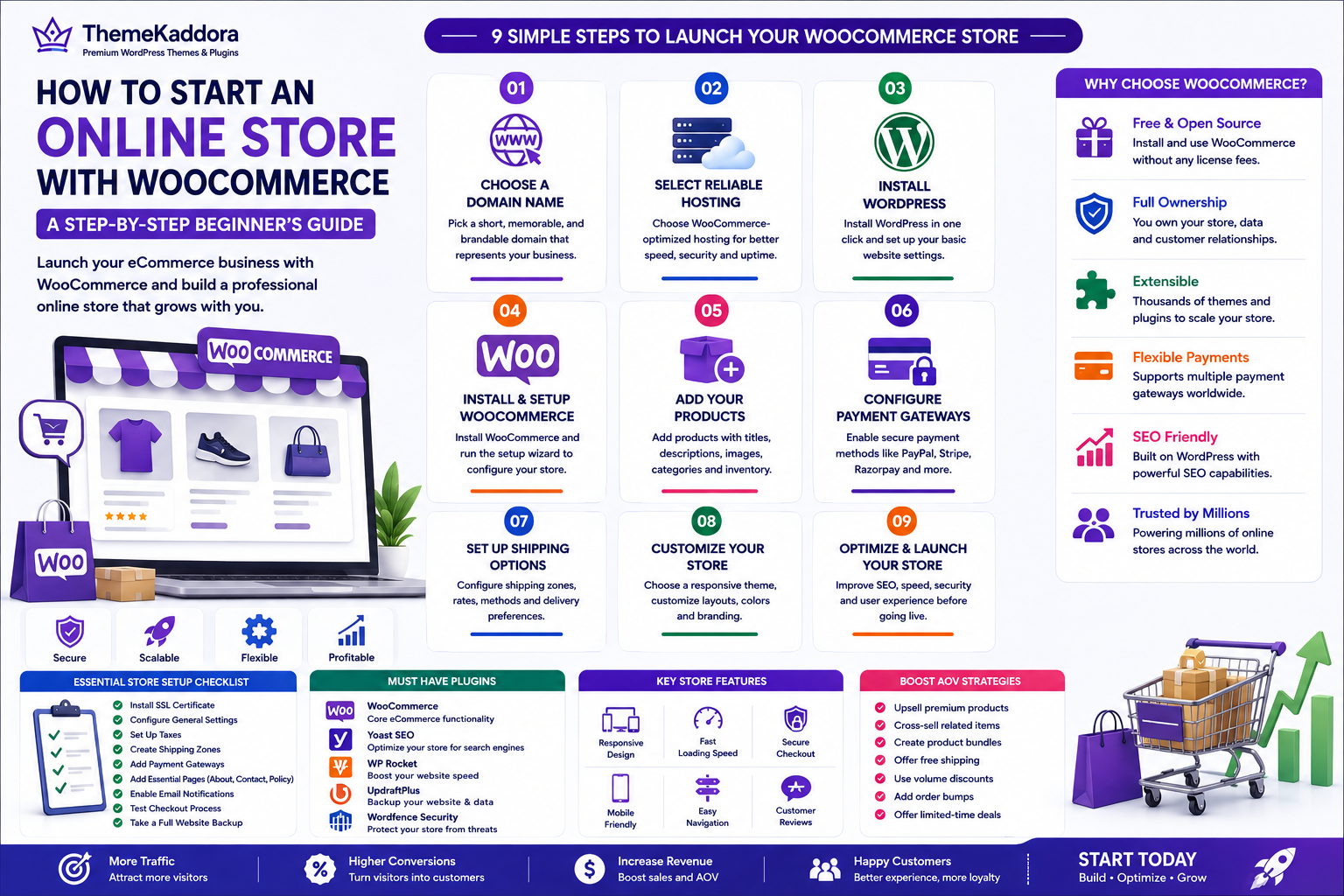
How to Start an Online Store with WooCommerce: A Step-by-Step Beginner's Guide
Introduction
Starting an online store has never been easier. Whether you want to sell physical products, digital downloads, subscriptions, or services, WooCommerce provides a flexible and powerful platform for building a professional eCommerce website. As the world's most popular eCommerce plugin for WordPress, WooCommerce powers millions of online stores, from small startups to large enterprises.
One of the biggest advantages of WooCommerce is that it gives you complete control over your online business. Unlike hosted platforms with monthly subscription fees and feature limitations, WooCommerce lets you customize every aspect of your store while keeping ownership of your data and website.
However, building a successful WooCommerce store involves more than simply installing a plugin. Choosing the right hosting, selecting a responsive theme, configuring payment gateways, optimizing for search engines, and creating a smooth shopping experience are all essential steps toward long-term success.
In this beginner-friendly guide, you'll learn how to launch a WooCommerce store from scratch, avoid common mistakes, and prepare your online business for growth.
Table of Contents
- Why Choose WooCommerce?
- Choose a Domain Name
- Select Reliable WordPress Hosting
- Install WordPress
- Install and Configure WooCommerce
- Choose an SEO-Friendly WooCommerce Theme
- Add Your First Products
- Configure Payment Gateways
- Set Up Shipping Methods
- Install Essential WooCommerce Plugins
- Optimize Your Store for SEO
- Test Before Launch
- Launch and Promote Your Store
- Why Choose ThemeKaddora
- Conclusion
- Frequently Asked Questions
Why Choose WooCommerce?
WooCommerce is a free, open-source eCommerce plugin built specifically for WordPress. It offers the flexibility to create virtually any type of online store without being locked into a proprietary platform.
Key benefits include:
- Free to install and use
- Full ownership of your website and data
- Thousands of themes and plugins
- Flexible customization options
- Support for physical and digital products
- Multiple payment gateway integrations
- Scalable for businesses of all sizes
- Strong SEO capabilities
- Large global community and documentation
Whether you're launching your first online business or expanding an existing one, WooCommerce provides the tools needed to grow.
Choose a Domain Name
Your domain name is your store's online identity. It should be easy to remember, relevant to your brand, and simple to type.
Tips for Choosing a Great Domain
- Keep it short and memorable.
- Avoid numbers and hyphens.
- Use keywords only when they fit naturally.
- Choose a trusted extension such as .com, .net, or a country-specific domain if appropriate.
- Ensure it reflects your business name or niche.
A professional domain builds credibility and makes it easier for customers to find your store.
Select Reliable WordPress Hosting
Your hosting provider has a direct impact on website speed, uptime, security, and overall customer experience.
Look for Hosting That Offers
- High performance
- SSD storage
- Free SSL certificate
- Automatic backups
- Malware protection
- One-click WordPress installation
- Excellent customer support
- WooCommerce optimization
- Scalable resources as your business grows
Reliable hosting creates a solid foundation for your online store.
Install WordPress
Most hosting providers offer one-click WordPress installation.
After installing WordPress:
- Log in to the WordPress dashboard.
- Configure your site title and tagline.
- Set your preferred permalink structure.
- Update WordPress to the latest version.
- Remove default themes and plugins you don't need.
Keeping your WordPress installation clean and updated improves both security and performance.
Install and Configure WooCommerce
From your WordPress dashboard:
Plugins → Add New → Search for WooCommerce → Install → Activate
After activation, the WooCommerce setup wizard will guide you through the basic configuration.
Configure Essential Settings
Complete the following:
- Store address
- Currency
- Business location
- Product types
- Tax settings
- Shipping regions
- Preferred payment gateways
Taking time to configure these settings correctly prevents issues later.
Choose an SEO-Friendly WooCommerce Theme
Your theme influences both user experience and search engine performance.
A high-quality WooCommerce theme should provide:
- Responsive design
- Fast loading speeds
- Clean, optimized code
- SEO-friendly structure
- Accessibility support
- WooCommerce compatibility
- Easy customization
- Regular updates
Avoid themes overloaded with unnecessary animations or features that may reduce performance.
Add Your First Products
With WooCommerce installed, you can begin building your product catalog.
Create Detailed Product Pages
Each product should include:
- Product title
- Detailed description
- Short description
- High-quality images
- Product gallery
- Price
- SKU
- Categories
- Tags
- Inventory information
Detailed product pages improve both customer confidence and search engine visibility.
Optimize Product Images
Professional product images significantly influence buying decisions.
Best practices include:
- Use high-resolution images.
- Compress images before uploading.
- Add descriptive alt text.
- Show products from multiple angles.
- Include lifestyle images when appropriate.
Optimized images improve both page speed and SEO.
Organize Products into Categories
Logical product categories make navigation easier and improve the shopping experience.
Examples include:
- Electronics
- Clothing
- Accessories
- Home & Kitchen
- Digital Products
Well-organized stores are easier for customers and search engines to understand.
Configure Payment Gateways
A secure and convenient payment process is essential for earning customer trust and increasing conversions. WooCommerce supports a wide range of payment gateways, allowing you to accept payments from customers around the world.
Popular Payment Gateways
Choose payment methods based on your target audience and business location.
Popular options include:
PayPal
Stripe
Razorpay
Square
Authorize.Net
Bank Transfer
Cash on Delivery (if applicable)
Offering multiple payment methods improves the shopping experience and reduces checkout abandonment.
Secure Your Payment Process
Security should always be a priority.
Ensure your store uses:
SSL certificates (HTTPS)
Trusted payment gateways
Two-factor authentication for administrators
Strong passwords
Regular software updates
A secure checkout process builds customer confidence and protects sensitive information.
Set Up Shipping Methods
Shipping plays a major role in customer satisfaction. Clear shipping policies and accurate delivery estimates help reduce abandoned carts.
Configure Shipping Zones
WooCommerce allows you to create shipping zones based on countries, states, or regions.
For each zone, you can offer:
Free Shipping
Flat Rate Shipping
Local Pickup
Custom Shipping Rates
Choose options that align with your business model and customer expectations.
Display Delivery Estimates
Customers appreciate knowing when their orders will arrive.
Provide information such as:
Estimated delivery dates
Processing time
Shipping carriers
Tracking availability
Transparent shipping information builds trust and improves conversions.
Install Essential WooCommerce Plugins
WooCommerce becomes even more powerful when combined with the right plugins.
Recommended Plugin Categories
Consider installing plugins for:
SEO optimization
Website security
Image optimization
Backup management
Caching and performance
Email marketing
Analytics
Customer reviews
Product filters
Marketing automation
Only install plugins that provide real value to avoid slowing down your website.
Keep Plugins Updated
Regular updates provide:
Security improvements
Bug fixes
Performance enhancements
Compatibility with the latest version of WordPress and WooCommerce
Before updating, create a complete website backup.
Optimize Your Store for SEO
Search Engine Optimization helps potential customers discover your products through search engines like Google.
Optimize Product Pages
Every product page should include:
Keyword-rich titles
Unique product descriptions
Optimized URLs
Meta titles
Meta descriptions
Image alt text
Avoid duplicate content by writing original descriptions for every product.
Improve Website Speed
Fast websites provide better user experiences and improve search rankings.
Ways to improve performance include:
Compress images
Enable caching
Use a Content Delivery Network (CDN)
Optimize CSS and JavaScript
Remove unused plugins
Choose reliable hosting
Website speed affects both SEO and conversions.
Build Internal Links
Link related products, categories, and blog articles to improve navigation and help search engines understand your site's structure.
Examples include:
Related products
Buying guides
Product comparisons
Tutorials
Category pages
A strong internal linking strategy increases user engagement and supports SEO.
Test Before Launch
Before making your store public, thoroughly test every aspect of the shopping experience.
Verify the Customer Journey
Complete a test order to ensure:
Products can be added to the cart
Coupons work correctly
Shipping charges are accurate
Payment gateways function properly
Confirmation emails are sent
Order status updates correctly
Testing helps identify issues before customers encounter them.
Check Mobile Compatibility
A large percentage of online shopping happens on mobile devices.
Review your website on:
Smartphones
Tablets
Different browsers
Various screen sizes
A responsive design ensures a consistent shopping experience across all devices.
Launch and Promote Your Store
Once everything is ready, it's time to launch your WooCommerce store.
Promote Your Business
Drive traffic using multiple marketing channels:
Search Engine Optimization (SEO)
Content marketing
Social media
Email marketing
Paid advertising
Influencer collaborations
Affiliate marketing
A balanced marketing strategy helps attract consistent traffic and sales.
Continue Improving
Launching your store is only the beginning.
Regularly:
Add new products
Publish helpful blog content
Monitor analytics
Improve website performance
Collect customer feedback
Test new marketing strategies
Continuous optimization leads to sustainable growth.
Why Choose ThemeKaddora?
At ThemeKaddora, we help businesses build fast, secure, and scalable WooCommerce stores that are designed for long-term success. Our WordPress themes and WooCommerce plugins focus on performance, user experience, and search engine optimization.
With ThemeKaddora, you get:
Lightweight, optimized code
Mobile-first responsive designs
WooCommerce compatibility
SEO-friendly architecture
Fast-loading performance
Easy customization
Secure development practices
AI-powered plugins for automation and business growth
Whether you're launching your first online store or expanding an established business, ThemeKaddora provides the tools needed to create a professional eCommerce website that delivers results.
Conclusion
Starting an online store with WooCommerce is one of the most flexible and cost-effective ways to build an eCommerce business. By selecting reliable hosting, installing WordPress and WooCommerce, choosing a high-quality theme, adding well-optimized products, configuring secure payments, and implementing SEO best practices, you create a strong foundation for long-term success.
Remember that launching your store is only the first step. Continue improving your website by analyzing customer behavior, optimizing performance, publishing valuable content, and refining your marketing strategy. Every improvement contributes to a better customer experience and increased sales.
With performance-focused themes and AI-powered WooCommerce solutions from ThemeKaddora, you can confidently build an online store that attracts visitors, converts customers, and supports sustainable business growth.
Frequently Asked Questions
1. Is WooCommerce free?
Yes. WooCommerce is a free, open-source WordPress plugin. You may incur costs for hosting, premium themes, plugins, or extensions depending on your needs.
2. Do I need coding knowledge to use WooCommerce?
No. Most WooCommerce stores can be created and managed without coding, thanks to its user-friendly interface and extensive plugin ecosystem.
3. Which hosting is best for WooCommerce?
Choose a hosting provider that offers SSD storage, strong security, automatic backups, free SSL certificates, excellent uptime, and WooCommerce optimization.
4. How many products can WooCommerce handle?
WooCommerce can manage thousands of products when paired with quality hosting and proper performance optimization.
5. Which payment gateways work with WooCommerce?
WooCommerce supports gateways such as PayPal, Stripe, Razorpay, Square, Authorize.Net, bank transfers, and many others.
6. Can WooCommerce sell digital products?
Yes. WooCommerce supports digital downloads, software, eBooks, music, online courses, and other virtual products.
7. Is WooCommerce SEO-friendly?
Yes. Combined with WordPress and proper SEO practices, WooCommerce provides a strong foundation for improving search engine visibility.
8. Which plugins should I install first?
Focus on essential plugins for SEO, security, backups, caching, image optimization, analytics, and email marketing.
9. How long does it take to launch a WooCommerce store?
A simple store can be launched within a few days, while larger stores with extensive customization and product catalogs may require several weeks.
10. Why choose ThemeKaddora?
ThemeKaddora offers high-performance WordPress themes and AI-powered WooCommerce plugins designed to improve speed, SEO, user experience, and business growth.
Comments (0)