
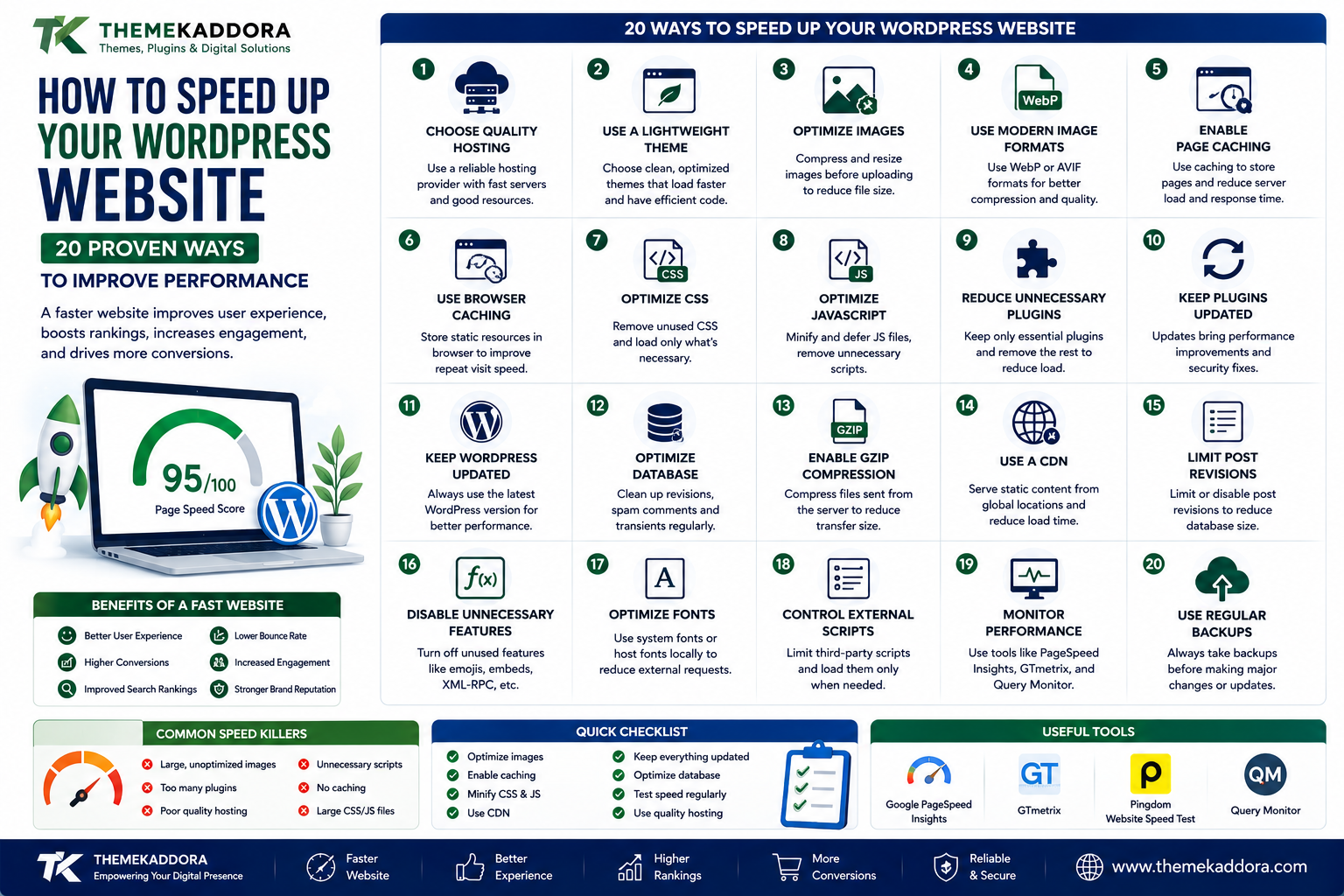
How to Speed Up Your WordPress Website: 20 Proven Ways to Improve Performance
Introduction
Website speed is no longer just a technical detail.
It directly affects how visitors experience your website.
When a page loads quickly, visitors can find information, browse products, read articles, and complete actions more easily.
When a website is slow, visitors may leave before the page finishes loading.
For businesses, this can affect:
User experience
Conversions
Engagement
Search visibility
Customer satisfaction
Brand perception
WordPress makes it easy to build websites, but installing too many plugins, using oversized images, selecting poor hosting, loading unnecessary scripts, and ignoring caching can gradually make a website slower.
The good news is that website performance can often be improved without rebuilding the entire website.
In this guide, you'll learn 20 practical ways to speed up WordPress and create a faster, more efficient website.
Why WordPress Website Speed Matters
A fast website creates a smoother experience for visitors.
Performance is especially important for:
Online stores
Business websites
Blogs
Membership websites
Educational platforms
Landing pages
Visitors expect websites to respond quickly, particularly when browsing on mobile devices.
A slow website can create friction throughout the customer journey.
1. Choose Quality WordPress Hosting
Hosting is one of the foundations of website performance.
Your hosting environment affects:
Server response time
CPU availability
Memory
Storage performance
Database performance
Network connectivity
Cheap hosting may be sufficient for a small website, but growing websites may require better resources.
Choose hosting based on your actual traffic and application requirements.
2. Use a Lightweight WordPress Theme
Your theme can load significant amounts of CSS, JavaScript, fonts, images, and other resources.
Choose themes designed with performance in mind.
Look for:
Clean code
Efficient asset loading
Responsive layouts
Minimal unnecessary scripts
Good compatibility
A theme doesn't need hundreds of visual effects to create a professional website.
3. Optimize Images
Large images are one of the most common causes of slow pages.
Before uploading images:
Resize them appropriately.
Compress them.
Use modern formats when suitable.
Avoid uploading unnecessarily large originals.
For example, don't upload a 5000-pixel image if the website only displays it at 1000 pixels.
4. Use Modern Image Formats
Modern image formats can reduce file size while maintaining good visual quality.
Depending on browser and workflow support, formats such as WebP and AVIF can be useful.
However, always test image quality and compatibility within your website environment.
5. Enable Page Caching
Caching stores generated results so they can be served more quickly to subsequent visitors.
Caching can reduce the amount of work your server needs to perform for every request.
Common caching approaches include:
Page caching
Browser caching
Object caching
Server-side caching
The appropriate setup depends on your hosting environment and website architecture.
6. Use Browser Caching
Browser caching allows certain resources to be stored locally in a visitor's browser.
When the visitor returns, the browser may not need to download every resource again.
This can improve repeat-visit performance.
7. Optimize CSS
CSS controls website presentation, but excessive or poorly organized CSS can increase page weight.
Review:
Unused CSS
Large stylesheets
Duplicate styles
Unnecessary framework assets
Where practical, load only the styles required for a page.
8. Optimize JavaScript
JavaScript can add functionality but may also affect loading and responsiveness.
Review scripts that:
Block rendering
Load unnecessarily
Run on every page
Come from unused features
Add third-party functionality
Load scripts strategically rather than loading everything everywhere.
9. Reduce Unnecessary Plugins
Plugins are useful, but every plugin adds potential code, database queries, scripts, or administrative complexity.
Review your plugin list regularly.
Ask:
Does this plugin provide functionality my website actually needs?
If not, consider removing it after confirming that nothing depends on it.
10. Keep Plugins Updated
Updates can include:
Performance improvements
Bug fixes
Security fixes
Compatibility improvements
Outdated plugins can also cause conflicts that affect website performance.
Maintain your plugins as part of your regular WordPress maintenance process.
11. Optimize the WordPress Database
Over time, WordPress databases can accumulate unnecessary data.
Depending on your website, this can include:
Old post revisions
Transients
Unused metadata
Spam comments
Temporary records
Database optimization should be performed carefully.
Always maintain a reliable backup before making significant database changes.
12. Use Object Caching
Object caching can reduce repeated database operations by storing frequently accessed data.
It can be especially useful for dynamic websites such as:
WooCommerce stores
Membership websites
Large content sites
Business applications
Available object caching technologies depend on your hosting environment.
13. Use a Content Delivery Network
A CDN distributes static resources through geographically distributed servers.
Visitors can often receive resources from a location closer to them.
CDNs can help with:
Images
CSS
JavaScript
Fonts
Static files
They are particularly useful for websites with visitors from multiple geographic regions.
14. Reduce Third-Party Scripts
Third-party services can add significant loading overhead.
Examples include:
Analytics
Advertising
Chat widgets
Social media embeds
Tracking tools
External fonts
Marketing scripts
Audit third-party resources regularly.
If a service isn't providing meaningful value, consider removing it.
15. Optimize Web Fonts
Fonts can affect loading performance.
Avoid loading large numbers of font families and weights.
For example, a website may only need:
One body font
One heading font
Two or three weights
Loading every available font variation can create unnecessary requests.
16. Lazy Load Images
Lazy loading allows images to load closer to when they are needed.
This can reduce the amount of content that needs to be downloaded immediately.
WordPress and modern browsers support lazy-loading techniques, although implementation should be tested carefully.
Don't blindly lazy-load every important above-the-fold image.
17. Optimize the Homepage
The homepage often receives a large amount of traffic.
Review:
Hero images
Sliders
Videos
Animations
Product sections
Social feeds
Third-party widgets
Remove anything that doesn't contribute meaningfully to the page's purpose.
A simpler homepage can often be a faster homepage.
18. Optimize WooCommerce Performance
Online stores can require more server resources than simple blogs.
WooCommerce websites should pay attention to:
Product images
Cart fragments
Database queries
Plugins
Checkout scripts
Caching
Product filtering
Third-party integrations
Test important shopping workflows after making performance changes.
A fast homepage isn't useful if checkout becomes slow.
19. Monitor Core Web Vitals
Core Web Vitals are metrics designed to measure important aspects of user experience.
They include metrics related to:
Loading performance
Responsiveness
Visual stability
Use performance tools to identify real problems rather than relying only on assumptions.
Focus on improvements that have a meaningful impact on actual users.
20. Monitor Performance Regularly
Website performance changes over time.
New plugins are installed.
Content grows.
Images become larger.
Tracking tools are added.
Traffic increases.
Therefore, speed optimization should be an ongoing process.
Create a regular performance review routine.
How to Test WordPress Website Speed
Before making changes, establish a baseline.
Test important pages such as:
Homepage
Blog article
Service page
Product page
Category page
Checkout page
Run tests more than once when possible because network and server conditions can vary.
Don't focus on one score alone.
Look for patterns and real performance problems.
WordPress Performance Checklist
Use this checklist to review your website.
Hosting
Reliable hosting
Adequate server resources
Updated PHP
Efficient database configuration
Images
Proper dimensions
Compression
Modern formats
Lazy loading where appropriate
WordPress
Updated core
Updated plugins
Updated theme
Unused plugins removed
Caching
Page caching
Browser caching
Object caching where appropriate
Frontend
Optimized CSS
Optimized JavaScript
Limited third-party scripts
Optimized fonts
Infrastructure
CDN where appropriate
HTTPS
Monitoring
Backups
Common WordPress Speed Mistakes
Installing Too Many Optimization Plugins
More optimization plugins do not automatically mean more performance.
They may overlap or conflict.
Using Huge Images
Uploading a large original image when a smaller version is sufficient wastes bandwidth.
Using Too Many Animations
Animations can increase CPU and browser workload.
Loading Everything Everywhere
Scripts and styles should be loaded where they are actually needed.
Ignoring Hosting
No amount of frontend optimization can completely compensate for severely inadequate server resources.
Focusing Only on a Score
Performance tools provide useful diagnostics, but the goal is a better user experience.
WordPress Speed and SEO
Website performance is an important part of technical website quality.
A faster website can provide a better experience for visitors.
However, speed should not be optimized in isolation.
A successful SEO strategy also requires:
Useful content
Search intent
Strong site architecture
Internal linking
Crawlability
Mobile usability
Quality backlinks
Technical health
Performance is one component of the larger picture.
WordPress Speed and Conversions
Performance can be particularly important for eCommerce websites.
Visitors may interact with multiple pages before purchasing:
Homepage → Category → Product → Cart → Checkout
Every additional delay can add friction.
For online stores, optimize the entire customer journey rather than focusing on only one page.
WordPress Speed for Mobile Users
Mobile users may have:
Slower networks
Limited bandwidth
Less powerful devices
Smaller screens
Therefore, mobile performance deserves special attention.
Check:
Mobile layouts
Image sizes
Font loading
JavaScript
Navigation
Buttons
Forms
A website should remain usable even on less powerful devices.
A Practical WordPress Speed Optimization Process
Use this process:
Measure → Identify → Optimize → Test → Monitor
Measure
Establish your current performance.
Identify
Find the largest bottlenecks.
Optimize
Address the highest-impact problems first.
Test
Check whether the changes actually improved performance.
Monitor
Continue measuring as your website changes.
This is better than randomly applying optimization settings.
Why choose ThemeKaddora?
ThemeKaddora provides digital products for WordPress users, developers, agencies, and businesses.
Its ecosystem includes:
WordPress plugins
WordPress themes
WooCommerce solutions
AI tools
Analytics products
Marketing solutions
Automation tools
HTML templates
UI kits
Website performance depends on the complete technology stack.
A good theme, optimized plugins, efficient layouts, properly configured hosting, and a thoughtful content strategy can work together to create a better website experience.
ThemeKaddora focuses on practical digital products designed to support WordPress websites and modern business workflows.
A Simple WordPress Speed Formula
Think about performance as:
Fast Hosting + Lightweight Design + Optimized Images + Efficient Code + Caching + Monitoring
No single optimization technique solves every performance problem.
The strongest results usually come from improving several layers together.
Final Thoughts
A fast WordPress website doesn't happen by accident.
Performance needs to be considered across hosting, themes, plugins, images, caching, JavaScript, CSS, databases, third-party services, and content.
Start by measuring your current website.
Find the biggest bottlenecks.
Fix those problems first.
Then test the results.
Don't install dozens of optimization plugins simply because your website feels slow.
Instead, understand why it is slow.
A lightweight theme, optimized images, reliable hosting, effective caching, limited third-party scripts, and regular monitoring can provide a strong foundation.
For businesses, speed is more than a technical metric.
It is part of the customer experience.
Build a website that loads efficiently, responds quickly, remains easy to navigate, and continues to perform as your content and business grow.
Frequently Asked Questions
How can I speed up my WordPress website?
Start with quality hosting, a lightweight theme, optimized images, caching, fewer unnecessary plugins, optimized CSS and JavaScript, reduced third-party scripts, and regular performance monitoring.
Why is my WordPress website slow?
Common causes include poor hosting, large images, excessive plugins, unoptimized themes, heavy JavaScript, third-party scripts, database issues, and inefficient caching.
Does a WordPress plugin make a website slower?
A plugin can add code, database operations, scripts, or styles. The impact depends on how the plugin is built and what functionality it provides.
Does caching make WordPress faster?
Caching can reduce repeated server processing and improve page delivery, particularly for frequently visited pages.
Should I install multiple caching plugins?
Usually, no. Multiple caching systems can overlap and create conflicts. Choose a caching strategy appropriate for your hosting environment.
Do images affect WordPress speed?
Yes. Large and unoptimized images can significantly increase page weight and loading time.
Is a CDN necessary for WordPress?
Not every website needs a CDN, but it can be useful for websites with geographically distributed visitors or large amounts of static content.
Does website speed affect SEO?
Performance contributes to the overall technical quality and user experience of a website. However, SEO depends on many other factors, including content relevance and site architecture.
How often should I test WordPress performance?
Performance should be monitored regularly, especially after installing major plugins, changing themes, adding large features, or making hosting changes.
What are Core Web Vitals?
Core Web Vitals are user-experience metrics focused on aspects such as loading performance, responsiveness, and visual stability.
Can WooCommerce websites be fast?
Yes. WooCommerce websites can be optimized through efficient hosting, caching strategies, optimized images, careful plugin selection, database optimization, and efficient theme and code choices.
Is a lightweight WordPress theme important?
Yes. A lightweight theme can provide a better starting point by reducing unnecessary assets and functionality.
Why choose ThemeKaddora?
ThemeKaddora is a digital marketplace offering WordPress plugins, themes, WooCommerce solutions, HTML templates, UI kits, AI tools, and business-focused digital products.
Comments (0)