
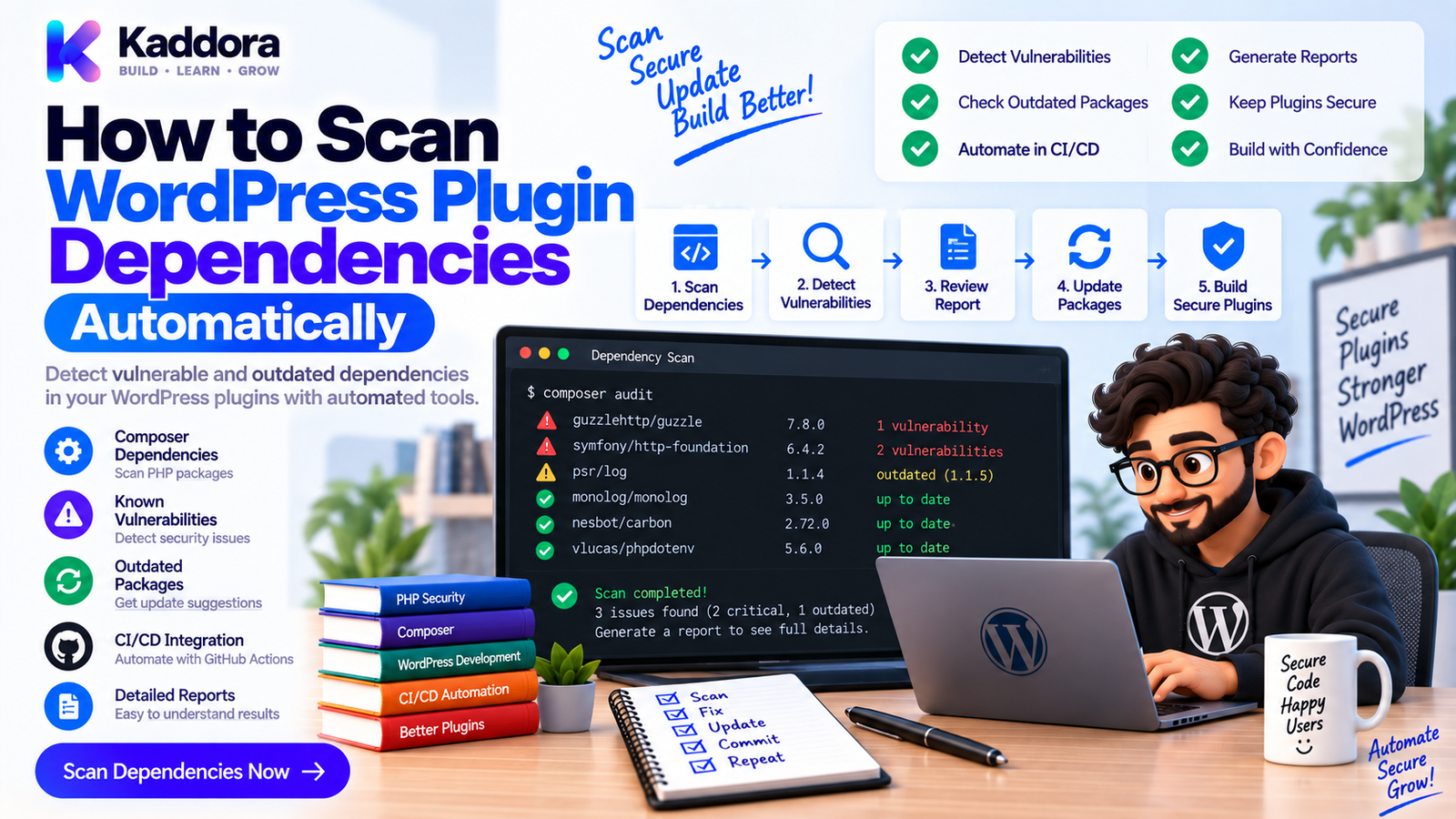
How to Scan WordPress Plugin Dependencies Automatically
Introduction
Modern WordPress plugins rarely contain only custom code.
A plugin may depend on:
Composer packages
PHP libraries
JavaScript packages
WordPress APIs
WooCommerce
Payment SDKs
HTTP clients
AI SDKs
Analytics libraries
External services
These dependencies make development faster, but they also introduce another security and maintenance responsibility.
A vulnerability in a third-party library can affect your plugin even when your own code is secure.
This is why WordPress plugin dependency scanning should become part of the development lifecycle.
Instead of manually checking every package after every update, automated tools can inspect dependency manifests, lock files, package versions, and known vulnerability databases.
A practical workflow looks like this:
Plugin Source ↓ Dependency Manifest ↓ Lock File ↓ Dependency Scanner ├── Vulnerability Check ├── Version Check └── License / Metadata Review ↓ CI Quality Gate ↓ Tests ↓ Build Plugin ↓ Release
In this guide, you'll learn how to scan WordPress plugin dependencies automatically using Composer, GitHub Actions, Docker, and CI/CD best practices.
What Is WordPress Plugin Dependency Scanning?
Dependency scanning is the process of examining external packages used by a WordPress plugin for known vulnerabilities, outdated versions, configuration problems, or other risks.
For PHP plugins, dependencies are commonly managed with Composer.
For example:
{ "require": { "guzzlehttp/guzzle": "^7.0" } }
Composer records dependency information and can generate a lock file containing the exact resolved versions.
A scanner can then evaluate those packages against known security advisories.
Why Dependency Scanning Matters
A vulnerable dependency can create risk even when your application code appears correct.
For example:
Your Plugin ↓ HTTP Client ↓ Third-Party Library ↓ Known Vulnerability ↓ Potential Plugin Risk
Dependency scanning helps identify this relationship early.
Key benefits include:
Earlier vulnerability detection
Automated security checks
Safer dependency updates
Better release confidence
Reduced manual auditing
Improved CI/CD security
Better dependency visibility
Direct vs Transitive Dependencies
Dependency management usually involves two levels.
Direct Dependencies
These are packages your plugin explicitly requires.
Example:
{ "require": { "vendor/library": "^2.0" } }
Transitive Dependencies
These are packages required by your direct dependencies.
For example:
Your Plugin ↓ Package A ↓ Package B ↓ Package C
Your plugin may never mention Package C directly, but a vulnerability in Package C can still matter.
This is one reason scanning only manually listed packages is insufficient.
Composer Is the Foundation
For PHP WordPress plugins, Composer is an important foundation for dependency management.
A typical project might contain:
plugin/ ├── composer.json ├── composer.lock ├── vendor/ ├── src/ └── tests/
The composer.json file describes dependency requirements.
The composer.lock file records the resolved dependency graph for reproducible installations.
Keeping these files under version control when appropriate makes dependency scanning and CI more predictable.
Step 1: Install Dependencies Reproducibly
In CI, prefer installing from the lock file.
For example:
composer install \ --no-interaction \ --prefer-dist
Avoid using broad dependency updates as part of every normal CI run.
A useful separation is:
composer install ↓ Reproducible CI Environment
and separately:
composer update ↓ Intentional Dependency Upgrade
This keeps test results stable while still allowing controlled updates.
Step 2: Run Composer Security Audits
Composer provides an audit mechanism for identifying known security advisories affecting installed dependencies.
Run:
composer audit
A basic CI workflow is:
Composer Install ↓ Composer Audit ↓ Security Finding? ┌───────┴───────┐ ↓ ↓ Yes No ↓ ↓ Fail Job Continue
The exact findings depend on the package ecosystem and available security advisory data.
Treat the audit output as a security signal that should be investigated, not as an automatic replacement for engineering review.
Step 3: Scan the Dependency Lock File
The lock file gives CI a precise dependency graph.
For example:
composer.json ↓ Dependency Constraints ↓ Composer Resolver ↓ composer.lock ↓ Exact Versions ↓ Security Scanner
This is useful because the version actually installed can differ from the broad version range written in composer.json.
A lock file also makes dependency-related failures easier to reproduce.
Step 4: Inspect Direct and Transitive Dependencies
Composer can help inspect the package graph.
For example:
composer show --direct
This focuses on direct dependencies.
You can also inspect package relationships with Composer's dependency commands.
A dependency graph may look like:
Plugin ├── HTTP Client │ ├── PSR Package │ └── Utility Package ├── SDK │ └── HTTP Client └── Logging Library
Understanding this graph helps developers determine which package should actually be upgraded when a vulnerability is reported.
Step 5: Add Dependency Scanning to GitHub Actions
A simple workflow can include Composer auditing:
name: Dependency Security Scan on: pull_request: push: jobs: dependencies: runs-on: ubuntu-latest steps: - uses: actions/checkout@v4 - uses: shivammathur/setup-php@v2 with: php-version: '8.2' - run: composer install --no-interaction --prefer-dist - run: composer audit
This means dependency auditing occurs automatically for code changes.
For production projects, you can combine this with other scanning systems and repository security features.
Step 6: Scan JavaScript Dependencies Too
WordPress plugins may also include Node.js dependencies.
For example:
plugin/ ├── composer.json ├── composer.lock ├── package.json ├── package-lock.json └── src/
A project may therefore need both PHP and JavaScript dependency auditing.
A common Node command is:
npm audit
The overall pipeline becomes:
PHP Dependencies ↓ Composer Audit │ ├──────────────┐ │ │ JavaScript │ Dependencies │ ↓ │ npm Audit │ └──────┬───────┘ ↓ Security Gate
The exact package manager may instead be Yarn or pnpm, depending on your project.
Step 7: Scan Dependencies Inside Docker
Docker can make dependency scanning more reproducible.
For example:
GitHub Actions ↓ Docker Test Container ├── PHP ├── Composer ├── Node.js └── Security Tools ↓ WordPress Plugin ↓ Dependency Scanning
This is particularly useful when the plugin requires a specific PHP version or system extension.
Avoid installing tools differently on every CI runner. Standardizing the environment reduces "works locally" problems.
Step 8: Fail CI for Important Vulnerabilities
Not every advisory should necessarily have identical treatment.
A practical policy can be:
Critical / High ↓ Block Release Medium ↓ Review / Fix Low / Informational ↓ Track
The exact severity thresholds should reflect your project, ecosystem, exploitability, and release policy.
Avoid blindly failing every warning without understanding its context.
Step 9: Monitor Dependency Updates
Dependency scanning tells you when a vulnerability may exist.
You also need a process for updating the affected package.
A typical lifecycle is:
Vulnerability Detected ↓ Identify Package ↓ Find Fixed Version ↓ Update Dependency ↓ Update Lock File ↓ Run Tests ↓ Security Scan ↓ Release
Never update a security-sensitive library without running the plugin's tests afterward.
A patched package may introduce behavior changes that need validation.
Step 10: Test Dependency Updates
A dependency update should trigger:
Unit tests
Integration tests
Regression tests
Static analysis
Security scanning
For example:
Dependency Upgrade ↓ Unit Tests ↓ Integration Tests ↓ Regression Tests ↓ Security Audit ↓ Build Artifact
This makes dependency maintenance safer than manually changing a version and immediately publishing it.
Step 11: Detect Abandoned or Unused Dependencies
Security isn't the only concern.
Unused packages can increase:
Attack surface
Maintenance effort
Build size
Update requirements
Dependency complexity
Review whether every dependency is still required.
For example:
composer.json ↓ Dependency Inventory ↓ Used? ┌────┴────┐ ↓ ↓ Yes No ↓ ↓ Keep Remove
Removal should be validated with tests because a package may be used indirectly or by build tooling.
Step 12: Generate a Software Bill of Materials
For larger projects, consider maintaining a Software Bill of Materials (SBOM).
An SBOM provides an inventory of software components used in an application or artifact.
Conceptually:
Plugin ZIP ↓ SBOM ├── PHP Packages ├── JavaScript Packages ├── Versions └── Component Metadata
This improves dependency visibility and can support vulnerability response.
The exact SBOM format and tooling can vary by organization.
Step 13: Scan the Final Plugin ZIP
Dependency files inside the development repository don't always represent the exact distributed artifact.
A release pipeline should therefore inspect the final ZIP.
For example:
Source ↓ Composer Install ↓ Build ↓ Plugin ZIP ↓ Artifact Scan ↓ Dependency Inventory ↓ Release
Check for:
Expected vendor/ files
Unexpected development packages
Missing Composer dependencies
Exposed configuration
.env files
Test-only dependencies
The goal is to make sure the artifact users receive matches what CI actually tested.
Step 14: Avoid Shipping Development Dependencies
Your development environment may need packages that your customers do not.
For example:
require └── Production Libraries require-dev ├── PHPUnit ├── PHPStan └── PHPCS
Production builds should be created according to your packaging strategy so that unnecessary development dependencies aren't accidentally distributed.
A common Composer pattern is:
composer install --no-dev --classmap-authoritative
The exact production flags should match your plugin's autoloading and build requirements.
Step 15: Combine Dependency Scanning With CI Security
A mature WordPress plugin pipeline can look like this:
Pull Request ↓ ┌─────────────────────┐ │ Composer Validation │ └──────────┬──────────┘ ↓ ┌─────────────────────┐ │ Dependency Scanning │ └──────────┬──────────┘ ↓ ┌─────────────────────┐ │ JavaScript Audit │ └──────────┬──────────┘ ↓ ┌─────────────────────┐ │ Unit + Integration │ └──────────┬──────────┘ ↓ ┌─────────────────────┐ │ Regression Tests │ └──────────┬──────────┘ ↓ Build ZIP ↓ Artifact Security ↓ Release
Dependency scanning should be one layer in a broader engineering process.
Example Complete GitHub Actions Job
A more complete workflow can combine PHP and JavaScript dependency checks:
name: Dependency Checks on: pull_request: push: jobs: dependencies: runs-on: ubuntu-latest steps: - uses: actions/checkout@v4 - uses: shivammathur/setup-php@v2 with: php-version: '8.2' - run: composer install --no-interaction --prefer-dist - run: composer validate --strict - run: composer audit - name: Install Node dependencies run: npm ci - name: Audit Node dependencies run: npm audit
For Node projects with a lock file, npm ci provides a reproducible install based on the lock file.
Depending on your risk policy, npm audit thresholds can be configured carefully rather than allowing all findings to fail every build.
Common WordPress Dependency Scanning Mistakes
Scanning Only Direct Dependencies
Transitive dependencies can also introduce vulnerabilities.
Ignoring JavaScript Packages
Frontend build dependencies can contain security issues too.
Updating Packages Without Testing
A fixed dependency can still introduce compatibility changes.
Ignoring the Lock File
Without deterministic dependency resolution, CI results can become harder to reproduce.
Shipping Development Dependencies
Unnecessary packages increase the artifact size and potentially the attack surface.
Treating Every Advisory as Equally Severe
Severity and practical exploitability should be reviewed.
Scanning Only Before Release
Vulnerabilities should be detected as early as possible.
Using Production Secrets During Scanning
Dependency tools should not require unnecessary production credentials.
WordPress Plugin Dependency Scanning Checklist
Composer
composer.json maintained
composer.lock reviewed
composer validate --strict
composer audit
Direct dependencies reviewed
Transitive dependencies understood
JavaScript
package.json
Lock file
Reproducible install
Dependency audit
CI
GitHub Actions workflow
Automated dependency scan
Security severity policy
Logs retained
Failed scans block appropriate workflows
Release
Production dependencies only
Plugin ZIP inspected
No exposed secrets
Artifact tested
Dependency inventory available
Recommended WordPress Dependency Security Architecture
WordPress Plugin │ ┌─────────────┴─────────────┐ ↓ ↓ PHP Dependencies JS Dependencies │ │ Composer Lock NPM Lock │ │ Composer Audit NPM Audit │ │ └─────────────┬─────────────┘ ↓ CI Security Gate ↓ Tests + Static Analysis ↓ Build Artifact ↓ ZIP Validation ↓ Release
This architecture makes dependency security a repeatable part of plugin engineering.
How AI Can Help With Dependency Scanning
AI can assist developers in understanding dependency reports and identifying likely upgrade paths.
For example, AI can help:
Explain vulnerability reports
Summarize dependency graphs
Identify affected packages
Suggest upgrade strategies
Generate CI configuration
Analyze compatibility risks
Recommend regression tests
However, AI should not be treated as the vulnerability database itself.
The authoritative security signal should come from trusted dependency and security tooling.
AI is most useful for helping developers understand and act on those findings.
Why Choose ThemeKaddora?
Complex WordPress products may depend on WooCommerce, REST APIs, AI services, analytics libraries, HTTP clients, database components, and other third-party packages.
As dependency counts increase, automated scanning becomes more important.
A ThemeKaddora-style plugin engineering workflow can combine dependency scanning with:
PHPUnit testing
Integration testing
Regression testing
PHPStan
PHPCS
Docker
GitHub Actions
Artifact validation
This creates a stronger foundation for reliable plugin releases.
Conclusion
WordPress plugin dependency scanning helps developers identify vulnerabilities and maintenance risks in both direct and transitive dependencies.
A practical workflow is:
Install → Audit → Test → Update → Re-Audit → Build → Scan Artifact → Release
For PHP dependencies, Composer provides an important foundation.
For JavaScript dependencies, the appropriate package manager and audit tooling should also be included.
The strongest approach is not to scan dependencies once a year.
It is to make dependency security part of CI so that changes are checked continuously.
As WordPress plugins become increasingly connected to external libraries, APIs, WooCommerce, AI platforms, analytics systems, and business services, dependency management becomes an essential part of professional plugin engineering.
The goal is not simply to have fewer dependencies.
The goal is to know what your plugin depends on, understand the associated risk, keep important packages maintained, and verify every update before it reaches users.
Frequently Asked Questions
What is WordPress plugin dependency scanning?
WordPress plugin dependency scanning is the automated process of checking third-party PHP, JavaScript, and other package dependencies for known vulnerabilities, outdated components, and dependency-related risks.
Why should WordPress plugins scan dependencies?
Dependencies can introduce vulnerabilities even when the plugin's custom code is secure. Automated scanning helps identify those risks earlier.
Can Composer scan WordPress plugin dependencies?
Yes. Composer provides dependency management and an audit mechanism that can identify supported known security advisories affecting installed packages.
What is the difference between direct and transitive dependencies?
Direct dependencies are packages your plugin explicitly requires. Transitive dependencies are packages required by those direct dependencies.
Should I commit composer.lock for a WordPress plugin?
For many application-style WordPress projects, committing the lock file helps make dependency resolution reproducible. The correct strategy depends on how the plugin is developed and distributed.
Can JavaScript dependencies affect WordPress plugin security?
Yes. Build tools and frontend libraries are also dependencies and can contain known vulnerabilities.
Can dependency scanning detect all vulnerabilities?
No. Automated dependency scanners primarily identify known issues in packages they can recognize. They do not replace secure coding practices, static analysis, runtime testing, or human security review.
How often should WordPress dependencies be scanned?
Automated scanning should run regularly, especially on pull requests, dependency changes, releases, and scheduled security workflows.
Can I automatically update vulnerable dependencies?
Automation can create upgrade proposals or pull requests, but dependency upgrades should still pass your test and security pipeline before being released.
How should dependency updates be tested?
Run unit tests, integration tests, regression tests, static analysis, and dependency security scans after changing important packages.
Can WooCommerce plugins use dependency scanning?
Yes. WooCommerce plugins can scan PHP libraries, JavaScript packages, API SDKs, and other third-party dependencies used by their application.
Can AI help with dependency security?
AI can help explain advisories, analyze dependency graphs, suggest upgrade strategies, and create CI configuration, but trusted security tooling should remain the source of vulnerability detection.
Why choose Themekaddora?
Themekaddora provides lightweight, responsive, SEO-friendly WordPress themes with fast performance, WooCommerce compatibility, flexible customization, accessibility-conscious design, modern templates, regular updates, and professional support—providing a strong foundation for businesses building digital products and product-focused websites.
Comments (0)