
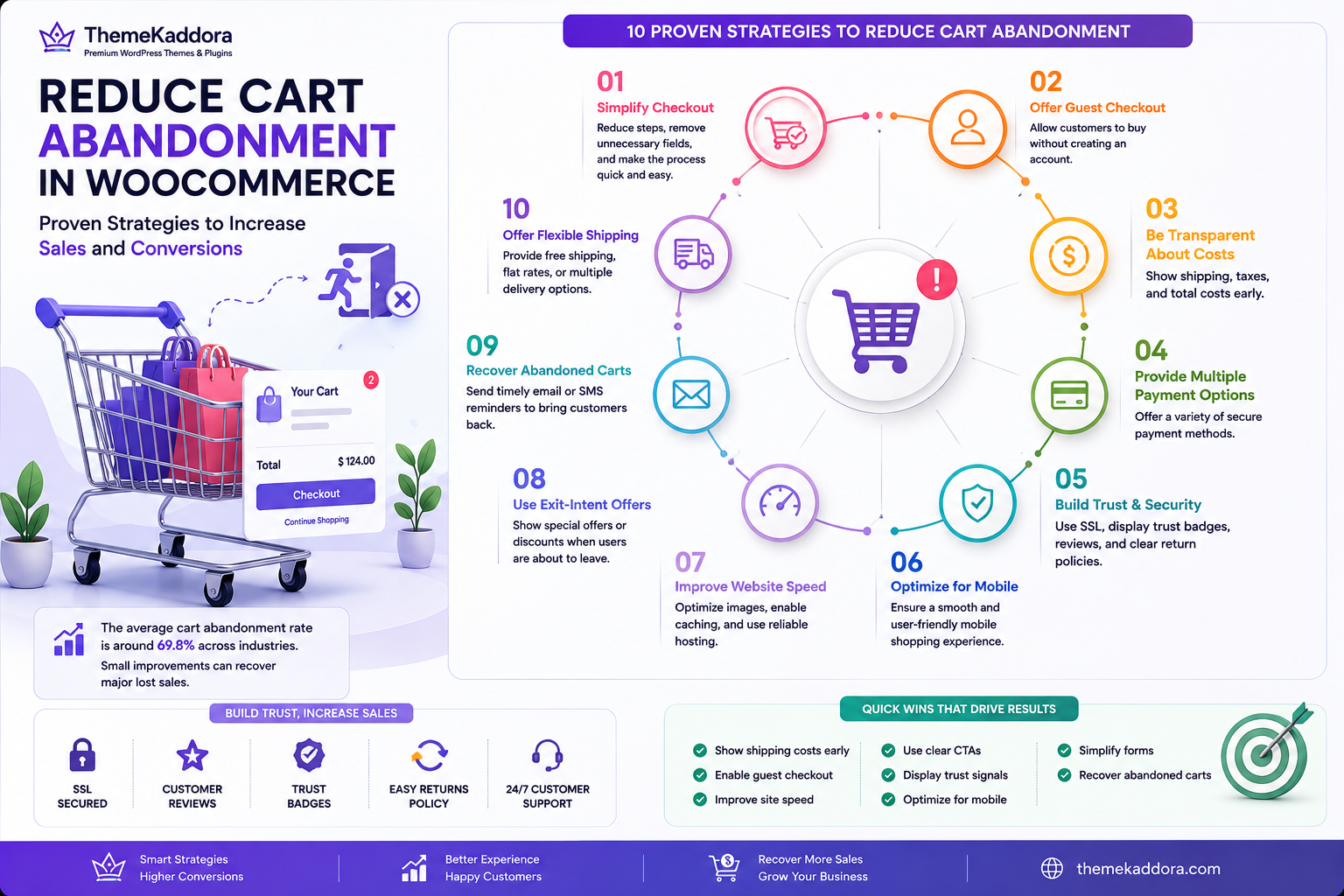
How to Reduce Cart Abandonment in WooCommerce: Proven Strategies to Increase Sales and Conversions
Introduction
Imagine a customer spending several minutes browsing your WooCommerce store, comparing products, reading reviews, and finally adding items to their shopping cart. Just when you expect them to complete the purchase, they leave without buying anything. This situation is known as cart abandonment, and it is one of the biggest challenges faced by eCommerce businesses.
Cart abandonment affects online stores of every size. While it's normal for some shoppers to leave before completing a purchase, a high cart abandonment rate often points to issues such as a complicated checkout process, unexpected costs, slow website performance, or a lack of customer trust.
The good news is that most of these problems can be fixed. By improving the shopping experience, optimizing your WooCommerce store, and removing common obstacles, you can encourage more visitors to complete their purchases and significantly increase your revenue.
In this guide, you'll learn practical strategies to reduce cart abandonment in WooCommerce, improve customer confidence, and create a smoother buying experience that leads to higher conversions.
What Is Cart Abandonment?
Cart abandonment occurs when a visitor adds one or more products to their shopping cart but leaves the website before completing the purchase.
This doesn't necessarily mean the customer has lost interest. They may simply be comparing prices, waiting to make a decision, or encountering an issue that prevents them from checking out.
Every abandoned cart represents a potential sale that could often be recovered through better optimization and customer experience.
Why Customers Abandon Their Carts
Understanding why customers leave is the first step toward reducing abandonment.
Some of the most common reasons include:
- Unexpected shipping charges
- Complicated checkout processes
- Mandatory account creation
- Slow website loading
- Limited payment options
- Security concerns
- Lack of trust
- Technical issues
- Poor mobile experience
- Distractions during shopping
By identifying and addressing these pain points, you can remove barriers that prevent customers from completing their purchases.
Optimize the Checkout Process
The checkout page is where buying decisions are finalized. Even small improvements can have a significant impact on conversion rates.
Reduce the Number of Steps
A long or confusing checkout process can frustrate customers.
Whenever possible:
- Combine unnecessary pages
- Eliminate redundant fields
- Keep the checkout flow simple
- Clearly display each step
A streamlined checkout reduces friction and encourages customers to complete their orders.
Allow Guest Checkout
Many shoppers don't want to create an account before making a purchase.
Offering guest checkout allows customers to complete orders quickly while giving them the option to create an account afterward if they choose.
Request Only Essential Information
Avoid asking for information that isn't required.
Typically, you only need:
- Name
- Email address
- Shipping information
- Payment details
Shorter forms improve the overall checkout experience.
Display Progress Indicators
If your checkout spans multiple steps, show customers where they are in the process.
Progress indicators reduce uncertainty and make longer checkouts feel more manageable.
Be Transparent About Costs
Unexpected costs are one of the leading causes of cart abandonment.
Customers appreciate transparency throughout the buying process.
Display Shipping Costs Early
Instead of revealing shipping charges at the final step, show estimated shipping costs on:
- Product pages
- Shopping cart
- Shipping calculator
This helps customers make informed decisions.
Clearly Explain Taxes
Unexpected taxes can surprise shoppers.
Display tax information clearly before checkout whenever possible.
Highlight Return Policies
Customers are more likely to purchase when they understand your return and refund policies.
Provide easy access to information about:
- Returns
- Exchanges
- Refunds
- Delivery timelines
Transparent policies increase buyer confidence.
Improve Website Speed and Performance
Website speed has a direct impact on user experience and conversion rates.
Even a few extra seconds of loading time can cause visitors to abandon their carts.
Optimize Images
Large product images often slow WooCommerce stores.
Best practices include:
- Compress images
- Use appropriate dimensions
- Enable lazy loading
- Add descriptive alt text
- Use modern formats like WebP where supported
Choose Reliable Hosting
A high-performance hosting provider ensures:
- Faster page loading
- Better uptime
- Improved server response
- Greater reliability during traffic spikes
Reliable hosting forms the foundation of a successful WooCommerce store.
Enable Caching
Caching reduces server processing by storing frequently accessed content.
Benefits include:
- Faster browsing
- Reduced server load
- Improved customer experience
Minimize Unnecessary Plugins
Installing too many plugins can reduce website performance and introduce compatibility issues.
Review your plugins regularly and remove those that are no longer needed.
Build Customer Trust
Trust plays a crucial role in online purchasing decisions.
Customers are more likely to complete their orders when they feel confident that your website is secure and reliable.
Use HTTPS
An SSL certificate encrypts customer data and displays the secure padlock icon in the browser.
A secure connection reassures visitors that their personal and payment information is protected.
Display Customer Reviews
Positive reviews provide social proof and help customers make informed purchasing decisions.
Encourage verified buyers to leave honest feedback after completing their orders.
Showcase Trust Signals
Trust signals can include:
- Secure payment badges
- Money-back guarantees
- Return policy highlights
- Customer testimonials
- Business contact information
These elements reassure visitors and reduce hesitation during checkout.
Provide Easy Access to Support
Make it simple for customers to contact you if they have questions.
Support options may include:
- Contact forms
- Live chat
- Phone support
- Frequently Asked Questions
Quick assistance can prevent customers from abandoning their purchases.
Optimize for Mobile Shopping
Mobile devices now account for a significant portion of WooCommerce traffic. If your online store isn't optimized for smartphones and tablets, customers may struggle to browse products or complete purchases, resulting in higher cart abandonment rates.
Use a Responsive Design
A responsive WooCommerce theme automatically adjusts to different screen sizes, ensuring a consistent shopping experience across desktops, tablets, and smartphones.
Your mobile store should feature:
- Easy-to-read text
- Responsive product images
- Touch-friendly buttons
- Fast navigation
- Simple checkout forms
A responsive design improves usability and encourages customers to complete their purchases.
Simplify Mobile Navigation
Visitors should be able to find products quickly without excessive scrolling or tapping.
Best practices include:
- Clear navigation menus
- Product categories
- Search functionality
- Sticky cart button
- Easy access to customer support
A streamlined navigation system helps shoppers reach checkout more efficiently.
Improve Mobile Checkout
Long forms are even more frustrating on mobile devices.
Reduce typing by:
- Using autofill where available
- Minimizing required fields
- Supporting digital wallets
- Providing guest checkout
- Displaying large, easy-to-tap buttons
The easier it is to check out on mobile, the more likely customers are to complete their orders.
Offer Multiple Payment Options
Every customer has a preferred payment method. Limiting payment choices may cause shoppers to abandon their carts.
Consider supporting:
- Credit and debit cards
- UPI (for applicable regions)
- Net banking
- Digital wallets
- Buy Now, Pay Later (BNPL) services
- Bank transfers where appropriate
Providing multiple secure payment options makes your store more convenient and accessible to a wider audience.
Ensure Secure Transactions
Customers need confidence that their payment information is protected.
Display indicators such as:
- SSL certificate (HTTPS)
- Trusted payment gateway logos
- Security badges
- Privacy policy
- Refund policy
Visible security measures reduce hesitation during checkout.
Recover Abandoned Carts
Even with an optimized store, some customers will still leave before completing their purchase. Recovering these potential sales can significantly increase your revenue.
Send Abandoned Cart Emails
Automated reminder emails are one of the most effective recovery strategies.
A good sequence might include:
- First reminder: Within 1 hour of cart abandonment
- Second reminder: After 24 hours
- Final reminder: After 48–72 hours, possibly with a limited-time incentive
Keep emails friendly, include product images, and provide a clear link back to the customer's cart.
Offer Limited-Time Incentives
A small incentive can encourage hesitant customers to complete their purchase.
Examples include:
- Percentage discounts
- Free shipping
- Bonus products
- Loyalty points
- Limited-time promotional offers
Use incentives strategically to avoid training customers to wait for discounts.
Enable Wishlist Functionality
Some shoppers aren't ready to buy immediately.
A wishlist allows visitors to save products and return later without rebuilding their cart, increasing the chances of future conversions.
Use Exit-Intent Messages
Exit-intent pop-ups can appear when a visitor is about to leave your website.
Instead of being intrusive, offer something valuable such as:
- A helpful buying guide
- A first-order discount
- Free shipping information
- Newsletter signup with exclusive offers
Well-designed exit messages can recover visitors who might otherwise leave permanently.
Monitor and Improve Store Performance
Reducing cart abandonment is an ongoing process rather than a one-time task.
Regularly monitor your store's performance and identify areas for improvement.
Analyze Customer Behavior
Review metrics such as:
- Cart abandonment rate
- Checkout completion rate
- Bounce rate
- Average session duration
- Conversion rate
Understanding customer behavior helps you make informed optimization decisions.
Test the Checkout Process
Periodically complete a purchase yourself.
Check for:
- Broken buttons
- Payment gateway issues
- Slow-loading pages
- Form validation errors
- Mobile usability problems
Testing helps identify issues before they affect real customers.
Perform A/B Testing
Experiment with different elements of your store to determine what improves conversions.
Test:
- Call-to-action buttons
- Checkout layouts
- Product page designs
- Shipping messages
- Promotional banners
Small improvements can produce significant increases in completed purchases over time.
Why Choose ThemeKaddora?
At ThemeKaddora, we understand that every abandoned cart represents a missed business opportunity. That's why our WordPress themes and WooCommerce solutions are designed with performance, usability, and conversion optimization in mind.
Our products help you create online stores that are:
- Fast-loading and performance optimized
- Fully responsive for mobile shopping
- SEO-friendly
- WooCommerce compatible
- Easy to customize
- Built with clean, secure code
- Designed to deliver an excellent user experience
In addition, our growing collection of AI-powered plugins supports smarter business automation, customer engagement, and data-driven decision-making to help online stores grow more efficiently.
Whether you're launching a new eCommerce business or optimizing an existing WooCommerce store, ThemeKaddora provides the tools needed to create a faster, more reliable, and higher-converting shopping experience.
Conclusion
Cart abandonment is a common challenge for WooCommerce store owners, but it is also one of the greatest opportunities for increasing revenue. By simplifying the checkout process, improving website speed, being transparent about costs, building customer trust, optimizing for mobile users, and offering multiple payment options, you can remove many of the barriers that prevent customers from completing their purchases.
Remember that optimization is an ongoing process. Continuously monitor customer behavior, test improvements, and refine your shopping experience based on real-world data. Even small changes can lead to noticeable increases in conversions and customer satisfaction.
With performance-focused themes, WooCommerce-ready designs, and AI-powered plugins from ThemeKaddora, you can build an online store that not only attracts visitors but also converts them into loyal customers.
Frequently Asked Questions
1. What is cart abandonment in WooCommerce?
Cart abandonment occurs when a customer adds products to their shopping cart but leaves the website before completing the purchase.
2. Why do customers abandon their carts?
Common reasons include unexpected shipping costs, complicated checkout processes, limited payment options, slow website speed, and concerns about security or trust.
3. How can I reduce cart abandonment?
Simplify checkout, improve website performance, offer guest checkout, display transparent pricing, provide multiple payment methods, and build customer trust.
4. Does website speed affect cart abandonment?
Yes. Slow-loading pages can frustrate shoppers and significantly increase the likelihood of abandoned carts.
5. Should I allow guest checkout?
Yes. Allowing customers to purchase without creating an account removes friction and often improves conversion rates.
6. Can abandoned cart emails recover lost sales?
Yes. Well-timed reminder emails with clear calls to action can encourage customers to return and complete their purchases.
7. Why are multiple payment options important?
Different customers prefer different payment methods. Offering a variety of secure options improves convenience and reduces checkout abandonment.
8. How important is mobile optimization?
Extremely important. Many shoppers browse and buy using mobile devices, so a responsive and mobile-friendly checkout experience is essential.
9. How often should I review my checkout process?
Regularly test your checkout flow, especially after updates to WordPress, WooCommerce, themes, or payment gateways.
10. Why choose ThemeKaddora?
ThemeKaddora offers fast, SEO-friendly, WooCommerce-compatible WordPress themes and AI-powered plugins that help businesses create secure, high-performing, and conversion-focused online stores.
Comments (0)