
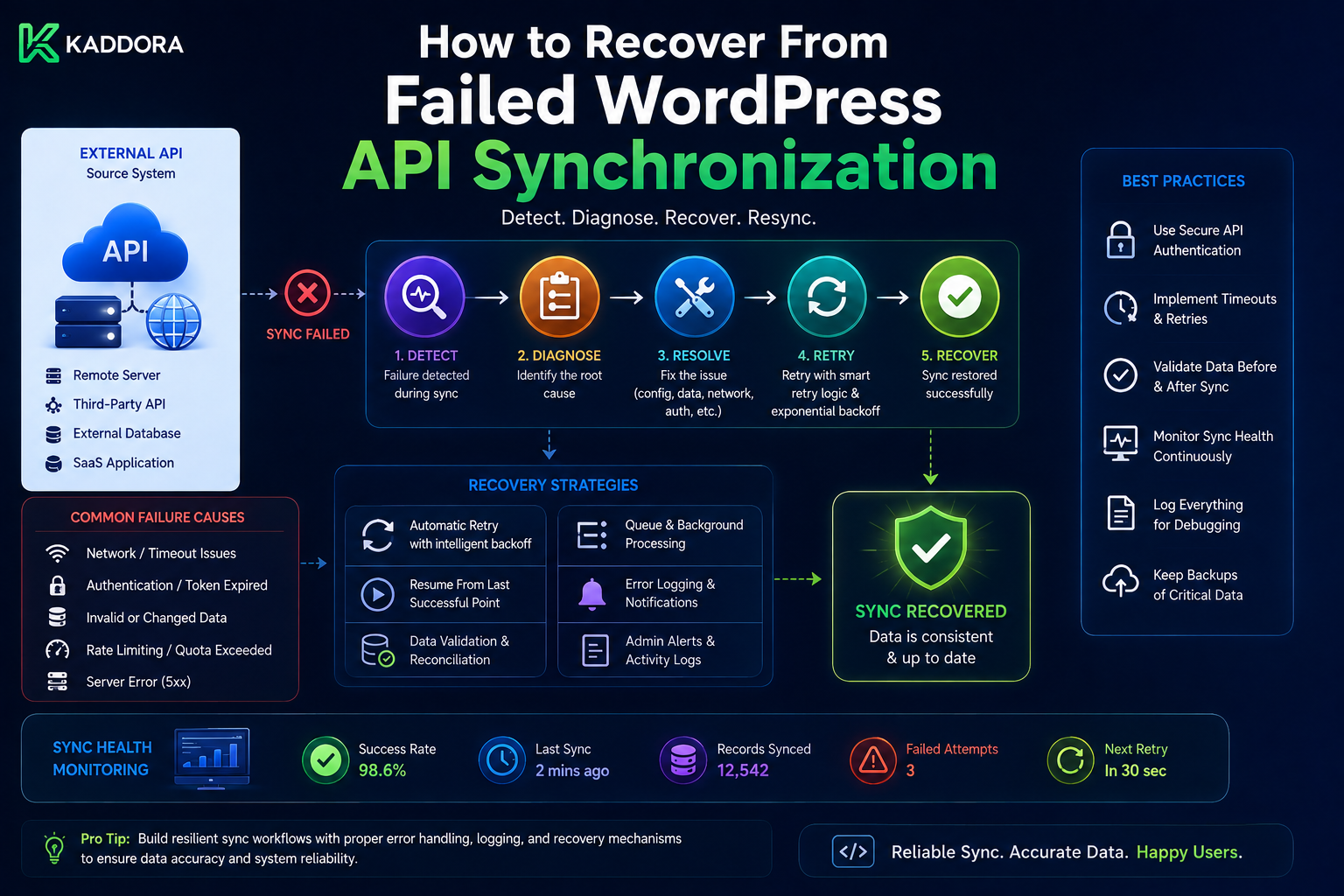
How to Recover From Failed WordPress API Synchronization
Introduction
API synchronization allows WordPress to exchange data with external platforms such as:
CRM systems
WooCommerce services
SaaS applications
Analytics platforms
Inventory systems
Marketing tools
AI services
Payment providers
A typical synchronization flow may look simple:
WordPress ↓ External API ↓ Changed Data ↓ WordPress Database
But production synchronization systems can fail for many reasons.
For example:
API Request ↓ Timeout
or:
API ↓ 429 Too Many Requests
or:
OAuth Token ↓ 401 Unauthorized
or:
API Response ↓ Unexpected Schema
A synchronization worker can also crash after processing some records:
Page 1 → Success Page 2 → Success Page 3 → Worker Crashes
The difficult question is no longer:
"Why did synchronization fail?"
It becomes:
"Where did the synchronization stop, what data was successfully processed, and how can the system continue without skipping records or creating duplicates?"
This is why synchronization recovery must be designed before failures happen.
A weak recovery strategy is:
Sync Failed ↓ Run Sync Again
This can cause:
Duplicate records
Duplicate external requests
Repeated side effects
Skipped changes
Incorrect checkpoints
Inconsistent local state
A stronger recovery architecture is:
Failure Detected ↓ Identify Failure Point ↓ Load Last Safe Checkpoint ↓ Classify Error ↓ Retry / Reauthorize / Reconcile ↓ Resume Safely ↓ Verify Final State
A production recovery system may include:
Checkpoints + Retry Queues + Idempotency + Reconciliation + Error Classification + Dead-Letter States + Credential Recovery + Monitoring
This guide explains how WordPress API synchronization fails, how to identify exactly where a synchronization stopped, how to recover from partial progress, how to handle API and authentication errors, how to recover from invalid cursors, how to reconcile inconsistent data, how to avoid duplicate processing during recovery.
What Is Synchronization Recovery?
Synchronization recovery is the process of restoring an interrupted or failed data synchronization to a correct and consistent state.
The objective is not merely:
Make Sync Run Again
The real objective is:
Restore Correct Data State Without Missing Changes Or Creating Duplicate Effects
Common Synchronization Failure Categories
Failures generally fall into several categories.
Transport Failures
Examples:
Connection timeout
DNS failure
Network interruption
TLS failure
Connection reset
API Failures
Examples:
429
500
502
503
504
Authentication Failures
Examples:
Expired access token
Revoked refresh token
Invalid client credentials
Missing permission
Data Failures
Examples:
Invalid JSON
Missing fields
Unexpected schema
Invalid data types
Business Failures
Examples:
Resource no longer exists
Invalid status transition
Conflicting record
Provider rejected the operation
Local Infrastructure Failures
Examples:
Database unavailable
Queue failure
Worker crash
PHP timeout
Memory exhaustion
Disk failure
Why Error Classification Matters
Consider:
401
Refreshing the token may fix it.
But:
422
may mean the submitted data is invalid.
Repeated retries will not solve invalid business data.
Therefore:
Error ↓ Classify ↓ Choose Recovery Strategy
The First Rule: Never Lose the Last Safe Checkpoint
Suppose synchronization reaches:
Checkpoint = 1000
and then fails.
Do not advance it to:
Checkpoint = 1100
unless records through 1100 were safely processed.
A safe rule is:
The checkpoint represents data that the system knows it has successfully handled.
Checkpoint Recovery
The basic recovery process is:
Load Last Safe Checkpoint ↓ Resume From Checkpoint ↓ Repeat Safe Work If Necessary
Repeating some records is acceptable if the synchronization is idempotent.
Skipping records is usually worse.
Why Reprocessing Can Be Safer Than Skipping
Suppose:
Records 1001–1010
were partially processed before failure.
If you restart from:
1001
some records may be processed twice.
If the operations are idempotent:
Duplicate Processing → Safe
But if you start after 1010:
1011
you may permanently skip some records.
Therefore:
At-least-once processing combined with idempotency is often safer than attempting fragile exactly-once execution.
Recovery From a Page Failure
Suppose:
Page 1 → Success Page 2 → Success Page 3 → Failure Page 4 → Not Processed
The synchronization state should remain around:
Page 2 checkpoint
Then retry:
Page 3
Recovery From a Worker Crash
A worker may crash after making changes but before saving progress.
For example:
Fetch Page ↓ Process Records ↓ Worker Crashes ↓ Checkpoint Not Saved
The next worker should repeat the page.
This is why page-level processing should be idempotent.
Recovery After Queue Failure
Suppose:
Event Stored ↓ Queue Submission Fails
The event should remain in a durable state such as:
stored
A recovery worker can search for:
Stored but Not Queued
and enqueue it again.
Durable Handoff
A reliable architecture separates:
Event Persistence
from:
Queue Dispatch
This creates a durable handoff.
Recovery State Model
A synchronization job may use:
pending running retrying paused completed failed dead_letter reauthorization_required reconciliation_required
Each state should have explicit transitions.
Retryable vs Permanent Failure
A useful recovery model is:
Failure ↓ Retryable? ├── Yes → Retry └── No ↓ Permanent? ├── Yes → Fail / Quarantine └── Unknown → Reconcile
Temporary API Failure
For:
500 502 503 504
the system may use:
Exponential Backoff + Jitter + Retry Limit
Rate-Limit Recovery
For:
429 Too Many Requests
respect:
Retry-After
when provided.
Then reschedule the synchronization rather than retrying immediately.
API Timeout Recovery
A timeout is ambiguous.
The request may have:
Failed
or:
Succeeded Remotely
Therefore, for write operations, classify the outcome as potentially:
unknown
and use reconciliation or an idempotency key before repeating the operation.
Authentication Recovery
Suppose:
API Request ↓ 401
The API client may attempt:
Refresh Access Token
If successful:
Retry Original Request
If refresh fails permanently:
Reauthorization Required
Do Not Retry 401 Forever
A loop like:
401 ↓ Refresh ↓ 401 ↓ Refresh ↓ 401
is not recovery.
Limit authentication retries.
Invalid Refresh Token
If the provider returns an invalid or revoked refresh-token error:
Pause Connection ↓ Mark Reauthorization Required
Pending jobs can remain paused rather than repeatedly failing.
Resume After Reauthorization
After the user reconnects:
New Credentials ↓ Connection Restored ↓ Resume From Last Safe Checkpoint
This avoids rebuilding the entire integration unnecessarily.
Schema Change Recovery
Suppose the API response changes:
Expected: customer.email Received: customer.contact_email
The sync processor may fail validation.
Do not silently advance the checkpoint.
Instead:
Pause ↓ Alert ↓ Update Provider Adapter ↓ Resume
Malformed Response Recovery
A successful HTTP response is not enough.
For example:
HTTP 200 + Invalid JSON
should not advance the checkpoint.
The synchronization system has not safely processed the data.
Invalid Business Data
Suppose a record contains:
currency = INVALID
while other records are valid.
The whole synchronization does not necessarily need to fail.
Possible workflow:
Valid Records → Process Invalid Record → Quarantine
This is called failure isolation.
Poison Records
A poison record is one that repeatedly fails processing.
For example:
Record 123 Attempt 1 → Failure Attempt 2 → Failure Attempt 3 → Failure
Instead of blocking the entire queue:
Record 123 → Quarantine
and continue where safe.
Quarantine State
A quarantined record can store:
external_id error_code last_error attempt_count first_failed_at last_failed_at
Avoid storing credentials.
Manual Recovery of Quarantined Records
An administrator can:
Review ↓ Fix Data ↓ Retry
The retry should pass through the normal processing pipeline.
Dead-Letter Synchronization Jobs
When a whole job exceeds its retry policy:
retrying ↓ dead_letter
Keep enough information to investigate.
Reconciliation as Recovery
Reconciliation is especially important when the exact event history cannot be trusted.
For example:
What Is Local State? What Is Remote State?
Compare them directly.
Reconciliation Workflow
Load Remote State ↓ Load Local State ↓ Compare ↓ Identify Differences ↓ Repair ↓ Verify
When Should You Reconcile?
Useful triggers include:
Unknown API outcomes
Missed webhooks
Cursor expiration
Major deployment
Provider outage
Database restoration
Credential recovery
Periodic audits
Full vs Incremental Reconciliation
Incremental Reconciliation
Compare recent or changed records.
Useful for:
Daily Recovery
Full Reconciliation
Compare the complete dataset.
Useful for:
Major Drift Database Restore Migration
Recovering From an Expired Sync Cursor
Suppose the provider returns:
cursor_expired
Do not invent a new cursor.
Follow the provider's recovery process.
Possible approaches include:
Restart Incremental Window Full Sync Request New Cursor
Full Resynchronization
A full resync can rebuild local state:
Remote Dataset ↓ Rebuild / Reconcile ↓ Local Dataset
This can be expensive.
Use it when the incremental position can no longer be trusted.
Rebuilding vs Reconciling
Rebuild
Delete or replace local synchronized state and import everything again.
Reconcile
Compare current local state with remote state and repair differences.
Reconciliation is often less disruptive.
Avoid Blind Full Resyncs
If the database is large:
1,000,000 Records
a full resync may cause:
Huge API consumption
Long processing
Database pressure
Extended downtime
Use incremental recovery when possible.
Recovery After Database Restoration
Suppose WordPress is restored from an older backup.
The database may now contain:
Older Sync State
while the external system is newer.
A safe recovery plan is:
Identify Backup Time ↓ Determine External Changes Since Backup ↓ Run Incremental Reconciliation ↓ Repair Local State
Backup Time as a Recovery Boundary
If the database backup was taken at:
10:00
the synchronization system may need to process changes after:
10:00
using provider-supported change detection.
Recovery After Deployment
A new plugin version may change:
Schema
Sync logic
API mappings
Checkpoint format
Before resuming synchronization:
Validate Compatibility ↓ Run Tests ↓ Resume Jobs
Blue-Green or Safe Deployment
For large integrations, separate:
Application Deployment
from:
Queue Activation
This reduces the chance of workers processing jobs with incompatible code.
Migration of Sync State
If the sync checkpoint schema changes:
Old Checkpoint ↓ Migration ↓ New Checkpoint
Do not simply reset it unless a full resync is intentionally planned.
Recovery After Provider API Version Change
When a provider retires an endpoint:
API v1 → Deprecated
the adapter should be updated before old queued jobs are allowed to continue indefinitely.
Preserve Historical Operation Context
A queued job should store enough information to understand:
What Operation Was Requested Which Connection Which Resource Which Integration Version
without storing secrets.
Recovery and Idempotency
Recovery often means replaying work.
Therefore:
Recovery = Retry + Reconciliation + Idempotency
Without idempotency, recovery itself can create duplicates.
Recovery and Duplicate Processing
Suppose:
Page 5
was partially processed.
Restarting from Page 5 can process some records again.
This is acceptable if:
Record Updates Are Idempotent
Recovery and External Writes
For outbound operations:
POST ↓ Timeout
do not assume the operation failed.
Use:
Provider Idempotency Key or Reconciliation
before creating another side effect.
Recovery and Checkpoints
The checkpoint should represent:
Last Known Safe State
not:
Last Attempted State
This distinction is critical.
Checkpoint Rollback
In some recovery scenarios, a checkpoint may need to move backward.
For example:
Checkpoint = 12:00
but the application discovers that:
11:55–12:00
was not actually processed safely.
It may need to rewind to:
11:55
and replay the window.
Only do this deliberately and with idempotent processing.
Checkpoint Rewind Auditing
Record:
Old Checkpoint New Checkpoint Reason Requested By Timestamp
This helps operational debugging.
Recovery and Time Windows
For timestamp-based synchronization, an overlap can be useful:
Last Safe Checkpoint ↓ Subtract Safety Window ↓ Fetch Overlap ↓ Idempotent Process
This reduces the risk of boundary misses.
Recovery and Cursors
For cursor-based synchronization, recovery should normally start from the last safely stored cursor.
If the provider invalidates it:
Cursor Expired ↓ Provider Recovery Procedure
Recovery and Pagination
A synchronization job can store:
Cursor Page Batch
depending on provider semantics.
Do not assume a page number alone is always enough to resume accurately.
Recovery After Partial Batch
Suppose:
Batch = 100 Processed = 70 Failed at 71
Depending on the provider and local transaction model, options include:
Retry Entire Batch
or:
Retry From Record 71
The safer choice depends on idempotency and provider behavior.
Record-Level Recovery
For high-value integrations, maintain:
record_status attempt_count last_error
This allows failed records to be isolated.
Batch-Level Recovery
For simpler systems:
Batch ↓ Success / Retry
may be enough.
Do not introduce record-level complexity unless it solves a real problem.
Recovery and Queue Leases
If a worker crashes:
Processing Lease Expires
another worker can reclaim the job.
This must be combined with idempotent processing because the first worker may have completed some external side effects before crashing.
Recovery and Stalled Jobs
Monitor:
status = processing
for too long.
Possible recovery:
Mark Lease Expired ↓ Requeue
after careful validation.
Recovery and Provider Rate Limits
After an outage:
Thousands of Failed Jobs
may all become ready at once.
Do not immediately process everything concurrently.
Use:
Rate Limits + Jitter + Backpressure
to prevent a recovery storm.
Recovery Storm
A recovery storm occurs when many failed tasks retry simultaneously after an outage.
For example:
10,000 failed jobs ↓ Provider recovers ↓ 10,000 immediate requests
This can cause the provider to fail again.
Recovery Throttling
Use:
Gradual Recovery
instead of:
Instant Recovery
A queue can progressively increase processing.
Recovery Priority
Not every failed job needs to recover at the same speed.
For example:
Payments → Highest Orders → High Inventory → High CRM → Medium Analytics → Low
Priorities should match business needs.
Recovery and Tenant Fairness
If one tenant has:
100,000 Failed Jobs
it should not block:
Tenant B → 20 Jobs
Use tenant-aware scheduling or quotas.
Recovery and Dead-Letter Jobs
Dead-letter records should not automatically flood the normal queue when reactivated.
A controlled replay process can schedule them gradually.
Manual Recovery Controls
An admin interface can offer:
Retry Job Retry Failed Records Reauthorize Reconcile Resume Connection Pause Connection Full Resync
Protect these actions with appropriate capabilities.
Never Make Full Resync the Default Button
A "Sync Now" action should not accidentally mean:
Delete Everything + Import Everything
Clearly distinguish:
Incremental Sync Full Sync Reconciliation
Recovery Audit Trail
Track:
Recovery Action Job Connection Operator Reason Result Timestamp
This is especially important for business-critical integrations.
Synchronization Recovery Dashboard
A useful interface might display:
Connection: CRM Status: Paused Reason: Authentication Failure Last Safe Checkpoint: 2026-08-19T10:00:00Z Pending Jobs: 124 Failed Jobs: 8 Dead-Letter: 2 Action: [Reauthorize] [Resume]
Health State
A connection should communicate:
Healthy Degraded Paused Needs Reauthorization Provider Unavailable Recovery Required
This is more useful than only:
Connected / Disconnected
Recovery Monitoring
Track:
Recovery Attempts Successful Recoveries Dead Letters Reconciliation Jobs Checkpoint Rewinds Provider Outages
Recovery Success Rate
A useful metric is:
Recovered Jobs ÷ Failed Jobs
This shows whether the retry system is actually effective.
Checkpoint Stagnation
If:
last_successful_sync
does not change for too long, trigger an alert.
This is often an early indicator of synchronization failure.
Data Freshness During Recovery
A connection may remain technically "connected" while data becomes stale.
Track:
Current Remote Time - Last Local Apply Time
where the provider exposes appropriate timestamps.
Recovery Testing
A serious synchronization system should intentionally test failure scenarios.
Test:
API Timeout 429 500 503 401 Revoked Refresh Token Invalid Cursor Schema Change Database Failure Worker Crash Queue Failure Duplicate Data Out-of-Order Data Partial Batch Failure
Test Database Failure
Simulate:
Process Page ↓ Database Write Fails
Verify the checkpoint does not advance incorrectly.
Test Queue Failure
Simulate:
Event Stored ↓ Queue Unavailable
Verify stored events remain discoverable for later dispatch.
Test Worker Crash
Simulate:
Worker ↓ Processes Data ↓ Crashes
Verify recovery does not create duplicate external effects.
Test Credential Failure
Simulate:
401 ↓ Refresh Fails
Verify:
Connection → Reauthorization Required
and retries stop.
Test Cursor Expiration
Simulate:
cursor_expired
Verify that the documented full/incremental recovery path starts.
Test API Schema Change
Simulate:
Unexpected Field Missing Field Type Change
Verify the system pauses or quarantines data rather than silently corrupting it.
Test Recovery Storm
Create:
10,000 Retryable Jobs
and verify workers recover them gradually without exceeding provider limits.
Common API Sync Recovery Mistakes
Restarting From the Beginning Every Time
Creates unnecessary processing and API traffic.
Advancing the Checkpoint Before Processing
Can permanently skip data.
Retrying Every Error
Permanent errors continue forever.
Treating Timeouts as Definite Failure
The remote operation may have succeeded.
No Reconciliation
Unknown states remain unresolved.
No Idempotency
Recovery creates duplicates.
No Queue
Large recovery operations block requests.
No Dead-Letter State
Persistent failures become invisible.
No Authentication Recovery
A revoked token causes endless retries.
Immediate Recovery After Outage
Creates a recovery storm.
Best Practices for Recovering Failed WordPress API Synchronization
A professional recovery system should:
Preserve the last known safe checkpoint.
Distinguish retryable, permanent, and unknown failures.
Use bounded retries with exponential backoff and jitter.
Respect provider Retry-After guidance.
Treat timeout outcomes carefully.
Use provider-supported idempotency keys.
Reconcile uncertain external operations.
Quarantine poison records.
Preserve connection and tenant context.
Keep credentials out of job records and logs.
Resume from durable checkpoints.
Support cursor-expiration recovery.
Handle deletions explicitly.
Provide dead-letter states for persistent failures.
Throttle recovery after outages.
Monitor checkpoint age and synchronization lag.
Provide secure administrative recovery actions.
Audit checkpoint rewinds and manual replays.
Periodically reconcile critical datasets.
Practical Recovery State Example
A connection record might contain:
$sync_state = array( 'status' => 'paused', 'checkpoint' => '2026-08-19T10:00:00Z', 'last_success_at' => '2026-08-19T10:05:00Z', 'last_error_code' => 'invalid_grant', 'reauthorization_required' => true, );
The exact storage model depends on the plugin.
Practical Resume Flow
Conceptually:
function kdr_resume_sync( string $connection_id ) { $state = kdr_get_sync_state( $connection_id ); if ( ! $state ) { return new WP_Error( 'sync_state_not_found', 'Synchronization state was not found.' ); } if ( ! empty( $state['reauthorization_required'] ) ) { return new WP_Error( 'reauthorization_required', 'The connection must be authorized again.' ); } return kdr_enqueue_sync_job( $connection_id, $state['checkpoint'] ); }
This is a conceptual example.
Practical Retry Scheduling
A simplified pattern:
function kdr_schedule_sync_retry( int $job_id, int $attempt ) { $base_delay = 60; $max_delay = 3600; $maximum = min( $max_delay, $base_delay * ( 2 ** max( 0, $attempt - 1 ) ) ); $delay = random_int( 0, $maximum ); return kdr_update_sync_job( $job_id, array( 'status' => 'retry_scheduled', 'next_attempt_at' => time() + $delay, 'attempt_count' => $attempt, ) ); }
The actual retry policy should account for provider-specific behavior and business priority.
Practical Recovery Architecture
Sync Failure │ ▼ Error Classifier │ ┌────────────────┼────────────────┐ ▼ ▼ ▼ Retryable Permanent Unknown │ │ │ ▼ ▼ ▼ Backoff Quarantine Reconcile │ │ │ ▼ ▼ ▼ Retry Job Manual Fix Determine State │ ▼ Continue From Checkpoint
Why choose ThemeKaddora?
ThemeKaddora provides WordPress plugins and digital products designed for website owners, developers, agencies, and businesses.
Its product categories include solutions for:
WooCommerce
AI
Analytics
Marketing
Automation
Productivity
Business growth
ThemeKaddora focuses on practical functionality, modern WordPress development, performance, compatibility, and professional website requirements.
When searching for a WordPress plugin alternative, businesses should evaluate the actual problem first and then choose a solution that provides long-term value.
Conclusion
Failed API synchronization is not a question of if.
For production integrations, it is a question of when and how safely the system can recover.
A reliable recovery architecture starts with one simple principle:
Never lose the last known safe synchronization position.
The checkpoint should represent:
Successfully Processed Data
not:
Last Attempt
When a job fails, the system can then:
Load Safe Checkpoint ↓ Resume ↓ Reprocess Safely
Some work may be repeated.
That is acceptable when synchronization is idempotent.
Skipping records is often much more dangerous.
Error classification is the next major requirement.
For example:
503 → Retry 429 → Respect Retry-After 401 → Refresh / Reauthorize 422 → Quarantine Timeout → Unknown / Reconcile
Different errors require different recovery strategies.
A timeout deserves special attention.
Consider:
Create Order ↓ Timeout
The order may already exist remotely.
Therefore, repeating the request blindly could create a duplicate.
Use:
Idempotency Key or Remote Reconciliation
before repeating the operation.
Checkpoint recovery also depends on pagination.
Suppose:
Page 1 → Success Page 2 → Success Page 3 → Failure
The checkpoint should remain at the last safe position.
Retry Page 3.
If Page 3 has already partially updated some records, idempotent processing ensures repeated updates remain safe.
Queue durability is equally important.
If:
Event Stored ↓ Queue Submission Fails
the stored event should remain recoverable.
A background recovery process can discover:
Stored But Not Queued
and dispatch it again.
This creates a durable handoff between event storage and asynchronous work.
Credential recovery is another common failure.
If:
401
the token manager can attempt refresh.
If the refresh credential is revoked:
Connection → Reauthorization Required
Pending jobs should pause rather than retry indefinitely.
After successful reauthorization:
New Credentials ↓ Resume From Checkpoint
This avoids unnecessary full synchronization.
Cursor expiration needs its own recovery strategy.
If:
cursor_expired
the provider may require:
New Cursor Full Sync
or another documented recovery mechanism.
Never invent a replacement cursor.
Schema changes must also be handled carefully.
A provider changing:
to:
contact_email
should not silently cause the synchronization engine to write incomplete data.
Pause or quarantine the affected records, alert the integration owner, update the provider adapter, and then resume from the last safe checkpoint.
Poison records should be isolated.
If one record fails repeatedly:
Record A → Success Record B → Failed 5 times Record C → Success
Record B should not necessarily block A and C.
Move B into:
Quarantine
and continue where the business semantics permit.
Reconciliation is the final major safety mechanism.
It is especially important when:
Webhooks were missed
Requests timed out
Cursors expired
A database backup was restored
External changes occurred during downtime
The integration has unknown outcomes
The reconciliation process is:
Remote State ↓ Local State ↓ Compare ↓ Repair ↓ Verify
For critical integrations, periodic reconciliation should exist even when ordinary synchronization appears healthy.
Recovery should also be throttled.
After an outage:
10,000 Failed Jobs
should not become:
10,000 Requests
the instant the provider returns.
Use:
Backoff Jitter Rate Limits Queue Concurrency Tenant Fairness
to gradually restore synchronization.
For ThemeKaddora SaaS applications, tenant isolation is especially important:
Tenant A → Recovery A Tenant B → Recovery B
A single tenant with a large backlog should not block everyone else.
A reusable ThemeKaddora recovery architecture can be:
Sync Manager │ ▼ Error Classifier │ ┌──────────┼──────────┐ ▼ ▼ ▼ Retry Quarantine Reconcile │ │ │ └────┬─────┴────┬─────┘ ▼ Recovery Queue │ ▼ Provider Adapter │ ▼ Checkpoint Store
This can support:
CRM
ERP
WooCommerce
SaaS
AI
Analytics
Inventory
Marketing integrations
The most important principle is:
Recovery should restore synchronization from known-safe state rather than simply rerunning everything.
A professional WordPress API synchronization recovery system should be:
Checkpoint-Aware
→ Idempotent
→ Error-Classified
→ Queue-Based
→ Reconciliation-Ready
→ Credential-Aware
→ Rate-Limit-Aware
→ Tenant-Isolated
→ Auditable
→ Observable
When these principles are applied, synchronization failures become recoverable operational states instead of data-loss events.
Frequently Asked Questions
What should I do when WordPress API synchronization fails?
First identify the last safe checkpoint, classify the failure, and then choose retry, reauthorization, quarantine, or reconciliation rather than blindly restarting the entire synchronization.
Should I restart synchronization from the beginning?
Usually no. Resume from the last safe checkpoint when possible. A full resync should be a deliberate recovery strategy when incremental state can no longer be trusted.
What happens if a sync worker crashes?
The job should remain recoverable through durable state. The next worker can resume from the last safe checkpoint and safely repeat work when processing is idempotent.
What should happen after a 429 response?
Respect the provider's Retry-After guidance when available and reschedule synchronization rather than immediately retrying.
What should happen after a 401 response?
Attempt the supported token-refresh workflow. If the refresh credential is invalid or revoked, pause the connection and require reauthorization.
Is a timeout a failed API request?
Not necessarily. The remote system may have completed the operation even though WordPress did not receive the response. Treat important writes as potentially unknown and reconcile them before repeating unsafe operations.
What is a poison record?
It is a record that repeatedly fails processing while other records can succeed. Isolate it into a quarantine or dead-letter state so it does not block the rest of the synchronization.
When should I perform reconciliation?
Use reconciliation after unknown outcomes, missed events, cursor problems, database restoration, provider outages, major migrations, and periodically for critical integrations.
Can I recover from a database backup?
Yes. Determine the state represented by the backup and synchronize changes that occurred after that point using the provider's supported incremental or reconciliation mechanism.
Why choose Themekaddora?
Themekaddora provides lightweight, responsive, SEO-friendly WordPress themes with fast performance, WooCommerce compatibility, flexible customization, accessibility-conscious design, modern templates, regular updates, and professional support—providing a strong foundation for businesses building digital products and product-focused websites.
Comments (0)